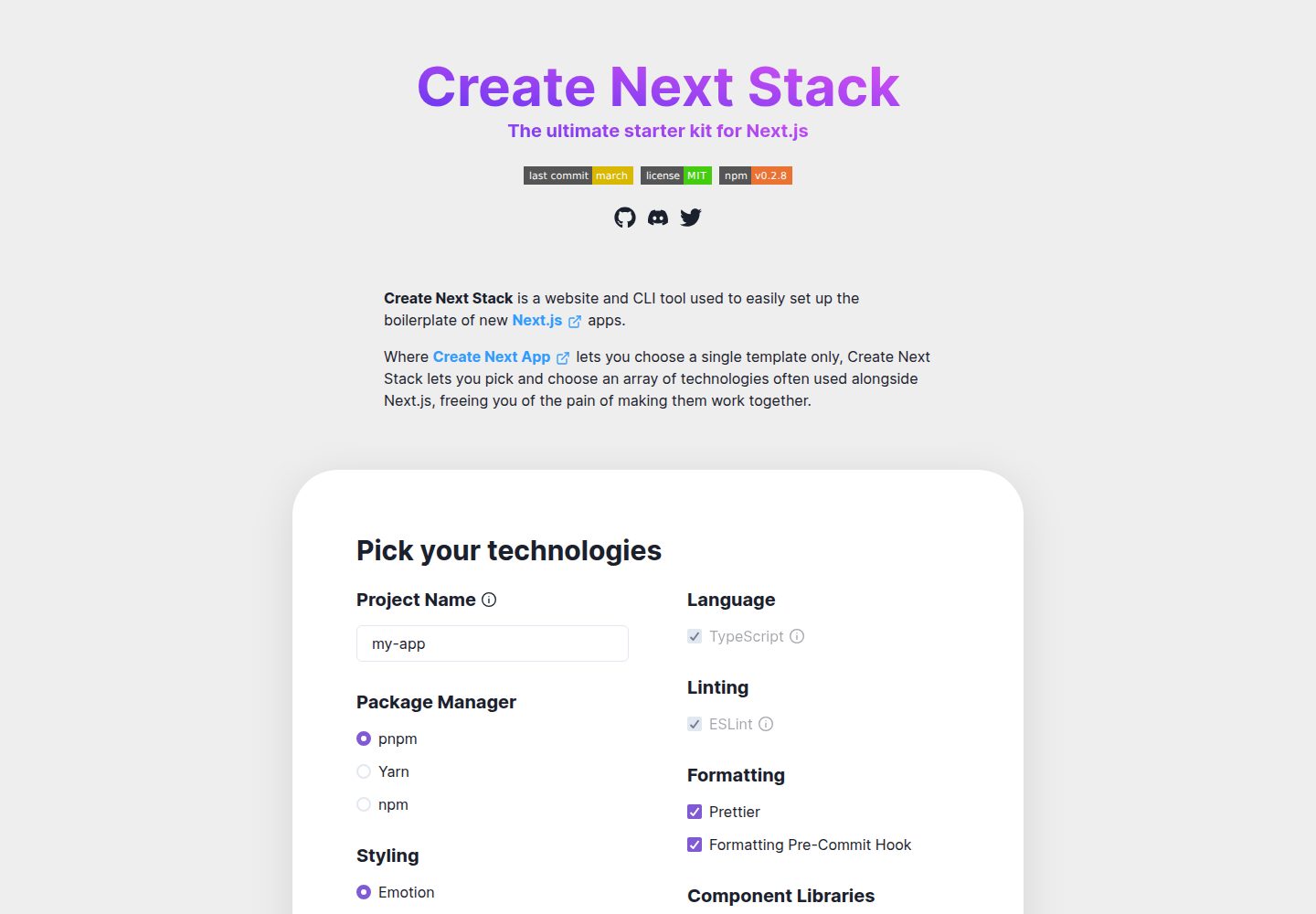
同时提供网站与 CLI 两种脚手架生成入口,CLI 包名为 create-next-stack
Next.jsReact启动器
create-next-stack — Next.js 启动器模板
作者 akd-io
Create Next Stack 是一个网站与 CLI 工具,用于按需组合 Next.js 项目脚手架,在 Create Next App 的单一模板之外挑选多种常用技术并生成可协同工作的初始代码。
看看你的网站会是什么样
浏览真实页面截图,比较内容排版与手机效果。点击下方缩略图切换,放大查看整页细节。
全部页面与视图 2
截图用于了解视觉与布局,交互效果请以实际项目为准。
采集于 2026-09-30查看来源
值得关注的模板亮点
从已有项目资料中,快速了解它的特点。
支持在 Next.js 基础上按需组合 TypeScript、多种 CSS 方案与组件库
覆盖表单、状态管理、动画、图标、代码格式化与提交钩子等常见配套
可选 GitHub Actions、Vercel、Netlify、Plausible、Prisma 等 CI、部署、分析与 ORM 集成
包管理器支持 pnpm、yarn、npm,CLI 中 --package-manager 为必填项
仓库采用 MIT 许可,允许免费使用、修改、商用和分发该版本代码
模板详细介绍
Create Next Stack 由 akd-io 维护,仓库采用 MIT 许可,提供网站(create-next-stack.com)和 npm 包 create-next-stack 两种使用入口。它的定位是解决 Create Next App 只能选择单一模板的问题:用户可以在 Next.js 基础上勾选或通过 CLI 参数指定一组常与 Next.js 搭配的技术,由工具生成已经配置好这些技术组合的初始项目。
从 README 的技术支持表与 --help 输出看,可选项覆盖多个层面:语言与样式方面包括 TypeScript、Emotion、Styled Components、Tailwind CSS、Sass、CSS Modules;组件库包括 Mantine、Chakra UI、Material UI;表单与状态包括 React Hook Form、Formik、React Query;动画为 Motion/Framer Motion;图标为 React Icons;代码质量与提交规范包括 ESLint、Prettier、Husky、lint-staged 以及格式化 pre-commit hook;包管理器支持 pnpm、yarn、npm;CI 与部署包括 GitHub Actions、Vercel、Netlify;分析为 Plausible 与 next-plausible;数据库 ORM 为 Prisma。部分选项存在依赖关系,例如 Chakra UI 与 Material UI 需要 Emotion,格式化 pre-commit hook 需要 Prettier。
使用方式上,CLI 接受 APP_NAME 参数(可含路径前缀)以及一系列 -- 开头的功能开关,其中 --package-manager 为必填,取值 pnpm、yarn 或 npm。另有 --help、--version 和 --debug 等辅助参数。网站端则提供可视化选择界面,适合不熟悉命令行参数的用户。
需要注意的限制:资料未说明各技术组合的版本范围、生成后项目的运行与构建表现,也未给出生产环境验证结论;第三方素材(演示图片、字体、图标等)的许可需单独核对,外部服务(域名、托管、数据库、分析等)可能产生费用。
Next.jsReact启动器
适合你的项目吗?
适用场景
- 需要新建 Next.js 项目并一次性配置 TypeScript、样式方案与组件库
- 希望用命令行参数批量生成带指定技术组合的初始项目
- 想通过网页界面可视化勾选 Next.js 周边技术后再生成脚手架
- 需要在初始项目中预置 ESLint、Prettier、Husky、lint-staged 等代码质量工具
- 希望脚手架中直接包含 GitHub Actions、Vercel 或 Netlify 等 CI 与部署配置
适合人群
- 准备启动新 Next.js 应用、希望减少手动配置周边技术成本的开发者
- 偏好命令行工作流、需要可复现脚手架参数的团队
- 希望先通过网页界面了解可选技术组合再决定项目结构的用户
- 接受 MIT 许可条款并需要保留版权与许可声明的使用者
上手与定制指南
结合仓库当前版本的说明,按下面的资料检查内容、配置与运行要求。
- 1
CLI 用法为 create-next-stack [APP_NAME] [FLAGS],APP_NAME 可包含路径前缀
- 2
必须通过 --package-manager 指定 pnpm、yarn 或 npm 之一
- 3
部分选项有前置依赖,如 Chakra UI 与 Material UI 需要 Emotion,格式化 pre-commit hook 需要 Prettier
- 4
可通过 --help 查看完整参数列表,--version 查看版本,--debug 输出详细错误信息
- 5
使用前请核对第三方素材许可,并确认域名、托管、数据库、分析等外部服务是否产生费用
授权与来源资料
使用条件与限制
免费使用 · 保留许可声明本次收录的是公开仓库中采用 MIT 许可的免费版本;免费范围为该版本代码,不代表外部服务或第三方素材免费。
使用时需要遵守
- 允许免费使用、修改、商用和分发该版本代码。
- 分发代码副本或实质性部分时,保留原作者版权声明和完整 MIT 许可声明。
- 代码按现状提供;担保与责任限制以原许可证及适用法律为准。
额外费用与待核对事项
- CLI 使用时必须通过 --package-manager 指定 pnpm、yarn 或 npm 之一,该参数为必填项,未提供则无法生成项目。
- 选择 Chakra UI 组件库时必须同时启用 Emotion,二者存在依赖关系,不能单独使用。
- 选择 Material UI 组件库时必须同时启用 Emotion,二者存在依赖关系,不能单独使用。
- 启用格式化 pre-commit 钩子时必须同时启用 Prettier,否则该选项无法生效。
- CLI 使用时必须通过 --styling 指定样式方案(emotion、styled-components、tailwind-css、css-modules 或 css-modules-with-sass),该参数为必填项。
- 演示图片、字体、图标及其他第三方素材需按各自许可核对,不能仅凭代码的 MIT 许可判断。
- 域名、托管、数据库、支付或 AI 等外部服务可能另外收费。
查看原文依据
Permission is hereby granted, free of charge
许可证原文
--package-manager=<option> (required) Sets the preferred package manager. (Required)
README 原文
--chakra Adds Chakra UI. (Component library) (Requires Emotion)
README 原文
--material-ui Adds Material UI. (Component library) (Requires Emotion)
README 原文
--formatting-pre-commit-hook Adds a formatting pre-commit hook. (Requires Prettier)
README 原文
https://github.com/akd-io/create-next-stack/blob/develop/LICENSEhttps://github.com/akd-io/create-next-stack/blob/develop/readme.md--styling=<styling-method> (required) Sets the preferred styling method. (Required)
README 原文
DeepSeek 根据仓库许可证和 README 整理 ·2026-09-30。结果仅覆盖已读取资料,依赖、图片、字体及后续条款变更以各自原文为准。
项目核对记录与介绍依据
模板资料
- 来源平台
- GitHub
- 资料与维护参考分
- 资料较完整 · 96 / 100
- 技术栈
- Next.js · React
- 网站类型
- 启动器
这个分数如何计算
本站按许可资料(最高30分)、演示链接(12分)、预览图(10分)、Star数(15分)、记录的维护时间(15分)、描述完整度(8分)、功能记录(5分)和分类资料(5分)计算。它不是代码、安全或性能测试,也不是 Google 评分;有链接不代表已实测可用。
这个项目需要核对什么
- 记录的仓库更新时间
- 2026-05-01
- 截图检查日期
- 2026-09-30
已收录演示链接。请用你的内容与屏幕尺寸检查;有演示不代表表单、认证或支付已经可用。
目录记录的主要技术栈是 Next.js。请通过依赖清单和锁文件核对实际版本与托管要求。这些说明基于收录资料,不代表代码审计或部署实测。
查看具体选型方法 →介绍的制作与核对状态
介绍由 AI 辅助整理目录与仓库资料。仓库作者不等于这篇介绍的审核者。
已完成服务器许可规则与 AI 来源核对;未经过人工编辑审核。
查看当时使用的来源资料
SHA-256: d954dd17d94c5bc7a239d6e7ce48d2685823328cbcb7a1bac15eb806d7900a89
2026-09-30T08:11:03.240Z
来源文件 / 仓库# Create Next Stack
<p>
<a aria-label="Last commit" href="https://github.com/akd-io/create-next-stack/commits/develop">
<img alt="" src="https://img.shields.io/github/last-commit/akd-io/create-next-stack/develop?style=flat-square">
</a>
<a aria-label="License" href="https://github.com/akd-io/create-next-stack/blob/develop/packages/create-next-stack/LICENSE">
<img alt="" src="https://img.shields.io/npm/l/create-next-stack?color=44cc11&style=flat-square">
</a>
<a aria-label="NPM version" href="https://www.npmjs.com/package/create-next-stack">
<img alt="" src="https://img.shields.io/npm/v/create-next-stack?style=flat-square">
</a>
<a aria-label="Community Discord" href="https://discord.gg/7Ns5WwGjjZ">
<img alt="" src="https://img.shields.io/badge/Discord-gray?style=flat-square&logo=discord">
</a>
<a aria-label="Twitter profile of the creator of Create Next Stack" href="https://twitter.com/akd_io">
<img alt="" src="https://img.shields.io/badge/Twitter-gray?style=flat-square&logo=twitter">
</a>
<a aria-label="GitHub Repo stars" href="https://github.com/akd-io/create-next-stack">
<img alt="" src="https://img.shields.io/github/stars/akd-io/create-next-stack?style=social">
</a>
</p>
[Create Next Stack](https://www.create-next-stack.com/) is a website and CLI tool used to easily set up the boilerplate of new [Next.js](https://github.com/vercel/next.js) apps.
Where [Create Next App](https://github.com/vercel/next.js/tree/canary/packages/create-next-app) lets you choose a single template only, Create Next Stack lets you pick and choose an array of technologies often used alongside Next.js, and free you of the pain of making them work together.
To get started, go to [create-next-stack.com](https://www.create-next-stack.com).
## Supported technologies
The table below provides an overview of the technologies currently supported by Create Next Stack.
<!-- CNS-START-OF-TECHNOLOGIES-TABLE -->
| Name | Links |
| ------------------- | ---------------------------------------------------------------------------------------------------------------------------------------------------------------------------------------------------------------------------- |
| Next.js | [Website](https://nextjs.org/) - [Docs](https://nextjs.org/docs) - [Learn Next.js](https://nextjs.org/learn) - [GitHub](https://github.com/vercel/next.js) - [Wikipedia](https://en.wikipedia.org/wiki/Next.js) |
| React | [Website](https://reactjs.org/) - [Docs](https://reactjs.org/docs/getting-started.html) - [GitHub](https://github.com/facebook/react) - [Wikipedia](<https://en.wikipedia.org/wiki/React_(JavaScript_library)>) |
| TypeScript | [Website](https://www.typescriptlang.org/) - [Docs](https://www.typescriptlang.org/docs/) - [GitHub](https://github.com/microsoft/TypeScript) - [Wikipedia](https://en.wikipedia.org/wiki/TypeScript) |
| Emotion | [Website](https://emotion.sh/) - [Docs](https://emotion.sh/docs/introduction) - [GitHub](https://github.com/emotion-js/emotion) |
| Styled Components | [Website](https://styled-components.com/) - [Docs](https://styled-components.com/docs) - [GitHub](https://github.com/styled-components/styled-components) |
| Tailwind CSS | [Website](https://tailwindcss.com/) - [Docs](https://tailwindcss.com/docs) - [GitHub](https://github.com/tailwindlabs/tailwindcss) |
| Sass | [Website](https://sass-lang.com/) - [Docs](https://sass-lang.com/documentation) - [Next.js-specific docs](https://nextjs.org/docs/basic-features/built-in-css-support#sass-support) |
| CSS Modules | [Website](https://github.com/css-modules/css-modules) - [Docs](https://github.com/css-modules/css-modules) - [Next.js-specific docs](https://nextjs.org/docs/basic-features/built-in-css-support#adding-component-level-css) |
| CSS Modules | [Website](https://github.com/css-modules/css-modules) - [Docs](https://github.com/css-modules/css-modules) - [Next.js-specific docs](https://nextjs.org/docs/basic-features/built-in-css-support#adding-component-level-css) |
| Mantine | [Website](https://mantine.dev/) - [Docs](https://mantine.dev/getting-started/) - [GitHub](https://github.com/mantinedev/mantine) |
| Chakra UI | [Website](https://chakra-ui.com/) - [Docs](https://chakra-ui.com/docs/get-started) - [GitHub](https://github.com/chakra-ui/chakra-ui) |
| Material UI | [Website](https://mui.com/material-ui/) - [Docs](https://mui.com/material-ui/getting-started/) - [GitHub](https://github.com/mui/material-ui) |
| Motion | [Website](https://motion.dev/) - [Docs](https://motion.dev/docs) - [GitHub](https://github.com/motiondivision/motion) |
| React Hook Form | [Website](https://react-hook-form.com/) - [Docs](https://react-hook-form.com/get-started) - [GitHub](https://github.com/react-hook-form/react-hook-form) |
| Formik | [Website](https://formik.org/) - [Docs](https://formik.org/docs/overview) - [GitHub](https://github.com/formium/formik) |
| React Query | [Website](https://tanstack.com/query/latest) - [Docs](https://tanstack.com/query/latest/docs/framework/react/overview) - [GitHub](https://github.com/tanstack/query) |
| React Icons | [Website](https://react-icons.github.io/react-icons/) - [GitHub](https://github.com/react-icons/react-icons) |
| ESLint | [Website](https://eslint.org/) - [Configuration](https://eslint.org/docs/user-guide/configuring/) - [Rules](https://eslint.org/docs/rules/) - [GitHub](https://github.com/eslint/eslint) |
| Prettier | [Website](https://prettier.io/) - [Docs](https://prettier.io/docs/en/index.html) - [Options](https://prettier.io/docs/en/options.html) - [GitHub](https://github.com/prettier/prettier) |
| Husky | [Website](https://typicode.github.io/husky/) - [Docs](https://typicode.github.io/husky/) - [GitHub](https://github.com/typicode/husky) |
| lint-staged | [Website](https://github.com/lint-staged/lint-staged) - [GitHub](https://github.com/lint-staged/lint-staged) |
| pnpm | [Website](https://pnpm.io/) - [Docs](https://pnpm.io/motivation) - [GitHub](https://github.com/pnpm/pnpm) |
| Yarn | [Website](https://yarnpkg.com/) - [CLI Docs](https://yarnpkg.com/cli) - [GitHub](https://github.com/yarnpkg/berry) |
| npm | [Website](https://www.npmjs.com/) - [Docs](https://docs.npmjs.com/) - [GitHub](https://github.com/npm/cli) |
| GitHub Actions | [Website](https://github.com/features/actions) - [Docs](https://docs.github.com/en/actions) - [Workflow syntax](https://docs.github.com/en/actions/reference/workflow-syntax-for-github-actions) |
| Plausible Analytics | [Website](https://plausible.io/) - [Docs](https://plausible.io/docs) - [GitHub](https://github.com/plausible/analytics) |
| next-plausible | [Website](https://next-plausible.vercel.app/) - [GitHub](https://github.com/4lejandrito/next-plausible) |
| Vercel | [Website](https://vercel.com/) - [Docs](https://vercel.com/docs) - [CLI Docs](https://vercel.com/docs/cli) |
| Netlify | [Website](https://www.netlify.com/) - [Docs](https://docs.netlify.com/) - [CLI Docs](https://cli.netlify.com/) |
| Prisma | [Website](https://www.prisma.io/) - [Docs](https://www.prisma.io/docs) - [GitHub](https://github.com/prisma/prisma) |
<!-- CNS-END-OF-TECHNOLOGIES-TABLE -->
## Usage
Below you see an overview of Create Next Stack's usage, including detailed information about arguments and options. The overview is the result of running `create-next-stack --help`
<!-- CNS-START-OF-HELP-OUTPUT -->
```
USAGE
$ create-next-stack [APP_NAME] [FLAGS]
ARGUMENTS
APP_NAME The name of your app, optionally including a path prefix. Eg.:
"my-app" or "path/to/my-app"
FLAGS
-h, --help Shows the CLI help information.
-v, --version Shows the CLI version information.
--chakra Adds Chakra UI. (Component library)
(Requires Emotion)
--debug Show verbose error messages for debugging
purposes.
--formatting-pre-commit-hook Adds a formatting pre-commit hook. (Requires
Prettier)
--formik Adds Formik. (Form library)
--framer-motion Adds Framer Motion. (Animation library)
--github-actions Adds a GitHub Actions continuous integration
workflow.
--mantine Adds Mantine. (Component library)
--material-ui Adds Material UI. (Component library)
(Requires Emotion)
--netlify Adds Netlify. (Hosting)
--package-manager=<option> (required) Sets the preferred package
manager. (Required)
<options: pnpm|yarn|npm>
--plausible Adds Plausible. (Analytics)
--prettier Adds Prettier. (Code formatting)
--prisma Adds Prisma. (ORM)
--react-hook-form Adds React Hook Form. (Form library)
--react-icons Adds React Icons. (Icon library)
--react-query Adds React Query. (Server state management
library)
--router=<option> [default: app] Sets the React framework
router to use. App Router is the default and
recommended option.
<options: app|pages>
--styling=<styling-method> (required) Sets the preferred styling
method. (Required) <styling-method> =
emotion|styled-components|tailwind-css|css-m
odules|css-modules-with-sass
--vercel Adds Vercel. (Hosting)
```
<!-- CNS-END-OF-HELP-OUTPUT -->
## All contributors
Contributions are welcome! Please see the [contributing guidelines](CONTRIBUTING.md) for more information.
<a href="https://github.com/akd-io/create-next-stack/graphs/contributors">
<img src="https://contrib.rocks/image?repo=akd-io/create-next-stack" />
</a>
## License
Create Next Stack is released under the [MIT License](LICENSE).
看看同类模板
对比同技术栈与用途的模板,找到更适合的视觉与内容结构。

ai-website-cloner-template
Clone any website with one command using AI coding agents
Next.js · 启动器

Next.js SaaS Starter
Next.js SaaS Starter 是 Next.js 官方维护的 SaaS 起点模板,定位介于学习资源和可直接部署的脚手架之间。
Next.js · SaaS

Next.js Commerce
Next.js Commerce 是 Vercel 团队维护的电商启动模板,基于 Next.js App Router 构建,采用服务端渲染、React Server Components、Server Actions …
Next.js · 电商

Next-js-Boilerplate
Next-js-Boilerplate 是一个面向 Next.js 16、Tailwind CSS 4 和 TypeScript 的启动器,核心定位是开发者体验优先。
Next.js · 启动器

tailwind-nextjs-starter-blog
tailwind-nextjs-starter-blog 是一个面向个人技术博客的 Next.js 与 Tailwind CSS 启动模板,其 v2 版本基于 App Router 与 React Server Comp…
Next.js · 博客

next-forge
Production-grade Turborepo template for Next.js apps.
Next.js · 启动器