
基于 Hugo 静态站点生成器,搭配 Toha 个人作品集主题
Hugo博客
personal-site — Hugo 博客模板
作者 Anas436
Anas436 的个人博客站点,基于 Hugo 与 Toha 主题搭建,采用 MIT 许可,可用于个人作品集与文章发布。
看看你的网站会是什么样
浏览真实页面截图,比较内容排版与手机效果。点击下方缩略图切换,放大查看整页细节。
目前有 1 张原始预览,可打开完整图片查看设计细节。
截图用于了解视觉与布局,交互效果请以实际项目为准。
采集于 2026-10-05查看来源
值得关注的模板亮点
从已有项目资料中,快速了解它的特点。
提供多语言支持,内置二十余种语言翻译
包含经历时间线、成就画廊与卡片式内容展示
支持多种分析服务与评论系统集成
提供提示框、图片、分栏、视频、Mermaid 等短代码
仓库采用 MIT 许可,可免费使用、修改与分发
模板详细介绍
该仓库是 Anas 的个人博客,使用 Hugo 静态站点生成器构建,并引入 Toha 主题。Toha 是一个面向个人作品集与博客的 Hugo 主题,强调简洁设计与响应式布局。
主题提供多语言支持、卡片式内容展示、经历时间线、成就画廊以及用于分类文章的侧边栏。内置若干短代码(如提示框、图片、分栏、垂直间距、视频、Mermaid 图表),并支持多种分析服务(GoatCounter、counter.dev、Google Analytics、Matomo/Piwik、Umami)与评论系统(Disqus、Valine、Utterances、Giscus)。
使用方式上,仓库说明推荐直接 fork 示例站点仓库再修改配置;也可从零开始,通过 Hugo Modules 引入主题,并借助 Node 依赖完成本地运行。运行环境要求 Hugo extended 版本、Go 语言以及 Node/npm。仓库采用 MIT 许可,允许免费使用、修改、商用与分发该版本代码,但演示图片、字体、图标等第三方素材需单独核对许可,域名、托管等外部服务也可能产生费用。
Hugo博客
适合你的项目吗?
适用场景
- 搭建个人博客并发布文章
- 制作个人作品集与经历展示页面
- 需要多语言支持的个人站点
- 通过 Hugo Modules 管理主题依赖的静态站点项目
适合人群
- 熟悉 Hugo 并希望快速搭建个人博客的开发者
- 需要展示个人经历与作品集的创作者
- 希望以 MIT 许可自由修改和分发站点代码的用户
上手与定制指南
结合仓库当前版本的说明,按下面的资料检查内容、配置与运行要求。
- 1
推荐直接 fork Toha 示例站点仓库,再按需修改配置
- 2
从零开始需先执行 hugo mod init 初始化 Hugo Modules
- 3
在 hugo.yaml 的 module 段中引入主题模块并运行 hugo mod tidy
- 4
运行 hugo mod npm pack 生成 package.json,再执行 npm install
- 5
本地预览使用 hugo server -w,首次运行需按文档配置首页各区块
授权与来源资料
使用条件与限制
免费使用 · 保留许可声明本次收录的是公开仓库中采用 MIT 许可的免费版本;免费范围为该版本代码,不代表外部服务或第三方素材免费。
使用时需要遵守
- 允许免费使用、修改、商用和分发该版本代码。
- 分发代码副本或实质性部分时,保留原作者版权声明和完整 MIT 许可声明。
- 代码按现状提供;担保与责任限制以原许可证及适用法律为准。
额外费用与待核对事项
- 演示图片、字体、图标及其他第三方素材需按各自许可核对,不能仅凭代码的 MIT 许可判断。
- 域名、托管、数据库、支付或 AI 等外部服务可能另外收费。
- 使用该主题需满足运行环境要求:Hugo 0.163.0(extended)或更高版本、Go 1.19 或更高版本(用于 Hugo modules)、Node v18.x 或更高版本及 npm 8.x 或更高版本。
- 推荐用法是 fork toha-example-site 示例仓库,再按需修改配置;从零开始则需按文档通过 Hugo Modules 引入主题。
- 评论功能依赖第三方外部服务(Disqus、Valine、Utterances、Giscus),启用时需注册相应服务账号并可能受其条款与费用约束。
- 分析功能依赖第三方外部服务(GoatCounter、counter.dev、Google Analytics、Matomo/Piwik、Umami),启用时需配置相应账号或 API 密钥。
- 部分插图来自 iconscout,属于第三方素材,其许可与站点代码的 MIT 许可相互独立,使用前需单独核对。
查看原文依据
Permission is hereby granted, free of charge
许可证原文
- Hugo Version 0.163.0 (extended) or higher - Go language 1.19 or higher (require for hugo modules) - Node version v18.x or later and npm 8.x or later.
README 原文
The easiest way to use this theme is to fork [toha-example-site](https://github.com/hugo-themes/toha-example-site) sample repo.Then change the configurations according to your need.
README 原文
- [Disqus](https://disqus.com/) - [Valine](https://valine.js.org/) - [Utterances](https://utteranc.es/) - [Giscus](https://giscus.app/)
README 原文
- GoatCounter - counter.dev - Google Analytics - Matomo/Piwik - [Umami](https://umami.is/)
README 原文
https://github.com/Anas436/personal-site/blob/main/LICENSEhttps://github.com/Anas436/personal-site/blob/main/README.md- Many of the illustrations have been taken from [iconscout](http://iconscout.com/).
README 原文
DeepSeek 根据仓库许可证和 README 整理 ·2026-10-05。结果仅覆盖已读取资料,依赖、图片、字体及后续条款变更以各自原文为准。
项目核对记录与介绍依据
模板资料
- 来源平台
- GitHub
- 资料与维护参考分
- 资料较完整 · 80 / 100
- 技术栈
- Hugo
- 网站类型
- 博客
这个分数如何计算
本站按许可资料(最高30分)、演示链接(12分)、预览图(10分)、Star数(15分)、记录的维护时间(15分)、描述完整度(8分)、功能记录(5分)和分类资料(5分)计算。它不是代码、安全或性能测试,也不是 Google 评分;有链接不代表已实测可用。
这个项目需要核对什么
- 记录的仓库更新时间
- 2026-10-05
- 截图检查日期
- 2026-10-05
已收录演示链接。请用你的内容与屏幕尺寸检查;有演示不代表表单、认证或支付已经可用。
目录记录的主要技术栈是 Hugo。请通过依赖清单和锁文件核对实际版本与托管要求。这些说明基于收录资料,不代表代码审计或部署实测。
查看具体选型方法 →介绍的制作与核对状态
介绍由 AI 辅助整理目录与仓库资料。仓库作者不等于这篇介绍的审核者。
审核声明: [email protected] · 2026-10-05
查看当时使用的来源资料
SHA-256: cdf0831229ab828eb0b16ff3e2bb44f489e9450fbdfd2d46eb64ed5f0272db6a
2026-10-05T06:42:56.148Z
来源文件 / 仓库# Anas's Blog
[](https://app.netlify.com/sites/toha/deploys)
[](https://actions-badge.atrox.dev/hugo-themes/toha/goto?ref=main)









A [Hugo](https://gohugo.io/) theme for a personal portfolio with minimalist design and responsiveness.

- **Example Site:** [toha-example-site](https://toha-example-site.netlify.app)
- **Documentation:** [toha-docs.netlify.app](https://toha-docs.netlify.app/posts)
## Features
- Minimalist Design
- Fully Responsive
- Multiple Language Support
- Carefully Designed Cards
- Experience Timeline
- Achievement Gallery
- Sidebar to Categorize the Posts
- Short Codes
- Analytics Support
- GoatCounter
- counter.dev
- Google Analytics
- Matomo/Piwik
- [Umami](https://umami.is/)
- Comment Support
- [Disqus](https://disqus.com/)
- [Valine](https://valine.js.org/)
- [Utterances](https://utteranc.es/)
- [Giscus](https://giscus.app/)
For more details about the features please visit [here](https://toha-docs.netlify.app/posts/features/).
## Available Translations
- English
- বাংলা
- Français
- Indonesian
- Deutsch
- Español
- 简体中文
- 繁體中文
- हिन्दी
- Italiano
- 日本語
- 한국어
- русский
- suomi
- Tiếng Việt
- Azerbaijan
- Turkish
- Arabic (العربية)
- Português Europeu
- Català
- Português Brasileiro
- Nederlands
- Hebrew
To know more about how to translate your site, please visit [here](https://toha-docs.netlify.app/posts/translation/). Follow, the data and post format from this [example site](https://github.com/hugo-themes/toha-example-site).
## Screenshots
Here are few screenshots from the [example site](https://toha-example-site.netlify.app).
##### Home Page Sections
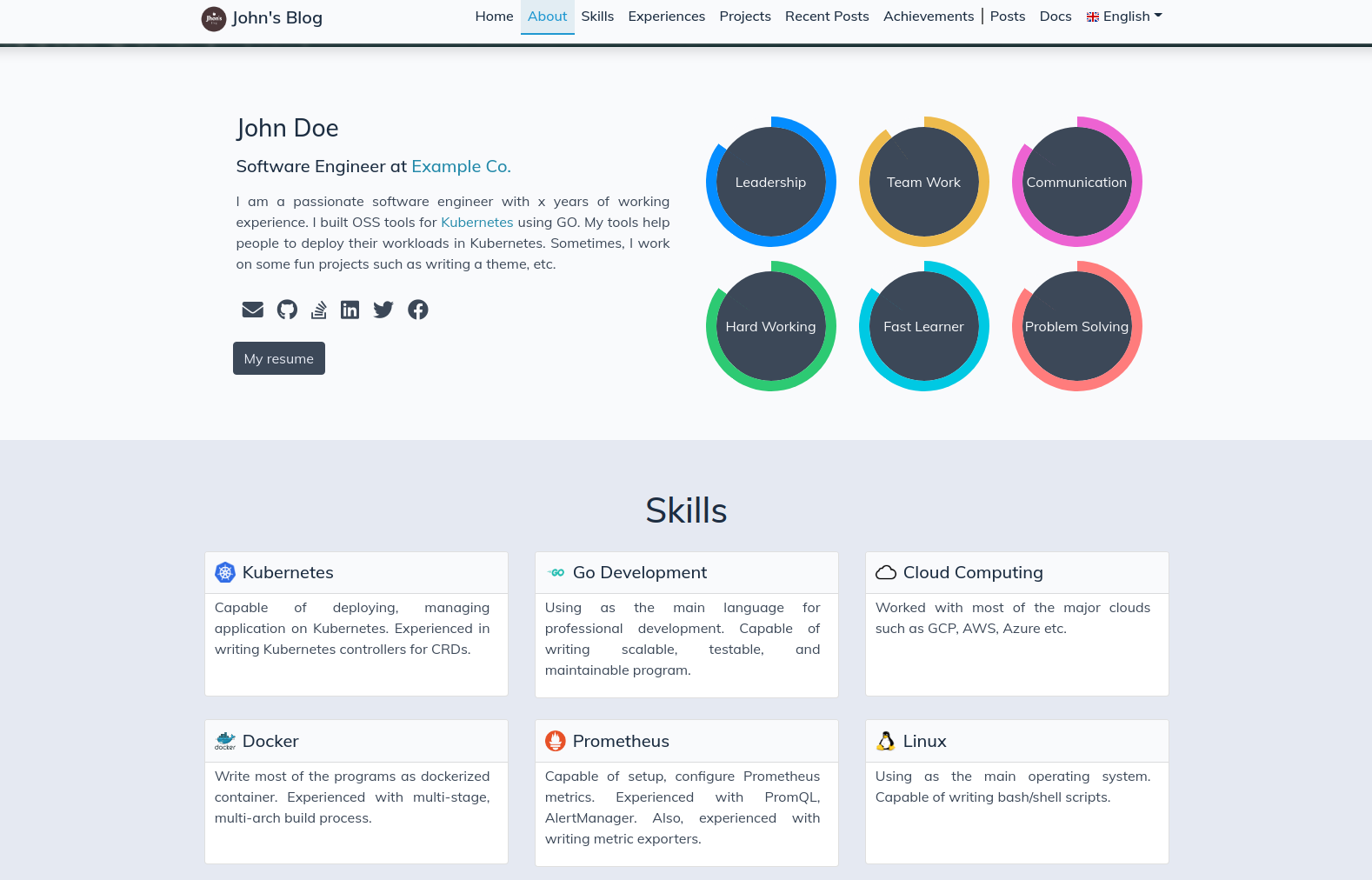
##### List Page
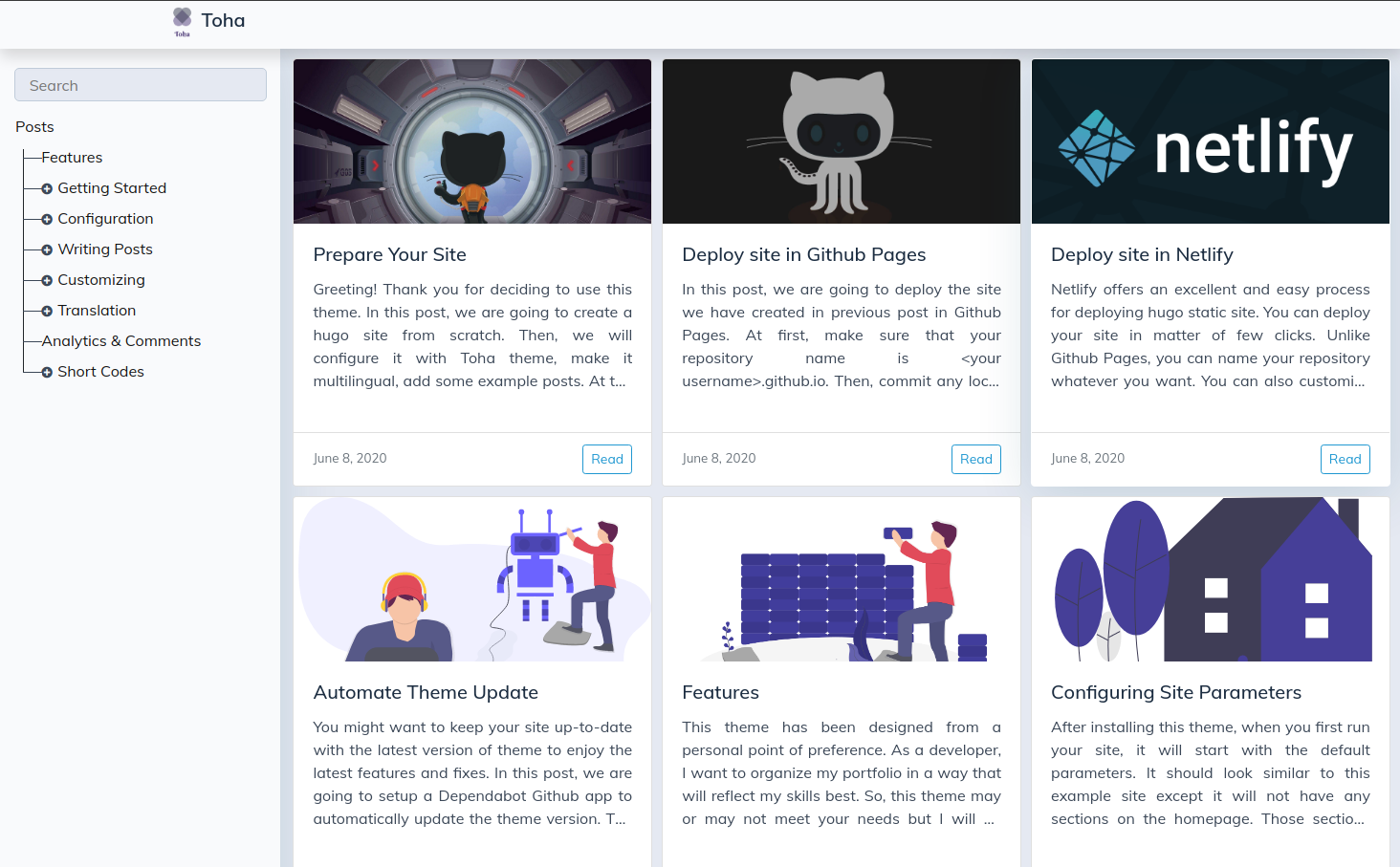
##### Reading Page
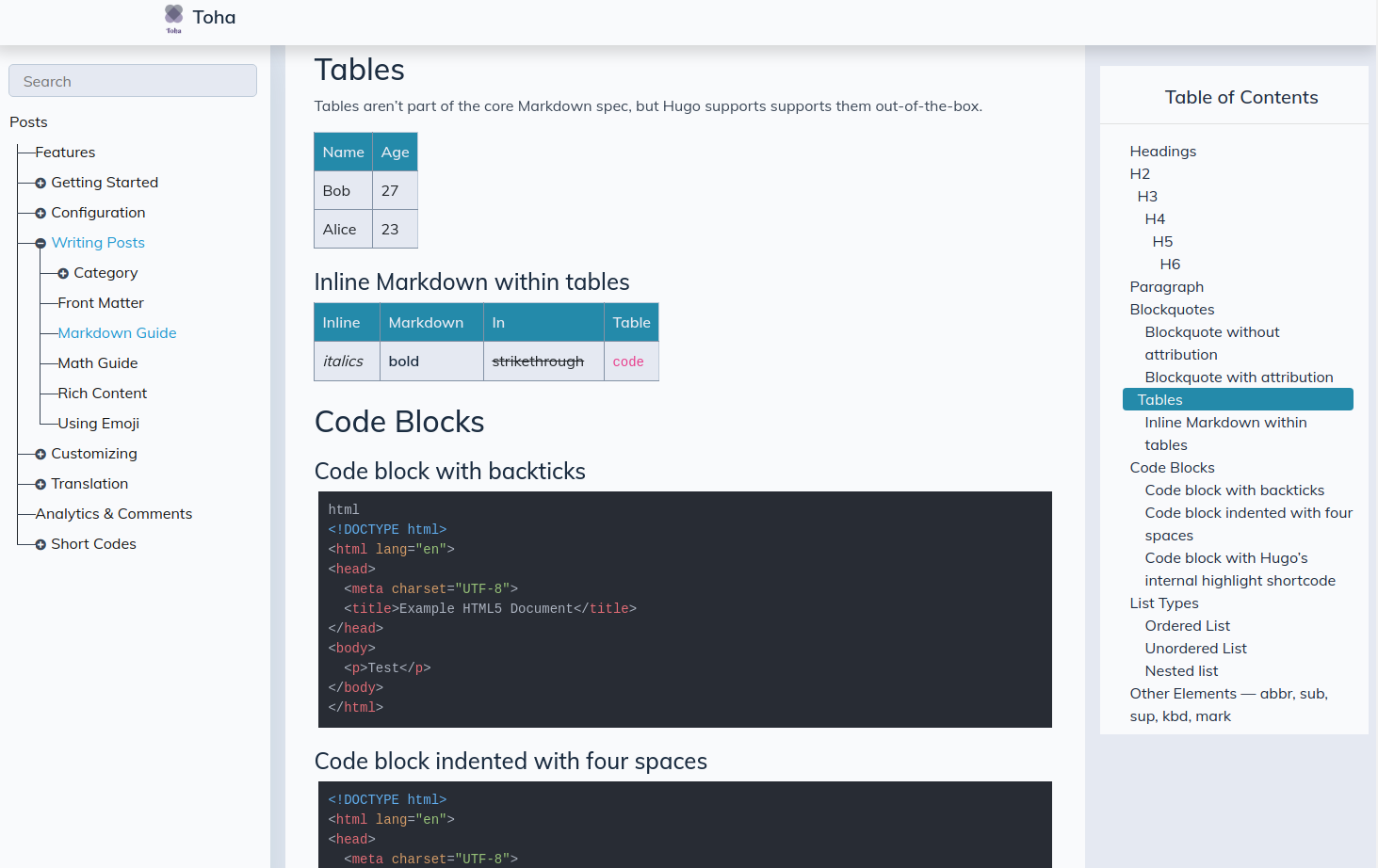
## Requirements
- Hugo Version 0.163.0 (extended) or higher
- Go language 1.19 or higher (require for hugo modules)
- Node version v18.x or later and npm 8.x or later.
## Usage
The easiest way to use this theme is to fork [toha-example-site](https://github.com/hugo-themes/toha-example-site) sample repo.Then change the configurations according to your need.
If you want to start from scratch, then follow these steps:
##### 1. Initialize Hugo module on you repo
At first, initialize [Hugo modules](https://gohugo.io/hugo-modules/) in your repo. This will create a `go.mod` file.
```bash
hugo mod init github.com/<your username>/<your repo name>
```
##### 2. Add this theme as your module dependency
Now, in your `hugo.yaml` file, add a `module` section.
```yaml
# Use Hugo modules to add theme
module:
imports:
- path: github.com/hugo-toha/toha/v4
```
Check this sample [hugo.yaml](https://github.com/hugo-toha/hugo-toha.github.io/blob/main/hugo.yaml) for further reference.
##### 3. Update your module
Now, run this command to load this theme as your module.
```bash
hugo mod tidy
```
#### Running Locally
Now, you can run your hugo site locally with the following steps:
##### 1. Generate node dependency configuration
Now run the following command to generate node dependency configuration. This will create the a `package.json` file in you repo.
```bash
hugo mod npm pack
```
##### 2. Install dependencies
Install the node dependencies using following command:
```bash
npm install
```
##### 3. Run your site
Now, run you site locally using following command.
```bash
hugo server -w
```
When you run your site for first time, it will start with the default parameters. It should look similar to the [example site](https://toha-example-site.netlify.app). However, it will not have any sections in the homepage as we haven't configured them yet. You can configure your site by following the guides from [here](https://toha-docs.netlify.app/posts/configuration/).
## Shortcodes
Here, are some handy shortcodes you can use with this theme.
- [Alert](https://toha-docs.netlify.app/posts/shortcodes/#alert)
- [Image](https://toha-docs.netlify.app/posts/shortcodes/#image)
- [Split](https://toha-docs.netlify.app/posts/shortcodes/#split)
- [Vertical Space](https://toha-docs.netlify.app/posts/shortcodes/#vertical-space)
- [Video](https://toha-docs.netlify.app/posts/shortcodes/#video)
- [Mermaid](https://toha-example-site.netlify.app/posts/shortcodes/#mermaid)
## Contributing
You can contribute to this theme in various ways. You can report a [bug](https://github.com/hugo-themes/toha/issues/new?template=bug.md), file an [feature request](https://github.com/hugo-themes/toha/issues/new?template=feature_request.md), send a PR, [share your thoughts](https://github.com/hugo-themes/toha/issues/new?template=question.md) etc.
Pull requests are most welcome and I will be happy to review. Just follow the following principles:
- Keep it simple.
- Keep it consistent with the design.
- Use as few dependencies as possible.
- Have patience.
> I am not a web developer. I have created this theme for my personal needs. So, it is reasonable to have some flaws in the codes. Feel free to open issues and PRs acknowledging the problems.
## Local Development
For local development, you can make changes in the theme submodule and test the changes against your own site or this [example site](https://github.com/hugo-toha/toha-example-site) locally.
### 1. Fork
At first, fork [this repo](https://github.com/hugo-themes/toha). Then, follow the following steps to use the forked theme for local developments,
We have an example configuration under `exampleSite` folder that will let you run the theme locally. Follow below steps to run the example site.
### 2. Install Mise
We use [jdx/mise](https://github.com/jdx/mise) to simplify managing dependencies and running locally. Please, install it following the instruction from [here](https://mise.jdx.dev/getting-started.html).
### 3. Install dependencies
Install the all the necessary tools by running:
```bash
mise install
```
This will install `hugo`, `go`, `node` and other tools that are necessary to run this project to appropriate versions.
### 4. Run example site
Now, run the site locally using following command.
```bash
mise run example-site
```
Now, you can make change in the theme and they will be reflected immediately on the running site. If you need to change any configuration, you can do that in the `hugo.yaml` file inside `exampleSite` folder. If you need to add any content or data, you can create the respective folder inside `exampleSite` directory and add your desired content or data there.
### Running the forked theme against your own site
If you want to run your local development against your own site, follow the following steps:
**Replace the theme module:**
Open your site's `go.mod` file and replace the `github.com/hugo-toha/toha/v4` with your forked repo's path. For example, if your forked repo is `github.com/<your-github-user>/toha`, then replace the `github.com/hugo-toha/toha/v4` with `github.com/<your-github-user>/toha/v4`.
```go
module github.com/hugo-toha/hugo-toha.github.io
go 1.19
require github.com/hugo-toha/toha/v4 v4.0.1-0.20231229170427-d3968ca711ef // indirect
replace(
github.com/hugo-toha/toha/v4 => github.com/<your-github-user>/toha/v4 <git branch>
)
```
For interactive development, you can replace the theme with your locally cloned fork. For example, if you have cloned your fork in `/home/my-projects/toha`, then replace the `github.com/hugo-toha/toha/v4` with `/home/my-projects/toha`.
```go
module github.com/hugo-toha/hugo-toha.github.io
go 1.19
require github.com/hugo-toha/toha/v4 v4.0.1-0.20231229170427-d3968ca711ef // indirect
replace(
github.com/hugo-toha/toha/v4 => /home/my-projects/toha
)
```
**Update dependencies:**
```bash
# update hugo modules
$ hugo mod tidy
# install dependencies
$ hugo mod npm pack
$ npm install
```
**Run your site locally:**
```bash
hugo server -w
```
From there you can make changes to the source code of the theme while testing with your running Hugo site or the example site.
### Open a PR
When the changes look good, commit and push them to your fork.
```bash
# stage all the changes
$ git add .
# commit the changes with a meaning full commit message
$ git commit -m "A meaningful commit message"
# push the commit to your fork
$ git push my-fork my-feature-branch
```
Then, open a PR against `main` branch of [hugo-themes/toha](https://github.com/hugo-themes/toha) from the `my-feature-branch` branch of your own fork.
## Attribution
- Thanks [Anup Deb](https://dribbble.com/anupdeb) for his design guidance.
- Many of the illustrations have been taken from [iconscout](http://iconscout.com/).
看看同类模板
对比同技术栈与用途的模板,找到更适合的视觉与内容结构。

hugo-PaperMod
PaperMod 是 Hugo 生态里知名度较高的主题之一,定位很明确:给博客和轻量作品集站点提供一套干净、响应式的阅读界面。
Hugo · 作品集

LoveIt
❤️A clean, elegant but advanced blog theme for Hugo 一个简洁、优雅且高效的 Hugo 主题
Hugo · 博客

hugo-coder
A minimalist blog theme for hugo.
Hugo · 博客

blowfish
Personal Website & Blog Theme for Hugo
Hugo · 博客

hugo-paper
🪺 A simple, clean, customizable Hugo theme
Hugo · 博客

hextra
Hextra 是一个 Hugo 主题,定位在文档站与博客之间:既提供侧边栏导航、目录、面包屑、分页这类文档站结构,也能承载博客内容。
Hugo · 文档