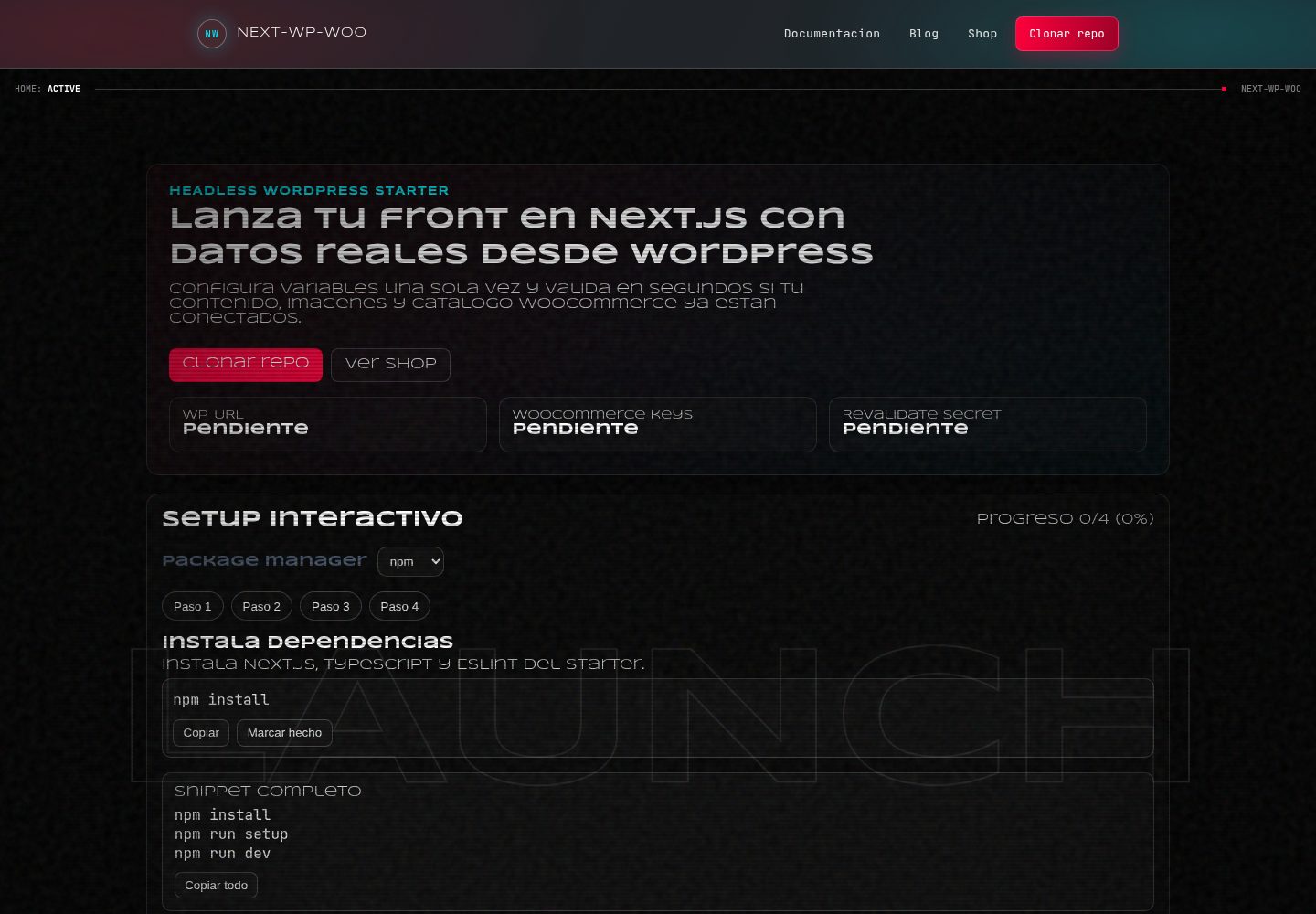
Next.js App Router + TypeScript 前端,通过 WordPress REST API 读取内容
Next.jsWordPressReact启动器
wordpress-template — Next.js 启动器模板
作者 AndrewUru
基于 Next.js App Router 的 WordPress 无头前端模板,通过 REST API 读取内容,可选接入 WooCommerce REST API,包含博客、页面、商店与按需 ISR 重验证路由。
看看你的网站会是什么样
浏览真实页面截图,比较内容排版与手机效果。点击下方缩略图切换,放大查看整页细节。
全部页面与视图 3
截图用于了解视觉与布局,交互效果请以实际项目为准。
采集于 2026-10-14查看来源
值得关注的模板亮点
从已有项目资料中,快速了解它的特点。
可选接入 WooCommerce REST API,未配置密钥时 /shop 显示设置提示
内置 /api/revalidate 按需 ISR,支持按 tag 或 path 触发重验证
读取 /wp-json/wp/v2/types 自动识别公开 CPT,并提供查询辅助函数
保留 REST 响应中的 ACF 字段,附带 hero 映射与渲染示例
提供 npm run setup 环境变量配置向导与 .env.example 参考
模板详细介绍
这是一个用于搭建 WordPress 无头前端的 Next.js 模板,前端使用 App Router 与 TypeScript,通过 WordPress REST API 获取内容,并可选通过 WooCommerce REST API 读取商品数据。README 说明其技术栈为 Next.js App Router、TypeScript、ESLint 和极简 CSS(不使用 UI 框架),并提供 npm run setup 安装向导、npm run dev、npm run lint、npm run typecheck 等脚本。
模板自带的路由包括首页(最新文章,启用 Woo 时含精选商品)、/blog、/blog/[slug]、/page/[slug]、/shop、/product/[slug] 以及 /api/revalidate。CPT 方面,应用会读取 /wp-json/wp/v2/types 并筛选公开可查看的类型,提供 getTypes()、getEntries(typeSlug)、getEntryBySlug(typeSlug, slug) 辅助方法,但默认不为所有 CPT 生成动态路由,需要参考示例自行添加。ACF 字段若出现在 REST 响应中会被保留,模板附带 hero 映射示例,/page/[slug] 在存在 hero_title 等字段时自动渲染;模板本身不要求安装 ACF 插件,缺少 acf 字段也不会出错。
重验证接口 /api/revalidate 支持通过请求头 x-revalidate-secret、查询参数 secret 或 JSON body 中的 tag/path 触发,支持的标签包括 wp:posts、wp:pages、wp:types、wp:cpt:<type>、woo:products、woo:categories;若未设置 WP_REVALIDATE_SECRET,该接口返回 404。README 未提供 WordPress 菜单导航的默认接入方案,说明需要自定义端点或插件并自行添加客户端。部署方面仅给出 Vercel 的导入、配置环境变量与重新部署步骤。
Next.jsWordPress启动器
适合你的项目吗?
适用场景
- 用 Next.js 为已有 WordPress 站点构建独立前端
- 在 WordPress 内容基础上接入 WooCommerce 商品展示
- 通过 webhook 或手动请求触发页面与数据缓存重验证
- 在页面中读取并渲染 ACF 自定义字段(如 hero 区块)
适合人群
- 熟悉 Next.js App Router 与 TypeScript 的开发者
- 已有可访问 REST API 的 WordPress 站点并希望使用无头架构的团队
- 需要可选接入 WooCommerce 商品数据的项目
- 计划部署到 Vercel 并使用环境变量管理配置的项目
上手与定制指南
结合仓库当前版本的说明,按下面的资料检查内容、配置与运行要求。
- 1
克隆仓库后运行 npm install,再运行 npm run setup 向导;也可手动复制 .env.example 为 .env.local 填写
- 2
必须设置 WP_URL;WooCommerce 需在 WooCommerce > Settings > Advanced > REST API 创建只读密钥并填入 WC_CONSUMER_KEY 与 WC_CONSUMER_SECRET
- 3
WordPress 后台需将固定链接设为 Post name,并确认 /wp-json/wp/v2/posts 可访问且未被防火墙拦截
- 4
如需使用 /api/revalidate,需设置 WP_REVALIDATE_SECRET,否则该接口返回 404
- 5
部署到 Vercel 时导入仓库、按 .env.example 配置环境变量并重新部署;README 未提供其他平台部署步骤
授权与来源资料
使用条件与限制
免费使用 · 保留许可声明本次收录的是公开仓库中采用 MIT 许可的免费版本;免费范围为该版本代码,不代表外部服务或第三方素材免费。
使用时需要遵守
- 允许免费使用、修改、商用和分发该版本代码。
- 分发代码副本或实质性部分时,保留原作者版权声明和完整 MIT 许可声明。
- 代码按现状提供;担保与责任限制以原许可证及适用法律为准。
额外费用与待核对事项
- 演示图片、字体、图标及其他第三方素材需按各自许可核对,不能仅凭代码的 MIT 许可判断。
- 域名、托管、数据库、支付或 AI 等外部服务可能另外收费。
- 必须配置 WP_URL 环境变量,指向可访问的 WordPress 站点 REST API,否则模板无法获取内容。
- WooCommerce 商品功能为可选,需自行提供 WC_CONSUMER_KEY 才能启用。
- WooCommerce 商品功能为可选,需自行提供 WC_CONSUMER_SECRET 才能启用。
- 需确保 WordPress 主机或防火墙不拦截 REST API 请求,否则前端无法读取内容。
- 使用 WooCommerce 功能需在 WooCommerce 后台创建具有 Read 权限的 API 密钥。
- 若未设置 WP_REVALIDATE_SECRET,/api/revalidate 接口将返回 404,无法使用按需重验证。
- 模板默认不包含 WordPress 菜单导航接入,需自行通过自定义端点或插件实现。
- 菜单导航需自行编写自定义端点或插件,并添加 src/lib/menu.ts 客户端。
查看原文依据
Permission is hereby granted, free of charge
许可证原文
- `WP_URL` (required)
README 原文
- `WC_CONSUMER_KEY` (optional)
README 原文
- `WC_CONSUMER_SECRET` (optional)
README 原文
4. Ensure your hosting/firewall does not block REST API requests.
README 原文
1. In WooCommerce, create API keys with **Read** permission:
README 原文
If `WP_REVALIDATE_SECRET` is empty, endpoint returns `404` with a clear message.
README 原文
This starter does not include WP menu ingestion by default.
README 原文
https://github.com/AndrewUru/wordpress-template/blob/main/LICENSEhttps://github.com/AndrewUru/wordpress-template/blob/main/README.mdUse a custom endpoint or plugin and add a small `src/lib/menu.ts` client as needed.
README 原文
DeepSeek 根据仓库许可证和 README 整理 ·2026-10-14。结果仅覆盖已读取资料,依赖、图片、字体及后续条款变更以各自原文为准。
项目核对记录与介绍依据
模板资料
- 来源平台
- GitHub
- 资料与维护参考分
- 资料较完整 · 85 / 100
- 技术栈
- Next.js · WordPress · React
- 网站类型
- 启动器
这个分数如何计算
本站按许可资料(最高30分)、演示链接(12分)、预览图(10分)、Star数(15分)、记录的维护时间(15分)、描述完整度(8分)、功能记录(5分)和分类资料(5分)计算。它不是代码、安全或性能测试,也不是 Google 评分;有链接不代表已实测可用。
这个项目需要核对什么
- 记录的仓库更新时间
- 2026-02-26
- 截图检查日期
- 2026-10-14
已收录演示链接。请用你的内容与屏幕尺寸检查;有演示不代表表单、认证或支付已经可用。
目录记录的主要技术栈是 Next.js。请通过依赖清单和锁文件核对实际版本与托管要求。这些说明基于收录资料,不代表代码审计或部署实测。
查看具体选型方法 →介绍的制作与核对状态
介绍由 AI 辅助整理目录与仓库资料。仓库作者不等于这篇介绍的审核者。
审核声明: codex-user-requested-batch-review-20261015 · 2026-10-15
查看当时使用的来源资料
SHA-256: 2ae9a22d04e0192d7b0a85b36d898be1d649b1546dfdd1ffa76d9835e7321d89
2026-10-14T16:59:18.888Z
来源文件 / 仓库# Next.js WordPress Headless Starter (WooCommerce Ready)
Production-ready template for building a **Next.js (App Router)** frontend with **WordPress Headless via REST API** and optional **WooCommerce REST API**.
Keywords: `nextjs wordpress starter`, `wordpress headless`, `woocommerce headless`, `next.js app router`, `wordpress rest api`, `vercel wordpress`.


## Use this template
1. Click **Use this template** on GitHub and create your new repository.
2. Clone your generated repository.
Or clone this repo directly:
```bash
git clone https://github.com/YOUR_ORG/next-wp-woo-headless-starter.git
cd next-wp-woo-headless-starter
```
## Quickstart
1. Install dependencies:
```bash
npm install
```
2. Run setup wizard:
```bash
npm run setup
```
3. Start dev server:
```bash
npm run dev
```
4. Open `http://localhost:3000`.
If you skip the wizard, copy `.env.example` to `.env.local` and fill values manually.
## Stack
- Next.js App Router
- TypeScript
- ESLint
- Minimal CSS (no UI framework)
## Environment variables
See `.env.example`:
- `WP_URL` (required)
- `WC_CONSUMER_KEY` (optional)
- `WC_CONSUMER_SECRET` (optional)
- `REVALIDATE_SECONDS` (default `60`)
- `WP_REVALIDATE_SECRET` (optional)
- `NEXT_PUBLIC_SITE_URL` (optional, used for sitemap/metadata)
## WordPress setup
1. In WordPress admin, go to **Settings > Permalinks**.
2. Set permalink structure to **Post name**.
3. Confirm REST API is reachable:
```bash
curl https://YOUR_WP_SITE/wp-json/wp/v2/posts
```
4. Ensure your hosting/firewall does not block REST API requests.
## WooCommerce setup (optional)
1. In WooCommerce, create API keys with **Read** permission:
- WooCommerce > Settings > Advanced > REST API
2. Put keys in `.env.local`:
- `WC_CONSUMER_KEY`
- `WC_CONSUMER_SECRET`
3. Start app and open `/shop`.
If keys are not configured, `/shop` shows a friendly setup notice.
## Routes
- `/` Home (latest posts + featured products if Woo enabled)
- `/blog`
- `/blog/[slug]`
- `/page/[slug]`
- `/shop` (Woo optional)
- `/product/[slug]` (Woo optional)
- `/api/revalidate` (on-demand ISR)
## CPT auto-detection
The app reads `GET /wp-json/wp/v2/types` and filters public/viewable types from `wp/v2`.
Helpers:
- `getTypes()`
- `getEntries(typeSlug)`
- `getEntryBySlug(typeSlug, slug)`
By default, it does not create dynamic routes for all CPTs.
See [examples/cpt-route-example.md](examples/cpt-route-example.md) for an explicit route example.
## ACF support
If REST responses include `acf`, data is preserved in type definitions (`acf?: Record<string, any>`).
Included mapper example:
- `src/lib/mappers/hero.ts` (`mapHeroFromAcf`)
- `src/components/blocks/Hero.tsx`
In `/page/[slug]`, hero renders automatically when fields like `hero_title` exist.
No ACF plugin is required by this template; if `acf` is missing, nothing breaks.
## Revalidation
`/api/revalidate` supports:
- Secret via header: `x-revalidate-secret`
- Secret via query: `?secret=...`
- JSON body: `{ "tag": "...", "path": "..." }`
If `WP_REVALIDATE_SECRET` is empty, endpoint returns `404` with a clear message.
### Supported tags
- `wp:posts`
- `wp:pages`
- `wp:types`
- `wp:cpt:<type>`
- `woo:products`
- `woo:categories`
### curl examples
Revalidate by tag:
```bash
curl -X POST "http://localhost:3000/api/revalidate" \
-H "content-type: application/json" \
-H "x-revalidate-secret: YOUR_SECRET" \
-d '{"tag":"wp:posts"}'
```
Revalidate by path:
```bash
curl -X POST "http://localhost:3000/api/revalidate?secret=YOUR_SECRET" \
-H "content-type: application/json" \
-d '{"path":"/blog"}'
```
Combined:
```bash
curl -X POST "http://localhost:3000/api/revalidate" \
-H "content-type: application/json" \
-H "x-revalidate-secret: YOUR_SECRET" \
-d '{"tag":"woo:products","path":"/shop"}'
```
Webhook sample: [examples/webhook-revalidate-example.md](examples/webhook-revalidate-example.md)
## Deploy on Vercel
1. Import repo in Vercel.
2. Set environment variables from `.env.example`.
3. Redeploy after saving env vars.
Recommended production vars:
- `WP_URL`
- `REVALIDATE_SECONDS`
- `WP_REVALIDATE_SECRET`
- `NEXT_PUBLIC_SITE_URL`
- Woo vars if needed
## DX scripts
```bash
npm run dev
npm run lint
npm run typecheck
npm run setup
```
## Troubleshooting
### 401/403 from WordPress or WooCommerce
- Verify API keys and permissions.
- Check reverse proxy/firewall/CDN rules.
- Ensure application passwords/plugins are not overriding auth behavior.
### CORS or hosting restrictions
- Server-to-server fetches in Next.js usually avoid browser CORS issues.
- If WordPress blocks unknown user agents or origins, whitelist your Vercel/server IP ranges.
### Woo Basic Auth headers not accepted
- Some hosts strip `Authorization` headers.
- Test with `curl` directly against `/wp-json/wc/v3/products`.
- If header stripping happens, configure server to pass auth headers through.
### Missing menus/navigation from WordPress
This starter does not include WP menu ingestion by default.
Use a custom endpoint or plugin and add a small `src/lib/menu.ts` client as needed.
## License
MIT
看看同类模板
对比同技术栈与用途的模板,找到更适合的视觉与内容结构。

ai-website-cloner-template
Clone any website with one command using AI coding agents
Next.js · 启动器

Next.js SaaS Starter
Next.js SaaS Starter 是 Next.js 官方维护的 SaaS 起点模板,定位介于学习资源和可直接部署的脚手架之间。
Next.js · SaaS

Next.js Commerce
Next.js Commerce 是 Vercel 团队维护的电商启动模板,基于 Next.js App Router 构建,采用服务端渲染、React Server Components、Server Actions …
Next.js · 电商

Next-js-Boilerplate
Next-js-Boilerplate 是一个面向 Next.js 16、Tailwind CSS 4 和 TypeScript 的启动器,核心定位是开发者体验优先。
Next.js · 启动器

tailwind-nextjs-starter-blog
tailwind-nextjs-starter-blog 是一个面向个人技术博客的 Next.js 与 Tailwind CSS 启动模板,其 v2 版本基于 App Router 与 React Server Comp…
Next.js · 博客

next-forge
Production-grade Turborepo template for Next.js apps.
Next.js · 启动器