预置 Clerk 认证,包含登录、注册与登录后跳转路径的环境变量配置
Next.jsReact启动器
nextjs-16-template — Next.js 启动器模板
作者 AnwarHossainSR
基于 Next.js 与 React 的启动器模板,预置 TypeScript、Tailwind CSS、Clerk 认证、Prisma 与 MongoDB、TanStack Query、Framer Motion 及 ESLint/Prettier/Husky 等开发工具,适合直接作为新项目起点。
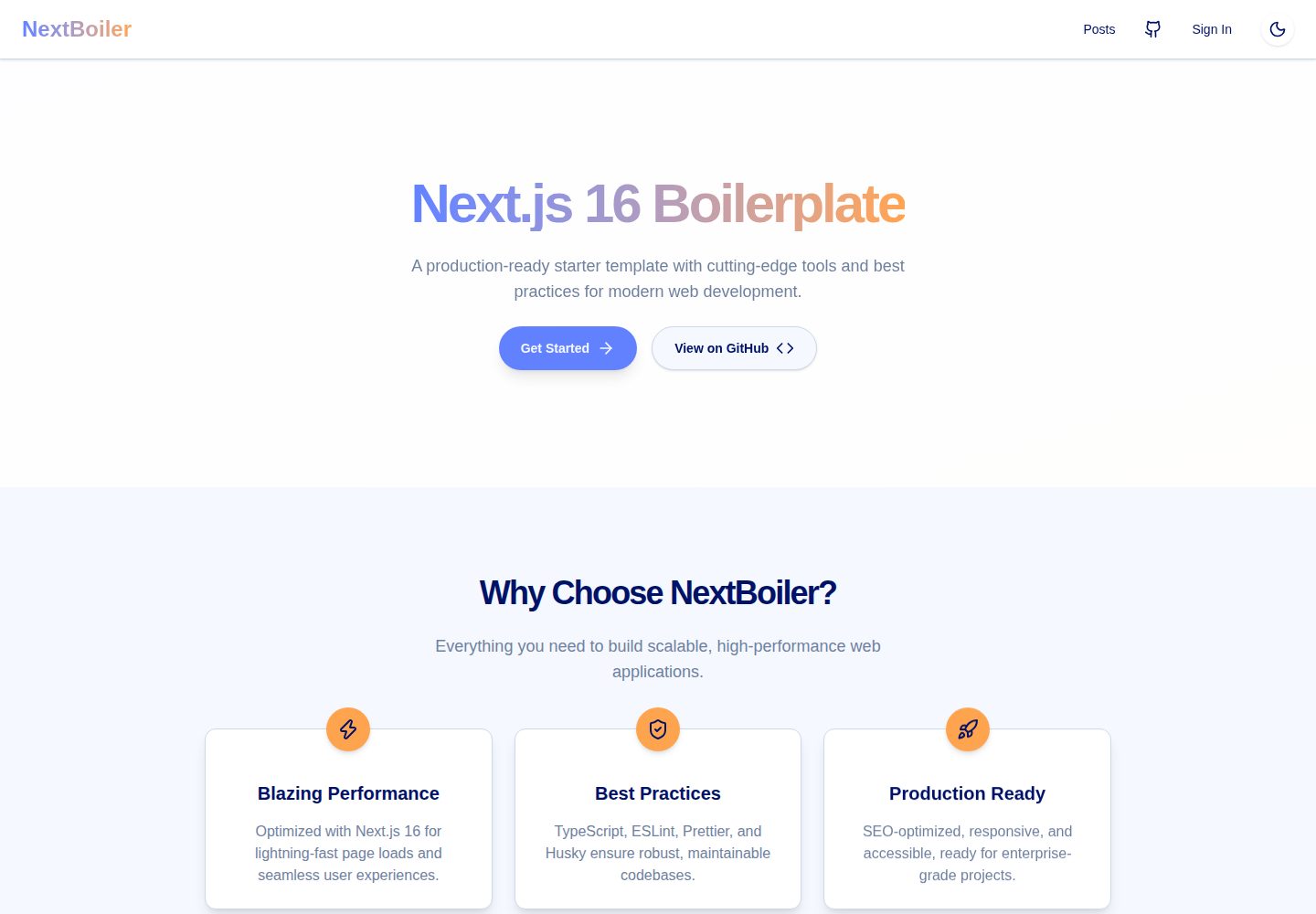
看看你的网站会是什么样
浏览真实页面截图,比较内容排版与手机效果。点击下方缩略图切换,放大查看整页细节。
全部页面与视图 2
截图用于了解视觉与布局,交互效果请以实际项目为准。
采集于 2026-10-02查看来源
值得关注的模板亮点
从已有项目资料中,快速了解它的特点。
集成 Prisma ORM 与 MongoDB 支持,提供 schema.prisma 与 seed.ts
使用 TanStack Query 处理数据获取与状态管理
包含 Framer Motion 动画库与 Tailwind CSS 样式方案
配置 ESLint、Prettier、Husky、Commitlint 等开发工具
提供 dev、build、start、lint、format、prisma:generate、prisma:push 等 npm 脚本
模板详细介绍
这是一个 Next.js 启动器模板,仓库描述为「next js 16 boilerplate」,目标是让使用者无需自行完成初始配置即可开始 Next.js 项目。模板采用 App Router 结构,源码按 app、components、lib、providers、styles、types 目录组织,并包含 prisma 目录用于数据库 schema 与种子脚本。
功能层面,模板预置了 TypeScript 类型检查、Tailwind CSS 样式方案、Clerk 用户认证、Prisma ORM 与 MongoDB 数据库支持、TanStack Query 数据获取与状态管理、Framer Motion 动画,以及 ESLint、Prettier、Husky、Commitlint 等开发工具链。README 还提到 SEO 相关的 meta 标签与社交分享资源已预先配置。
使用前需要自行准备环境变量:MongoDB 连接字符串、Clerk 的 publishable key、secret key 与 webhook secret,以及 Clerk 的登录、注册和登录后跳转路径。项目提供 dev、build、start、lint、format、prisma:generate、prisma:push 等 npm 脚本。
许可方面,仓库采用 MIT 许可证,允许免费使用、修改、商用和分发该版本代码,分发时需保留版权声明与许可声明。代码按现状提供。演示图片、字体、图标等第三方素材需按各自许可核对;域名、托管、数据库、支付或 AI 等外部服务可能另外收费。
Next.jsReact启动器
适合你的项目吗?
适用场景
- 需要快速启动一个带认证与数据库层的 Next.js 项目
- 希望以 TypeScript 和 Tailwind CSS 为基础搭建前端界面
- 需要 Prisma 与 MongoDB 组合进行数据建模与访问
- 希望项目自带代码检查、格式化与提交规范工具链
适合人群
- 熟悉 Next.js App Router 与 React 的开发者
- 需要 Clerk 认证与 MongoDB 数据库起步配置的团队
- 希望减少初始配置工作、直接进入业务开发的项目
- 接受 MIT 许可并自行准备外部服务凭据的使用者
上手与定制指南
结合仓库当前版本的说明,按下面的资料检查内容、配置与运行要求。
- 1
克隆仓库后运行 npm install 安装依赖
- 2
在根目录创建 .env 文件,填写 MONGODB_URI、Clerk 的 publishable key、secret key 与 webhook secret
- 3
按需配置 Clerk 的登录、注册及登录后跳转路径变量
- 4
运行 npm run dev 启动开发服务器,默认地址为 http://localhost:3000
- 5
数据库 schema 变更后可使用 npm run prisma:generate 与 npm run prisma:push
授权与来源资料
使用条件与限制
免费使用 · 保留许可声明本次收录的是公开仓库中采用 MIT 许可的免费版本;免费范围为该版本代码,不代表外部服务或第三方素材免费。
使用时需要遵守
- 允许免费使用、修改、商用和分发该版本代码。
- 分发代码副本或实质性部分时,保留原作者版权声明和完整 MIT 许可声明。
- 代码按现状提供;担保与责任限制以原许可证及适用法律为准。
额外费用与待核对事项
- 认证功能依赖第三方服务 Clerk,需注册账号并配置 publishable key、secret key 与 webhook secret 才能使用。
- 数据库层依赖 MongoDB,需自行提供 MONGODB_URI 连接字符串,数据库托管可能产生额外费用。
- 使用前必须在 .env 中填写 Clerk 与 MongoDB 凭据,否则认证与数据库功能无法运行。
- 演示图片、字体、图标及其他第三方素材需按各自许可核对,不能仅凭代码的 MIT 许可判断。
- 域名、托管、数据库、支付或 AI 等外部服务可能另外收费。
查看原文依据
Permission is hereby granted, free of charge
许可证原文
Pre-configured with Clerk for secure user management.
README 原文
Prisma ORM with MongoDB support.
README 原文
https://github.com/AnwarHossainSR/nextjs-16-template/blob/main/LICENSEhttps://github.com/AnwarHossainSR/nextjs-16-template/blob/main/README.mdNEXT_PUBLIC_CLERK_PUBLISHABLE_KEY=your_clerk_publishable_key
README 原文
DeepSeek 根据仓库许可证和 README 整理 ·2026-10-02。结果仅覆盖已读取资料,依赖、图片、字体及后续条款变更以各自原文为准。
项目核对记录与介绍依据
模板资料
- 来源平台
- GitHub
- 资料与维护参考分
- 资料较完整 · 96 / 100
- 技术栈
- Next.js · React
- 网站类型
- 启动器
这个分数如何计算
本站按许可资料(最高30分)、演示链接(12分)、预览图(10分)、Star数(15分)、记录的维护时间(15分)、描述完整度(8分)、功能记录(5分)和分类资料(5分)计算。它不是代码、安全或性能测试,也不是 Google 评分;有链接不代表已实测可用。
这个项目需要核对什么
- 记录的仓库更新时间
- 2026-08-09
- 截图检查日期
- 2026-10-02
已收录演示链接。请用你的内容与屏幕尺寸检查;有演示不代表表单、认证或支付已经可用。
目录记录的主要技术栈是 Next.js。请通过依赖清单和锁文件核对实际版本与托管要求。这些说明基于收录资料,不代表代码审计或部署实测。
查看具体选型方法 →介绍的制作与核对状态
介绍由 AI 辅助整理目录与仓库资料。仓库作者不等于这篇介绍的审核者。
已完成服务器许可规则与 AI 来源核对;未经过人工编辑审核。
查看当时使用的来源资料
SHA-256: 923e6632a07896cc06c2ff448605524ab319d721958745a75b65933094762b58
2026-10-02T09:26:13.813Z
来源文件 / 仓库# Next.js 16 Boilerplate <div align="center"> <img src="/public/images/og.png" alt="Next.js Boilerplate" width="600px" /> <p>A production-ready starter template with everything you need to build and deploy high-performance Next.js applications.</p> [](https://opensource.org/licenses/MIT) [](https://www.typescriptlang.org/) [](https://nextjs.org/) [](https://react.dev/) [](https://tailwindcss.com/) [](https://www.prisma.io/) </div> ## ✨ Features This boilerplate is designed to give you a production-ready foundation with everything configured for optimal development experience and performance: - 🚀 **Next.js 16 & React 19** - Leveraging the latest features and performance improvements. - 🎨 **Tailwind CSS 4** - Modern utility-first CSS with high performance and canonical syntax. - 🔒 **Full Type Safety** - TypeScript 5.8 throughout the entire codebase. - 🛡️ **Authentication** - Pre-configured with Clerk for secure user management. - 🗄️ **Database Ready** - Prisma ORM with MongoDB support. - ⚡ **Turbopack** - Blazing fast development builds. - 🔄 **State Management** - TanStack Query (React Query) for efficient data fetching. - 🎭 **Animations** - Framer Motion 12 for smooth transitions. - 🔍 **SEO Optimized** - Pre-configured meta tags and social sharing assets. - 🛠️ **Dev Tooling** - ESLint 9, Prettier, Husky, and Commitlint pre-configured. ## 📚 Tech Stack - [`Next.js 16.1.4`](https://nextjs.org/) - React framework for production with Turbopack. - [`React 19.2.3`](https://react.dev/) - Latest React with improved performance and new features. - [`Prisma 6.19.2`](https://www.prisma.io/) - Next-generation ORM for database management. - [`Clerk`](https://clerk.com/) - Complete user management and authentication. - [`Framer Motion 12`](https://www.framer.com/motion/) - Production-ready animation library. - [`TypeScript 5.8`](https://typescriptlang.org) - Type safety and improved developer experience. - [`Tailwind CSS 4.1.4`](https://tailwindcss.com/) - High-performance styling with canonical syntax. - [`ESLint 9`](https://eslint.org/) - Code quality and consistency. - [`Prettier`](https://prettier.io/) - Code formatting. - [`TanStack Query 5`](https://tanstack.com/query) - Powerful data fetching and state management. ## 🚀 Getting Started ### 1. Clone the project ```bash git clone https://github.com/AnwarHossainSR/nextjs-16-template.git ``` ### 2. Install dependencies ```bash npm install ``` ### 3. Environment Setup Create a `.env` file in the root directory and add your credentials: ```env # Database MONGODB_URI=your_mongodb_connection_string # Clerk Authentication NEXT_PUBLIC_CLERK_PUBLISHABLE_KEY=your_clerk_publishable_key CLERK_SECRET_KEY=your_clerk_secret_key CLERK_WEBHOOK_SECRET=your_clerk_webhook_secret # Clerk URLs NEXT_PUBLIC_CLERK_SIGN_IN_URL=/sign-in NEXT_PUBLIC_CLERK_SIGN_UP_URL=/sign-up NEXT_PUBLIC_CLERK_AFTER_SIGN_IN_URL=/dashboard NEXT_PUBLIC_CLERK_AFTER_SIGN_UP_URL=/dashboard ``` ### 4. Start Development ```bash npm run dev ``` Your application will be available at [http://localhost:3000](http://localhost:3000). ## 📋 Scripts | Command | Description | | ------------------------- | -------------------------------- | | `npm run dev` | Start development server | | `npm run build` | Build production application | | `npm run start` | Start production server | | `npm run lint` | Run ESLint to check code quality | | `npm run format` | Format code with Prettier | | `npm run prisma:generate` | Generate Prisma client | | `npm run prisma:push` | Push schema changes | ## 🧰 Project Structure ``` src/ ├── app/ # App router pages and API routes ├── components/ # Reusable UI components ├── lib/ # Utility functions and library wrappers ├── providers/ # React Context providers ├── styles/ # Global styles and Tailwind configuration └── types/ # TypeScript definitions prisma/ ├── schema.prisma # Database schema └── seed.ts # Database seeding script ``` ## 💅 Styling with Tailwind CSS 4 This project utilizes the latest Tailwind CSS 4 features, including the new canonical syntax and CSS-first configuration: ```tsx // Canonical syntax for variables className = 'bg-(--primary) text-(--foreground)'; ``` ## 📝 License This project is licensed under the MIT License - see the LICENSE file for details. --- <div align="center"> <p>Made with ❤️ by <a href="https://github.com/AnwarHossainSR">Anwar Hossain</a></p> </div>
看看同类模板
对比同技术栈与用途的模板,找到更适合的视觉与内容结构。

ai-website-cloner-template
Clone any website with one command using AI coding agents
Next.js · 启动器

Next.js SaaS Starter
Next.js SaaS Starter 是 Next.js 官方维护的 SaaS 起点模板,定位介于学习资源和可直接部署的脚手架之间。
Next.js · SaaS

Next.js Commerce
Next.js Commerce 是 Vercel 团队维护的电商启动模板,基于 Next.js App Router 构建,采用服务端渲染、React Server Components、Server Actions …
Next.js · 电商

Next-js-Boilerplate
Next-js-Boilerplate 是一个面向 Next.js 16、Tailwind CSS 4 和 TypeScript 的启动器,核心定位是开发者体验优先。
Next.js · 启动器

tailwind-nextjs-starter-blog
tailwind-nextjs-starter-blog 是一个面向个人技术博客的 Next.js 与 Tailwind CSS 启动模板,其 v2 版本基于 App Router 与 React Server Comp…
Next.js · 博客

next-forge
Production-grade Turborepo template for Next.js apps.
Next.js · 启动器