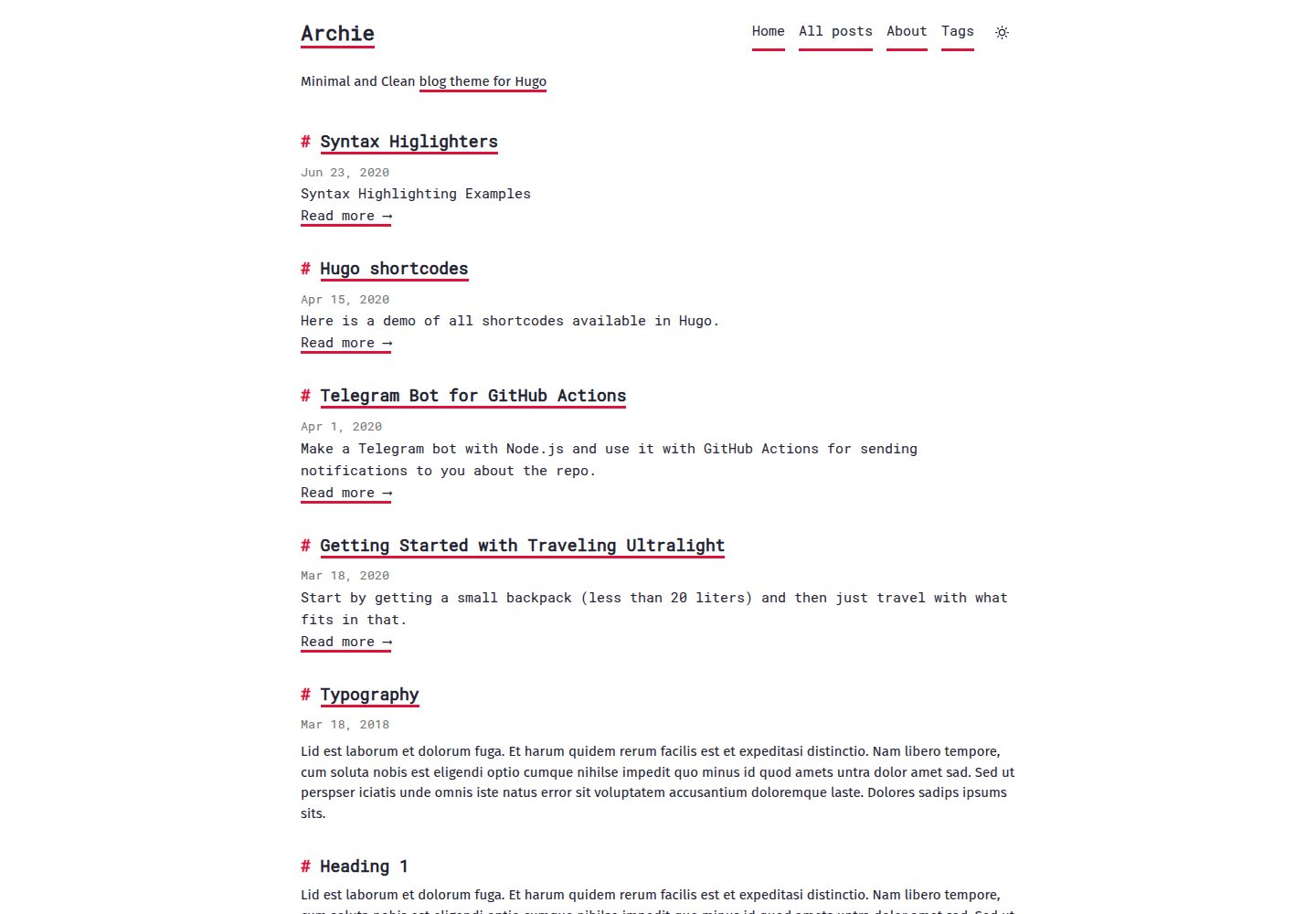
极简、干净的博客界面,带有 Markdown 风格
Hugo博客
archie — Hugo 博客模板
作者 athul
Archie 是一个基于 Hugo 的极简博客主题,界面带有 Markdown 风格,支持深色模式、标签、搜索与提示块等写作功能。
看看你的网站会是什么样
浏览真实页面截图,比较内容排版与手机效果。点击下方缩略图切换,放大查看整页细节。
全部页面与视图 3
截图用于了解视觉与布局,交互效果请以实际项目为准。
采集于 2026-10-02查看来源
值得关注的模板亮点
从已有项目资料中,快速了解它的特点。
支持自动深色模式(跟随系统)与手动深色/浅色切换
内置标签、目录、tl:dr 摘要与 Disqus 评论
提供五种提示块(callout),兼容深浅色模式
可选搜索页,由 Hugo 生成的 JSON 索引驱动
支持自定义 CSS、MathJax 与 KaTeX
模板详细介绍
Archie 是 athul 维护的 Hugo 博客主题,定位为极简、干净的博客外观,界面带有 Markdown 风格。它从 Ezhil 主题分支而来,采用 MIT 许可,演示站点托管在 GitHub Pages。主题提供文章列表、标签、目录、tl;dr 摘要、提示块(callout)、Disqus 评论、Google Analytics 脚本、搜索页以及基于系统主题的自动深色模式与手动切换。搜索功能需要单独创建 search 页面并配置 JSON 输出,属于可选开启。主题通过 config.toml 中的 theme="archie" 启用,支持自定义 CSS、MathJax 与 KaTeX、社交链接和主菜单配置。使用前需注意:Google Analytics 相关功能要求 Hugo v0.125.0 或更高版本;演示图片、字体、图标等第三方素材的许可需单独核对。
Hugo博客
适合你的项目吗?
适用场景
- 搭建个人技术博客或写作博客
- 需要深色模式与简洁阅读体验的内容站点
- 使用 Hugo 并希望以 Markdown 写作、通过 frontmatter 控制目录与摘要的博客
- 需要标签归档、站内搜索或 Disqus 评论的博客
适合人群
- 使用 Hugo 构建静态博客的个人开发者或写作者
- 偏好极简排版与 Markdown 风格界面的用户
- 需要深色模式、标签、目录与提示块等写作功能的博客作者
上手与定制指南
结合仓库当前版本的说明,按下面的资料检查内容、配置与运行要求。
- 1
在 Hugo 站点目录下创建 themes 文件夹并克隆仓库:mkdir themes && cd themes && git clone https://github.com/athul/archie.git
- 2
在 config.toml 中设置 theme="archie"
- 3
若使用 Google Analytics,需将 Hugo 升级到 v0.125.0 或更高版本并使用最新主题
- 4
搜索页需手动创建带 layout: search 和 json 输出的页面,并按需加入主菜单
- 5
自定义 CSS 文件应放在 assets 目录下,再通过 params.customcss 引用
授权与来源资料
使用条件与限制
免费使用 · 保留许可声明本次收录的是公开仓库中采用 MIT 许可的免费版本;免费范围为该版本代码,不代表外部服务或第三方素材免费。
使用时需要遵守
- 允许免费使用、修改、商用和分发该版本代码。
- 分发代码副本或实质性部分时,保留原作者版权声明和完整 MIT 许可声明。
- 代码按现状提供;担保与责任限制以原许可证及适用法律为准。
额外费用与待核对事项
- 使用 Google Analytics 功能需将 Hugo 升级至 v0.125.0 或更高版本,并使用最新版主题,否则可能无法正常工作。
- Disqus 评论为可选功能,需自行注册 Disqus 并填写 shortname 才能启用,属于第三方外部服务。
- 默认可能通过 CDN 加载字体与图标;如需本地托管需将 useCDN 设为 false,并自行确认相关第三方素材的许可。
- README 中的 Buy Me A Coffee 为自愿捐赠,不影响主题的免费使用,不构成付费限制。
- 演示图片、字体、图标及其他第三方素材需按各自许可核对,不能仅凭代码的 MIT 许可判断。
- 域名、托管、数据库、支付或 AI 等外部服务可能另外收费。
查看原文依据
Permission is hereby granted, free of charge
许可证原文
If you encounter any issues with Google Analytics, update Hugo to v0.125.0 or later and make sure your using the latest version of the theme.
README 原文
disqusShortname = "yourDisqusShortname"
README 原文
useCDN=false # don't use CDNs for fonts and icons, instead serve them locally.
README 原文
https://github.com/athul/archie/blob/master/LICENSEhttps://github.com/athul/archie/blob/master/README.mdIf you liked my work please consider supporting me on [BuymeACoffee](https://www.buymeacoffee.com/athulca)
README 原文
DeepSeek 根据仓库许可证和 README 整理 ·2026-10-02。结果仅覆盖已读取资料,依赖、图片、字体及后续条款变更以各自原文为准。
项目核对记录与介绍依据
模板资料
- 来源平台
- Hugo Themes
- 资料与维护参考分
- 资料较完整 · 87 / 100
- 技术栈
- Hugo
- 网站类型
- 博客
这个分数如何计算
本站按许可资料(最高30分)、演示链接(12分)、预览图(10分)、Star数(15分)、记录的维护时间(15分)、描述完整度(8分)、功能记录(5分)和分类资料(5分)计算。它不是代码、安全或性能测试,也不是 Google 评分;有链接不代表已实测可用。
这个项目需要核对什么
- 记录的仓库更新时间
- 2026-03-30
- 截图检查日期
- 2026-10-02
已收录演示链接。请用你的内容与屏幕尺寸检查;有演示不代表表单、认证或支付已经可用。
目录记录的主要技术栈是 Hugo。请通过依赖清单和锁文件核对实际版本与托管要求。这些说明基于收录资料,不代表代码审计或部署实测。
查看具体选型方法 →介绍的制作与核对状态
介绍由 AI 辅助整理目录与仓库资料。仓库作者不等于这篇介绍的审核者。
已完成服务器许可规则与 AI 来源核对;未经过人工编辑审核。
查看当时使用的来源资料
SHA-256: 359b08811cde694fbb071d4df3bd9f5a9a42c50af5c4b99f3c2f9bc384bf431f
2026-10-02T06:34:12.365Z
来源文件 / 仓库# Archie - Hugo theme
Archie is a minimal and clean theme for hugo with a markdown-ish UI.
Forked from [Ezhil Theme](https://github.com/vividvilla/ezhil)
## Demo
[Check the Demo](https://athul.github.io/archie/) hosted on GitHub Pages :smile: . You can find the source code to that in the `site` branch of this repository


## Feature
- Google Analytics Script
- Callouts
- Tags
- Search
- Auto Dark Mode(based on system theme)
- Dark/Light Mode toggle
- tl:dr; frontamatter
- Table of contents
- Cache busting for CSS files
- Disqus Comments
## Installation
In your Hugo website directory, create a new folder named theme and clone the repo
```bash
$ mkdir themes
$ cd themes
$ git clone https://github.com/athul/archie.git
```
Edit the `config.toml` file with `theme="archie"`
For more information read the official [setup guide](https://gohugo.io/installation/) of Hugo.
If you encounter any issues with Google Analytics, update Hugo to v0.125.0 or
later and make sure your using the latest version of the theme.
## Writing Posts
Create a new `.md` file in the *content/posts* folder
```yml
---
title: Title of the post
description:
date:
tldr: (optional)
draft: true/false (optional)
tags: [tag names] (optional)
toc: true/false (optional)
---
```
## Credits
Forked from [Ezhil Theme](https://github.com/vividvilla/ezhil) and Licensed under MIT License
Inspired by design of blog.jse.li
----
## Config Options
### Custom CSS
Custom CSS files can be included though the `customcss` config parameter.
Note: CSS files should be placed under the `assets` directory e.g. `assets/css/first.css`.
```toml
[params]
customcss = ["css/first.css", "css/second.css"]
```
### Callouts
There are five different types of callout, including this themes original callout and a custom one as well. These callouts are compatible with both light and dark theme modes.

#### Original
This steup is to ensure backwards compatibility for previous callouts.
```markdown
{{< callout emoji="⚡️" text="Original callout." >}}
```
#### Alert
```markdown
{{< callout type="alert" text="This is an alert callout." >}}
```
#### Custom
This include the ability to set your own callout emoji, title, and css style element.
```markdown
{{< callout type="custom" emoji="⚡️" title="Custom callout" text="This is custom text for a custom callout." style="background-color: transparent; border: 3px solid #d340e0;" >}}
```
#### Tip
```markdown
{{< callout type="tip" text="This is a tip callout." >}}
```
#### Warning
```markdown
{{< callout type="warning" text="This is a warning callout." >}}
```
### Search
Archie ships with an opt-in search page backed by a Hugo-generated JSON index.
1. Create a search page:
```yaml
---
title: "Search"
layout: "search"
outputs:
- html
- json
---
```
2. Add the page to your main menu if you want it linked in the header:
```toml
[[menu.main]]
name = "Search"
url = "/search/"
weight = 5
```
The generated search page indexes the same content surface as the home page when
`params.mainSections` is set. Otherwise it falls back to all regular pages,
excluding hidden content and the search page itself.
## Config of the Demo Site
```toml
baseURL = "https://athul.github.io/archie/"
languageCode = "en-us"
title = "Archie"
theme="archie"
copyright = "© Athul"
# Code Highlight
pygmentsstyle = "monokai"
pygmentscodefences = true
pygmentscodefencesguesssyntax = true
disqusShortname = "yourDisqusShortname"
[pagination]
pagerSize = 3 # articles per page
[params]
mode="auto" # color-mode → light,dark,toggle or auto
useCDN=false # don't use CDNs for fonts and icons, instead serve them locally.
subtitle = "Minimal and Clean [blog theme for Hugo](https://github.com/athul/archie)"
mathjax = true # enable MathJax support
katex = true # enable KaTeX support
# Social Tags
[[params.social]]
name = "GitHub"
icon = "github"
url = "https://github.com/athul/archie"
[[params.social]]
name = "Twitter"
icon = "twitter"
url = "https://twitter.com/athulcajay/"
[[params.social]]
name = "GitLab"
icon = "gitlab"
url = "https://gitlab.com/athul/"
# Main menu Items
[[menu.main]]
name = "Home"
url = "/"
weight = 1
[[menu.main]]
name = "All posts"
url = "/posts"
weight = 2
[[menu.main]]
name = "About"
url = "/about"
weight = 3
[[menu.main]]
name = "Tags"
url = "/tags"
weight = 4
```
---
If you liked my work please consider supporting me on [BuymeACoffee](https://www.buymeacoffee.com/athulca)
<a href="https://www.buymeacoffee.com/athulca" target="_blank"><img src="https://cdn.buymeacoffee.com/buttons/v2/default-red.png" alt="Buy Me A Coffee" height="41" width="174" ></a>
看看同类模板
对比同技术栈与用途的模板,找到更适合的视觉与内容结构。

hugo-PaperMod
PaperMod 是 Hugo 生态里知名度较高的主题之一,定位很明确:给博客和轻量作品集站点提供一套干净、响应式的阅读界面。
Hugo · 作品集

LoveIt
❤️A clean, elegant but advanced blog theme for Hugo 一个简洁、优雅且高效的 Hugo 主题
Hugo · 博客

hugo-coder
A minimalist blog theme for hugo.
Hugo · 博客

blowfish
Personal Website & Blog Theme for Hugo
Hugo · 博客

hugo-paper
🪺 A simple, clean, customizable Hugo theme
Hugo · 博客

hextra
Hextra 是一个 Hugo 主题,定位在文档站与博客之间:既提供侧边栏导航、目录、面包屑、分页这类文档站结构,也能承载博客内容。
Hugo · 文档