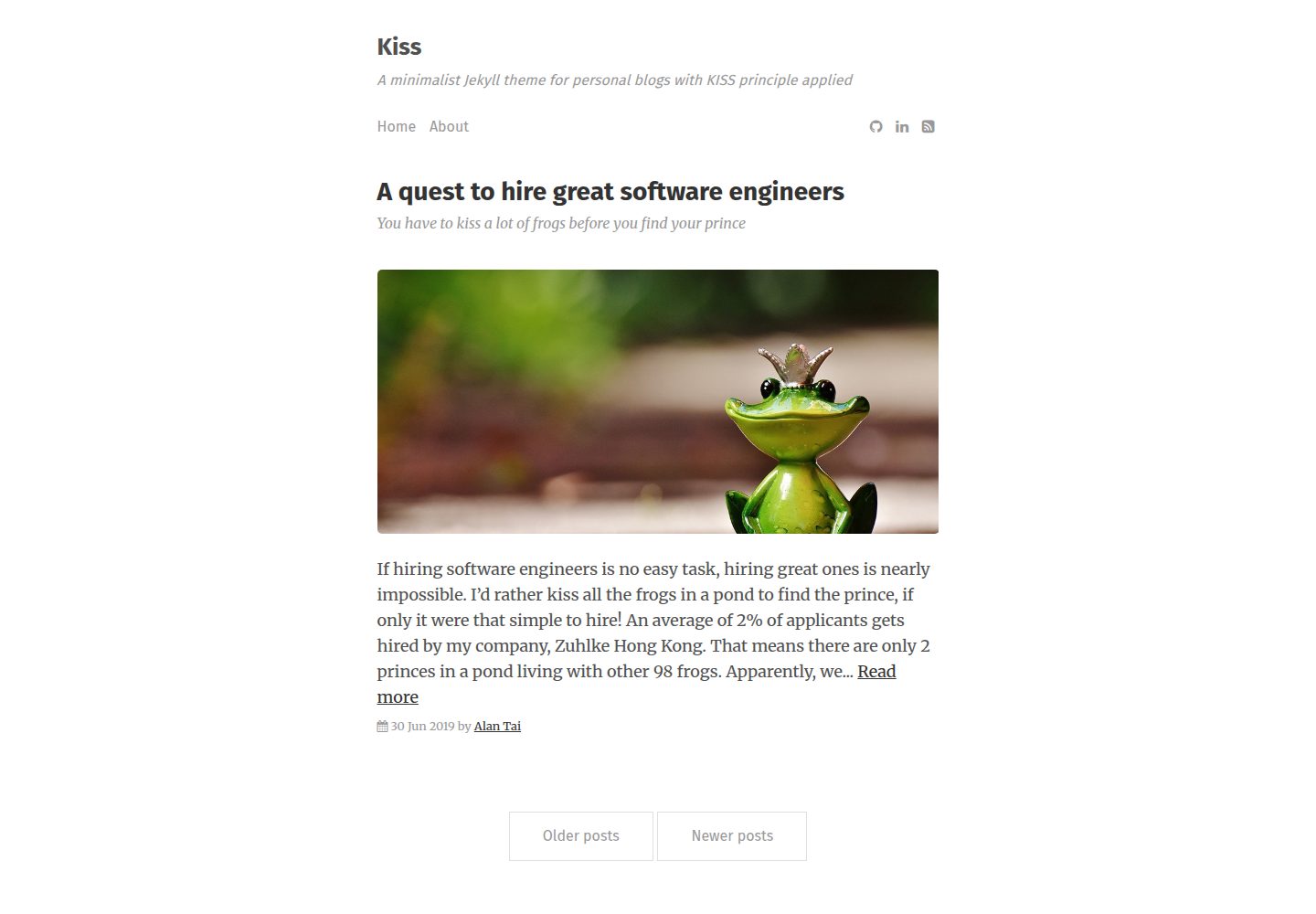
遵循 KISS 原则的极简个人博客主题
Jekyll博客
kiss — Jekyll 博客模板
作者 ayltai
Kiss 是一个遵循 KISS 原则的极简 Jekyll 个人博客主题,兼容 GitHub Pages,支持远程主题、Disqus 评论、Google Analytics、Font Awesome 与代码语法高亮。
看看你的网站会是什么样
浏览真实页面截图,比较内容排版与手机效果。点击下方缩略图切换,放大查看整页细节。
全部页面与视图 3
截图用于了解视觉与布局,交互效果请以实际项目为准。
采集于 2026-10-02查看来源
值得关注的模板亮点
从已有项目资料中,快速了解它的特点。
完全兼容 GitHub Pages,支持 gem-based remote theme
通过 _data/settings.yml 配置菜单、作者、社交图标与分页标签
可选集成 Disqus 评论与 Google Analytics,不配置即关闭
支持 Font Awesome 图标与代码语法高亮
包含 RSS 2.0 feed 布局与可覆盖的 404 页面
模板详细介绍
Kiss 是开发者 ayltai 发布的 Jekyll 主题,定位为个人博客,设计上强调极简与 KISS 原则。主题完全兼容 GitHub Pages,并支持以 gem-based remote theme 的方式引用,便于在 GitHub Pages 上直接使用。
功能方面,主题内置对 Google Analytics 与 Disqus 评论的支持,两者均通过 _data/settings.yml 配置,且可分别通过不添加对应配置段来关闭。主题还支持 Font Awesome 图标、代码语法高亮,并包含面向搜索引擎的优化处理。
使用方式上,需要在 Gemfile 中声明 remote_theme: ayltai/kiss,复制并修改 _data/settings.yml,创建使用 home 布局的 index.html,可选创建使用 feed 布局的 feed.xml,并在 _posts 目录中撰写文章。主题的 _includes、_layouts、assets/css/main.css、assets/css/syntax.css 与 404.html 均可覆盖。
限制方面,仓库最近更新时间为 2020 年,README 未说明对较新 Jekyll 或依赖版本的兼容情况;演示图片、字体、图标等第三方素材需按各自许可单独核对。
Jekyll博客
适合你的项目吗?
适用场景
- 在 GitHub Pages 上搭建个人博客
- 以远程主题方式为现有 Jekyll 站点套用极简外观
- 需要文章评论与访问统计的个人写作站点
- 需要 RSS 订阅与代码高亮的技术博客
适合人群
- 使用 Jekyll 并托管在 GitHub Pages 的个人博主
- 偏好极简排版、希望减少主题复杂度的写作者
- 需要按需开启 Disqus 评论或 Google Analytics 的站点
- 希望通过覆盖 _includes、_layouts 与 CSS 进行小幅定制的开发者
上手与定制指南
结合仓库当前版本的说明,按下面的资料检查内容、配置与运行要求。
- 1
在 Gemfile 中使用 remote_theme: ayltai/kiss 引入主题
- 2
复制 _data/settings.yml 并按需修改菜单、作者、社交图标与分页标签
- 3
创建使用 home 布局的 index.html;如需 RSS 则创建使用 feed 布局的 feed.xml
- 4
在 _posts 目录中按 Jekyll 文档创建文章
- 5
Disqus 与 Google Analytics 为可选配置,不添加对应配置段即不启用
授权与来源资料
使用条件与限制
免费使用 · 保留许可声明本次收录的是公开仓库中采用 MIT 许可的免费版本;免费范围为该版本代码,不代表外部服务或第三方素材免费。
使用时需要遵守
- 允许免费使用、修改、商用和分发该版本代码。
- 分发代码副本或实质性部分时,保留原作者版权声明和完整 MIT 许可声明。
- 代码按现状提供;担保与责任限制以原许可证及适用法律为准。
额外费用与待核对事项
- 启用文章评论功能需自行注册 Disqus 账号,并在 _data/settings.yml 中填写 Disqus shortname;不添加 disqus 配置段则不启用评论。
- 启用访问统计需自行注册 Google Analytics 账号,并在 _data/settings.yml 中填写 tracking ID;不添加 google 配置段则不启用统计。
- 演示图片、字体、图标及其他第三方素材需按各自许可核对,不能仅凭代码的 MIT 许可判断。
- 域名、托管、数据库、支付或 AI 等外部服务可能另外收费。
查看原文依据
Permission is hereby granted, free of charge
许可证原文
You need to have a [Disqus](https://disqus.com/) account and set your [Disqus shortname](https://help.disqus.com/customer/portal/articles/466208) in [`_data/settings.yml`](blob/master/_data/settings.yml):
README 原文
https://github.com/ayltai/kiss/blob/master/LICENSEhttps://github.com/ayltai/kiss/blob/master/README.mdYou need to have a [Google Analytics](https://analytics.google.com/analytics/web/) and set your [tracking ID](https://support.google.com/analytics/answer/1008080?visit_id=636988589985352940-1664182305&rd=1#GAID) in [`_data/settings.yml`](blob/master/_data/settings.yml):
README 原文
DeepSeek 根据仓库许可证和 README 整理 ·2026-10-02。结果仅覆盖已读取资料,依赖、图片、字体及后续条款变更以各自原文为准。
项目核对记录与介绍依据
模板资料
- 来源平台
- GitHub
- 资料与维护参考分
- 资料一般 · 68 / 100
- 技术栈
- Jekyll
- 网站类型
- 博客
这个分数如何计算
本站按许可资料(最高30分)、演示链接(12分)、预览图(10分)、Star数(15分)、记录的维护时间(15分)、描述完整度(8分)、功能记录(5分)和分类资料(5分)计算。它不是代码、安全或性能测试,也不是 Google 评分;有链接不代表已实测可用。
这个项目需要核对什么
- 记录的仓库更新时间
- 2020-02-19
- 截图检查日期
- 2026-10-02
已收录演示链接。请用你的内容与屏幕尺寸检查;有演示不代表表单、认证或支付已经可用。
目录记录的主要技术栈是 Jekyll。请通过依赖清单和锁文件核对实际版本与托管要求。这些说明基于收录资料,不代表代码审计或部署实测。
查看具体选型方法 →介绍的制作与核对状态
介绍由 AI 辅助整理目录与仓库资料。仓库作者不等于这篇介绍的审核者。
已完成服务器许可规则与 AI 来源核对;未经过人工编辑审核。
查看当时使用的来源资料
SHA-256: a8babcdf689f720a39e33b29831e7791625b5feeceb578bf758149e6e9f2880c
2026-10-02T21:38:24.273Z
来源文件 / 仓库# Kiss
[-100-success.svg?style=flat)](https://developers.google.com/speed/pagespeed/insights/?url=https%3A%2F%2Fayltai.github.io%2Fkiss&tab=desktop)
[-98-success.svg?style=flat)](https://developers.google.com/speed/pagespeed/insights/?url=https%3A%2F%2Fayltai.github.io%2Fkiss&tab=mobile)
[](https://lgtm.com/projects/g/ayltai/kiss/context:javascript)


Kiss is a minimalist Jekyll theme for personal blogs with [KISS principle](https://en.wikipedia.org/wiki/KISS_principle) applied.
[View demo website](https://ayltai.github.io/kiss)

## Features
* Fully compatible with [GitHub Pages](https://pages.github.com/)
* Support Jekyll [gem-based](https://jekyllrb.com/docs/themes/#understanding-gem-based-themes) [remote theme](https://github.blog/2017-11-29-use-any-theme-with-github-pages/)
* Supports [Google Analytics](https://analytics.google.com/analytics/web/)
* Post comments powered by [Disqus](https://disqus.com/)
* Search engine optimization
* Supports [Font Awesome](https://fontawesome.com/)
* Code syntax highlighting
## Usage
1. Use `remote_theme: ayltai/kiss` in your `Gemfile`.
2. Copy [`_data/settings.yml`](blob/master/_data/settings.yml) and customize as you need.
3. Create `index.html` that uses `home` layout.
4. If your site supports RSS feed, create `feed.xml` that uses `feed` layout.
5. Create your first post in `_posts` folder.
## File structure
```
kiss/
├─ _data/ # Data files go here
| └- settings.yml # Theme settings
├─ _includes/ # Theme includes (Overridable)
├─ _layouts/ # Theme layouts (Overridable)
├─ _posts/ # Your posts go here
├─ assets/ # JS, CSS and images go here
| ├─ css/ # CSS files go here
| | ├─ main.css # CSS for the theme (Overridable)
| | └- syntax.css # CSS for code syntax highlighting (Overridable)
| └- img/ # Images go here
├─ pages/ # Additional pages that shows as menu items go here
| └- about.md # About page
├─ _config.yml # Site settings
├─ 404.html # Page to be display when requested URL does not exist (Overridable)
├─ feed.xml # For generating RSS 2.0 feed
├─ Gemfile # Ruby Gemfile
└- index.html # Home page
```
More information about these file structure can be found in [Jekyll documentation](https://jekyllrb.com/docs/structure/).
## Configurations
### Site configuration
Copy [`_config.yml`](blob/master/_config.yml) and change the site variables:
```yml
# Site settings
title : # Name of the website
description : # Subtitle of the website
author : # Default post author name
```
More information about site configuration can be found in [Jekyll documentation](https://jekyllrb.com/docs/configuration/).
### Theme configuration
Copy [`_data/settings.yml`](blob/master/_data/settings.yml) and change the theme variables:
```yml
favicon : # The favicon of the website
menu: # Menu item array
- { name : 'Home' }
- { name : 'About', path : 'pages', url : 'about.html' }
authors: # Post author array
- { name : 'Alan Tai', url : 'https://www.linkedin.com/in/ayltai' }
social: # FontAwesome icons linked to external websites; to be shown in footer
- { icon : 'github', url : 'https://github.com/ayltai' }
- { icon : 'linkedin', url : 'https://github.com/ayltai' }
- { icon : 'rss-square', url : '/feed.xml' }
pagination:
previous : # Label that represents "older posts"
next : # Label that represents "newer posts"
```
### Content creation
#### Home page
You need to create an `index.html` file as your home page with at least the following content:
```
---
layout : home
---
```
#### (Optional) RSS feed
If you want to support RSS feed for your website, you need to create `feed.xml` file with at least the following content:
```
---
layout : feed
---
```
#### Posts
You can follow the [Jekyll documentation](https://jekyllrb.com/docs/posts/) on how to create posts.
#### (Optional) About page
If you want to show the About page somewhere on your website, you can show it using the menu.
Copy [`_data/settings.yml`](blob/master/_data/settings.yml) and change the theme variables:
```yml
menu:
- { name : 'Home' } # Home page, the path is [Base URL]
- { name : 'About', path : 'pages', url : 'about.html' } # About page, the path is [Base URL]/pages/about.html
```
### (Optional) Disqus integration
This theme supports comments at the end of posts through [Disqus](https://disqus.com/). You need to have a [Disqus](https://disqus.com/) account and set your [Disqus shortname](https://help.disqus.com/customer/portal/articles/466208) in [`_data/settings.yml`](blob/master/_data/settings.yml):
```yml
disqus:
shortname : # Your Disqus shortname
```
If you want to disable [Disqus](https://disqus.com/) comments, just don't add `disqus` section in [`_data/settings.yml`](blob/master/_data/settings.yml).
### (Optional) Google Analytics integration
This theme supports [Google Analytics](https://analytics.google.com/analytics/web/). You need to have a [Google Analytics](https://analytics.google.com/analytics/web/) and set your [tracking ID](https://support.google.com/analytics/answer/1008080?visit_id=636988589985352940-1664182305&rd=1#GAID) in [`_data/settings.yml`](blob/master/_data/settings.yml):
```yml
google:
analytics : #UA-XXXXXXXXX-1
```
If you want to disable [Google Analytics](https://analytics.google.com/analytics/web/), just don't add `google` section in [`_data/settings.yml`](blob/master/_data/settings.yml).
## License
[The MIT License](blob/master/LICENSE)
看看同类模板
对比同技术栈与用途的模板,找到更适合的视觉与内容结构。

al-folio
al-folio 是一个面向学者与研究人员的 Jekyll 作品集主题,设计简洁、响应式,适合搭建个人学术主页。
Jekyll · 作品集

minimal-mistakes
:triangular_ruler: Jekyll theme for building a personal site, blog, project documentation, or portfolio.
Jekyll · 作品集

Beautiful Jekyll
Beautiful Jekyll 是一个在 Jekyll 生态中经过长期打磨的博客主题,由 Dean Attali 维护,自 2015 年起积累了超过 5 万用户。
Jekyll · 博客

jekyll-TeXt-theme
💎 🐳 A super customizable Jekyll theme for personal site, team site, blog, project, documentation, etc.
Jekyll · 博客

startbootstrap-clean-blog-jekyll
A Jekyll version of the Clean Blog theme by Start Bootstrap
Jekyll · 博客

So Simple
So Simple 是 Michael Rose 开发的 Jekyll 主题,定位清晰:为文字和图片提供一个干净、可读性强的展示框架。
Jekyll · 博客