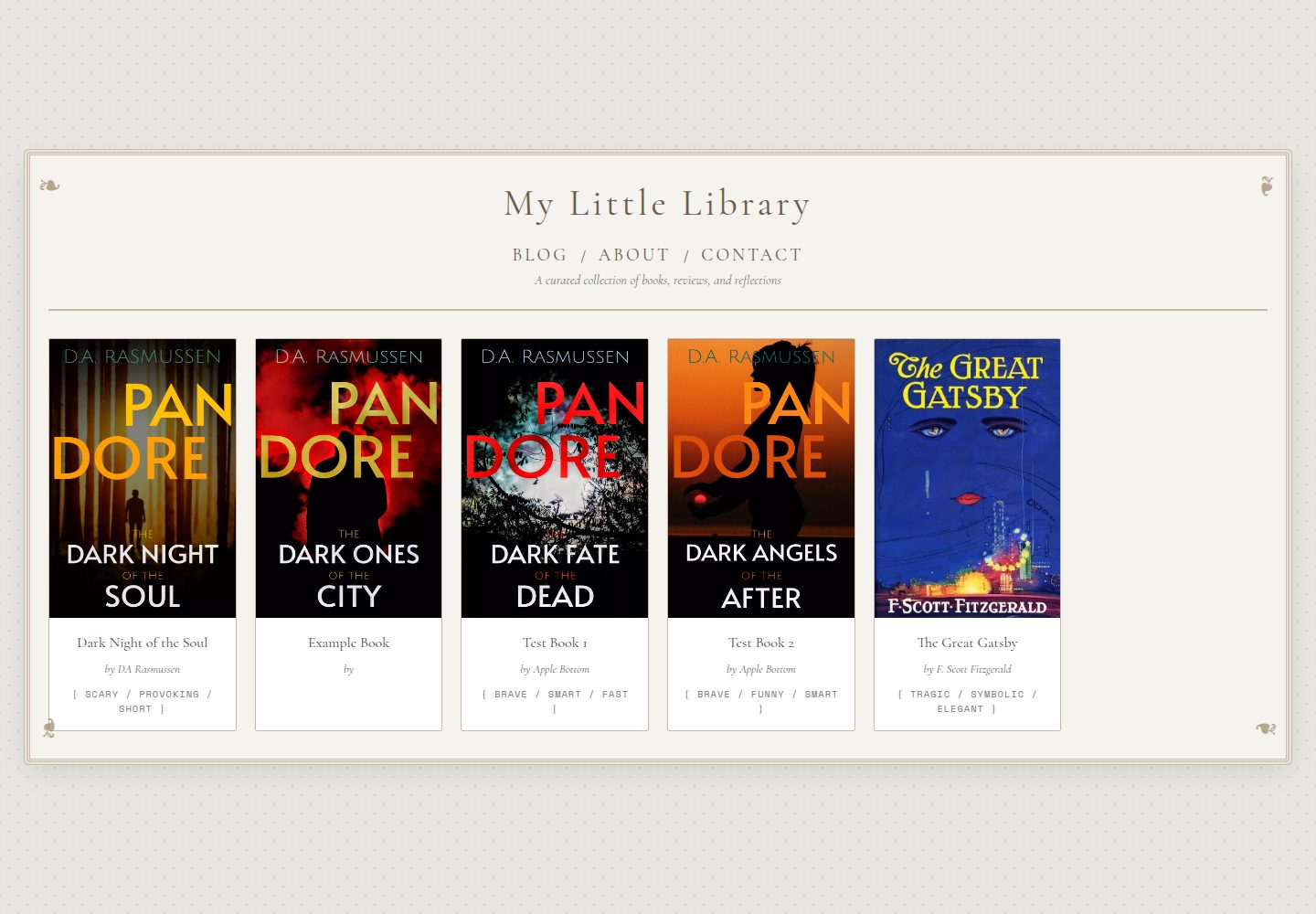
单页书籍展示布局,左侧边栏与右侧内容区分离
JekyllHTML博客
book-theme — Jekyll 博客模板
作者 breakthebull
面向作者与读者的 Jekyll 单页书籍主题,用于展示书单、阅读清单或作品进度,采用复古纸质卡片式版式。
看看你的网站会是什么样
浏览真实页面截图,比较内容排版与手机效果。点击下方缩略图切换,放大查看整页细节。
全部页面与视图 3
截图用于了解视觉与布局,交互效果请以实际项目为准。
采集于 2026-10-13查看来源
值得关注的模板亮点
从已有项目资料中,快速了解它的特点。
相关书籍列表从 _books/ 集合自动生成
附带 new-book.bat 批处理脚本,交互式创建书籍档案
响应式设计,覆盖桌面、平板与手机
包含 BLOG / ABOUT / CONTACT 页面
颜色变量集中在 _sass/main.scss 中可调整
模板详细介绍
book-theme 是一个基于 Jekyll 的静态网站主题,定位为书籍资料库或个人书单页面。它改编自 Starcorex 的 Paperback HTML 设计,并加入 Jekyll 的动态内容生成能力。主题采用单页布局:左侧边栏放置书籍封面、可选的“购买书籍”按钮、引文框、五组交替底色的元数据区以及 About/Warning 区块;右侧内容区显示带特征标签的书名、带首字下沉的可滚动简介框,以及横向滚动的相关书籍列表。相关书籍链接从 _books/ 集合自动生成。主题包含响应式设计,适配桌面、平板与手机,并附带 Windows 批处理脚本 new-book.bat,通过交互式提示生成新的书籍档案文件。仓库还包含 BLOG / ABOUT / CONTACT 页面。使用前需安装 Ruby 与 Bundler 依赖,并在 _config.yml 中配置 books 集合。
JekyllHTML博客
适合你的项目吗?
适用场景
- 作者整理个人作品集与创作进度(WIP)
- 读者维护阅读清单或书单页面
- 为单本书籍制作包含简介、引文与购买链接的展示页
- 以静态站点形式发布书籍资料库并托管到任意静态托管服务
适合人群
- 使用 Jekyll 搭建个人站点的作者与读者
- 希望以复古纸质卡片风格展示书籍信息的人
- 需要从 _books/ 集合批量生成书籍页面的静态站点项目
上手与定制指南
结合仓库当前版本的说明,按下面的资料检查内容、配置与运行要求。
- 1
克隆仓库后运行 bundle install 安装依赖
- 2
在 _config.yml 中配置 title、author、url,并声明 books 集合(output: true,permalink: /books/:title/)
- 3
本地预览运行 bundle exec jekyll serve,访问 http://localhost:4000
- 4
部署时运行 bundle exec jekyll build,并将 _site/ 目录内容上传到静态托管空间
- 5
新增书籍可在 _books/ 下手动创建 Markdown 文件,或在 Windows 上运行 new-book.bat 按提示生成
授权与来源资料
使用条件与限制
免费使用 · 保留许可声明本次收录的是公开仓库中采用 MIT 许可的免费版本;免费范围为该版本代码,不代表外部服务或第三方素材免费。
使用时需要遵守
- 允许免费使用、修改、商用和分发该版本代码。
- 分发代码副本或实质性部分时,保留原作者版权声明和完整 MIT 许可声明。
- 代码按现状提供;担保与责任限制以原许可证及适用法律为准。
额外费用与待核对事项
- 演示图片、字体、图标及其他第三方素材需按各自许可核对,不能仅凭代码的 MIT 许可判断。
- 域名、托管、数据库、支付或 AI 等外部服务可能另外收费。
- 使用该主题时需在页面中注明原作者 Starcorex 及 Jekyll 改编者 DAR 的署名,属于项目特定的署名要求。
- 主题改编自 Starcorex 的 Paperback HTML 设计,原始设计并非本项目原创,使用时需注意其来源与署名条件。
- 批量生成书籍档案的 new-book.bat 脚本仅适用于 Windows 系统,其他平台需手动创建 Markdown 文件。
- 主题使用 Google Fonts 提供的 Cormorant Garamond 与 Space Mono 字体,加载时依赖外部字体服务。
查看原文依据
Permission is hereby granted, free of charge
许可证原文
Please credit [Starcorex](https://toyhou.se/30182937.paperback-f2u/30231690.live-preview) and me when using this theme.
README 原文
This theme is adapted from the original Paperback HTML design.
README 原文
### Option 1: Use the Batch Generator (Windows)
README 原文
https://github.com/breakthebull/book-theme/blob/main/LICENSEhttps://github.com/breakthebull/book-theme/blob/main/README.md- **Fonts:** Cormorant Garamond, Space Mono (Google Fonts)
README 原文
DeepSeek 根据仓库许可证和 README 整理 ·2026-10-13。结果仅覆盖已读取资料,依赖、图片、字体及后续条款变更以各自原文为准。
项目核对记录与介绍依据
模板资料
- 来源平台
- GitHub
- 资料与维护参考分
- 资料较完整 · 88 / 100
- 技术栈
- Jekyll · HTML
- 网站类型
- 博客
这个分数如何计算
本站按许可资料(最高30分)、演示链接(12分)、预览图(10分)、Star数(15分)、记录的维护时间(15分)、描述完整度(8分)、功能记录(5分)和分类资料(5分)计算。它不是代码、安全或性能测试,也不是 Google 评分;有链接不代表已实测可用。
这个项目需要核对什么
- 记录的仓库更新时间
- 2026-03-29
- 截图检查日期
- 2026-10-13
已收录演示链接。请用你的内容与屏幕尺寸检查;有演示不代表表单、认证或支付已经可用。
目录记录的主要技术栈是 Jekyll。请通过依赖清单和锁文件核对实际版本与托管要求。这些说明基于收录资料,不代表代码审计或部署实测。
查看具体选型方法 →介绍的制作与核对状态
介绍由 AI 辅助整理目录与仓库资料。仓库作者不等于这篇介绍的审核者。
审核声明: [email protected] · 2026-10-13
查看当时使用的来源资料
SHA-256: 01175f2bc29d7cce0258a3ae7c94f7e0a000264a5d64ac28c729e1fcd832cb69
2026-10-13T07:54:13.854Z
来源文件 / 仓库# 📚 Paperback Book Theme for Jekyll


<a href="https://jekyll-themes.com/breakthebull/book-theme">
<img
src="https://img.shields.io/badge/featured%20on-JT-red.svg"
height="20"
alt="Jekyll Themes Shield"
/>
</a>
A beautiful, vintage-inspired Jekyll theme for creating book library/profile pages. Based on the original [Paperback HTML design](https://toyhou.se/30182937.paperback-f2u/30231690.live-preview) by Starcorex, adapted for Jekyll with dynamic content generation.
 | 
--- | ---
 |
---
## Features
- **Decorative Card Layout** – Double-border frame with ornamental corner symbols (❧)
- **Left Sidebar**
- Book cover image with decorative corners
- Optional "Buy Book" button
- Quote box with elegant line dividers
- 5 metadata sections with alternating background colors
- About/Warning section (full-width)
- **Right Content Area**
- Book title with trait tags `[ TRAIT / TRAIT / TRAIT ]`
- Scrollable introduction box with drop cap (CSS `::first-letter`)
- Horizontal scrolling related books list (hidden scrollbar)
- Footer with credits
- **Responsive Design** – Optimized for desktop, tablet, and mobile
- **Auto-Generated Links** – Related books pull automatically from your `_books/` collection
- **Batch File Generator** – `new-book.bat` creates new book profiles with interactive prompts
---
## Installation
### 1. Clone or Download
```bash
# Clone your repository
git clone https://github.com/breakthebull/book-theme.git
cd book-theme
```
### 2. Install Dependencies
```bash
bundle install
```
### 3. Configure `_config.yml`
```yaml
title: "My Book Library"
author: "Your Name"
url: "https://yourdomain.com"
collections:
books:
output: true
permalink: /books/:title/
```
### 4. Run Locally
```bash
bundle exec jekyll serve
```
Visit `http://localhost:4000`
### 5. Deploy
```bash
bundle exec jekyll build
# Upload contents of _site/ folder to public_html/ via FTP
```
---
## Creating New Books
### Option 1: Use the Batch Generator (Windows)
```bash
new-book.bat
```
Follow the interactive prompts to fill in book details. The file will auto-open in your default editor.
### Option 2: Manual Creation
Create a new file in `_books/`:
```yaml
---
title: "The Great Gatsby"
subtitle: "A Novel"
author: "F. Scott Fitzgerald"
published: "1925"
publisher: "Charles Scribner's Sons"
genre: "Classic Fiction"
series: "Standalone"
pages: "180"
status: "Completed"
traits: ["Tragic", "Symbolic", "Elegant"]
cover_image: "/assets/covers/gatsby.jpg"
quote: "So we beat on, boats against the current..."
description: "A story of wealth, love, and the American Dream."
buy_link: "https://amazon.com/example"
content_warning: "Infidelity, Death"
about_text: "A story of wealth, love, and the American Dream in the Jazz Age."
work_in_progress: false
---
## Introduction
Write your book review, analysis, or synopsis here...
```
---
## Customization
### Colors
Edit `_sass/main.scss` variables:
```scss
$color-bg: #f5f3ed;
$color-text: #4a4a4a;
$color-accent: #8b7355;
$color-border: #c9b9a4;
```
## Credits
- **Original Design:** [Starcorex](https://toyhou.se/30182937.paperback-f2u/30231690.live-preview) on Toyhou.se
- **Jekyll Adaptation:** DAR
- **Fonts:** Cormorant Garamond, Space Mono (Google Fonts)
---
## License
This theme is adapted from the original Paperback HTML design. Please credit [Starcorex](https://toyhou.se/30182937.paperback-f2u/30231690.live-preview) and me when using this theme.
## 📬 Support
For questions or issues, please open a GitHub issue or contact me directly.
---
**Happy Reading! 📚✨**
---
# UPDATES
v1.03: Added the BLOG / ABOUT / CONTACT pages
看看同类模板
对比同技术栈与用途的模板,找到更适合的视觉与内容结构。

al-folio
al-folio 是一个面向学者与研究人员的 Jekyll 作品集主题,设计简洁、响应式,适合搭建个人学术主页。
Jekyll · 作品集

minimal-mistakes
:triangular_ruler: Jekyll theme for building a personal site, blog, project documentation, or portfolio.
Jekyll · 作品集

Beautiful Jekyll
Beautiful Jekyll 是一个在 Jekyll 生态中经过长期打磨的博客主题,由 Dean Attali 维护,自 2015 年起积累了超过 5 万用户。
Jekyll · 博客

jekyll-TeXt-theme
💎 🐳 A super customizable Jekyll theme for personal site, team site, blog, project, documentation, etc.
Jekyll · 博客

startbootstrap-clean-blog-jekyll
A Jekyll version of the Clean Blog theme by Start Bootstrap
Jekyll · 博客

So Simple
So Simple 是 Michael Rose 开发的 Jekyll 主题,定位清晰:为文字和图片提供一个干净、可读性强的展示框架。
Jekyll · 博客