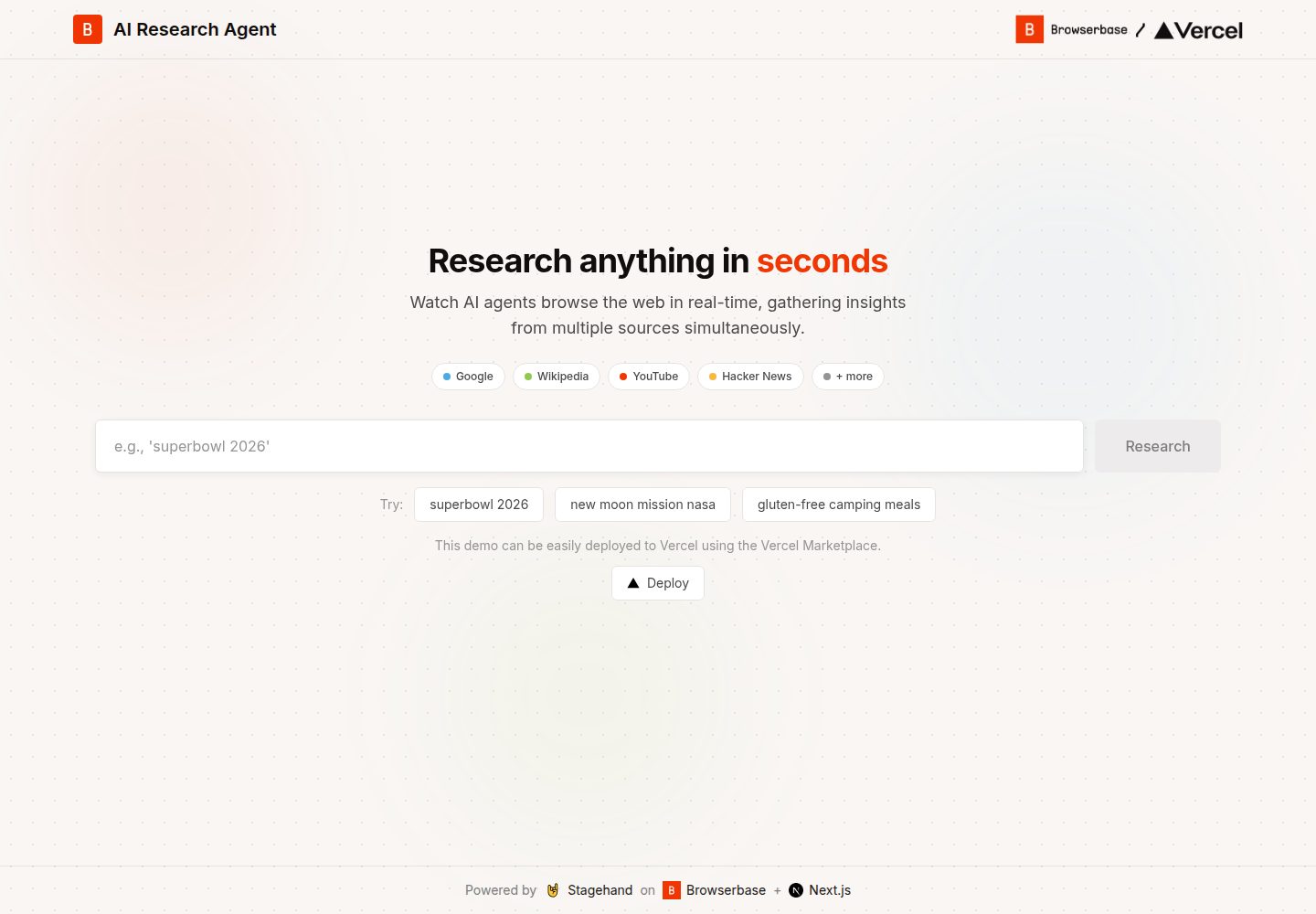
并行开启 5 个 Browserbase 云浏览器会话,每个会话研究不同来源
Next.jsReact启动器
browserbase-nextjs-template — Next.js 启动器模板
作者 browserbase
基于 Next.js 的浏览器自动化启动模板,用 Stagehand 与 Browserbase 并行开启 5 个云浏览器会话,从多个来源检索并由 Claude 汇总研究结果。
看看你的网站会是什么样
浏览真实页面截图,比较内容排版与手机效果。点击下方缩略图切换,放大查看整页细节。
全部页面与视图 2
截图用于了解视觉与布局,交互效果请以实际项目为准。
采集于 2026-10-03查看来源
值得关注的模板亮点
从已有项目资料中,快速了解它的特点。
通过 Stagehand 驱动浏览器,由 Claude 按结构化 schema 提取页面信息
使用 Server-Sent Events 将各来源发现实时流式推送到前端
前端用 ReactMarkdown 渲染最终合成的研究总结
提供 Vercel 一键部署入口,部署时会引导配置 Browserbase
模板详细介绍
这是一个面向浏览器自动化与智能体工作流的 Next.js 启动模板。它演示了一个 AI 研究代理:接收用户查询后,在 Browserbase 云端同时创建 5 个 Stagehand 会话,分别访问 Google、Wikipedia、YouTube、Hacker News 和 Google News,由 Claude 按结构化 schema 从页面提取信息,再通过 Server-Sent Events 将各来源结果实时推送到前端,最后合成为 Markdown 格式的总结。
前端使用 Next.js App Router、React 与 Tailwind CSS,结果用 ReactMarkdown 渲染;后端为 Next.js API Route,运行时长上限 300 秒,AI 模型经 Vercel AI Gateway 调用 Claude Sonnet。项目结构包含 app/api/research/route.ts、components、context、results 等目录,并提供 dev、build、start、lint 脚本。
使用前需要 Browserbase 账号与 API Key、Project ID,以及 Vercel AI Gateway 的 API Key,三者均为必填环境变量。仓库以 MIT 许可发布,可免费使用、修改与分发,但 Browserbase、Vercel AI Gateway 等外部服务可能另行计费;演示中的第三方素材需单独核对许可。
Next.js启动器
适合你的项目吗?
适用场景
- 需要演示多浏览器并行抓取与实时结果推送的 Next.js 项目
- 构建以 Stagehand 和 Browserbase 为基础的浏览器自动化原型
- 展示 AI 代理从多来源检索并合成摘要的工作流
适合人群
- 熟悉 Next.js App Router 与 API Routes 的开发者
- 已有 Browserbase 账号并希望接入云浏览器的团队
- 需要研究代理或浏览器自动化参考实现的开发者
上手与定制指南
结合仓库当前版本的说明,按下面的资料检查内容、配置与运行要求。
- 1
需要 Node.js 18 或更高版本,以及 npm、yarn、pnpm 或 bun 之一
- 2
复制 .env.example 为 .env.local,填入 AI_GATEWAY_API_KEY、BROWSERBASE_API_KEY 和 BROWSERBASE_PROJECT_ID
- 3
Browserbase 与 Vercel AI Gateway 均为外部服务,需自行注册并可能产生费用
- 4
运行 npm run dev 后访问 http://localhost:3000 查看页面
授权与来源资料
使用条件与限制
免费使用 · 保留许可声明本次收录的是公开仓库中采用 MIT 许可的免费版本;免费范围为该版本代码,不代表外部服务或第三方素材免费。
使用时需要遵守
- 允许免费使用、修改、商用和分发该版本代码。
- 分发代码副本或实质性部分时,保留原作者版权声明和完整 MIT 许可声明。
- 代码按现状提供;担保与责任限制以原许可证及适用法律为准。
额外费用与待核对事项
- 使用本项目必须注册 Browserbase 账号并获取 API Key,属于外部服务依赖,可能产生费用。
- 必须配置 Vercel AI Gateway 的 API Key 才能调用 Claude 模型,该外部服务可能另行计费。
- 除 API Key 外还需提供 Browserbase 的 Project ID,三者均为必填环境变量,缺少则无法运行。
- 一键部署依赖 Vercel 平台,部署时会引导绑定 Browserbase 集成,使用前需具备相应账号。
- 演示图片、字体、图标及其他第三方素材需按各自许可核对,不能仅凭代码的 MIT 许可判断。
- 域名、托管、数据库、支付或 AI 等外部服务可能另外收费。
查看原文依据
Permission is hereby granted, free of charge
许可证原文
[Browserbase](https://browserbase.com) account and API key
README 原文
[Vercel AI Gateway](https://vercel.com/docs/ai-gateway) API key
README 原文
BROWSERBASE_PROJECT_ID=your_project_id
README 原文
https://github.com/browserbase/browserbase-nextjs-template/blob/main/LICENSEhttps://github.com/browserbase/browserbase-nextjs-template/blob/main/README.mdDeploy this template to Vercel with one click.
README 原文
DeepSeek 根据仓库许可证和 README 整理 ·2026-10-03。结果仅覆盖已读取资料,依赖、图片、字体及后续条款变更以各自原文为准。
项目核对记录与介绍依据
模板资料
- 来源平台
- GitHub
- 资料与维护参考分
- 资料较完整 · 87 / 100
- 技术栈
- Next.js · React
- 网站类型
- 启动器
这个分数如何计算
本站按许可资料(最高30分)、演示链接(12分)、预览图(10分)、Star数(15分)、记录的维护时间(15分)、描述完整度(8分)、功能记录(5分)和分类资料(5分)计算。它不是代码、安全或性能测试,也不是 Google 评分;有链接不代表已实测可用。
这个项目需要核对什么
- 记录的仓库更新时间
- 2026-02-12
- 截图检查日期
- 2026-10-03
已收录演示链接。请用你的内容与屏幕尺寸检查;有演示不代表表单、认证或支付已经可用。
目录记录的主要技术栈是 Next.js。请通过依赖清单和锁文件核对实际版本与托管要求。这些说明基于收录资料,不代表代码审计或部署实测。
查看具体选型方法 →介绍的制作与核对状态
介绍由 AI 辅助整理目录与仓库资料。仓库作者不等于这篇介绍的审核者。
审核声明: [email protected] · 2026-10-04
查看当时使用的来源资料
SHA-256: a1d4474a05fb0af883f00b22d81774826cf3e1a036955c525a670af6c26ea041
2026-10-03T17:02:06.607Z
来源文件 / 仓库# Stagehand Research Agent [Demo]() | [Browserbase](https://browserbase.com) | [Stagehand](https://stagehand.dev) An AI-powered research agent that runs **5 parallel browser sessions** to search the web in real-time. Watch AI agents browse Google, Wikipedia, YouTube, Hacker News, and Google News simultaneously, then synthesize findings into a comprehensive summary. ## Deploy Deploy this template to Vercel with one click. The Vercel Marketplace will automatically prompt you to set up Browserbase. [](https://vercel.com/new/clone?repository-url=https%3A%2F%2Fgithub.com%2Fbrowserbase%2Fbrowserbase-nextjs-template&stores=%5B%7B%22type%22%3A%22integration%22%2C%22protocol%22%3A%22other%22%2C%22productSlug%22%3A%22browserbase%22%2C%22integrationSlug%22%3A%22browserbase%22%7D%5D) ## Features - **Parallel Browser Sessions**: 5 browsers run simultaneously, each researching a different source - **Live Browser Views**: Watch AI agents navigate the web in real-time - **Multi-Source Research**: Searches Google, Wikipedia, YouTube, Hacker News, and Google News - **AI-Powered Extraction**: Uses Claude to intelligently extract relevant information from pages - **Smart Synthesis**: Combines findings into a structured, comprehensive summary - **Real-time Streaming**: Server-Sent Events deliver results as they're discovered ## Tech Stack ### Frontend - **Framework**: Next.js 15 with React 19 and TypeScript - **Styling**: Tailwind CSS 4 - **Markdown**: ReactMarkdown for rendering summaries ### Backend - **AI Model**: Claude Sonnet via Vercel AI Gateway - **Browser Automation**: [Stagehand](https://stagehand.dev) + [Browserbase](https://browserbase.com) - **Streaming**: Server-Sent Events (SSE) - **Runtime**: Next.js API Routes with 300s max duration ### Infrastructure - **Browser Infrastructure**: Browserbase cloud browsers - **AI Gateway**: Vercel AI Gateway - **Deployment**: Vercel ## Prerequisites - Node.js 18.x or later - npm, yarn, pnpm, or bun - [Browserbase](https://browserbase.com) account and API key - [Vercel AI Gateway](https://vercel.com/docs/ai-gateway) API key ## Getting Started ### 1. Clone the repository ```bash git clone https://github.com/browserbase/browserbase-nextjs-template cd research-agent-template ``` ### 2. Install dependencies ```bash npm install # or pnpm install ``` ### 3. Configure environment variables ```bash cp .env.example .env.local ``` Edit `.env.local` with your API keys: ```env # Vercel AI Gateway API Key # Get yours at: https://vercel.com/docs/ai-gateway AI_GATEWAY_API_KEY=your_ai_gateway_key # Browserbase (for cloud browser sessions) # Get yours at: https://browserbase.com BROWSERBASE_PROJECT_ID=your_project_id BROWSERBASE_API_KEY=your_api_key ``` ### 4. Start the development server ```bash npm run dev ``` ### 5. Open your browser Navigate to [http://localhost:3000](http://localhost:3000) ## Environment Variables | Variable | Description | Required | |----------|-------------|----------| | `AI_GATEWAY_API_KEY` | Vercel AI Gateway API key for Claude access | Yes | | `BROWSERBASE_API_KEY` | Your Browserbase API key | Yes | | `BROWSERBASE_PROJECT_ID` | Your Browserbase project ID | Yes | ## Usage 1. **Enter a Query**: Type any research question or select from example queries: - "What is quantum computing?" - "Latest developments in AI" - "How does blockchain work?" 2. **Watch the Research**: See 5 browser windows researching in parallel, each exploring a different source 3. **Get Results**: Receive findings from each source as they complete, followed by an AI-synthesized summary ## How It Works 1. **Session Creation**: Creates 5 parallel Stagehand sessions on Browserbase 2. **Parallel Research**: Each session navigates to a different source (Google, Wikipedia, etc.) 3. **AI Extraction**: Claude extracts relevant information from each page using structured schemas 4. **Real-time Streaming**: Findings stream to the frontend as SSE events 5. **Synthesis**: Claude combines all findings into a formatted summary ## Available Scripts ```bash # Development server npm run dev # Production build npm run build # Start production server npm run start # Lint code npm run lint ``` ## Project Structure ``` ├── app/ │ ├── api/ │ │ └── research/ │ │ └── route.ts # Research API with parallel Stagehand sessions │ ├── components/ # React components │ ├── context/ # Research context provider │ ├── results/ # Results page │ ├── page.tsx # Home page │ └── layout.tsx # Root layout ├── public/ # Static assets └── .env.example # Environment variables template ``` ## License MIT ## Acknowledgments - [Browserbase](https://browserbase.com) - Cloud browser infrastructure - [Stagehand](https://stagehand.dev) - AI-powered browser automation - [Vercel](https://vercel.com) - Hosting and AI Gateway - [Anthropic](https://anthropic.com) - Claude AI model
看看同类模板
对比同技术栈与用途的模板,找到更适合的视觉与内容结构。

ai-website-cloner-template
Clone any website with one command using AI coding agents
Next.js · 启动器

Next.js SaaS Starter
Next.js SaaS Starter 是 Next.js 官方维护的 SaaS 起点模板,定位介于学习资源和可直接部署的脚手架之间。
Next.js · SaaS

Next.js Commerce
Next.js Commerce 是 Vercel 团队维护的电商启动模板,基于 Next.js App Router 构建,采用服务端渲染、React Server Components、Server Actions …
Next.js · 电商

Next-js-Boilerplate
Next-js-Boilerplate 是一个面向 Next.js 16、Tailwind CSS 4 和 TypeScript 的启动器,核心定位是开发者体验优先。
Next.js · 启动器

tailwind-nextjs-starter-blog
tailwind-nextjs-starter-blog 是一个面向个人技术博客的 Next.js 与 Tailwind CSS 启动模板,其 v2 版本基于 App Router 与 React Server Comp…
Next.js · 博客

next-forge
Production-grade Turborepo template for Next.js apps.
Next.js · 启动器