集成 Supabase Auth,支持魔法链接、Google 和 GitHub OAuth,使用 cookie 会话与 Proxy 刷新
Next.jsReact后台SaaS启动器
saas-starter-nextjs — Next.js 后台模板
作者 bxdr-glitch
基于 Next.js App Router 的 SaaS 启动模板,集成 Supabase 认证与 Postgres RLS、Stripe 订阅计费、仪表盘与营销页,采用 MIT 许可。
看看你的网站会是什么样
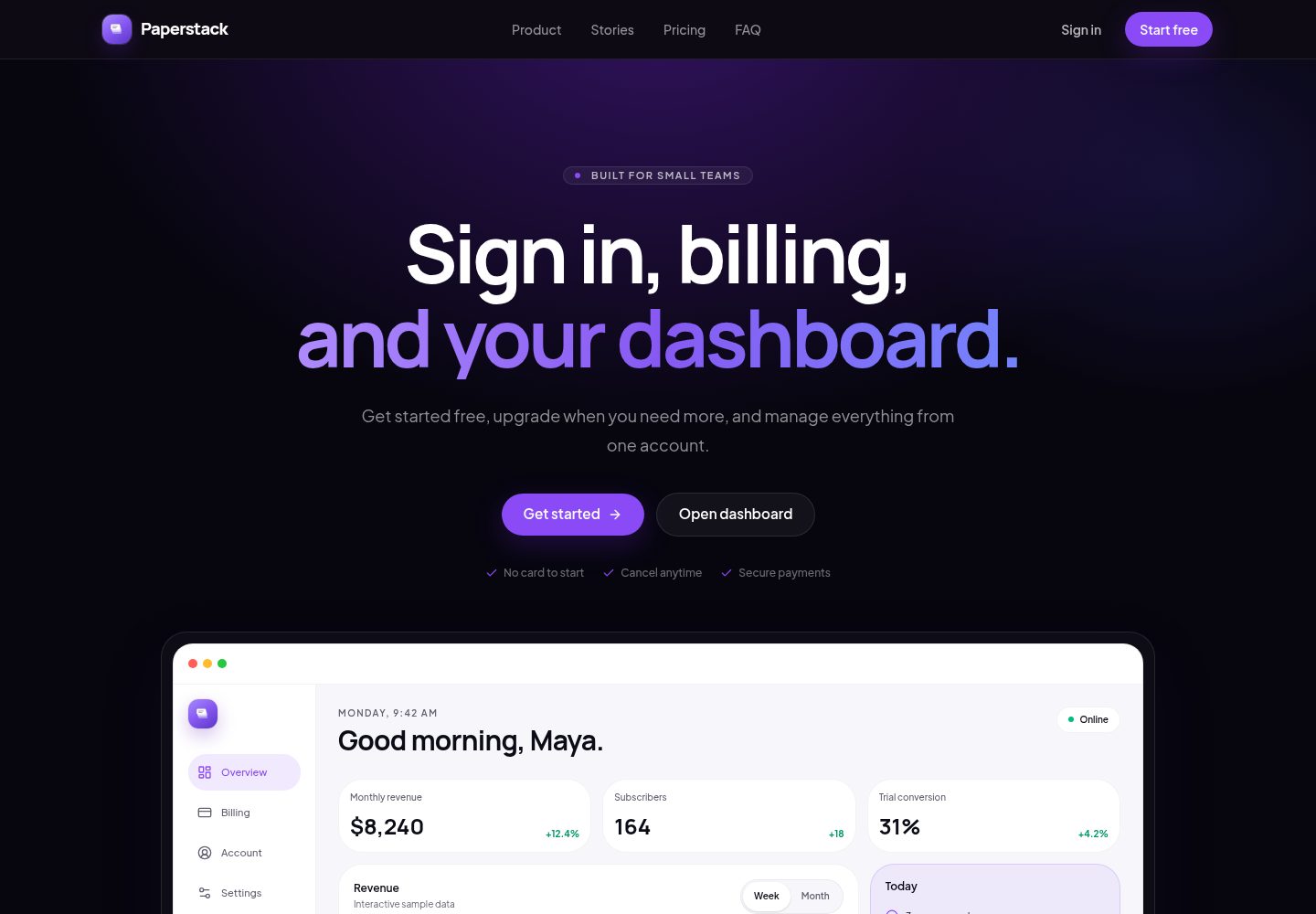
浏览真实页面截图,比较内容排版与手机效果。点击下方缩略图切换,放大查看整页细节。
全部页面与视图 2
截图用于了解视觉与布局,交互效果请以实际项目为准。
采集于 2026-10-02查看来源
值得关注的模板亮点
从已有项目资料中,快速了解它的特点。
集成 Stripe Checkout 与 Customer Portal,提供定价页、订阅状态、取消/升级和发票
Stripe webhook 以 Supabase Edge Function 运行,包含订阅表与 webhook 幂等日志
提供受保护仪表盘,包含侧边栏外壳、账户设置和计费管理
营销页包含 hero、定价、用户评价和 FAQ
使用 Resend 发送欢迎邮件和 invoice.paid 收据邮件
模板详细介绍
Paperstack 是一个 Next.js SaaS 启动模板,包含营销站、认证、Stripe 订阅计费和受保护仪表盘。技术栈为 Next.js App Router、Supabase Auth + Postgres RLS、Stripe Checkout + Customer Portal、Resend 邮件、Tailwind CSS 和 shadcn/ui。认证支持魔法链接以及 Google、GitHub OAuth,使用 cookie 会话并通过 Proxy 刷新。计费部分提供定价页、Stripe Checkout、webhook 同步、订阅状态、取消/升级门户和发票;webhook 以 Supabase Edge Function 运行,处理 checkout.session.completed、订阅创建/更新/删除、invoice.payment_failed 和 invoice.paid 等事件。仪表盘包含侧边栏外壳、账户设置和计费管理;营销页包含 hero、定价、用户评价和 FAQ。邮件方面,首次登录后发送欢迎邮件,invoice.paid 后发送收据邮件。项目还复用了 stripe-supabase-webhooks 和 supabase-rls-patterns 两个仓库的模式,包括订阅表、webhook 幂等日志、基于 auth.uid() 的 RLS 策略以及 SECURITY DEFINER 辅助函数。
Next.js后台SaaS启动器
适合你的项目吗?
适用场景
- 快速搭建带认证和订阅计费的 SaaS 产品原型
- 学习 Next.js App Router 与 Supabase RLS、Stripe webhook 的集成方式
- 作为需要营销页、登录和仪表盘的后台项目起点
- 在本地使用 Supabase CLI 和 Stripe CLI 测试完整订阅流程
适合人群
- 需要 Next.js + Supabase + Stripe 组合的 SaaS 项目开发者
- 希望复用 RLS 策略和 webhook 幂等模式的后端开发者
- 需要快速获得认证、计费、仪表盘基础结构的独立开发者或小团队
上手与定制指南
结合仓库当前版本的说明,按下面的资料检查内容、配置与运行要求。
- 1
需要 Node.js 20+、npm、Supabase CLI 和 Stripe CLI,Stripe 测试模式账号即可
- 2
复制 .env.example 为 .env.local,并填写 Supabase、Stripe、Resend 和站点 URL 等变量
- 3
本地运行 npx supabase start 和 npx supabase db reset,再从 npx supabase status 获取本地密钥
- 4
本地测试 webhook 需用 supabase functions serve 和 stripe listen 转发事件,并将 CLI 签名密钥写入 STRIPE_WEBHOOK_SECRET
- 5
OAuth 需在 Supabase 中配置 Google/GitHub 凭据,回调地址指向 Supabase 的 /auth/v1/callback
授权与来源资料
使用条件与限制
免费使用 · 保留许可声明本次收录的是公开仓库中采用 MIT 许可的免费版本;免费范围为该版本代码,不代表外部服务或第三方素材免费。
使用时需要遵守
- 允许免费使用、修改、商用和分发该版本代码。
- 分发代码副本或实质性部分时,保留原作者版权声明和完整 MIT 许可声明。
- 代码按现状提供;担保与责任限制以原许可证及适用法律为准。
额外费用与待核对事项
- 使用计费功能需要注册 Stripe 账号(测试模式即可),并创建两个循环订阅价格(Starter 和 Growth),将价格 ID 填入环境变量。
- 真实发送欢迎邮件和收据邮件需要 Resend 账号与 API Key;仅本地 UI 开发可不配置。
- 启用 Google/GitHub 登录需自行在 Google Cloud 和 GitHub 创建 OAuth 应用,并在 Supabase 中配置凭据与回调地址。
- 本地运行与数据库迁移依赖 Supabase CLI 及 Supabase 服务(本地或托管),需配置 Supabase 项目与密钥。
- 本地测试 Stripe webhook 需安装 Stripe CLI 并转发事件,将 CLI 签名密钥写入 STRIPE_WEBHOOK_SECRET。
- 生产环境发送邮件需在 Resend 验证自有域名并更新发件地址。
- 项目资料提及可选付费版本或功能;本次仅收录公开免费代码,不包含付费升级。
- 演示图片、字体、图标及其他第三方素材需按各自许可核对,不能仅凭代码的 MIT 许可判断。
- 域名、托管、数据库、支付或 AI 等外部服务可能另外收费。
查看原文依据
Permission is hereby granted, free of charge
许可证原文
A Stripe account (test mode is fine)
README 原文
A Resend account (optional for local UI work, required for real email)
README 原文
Create OAuth apps in Google Cloud and GitHub.
README 原文
[Supabase CLI](https://supabase.com/docs/guides/cli)
README 原文
[Stripe CLI](https://docs.stripe.com/stripe-cli) for local webhook testing
README 原文
https://github.com/bxdr-glitch/saas-starter-nextjs/blob/main/LICENSEhttps://github.com/bxdr-glitch/saas-starter-nextjs/blob/main/README.mdFor production, verify your domain and update `RESEND_FROM_EMAIL`.
README 原文
DeepSeek 根据仓库许可证和 README 整理 ·2026-10-02。结果仅覆盖已读取资料,依赖、图片、字体及后续条款变更以各自原文为准。
项目核对记录与介绍依据
模板资料
- 来源平台
- GitHub
- 资料与维护参考分
- 资料较完整 · 88 / 100
- 技术栈
- Next.js · React
- 网站类型
- 后台 · SaaS · 启动器
这个分数如何计算
本站按许可资料(最高30分)、演示链接(12分)、预览图(10分)、Star数(15分)、记录的维护时间(15分)、描述完整度(8分)、功能记录(5分)和分类资料(5分)计算。它不是代码、安全或性能测试,也不是 Google 评分;有链接不代表已实测可用。
这个项目需要核对什么
- 记录的仓库更新时间
- 2026-07-19
- 截图检查日期
- 2026-10-02
已收录演示链接。请用你的内容与屏幕尺寸检查;有演示不代表表单、认证或支付已经可用。
目录记录的主要技术栈是 Next.js。请通过依赖清单和锁文件核对实际版本与托管要求。这些说明基于收录资料,不代表代码审计或部署实测。
查看具体选型方法 →介绍的制作与核对状态
介绍由 AI 辅助整理目录与仓库资料。仓库作者不等于这篇介绍的审核者。
已完成服务器许可规则与 AI 来源核对;未经过人工编辑审核。
查看当时使用的来源资料
SHA-256: 7f76ba8723e1435a967b2d2555662bcbf20e05105683aa7591b595b9c28f92a6
2026-10-02T18:23:58.866Z
来源文件 / 仓库# Paperstack A Next.js SaaS starter with auth, billing, a dashboard, and a marketing site. It is the web counterpart to a mobile Expo boilerplate. **Stack:** Next.js App Router, Supabase Auth + Postgres RLS, Stripe Checkout + Customer Portal, Resend email, Tailwind CSS, and shadcn/ui. ## What you get - **Auth:** Magic link plus Google and GitHub OAuth, cookie sessions, and Proxy-based refresh - **Billing:** Pricing page, Stripe Checkout, webhook sync, subscription status, cancel/upgrade portal, invoices - **Dashboard:** Sidebar shell, account settings, and billing management - **Marketing:** Landing page with hero, pricing, testimonials, and FAQ - **Email:** Welcome email after first sign-in, receipt email after `invoice.paid` ## Reused repositories This starter reuses patterns from two sibling repos. ### `stripe-supabase-webhooks` Copied and adapted into this project: | Source | Where it lives here | | --- | --- | | Subscriptions schema | [`supabase/migrations/202607190002_subscriptions.sql`](supabase/migrations/202607190002_subscriptions.sql) | | Webhook idempotency log | [`supabase/migrations/202607190003_webhook_events.sql`](supabase/migrations/202607190003_webhook_events.sql) | | Edge Function webhook | [`supabase/functions/stripe-webhook`](supabase/functions/stripe-webhook) | | Checkout helper idea | [`src/lib/stripe/checkout.ts`](src/lib/stripe/checkout.ts) (Node/Server Actions) | The webhook still runs as a Supabase Edge Function. The Next.js app creates Checkout and Customer Portal sessions, then reads `subscriptions` through RLS. ### `supabase-rls-patterns` Adapted into runnable migrations: | Pattern idea | Where it lives here | | --- | --- | | Owner-scoped rows (`auth.uid()`) | Profiles + subscriptions SELECT policies | | Explicit table grants with RLS | Profiles and subscriptions migrations | | `SECURITY DEFINER` helpers | `claim_welcome_email` / `release_welcome_email` | | Service-role-only writes for billing | No client INSERT/UPDATE on `subscriptions` or `webhook_events` | ## Prerequisites - Node.js 20+ - npm - [Supabase CLI](https://supabase.com/docs/guides/cli) - [Stripe CLI](https://docs.stripe.com/stripe-cli) for local webhook testing - A Stripe account (test mode is fine) - A Resend account (optional for local UI work, required for real email) ## Quick start ```bash npm install cp .env.example .env.local ``` Fill in the values described below, then: ```bash npx supabase start npx supabase db reset npm run dev ``` Open [http://localhost:3000](http://localhost:3000). Useful local Supabase URLs after `supabase start`: - API: `http://127.0.0.1:54321` - Studio: `http://127.0.0.1:54323` - Inbucket (auth emails): `http://127.0.0.1:54324` Copy the local anon/publishable and service role keys from `npx supabase status` into `.env.local`. ## Environment variables See [`.env.example`](.env.example). The important ones: | Variable | Used for | | --- | --- | | `NEXT_PUBLIC_SUPABASE_URL` | Browser + server Supabase client | | `NEXT_PUBLIC_SUPABASE_PUBLISHABLE_KEY` | Public Supabase key (anon key still works as an alias) | | `SUPABASE_SERVICE_ROLE_KEY` | Edge Function secrets only, never expose to the browser | | `STRIPE_SECRET_KEY` | Checkout and Customer Portal Server Actions | | `STRIPE_WEBHOOK_SECRET` | Signature verification in the Edge Function | | `STRIPE_PRICE_STARTER_MONTHLY` / `STRIPE_PRICE_GROWTH_MONTHLY` | Paid plan Checkout prices | | `RESEND_API_KEY` / `RESEND_FROM_EMAIL` | Welcome + receipt email | | `NEXT_PUBLIC_SITE_URL` | Auth redirects and Checkout return URLs | ## Auth setup The app wiring for magic link, Google, and GitHub is already in place: - Server Actions: [`src/actions/auth.ts`](src/actions/auth.ts) - Callback + confirm handlers: [`src/app/auth/callback`](src/app/auth/callback), [`src/app/auth/confirm`](src/app/auth/confirm) - Session refresh: [`src/proxy.ts`](src/proxy.ts) Without Supabase keys in `.env.local`, the login page shows a setup banner and auth actions return a clear error. They will not crash. ### Magic link Works as soon as local (or hosted) Supabase is configured. 1. Set `NEXT_PUBLIC_SUPABASE_URL`, `NEXT_PUBLIC_SUPABASE_PUBLISHABLE_KEY`, and `NEXT_PUBLIC_SITE_URL`. 2. Confirm Site URL is `http://localhost:3000` and these redirects are allowed: - `http://localhost:3000/auth/callback` - `http://localhost:3000/auth/confirm` 3. Local emails land in Inbucket at `http://127.0.0.1:54324`. 4. This repo ships a magic-link email template that uses `/auth/confirm?token_hash=...`, so the link works even if the email client opens in a different browser context. ### Google / GitHub OAuth Buttons are live in the UI. They need provider credentials in Supabase before they succeed. 1. Create OAuth apps in Google Cloud and GitHub. 2. Enable the providers in the Supabase dashboard (or Studio for local). 3. Set each provider callback URL to: ```text https://<your-project-ref>.supabase.co/auth/v1/callback ``` For local Supabase: ```text http://127.0.0.1:54321/auth/v1/callback ``` 4. Keep the app redirect allow list pointed at `/auth/callback`. 5. After Google or GitHub approves the user, Supabase returns a PKCE `code` to `/auth/callback`, which exchanges it for a session cookie and sends the user to the dashboard. ## Stripe setup 1. Create two recurring products/prices in Stripe test mode (Starter and Growth). 2. Put the price IDs into `.env.local`. 3. In Stripe Customer Portal settings, enable plan changes and cancellation. 4. Keep the portal return URL pointing at your site (the app passes `/dashboard/billing`). ### Local webhook testing Serve the Edge Function: ```bash npx supabase functions serve stripe-webhook --env-file .env.local --no-verify-jwt ``` Forward Stripe events: ```bash stripe listen --forward-to http://127.0.0.1:54321/functions/v1/stripe-webhook ``` Copy the CLI webhook signing secret into `STRIPE_WEBHOOK_SECRET`, then retry Checkout with a test card such as `4242 4242 4242 4242`. Events handled: - `checkout.session.completed` - `customer.subscription.created` - `customer.subscription.updated` - `customer.subscription.deleted` - `invoice.payment_failed` - `invoice.paid` (also sends the Resend receipt) ## Deploy the webhook Set secrets, then deploy: ```bash npx supabase secrets set STRIPE_SECRET_KEY=sk_live_or_test npx supabase secrets set STRIPE_WEBHOOK_SECRET=whsec_... npx supabase secrets set RESEND_API_KEY=re_... npx supabase secrets set RESEND_FROM_EMAIL="Paperstack <[email protected]>" npx supabase secrets set APP_NAME=Paperstack npx supabase functions deploy stripe-webhook --no-verify-jwt ``` In the Stripe Dashboard, create an endpoint: ```text https://<your-project-ref>.supabase.co/functions/v1/stripe-webhook ``` Subscribe it to the events listed above. Use the Dashboard signing secret for production, not the Stripe CLI secret. ## Resend setup 1. Create an API key in Resend. 2. For local development you can send from `[email protected]`. 3. For production, verify your domain and update `RESEND_FROM_EMAIL`. 4. Welcome email sends once after the first authenticated session. 5. Receipt email sends from the webhook on `invoice.paid`, with an idempotency key based on the invoice id. ## Project map ```text src/ app/ (marketing)/ Landing + pricing (auth)/login Magic link + OAuth auth/ PKCE callback + token confirm dashboard/ Protected shell, account, billing actions/ Server Actions for auth + billing components/ Marketing, dashboard, and UI primitives emails/ React Email welcome template lib/ Supabase, Stripe, plans, helpers supabase/ migrations/ Profiles, subscriptions, webhook log functions/ Stripe webhook Edge Function ``` ## Scripts ```bash npm run dev # Next.js dev server npm run build # Production build npm run start # Serve the production build npm run lint # ESLint npm run typecheck # TypeScript npm test # Vitest unit tests ``` ## Deploy the Next.js app 1. Push the repo to GitHub. 2. Import the project into Vercel (or your host of choice). 3. Add the same environment variables from `.env.example`. 4. Set `NEXT_PUBLIC_SITE_URL` to your production URL. 5. Update Supabase Auth Site URL + redirect allow list for production. 6. Point Stripe and Resend at production keys and domains. ## Troubleshooting **Magic link opens but I am still logged out** Confirm `/auth/callback` and `/auth/confirm` are allowed redirects, and that Proxy is running (it lives in `src/proxy.ts`). **Checkout succeeds but the dashboard still shows Free** Check Stripe CLI forwarding, the Edge Function logs, and the `subscriptions` / `webhook_events` tables. A failed event claim is deleted so Stripe can retry. **OAuth returns an error** Provider callback must go to Supabase (`/auth/v1/callback`), not directly to Next.js. The app then finishes the PKCE exchange at `/auth/callback`. **Emails are silent** Welcome email needs `RESEND_API_KEY` in the Next.js env. Receipt email needs the same secrets on the Edge Function. **`supabase db reset` complains about seed** This project includes an empty `supabase/seed.sql` so resets stay quiet. ## License MIT License. Copyright (c) 2026 Rami Badr. See [LICENSE](LICENSE).
看看同类模板
对比同技术栈与用途的模板,找到更适合的视觉与内容结构。

ai-website-cloner-template
Clone any website with one command using AI coding agents
Next.js · 启动器

Next.js SaaS Starter
Next.js SaaS Starter 是 Next.js 官方维护的 SaaS 起点模板,定位介于学习资源和可直接部署的脚手架之间。
Next.js · SaaS

Next.js Commerce
Next.js Commerce 是 Vercel 团队维护的电商启动模板,基于 Next.js App Router 构建,采用服务端渲染、React Server Components、Server Actions …
Next.js · 电商

Next-js-Boilerplate
Next-js-Boilerplate 是一个面向 Next.js 16、Tailwind CSS 4 和 TypeScript 的启动器,核心定位是开发者体验优先。
Next.js · 启动器

tailwind-nextjs-starter-blog
tailwind-nextjs-starter-blog 是一个面向个人技术博客的 Next.js 与 Tailwind CSS 启动模板,其 v2 版本基于 App Router 与 React Server Comp…
Next.js · 博客

next-forge
Production-grade Turborepo template for Next.js apps.
Next.js · 启动器