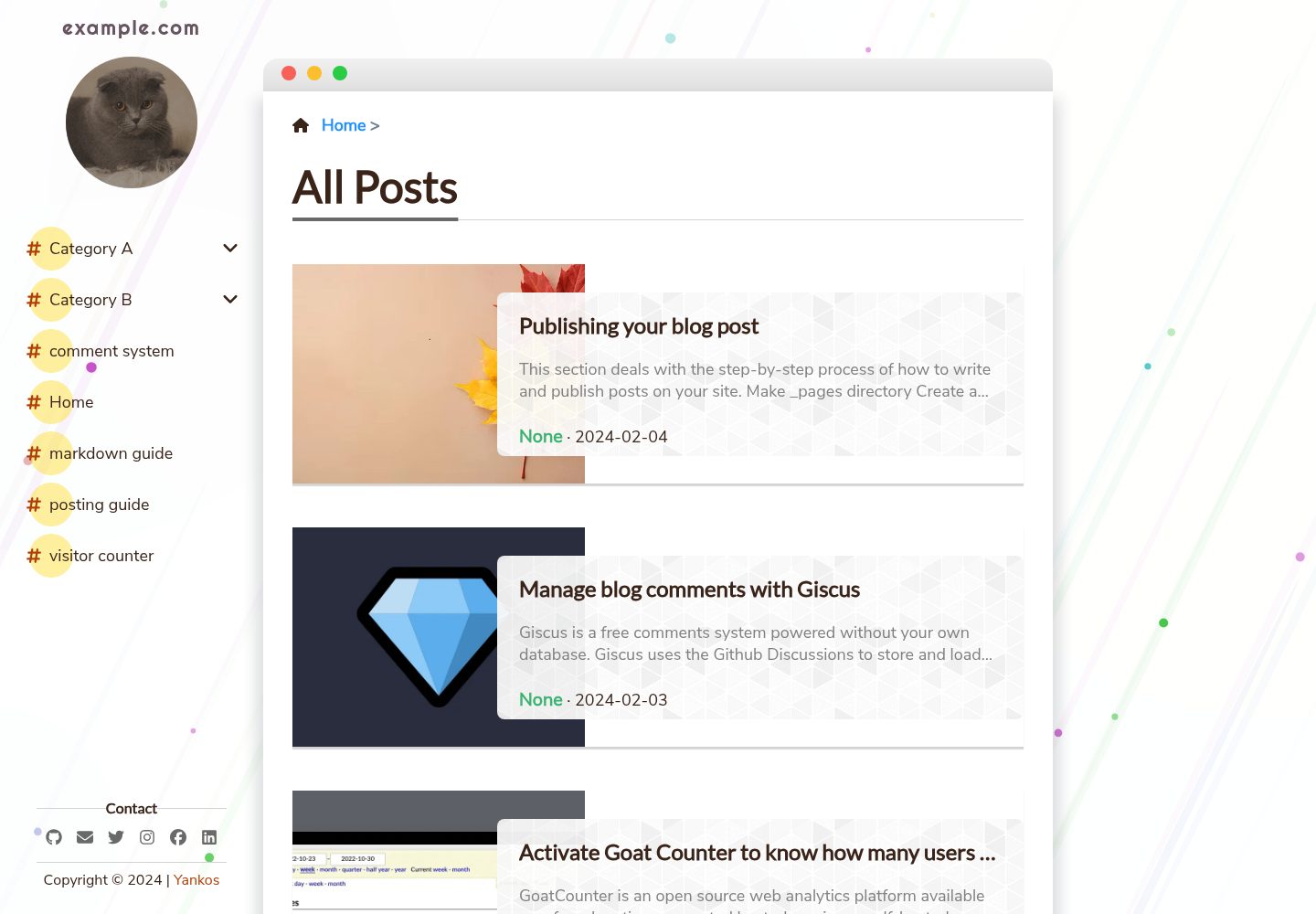
支持明暗主题切换与移动端适配
Jekyll作品集博客
jekyll-theme-satellite — Jekyll 作品集模板
作者 byanko55
Satellite 是一款基于 Jekyll 的博客主题,提供明暗主题、层级分类、站内搜索、目录、评论与访客计数等功能,采用 MIT 许可。
看看你的网站会是什么样
浏览真实页面截图,比较内容排版与手机效果。点击下方缩略图切换,放大查看整页细节。
全部页面与视图 3
截图用于了解视觉与布局,交互效果请以实际项目为准。
采集于 2026-09-30查看来源
值得关注的模板亮点
从已有项目资料中,快速了解它的特点。
按标题或标签搜索文章,支持层级分类与相关文章
文章页提供目录导航,代码块可一键复制并使用 highlight.js 高亮
可接入 giscus 评论、goatcounter 访客计数与 Google Analytics
自动生成 RSS 与 Sitemap
MIT 许可,可免费使用、修改、商用与分发
模板详细介绍
Satellite 是一款基于 Jekyll 的博客主题,仓库与在线演示均公开,采用 MIT 许可发布。主题围绕博客内容组织与阅读体验提供多项内置能力:支持按标题或标签搜索文章、按层级分类组织内容、显示相关文章,并自动生成 RSS 与 Sitemap。文章页提供目录导航,代码块支持一键复制并配合 highlight.js 进行语法高亮。站点层面包含明暗主题切换、移动端适配,以及可选的 giscus 评论系统、goatcounter 访客计数和 Google Analytics 统计。
安装方式有两种:一是直接 Fork 仓库或下载源码压缩包,若目标仓库名为 USERNAME.github.io 则站点地址为 https://USERNAME.github.io/,否则需要修改 _config.yml 中的 baseurl;二是以 Gem 包方式引入,需新建干净的站点目录、移除默认的 index.markdown 与 about.markdown,在 Gemfile 中添加 jekyll-theme-satellite,并用仓库提供的 _config.yml 替换初始配置。之后在 _config.yml 中填写站点标题、描述、logo、头像及社交账号等信息,通过 bundle install 安装依赖,再用 bundle exec jekyll serve 在本地预览。
使用限制方面,评论、访客计数等外部服务需要按文档单独启用;演示图片、字体、图标等第三方素材的许可需另行核对,不能仅凭代码的 MIT 许可判断。
Jekyll作品集博客
适合你的项目吗?
适用场景
- 搭建个人博客并发布图文文章
- 以层级分类和标签组织技术或生活类内容
- 需要评论互动、访问统计与站内搜索的博客站点
- 部署在 GitHub Pages 上作为个人站点
适合人群
- 使用 Jekyll 构建静态博客的个人开发者
- 希望快速获得明暗主题、搜索与目录等博客功能的写作者
- 需要按分类与标签整理文章的内容站点维护者
上手与定制指南
结合仓库当前版本的说明,按下面的资料检查内容、配置与运行要求。
- 1
方式一:Fork 仓库或下载源码压缩包,若仓库名为 USERNAME.github.io 则站点地址为 https://USERNAME.github.io/,否则需在 _config.yml 中设置 baseurl 为 /<repo-name>
- 2
方式二:新建干净站点目录,移除默认的 index.markdown 与 about.markdown,在 Gemfile 添加 gem "jekyll-theme-satellite",并用仓库提供的 _config.yml 替换初始配置
- 3
在 _config.yml 中填写站点标题、描述、logo、头像及社交账号等站点变量
- 4
本地运行:先执行 bundle install,再执行 bundle exec jekyll serve,然后访问 http://localhost:4000
- 5
评论系统与访客计数需参照仓库 docs 目录下的对应文档单独启用
授权与来源资料
使用条件与限制
免费使用 · 保留许可声明本次收录的是公开仓库中采用 MIT 许可的免费版本;免费范围为该版本代码,不代表外部服务或第三方素材免费。
使用时需要遵守
- 允许免费使用、修改、商用和分发该版本代码。
- 分发代码副本或实质性部分时,保留原作者版权声明和完整 MIT 许可声明。
- 代码按现状提供;担保与责任限制以原许可证及适用法律为准。
额外费用与待核对事项
- 评论功能依赖 giscus 外部服务,需按仓库文档单独配置并可能需要在第三方平台授权,不属于主题代码本身自带的能力。
- 访客计数依赖 goatcounter 外部服务,需自行注册账号并配置,主题代码本身不提供计数后端。
- 统计功能依赖 Google Analytics 外部服务,需自行申请账号并填写跟踪标识,可能涉及第三方服务条款与费用。
- 演示图片、字体、图标及其他第三方素材需按各自许可核对,不能仅凭代码的 MIT 许可判断。
- 域名、托管、数据库、支付或 AI 等外部服务可能另外收费。
查看原文依据
Permission is hereby granted, free of charge
许可证原文
Comment System using *giscus*
README 原文
Visitor Counter (*goatcounter*)
README 原文
https://github.com/byanko55/jekyll-theme-satellite/blob/master/LICENSEhttps://github.com/byanko55/jekyll-theme-satellite/blob/master/README.mdGoogle Analytics
README 原文
DeepSeek 根据仓库许可证和 README 整理 ·2026-09-30。结果仅覆盖已读取资料,依赖、图片、字体及后续条款变更以各自原文为准。
项目核对记录与介绍依据
模板资料
- 来源平台
- GitHub
- 资料与维护参考分
- 资料较完整 · 77 / 100
- 技术栈
- Jekyll
- 网站类型
- 作品集 · 博客
这个分数如何计算
本站按许可资料(最高30分)、演示链接(12分)、预览图(10分)、Star数(15分)、记录的维护时间(15分)、描述完整度(8分)、功能记录(5分)和分类资料(5分)计算。它不是代码、安全或性能测试,也不是 Google 评分;有链接不代表已实测可用。
这个项目需要核对什么
- 记录的仓库更新时间
- 2024-05-20
- 截图检查日期
- 2026-09-30
已收录演示链接。请用你的内容与屏幕尺寸检查;有演示不代表表单、认证或支付已经可用。
目录记录的主要技术栈是 Jekyll。请通过依赖清单和锁文件核对实际版本与托管要求。这些说明基于收录资料,不代表代码审计或部署实测。
查看具体选型方法 →介绍的制作与核对状态
介绍由 AI 辅助整理目录与仓库资料。仓库作者不等于这篇介绍的审核者。
已完成服务器许可规则与 AI 来源核对;未经过人工编辑审核。
查看当时使用的来源资料
SHA-256: 8955c3c9c3db8a568c358ef0106f2e33d1d7162e35bf3aa535f1d859695e13ce
2026-09-30T11:29:51.716Z
来源文件 / 仓库[](ci)
[](https://opensource.org/licenses/MIT)
[](https://jekyllrb.com/)
[](gem)
<a href="https://jekyll-themes.com/byanko55/jekyll-theme-satellite">
<img
src="https://img.shields.io/badge/featured%20on-JT-red.svg"
height="20"
alt="Jekyll Themes Shield"
/>
</a>
# Satellite🛰️ - Jekyll blog theme
An emotional and adorable blog theme powered by ***Jekyll***.
Live demo is available [here](https://byanko55.github.io)

### Light Mode

### Dark Mode

### Fresh and Attractive Design
<p>
<img src="https://i.ibb.co/4NwrTyj/image-2.webp" height="400px" align="center"/>
<img src="https://i.ibb.co/WvyBzkL/Animation.gif" height="400px" align="center"/>
</p>
<br></br>
## Features
* Comment System using *giscus*
* Copy contents of Code Block
* Dark/Light Theme
* Google Analytics
* Hierarchical Categorization
* Mobile friendly design
* Related Posts
* RSS/Sitemap support
* Search Post by Title or Tags
* Syntax Highlighter (*highlight.js*)
* Table of Contents
* Visitor Counter (*goatcounter*)
## Installation
There are two ways to setup this theme:
<br></br>
### Method 1: Build from source (Recommended)
Fork [this repository](https://github.com/byanko55/jekyll-theme-satellite) or download the [source](https://github.com/byanko55/jekyll-theme-satellite/releases) as a zip.
If you use as destination a repository named USERNAME.github.io, then your url will be https://USERNAME.github.io/.
Otherwise (let's say `myblog`), you need to edit the '*baseurl*' parameter in `_config.yml`. In this case, the root page will be served to "https://USERNAME.github.io/myblog/".
```yml
# set baseurl as "/<repo-name>". ex) baseurl: /myblog
baseurl: /myblog
```
<br></br>
### Method 2: Utilize Gem package
Create a clean site directory (Follow the **Instruction 1~4** described [here](https://jekyllrb.com/docs/)).
The following materials are redundant, so remove them.
* index.markdown
* about.markdown
<br></br>
Then, add this line to your Jekyll site's `Gemfile`:
```bash
gem "jekyll-theme-satellite"
```
You need to replace the initial `_config.yml` file with the [prepared one](https://github.com/byanko55/jekyll-theme-satellite/blob/master/docs/_config.yml).
<br></br>
### Modify your site setting
Now fill in the **site variable** such as blog name, profile image, and social accounts in `_config.yml`.
```yml
title: Example.com
description: "Satellite - jekyll blog theme"
logo_img: "/assets/img/favicon.webp"
profile_img: "/assets/img/profile.jpg"
# Social Links
email: [email protected]
github_username: github
twitter_username: twitter
instagram_username: instagram
linkedin_username: linkedin
facebook_username: facebook
```
### Run site locally
From the site root directory, install the dependencies:
```
bundle install
```
Start a Jekyll service.
```
bundle exec jekyll serve
```
Now open [http://localhost:4000](http://localhost:4000) in your browser.
<br></br>
## Customizing
You can find useful manuals for customizing your site from the below table:
|||
|---|---|
|Posting guidelines|[link](https://github.com/byanko55/jekyll-theme-satellite/blob/master/docs/Posting%20Guide.md)|
|Enabling ***comment system***|[link](https://github.com/byanko55/jekyll-theme-satellite/blob/master/docs/Comment%20System.md)|
|Enabling ***Visitor counter***|[link](https://github.com/byanko55/jekyll-theme-satellite/blob/master/docs/Visitor%20Counter.md)|
## Contribution
If you would like to report a bug or request a new feature, please open [an issue](https://github.com/byanko55/jekyll-theme-satellite/issues) We are open to any kind of feedback or collaboration.
<br></br>
## License
© 2024 *Yankos*. This theme is available as open source under the terms of the [MIT License](https://opensource.org/license/mit/).
看看同类模板
对比同技术栈与用途的模板,找到更适合的视觉与内容结构。

al-folio
al-folio 是一个面向学者与研究人员的 Jekyll 作品集主题,设计简洁、响应式,适合搭建个人学术主页。
Jekyll · 作品集

minimal-mistakes
:triangular_ruler: Jekyll theme for building a personal site, blog, project documentation, or portfolio.
Jekyll · 作品集

Beautiful Jekyll
Beautiful Jekyll 是一个在 Jekyll 生态中经过长期打磨的博客主题,由 Dean Attali 维护,自 2015 年起积累了超过 5 万用户。
Jekyll · 博客

jekyll-TeXt-theme
💎 🐳 A super customizable Jekyll theme for personal site, team site, blog, project, documentation, etc.
Jekyll · 博客

startbootstrap-clean-blog-jekyll
A Jekyll version of the Clean Blog theme by Start Bootstrap
Jekyll · 博客

So Simple
So Simple 是 Michael Rose 开发的 Jekyll 主题,定位清晰:为文字和图片提供一个干净、可读性强的展示框架。
Jekyll · 博客