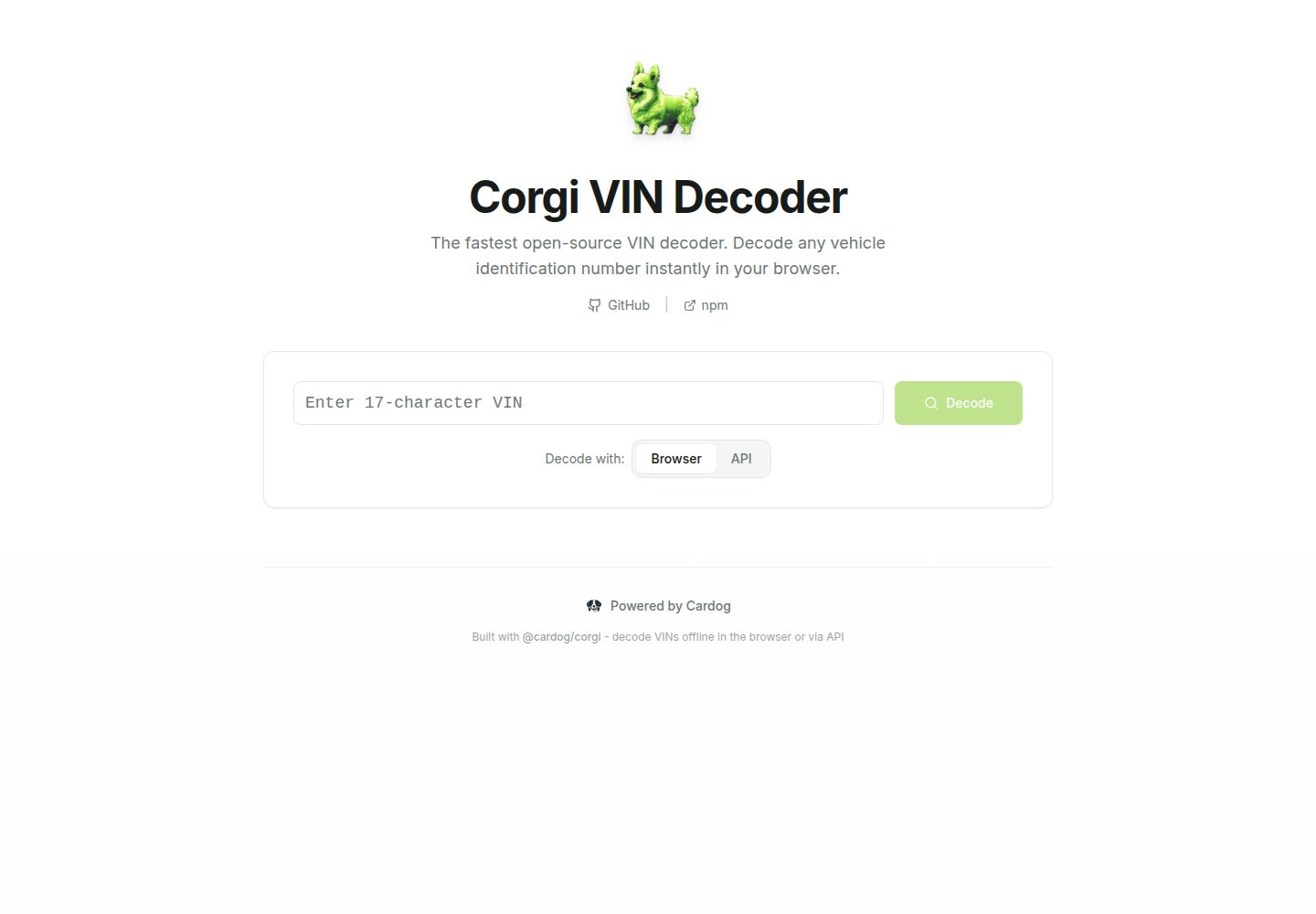
提供浏览器离线解码与 Cardog API 服务端解码两种模式
Next.jsReact启动器
nextjs-corgi-starter — Next.js 启动器模板
作者 cardog-ai
基于 Next.js 与 @cardog/corgi 的 VIN 解码起始模板,提供浏览器端离线解码与 Cardog API 服务端解码两种模式。
看看你的网站会是什么样
浏览真实页面截图,比较内容排版与手机效果。点击下方缩略图切换,放大查看整页细节。
全部页面与视图 2
截图用于了解视觉与布局,交互效果请以实际项目为准。
采集于 2026-10-14查看来源
值得关注的模板亮点
从已有项目资料中,快速了解它的特点。
浏览器模式首次使用时自动从 Cardog CDN 获取 VPIC 数据库,无需手动下载
使用 Next.js、TypeScript 与 Tailwind CSS,UI 基于 shadcn/ui 组件
包含 VIN 输入表单、解码结果展示等页面组件与 lib 下的解码逻辑
README 提供 Vercel 一键部署按钮及手动 build/start 部署步骤
模板详细介绍
该模板用于搭建 VIN(车辆识别码)解码应用,核心依赖 @cardog/corgi 解码库。README 说明它提供两种解码方式:浏览器模式在客户端使用本地数据库完成离线解码,首次使用时自动从 Cardog 的公共 CDN 拉取最新 VPIC 数据库;API 模式通过 Cardog API 在服务端解码,需要在 .env.local 中配置 NEXT_PUBLIC_CARDOG_API_URL 与 NEXT_PUBLIC_CARDOG_API_KEY。
项目结构包含 app/(布局、主页面、全局样式)、components/(VIN 输入表单、解码结果展示及 shadcn/ui 组件)、lib/(浏览器解码器、API 解码器与工具函数)。README 提到技术栈为 Next.js、TypeScript 与 Tailwind CSS,并列出部署到 Vercel 的一键按钮与手动构建部署步骤,但未给出具体版本号、性能数据或生产环境验证说明。
Next.js启动器
适合你的项目吗?
适用场景
- 构建需要输入 17 位 VIN 并展示车辆信息的网页应用
- 在无网络或希望避免服务端调用的场景下使用浏览器端离线解码
- 通过 Cardog API 在服务端完成解码并集中管理 API 凭据
- 以该模板为起点扩展自定义解码前后的处理逻辑
适合人群
- 需要 VIN 解码功能的 Next.js 项目开发者
- 希望同时保留离线与 API 两种解码路径的团队
- 使用 Tailwind CSS 与 shadcn/ui 进行界面定制的开发者
上手与定制指南
结合仓库当前版本的说明,按下面的资料检查内容、配置与运行要求。
- 1
克隆或通过 create-next-app 使用该模板后执行 npm install(或 pnpm/yarn install)
- 2
如需 API 模式,复制 .env.example 为 .env.local 并填写 NEXT_PUBLIC_CARDOG_API_URL 与 NEXT_PUBLIC_CARDOG_API_KEY
- 3
运行 npm run dev 启动开发服务器,浏览器模式会自动获取 VPIC 数据库
- 4
生产部署可执行 npm run build 后 npm start,或使用 README 中的 Vercel 一键部署按钮
- 5
README 提到 public/vpic.lite.db.gz 需手动添加,但浏览器模式默认从 Cardog CDN 获取数据库
授权与来源资料
使用条件与限制
免费使用 · 保留许可声明本次收录的是公开仓库中采用 MIT 许可的免费版本;免费范围为该版本代码,不代表外部服务或第三方素材免费。
使用时需要遵守
- 允许免费使用、修改、商用和分发该版本代码。
- 分发代码副本或实质性部分时,保留原作者版权声明和完整 MIT 许可声明。
- 代码按现状提供;担保与责任限制以原许可证及适用法律为准。
额外费用与待核对事项
- 演示图片、字体、图标及其他第三方素材需按各自许可核对,不能仅凭代码的 MIT 许可判断。
- 域名、托管、数据库、支付或 AI 等外部服务可能另外收费。
- API 模式需要 Cardog API 密钥,需在 cardog.ai 注册获取(可免费获取)。
- 浏览器模式首次使用时需联网从 Cardog 的 CDN 自动下载 VPIC 数据库,无法完全离线首次初始化。
- 浏览器模式依赖 Cardog 公共 CDN 提供 VPIC 数据库,默认指向其外部服务地址。
- public/vpic.lite.db.gz 需手动添加,仓库中未随附该数据库文件。
查看原文依据
Permission is hereby granted, free of charge
许可证原文
> Get your free API key at [cardog.ai](https://cardog.ai)
README 原文
Browser mode automatically fetches the latest VPIC database from Cardog's CDN on first use - no manual download needed!
README 原文
Browser mode fetches the latest VPIC database from Cardog's public CDN (`https://corgi.cardog.io/vpic_lite_latest.db.gz`).
README 原文
https://github.com/cardog-ai/nextjs-corgi-starter/blob/main/LICENSEhttps://github.com/cardog-ai/nextjs-corgi-starter/blob/main/README.md│ └── vpic.lite.db.gz # VPIC database (add manually)
README 原文
DeepSeek 根据仓库许可证和 README 整理 ·2026-10-14。结果仅覆盖已读取资料,依赖、图片、字体及后续条款变更以各自原文为准。
项目核对记录与介绍依据
模板资料
- 来源平台
- GitHub
- 资料与维护参考分
- 资料较完整 · 80 / 100
- 技术栈
- Next.js · React
- 网站类型
- 启动器
这个分数如何计算
本站按许可资料(最高30分)、演示链接(12分)、预览图(10分)、Star数(15分)、记录的维护时间(15分)、描述完整度(8分)、功能记录(5分)和分类资料(5分)计算。它不是代码、安全或性能测试,也不是 Google 评分;有链接不代表已实测可用。
这个项目需要核对什么
- 记录的仓库更新时间
- 2026-03-22
- 截图检查日期
- 2026-10-14
已收录演示链接。请用你的内容与屏幕尺寸检查;有演示不代表表单、认证或支付已经可用。
目录记录的主要技术栈是 Next.js。请通过依赖清单和锁文件核对实际版本与托管要求。这些说明基于收录资料,不代表代码审计或部署实测。
查看具体选型方法 →介绍的制作与核对状态
介绍由 AI 辅助整理目录与仓库资料。仓库作者不等于这篇介绍的审核者。
审核声明: codex-user-requested-batch-review-20261015 · 2026-10-15
查看当时使用的来源资料
SHA-256: dd0ccd057ccfa951bd03a69bd6d03bd2952de040767628f672262af84de28c30
2026-10-14T15:44:40.688Z
来源文件 / 仓库# Next.js + Corgi VIN Decoder Starter
A modern, production-ready Next.js starter template for building VIN decoder applications using [@cardog/corgi](https://github.com/cardog-ai/corgi) - the fastest open-source VIN decoding library.
[](https://vercel.com/new/clone?repository-url=https://github.com/cardog-ai/nextjs-corgi-starter&env=NEXT_PUBLIC_CARDOG_API_URL,NEXT_PUBLIC_CARDOG_API_KEY&envDescription=Optional%20API%20credentials%20for%20server-side%20VIN%20decoding&envLink=https://cardog.ai)



## Features
- **Dual Decoding Modes**
- **Browser Mode**: Fully offline VIN decoding with client-side database
- **API Mode**: Server-side decoding via Cardog API
- **Modern Stack**: Next.js 14, TypeScript, Tailwind CSS
- **Beautiful UI**: Clean, responsive interface with shadcn/ui components
- **Production Ready**: Optimized build, type-safe, error handling
- **SEO Friendly**: Server-side rendering, meta tags, sitemap ready
- **One-Click Deploy**: Deploy to Vercel with a single click
## Quick Start
### 1. Create Your Project
```bash
# Clone or download this template
npx create-next-app@latest my-vin-decoder --example https://github.com/cardog-ai/nextjs-corgi-starter
# Or clone directly
git clone https://github.com/cardog-ai/nextjs-corgi-starter.git my-vin-decoder
cd my-vin-decoder
```
### 2. Install Dependencies
```bash
npm install
# or
pnpm install
# or
yarn install
```
### 3. Configure Environment (Optional)
For API-based decoding, create a `.env.local` file:
```bash
cp .env.example .env.local
```
Edit `.env.local` and add your Cardog API credentials:
```env
NEXT_PUBLIC_CARDOG_API_URL=https://api.cardog.ai
NEXT_PUBLIC_CARDOG_API_KEY=your_api_key_here
```
> Get your free API key at [cardog.ai](https://cardog.ai)
### 4. Run Development Server
Browser mode automatically fetches the latest VPIC database from Cardog's CDN on first use - no manual download needed!
```bash
npm run dev
```
Open [http://localhost:3000](http://localhost:3000) and start decoding VINs!
## What's Included
```
nextjs-corgi-starter/
├── app/
│ ├── layout.tsx # Root layout with metadata
│ ├── page.tsx # Main VIN decoder page
│ └── globals.css # Global styles & theme
├── components/
│ ├── vin-input.tsx # VIN input form with mode toggle
│ ├── vin-result.tsx # Decoded vehicle information display
│ └── ui/ # shadcn/ui components
│ ├── button.tsx
│ ├── card.tsx
│ ├── input.tsx
│ └── badge.tsx
├── lib/
│ ├── utils.ts # Utility functions
│ ├── vin-decoder-browser.ts # Browser-based decoder
│ └── vin-decoder-api.ts # API-based decoder
├── public/
│ └── vpic.lite.db.gz # VPIC database (add manually)
└── package.json
```
## Customization
### Styling
This template uses Tailwind CSS with a customizable theme. Edit `tailwind.config.ts` to change colors, fonts, and more:
```typescript
// tailwind.config.ts
theme: {
extend: {
colors: {
// Add your brand colors
brand: {
primary: '#your-color',
secondary: '#your-color',
}
}
}
}
```
### Components
All UI components are in `components/ui/` and follow the shadcn/ui pattern. Customize them or add more:
```bash
# Add more shadcn components
npx shadcn-ui@latest add <component-name>
```
### Decoding Logic
Extend or modify the decoding logic in `lib/`:
```typescript
// lib/vin-decoder-browser.ts
export async function decodeBrowser(vin: string) {
// Add custom preprocessing
const cleanVin = vin.trim().toUpperCase();
// Decode with additional options
const result = await decodeVIN(cleanVin, adapter, {
includePatternDetails: true, // Enable for detailed analysis
});
// Add custom postprocessing
return enhanceResult(result);
}
```
## Deployment
### Deploy to Vercel (Recommended)
[](https://vercel.com/new/clone?repository-url=https://github.com/cardog-ai/nextjs-corgi-starter&env=NEXT_PUBLIC_CARDOG_API_URL,NEXT_PUBLIC_CARDOG_API_KEY&envDescription=Optional%20API%20credentials%20for%20server-side%20VIN%20decoding&envLink=https://cardog.ai)
1. Click the button above
2. Connect your GitHub account
3. Configure environment variables (if using API mode)
4. Deploy!
### Manual Deployment
```bash
# Build for production
npm run build
# Start production server
npm start
```
### Database Hosting
Browser mode fetches the latest VPIC database from Cardog's public CDN (`https://corgi.cardog.io/vpic_lite_latest.db.gz`).
The database is:
- **Always up-to-date**: Automatically updated monthly
- **Globally distributed**: Fast downloads worldwide via Cloudflare
- **Free to use**: No API key required for browser mode
Want to host your own? Modify `lib/vin-decoder-browser.ts` to point to your CDN URL.
## Usage Examples
### Basic VIN Decoding
```typescript
import { decodeBrowser } from "@/lib/vin-decoder-browser";
const result = await decodeBrowser("1HGCM82633A123456");
console.log(result.components.vehicle);
// {
// make: 'Honda',
// model: 'Accord',
// year: 2003,
// bodyStyle: 'Sedan',
// ...
// }
```
### With Error Handling
```typescript
try {
const result = await decodeBrowser(vin);
if (!result.valid) {
console.error("Invalid VIN:", result.errors);
return;
}
// Use the decoded data
displayVehicle(result.components.vehicle);
} catch (error) {
console.error("Decode failed:", error);
}
```
## API Reference
### Browser Decoder
```typescript
import { decodeBrowser, getDatabaseStatus } from "@/lib/vin-decoder-browser";
// Decode a VIN
const result = await decodeBrowser("VIN17CHARACTERS");
// Check database status
const status = getDatabaseStatus();
console.log(status.initialized); // true/false
```
### API Decoder
```typescript
import { decodeAPI, isAPIConfigured } from "@/lib/vin-decoder-api";
// Check if API is configured
if (isAPIConfigured()) {
const result = await decodeAPI("VIN17CHARACTERS");
}
```
## Contributing
Contributions are welcome! This template is designed to showcase [@cardog/corgi](https://github.com/cardog-ai/corgi).
1. Fork the repository
2. Create your feature branch
3. Commit your changes
4. Push to the branch
5. Open a Pull Request
## License
MIT License - feel free to use this template for any project!
## Acknowledgments
Built with:
- [@cardog/corgi](https://github.com/cardog-ai/corgi) - Fast, offline VIN decoding
- [Next.js](https://nextjs.org/) - React framework
- [Tailwind CSS](https://tailwindcss.com/) - Utility-first CSS
- [shadcn/ui](https://ui.shadcn.com/) - Beautiful components
- [Cardog](https://cardog.ai) - Automotive data platform
---
**Made by the automotive developer community**
Need help? [Open an issue](https://github.com/cardog-ai/nextjs-corgi-starter/issues) or visit [cardog.ai](https://cardog.ai)
看看同类模板
对比同技术栈与用途的模板,找到更适合的视觉与内容结构。

ai-website-cloner-template
Clone any website with one command using AI coding agents
Next.js · 启动器

Next.js SaaS Starter
Next.js SaaS Starter 是 Next.js 官方维护的 SaaS 起点模板,定位介于学习资源和可直接部署的脚手架之间。
Next.js · SaaS

Next.js Commerce
Next.js Commerce 是 Vercel 团队维护的电商启动模板,基于 Next.js App Router 构建,采用服务端渲染、React Server Components、Server Actions …
Next.js · 电商

Next-js-Boilerplate
Next-js-Boilerplate 是一个面向 Next.js 16、Tailwind CSS 4 和 TypeScript 的启动器,核心定位是开发者体验优先。
Next.js · 启动器

tailwind-nextjs-starter-blog
tailwind-nextjs-starter-blog 是一个面向个人技术博客的 Next.js 与 Tailwind CSS 启动模板,其 v2 版本基于 App Router 与 React Server Comp…
Next.js · 博客

next-forge
Production-grade Turborepo template for Next.js apps.
Next.js · 启动器