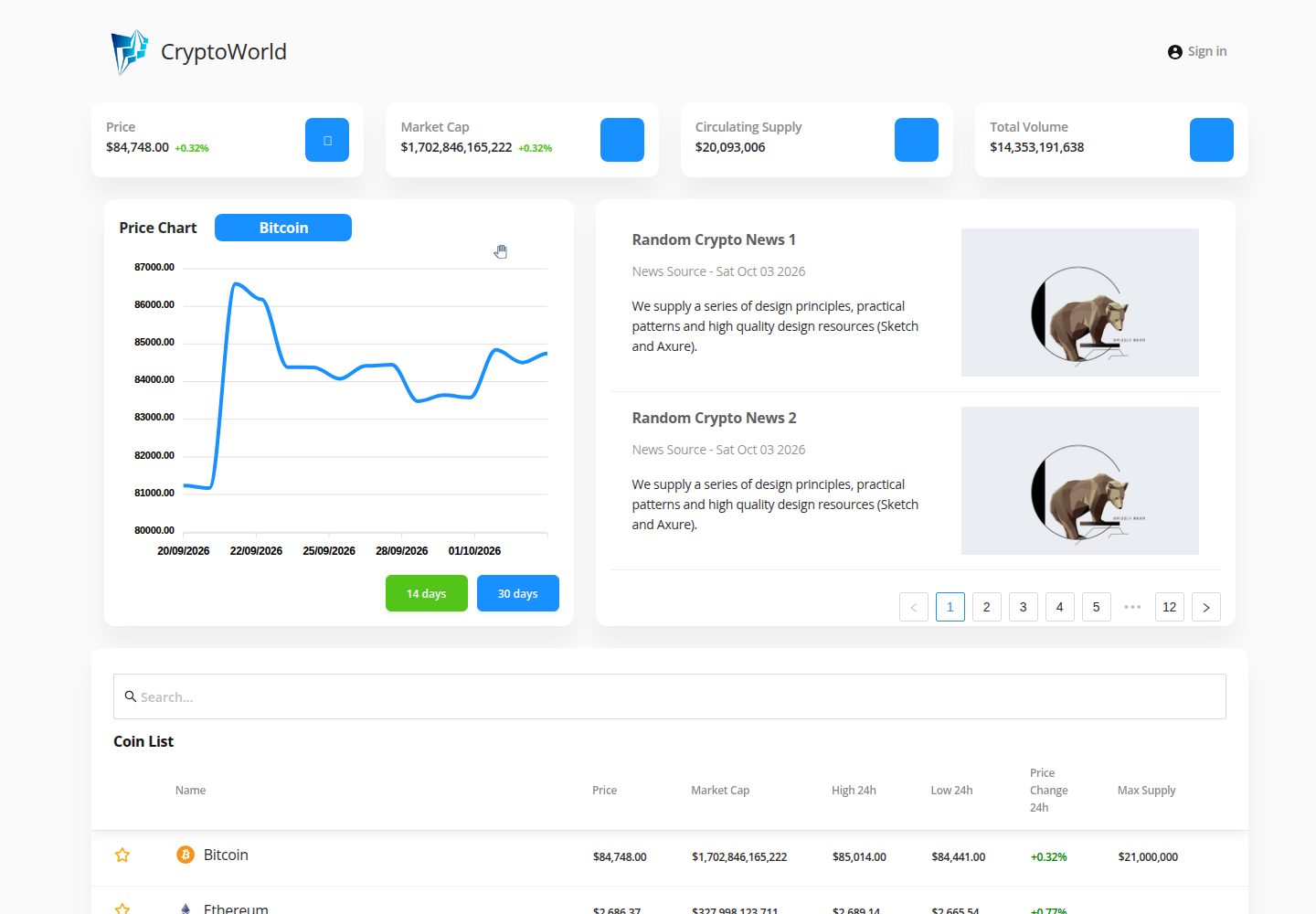
React 前端配合 Chakra UI Muse 后台模板搭建的仪表盘界面
React后台
v43-tier2-team-13 — React 后台模板
作者 chingu-voyages
基于 React 的加密货币数据后台仪表盘,使用 Chakra UI Muse 模板与 CoinGecko API 展示行情,并包含 Firebase 登录、自选列表与 GNews 新闻模块。
看看你的网站会是什么样
浏览真实页面截图,比较内容排版与手机效果。点击下方缩略图切换,放大查看整页细节。
目前有 1 张原始预览,可打开完整图片查看设计细节。
截图用于了解视觉与布局,交互效果请以实际项目为准。
采集于 2026-10-03查看来源
值得关注的模板亮点
从已有项目资料中,快速了解它的特点。
通过 CoinGecko API 获取加密货币行情数据
使用 Apex Charts 绘制数据图表
集成 Firebase 处理登录注册与用户资料
通过 GNews API 展示 Web3 相关新闻
README 说明需使用 Node v16,Node v18 下构建会失败
模板详细介绍
这是一个 Chingu Voyage 团队项目,定位为加密货币数据后台仪表盘。界面基于 Chakra UI Muse 模板搭建,行情数据来自 CoinGecko API,新闻内容来自 GNews API,用户登录与资料管理由 Firebase 承担,图表使用 Apex Charts 渲染。
README 描述的目标功能包括:用户登录/注册并管理个人资料、维护不同币种的自选列表(watchlist)、浏览最新 Web3 新闻。仓库同时给出本地运行方式:克隆仓库、安装依赖、执行 npm run start 启动开发服务器。
使用上有明确限制:README 提示构建在 Node v18 下会失败,需使用 Node v16;CoinGecko、GNews 与 Firebase 都需要自行注册账号并配置 API 密钥,仓库本身不提供这些凭据。代码采用 MIT 许可,但演示图片、字体、图标等第三方素材以及外部服务的费用需单独核对。
React后台
适合你的项目吗?
适用场景
- 需要加密货币行情看板并希望直接基于现成模板改造的项目
- 学习如何把 CoinGecko、GNews 等第三方 API 接入 React 后台界面
- 需要 Firebase 登录与用户资料管理示例的练习场景
- 作为 Chingu Voyage 团队协作项目的参考实现
适合人群
- 具备 React 基础、能自行配置 API 密钥的开发者
- 需要加密货币数据展示后台原型的个人或小团队
- 想研究 Chakra UI Muse 后台模板二次开发方式的前端学习者
上手与定制指南
结合仓库当前版本的说明,按下面的资料检查内容、配置与运行要求。
- 1
需先安装 Git 与 Node,并克隆仓库后执行 npm install
- 2
使用 npm run start 启动本地开发服务器
- 3
README 明确要求使用 Node v16,Node v18 会导致构建失败
- 4
需自行注册 CoinGecko、GNews 与 Firebase 账号并配置 API 密钥
- 5
非 Chingu 成员可能需要先 fork 仓库再操作
授权与来源资料
使用条件与限制
免费使用 · 保留许可声明本次收录的是公开仓库中采用 MIT 许可的免费版本;免费范围为该版本代码,不代表外部服务或第三方素材免费。
使用时需要遵守
- 允许免费使用、修改、商用和分发该版本代码。
- 分发代码副本或实质性部分时,保留原作者版权声明和完整 MIT 许可声明。
- 代码按现状提供;担保与责任限制以原许可证及适用法律为准。
额外费用与待核对事项
- 使用 CoinGecko、GNews 与 Firebase 等外部 API 前,需自行注册账号并配置 API 密钥,仓库不提供这些凭据。
- 构建环境受限:必须使用 Node v16,使用 Node v18 会导致构建失败。
- 非 Chingu 成员需先 fork 仓库才能进行本地开发。
- README 提及 Firebase 集成;启用相关动态功能前需自行配置,并核对 Firebase 的额度与收费。
- 演示图片、字体、图标及其他第三方素材需按各自许可核对,不能仅凭代码的 MIT 许可判断。
- 域名、托管、数据库、支付或 AI 等外部服务可能另外收费。
查看原文依据
Permission is hereby granted, free of charge
许可证原文
You may need to create an account and setup the API keys to use the APIs.
README 原文
The build will fail if you're using `Node v18`. Please stick to using `Node v16` to avoid errors.
README 原文
https://github.com/chingu-voyages/v43-tier2-team-13/blob/main/LICENSEhttps://github.com/chingu-voyages/v43-tier2-team-13/blob/main/README.mdYou may first need to fork the repo if you are not a member of Chingu.
README 原文
DeepSeek 根据仓库许可证和 README 整理 ·2026-10-03。结果仅覆盖已读取资料,依赖、图片、字体及后续条款变更以各自原文为准。
项目核对记录与介绍依据
模板资料
- 来源平台
- GitHub
- 资料与维护参考分
- 资料一般 · 68 / 100
- 技术栈
- React
- 网站类型
- 后台
这个分数如何计算
本站按许可资料(最高30分)、演示链接(12分)、预览图(10分)、Star数(15分)、记录的维护时间(15分)、描述完整度(8分)、功能记录(5分)和分类资料(5分)计算。它不是代码、安全或性能测试,也不是 Google 评分;有链接不代表已实测可用。
这个项目需要核对什么
- 记录的仓库更新时间
- 2023-04-14
- 截图检查日期
- 2026-10-03
已收录演示链接。请用你的内容与屏幕尺寸检查;有演示不代表表单、认证或支付已经可用。
目录记录的主要技术栈是 React。请通过依赖清单和锁文件核对实际版本与托管要求。这些说明基于收录资料,不代表代码审计或部署实测。
查看具体选型方法 →介绍的制作与核对状态
介绍由 AI 辅助整理目录与仓库资料。仓库作者不等于这篇介绍的审核者。
审核声明: [email protected] · 2026-10-04
查看当时使用的来源资料
SHA-256: bcb48e201ccc51f883f355baa58a15a13a7363831a3e7ded63da335452fcf638
2026-10-03T23:19:35.676Z
来源文件 / 仓库# CryptoWorld Chingu Voyage Project CryptoWorld is a one stop solution for all your crypto needs. Track and manage your crypto assets. Update yourself with the latest news in Web3. ## Table of contents - [Overview](#overview) - [The challenge](#the-challenge) - [Screenshot](#screenshot) - [Built with](#built-with) - [Project setup](#project-setup) - [Prerequisite](#prerequisite) - [Local Setup](#local-setup) ## Overview ### The Challenge Users should be able to: - Login / Sign up and manage user profile. - Keep track of different coins in a watchlist. - Stay informed with latest crypto news. ### Screenshot  ### Built with - FE Framework: [ReactJS](https://react.dev/) - Backend: [Firebase](https://firebase.google.com/) - Component Library: [Ant Design](https://ant.design/) - Charts: [Apex Charts](https://apexcharts.com/) - Crypto API: [CoinGecko](https://www.coingecko.com/en/api/documentation) - News API: [GNews](https://gnews.io/) - Template: [Chakra UI Muse template](https://www.creative-tim.com/product/muse-ant-design-dashboard) ## Project Setup ### Prerequisite Before starting with the project make sure you have [Git](https://git-scm.com/) and [Node](https://nodejs.org) installed in your system. If not follow the links and install the packages. You may need to create an account and setup the API keys to use the APIs. ### Local Setup **Note:** You may first need to fork the repo if you are not a member of Chingu. To run the project locally first clone the project to your local machine: ``` git clone https://github.com/chingu-voyages/v43-tier2-team-13.git ``` Next, change to the project directory and install dependencies: ``` cd v43-tier2-team-13 npm install ``` Start the dev server in your local machine: ``` npm run start ``` **Note:** The build will fail if you're using `Node v18`. Please stick to using `Node v16` to avoid errors.
看看同类模板
对比同技术栈与用途的模板,找到更适合的视觉与内容结构。
ant-design-pro
Ant Design Pro 是 Ant Design 官方推出的企业级中后台前端脚手架,基于 React 19、Umi Max 4 和 antd 6 构建,内置 TypeScript 支持。
React · 后台

coreui-free-react-admin-template
Free React Admin & Dashboard Template Built for AI-Assisted Development
React · 后台

fastapi-react
fastapi-react 是一个基于 Cookiecutter 的模板,用于快速搭建 FastAPI 与 React(TypeScript)的全栈项目。
React · 后台

react-antd-admin-template
一个基于React+Antd的后台管理模版,在线预览https://nlrx-wjc.github.io/react-antd-admin-template/
React · 后台

react-saas-template
🌊 Template for building an SaaS / admin website using React + Material-UI
React · 后台

react-material-admin
☄️React Material Admin is a React template built with Material-UI
React · 后台