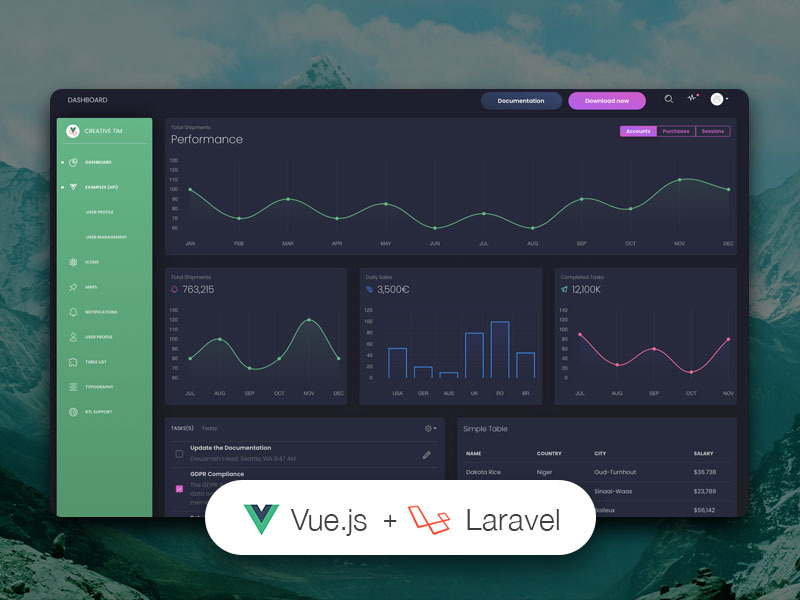
前端为 Vue Black Dashboard 的 Vue SPA,后端为独立的 Laravel JSON:API 项目
VueLaravel后台
vue-black-dashboard-laravel — Vue 后台模板
作者 creativetimofficial
基于 Vue 与 Laravel 的后台模板,前端为 Black Dashboard 的 Vue SPA,后端通过 JSON:API 标准提供 REST 接口。
看看你的网站会是什么样
浏览真实页面截图,比较内容排版与手机效果。点击下方缩略图切换,放大查看整页细节。
目前有 1 张原始预览,可打开完整图片查看设计细节。
截图用于了解视觉与布局,交互效果请以实际项目为准。
采集于 2026-10-03查看来源
值得关注的模板亮点
从已有项目资料中,快速了解它的特点。
前后端通过 JSON:API 规范通信,接口定义与响应格式遵循该标准
内置登录、注册、仪表盘和资料编辑页面,路由与认证状态已配置
使用 Laravel Passport 处理 API 认证,需在安装时生成并配置客户端凭据
代码采用 MIT 许可,允许免费使用、修改、商用与分发
模板详细介绍
该模板由两个独立项目组成:一个 Laravel JSON:API 后端和一个 Vue Black Dashboard 前端。后端遵循 JSON:API 规范,用于定义客户端如何请求和修改资源以及服务端如何响应;前端是 Vue 单页应用,通过接口与后端交互。
已实现的功能包括登录、注册、仪表盘以及编辑当前登录用户的资料(姓名、邮箱、头像)和密码。登录与注册页面分别由 src/pages/Login.vue 和 src/pages/Register.vue 处理,认证状态存放在 src/store/modules/auth.js。路由集中在 src/router/index.js,仪表盘可通过侧边栏链接或 /home 访问,登录为 /login,注册为 /register,资料编辑为 /profile。
使用前需要分别安装并运行后端与前端。后端要求多线程 Web 服务器(如 Apache/Nginx)配合 PHP、Composer 2 和 MySQL,README 明确不建议使用 php artisan serve,因为其单线程特性会导致请求停滞;还需安装 Laravel Passport 并配置 CLIENT_ID 与 CLIENT_SECRET。前端要求 Node.js 8.9 及以上(推荐 8.11.0+)、npm 和 Vue CLI,通过 .env 中的 VUE_APP_BASE_URL 与 VUE_APP_API_BASE_URL 指向前端自身与后端 API 地址。
该版本采用 MIT 许可,可免费使用、修改、商用和分发,但演示图片、字体、图标等第三方素材需单独核对许可,域名、托管、数据库等外部服务可能另外收费。
VueLaravel后台
适合你的项目吗?
适用场景
- 需要一个带可用 Laravel REST 后端的 Vue 后台界面时
- 希望以 JSON:API 标准组织前后端数据交互时
- 需要登录、注册、仪表盘和用户资料编辑等基础后台页面时
- 希望分别部署和维护前端 SPA 与后端 API 时
适合人群
- 熟悉 Vue 与 Laravel 的前后端开发者
- 需要 JSON:API 风格接口约定的项目
- 希望基于现成后台界面搭建管理端原型的团队
上手与定制指南
结合仓库当前版本的说明,按下面的资料检查内容、配置与运行要求。
- 1
后端需 Apache/Nginx 等多线程 Web 服务器配合 PHP、Composer 2 和 MySQL,README 明确不建议使用 php artisan serve
- 2
后端安装需执行 composer install、复制 .env、配置数据库、运行 php artisan migrate --seed、生成应用密钥并安装 Laravel Passport
- 3
前端需 Node.js 8.9 及以上(推荐 8.11.0+)、npm 和 Vue CLI,执行 npm install 并配置 .env 中的 VUE_APP_BASE_URL 与 VUE_APP_API_BASE_URL
- 4
可使用示例账号 [email protected] / secret 登录,或自行注册用户
- 5
演示图片、字体、图标等第三方素材需按各自许可单独核对
授权与来源资料
使用条件与限制
免费使用 · 保留许可声明本次收录的是公开仓库中采用 MIT 许可的免费版本;免费范围为该版本代码,不代表外部服务或第三方素材免费。
使用时需要遵守
- 允许免费使用、修改、商用和分发该版本代码。
- 分发代码副本或实质性部分时,保留原作者版权声明和完整 MIT 许可声明。
- 代码按现状提供;担保与责任限制以原许可证及适用法律为准。
额外费用与待核对事项
- 后端必须使用 Apache/Nginx 等多线程 Web 服务器,不能使用 PHP 内置的 php artisan serve,否则请求会因单线程而停滞。
- 运行后端需要自备多线程 Web 服务器环境,并安装 PHP、Composer 与 MySQL 等外部依赖。
- API 认证依赖 Laravel Passport,安装时须生成并配置 CLIENT_ID 与 CLIENT_SECRET。
- 邮件功能需自行注册并配置 mailtrap.io 等外部邮件服务的账号凭据。
- 更多功能属于付费 PRO 版本,免费版不包含这些额外功能。
- 前端需自备 Node.js 8.9 及以上(推荐 8.11.0+)、npm 与 Vue CLI 环境。
- 演示图片、字体、图标及其他第三方素材需按各自许可核对,不能仅凭代码的 MIT 许可判断。
- 域名、托管、数据库、支付或 AI 等外部服务可能另外收费。
查看原文依据
Permission is hereby granted, free of charge
许可证原文
Do not use `php artisan serve` as it will result in stalled requests due to the single-threaded nature of the built-in PHP web server.
README 原文
The Laravel JSON:API backend project requires a proper multi-threaded web server such as Apache/Nginx environment with PHP, Composer and MySQL.
README 原文
Install Laravel Passport: `php artisan passport:install` and set in the .env file the CLIENT_ID and CLIENT_SECRET that you receive
README 原文
Add your own mailtrap.io credentials in MAIL_USERNAME and MAIL_PASSWORD in the .env file
README 原文
If you want to get more features, go PRO with [Vue Black Dashboard PRO Laravel](https://www.creative-tim.com/product/vue-black-dashboard-pro-laravel)
README 原文
https://github.com/creativetimofficial/vue-black-dashboard-laravel/blob/master/LICENSE.mdhttps://github.com/creativetimofficial/vue-black-dashboard-laravel/blob/master/README.mdThe Vue Black frontend project requires a working local environment with NodeJS version 8.9 or above (8.11.0+ recommended), npm, VueCLI.
README 原文
DeepSeek 根据仓库许可证和 README 整理 ·2026-10-03。结果仅覆盖已读取资料,依赖、图片、字体及后续条款变更以各自原文为准。
项目核对记录与介绍依据
模板资料
- 来源平台
- GitHub
- 资料与维护参考分
- 资料一般 · 65 / 100
- 技术栈
- Vue · Laravel
- 网站类型
- 后台
这个分数如何计算
本站按许可资料(最高30分)、演示链接(12分)、预览图(10分)、Star数(15分)、记录的维护时间(15分)、描述完整度(8分)、功能记录(5分)和分类资料(5分)计算。它不是代码、安全或性能测试,也不是 Google 评分;有链接不代表已实测可用。
这个项目需要核对什么
- 记录的仓库更新时间
- 2024-05-27
- 截图检查日期
- 2026-10-03
目前没有记录演示链接。请依据仓库说明在本地评估;仅凭截图无法确认交互行为。
目录记录的主要技术栈是 Vue。请通过依赖清单和锁文件核对实际版本与托管要求。这些说明基于收录资料,不代表代码审计或部署实测。
查看具体选型方法 →介绍的制作与核对状态
介绍由 AI 辅助整理目录与仓库资料。仓库作者不等于这篇介绍的审核者。
已完成服务器许可规则与 AI 来源核对;未经过人工编辑审核。
查看当时使用的来源资料
SHA-256: bab0923a38a5343bb697f6f6d1f5f718dcb3b6d26d7a157d6a1af35863f2c6b7
2026-10-03T08:36:34.755Z
来源文件 / 仓库# [Vue Black Dashboard Laravel](https://vue-black-dashboard-laravel.creative-tim.com/?ref=vbl-readme)   [](https://github.com/creativetimofficial/vue-black-dashboard-laravel/issues?q=is%3Aopen+is%3Aissue) [](https://github.com/creativetimofficial/vue-black-dashboard-laravel/issues?q=is%3Aissue+is%3Aclosed) *Frontend version*: Black Dashboard v1.0.1. More info at https://www.creative-tim.com/product/black-dashboard *Vue version*: Vue Black Dashboard v1.1.1. More info at https://www.creative-tim.com/product/vue-black-dashboard  What if your frontend came not only with reusable components, but also with a reusable backend? API-driven development is more than just a buzzword and we partnered with [UPDIVISION](https://updivision.com) to prove it. Build awesome-looking apps with a flexible architecture across a variety of devices and operating systems with Vue Black Dashboard Laravel. If you want to get more features, go PRO with [Vue Black Dashboard PRO Laravel](https://www.creative-tim.com/product/vue-black-dashboard-pro-laravel) # Download For the free version of the project you can either - download the .zip file from the Creative Tim site and extract it or - make a clone from the Github repository You will get two project folders: one for the Laravel API project and one for the Vue frontend. # Laravel API Setup ## Introduction JSON:API is a specification for how a client should request that resources be fetched or modified, and how a server should respond to those requests. It is designed to minimize both the number of requests and the amount of data transmitted between clients and servers. This efficiency is achieved without compromising readability, flexibility, or discoverability. [Click here to go to the JSON:API docs](https://explore.postman.com/api/6357/laravel-jsonapi) ## Prerequisites ### JSON:API backend The Laravel JSON:API backend project requires a proper multi-threaded web server such as Apache/Nginx environment with PHP, Composer and MySQL. **Do not use `php artisan serve` as it will result in stalled requests due to the single-threaded nature of the built-in PHP web server.** We strongly recommend using [Laradock](https://laradock.io/) for Linux and Mac or [Laragon](https://laragon.org/download/) for Windows if possible. Other options for your local environment: - Windows: [How to install WAMP on Windows](https://updivision.com/blog/post/beginner-s-guide-to-setting-up-your-local-development-environment-on-windows) - Linux & Mac: [How to install LAMP on Linux & Mac](https://updivision.com/blog/post/guide-what-is-lamp-and-how-to-install-it-on-ubuntu-and-macos) You will also need to install Composer 2: [https://getcomposer.org/doc/00-intro.md](https://getcomposer.org/doc/00-intro.md) ### Vue Black frontend The Vue Black frontend project requires a working local environment with NodeJS version 8.9 or above (8.11.0+ recommended), npm, VueCLI. Install Node: https://nodejs.org/ (version 8.11.0+ recommended) Install NPM: https://www.npmjs.com/get-npm Install VueCLI: https://cli.vuejs.org/guide/installation.html ## Laravel JSON:API Project Installation 1. Navigate in your Laravel API project folder: `cd your-laravel-json-api-project` 2. Install project dependencies: `composer install` 3. Create a new .env file: `cp .env.example .env` 3. Add your own database credentials in the .env file in DB_DATABASE, DB_USERNAME, DB_PASSWORD 5. Create users table: `php artisan migrate --seed` 6. Generate application key: `php artisan key:generate` 7. Install Laravel Passport: `php artisan passport:install` and set in the .env file the CLIENT_ID and CLIENT_SECRET that you receive 8. Add your own mailtrap.io credentials in MAIL_USERNAME and MAIL_PASSWORD in the .env file ## Vue Black Dashboard Project Installation 1. Navigate to your Vue Dashboard project folder: `cd your-vue-black-dashbord-project` 2. Install project dependencies: `npm install` 3. Create a new .env file: `cp .env.example .env` 4. `VUE_APP_BASE_URL` should contain the URL of your Vue Black Dashboard Project (eg. http://localhost:8080/) 5. `VUE_APP_API_BASE_URL` should contain the URL of your Laravel JSON:API Project. (eg. http://localhost:3000/api/v1) 6. Run `npm run dev` to start the application in a local development environment or `npm run build` to build release distributables. ## Usage Register a user or login using [email protected] and secret and start testing the theme. Besides the dashboard and the auth pages this theme also has an edit profile page. All the necessary files are installed out of the box and all the needed routes are added to `src\router\index.js`. Keep in mind that all the features can be viewed once you log in using the credentials provided above or by registering your own user. ### Dashboard You can access the dashboard either by using the "**Dashboards/Dashboard**" link in the left sidebar or by adding **/home** in the URL. ### Login The login functionality is fully implemented in our theme helping you to start your project in no time. To login into dashboard you just have to add **/login** in the URL and fill the login form with the credentials (user: **[email protected]** and password: **secret**). The `src\pages\Login.vue` is the Vue component which handles the login functinality. You can easily adapt it to your needs. It uses the auth store located in `src\store\modules\auth.js`. #### Login card ``` <div class="col-lg-4 col-md-6 ml-auto mr-auto"> <form @submit.prevent="handleSubmit()"> <card class="card-login card-white"> <template slot="header"> <img src="/img/card-primary.png" alt="" /> <h1 class="card-title">Log in</h1> </template> <div> <ValidationProvider name="email" rules="required|email" v-slot="{ passed, failed, errors }" > <base-input required v-model="email" type="email" placeholder="Email" addon-left-icon="tim-icons icon-email-85" :error="errors[0]" :class="[{ 'has-success': passed }, { 'has-danger': failed }]"> </base-input> <validation-error :errors="apiValidationErrors.email" /> </ValidationProvider> <ValidationProvider name="password" rules="required|min:5" v-slot="{ passed, failed, errors }" > <base-input required v-model="password" placeholder="Password" addon-left-icon="tim-icons icon-lock-circle" type="password" :error="errors[0]" :class="[{ 'has-success': passed }, { 'has-danger': failed }]"> </base-input> <validation-error :errors="apiValidationErrors.password" /> </ValidationProvider> </div> <div slot="footer"> <base-button native-type="submit" type="primary" class="mb-3" size="lg" block> Get Started </base-button> <div class="pull-left"> <h6> <router-link class="link footer-link" to="/register"> Create Account </router-link> </h6> </div> <div class="pull-right"> <h6><a href="#pablo" class="link footer-link">Need Help?</a></h6> </div> </div> </card> </form> <!-- </ValidationObserver> --> </div> ``` ### Register The register functionality is fully implemented in our theme helping you to start your project in no time. To register a new user you just have to add **/register** in the URL or click on register link from login page and fill the register form with user details. The `src\pages\Register.vue` is the Vue component which handles the login functinality. You can easily extend it to your needs. It uses the auth store located in `src\store\modules\auth.js`. #### Register card ``` <div class="col-md-7 mr-auto"> <form @submit.prevent="handleSubmit()"> <card class="card-register card-white"> <template slot="header"> <img class="card-img" src="/img/card-primary.png" alt="Card image"/> <h4 class="card-title">Register</h4> </template> <ValidationProvider name="name" rules="required" v-slot="{ passed, failed, errors }"> <base-input required v-model="name" placeholder="Full Name" addon-left-icon="tim-icons icon-single-02" type="text" :error="errors[0]" :class="[{ 'has-success': passed }, { 'has-danger': failed }]"> </base-input> </ValidationProvider> <ValidationProvider name="email" rules="required|email" v-slot="{ passed, failed, errors }"> <base-input required v-model="email" placeholder="Email" addon-left-icon="tim-icons icon-email-85" type="email" :error="errors[0]" :class="[{ 'has-success': passed }, { 'has-danger': failed }]"> </base-input> </ValidationProvider> <ValidationProvider name="password" rules="required" v-slot="{ passed, failed, errors }"> <base-input required v-model="password" placeholder="Password" addon-left-icon="tim-icons icon-lock-circle" type="password" :error="errors[0]" :class="[{ 'has-success': passed }, { 'has-danger': failed }]"> </base-input> </ValidationProvider> <ValidationProvider name="password" rules="required" v-slot="{ passed, failed, errors }"> <base-input required placeholder="Confirm Password" type="password" name="Password confirmation" v-model="password_confirmation" addon-left-icon="tim-icons icon-lock-circle" :error="errors[0]" :class="[{ 'has-success': passed }, { 'has-danger': failed }]"> </base-input> </ValidationProvider> <base-checkbox v-model="boolean" class="text-left"> I agree to the <a href="#something">terms and conditions</a>. </base-checkbox> <base-button native-type="submit" slot="footer" type="primary" round block size="lg"> Get Started </base-button> </card> </form> </div> ``` ### Profile edit You have the option to edit the current logged in user's profile information (name, email, profile picture) and password. To access this page, just click the "**Examples/Profile**" link in the left sidebar or add **/profile** in the URL. The `src\pages\Examples\UserProfile` is the folder with Vue components that handle the update of the user information and password. #### Edit profile component ``` <template> <card class="stacked-form" title="Stacked Form"> <h4 slot="header" class="card-title">Edit Profile</h4> <form @submit.prevent> <base-input v-model="user.email" label="Email" type="email" placeholder="Enter email"/> <validation-error :errors="apiValidationErrors.email" /> <base-input v-model="user.name" label="Name" placeholder="Name"/> <validation-error :errors="apiValidationErrors.name" /> <base-button @click="updateProfile()" class="mt-3" native-type="submit" type="primary">Submit</base-button> </form> </card> </template> <script> import ValidationError from "@/components/ValidationError.vue"; import formMixin from "@/mixins/form-mixin"; export default { mixins: [formMixin], components: { ValidationError }, props: { user: Object }, methods: { async updateProfile() { try { await this.$store.dispatch("profile/update", this.user) this.resetApiValidation(); this.$notify({ type: 'success', message: 'Profile updated successfully.', icon: 'tim-icons icon-bell-55', }) await this.$store.getters["profile/me"] } catch (e) { this.$notify({ type: 'danger', message: 'Oops, something went wrong!', icon: 'tim-icons icon-bell-55', }) this.setApiValidation(e.response.data.errors) } } } } </script> ``` #### Edit password component ``` <template> <card class="stacked-form" title="Change Password"> <h4 slot="header" class="card-title">Change Password</h4> <form ref="password_form" @submit.prevent> <div> <base-input v-model="password" label="Password" type="password" placeholder="Password"/> <validation-error :errors="apiValidationErrors.password"/> <base-input v-model="password_confirmation" label="Password Confirmation" type="password" placeholder="Password Confirmation"/> <validation-error :errors="apiValidationErrors.password_confirmation"/> <base-button class="mt-3" native-type="submit" type="primary" @click="changePassword()" >Submit</base-button > </div> </form> </card> </template> <script> import ValidationError from "@/components/ValidationError.vue"; import formMixin from "@/mixins/form-mixin"; export default { name: "edit-password-card", props: { user: Object }, components: {ValidationError}, mixins: [formMixin], data: () => ({ password: null, password_confirmation: null, }), methods: { async changePassword() { this.user.password = this.password; this.user.password_confirmation = this.password_confirmation; try { this.resetApiValidation(); await this.$store.dispatch("users/update", this.user) this.$notify({ type: 'success', message: 'Password changed successfully.', icon: 'tim-icons icon-bell-55', }) this.user = await this.$store.getters["profile/me"] this.$refs["password_form"].reset(); } catch (e) { this.$notify({ type: 'danger', message: 'Oops, something went wrong!', icon: 'tim-icons icon-bell-55', }) this.setApiValidation(e.response.data.errors) } } } }; </script> ``` ## Table of Contents * [Versions](#versions) * [Demo](#demo) * [Documentation](#documentation) * [File Structure](#file-structure) * [Browser Support](#browser-support) * [Resources](#resources) * [Reporting Issues](#reporting-issues) * [Licensing](#licensing) * [Useful Links](#useful-links) ## Versions [<img src="https://github.com/creativetimofficial/public-assets/blob/master/logos/html-logo.jpg" height="80" />](#) [<img src="https://github.com/creativetimofficial/public-assets/blob/master/logos/laravel_logo.png" height="80" />](#) [<img src="https://github.com/creativetimofficial/public-assets/blob/master/logos/vue.jpg" height="80" />](#) [<img src="https://github.com/creativetimofficial/public-assets/blob/master/logos/json-api.png" height="75" />](#) | HTML | Laravel | | ---------------------------------------------------------------------------------------------------------------------------------------------------------------------------------------------- | ----------------------------------------------------------------------------------------------------------------------------------------------------------------------------------------------------------------- | | [](https://www.creative-tim.com/product/black-dashboard?ref=vbdl-readme) | [](https://www.creative-tim.com/product/black-dashboard-laravel?ref=vbdl-readme) | | Vue | Vue & Laravel | | ---------------------------------------------------------------------------------------------------------------------------------------------------------------------------------------------------------- | ------------------------------------------------------------------------------------------------------------------------------------------------------------------------------------------------------------------------------ | | [](https://www.creative-tim.com/product/vue-black-dashboard?ref=vbdl-readme) | [](https://www.creative-tim.com/product/vue-black-dashboard-laravel?ref=vbdl-readme) | ## Demo | Register | Login | Dashboard | | --- | --- | --- | | [](https://vue-black-dashboard-laravel.creative-tim.com/register?ref=vbdl-readme) | [](https://vue-black-dashboard-laravel.creative-tim.com/login?ref=vbdl-readme) | [](https://vue-black-dashboard-laravel.creative-tim.com/?ref=vbdl-readme) | | Profile Page | Users Page | Tables Page | | --- | --- | --- | | [](https://vue-black-dashboard-laravel.creative-tim.com/examples/user-profile?ref=vbdl-readme) | [](https://vue-black-dashboard-laravel.creative-tim.com/examples/user-management/list-users?ref=vbdl-readme) | [](https://vue-black-dashboard-laravel.creative-tim.com/table-list?ref=vbdl-readme) [View More](https://vue-black-dashboard-laravel.creative-tim.com/?ref=vbdl-readme) ## Documentation The documentation for the Vue Black Dashboard Laravel is hosted at our [website](https://vue-black-dashboard-laravel.creative-tim.com/documentation?ref=vbdl-readme). ## File Structure ``` | .browserslistrc | .eslintrc.js | .gitignore | .jshintrc | babel.config.js | CHANGELOG.md | package-lock.json | package.json | postcss.config.js | README.md | yarn.lock | +---public | | .DS_Store | | favicon.png | | index.html | | | \---img | | apple-icon.png | | bg-pricing.jpg | | bg3.jpg | | default-avatar.png | | favicon.png | | image_placeholder.jpg | | laravel-vue.svg | | placeholder.jpg | | |---src | .DS_Store | App.vue | globalComponents.js | globalDirectives.js | main.js | |---assets | | .DS_Store | | | |---css | | demo.css | | | | | └── sass │ ├── dashboard │ └── vendor │ └── bootstrap-rtl.scss ├── components │ ├── BaseAlert.vue │ ├── BaseButton.vue │ ├── BaseCheckbox.vue │ ├── BaseDropdown.vue │ ├── BaseNav.vue │ ├── BaseRadio.vue │ ├── BaseTable.vue │ ├── Cards │ │ ├── Card.vue │ │ └── StatsCard.vue │ ├── Charts │ │ ├── BarChart.js │ │ ├── config.js │ │ ├── LineChart.js │ │ └── utils.js │ ├── CloseButton.vue │ ├── index.js │ ├── Inputs │ │ └── BaseInput.vue │ ├── Modal.vue │ ├── NavbarToggleButton.vue │ ├── NotificationPlugin │ │ ├── index.js │ │ ├── Notifications.vue │ │ └── Notification.vue │ ├── SidebarPlugin │ │ ├── index.js │ │ ├── SidebarLink.vue │ │ └── SideBar.vue │ └── ValidationError.vue ├── layout │ ├── dashboard │ │ ├── AuthLayout.vue │ │ ├── ContentFooter.vue │ │ ├── Content.vue │ │ ├── DashboardLayout.vue │ │ ├── MobileMenu.vue │ │ └── TopNavbar.vue │ └── starter │ ├── Content.vue │ ├── MobileMenu.vue │ ├── SampleFooter.vue │ ├── SampleLayout.vue │ ├── SampleNavbar.vue │ └── SamplePage.vue ├── main.js ├── middleware │ ├── auth.js │ └── guest.js ├── mixins │ └── form-mixin.js ├── pages │ ├── Dashboard │ │ ├── TaskList.vue │ │ └── UserTable.vue │ ├── Dashboard.vue │ ├── Examples │ │ ├── UserManagement │ │ │ └── ListUserPage.vue │ │ ├── UserProfile │ │ │ ├── EditPasswordCard.vue │ │ │ └── EditProfileCard.vue │ │ └── UserProfile.vue │ ├── Icons.vue │ ├── Login.vue │ ├── Maps.vue │ ├── NotFoundPage.vue │ ├── Notifications │ │ └── NotificationTemplate.vue │ ├── Notifications.vue │ ├── Password │ │ ├── Email.vue │ │ └── Reset.vue │ ├── Profile │ │ ├── EditProfileForm.vue │ │ └── UserCard.vue │ ├── Profile.vue │ ├── Register.vue │ ├── TableList.vue │ └── Typography.vue ├── plugins │ ├── blackDashboard.js │ ├── globalComponents.js │ ├── globalDirectives.js │ ├── isDemo.js │ └── RTLPlugin.js ├── registerServiceWorker.js ├── router │ ├── index.js │ ├── routes.js │ └── starterRouter.js └── store ├── index.js ├── modules │ ├── alerts-module.js │ ├── auth.js │ ├── profile-module.js │ ├── reset.js │ └── users-module.js └── services ├── profile-service.js └── users-service.js ``` ## Browser Support At present, we officially aim to support the last two versions of the following browsers: <img src="https://github.com/creativetimofficial/public-assets/blob/master/logos/chrome-logo.png?raw=true" width="64" height="64"> <img src="https://raw.githubusercontent.com/creativetimofficial/public-assets/master/logos/firefox-logo.png" width="64" height="64"> <img src="https://raw.githubusercontent.com/creativetimofficial/public-assets/master/logos/edge-logo.png" width="64" height="64"> <img src="https://raw.githubusercontent.com/creativetimofficial/public-assets/master/logos/safari-logo.png" width="64" height="64"> <img src="https://raw.githubusercontent.com/creativetimofficial/public-assets/master/logos/opera-logo.png" width="64" height="64"> ## Resources - Demo: <https://vue-black-dashboard-laravel.creative-tim.com/?ref=vbdl-readme> - Download Page: <https://www.creative-tim.com/product/vue-black-dashboard-laravel?ref=vbdl-readme> - Documentation: <https://vue-black-dashboard-laravel.creative-tim.com/documentation?ref=vbdl-readme> - License Agreement: <https://www.creative-tim.com/license> - Support: <https://www.creative-tim.com/contact-us> - Issues: [Github Issues Page](https://github.com/creativetimofficial/vue-black-dashboard-laravel/issues) - **Dashboards:** | HTML | Laravel | | ---------------------------------------------------------------------------------------------------------------------------------------------------------------------------------------------- | ----------------------------------------------------------------------------------------------------------------------------------------------------------------------------------------------------------------- | | [](https://www.creative-tim.com/product/black-dashboard?ref=vbdl-readme) | [](https://www.creative-tim.com/product/black-dashboard-laravel?ref=vbdl-readme) | | Vue | Vue & Laravel | | ---------------------------------------------------------------------------------------------------------------------------------------------------------------------------------------------------------- | ------------------------------------------------------------------------------------------------------------------------------------------------------------------------------------------------------------------------------ | | [](https://www.creative-tim.com/product/vue-black-dashboard?ref=vbdl-readme) | [](https://www.creative-tim.com/product/vue-black-dashboard-laravel?ref=vbdl-readme) | ## Change log Please see the [changelog](CHANGELOG.md) for more information on what has changed recently. ## Credits - [Creative Tim](https://creative-tim.com/?ref=vbdl-readme) - [UPDIVISION](https://updivision.com) ## Reporting Issues We use GitHub Issues as the official bug tracker for the Black Dashboard Laravel. Here are some advices for our users that want to report an issue: 1. Make sure that you are using the latest version of the Black Dashboard Laravel. Check the CHANGELOG from your dashboard on our [website](https://www.creative-tim.com/?ref=vbdl-readme). 2. Providing us reproducible steps for the issue will shorten the time it takes for it to be fixed. 3. Some issues may be browser specific, so specifying in what browser you encountered the issue might help. ## Licensing - Copyright Creative Tim (https://www.creative-tim.com/?ref=vbdl-readme) - Licensed under MIT (https://github.com/creativetimofficial/vue-black-dashboard-laravel/blob/master/LICENSE.md) ## Useful Links - [Tutorials](https://www.youtube.com/channel/UCVyTG4sCw-rOvB9oHkzZD1w) - [Affiliate Program](https://www.creative-tim.com/affiliates/new) (earn money) - [Blog Creative Tim](http://blog.creative-tim.com/) - [Free Products](https://www.creative-tim.com/bootstrap-themes/free) from Creative Tim - [Premium Products](https://www.creative-tim.com/bootstrap-themes/premium?ref=vbdl-readme) from Creative Tim - [React Products](https://www.creative-tim.com/bootstrap-themes/react-themes?ref=vbdl-readme) from Creative Tim - [Angular Products](https://www.creative-tim.com/bootstrap-themes/angular-themes?ref=vbdl-readme) from Creative Tim - [VueJS Products](https://www.creative-tim.com/bootstrap-themes/vuejs-themes?ref=vbdl-readme) from Creative Tim - [More products](https://www.creative-tim.com/bootstrap-themes?ref=vbdl-readme) from Creative Tim - Check our Bundles [here](https://www.creative-tim.com/bundles??ref=vbdl-readme) ## Social Media ### Creative Tim: Twitter: <https://twitter.com/CreativeTim?ref=vbdl-readme> Facebook: <https://www.facebook.com/CreativeTim?ref=vbdl-readme> Dribbble: <https://dribbble.com/creativetim?ref=vbdl-readme> Instagram: <https://www.instagram.com/CreativeTimOfficial?ref=vbdl-readme> ### Updivision: Twitter: <https://twitter.com/updivision?ref=vbdl-readme> Facebook: <https://www.facebook.com/updivision?ref=vbdl-readme> Linkedin: <https://www.linkedin.com/company/updivision?ref=vbdl-readme> Updivision Blog: <https://updivision.com/blog/?ref=vbdl-readme> ## Credits - [Creative Tim](https://creative-tim.com/?ref=vbdl-readme) - [UPDIVISION](https://updivision.com)
看看同类模板
对比同技术栈与用途的模板,找到更适合的视觉与内容结构。

vuestic-admin
Vuestic Admin is an open-source, ready-to-use admin template suite designed for rapid development, easy mainte…
Vue · 后台

v3-admin-vite
v3-admin-vite 是一个主打 AI 编程友好体验的 Vue3 后台管理模板,基于 Vue3、Vite、TypeScript、Element Plus 构建。
Vue · 后台

vue-typescript-admin-template
vue-typescript-admin-template 是一套面向后台管理界面的前端解决方案,基于 Vue 2.6、TypeScript 和 Element UI 构建。
Vue · 后台

vue-antd-admin
Vue Antd Admin 是 Ant Design Pro 的 Vue 实现版本,目标是为中后台项目提供一套开箱即用的前端与设计解决方案。
Vue · 后台

coreui-free-vue-admin-template
Free Vue Admin & Dashboard Template Built for AI-Assisted Development
Vue · 后台
nova-admin
A simple and flexible admin template based on Vue3, Vite, TypeScript, NaiveUI
Vue · 后台