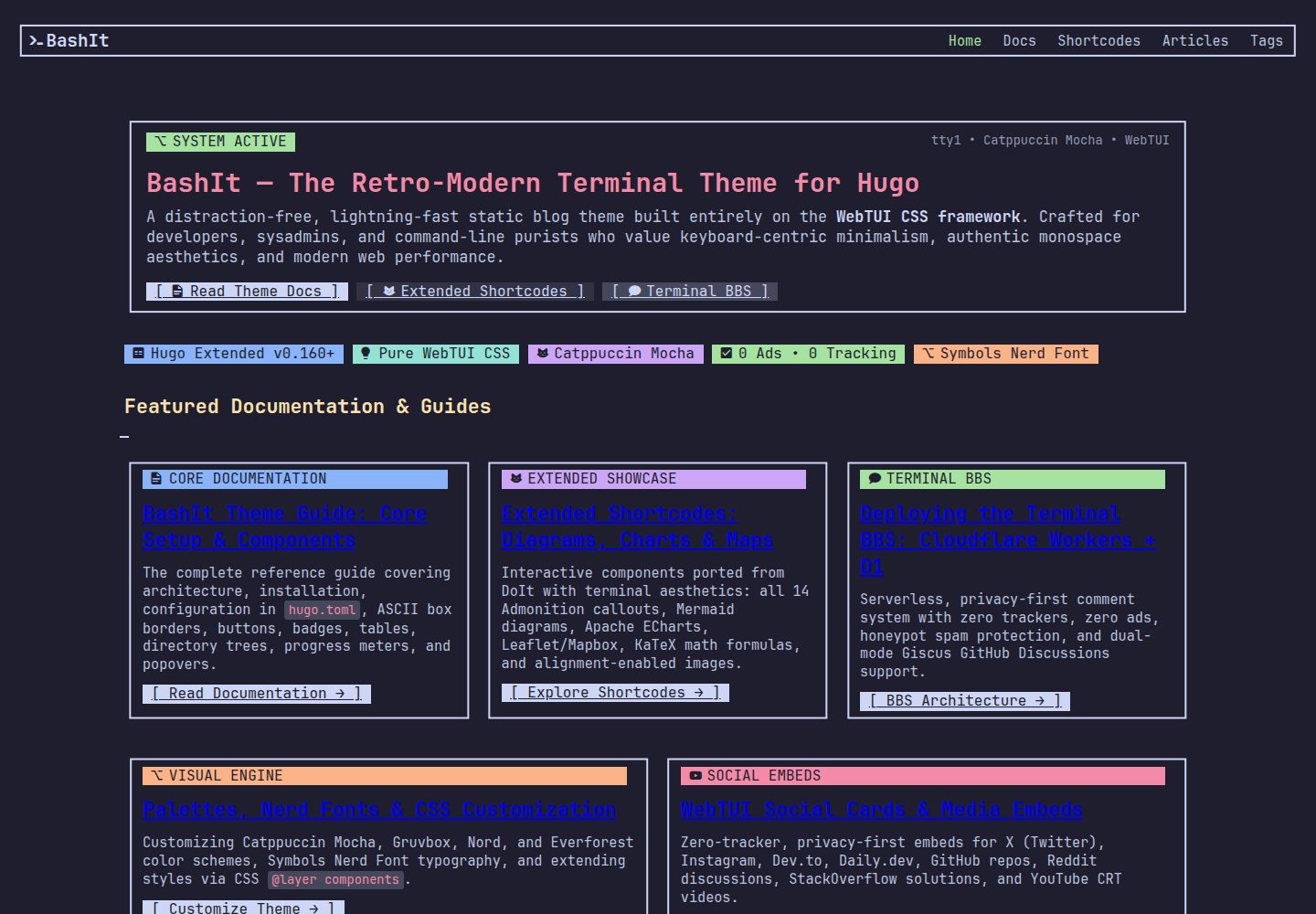
基于 WebTUI CSS 构建终端风格界面组件,包括按钮、徽章、ASCII 边框、进度条和弹出层
Hugo博客启动器
BashIt — Hugo 博客模板
作者 Debajyati
BashIt 是一个基于 WebTUI CSS 的 Hugo 主题,采用终端界面风格,适合搭建个人站点与博客,内置多种技术内容短代码和两套评论方案。
看看你的网站会是什么样
浏览真实页面截图,比较内容排版与手机效果。点击下方缩略图切换,放大查看整页细节。
全部页面与视图 3
截图用于了解视觉与布局,交互效果请以实际项目为准。
采集于 2026-09-30查看来源
值得关注的模板亮点
从已有项目资料中,快速了解它的特点。
提供 webtui-box、webtui-callout、webtui-table 等终端风格短代码,callout 含 14 种提示变体
集成 Mermaid 图表、Apache ECharts 可视化、KaTeX 公式、Leaflet 与 Mapbox GL 地图等富技术内容
内置 YouTube 隐私增强播放器、GitHub 仓库卡片及多个社交平台嵌入卡片和 OpenGraph 链接卡片
评论系统可选 Cloudflare Workers + D1 SQLite 自托管 Terminal BBS 或 GitHub Discussions 驱动的 Giscus
支持全局、正文与代码三级字体独立配置,并兼容 JetBrains Mono Nerd Font 与 Symbols Nerd Font
模板详细介绍
BashIt 是面向 Hugo 的终端界面风格主题,界面由 WebTUI CSS 组件构成,使用 Catppuccin 等配色,整体呈现复古终端与现代网页结合的观感。主题定位为个人站点加博客,适合开发者、系统管理员和习惯命令行界面的用户。
内容能力方面,主题提供 webtui-box、webtui-callout、webtui-table 等终端风格短代码,并集成 Mermaid 图表、Apache ECharts 可视化、KaTeX 公式、Leaflet 与 Mapbox GL 地图、标签面板和打字机动画等。媒体与社交嵌入包括 YouTube 隐私增强播放器、GitHub 仓库卡片、X、Instagram、Peerlist、Reddit、Dev.to、Daily.dev 等平台卡片,以及基于 OpenGraph 抓取的通用链接卡片。
评论系统提供两种可选方案:基于 Cloudflare Workers 与 D1 SQLite 的自托管 Terminal BBS,以及基于 GitHub Discussions 的 Giscus。主题在导航栏图标、全局与正文及代码字体上提供独立配置,并支持 Nerd Font 图标。
使用限制:主题要求 Hugo Extended,需通过 npm 安装 WebTUI 依赖以完成本地资源打包;评论、OpenGraph 抓取等能力依赖外部服务,需自行部署或配置。演示图片、字体、图标等第三方素材的许可需单独核对。
Hugo博客启动器
适合你的项目吗?
适用场景
- 搭建以终端界面为视觉风格的个人站点与博客
- 撰写包含流程图、数据图表、数学公式或地图的技术文章
- 需要自托管评论系统并希望避免第三方追踪的博客
- 在文章中嵌入 GitHub 仓库、视频或社交平台内容卡片
适合人群
- 使用 Hugo 并希望获得终端风格主题的开发者
- 习惯命令行界面与等宽字体审美的系统管理员
- 需要在文章中展示图表、公式等技术内容的博客作者
- 希望评论数据自主可控、可部署 Cloudflare Workers 的用户
上手与定制指南
结合仓库当前版本的说明,按下面的资料检查内容、配置与运行要求。
- 1
主题要求 Hugo Extended,可通过 git submodule 添加到站点的 themes/BashIt 目录
- 2
需在主题目录执行 npm install,安装 WebTUI 本地依赖以完成离线资源打包
- 3
在 hugo.toml 中设置 theme = 'BashIt',并按需配置配色、导航栏图标与字体参数
- 4
评论功能需在 params.comment 中选择 cloudflare 或 giscus,并填写对应的 API 地址或仓库信息
- 5
OpenGraph 链接卡片依赖可配置的抓取服务,需自行部署或指定可用接口
授权与来源资料
使用条件与限制
免费使用 · 保留许可声明本次收录的是公开仓库中采用 MIT 许可的免费版本;免费范围为该版本代码,不代表外部服务或第三方素材免费。
使用时需要遵守
- 允许免费使用、修改、商用和分发该版本代码。
- 分发代码副本或实质性部分时,保留原作者版权声明和完整 MIT 许可声明。
- 代码按现状提供;担保与责任限制以原许可证及适用法律为准。
额外费用与待核对事项
- 评论功能若选用 Terminal BBS 方案,需自行部署 Cloudflare Workers 与 D1 SQLite 服务,并配置对应 API 地址,属于外部服务依赖。
- OpenGraph 链接卡片依赖可配置的抓取服务,需自行部署或指定可用接口,属于外部服务依赖。
- 需在主题目录执行 npm install 安装 WebTUI 本地依赖,才能完成离线资源打包。
- 主题要求使用 Hugo Extended 版本,普通版 Hugo 可能无法正常构建。
- 演示图片、字体、图标及其他第三方素材需按各自许可核对,不能仅凭代码的 MIT 许可判断。
- 域名、托管、数据库、支付或 AI 等外部服务可能另外收费。
查看原文依据
Permission is hereby granted, free of charge
许可证原文
Self-hosted serverless bulletin board system backed by **Cloudflare Workers + D1 SQLite**
README 原文
OpenGraph Link Preview Scraper API (Optional)
README 原文
install the local WebTUI dependencies for offline asset bundling
README 原文
https://github.com/Debajyati/BashIt/blob/main/LICENSEhttps://github.com/Debajyati/BashIt/blob/main/README.mdHugo Extended
README 原文
DeepSeek 根据仓库许可证和 README 整理 ·2026-10-01。结果仅覆盖已读取资料,依赖、图片、字体及后续条款变更以各自原文为准。
项目核对记录与介绍依据
模板资料
- 来源平台
- GitHub
- 资料与维护参考分
- 资料较完整 · 88 / 100
- 技术栈
- Hugo
- 网站类型
- 博客 · 启动器
这个分数如何计算
本站按许可资料(最高30分)、演示链接(12分)、预览图(10分)、Star数(15分)、记录的维护时间(15分)、描述完整度(8分)、功能记录(5分)和分类资料(5分)计算。它不是代码、安全或性能测试,也不是 Google 评分;有链接不代表已实测可用。
这个项目需要核对什么
- 记录的仓库更新时间
- 2026-09-20
- 截图检查日期
- 2026-10-01
已收录演示链接。请用你的内容与屏幕尺寸检查;有演示不代表表单、认证或支付已经可用。
目录记录的主要技术栈是 Hugo。请通过依赖清单和锁文件核对实际版本与托管要求。这些说明基于收录资料,不代表代码审计或部署实测。
查看具体选型方法 →介绍的制作与核对状态
介绍由 AI 辅助整理目录与仓库资料。仓库作者不等于这篇介绍的审核者。
已完成服务器许可规则与 AI 来源核对;未经过人工编辑审核。
查看当时使用的来源资料
SHA-256: f7396e9b5015ac14e1920a4f3a78013a29572c0cd3d21472f2002445b26aff4c
2026-10-01T15:14:44.877Z
来源文件 / 仓库# BashIt 📟
[](https://gohugo.io/)
[](https://github.com/webtui/webtui)
[](https://github.com/catppuccin/catppuccin)
[](https://www.nerdfonts.com/)
[](LICENSE)
[]()
A distraction-free, lightning-fast retro-modern terminal UI theme for [Hugo](https://gohugo.io/), built entirely on the [WebTUI CSS framework](https://github.com/webtui/webtui).
Designed for developers, sysadmins, and command-line enthusiasts who appreciate authentic monospace aesthetics, keyboard-centric minimalism, and modern web performance.
---
## ✨ Features
- **Pure WebTUI CSS Components**: Buttons, badges, ASCII box borders, progress meters, and popovers built with native CSS layers (`@layer base, utils, components`) — zero heavy JS or CSS runtimes.
- **3-Tier Typography Engine**: Independent customization for global UI font, prose/paragraph font, and code block font with built-in **JetBrains Mono Nerd Font** & **Symbols Nerd Font** support.
- **Dual-Mode Unified Comments**:
- **Terminal BBS**: Self-hosted serverless bulletin board system backed by **Cloudflare Workers + D1 SQLite**, featuring zero trackers, zero ads, and honeypot spam defense.
- **Giscus**: GitHub Discussions-powered discussions with Catppuccin dark mode styling.
- **Privacy-First Media & Social Embeds**:
- **YouTube CRT Player**: Monospace video terminal with privacy-enhanced mode (`youtube-nocookie.com`).
- **Social Cards**: Official dark widgets and clean cards for **X (Twitter)**, **Instagram**, **Peerlist**, **Reddit**, **Dev.to**, **Daily.dev**, and **GitHub** repository cards.
- **Universal OpenGraph Linkcards**: Auto-scrapes metadata at build time via configurable OpenGraph microservices.
- **Rich Technical Shortcodes**:
- 14 distinct Admonition callouts (Note, Tip, Warning, Danger, Terminal, Git, etc.).
- Interactive Mermaid.js diagrams & Apache ECharts data visualizations (lazy-loaded).
- Dark theme Leaflet & Mapbox GL geographic maps.
- KaTeX mathematical formula rendering.
- Interactive Tabbed panels and Typewriter text animation (`typeit`).
- WebTUI styled tables with flexible delimiters (`;;`, `\n`, `|`) and Markdown cell rendering.
- **Blazing Fast**: Compiles 60+ pages in under 55ms via Hugo Pipes asset bundling.
---
## 🚀 Installation
You can add this repo as a submodule of your Hugo site directory:
```bash
git submodule add https://github.com/Debajyati/BashIt.git themes/BashIt
```
And later you can update the submodule in your site directory to the latest commit using this command:
```bash
git submodule update --remote --merge
```
Next, install the local WebTUI dependencies for offline asset bundling:
```bash
cd themes/BashIt
npm install
```
---
## ⚙️ Quickstart Configuration
Add `BashIt` to your site's `hugo.toml`:
```toml
baseURL = 'https://yoursite.org/'
title = 'My Terminal Blog'
theme = 'BashIt'
[params]
webtuiTheme = 'catppuccin' # Options: catppuccin, gruvbox, nord, everforest
# Brand Icon / Logo in Navbar (Vim glyph by default)
[params.navbar]
icon = "" # Nerd font glyph, Unicode emoji ("⚡"), or path to SVG/PNG logo
# disableIcon = true # Set to true for text-only navbar
# Typography Customization
[params.font]
# global = "JetBrainsMono Nerd Font"
# paragraph = "JetBrainsMono Nerd Font"
# code = "JetBrainsMono Nerd Font"
# Comments Configuration
[params.comment]
enable = true
provider = "cloudflare" # "cloudflare" (Terminal BBS) | "giscus" | "disabled"
[params.comment.cloudflare]
api = "https://bashit-comments.<your-subdomain>.workers.dev"
mockMode = false # Set to true for offline local testing via localStorage
[params.comment.giscus]
repo = "username/repo"
repoId = "R_kgD..."
category = "Announcements"
categoryId = "DIC_kwD..."
mapping = "pathname"
theme = "catppuccin_mocha"
# OpenGraph Link Preview Scraper API (Optional)
[params.opengraph]
scraperApi = "https://xogapi.ddebajyati.workers.dev"
```
---
## 🧩 Shortcode Overview
| Shortcode | Purpose | Example Syntax |
|---|---|---|
| `{{< webtui-box >}}` | Terminal ASCII border box | `{{< webtui-box style="square" >}}Content{{< /webtui-box >}}` |
| `{{< webtui-callout >}}` | Admonition box (14 variants) | `{{< webtui-callout variant="tip" title="Pro Tip" >}}Text{{< /webtui-callout >}}` |
| `{{< webtui-table >}}` | WebTUI table with divider lines | `{{< webtui-table headers="A \| B" rows="1 \| 2 ;; 3 \| 4" divide="both" >}}` |
| `{{< youtube >}}` | CRT TV YouTube player | `{{< youtube "dQw4w9WgXcQ" >}}` |
| `{{< github >}}` | GitHub repo card with live stats | `{{< github "Debajyati/BashIt" >}}` |
| `{{< peerlist >}}` | Peerlist embed with auto-resize | `{{< peerlist "ACTHOK8A7BG66JBGR17ALNR98QPL7Q" >}}` |
| `{{< dailydev >}}` | Daily.dev curated article card | `{{< dailydev "https://dly.to/g9vaRB1agcs" >}}` |
| `{{< linkcard >}}` | OpenGraph link card | `{{< linkcard "https://gohugo.io" >}}` |
| `{{< mermaid >}}` | Mermaid flowchart / sequence | `{{< mermaid >}}graph LR; A-->B;{{< /mermaid >}}` |
| `{{< echarts >}}` | Apache ECharts visualization | `{{< echarts >}}{"series":[...]}{{< /echarts >}}` |
| `{{< math >}}` | KaTeX math equation block | `{{< math >}}\int_{-\infty}^{\infty} e^{-x^2} dx = \sqrt{\pi}{{< /math >}}` |
---
## 🛠️ Development & Contributing
To run tests or preview the theme locally:
```bash
# 1. Clone the theme repository
git clone https://github.com/Debajyati/BashIt.git
cd BashIt
# 2. Install dependencies
npm install
# 3. Test build
hugo --source .
```
Pull requests and issues are welcome! Feel free to report bugs, suggest new shortcodes, or submit styling improvements.
---
## 📄 License
This theme is open-source software licensed under the [MIT License](LICENSE).
Built on top of the open-source [WebTUI CSS framework](https://github.com/webtui/webtui) and [Catppuccin](https://github.com/catppuccin/catppuccin) color palettes.
看看同类模板
对比同技术栈与用途的模板,找到更适合的视觉与内容结构。

hugo-PaperMod
PaperMod 是 Hugo 生态里知名度较高的主题之一,定位很明确:给博客和轻量作品集站点提供一套干净、响应式的阅读界面。
Hugo · 作品集

LoveIt
❤️A clean, elegant but advanced blog theme for Hugo 一个简洁、优雅且高效的 Hugo 主题
Hugo · 博客

hugo-coder
A minimalist blog theme for hugo.
Hugo · 博客

blowfish
Personal Website & Blog Theme for Hugo
Hugo · 博客

hugo-paper
🪺 A simple, clean, customizable Hugo theme
Hugo · 博客

hextra
Hextra 是一个 Hugo 主题,定位在文档站与博客之间:既提供侧边栏导航、目录、面包屑、分页这类文档站结构,也能承载博客内容。
Hugo · 文档