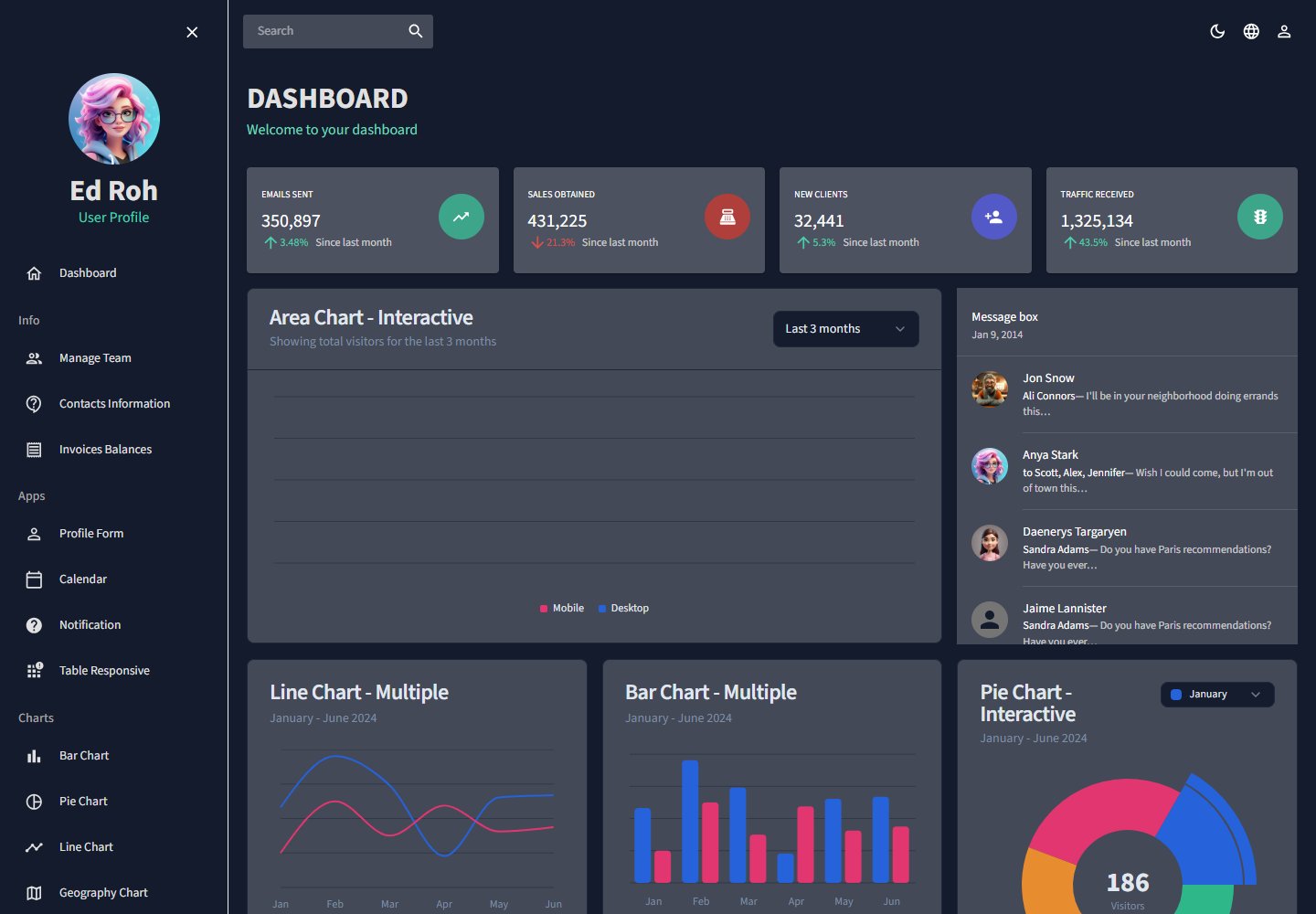
使用 React JS 作为界面构建基础,通过可复用组件组织管理后台界面
React后台
dashboard-admin-base — React 后台模板
作者 dehoyos9804
基于 React JS 构建的管理后台仪表盘模板,使用 Material UI 与 shadcn/ui 组件库,README 称其为响应式管理界面,并提供 npm 开发、测试、构建与 eject 脚本。
看看你的网站会是什么样
浏览真实页面截图,比较内容排版与手机效果。点击下方缩略图切换,放大查看整页细节。
全部页面与视图 2
截图用于了解视觉与布局,交互效果请以实际项目为准。
采集于 2026-10-16查看来源
值得关注的模板亮点
从已有项目资料中,快速了解它的特点。
集成 Material UI,采用其预定义且可定制的组件实现统一设计系统
引入 shadcn/ui 补充组件,以更灵活的方式定制界面细节
README 声明模板为完全响应式,适配移动端到桌面端
提供 npm start、npm test、npm run build、npm run eject 等脚本说明
包含在线演示链接,并附有桌面与移动端预览截图
模板详细介绍
该模板是一个用 React JS 开发的管理后台仪表盘(Dashboard Admin Template),目标为创建现代、直观且完全响应式的管理界面,适配从移动端到桌面端的设备。README 说明其技术栈包括 React JS、Material UI 和 shadcn/ui,其中 Material UI 用于实现一致且现代的设计系统,shadcn/ui 用于补充额外组件并支持界面细节定制。项目提供在线演示链接,并给出本地运行步骤:克隆仓库后推荐使用 npm,通过 npm start 在开发模式运行并访问 localhost:3000,npm test 启动交互式测试,npm run build 生成生产构建到 build 文件夹,npm run eject 为单向操作。README 未提供具体页面模块、路由、状态管理、鉴权、API 集成或部署配置的说明,也未列出依赖清单中的具体框架版本号。
React后台
适合你的项目吗?
适用场景
- 作为管理后台界面的起步模板,在本地克隆后通过 npm start 进行开发调试
- 使用 npm run build 生成生产构建并部署到静态托管环境
- 在 React 项目中参考 Material UI 与 shadcn/ui 的组合使用方式
- 通过在线演示快速查看模板在桌面与移动端的实际呈现
适合人群
- 需要 React 管理后台界面基础结构的开发者
- 希望同时使用 Material UI 与 shadcn/ui 组件库的前端项目
- 需要响应式后台模板用于开发或测试目的的团队
- 希望基于现有模板进行界面定制而非从零搭建的开发者
上手与定制指南
结合仓库当前版本的说明,按下面的资料检查内容、配置与运行要求。
- 1
README 建议使用 npm 作为包管理器
- 2
克隆仓库:git clone https://github.com/dehoyos9804/dashboard-admin-base.git
- 3
npm start 在开发模式运行,访问 http://localhost:3000
- 4
npm test 启动交互式测试运行器
- 5
npm run build 生成生产构建到 build 文件夹;npm run eject 为单向操作,执行后无法回退
授权与来源资料
使用条件与限制
免费使用 · 保留许可声明本次收录的是公开仓库中采用 MIT 许可的免费版本;免费范围为该版本代码,不代表外部服务或第三方素材免费。
使用时需要遵守
- 允许免费使用、修改、商用和分发该版本代码。
- 分发代码副本或实质性部分时,保留原作者版权声明和完整 MIT 许可声明。
- 代码按现状提供;担保与责任限制以原许可证及适用法律为准。
额外费用与待核对事项
- 演示图片、字体、图标及其他第三方素材需按各自许可核对,不能仅凭代码的 MIT 许可判断。
- 域名、托管、数据库、支付或 AI 等外部服务可能另外收费。
查看原文依据
https://github.com/dehoyos9804/dashboard-admin-base/blob/develop/LICENSE.mdhttps://github.com/dehoyos9804/dashboard-admin-base/blob/develop/README.mdPermission is hereby granted, free of charge
许可证原文
DeepSeek 根据仓库许可证和 README 整理 ·2026-10-14。结果仅覆盖已读取资料,依赖、图片、字体及后续条款变更以各自原文为准。
项目核对记录与介绍依据
模板资料
- 来源平台
- GitHub
- 资料与维护参考分
- 资料一般 · 68 / 100
- 技术栈
- React
- 网站类型
- 后台
这个分数如何计算
本站按许可资料(最高30分)、演示链接(12分)、预览图(10分)、Star数(15分)、记录的维护时间(15分)、描述完整度(8分)、功能记录(5分)和分类资料(5分)计算。它不是代码、安全或性能测试,也不是 Google 评分;有链接不代表已实测可用。
这个项目需要核对什么
- 记录的仓库更新时间
- 2024-09-08
- 截图检查日期
- 2026-10-16
已收录演示链接。请用你的内容与屏幕尺寸检查;有演示不代表表单、认证或支付已经可用。
目录记录的主要技术栈是 React。请通过依赖清单和锁文件核对实际版本与托管要求。这些说明基于收录资料,不代表代码审计或部署实测。
查看具体选型方法 →介绍的制作与核对状态
介绍由 AI 辅助整理目录与仓库资料。仓库作者不等于这篇介绍的审核者。
审核声明: codex-user-requested-batch-review-20261017 · 2026-10-16
查看当时使用的来源资料
SHA-256: f24142039e3e28410b5e46c303b1a0b053a782c81a49d366e0e68309a82807f1
2026-10-14T01:09:26.230Z
来源文件 / 仓库# DASHBOARD ADMIN TEMPLATE RECT JS This project is a **Dashboard Admin Template** developed in **React JS**. The main objective of the project was to create a modern, intuitive and fully **responsive** administration interface that adapts to any device, from mobile to desktop. ## Technologies and Libraries Used 🤖 - **[React JS](https://react.dev/)**: The foundation of the project, a JavaScript library for efficiently building user interfaces through the use of reusable components. - **[Material UI](https://mui.com/)**: It was used to implement a consistent and modern design system, taking advantage of its extensive collection of predefined and highly customizable components. - **[shadcn/ui](https://shadcn.dev/)**: It was integrated to complement Material UI, adding additional components with a minimalist and flexible approach, allowing detailed customization of the interface. ## Demo 👀 Visit the following link to see the demo in action: [](https://dashboard-admin-de-hoyos.netlify.app/) ## Getting started 🚀 _These instructions will allow you to get a working copy of the project on your local machine for development and testing purposes._ ### Clone this repository and host it in a convenient folder. ```sh git clone https://github.com/dehoyos9804/dashboard-admin-base.git ``` It is recommended to use [**npm**](https://www.npmjs.com/) ### Available Scripts In the project directory, you can run: ### `npm start` Runs the app in the development mode.\ Open [http://localhost:3000](http://localhost:3000) to view it in your browser. The page will reload when you make changes.\ You may also see any lint errors in the console. ### `npm test` Launches the test runner in the interactive watch mode.\ See the section about [running tests](https://facebook.github.io/create-react-app/docs/running-tests) for more information. ### `npm run build` Builds the app for production to the `build` folder.\ It correctly bundles React in production mode and optimizes the build for the best performance. The build is minified and the filenames include the hashes.\ Your app is ready to be deployed! See the section about [deployment](https://facebook.github.io/create-react-app/docs/deployment) for more information. ### `npm run eject` **Note: this is a one-way operation. Once you `eject`, you can't go back!** If you aren't satisfied with the build tool and configuration choices, you can `eject` at any time. This command will remove the single build dependency from your project. Instead, it will copy all the configuration files and the transitive dependencies (webpack, Babel, ESLint, etc) right into your project so you have full control over them. All of the commands except `eject` will still work, but they will point to the copied scripts so you can tweak them. At this point you're on your own. You don't have to ever use `eject`. The curated feature set is suitable for small and middle deployments, and you shouldn't feel obligated to use this feature. However we understand that this tool wouldn't be useful if you couldn't customize it when you are ready for it. ## License 📄 This project is licensed under the MIT License - see the file [LICENSE.md](LICENSE.md) for details. --- ⌨️ con ❤️ por [Aldair De Hoyos](https://github.com/dehoyos9804) 😊
看看同类模板
对比同技术栈与用途的模板,找到更适合的视觉与内容结构。
ant-design-pro
Ant Design Pro 是 Ant Design 官方推出的企业级中后台前端脚手架,基于 React 19、Umi Max 4 和 antd 6 构建,内置 TypeScript 支持。
React · 后台

coreui-free-react-admin-template
Free React Admin & Dashboard Template Built for AI-Assisted Development
React · 后台

fastapi-react
fastapi-react 是一个基于 Cookiecutter 的模板,用于快速搭建 FastAPI 与 React(TypeScript)的全栈项目。
React · 后台

react-antd-admin-template
一个基于React+Antd的后台管理模版,在线预览https://nlrx-wjc.github.io/react-antd-admin-template/
React · 后台

react-saas-template
🌊 Template for building an SaaS / admin website using React + Material-UI
React · 后台

react-material-admin
☄️React Material Admin is a React template built with Material-UI
React · 后台