基于 Next.js 的起始模板,使用 TypeScript 编写
Next.jsReact启动器
xostarter — Next.js 启动器模板
作者 egarrisxn
XOStarter 是 Ethan G. 发布的 Next.js 起始模板,集成 TypeScript、Tailwind CSS、shadcn/ui、Motion、lucide-react 与 ESLint/Prettier,默认使用 pnpm,并提供 Vercel 部署入口。
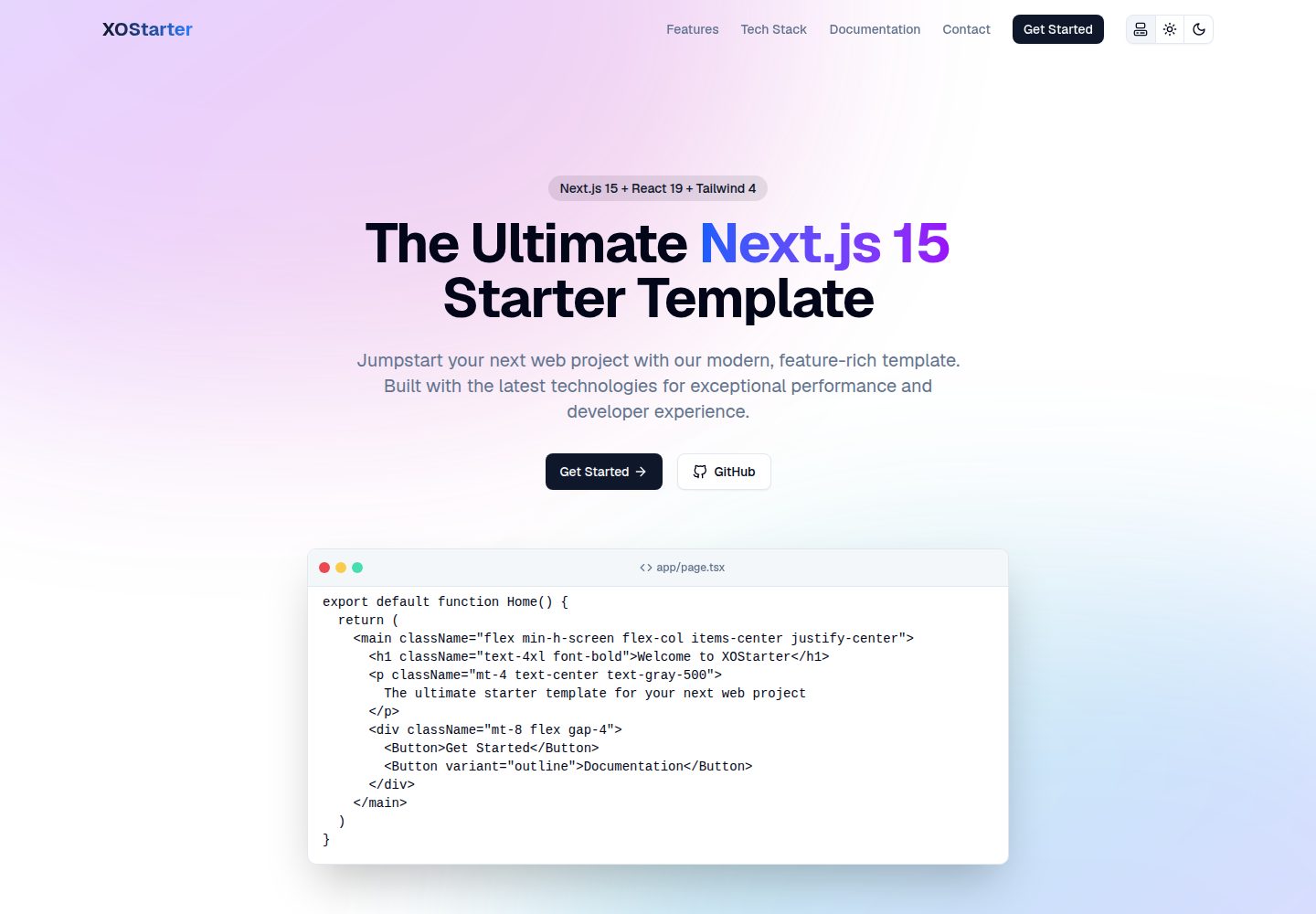
看看你的网站会是什么样
浏览真实页面截图,比较内容排版与手机效果。点击下方缩略图切换,放大查看整页细节。
全部页面与视图 2
截图用于了解视觉与布局,交互效果请以实际项目为准。
采集于 2026-10-14查看来源
值得关注的模板亮点
从已有项目资料中,快速了解它的特点。
集成 Tailwind CSS、shadcn/ui、Motion 与 lucide-react
默认使用 pnpm,可修改 package.json 切换至 npm、yarn 或 bun
配置集中在 utils/config.ts,便于统一调整
内置 Vercel Analytics,部署后可在 Vercel 面板启用
使用 next/font 加载字体,默认包含 Geist
模板详细介绍
XOStarter 是一个基于 Next.js 的起始模板,作者为 Ethan G.,采用 MIT 许可。README 说明其目标是简化开发流程,但未提供具体性能或生产就绪程度的说明。
技术栈方面,模板使用 TypeScript 保证类型安全,Next.js 作为 React 框架,Tailwind CSS 负责样式,shadcn/ui 提供 UI 组件,Motion 处理动画,lucide-react 提供图标,ESLint 与 Prettier 负责代码检查与格式化。部署方面推荐 Vercel,但 README 也指出可以部署到任何支持 Next.js 的平台。
模板默认强制使用 pnpm 作为包管理器,若想改用 npm、yarn 或 bun,需要修改 package.json 中的 preinstall 与 prebuild 脚本。项目配置集中在 utils/config.ts,便于调整。样式部分结合 shadcn/ui 与 Tailwind CSS v4,可通过 shadcn CLI 添加组件或重新初始化以自定义基础 UI 颜色。字体使用 next/font,默认包含 Geist。
元数据方面,由于使用 Next.js 15 的 App Router,OpenGraph/Twitter 图片、图标、manifest、robots 与 sitemap 等文件可直接放在 app 目录中被自动识别,layout.tsx 中相关属性已注释掉作为参考。模板还集成了 Vercel Analytics,可在部署后于 Vercel 面板启用,或卸载并移除 layout.tsx 中的引用。README 未提供关于测试、CI/CD、数据库或认证等额外功能的说明。
Next.jsReact启动器
适合你的项目吗?
适用场景
- 快速搭建一个使用 Next.js 与 TypeScript 的新项目骨架
- 需要 Tailwind CSS 与 shadcn/ui 组件库作为样式与 UI 基础
- 希望以 Vercel 作为部署目标并启用基础分析
- 想要一个包含 ESLint 与 Prettier 的代码检查与格式化配置
适合人群
- 熟悉 Next.js 与 TypeScript 的开发者
- 偏好 pnpm 或愿意自行切换包管理器的用户
- 计划在 Vercel 或支持 Next.js 的平台部署项目的人
- 需要 shadcn/ui 与 Tailwind CSS 作为 UI 起点的项目
上手与定制指南
结合仓库当前版本的说明,按下面的资料检查内容、配置与运行要求。
- 1
克隆仓库后运行 pnpm install 安装依赖
- 2
运行 pnpm dev 启动开发服务器,默认访问 http://localhost:3000
- 3
如需改用 npm、yarn 或 bun,先移除 package.json 中的 preinstall 与 prebuild 脚本
- 4
通过 pnpm dlx shadcn@latest add [component] 添加 shadcn/ui 组件
- 5
运行 pnpm dlx shadcn@latest init 可重新配置 CSS 变量以自定义基础 UI 颜色
授权与来源资料
使用条件与限制
免费使用 · 保留许可声明本次收录的是公开仓库中采用 MIT 许可的免费版本;免费范围为该版本代码,不代表外部服务或第三方素材免费。
使用时需要遵守
- 允许免费使用、修改、商用和分发该版本代码。
- 分发代码副本或实质性部分时,保留原作者版权声明和完整 MIT 许可声明。
- 代码按现状提供;担保与责任限制以原许可证及适用法律为准。
额外费用与待核对事项
- 演示图片、字体、图标及其他第三方素材需按各自许可核对,不能仅凭代码的 MIT 许可判断。
- 域名、托管、数据库、支付或 AI 等外部服务可能另外收费。
- 模板默认强制使用 pnpm 作为包管理器;若要改用 npm、yarn 或 bun,需先修改 package.json 中的 preinstall 与 prebuild 脚本。
- 模板集成了 Vercel Analytics,需在部署后通过 Vercel 面板启用,属于依赖 Vercel 平台的外部服务。
- README 推荐使用 Vercel 部署以获得最便捷的体验,但并非强制,也可部署到其他支持 Next.js 的平台。
查看原文依据
Permission is hereby granted, free of charge
许可证原文
By default, this template enforces `pnpm`. To use another package manager, follow these steps:
README 原文
This template includes [Vercel Analytics](https://vercel.com/docs/analytics) for basic site tracking. After deployment, you can enable analytics through your Vercel dashboard.
README 原文
https://github.com/egarrisxn/xostarter/blob/main/LICENSEhttps://github.com/egarrisxn/xostarter/blob/main/README.mdNote: You are not limited to Vercel and may deploy this template on any platform that supports Next.js. However, in my experience, Vercel provides the fastest and most convenient setup.
README 原文
DeepSeek 根据仓库许可证和 README 整理 ·2026-10-14。结果仅覆盖已读取资料,依赖、图片、字体及后续条款变更以各自原文为准。
项目核对记录与介绍依据
模板资料
- 来源平台
- GitHub
- 资料与维护参考分
- 资料较完整 · 85 / 100
- 技术栈
- Next.js · React
- 网站类型
- 启动器
这个分数如何计算
本站按许可资料(最高30分)、演示链接(12分)、预览图(10分)、Star数(15分)、记录的维护时间(15分)、描述完整度(8分)、功能记录(5分)和分类资料(5分)计算。它不是代码、安全或性能测试,也不是 Google 评分;有链接不代表已实测可用。
这个项目需要核对什么
- 记录的仓库更新时间
- 2026-05-16
- 截图检查日期
- 2026-10-14
已收录演示链接。请用你的内容与屏幕尺寸检查;有演示不代表表单、认证或支付已经可用。
目录记录的主要技术栈是 Next.js。请通过依赖清单和锁文件核对实际版本与托管要求。这些说明基于收录资料,不代表代码审计或部署实测。
查看具体选型方法 →介绍的制作与核对状态
介绍由 AI 辅助整理目录与仓库资料。仓库作者不等于这篇介绍的审核者。
审核声明: codex-user-requested-batch-review-20261017 · 2026-10-16
查看当时使用的来源资料
SHA-256: 903bedd502e4a8faa8b4b7ee3ef360b4865b2411484255a2e9c0e9e9215e53fc
2026-10-14T06:53:06.373Z
来源文件 / 仓库# **XOStarter**  [](https://opensource.org/licenses/MIT)   ## **Overview** This is an easy-to-deploy [Next.js](https://nextjs.org) starter template created by [Ethan G.](https://egxo.dev). It is designed to streamline development with modern tools, ensuring a fast and efficient workflow from setup to deployment. ## **Technologies** This template leverages a modern tech stack for a smooth developer experience: - **Programming Language**: [TypeScript](https://www.typescriptlang.org/) – Ensures type safety and better maintainability. - **Framework**: [Next.js](https://nextjs.org/) – The leading React framework for hybrid static & server-side rendering. - **Deployment**: [Vercel](https://vercel.com) – Optimized for seamless, serverless deployment. - **Styling**: [Tailwind CSS](https://tailwindcss.com/) – Utility-first CSS for rapid styling. - **UI Components**: [shadcn/ui](https://ui.shadcn.com/) – A flexible, customizable UI component library. - **Animations**: [Motion](https://motion.dev) – Powerful animations with an intuitive API. - **Icons**: [lucide-react](https://lucide.dev/) – Crisp, open-source React icons. - **Linting & Formatting**: - [ESLint](https://eslint.org/) – Enforces code quality and best practices. - [Prettier](https://prettier.io/) – Automatic code formatting for consistency. ## **Before You Begin** This template uses [pnpm](https://pnpm.io) as the default package manager for faster dependency resolution and disk space efficiency. However, you can switch to `npm`, `yarn`, or `bun` if preferred. ### Updataing Package Manager By default, this template enforces `pnpm`. To use another package manager, follow these steps: #### 1. Remove `pnpm` Enforcement Open `package.json` and modify or remove the following lines: ```json "preinstall": "npx only-allow pnpm", "prebuild": "pnpm run lint" ``` #### 2. Install Dependencies Using Your Preferred Manager Run one of the following commands: ```bash npm install # or yarn install, bun install ``` Now you're ready to start building! 🚀 ## **Getting Started** #### 1. Clone the Template First, clone the repository onto your local machine: ```bash git clone https://github.com/egarrisxn/xostarter.git cd xo-starter ``` #### 2. Install Dependencies Run the following command to install dependencies: ```bash pnpm install ``` #### 3. Start the Development Server Launch the local development server: ```bash pnpm dev ``` #### 4. Open in Your Browser Once the server is running, open [http://localhost:3000](http://localhost:3000) with your browser to see the result. You can start editing the page by modifying `app/page.tsx`. The page will auto-update as you edit the file. Now, get to building! 🚀 ## **Configuration** Easily customize your project by updating `utils/config.ts`. This file centralizes important settings, allowing for quick adjustments without modifying multiple files. ## **Styling** This project utilizes [shadcn/ui](https://ui.shadcn.com/) alongside [Tailwind CSS v4](https://tailwindcss.com/blog/tailwindcss-v4). We will use the `shadcn/ui` CLI to add components. To install a UI component, run the following command, replacing `[component]` with the actual component name: ```bash pnpm dlx shadcn@latest add [component] ``` ### Updating UI To customize the base UI colors, you'll need to reconfigure your CSS variables. Run: ```bash pnpm dlx shadcn@latest init ``` ## **Fonts** This project uses [`next/font`](https://nextjs.org/docs/app/building-your-application/optimizing/fonts) for optimized font loading. By default, it includes [Geist](https://vercel.com/font), a modern typeface by Vercel. You can easily swap out the font for another one. I recommend using `next/font` for built-in optimization or self-hosting fonts for better performance. Be mindful of font file sizes if sourcing them locally. ## **Metadata** Since we are using the app router in **Next.js 15**, many metadata-related assets no longer need to be manually defined in the `<Head>` of your layout. Instead, Next.js automatically picks them up when they are placed in the `app` folder. For example, the following files are already recognized by Next.js: - **OpenGraph & Twitter images**: `opengraph-image.png` & `twitter-image.png` + alt. txt files. - **Icons**: `favicon.ico`, `apple-icon.png`, `icon.svg`, & `icon.png`. - **Manifest**: `manifest.ts`, `manifest.json`, `manifest.webmanifest`, OR `site.webmanifest`. - **SEO & Crawler files**: `robots.ts` OR `robots.txt` & `sitemap.ts` OR `sitemap.xml`. Because of this, metadata properties like `robots`, `icons`, `manifest`, and OpenGraph/Twitter images are **commented out** in `layout.tsx`. They are left in the code for reference, but they are not necessary unless you want to override the default behavior. If you need to customize metadata on a **per-page basis**, you can still define it manually inside a `metadata` object in the corresponding page or layout file. Otherwise, Next.js will handle it automatically. ### Quick Note For generating favicons, icons, and a `manifest.json`, I **highly** recommend visiting [Real Favicon Generator](https://realfavicongenerator.net) and using their open-sourced tools. ## **Analytics** This template includes [Vercel Analytics](https://vercel.com/docs/analytics) for basic site tracking. After deployment, you can enable analytics through your Vercel dashboard. If you prefer another analytics solution or are deploying elsewhere, simply uninstall the package and remove the import from `layout.tsx`. ## **Deployment** For a seamless deployment experience, use the **Deploy** button below to launch your project on Vercel. Note: You are not limited to Vercel and may deploy this template on any platform that supports Next.js. However, in my experience, Vercel provides the fastest and most convenient setup. [](https://vercel.com/new/clone?repository-url=https%3A%2F%2Fgithub.com%2Fegarrisxn%2Fxostarter) ## **Learn More** To explore more about Next.js, check out these resources: - 📖 [Next.js Documentation](https://nextjs.org/docs) – Official docs covering features and best practices. - 🛠️ [Next.js GitHub](https://github.com/vercel/next.js) – Browse the source code and contribute. ## **License** This project is licensed under the [MIT license](https://opensource.org/licenses/MIT). ## **Contact** If you have any questions or need further assistance, feel free to reach out to me at [github.com/garrisxn](https://github.com/egarrisxn) or send an email to [[email protected]](mailto:[email protected]) and I'll get back to you as soon as possible!
看看同类模板
对比同技术栈与用途的模板,找到更适合的视觉与内容结构。

ai-website-cloner-template
Clone any website with one command using AI coding agents
Next.js · 启动器

Next.js SaaS Starter
Next.js SaaS Starter 是 Next.js 官方维护的 SaaS 起点模板,定位介于学习资源和可直接部署的脚手架之间。
Next.js · SaaS

Next.js Commerce
Next.js Commerce 是 Vercel 团队维护的电商启动模板,基于 Next.js App Router 构建,采用服务端渲染、React Server Components、Server Actions …
Next.js · 电商

Next-js-Boilerplate
Next-js-Boilerplate 是一个面向 Next.js 16、Tailwind CSS 4 和 TypeScript 的启动器,核心定位是开发者体验优先。
Next.js · 启动器

tailwind-nextjs-starter-blog
tailwind-nextjs-starter-blog 是一个面向个人技术博客的 Next.js 与 Tailwind CSS 启动模板,其 v2 版本基于 App Router 与 React Server Comp…
Next.js · 博客

next-forge
Production-grade Turborepo template for Next.js apps.
Next.js · 启动器