集成 Stripe Checkout 定价页与客户门户,支持订阅管理
Next.jsReact后台SaaS启动器
SaaSLaunchpad — Next.js 后台模板
作者 Excelorithm
SaaSLaunchpad 是一个基于 Next.js 的 SaaS 启动模板,集成 Stripe 支付、NextAuth 社交登录、RBAC 权限、用户仪表盘、博客系统与推送通知,采用 PostgreSQL + Drizzle 与 shadcn/ui。
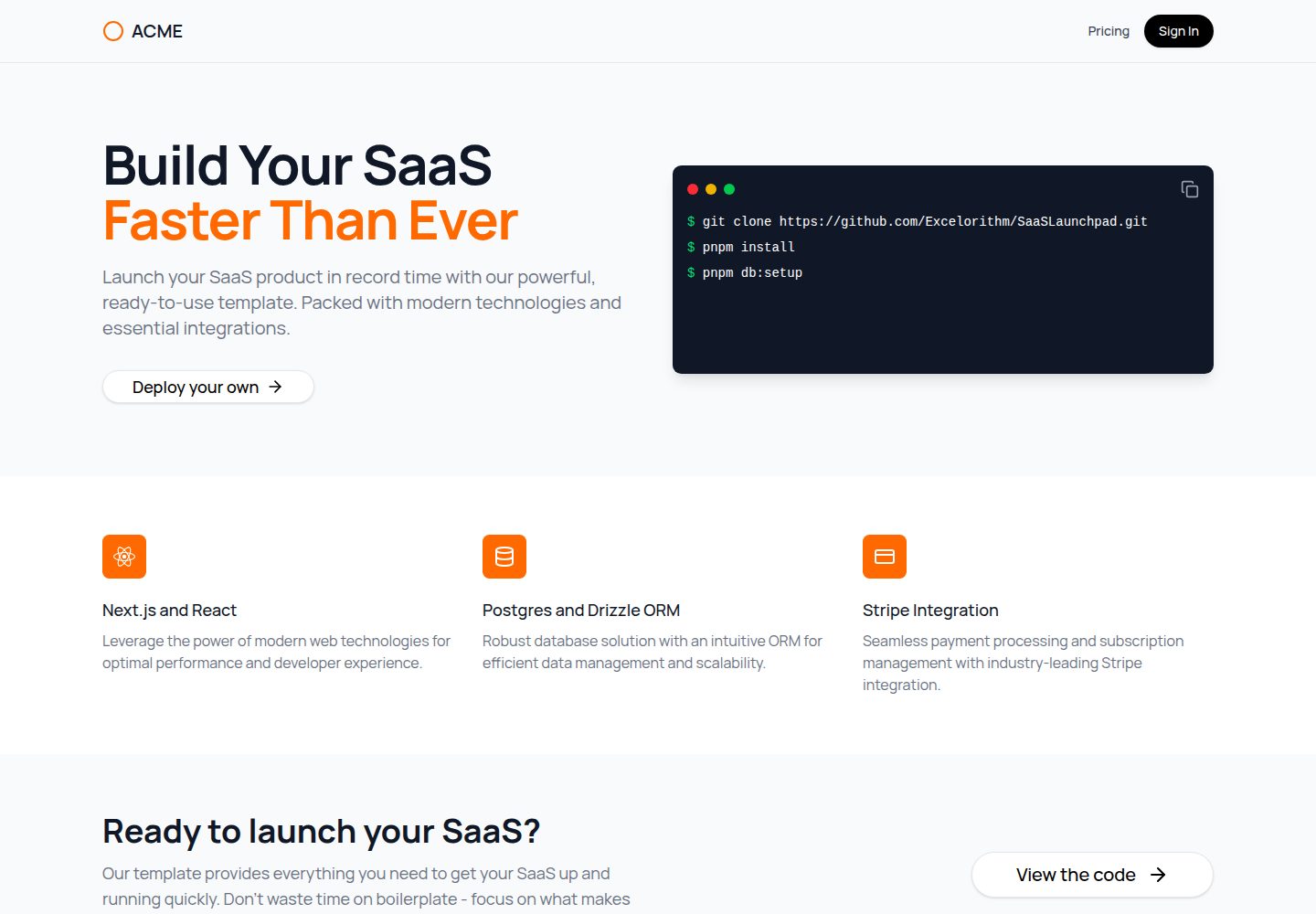
看看你的网站会是什么样
浏览真实页面截图,比较内容排版与手机效果。点击下方缩略图切换,放大查看整页细节。
全部页面与视图 2
截图用于了解视觉与布局,交互效果请以实际项目为准。
采集于 2026-10-02查看来源
值得关注的模板亮点
从已有项目资料中,快速了解它的特点。
基于 NextAuth.js 的社交登录,并提供 Owner/Member 角色 RBAC
用户与团队管理仪表盘,支持 CRUD 操作与活动日志
内置博客系统,含分类、标签、TipTap 富文本编辑器、评论审核、媒体管理与搜索
通过 Nodemailer 发送邮件模板,通过 Firebase 与 OneSignal 推送通知
使用 PostgreSQL + Drizzle ORM 与 shadcn/ui 组件
模板详细介绍
SaaSLaunchpad 是 Excelorithm 维护的 Next.js SaaS 启动模板,基于 Next.js SaaS Starter 扩展而来。它提供营销落地页、Stripe Checkout 定价页、用户与团队管理仪表盘、Owner/Member 角色 RBAC、Stripe 客户门户、NextAuth 社交登录、中间件路由保护与 schema 校验、用户活动日志、Nodemailer 邮件模板,以及 Firebase 与 OneSignal 推送通知。模板还内置完整博客系统,包含分类、标签、文章、TipTap 富文本编辑器、评论审核、媒体管理与搜索。技术栈为 Next.js、PostgreSQL、Drizzle ORM、Stripe、shadcn/ui、NextAuth.js、Nodemailer、Firebase、OneSignal 与 TipTap。
使用前需自行配置大量环境变量,包括数据库、Stripe、NextAuth、Google OAuth、邮件服务器、Firebase 与 OneSignal 等。本地开发需运行 pnpm app:setup、数据库迁移与种子脚本,并通过 Stripe CLI 转发 webhook。部署到 Vercel 时需在项目设置中补齐生产环境变量,并在 Stripe 后台创建生产 webhook。
代码采用 MIT 许可,可免费使用、修改、商用和分发,但需保留版权与许可声明。README 提及的 Firebase 等外部服务需自行配置并核对额度与收费;演示图片、字体、图标等第三方素材需按各自许可核对。模板按现状提供,不附带担保。
Next.js后台SaaS启动器
适合你的项目吗?
适用场景
- 快速搭建带订阅付费与用户仪表盘的 SaaS 产品原型
- 需要社交登录、角色权限与团队管理的后台系统
- 为 SaaS 产品添加内容博客、评论与推送通知模块
- 在 Vercel 上部署 Next.js 全栈应用并接入 Stripe 生产 webhook
适合人群
- 熟悉 Next.js 与 PostgreSQL 的全栈开发者
- 需要 Stripe 订阅与 RBAC 权限的 SaaS 项目
- 希望以 MIT 许可代码为基础进行二次开发的团队
- 能自行配置 Firebase、OneSignal、邮件与 OAuth 等外部服务的开发者
上手与定制指南
结合仓库当前版本的说明,按下面的资料检查内容、配置与运行要求。
- 1
克隆仓库后运行 pnpm install,并通过 pnpm app:setup 配置环境变量
- 2
执行 pnpm db:migrate 与 pnpm db:seed 完成数据库迁移与初始化数据
- 3
运行 pnpm push:setup 配置 Firebase 推送通知
- 4
本地开发使用 pnpm dev,并通过 Stripe CLI 将 webhook 转发到 /api/stripe/webhook
- 5
部署到 Vercel 时需在项目设置中补齐生产环境变量,并在 Stripe 后台创建生产 webhook
授权与来源资料
使用条件与限制
免费使用 · 保留许可声明本次收录的是公开仓库中采用 MIT 许可的免费版本;免费范围为该版本代码,不代表外部服务或第三方素材免费。
使用时需要遵守
- 允许免费使用、修改、商用和分发该版本代码。
- 分发代码副本或实质性部分时,保留原作者版权声明和完整 MIT 许可声明。
- 代码按现状提供;担保与责任限制以原许可证及适用法律为准。
额外费用与待核对事项
- README 仅将 excelorithm.com 作为可选的付费定制/托管开发服务推广,并非使用模板的前提条件;免费使用、修改与分发不受影响。
- 推送通知功能依赖 Firebase 与 OneSignal 等外部服务,需自行注册账号、获取 API 密钥并配置环境变量,可能产生第三方服务费用。
- Stripe 支付与订阅功能需自行注册 Stripe 账号、配置密钥与 webhook,属于外部服务依赖,可能产生交易费用。
- 社交登录需自行申请 Google OAuth 等第三方凭据并配置环境变量,属于外部账号依赖。
- 邮件发送功能需自行提供 SMTP 邮件服务器账号与凭据,属于外部服务依赖。
- README 提及 Firebase 集成;启用相关动态功能前需自行配置,并核对 Firebase 的额度与收费。
- 演示图片、字体、图标及其他第三方素材需按各自许可核对,不能仅凭代码的 MIT 许可判断。
- 域名、托管、数据库、支付或 AI 等外部服务可能另外收费。
查看原文依据
Permission is hereby granted, free of charge
许可证原文
If you need managed software development services or help customizing this starter for your own SaaS, visit [excelorithm.com](https://excelorithm.com).
README 原文
Setup Firebase Push Notifications
README 原文
To handle Stripe webhooks locally, use the Stripe CLI:
README 原文
Social authentication using **NextAuth.js**
README 原文
https://github.com/Excelorithm/SaaSLaunchpad/blob/main/LICENSEhttps://github.com/Excelorithm/SaaSLaunchpad/blob/main/README.mdEmail templates using **Nodemailer**
README 原文
DeepSeek 根据仓库许可证和 README 整理 ·2026-10-02。结果仅覆盖已读取资料,依赖、图片、字体及后续条款变更以各自原文为准。
项目核对记录与介绍依据
模板资料
- 来源平台
- GitHub
- 资料与维护参考分
- 资料较完整 · 92 / 100
- 技术栈
- Next.js · React
- 网站类型
- 后台 · SaaS · 启动器
这个分数如何计算
本站按许可资料(最高30分)、演示链接(12分)、预览图(10分)、Star数(15分)、记录的维护时间(15分)、描述完整度(8分)、功能记录(5分)和分类资料(5分)计算。它不是代码、安全或性能测试,也不是 Google 评分;有链接不代表已实测可用。
这个项目需要核对什么
- 记录的仓库更新时间
- 2026-03-09
- 截图检查日期
- 2026-10-02
已收录演示链接。请用你的内容与屏幕尺寸检查;有演示不代表表单、认证或支付已经可用。
目录记录的主要技术栈是 Next.js。请通过依赖清单和锁文件核对实际版本与托管要求。这些说明基于收录资料,不代表代码审计或部署实测。
查看具体选型方法 →介绍的制作与核对状态
介绍由 AI 辅助整理目录与仓库资料。仓库作者不等于这篇介绍的审核者。
已完成服务器许可规则与 AI 来源核对;未经过人工编辑审核。
查看当时使用的来源资料
SHA-256: 15f5d6d96cfe51e3337f711076832d02149e915b76f8c762d0939b3faa9533e8
2026-10-02T16:44:49.631Z
来源文件 / 仓库 # SaaSLaunchpad Next.js SaaS Starter Welcome to the SaasLaunchpad! This project is designed to help you quickly build a SaaS application using **Next.js**. It includes features such as authentication, Stripe payment integration, and a user dashboard. **Note:** This is an expanded version of the **[Next.js SaaS Starter](https://github.com/nextjs/saas-starter)**, offering a richer feature set beyond the original template. **Live Demo: [https://saaslaunchpad.vercel.app/](https://saaslaunchpad.vercel.app/)** ## Key Features - 🏠 Animated marketing landing page (`/`) - 💳 Pricing page (`/pricing`) integrated with Stripe Checkout - 🛠️ User and team management dashboard with CRUD operations - 🔒 Role-based access control (RBAC) with Owner and Member roles - 💼 Stripe Customer Portal for subscription management - 🔑 Social authentication using **NextAuth.js** - 🛡️ Middleware for route protection and schema validation - 📊 User activity logging - ✉️ Email templates using **Nodemailer** - 🔔 Push notifications via **Firebase** and **OneSignal** - 📝 Full-featured blog system with categories, tags, and posts (`/blog`) - 🖊️ Rich text editor with **TipTap** for blog content creation - 💬 Comments system with moderation capabilities - 🖼️ Media management for blog images - 🔍 Blog search functionality - 🏷️ Content organization with categories and tags ## Technology Stack - **Framework**: [Next.js](https://nextjs.org/) - **Database**: [PostgreSQL](https://www.postgresql.org/) - **ORM**: [Drizzle](https://orm.drizzle.team/) - **Payments**: [Stripe](https://stripe.com/) - **UI Components**: [shadcn/ui](https://ui.shadcn.com/) - **Authentication**: [NextAuth.js](https://next-auth.js.org/) - **Email Service**: [Nodemailer](https://nodemailer.com/) - **Push Notifications**: [Firebase](https://firebase.google.com/), [OneSignal](https://onesignal.com/) - **Rich Text Editor**: [TipTap](https://tiptap.dev/) ## Getting Started Clone the repository and install dependencies: ```bash git clone https://github.com/Excelorithm/SaaSLaunchpad cd SaaSLaunchpad pnpm install ``` ## Local Development Set up your environment variables by running the setup script: ```bash pnpm app:setup ``` Run database migrations and seed the database with initial data: ```bash pnpm db:migrate pnpm db:seed ``` Setup Firebase Push Notifications ```bash pnpm push:setup ``` Start the development server: ```bash pnpm dev ``` Visit [http://localhost:3000](http://localhost:3000) to view the application. To handle Stripe webhooks locally, use the Stripe CLI: ```bash stripe listen --forward-to localhost:3000/api/stripe/webhook ``` ## Testing Stripe Payments Use the following test card details for Stripe payments: - Card Number: `4242 4242 4242 4242` - Expiration Date: Any future date - CVC: Any 3-digit number ## Deployment ### Setting Up Production Stripe Webhook 1. Create a new webhook in the Stripe Dashboard for your production environment. 2. Set the endpoint URL to your production API route (e.g., `https://yourdomain.com/api/stripe/webhook`). 3. Select the events you want to listen for (e.g., `checkout.session.completed`, `customer.subscription.updated`). ### Deploying to Vercel 1. Push your code to a GitHub repository. 2. Connect your repository to [Vercel](https://vercel.com/) and deploy it. 3. Follow the Vercel deployment steps to set up your project. ### Configuring Environment Variables In your Vercel project settings, add the necessary environment variables for production: 1. `APP_NAME`: Your app name. 2. `APP_LOGO`: Your app logo. 3. `BASE_URL`: Your production domain. 4. `POSTGRES_URL`: Your production database URL. 5. `STRIPE_SECRET_KEY`: Your Stripe secret key for production. 6. `STRIPE_WEBHOOK_SECRET`: The webhook secret from your production Stripe webhook. 7. `NEXTAUTH_URL`: Same as "BASE_URL". 8. `NEXTAUTH_SECRET`: A random string for authentication. Generate one using `openssl rand -base64 32`. 9. `NEXT_PUBLIC_LOGIN_URL`: Login page URL, typically "BASE_URL/auth/signin". 10. `GOOGLE_CLIENT_ID`: Client ID for Google OAuth. 11. `GOOGLE_CLIENT_SECRET`: Client secret for Google OAuth. 12. `EMAIL_SERVER_USER`: Username for your email server. 13. `EMAIL_SERVER_PASSWORD`: Password for your email server. 14. `EMAIL_SERVER_HOST`: Host address for your email server. 15. `EMAIL_SERVER_PORT`: Port number for your email server. 16. `EMAIL_FROM`: The email address that your app will use to send emails. 17. `NEXT_PUBLIC_PUSH_NOTIFICATIONS_CHANNEL`: Channel name for push notifications. 18. `NEXT_PUBLIC_FIREBASE_API_KEY`: Firebase API key. 19. `NEXT_PUBLIC_FIREBASE_AUTH_DOMAIN`: Firebase Auth domain. 20. `NEXT_PUBLIC_FIREBASE_PROJECT_ID`: Firebase project ID. 21. `NEXT_PUBLIC_FIREBASE_STORAGE_BUCKET`: Firebase storage bucket. 22. `NEXT_PUBLIC_FIREBASE_MESSAGING_SENDER_ID`: Firebase messaging sender ID. 23. `NEXT_PUBLIC_FIREBASE_APP_ID`: Firebase app ID. 24. `NEXT_PUBLIC_FIREBASE_MEASUREMENT_ID`: Firebase measurement ID. 25. `NEXT_PUBLIC_FIREBASE_VAPID`: Firebase VAPID key for push notifications. 26. `FIREBASE_ADMIN_PROJECT_ID`: Firebase Admin project ID. 27. `FIREBASE_ADMIN_PRIVATE_KEY`: Firebase Admin private key. 28. `FIREBASE_ADMIN_CLIENT_EMAIL`: Firebase Admin client email. 29. `NEXT_PUBLIC_ONESIGNAL_APP_ID`: OneSignal app ID for push notifications. 30. `ONESIGNAL_REST_API_KEY`: OneSignal REST API key for server-side push notifications. ## Managed software development services If you need managed software development services or help customizing this starter for your own SaaS, visit [excelorithm.com](https://excelorithm.com).
看看同类模板
对比同技术栈与用途的模板,找到更适合的视觉与内容结构。

ai-website-cloner-template
Clone any website with one command using AI coding agents
Next.js · 启动器

Next.js SaaS Starter
Next.js SaaS Starter 是 Next.js 官方维护的 SaaS 起点模板,定位介于学习资源和可直接部署的脚手架之间。
Next.js · SaaS

Next.js Commerce
Next.js Commerce 是 Vercel 团队维护的电商启动模板,基于 Next.js App Router 构建,采用服务端渲染、React Server Components、Server Actions …
Next.js · 电商

Next-js-Boilerplate
Next-js-Boilerplate 是一个面向 Next.js 16、Tailwind CSS 4 和 TypeScript 的启动器,核心定位是开发者体验优先。
Next.js · 启动器

tailwind-nextjs-starter-blog
tailwind-nextjs-starter-blog 是一个面向个人技术博客的 Next.js 与 Tailwind CSS 启动模板,其 v2 版本基于 App Router 与 React Server Comp…
Next.js · 博客

next-forge
Production-grade Turborepo template for Next.js apps.
Next.js · 启动器