Zola 静态站点主题,由 Hugo 的 Doks 主题移植而来
HTML启动器
website-theme — HTML 启动器模板
作者 fishfolk
fishfolk 的 Zola 网站主题仓库,基于 AdiDoks 文档主题,用于搭建带博客与文档板块的静态站点。
看看你的网站会是什么样
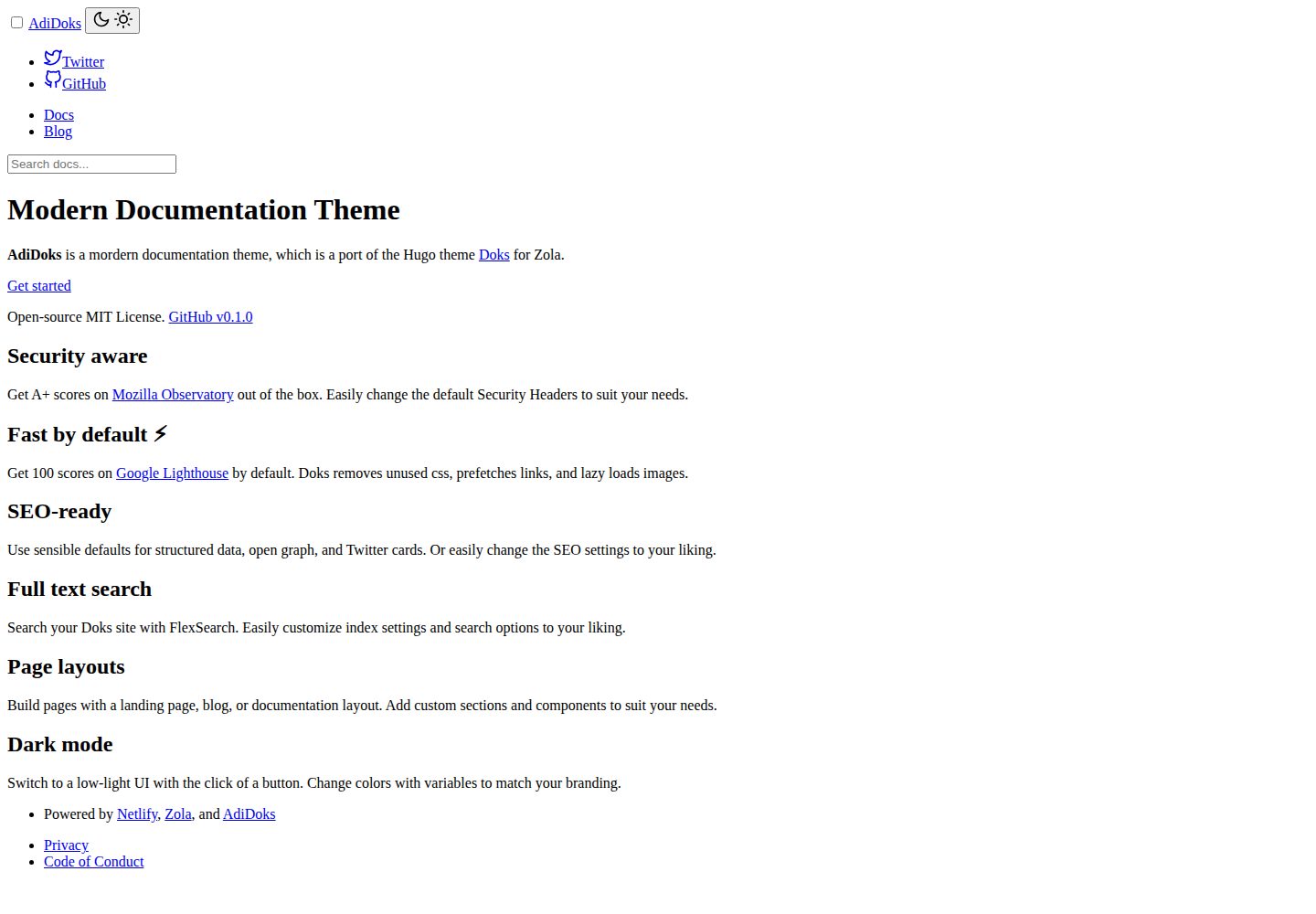
浏览真实页面截图,比较内容排版与手机效果。点击下方缩略图切换,放大查看整页细节。
全部页面与视图 2
截图用于了解视觉与布局,交互效果请以实际项目为准。
采集于 2026-10-03查看来源
值得关注的模板亮点
从已有项目资料中,快速了解它的特点。
内容按 blog、docs、authors 三类页面组织,section 用 _index.md 管理
config.toml 的 [extra] 可配置语言、主题色、标题分隔符、时间格式与时区
支持 KaTeX 或 MathJax 数学公式,以及 Open Graph、Twitter Cards 与 JSON-LD
可开启搜索索引与 authors 分类法,页脚与顶部菜单均可配置
MIT 许可,仓库更新于 2023 年,stars 数量较少
模板详细介绍
该仓库是 fishfolk 网站所使用的 Zola 主题,README 显示其内容为 AdiDoks——一个从 Hugo 主题 Doks 移植到 Zola 的文档型主题。主题面向需要同时承载文档与博客的静态站点:内容分为 blog、docs、authors 三类页面,每个 section 通过 _index.md 组织,首页内容在 content/_index.md 中配置。
配置集中在 config.toml:可在 [extra] 下设置语言代码、主题色、标题分隔符与首页标题附加内容、时间格式与时区、是否显示指向 GitHub 仓库的编辑页面链接、KaTeX 或 MathJax 数学公式库,以及 Open Graph/Twitter Cards、JSON-LD、顶部主菜单与社交链接、页脚内容与页脚导航。站点级还可开启 authors 分类法与搜索索引。模板均继承 base.html,可按需修改。
使用前提是本地安装 Zola 0.15.0 或更高版本。仓库本身是主题而非可直接部署的完整站点,需先 zola init 建站,再把主题放入 themes 目录(克隆或作为 git submodule),在 config.toml 中设置 theme,并按需复制示例配置与 content 目录。仓库 stars 较少,更新时间停留在 2023 年,采用 MIT 许可;演示站与文档位于 adidoks 相关域名,第三方素材需另行核对许可。
HTML启动器
适合你的项目吗?
适用场景
- 为 fishfolk 网站搭建文档与博客并存的静态站点
- 基于 Zola 快速起一个带文档板块的项目站点
- 需要数学公式渲染(KaTeX/MathJax)与 SEO 元信息配置的文档站
- 希望用 config.toml 集中控制菜单、社交链接与页脚内容的站点
适合人群
- 使用 Zola 0.15.0 及以上版本的开发者
- 需要文档加博客双板块结构的静态站点项目
- 能接受自行安装主题、复制示例配置与内容的使用者
上手与定制指南
结合仓库当前版本的说明,按下面的资料检查内容、配置与运行要求。
- 1
需先安装 Zola 0.15.0 或更高版本
- 2
用 zola init 创建站点,再将主题克隆或作为 git submodule 放入 themes 目录
- 3
在 config.toml 中设置 theme,并可复制主题的 config.toml.example 与 content 目录
- 4
本地运行 zola serve,默认访问 http://127.0.0.1:1111
- 5
演示图片、字体、图标等第三方素材需按各自许可单独核对
授权与来源资料
使用条件与限制
免费使用 · 保留许可声明本次收录的是公开仓库中采用 MIT 许可的免费版本;免费范围为该版本代码,不代表外部服务或第三方素材免费。
使用时需要遵守
- 允许免费使用、修改、商用和分发该版本代码。
- 分发代码副本或实质性部分时,保留原作者版权声明和完整 MIT 许可声明。
- 代码按现状提供;担保与责任限制以原许可证及适用法律为准。
额外费用与待核对事项
- 使用该主题需先在本地安装 Zola 0.15.0 或更高版本,属于外部工具依赖,不随仓库提供。
- 主题需从上游仓库克隆或作为 git submodule 引入到站点的 themes 目录,仓库本身不是可直接部署的完整站点。
- 需先自行用 zola init 创建站点,再安装主题并配置 config.toml,不能直接开箱使用。
- 演示图片、字体、图标及其他第三方素材需按各自许可核对,不能仅凭代码的 MIT 许可判断。
- 域名、托管、数据库、支付或 AI 等外部服务可能另外收费。
查看原文依据
Permission is hereby granted, free of charge
许可证原文
you need to install the [Zola](https://www.getzola.org/documentation/getting-started/installation/) ≥ 0.15.0
README 原文
git clone https://github.com/aaranxu/adidoks.git
README 原文
https://github.com/fishfolk/website-theme/blob/main/LICENSEhttps://github.com/fishfolk/website-theme/blob/main/README.mdzola init mysite
README 原文
DeepSeek 根据仓库许可证和 README 整理 ·2026-10-03。结果仅覆盖已读取资料,依赖、图片、字体及后续条款变更以各自原文为准。
项目核对记录与介绍依据
模板资料
- 来源平台
- GitHub
- 资料与维护参考分
- 资料一般 · 68 / 100
- 技术栈
- HTML
- 网站类型
- 启动器
这个分数如何计算
本站按许可资料(最高30分)、演示链接(12分)、预览图(10分)、Star数(15分)、记录的维护时间(15分)、描述完整度(8分)、功能记录(5分)和分类资料(5分)计算。它不是代码、安全或性能测试,也不是 Google 评分;有链接不代表已实测可用。
这个项目需要核对什么
- 记录的仓库更新时间
- 2023-03-10
- 截图检查日期
- 2026-10-03
已收录演示链接。请用你的内容与屏幕尺寸检查;有演示不代表表单、认证或支付已经可用。
目录记录的主要技术栈是 HTML。请通过依赖清单和锁文件核对实际版本与托管要求。这些说明基于收录资料,不代表代码审计或部署实测。
查看具体选型方法 →介绍的制作与核对状态
介绍由 AI 辅助整理目录与仓库资料。仓库作者不等于这篇介绍的审核者。
已完成服务器许可规则与 AI 来源核对;未经过人工编辑审核。
查看当时使用的来源资料
SHA-256: a51fec139e60997be8ac15ca7b2b70e2c3ed8c2c068208fd2d7c51e43b3201c0
2026-10-03T00:20:35.132Z
来源文件 / 仓库# Zola Theme AdiDoks
AdiDoks is a modern documentation theme, which is a port of the Hugo
theme [Doks](https://github.com/h-enk/doks) for Zola.
## Demo
[Live Preview](https://adidoks.netlify.app/).
## Requirements
Before using the theme, you need to install the [Zola](https://www.getzola.org/documentation/getting-started/installation/) ≥ 0.15.0.
## Quick Start
```bash
git clone https://github.com/aaranxu/adidoks.git
cd adidoks
zola serve
# open http://127.0.0.1:1111/ in the browser
```
Read more from [the document of the AdiDoks](https://adidoks.org/docs/getting-started/introduction/).
## Installation
Just earlier we showed you how to run the theme directly. Now we start to
install the theme in an existing site step by step.
### Step 1: Create a new zola site
```bash
zola init mysite
```
### Step 2: Install AdiDoks
Download this theme to your themes directory:
```bash
cd mysite/themes
git clone https://github.com/aaranxu/adidoks.git
```
Or install as a submodule:
```bash
cd mysite
git init # if your project is a git repository already, ignore this command
git submodule add https://github.com/aaranxu/adidoks.git themes/adidoks
```
### Step 3: Configuration
Enable the theme in your `config.toml` in the site directory:
```toml
theme = "adidoks"
```
Or copy the `config.toml.example` from the theme directory to your project's
root directory:
```bash
cp themes/adidoks/config.toml.example config.toml
```
### Step 4: Add new content
You can copy the content from the theme directory to your project:
```bash
cp -r themes/adidoks/content .
```
You can modify or add new posts in the `content/blog`, `content/docs` or other
content directories as needed.
### Step 5: Run the project
Just run `zola serve` in the root path of the project:
```bash
zola serve
```
AdiDoks will start the Zola development web server accessible by default at
`http://127.0.0.1:1111`. Saved changes will live reload in the browser.
## Customisation
You can customize your configurations, templates and content for yourself. Look
at the `config.toml`, `theme.toml`, `content` files and templates files in this
repo for an idea.
### Global Configuration
There are some configuration options that you can customize in `config.toml`.
#### Configuration options before `extra` options
Set the authors's taxonomies for the site.
```toml
taxonomies = [
{name = "authors"},
]
```
Use search function for the content.
```toml
build_search_index = true
```
#### Configuration options under the `extra`
The following options should be under the `[extra]` in `config.toml`
- `language_code` - set HTML file language (default to `en-US`)
- `theme_color` - your site's HTML color (default to `#fff`)
- `title_separator` - the separator to your site title, like `|` and `-` (defaults to `|`)
- `title_addition` - the additon content for the title of the homepage
- `timeformat` - the timeformat for the blog article published date
- `timezone` - the timezone for the blog article published date
- `edit_page` (and `docs_repo`, `repo_branch`) - whether to show the edit page in the github repo for your docs
- `math` (and `library`) - set KaTeX or MathJax library
- `[extra.open]` - Open Graph + Twitter Cards for the site
- `[extra.schema]` - set JSON-LD for the site
- `[[extra.menu.main]]` - the header navigations for the site
- `[[extra.menu.social]]` - the social links on the header of the page
- `[extra.footer]` - the footer content on the left
- `[[extra.footer.nav]]` - the footer navigations on the right
### Templates
All pages are extend to the `base.html`, and you can customize them as need.
### Content
#### Homepage
Go to the *content/_index.md* file to add your own homepage content.
- `[extra]` - the main content of the homepage
- `[[extra.ist]]` - the lists' content of the homepage
#### Sections
Each section includes a `_index.md`, and you can customize it or add your new
section under the `content` folder.
#### Pages
There are mainly three types of pages in the site.
- `blog` - blog article
- `docs` - documentation article
- `authors` - authors page if you need to add some information for a new author
## Reporting Issues
We use GitHub Issues as the official bug tracker for the **AdiDoks**. Please
search [existing issues](https://github.com/aaranxu/adidoks/issues). It’s
possible someone has already reported the same problem.
If your problem or idea is not addressed yet, [open a new issue](https://github.com/aaranxu/adidoks/issues/new).
## Contributing
We'd love your help! Please see [CONTRIBUTING.md](./CONTRIBUTING.md) to learn
about the kinds of contributions we're looking for.
## License
**AdiDoks** is distributed under the terms of the
[MIT license](https://github.com/aaranxu/adidoks/blob/main/LICENSE).
看看同类模板
对比同技术栈与用途的模板,找到更适合的视觉与内容结构。

startbootstrap-simple-sidebar
An off canvas sidebar navigation Bootstrap HTML template created by Start Bootstrap
HTML · 启动器

adminkit
AdminKit is a free & open-source HTML dashboard & admin template based on Bootstrap 5
HTML · 后台

Landing-Page
Tailwind CSS Starter Template - Landing Page
HTML · 企业官网

light-bootstrap-dashboard
Light Bootstrap Dashboard is an admin dashboard template designed to be beautiful and simple.
HTML · 后台

sing-app
💥Free and open-source admin dashboard template built with Bootstrap 4.5 💥
HTML · 后台

startbootstrap-modern-business
A multipurpose Bootstrap full website template created by Start Bootstrap
HTML · 启动器