使用 MDX 写作,可在 Markdown 文档中直接嵌入 JSX 与自定义 React 组件
Next.jsHugoJekyllReact作品集博客启动器
tailwind-nextjs-starter-blog — Next.js 作品集模板
作者 fu4303
基于 Next.js 与 Tailwind CSS 的静态博客与作品集启动模板,使用 MDX 写作,内置标签页、项目页、RSS 与站点地图,可作为 Jekyll、Hugo 个人博客的替代方案。
看看你的网站会是什么样
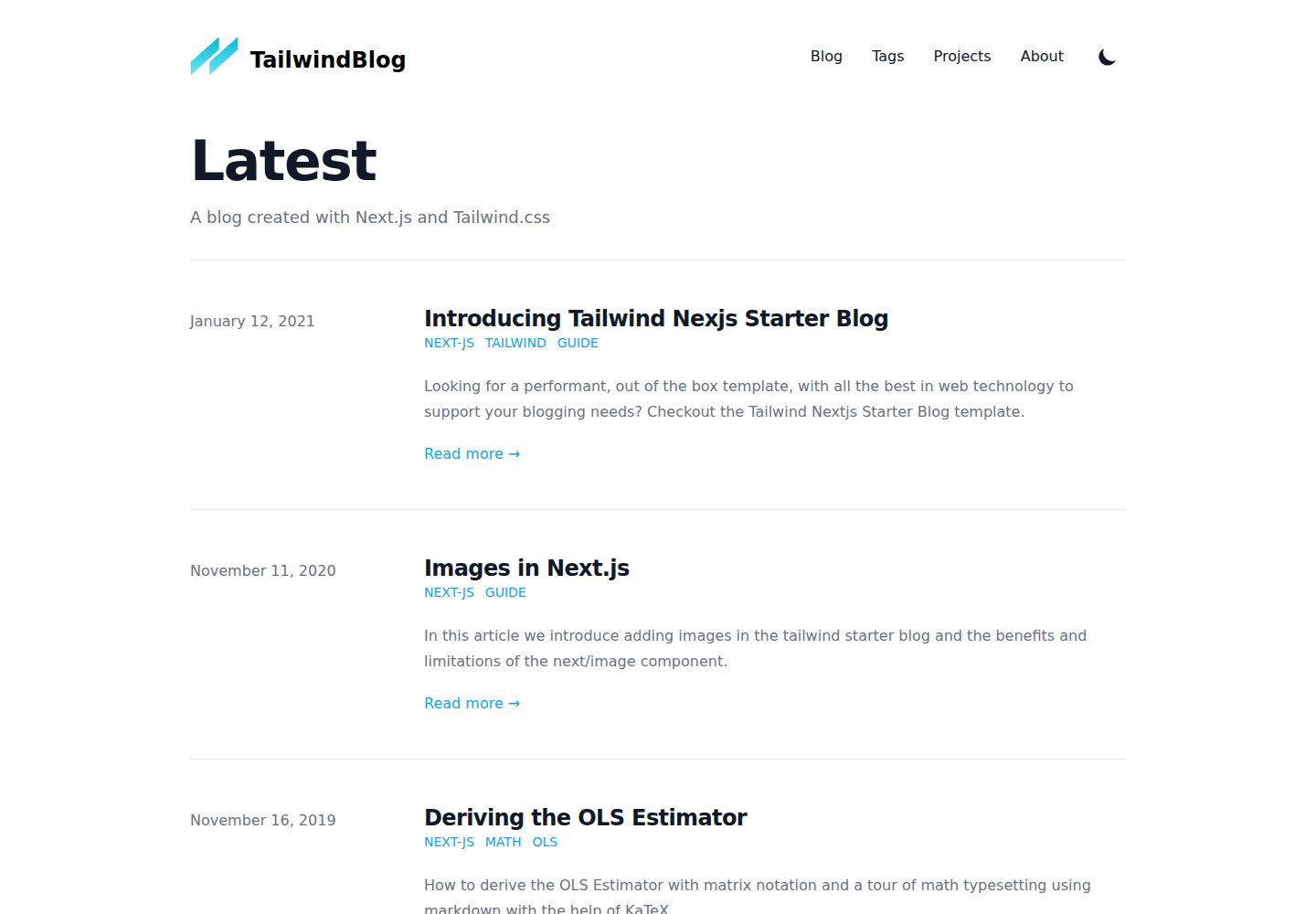
浏览真实页面截图,比较内容排版与手机效果。点击下方缩略图切换,放大查看整页细节。
全部页面与视图 3
截图用于了解视觉与布局,交互效果请以实际项目为准。
采集于 2026-10-13查看来源
值得关注的模板亮点
从已有项目资料中,快速了解它的特点。
frontmatter 沿用 Hugo 字段规范,支持 title、date、tags、lastmod、draft、summary、images
每个标签自动生成独立页面,并内置项目展示页、RSS 订阅与站点地图
集成 KaTeX 数学公式渲染与 rehype-prism 服务端代码高亮
站点配置、导航链接、项目数据与主题样式分别集中在 data 与 css 目录,便于替换
提供 scripts/compose.js 生成预填 frontmatter 的文章骨架
模板详细介绍
这是一个面向技术写作者的博客启动模板,仓库由 fu4303 从 timlrx 的 tailwind-nextjs-starter-blog 派生。它把 Next.js 的静态生成能力与 Tailwind CSS 的样式体系组合在一起,写作内容以 MDX 或 Markdown 文件形式存放在 data/blog 目录,frontmatter 沿用 Hugo 的字段规范,支持 title、date、tags、lastmod、draft、summary、images 七个字段。模板自带标签页(每个标签生成独立页面)、项目展示页、RSS 订阅与站点地图,并集成 KaTeX 数学公式渲染、rehype-prism 服务端代码高亮以及 next/image 图片优化。
站点信息集中在 data/siteMetadata.json,导航链接在 data/headerNavLinks.js,项目卡片数据在 data/projectsData.js,整体外观可通过 css/tailwind.css 调整。components/MDXComponents.js 允许在 Markdown 中直接调用自定义 JSX 或 React 组件,components/social-icons 支持按 Simple Icons 的 SVG 扩展社交图标。scripts/compose.js 可生成带预填 frontmatter 的文章骨架。
部署方面,README 以 Vercel 为主要路径;若改用 Netlify、GitHub Pages 或 Firebase 等静态托管,由于模板使用 next/image,需要额外配置图片优化服务(如 Imgix、Cloudinary、Akamai)或把 next/image 替换为普通 img 标签。仓库采用 MIT 许可,可免费使用、修改与分发,但演示图片、字体、图标等第三方素材以及 Firebase 等外部服务的额度与收费需另行核对。
Next.jsHugoJekyll作品集博客启动器
适合你的项目吗?
适用场景
- 把已有的 Jekyll 或 Hugo 个人博客迁移到 Next.js 技术栈
- 为技术写作搭建以 Markdown/MDX 为内容源的静态博客
- 在博客之外增加项目展示页,作为个人作品集使用
- 撰写包含数学公式或代码块的技术教程类文章
适合人群
- 习惯用 Markdown 或 MDX 写作、希望内容以文件形式管理的开发者
- 需要标签归档、RSS 与站点地图等基础博客结构的个人站点作者
- 愿意自行配置图片优化服务或调整 next/image 用法的使用者
- 接受以 Vercel 为主要部署路径、或能自行处理其他静态托管配置的团队
上手与定制指南
结合仓库当前版本的说明,按下面的资料检查内容、配置与运行要求。
- 1
README 给出的快速开始方式为 npx degit 拉取仓库,随后依次修改 siteMetadata.json、projectsData.js、headerNavLinks.js 并添加文章
- 2
本地开发运行 npm start 或 npm run dev,默认在 localhost:3000 预览
- 3
文章放在 data/blog 目录,可用 node ./scripts/compose.js "文章名" .md 生成预填 frontmatter 的骨架
- 4
部署到 Netlify、GitHub Pages 或 Firebase 时需为 next/image 配置替代图片优化服务,或改用普通 img 标签
- 5
仓库为 MIT 许可,分发时需保留版权与许可声明;第三方素材与外部服务需单独核对授权和费用
授权与来源资料
使用条件与限制
免费使用 · 保留许可声明本次收录的是公开仓库中采用 MIT 许可的免费版本;免费范围为该版本代码,不代表外部服务或第三方素材免费。
使用时需要遵守
- 允许免费使用、修改、商用和分发该版本代码。
- 分发代码副本或实质性部分时,保留原作者版权声明和完整 MIT 许可声明。
- 代码按现状提供;担保与责任限制以原许可证及适用法律为准。
额外费用与待核对事项
- README 提及 Firebase 集成;启用相关动态功能前需自行配置,并核对 Firebase 的额度与收费。
- 演示图片、字体、图标及其他第三方素材需按各自许可核对,不能仅凭代码的 MIT 许可判断。
- 域名、托管、数据库、支付或 AI 等外部服务可能另外收费。
- 部署到 Netlify、GitHub Pages、Firebase 等非 Vercel 静态托管时,因模板使用 next/image,必须额外配置图片优化服务(如 Imgix、Cloudinary、Akamai),或把 next/image 替换为普通 img 标签,否则无法直接部署。
查看原文依据
Permission is hereby granted, free of charge
许可证原文
https://github.com/fu4303/tailwind-nextjs-starter-blog/blob/master/LICENSEhttps://github.com/fu4303/tailwind-nextjs-starter-blog/blob/master/README.mdAs the template uses `next/image` for image optimization, additional configurations has to be made to deploy on other popular static hosting websites like [Netlify](https://www.netlify.com/) or [Github Pages](https://pages.github.com/). An alternative image optimization provider such as Imgix, Cloudinary or Akamai has to be used. Alternatively, replace the `next/image` component with a standard `<img>` tag.
README 原文
DeepSeek 根据仓库许可证和 README 整理 ·2026-10-13。结果仅覆盖已读取资料,依赖、图片、字体及后续条款变更以各自原文为准。
项目核对记录与介绍依据
模板资料
- 来源平台
- GitHub
- 资料与维护参考分
- 资料一般 · 70 / 100
- 技术栈
- Next.js · Hugo · Jekyll · React
- 网站类型
- 作品集 · 博客 · 启动器
这个分数如何计算
本站按许可资料(最高30分)、演示链接(12分)、预览图(10分)、Star数(15分)、记录的维护时间(15分)、描述完整度(8分)、功能记录(5分)和分类资料(5分)计算。它不是代码、安全或性能测试,也不是 Google 评分;有链接不代表已实测可用。
这个项目需要核对什么
- 记录的仓库更新时间
- 2021-04-26
- 截图检查日期
- 2026-10-13
已收录演示链接。请用你的内容与屏幕尺寸检查;有演示不代表表单、认证或支付已经可用。
目录记录的主要技术栈是 Next.js。请通过依赖清单和锁文件核对实际版本与托管要求。这些说明基于收录资料,不代表代码审计或部署实测。
查看具体选型方法 →介绍的制作与核对状态
介绍由 AI 辅助整理目录与仓库资料。仓库作者不等于这篇介绍的审核者。
审核声明: [email protected] · 2026-10-13
查看当时使用的来源资料
SHA-256: 84e80d295ef07f14f7be59afa29d51c130017bea8c03e51acc83c62e29944ee7
2026-10-13T07:43:59.012Z
来源文件 / 仓库 # Tailwind Nextjs Starter Blog [](https://vercel.com/new/git/external?repository-url=https://github.com/timlrx/tailwind-nextjs-starter-blog) This is a [Next.js](https://nextjs.org/), [Tailwind CSS](https://tailwindcss.com/) blogging starter template. Comes out of the box configured with the latest technologies to make technical writing a breeze. Easily configurable and customizable. Perfect as a replacement to existing Jekyll and Hugo individual blogs. ## Examples - [Demo Blog](https://tailwind-nextjs-starter-blog.vercel.app/) - this repo - [My personal blog](https://www.timlrx.com) - modified to auto-generate blog posts with dates Using the template? Happy to accept any PR with modifications made e.g. sub-paths, localization or multiple authors ## Motivation I wanted to port my existing blog to Nextjs and Tailwind CSS but there was no easy out of the box template to use so I decided to create one. It is inspired by [Lee Robinson's blog](https://github.com/leerob/leerob.io), but focuses only on static site generation. Design is adapted from [Tailwindlabs blog](https://github.com/tailwindlabs/blog.tailwindcss.com). I wanted it to be nearly as feature-rich as popular blogging templates like [beautiful-jekyll](https://github.com/daattali/beautiful-jekyll) and [Hugo Academic](https://github.com/wowchemy/wowchemy-hugo-modules) but with the best of React's ecosystem and current web development's best practices. ## Features - Easy styling customization with [Tailwind 2.0](https://blog.tailwindcss.com/tailwindcss-v2) - Near perfect lighthouse score - [Lighthouse report](https://www.webpagetest.org/result/210111_DiC1_08f3670c3430bf4a9b76fc3b927716c5/) - Lightweight, 43kB first load JS, uses Preact in production build - Mobile-friendly view - Light and dark theme - [MDX - write JSX in markdown documents!](https://mdxjs.com/) - Server-side syntax highlighting with [rehype-prism](https://github.com/mapbox/rehype-prism) - Math display supported via [KaTeX](https://katex.org/) - Automatic image optimization via [next/image](https://nextjs.org/docs/basic-features/image-optimization) - Flexible data retrieval with [next-mdx-remote](https://github.com/hashicorp/next-mdx-remote) - Support for tags - each unique tag will be its own page - Projects page - SEO friendly with RSS feed, sitemaps and more! ## Sample posts - [A markdown guide](https://tailwind-nextjs-starter-blog.vercel.app/blog/github-markdown-guide) - [Learn more about images in Next.js](https://tailwind-nextjs-starter-blog.vercel.app/blog/guide-to-using-images-in-nextjs) - [A tour of math typesetting](https://tailwind-nextjs-starter-blog.vercel.app/blog/deriving-ols-estimator) - [Simple MDX image grid](https://tailwind-nextjs-starter-blog.vercel.app/blog/pictures-of-canada) - [Example of long prose](https://tailwind-nextjs-starter-blog.vercel.app/blog/the-time-machine) ## Quick Start Guide 1. `npx degit https://github.com/timlrx/tailwind-nextjs-starter-blog.git` 2. Personalize `siteMetadata.json` 3. Modify `projectsData.js` 4. Modify `headerNavLinks.js` to customize navigation links 5. Add blog posts 6. Deploy on Vercel ## Development First, run the development server: ```bash npm start # or npm run dev ``` Open [http://localhost:3000](http://localhost:3000) with your browser to see the result. You can start editing the page by modifying `pages/index.js`. The page auto-updates as you edit the file. ## Extend / Customize `data/siteMetadata.json` - contains most of the site related information which should be modified for a user's need. `data/projectsData.js` - data used to generate styled card in projects page. `data/headerNavLinks.js` - navigation links. `data/logo.svg` - replace with your own logo. `data/blog` - replace with your own blog posts. `public/static` - store assets such as images and favicons. `css/tailwind.css` - contains the tailwind stylesheet which can be modified to change the overall look and feel of the site. `components/social-icons` - to add other icons, simply copy an svg file from [Simple Icons](https://simpleicons.org/) and map them in `index.js`. Other icons uses [heroicons](https://heroicons.com/). `components/MDXComponents.js` - pass your own JSX code or React component by specifying it over here. You can then call them directly in the `.mdx` or `.md` file. By default, a custom link and image component is passed. `layouts` - main templates used in pages. `pages` - pages to route to. Read the [Next.js documentation](https://nextjs.org/docs) for more information ## Post ### Frontmatter Frontmatter follows [Hugo's standards](https://gohugo.io/content-management/front-matter/). Currently 7 fields are supported. ``` title (required) date (required) tags (required, can be empty array) lastmod (optional) draft (optional) summary (optional) images (optional, if none provided defaults to socialBanner in siteMetadata config) ``` Here's an example of a post's frontmatter: ``` --- title: 'Introducing Tailwind Nexjs Starter Blog' date: '2021-01-12' lastmod: '2021-01-18' tags: ['next-js', 'tailwind', 'guide'] draft: false summary: 'Looking for a performant, out of the box template, with all the best in web technology to support your blogging needs? Checkout the Tailwind Nextjs Starter Blog template.' images: ['/static/images/canada/mountains.jpg', '/static/images/canada/toronto.jpg'] --- ``` ### Compose `scripts/compose.js` can be used to easily generate a post with pre-filled front matter. The first argument is the name of the post and the second optional argument is the extension (default to .mdx) Example code to generate the post called "My First Post" in markdown format ``` node ./scripts/compose.js "My First Post" .md ``` This will generate `./data/blog/my-first-post.md` with pre-filled front matter. ## Deploy **Vercel** The easiest way to deploy the template is to use the [Vercel Platform](https://vercel.com) from the creators of Next.js. Check out the [Next.js deployment documentation](https://nextjs.org/docs/deployment) for more details. **Netlify / Github Pages / Firebase etc.** As the template uses `next/image` for image optimization, additional configurations has to be made to deploy on other popular static hosting websites like [Netlify](https://www.netlify.com/) or [Github Pages](https://pages.github.com/). An alternative image optimization provider such as Imgix, Cloudinary or Akamai has to be used. Alternatively, replace the `next/image` component with a standard `<img>` tag. See [`next/image` documentation](https://nextjs.org/docs/basic-features/image-optimization) for more details.
看看同类模板
对比同技术栈与用途的模板,找到更适合的视觉与内容结构。

ai-website-cloner-template
Clone any website with one command using AI coding agents
Next.js · 启动器

Next.js SaaS Starter
Next.js SaaS Starter 是 Next.js 官方维护的 SaaS 起点模板,定位介于学习资源和可直接部署的脚手架之间。
Next.js · SaaS

Next.js Commerce
Next.js Commerce 是 Vercel 团队维护的电商启动模板,基于 Next.js App Router 构建,采用服务端渲染、React Server Components、Server Actions …
Next.js · 电商

Next-js-Boilerplate
Next-js-Boilerplate 是一个面向 Next.js 16、Tailwind CSS 4 和 TypeScript 的启动器,核心定位是开发者体验优先。
Next.js · 启动器

tailwind-nextjs-starter-blog
tailwind-nextjs-starter-blog 是一个面向个人技术博客的 Next.js 与 Tailwind CSS 启动模板,其 v2 版本基于 App Router 与 React Server Comp…
Next.js · 博客

next-forge
Production-grade Turborepo template for Next.js apps.
Next.js · 启动器