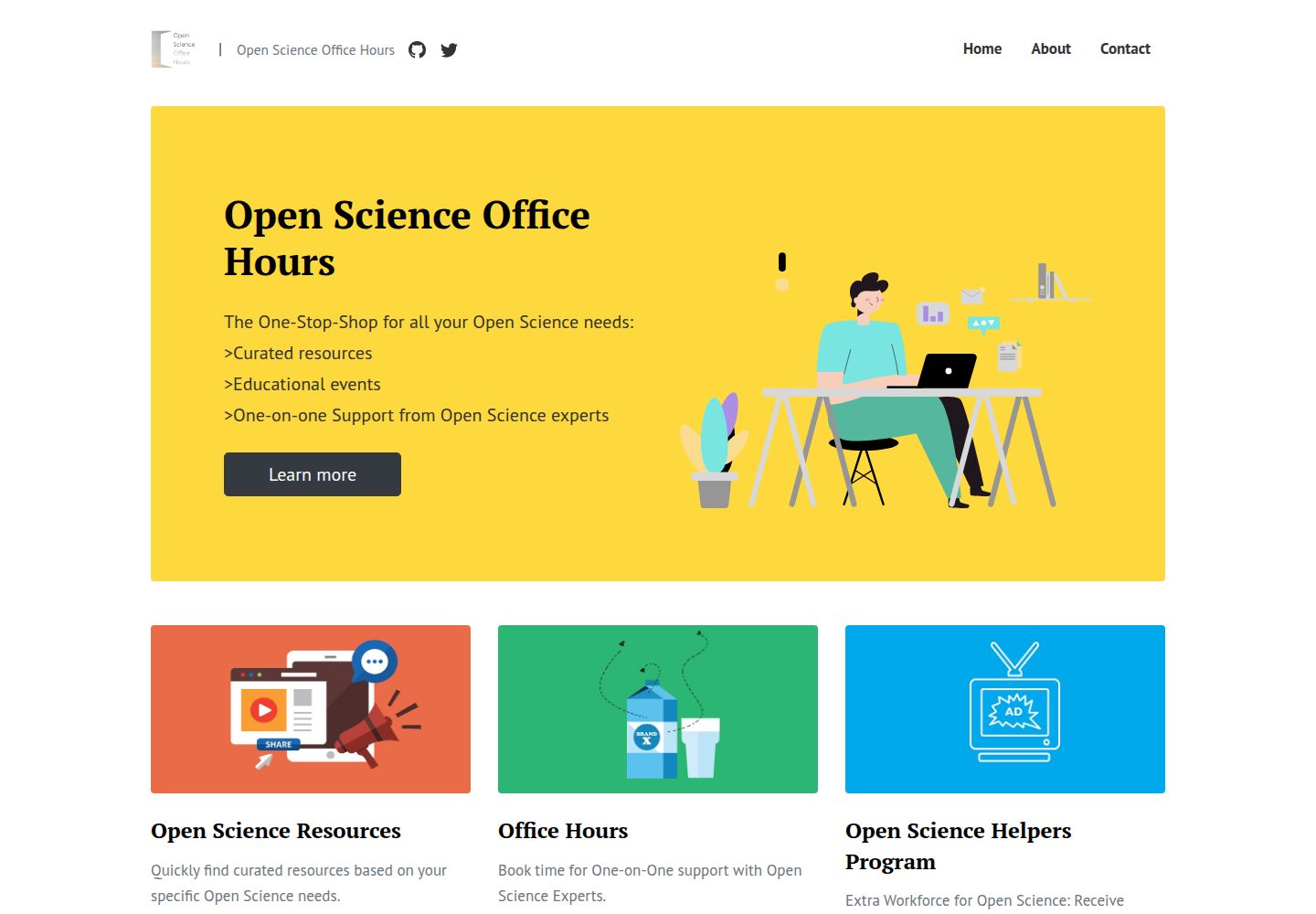
基于 Affiliates Jekyll 主题改造,用于 OSOH 网站测试
Jekyll博客
affiliates-jekyll-test-site — Jekyll 博客模板
作者 GabrielPelletier
基于 Affiliates Jekyll 主题改造的 Open Science Office Hours 网站测试站,用 _posts 承载特色内容与新闻事件,用 pages 与 _data/menus.yml 管理导航。
看看你的网站会是什么样
浏览真实页面截图,比较内容排版与手机效果。点击下方缩略图切换,放大查看整页细节。
全部页面与视图 2
截图用于了解视觉与布局,交互效果请以实际项目为准。
采集于 2026-10-12查看来源
值得关注的模板亮点
从已有项目资料中,快速了解它的特点。
内容分为特色页、常规文章和导航页面三类
特色内容与常规文章均存放于 _posts,以 Featured 字段区分
文件名必须以 yyyy-mm-dd- 开头,否则不会显示
导航菜单由 _data/menus.yml 配置,页面存于 pages 目录
仓库包含 MIT 许可文件
模板详细介绍
这是一个 Jekyll 博客站点,仓库说明其用途是测试 Affiliates - Jekyll Blogging Theme,用于 OSOH(Open Science Office Hours)网站。README 将内容分为三类:特色“文章”(实际是 Pages,显示在首页主视觉区块下方,对应 OSOH 的主要功能组件,如资源库、一对一支持等,后端放在 _posts 目录,文件名必须以 yyyy-mm-dd- 开头,文件头需设置 Featured: yes,且按当前尺寸建议最多 3 条);常规文章(新闻与事件,显示在特色文章之后,_posts 中所有非 Featured: yes 的内容都会归入此类,可按需移入 _posts/archive,文件名同样需以日期开头,日期会显示在首页和文章页,文件头可填 Categories 以便按分类浏览,Author 留空则只显示日期,填写后显示“By Author, Date”);以及顶部/右侧导航菜单中的页面,后端位于 pages 目录,但并非 pages 中所有内容都会进入导航,具体由 _data/menus.yml 配置。仓库另有 LICENSE.txt,采用 MIT 许可。
Jekyll博客
适合你的项目吗?
适用场景
- 搭建以新闻与事件为主的 Jekyll 博客
- 用特色内容区块展示组织的主要功能组件
- 通过分类浏览文章,并按作者或日期显示署名信息
- 以 _data/menus.yml 集中管理站点导航链接
适合人群
- 需要按特色内容与常规文章分层展示的 Jekyll 站点
- 希望用 Markdown 文件头控制首页展示与分类的博客
- 以新闻、事件和月度主题为更新节奏的内容站点
上手与定制指南
结合仓库当前版本的说明,按下面的资料检查内容、配置与运行要求。
- 1
特色内容与常规文章都放在 _posts,文件名需以 yyyy-mm-dd- 开头
- 2
特色内容需在文件头设置 Featured: yes,且按当前尺寸建议不超过 3 条
- 3
常规文章可填写 Categories 以支持按分类浏览,Author 留空则只显示日期
- 4
导航菜单项在 _data/menus.yml 中配置,页面文件放在 pages 目录
- 5
如需移除文章,可将其移入 _posts/archive
授权与来源资料
使用条件与限制
免费使用 · 保留许可声明本次收录的是公开仓库中采用 MIT 许可的免费版本;免费范围为该版本代码,不代表外部服务或第三方素材免费。
使用时需要遵守
- 允许免费使用、修改、商用和分发该版本代码。
- 分发代码副本或实质性部分时,保留原作者版权声明和完整 MIT 许可声明。
- 代码按现状提供;担保与责任限制以原许可证及适用法律为准。
额外费用与待核对事项
- 演示图片、字体、图标及其他第三方素材需按各自许可核对,不能仅凭代码的 MIT 许可判断。
- 域名、托管、数据库、支付或 AI 等外部服务可能另外收费。
- 特色内容区块受当前布局尺寸限制,建议最多只放 3 条 Featured: yes 的条目,超出可能影响首页显示效果。
- _posts 中的文件名必须以 yyyy-mm-dd- 日期前缀开头,否则该内容不会在站点上显示。
- 要移除常规文章时,需将其移动到 _posts/archive 目录,而不是直接删除。
- 顶部/右侧导航菜单项并非自动收录 pages 目录内容,必须在 _data/menus.yml 中手动配置才会出现在导航中。
查看原文依据
Permission is hereby granted, free of charge
许可证原文
Should be limited to 3 total with the current sizing of things
README 原文
File name needs to start with a date (yyyy-mm-dd-) or it won't be displayed.
README 原文
If you want to remove posts, you may move them in _posts/archive
README 原文
https://github.com/GabrielPelletier/affiliates-jekyll-test-site/blob/master/LICENSE.txthttps://github.com/GabrielPelletier/affiliates-jekyll-test-site/blob/master/README.mdWhat goes into the Nav Menu is configured in _data/menus.yml
README 原文
DeepSeek 根据仓库许可证和 README 整理 ·2026-10-12。结果仅覆盖已读取资料,依赖、图片、字体及后续条款变更以各自原文为准。
项目核对记录与介绍依据
模板资料
- 来源平台
- GitHub
- 资料与维护参考分
- 资料一般 · 65 / 100
- 技术栈
- Jekyll
- 网站类型
- 博客
这个分数如何计算
本站按许可资料(最高30分)、演示链接(12分)、预览图(10分)、Star数(15分)、记录的维护时间(15分)、描述完整度(8分)、功能记录(5分)和分类资料(5分)计算。它不是代码、安全或性能测试,也不是 Google 评分;有链接不代表已实测可用。
这个项目需要核对什么
- 记录的仓库更新时间
- 2023-02-09
- 截图检查日期
- 2026-10-12
已收录演示链接。请用你的内容与屏幕尺寸检查;有演示不代表表单、认证或支付已经可用。
目录记录的主要技术栈是 Jekyll。请通过依赖清单和锁文件核对实际版本与托管要求。这些说明基于收录资料,不代表代码审计或部署实测。
查看具体选型方法 →介绍的制作与核对状态
介绍由 AI 辅助整理目录与仓库资料。仓库作者不等于这篇介绍的审核者。
审核声明: [email protected] · 2026-10-13
查看当时使用的来源资料
SHA-256: 20275d93433d72a482bc56a4ada79baec84d957d5c24a1b8c286b247a0f5f1f9
2026-10-12T23:35:11.867Z
来源文件 / 仓库# Open Science Office Hours Website Notes for developers Built/Adapted from Affiliates - Free Jekyll Theme [Live Demo](https://wowthemesnet.github.io/affiliates-jekyll-theme/) | [Docs & Download](https://bootstrapstarter.com/template-affiliates-bootstrap-jekyll/) | [Buy me a coffee](https://www.wowthemes.net/donate/) ## Notes * 3 types of content/pages ### Featured "posts" - actually Pages * Displayed under the main hero block * These are the Pages for the main Components of what OSOH does (Resources repository, One-on-One Support, ...) * In the backend, located in _posts * File name needs to start with a date (yyyy-mm-dd-) or it won't be displayed. The rest of the title is for you. * File Header: * Title: "The title that will be displayed" * Image: "The image that will be displayed" * Layout: pages * Featured: yes * Categories: (not needed) * Author: (not needed) * Should be limited to 3 total with the current sizing of things ### Regular Posts - News and Events * Displayed after the 'featured posts' * These are more frequently added for Events, Theme of the Months, Other news... * In the backend, located in _posts * Everything contained in _posts that is not a "Featured: yes" post will end up here. If you want to remove posts, you may move them in _posts/archive * File name needs to start with a date (yyyy-mm-dd-) or it won't be displayed. This date will be displayed on the landing page and on the Post Page. * File Header: * Title: "The title that will be displayed" * Image: "The image that will be displayed" * Layout: pages * Featured: no * Categories: [caterogy1 caterory2] (Categories are important because you can browse posts by categories) * Author: (If left empty only the date will be diplayed, if Author provided "By Author, Date" will be displayed) ### Pages listed in the top/right navigation menu * These are links at the top-right of all pages, and may be use for general stuff; About, Get in Touch, Contribute, ... * In the backend, located in pages (but not everything in Pages has to end up in the nav menu) * What goes into the Nav Menu is configured in _data/menus.yml
看看同类模板
对比同技术栈与用途的模板,找到更适合的视觉与内容结构。

al-folio
al-folio 是一个面向学者与研究人员的 Jekyll 作品集主题,设计简洁、响应式,适合搭建个人学术主页。
Jekyll · 作品集

minimal-mistakes
:triangular_ruler: Jekyll theme for building a personal site, blog, project documentation, or portfolio.
Jekyll · 作品集

Beautiful Jekyll
Beautiful Jekyll 是一个在 Jekyll 生态中经过长期打磨的博客主题,由 Dean Attali 维护,自 2015 年起积累了超过 5 万用户。
Jekyll · 博客

jekyll-TeXt-theme
💎 🐳 A super customizable Jekyll theme for personal site, team site, blog, project, documentation, etc.
Jekyll · 博客

startbootstrap-clean-blog-jekyll
A Jekyll version of the Clean Blog theme by Start Bootstrap
Jekyll · 博客

So Simple
So Simple 是 Michael Rose 开发的 Jekyll 主题,定位清晰:为文字和图片提供一个干净、可读性强的展示框架。
Jekyll · 博客