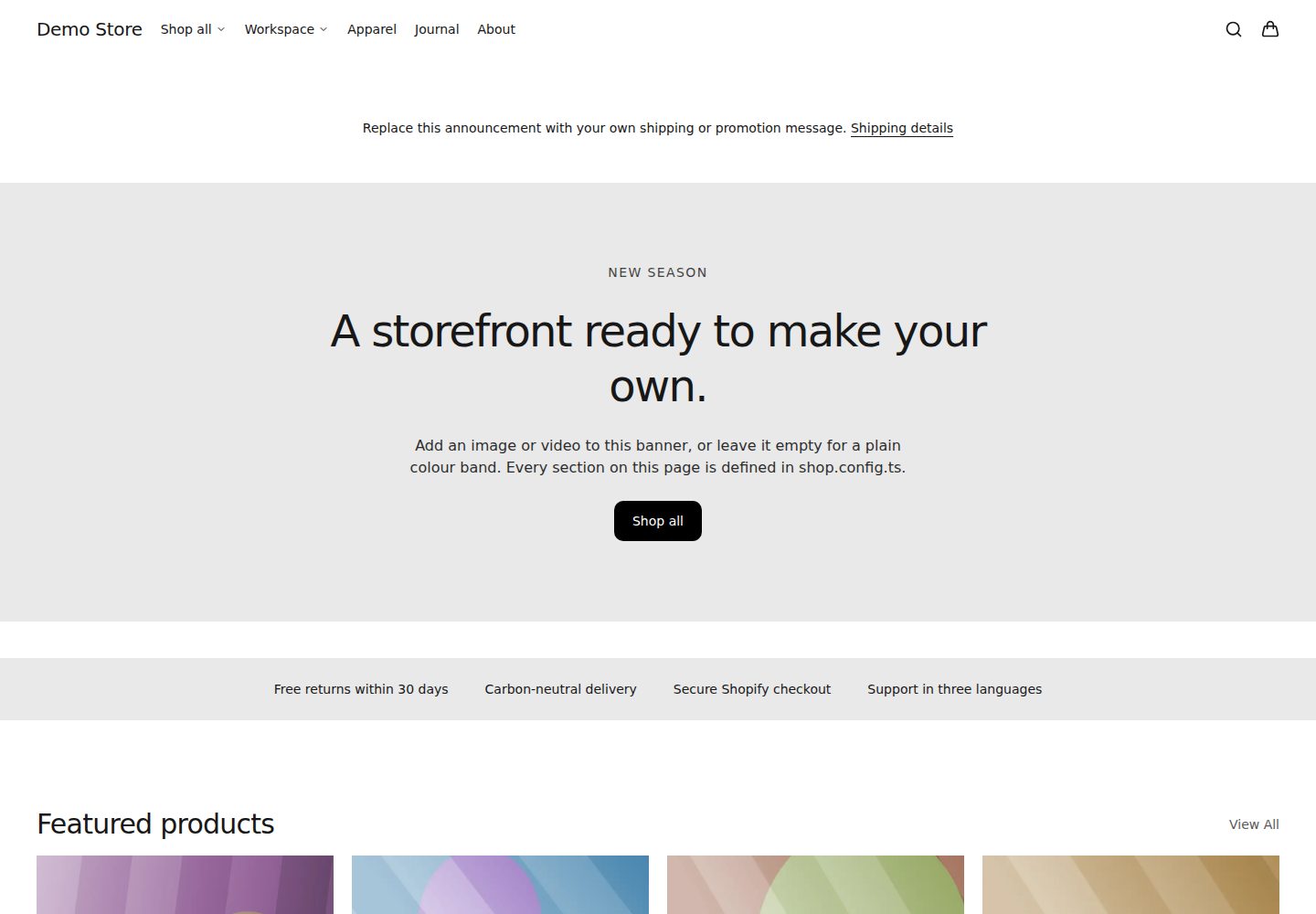
覆盖首页、商品、集合、搜索、购物车、博客、政策页、落地页与 404 等标准 Shopify 页面类型
Next.jsReact电商启动器
headless-shopify-nextjs-starter — Next.js 电商模板
作者 giorgioliapakis
基于 Next.js 与 React 的 Shopify 无头店面启动器,覆盖完整页面类型、可主题化设计系统,并提供无需 Shopify 账号的演示模式。
看看你的网站会是什么样
浏览真实页面截图,比较内容排版与手机效果。点击下方缩略图切换,放大查看整页细节。
全部页面与视图 3
截图用于了解视觉与布局,交互效果请以实际项目为准。
采集于 2026-10-02查看来源
值得关注的模板亮点
从已有项目资料中,快速了解它的特点。
提供无需 Shopify 账号的演示模式,使用生成数据运行完整店面,并可直接部署到 Vercel
购物车支持商品行、数量、折扣、备注与售卖计划,含可访问抽屉与乐观更新,禁用 JavaScript 时仍可加入购物车
设计系统以语义化令牌集中管理,支持明暗模式并在配置阶段校验 WCAG 对比度
页面由类型化的服务端渲染区块注册表拼装,首页与落地页可复用同一套区块
内置 robots.txt、分片 sitemap、llms.txt、动态 OG 图片及商品/集合/搜索的 markdown 表示
模板详细介绍
这是一个 Shopify 无头店面的启动模板,使用 Next.js App Router 与 React 构建,通过 Shopify 的 Hydrogen SDK 与 Storefront API 通信。模板覆盖首页、商品页、集合页、集合列表、搜索、购物车、博客、文章、内容页、政策页、落地页和 404 等标准页面类型,并为各页面提供元数据、JSON-LD 结构化数据以及错误与空状态处理。
转化路径方面,模板包含带商品行、数量、折扣、备注和售卖计划的购物车,以及可访问的抽屉式购物车(带乐观更新)、Shop Pay、预测性搜索和 Shopify 托管结账;在禁用 JavaScript 的情况下仍可完成加入购物车操作。设计系统通过语义化令牌(颜色、字体、间距、圆角、动效)集中管理,支持明暗模式,并在配置阶段校验 WCAG 对比度,主题可在单个配置文件中调整。
页面由可组合的、类型化的服务端渲染区块注册表拼装而成,首页与落地页均基于该注册表构建。模板还提供 robots.txt、分片 sitemap、llms.txt、动态 OG 图片,以及商品、集合和搜索的 markdown 表示。质量方面,仓库在 CI 中运行 Storefront 查询预算、打包体积预算、Lighthouse、Playwright 与 axe 检查(覆盖桌面、移动端和禁用 JavaScript 场景),并统一通过 pnpm check 执行类型、lint、单元与契约测试及供应链审计。
需要说明的限制:结账、支付和客户账户被有意交给 Shopify 托管,模板不接触卡数据,也不重建认证;评论、忠诚度、愿望清单、订阅门户等第三方应用需要自行编写适配层。项目自述为年轻但可用,shop.config.ts 的 API 表面与区块 schema 在 1.0 之前仍可能变动;Hydrogen SDK 固定在预览版本上,并附有日期化的评审例外说明。
Next.jsReact电商启动器
适合你的项目吗?
适用场景
- 为 Shopify 店铺搭建无头前端,并希望直接使用现成的页面类型与转化路径
- 在未接入真实 Shopify 账号前,用演示数据预览和评估店面结构与设计系统
- 通过 shop.config.ts 集中调整主题、导航与页面配方,快速定制品牌外观
- 让编码代理基于仓库内的 AGENTS.md 与固定技能包来扩展页面或区块
- 在 CI 中引入查询预算、打包体积、Lighthouse 与无障碍检查作为质量门禁
适合人群
- 需要 Shopify 无头店面前端起点的开发者或团队
- 希望用演示模式先行验证设计系统与页面结构的项目
- 习惯使用 Next.js App Router 与 React 服务端组件的开发者
- 计划借助编码代理进行页面拼装与二次开发的工作流
上手与定制指南
结合仓库当前版本的说明,按下面的资料检查内容、配置与运行要求。
- 1
克隆仓库后执行 pnpm install,再运行 pnpm dev:demo 即可在无凭据情况下浏览演示店面
- 2
接入真实店铺需在 Shopify 后台安装 Headless 销售渠道并创建 storefront,获取公开 Storefront API 访问令牌
- 3
复制 .env.example 为 .env.local,设置 PUBLIC_STORE_DOMAIN 与 PUBLIC_STOREFRONT_API_TOKEN,然后运行 pnpm storefront:doctor 验证连接
- 4
店铺名称、导航、主题与页面配方集中在 shop.config.ts 中修改
- 5
提交前运行 pnpm check,该命令统一执行类型、lint、单元与契约测试及供应链审计
授权与来源资料
使用条件与限制
免费使用 · 保留许可声明本次收录的是公开仓库中采用 MIT 许可的免费版本;免费范围为该版本代码,不代表外部服务或第三方素材免费。
使用时需要遵守
- 允许免费使用、修改、商用和分发该版本代码。
- 分发代码副本或实质性部分时,保留原作者版权声明和完整 MIT 许可声明。
- 代码按现状提供;担保与责任限制以原许可证及适用法律为准。
额外费用与待核对事项
- 结账、支付与客户账户功能不在模板内实现,而是交由 Shopify 托管;使用这些能力必须依赖 Shopify 平台及其托管页面。
- 评论、忠诚度、愿望清单、订阅门户等第三方应用功能不随模板提供,需自行编写适配层接入。
- 接入真实店铺需在 Shopify 后台安装 Headless 销售渠道并创建 storefront,属于外部平台账号与配置要求。
- 连接真实店铺必须配置 Shopify Storefront API 域名与公开访问令牌,即需要外部服务凭据。
- 模板依赖的 Hydrogen SDK 固定在预览版本上,属于非稳定版本依赖,后续升级可能带来兼容性变动。
- 项目尚未发布 1.0,shop.config.ts 的 API 表面与区块 schema 在 1.0 之前仍可能发生变动。
- 演示图片、字体、图标及其他第三方素材需按各自许可核对,不能仅凭代码的 MIT 许可判断。
- 域名、托管、数据库、支付或 AI 等外部服务可能另外收费。
查看原文依据
Permission is hereby granted, free of charge
许可证原文
Deliberately handed off to Shopify: **checkout**, **payments** and **customer accounts**.
README 原文
Third-party apps (reviews, loyalty, wishlists, subscriptions portals) need their own adapters
README 原文
In Shopify admin, install the **Headless** sales channel and create a storefront.
README 原文
Set `PUBLIC_STORE_DOMAIN` to `your-store.myshopify.com` and `PUBLIC_STOREFRONT_API_TOKEN` to the public token.
README 原文
The Hydrogen SDK is pinned to a preview build under a dated, reviewed exception
README 原文
https://github.com/giorgioliapakis/headless-shopify-nextjs-starter/blob/main/LICENSEhttps://github.com/giorgioliapakis/headless-shopify-nextjs-starter/blob/main/README.mdExpect the API surface of `shop.config.ts` and the section schema to still move before a 1.0.
README 原文
DeepSeek 根据仓库许可证和 README 整理 ·2026-10-02。结果仅覆盖已读取资料,依赖、图片、字体及后续条款变更以各自原文为准。
项目核对记录与介绍依据
模板资料
- 来源平台
- GitHub
- 资料与维护参考分
- 资料较完整 · 85 / 100
- 技术栈
- Next.js · React
- 网站类型
- 电商 · 启动器
这个分数如何计算
本站按许可资料(最高30分)、演示链接(12分)、预览图(10分)、Star数(15分)、记录的维护时间(15分)、描述完整度(8分)、功能记录(5分)和分类资料(5分)计算。它不是代码、安全或性能测试,也不是 Google 评分;有链接不代表已实测可用。
这个项目需要核对什么
- 记录的仓库更新时间
- 2026-09-14
- 截图检查日期
- 2026-10-02
已收录演示链接。请用你的内容与屏幕尺寸检查;有演示不代表表单、认证或支付已经可用。
目录记录的主要技术栈是 Next.js。请通过依赖清单和锁文件核对实际版本与托管要求。这些说明基于收录资料,不代表代码审计或部署实测。
查看具体选型方法 →介绍的制作与核对状态
介绍由 AI 辅助整理目录与仓库资料。仓库作者不等于这篇介绍的审核者。
已完成服务器许可规则与 AI 来源核对;未经过人工编辑审核。
查看当时使用的来源资料
SHA-256: 0eb311034e026613d6796c92b825655717b5518f85205da09538cca84c66f588
2026-10-02T07:35:05.290Z
来源文件 / 仓库# Headless Shopify Next.js Starter A production-shaped headless Shopify storefront on Next.js 16 — every standard page type, a themed design system, and a demo mode that runs without a Shopify account. Point it at your store, or hand it to a coding agent and let it build. **[Browse the live demo →](https://headless-shopify-nextjs-starter.vercel.app)**  ```bash git clone https://github.com/giorgioliapakis/headless-shopify-nextjs-starter cd headless-shopify-nextjs-starter pnpm install pnpm dev:demo ``` That runs the full storefront on generated demo data — no credentials, no Shopify account. Open [localhost:3000](http://localhost:3000) to browse it, and `/styleguide` to see the design system. Or deploy the same credential-free demo straight to Vercel — set the four demo values from [`.env.example`](.env.example) when prompted: [](https://vercel.com/new/clone?repository-url=https%3A%2F%2Fgithub.com%2Fgiorgioliapakis%2Fheadless-shopify-nextjs-starter&env=SHOPIFY_STOREFRONT_FIXTURE,PUBLIC_STORE_DOMAIN,PUBLIC_STOREFRONT_API_TOKEN,SHOPIFY_API_VERSION&envDescription=Demo%20fixture%20values%20from%20.env.example%20boot%20a%20credential-free%20demo%20store&envLink=https%3A%2F%2Fgithub.com%2Fgiorgioliapakis%2Fheadless-shopify-nextjs-starter%2Fblob%2Fmain%2F.env.example) ## What you get - **Every Shopify page type**: home, product, collection, collection list, search, cart, blog, article, content pages, policies, landing pages, 404 — each with metadata, JSON-LD, error and empty states. - **A real conversion path**: a cart with lines, quantities, discounts, notes and selling plans, an accessible drawer with optimistic updates, Shop Pay, predictive search with Shopify attribution, and hosted Shopify checkout. Adding to cart works with JavaScript disabled. - **A design system you can retheme from one file** — semantic tokens for colour, type, spacing, radius and motion, with light and dark mode and WCAG contrast validated at config time. - **Composable page sections** — a registry of typed, server-rendered sections that home and landing pages are built from, so an agent can assemble pages without inventing markup. - **SEO and agent surfaces** — `robots.txt`, sharded sitemaps, `llms.txt`, dynamic OG images, and markdown representations of products, collections and search. - **Performance and accessibility enforced, not aspired to** — Storefront query budgets, bundle budgets, Lighthouse runs, and Playwright + axe across desktop, mobile and JavaScript-disabled, all failing CI when they slip; types, lint, unit and contract tests and supply-chain audits ride the same `pnpm check` gate. - **Pinned agent skills** for Hydrogen, React performance and shadcn, in `.agents/skills/`. Built on Next.js 16 (App Router, Server Components, Cache Components), React 19, Tailwind CSS 4, shadcn source-owned components on Base UI, and Shopify's framework-agnostic Hydrogen SDK. ## Connect your Shopify store 1. In Shopify admin, install the **Headless** sales channel and create a storefront. Copy the public Storefront API access token. 2. Configure the environment: ```bash cp .env.example .env.local ``` Set `PUBLIC_STORE_DOMAIN` to `your-store.myshopify.com` and `PUBLIC_STOREFRONT_API_TOKEN` to the public token. The public token is safe in the browser by design. 3. Verify the connection. The report is redacted and never prints your token: ```bash pnpm storefront:doctor ``` 4. Run it: ```bash pnpm dev ``` Then edit `shop.config.ts` — that's the one file that holds your store's name, navigation, theme and page recipes. Full walkthrough: [docs/getting-started.md](docs/getting-started.md). ## Customize | I want to… | Go to | | ---------------------------------------- | ------------------------------------------------------------------------------------ | | Change colours, type, spacing, dark mode | `shop.config.ts` → `theme`, see [design tokens](docs/customization/design-tokens.md) | | Rearrange the homepage | `shop.config.ts` → `recipes.home`, see [sections](docs/customization/sections.md) | | Add a landing page | `shop.config.ts` → `recipes.landing` | | Change navigation | `shop.config.ts` → `navigation`, or let it read your Shopify menus | | Add a UI primitive | `components/ui/` — source-owned, edit in place | | Add a Storefront query | `lib/shopify/operations/` | ## What's supported The [storefront capability contract](docs/compatibility/storefront-capabilities.md) lists every route and capability with an honest status. Deliberately handed off to Shopify: **checkout**, **payments** and **customer accounts**. This starter never touches card data, and links out to Shopify's hosted account pages rather than rebuilding authentication. Third-party apps (reviews, loyalty, wishlists, subscriptions portals) need their own adapters — the starter does not ship fake provider-neutral UI that silently drops those contracts. ## Working with coding agents `AGENTS.md` is the instruction source, and it is read automatically by Claude Code, Codex and other agent hosts. It describes the architecture, the invariants, and where things live. `.agents/skills/` carries pinned Shopify Hydrogen, React and shadcn skills so an agent gets current, version-matched guidance instead of guessing. The practical loop: run `pnpm dev:demo`, point your agent at the repo, and ask for what you want. `pnpm check` is the gate it should pass before it claims to be done. ## Project status Young but real. The storefront runtime, design system, demo mode and quality gates work today and are covered by CI. Expect the API surface of `shop.config.ts` and the section schema to still move before a 1.0. The Hydrogen SDK is pinned to a preview build under a dated, reviewed exception — see [ADR 0002](docs/adr/0002-hydrogen-preview-adoption.md). ## Documentation Start at [docs/README.md](docs/README.md). ## Contributing [`CONTRIBUTING.md`](CONTRIBUTING.md). The one hard rule: nothing store-specific ever enters the repository — no real merchant names, product data, imagery or credentials. `pnpm check` enforces it. ## License MIT — see [`LICENSE`](LICENSE). Derived from and bundling MIT-licensed work by Vercel, Shopify and shadcn; attribution in [`NOTICE`](NOTICE).
看看同类模板
对比同技术栈与用途的模板,找到更适合的视觉与内容结构。

ai-website-cloner-template
Clone any website with one command using AI coding agents
Next.js · 启动器

Next.js SaaS Starter
Next.js SaaS Starter 是 Next.js 官方维护的 SaaS 起点模板,定位介于学习资源和可直接部署的脚手架之间。
Next.js · SaaS

Next.js Commerce
Next.js Commerce 是 Vercel 团队维护的电商启动模板,基于 Next.js App Router 构建,采用服务端渲染、React Server Components、Server Actions …
Next.js · 电商

Next-js-Boilerplate
Next-js-Boilerplate 是一个面向 Next.js 16、Tailwind CSS 4 和 TypeScript 的启动器,核心定位是开发者体验优先。
Next.js · 启动器

tailwind-nextjs-starter-blog
tailwind-nextjs-starter-blog 是一个面向个人技术博客的 Next.js 与 Tailwind CSS 启动模板,其 v2 版本基于 App Router 与 React Server Comp…
Next.js · 博客

next-forge
Production-grade Turborepo template for Next.js apps.
Next.js · 启动器