内置认证体系:邮箱密码、Google/GitHub OAuth、TOTP 两步验证、OTP 验证、会话管理与密码找回
Next.jsReact后台博客SaaS启动器
nextjs_boilerplate — Next.js 后台模板
作者 habibjutt
基于 Next.js 与 React 的 SaaS 启动模板,集成认证、Stripe 支付、管理后台、博客 CMS、RBAC 与邮件系统,含 50+ 组件,采用 MIT 许可。
看看你的网站会是什么样
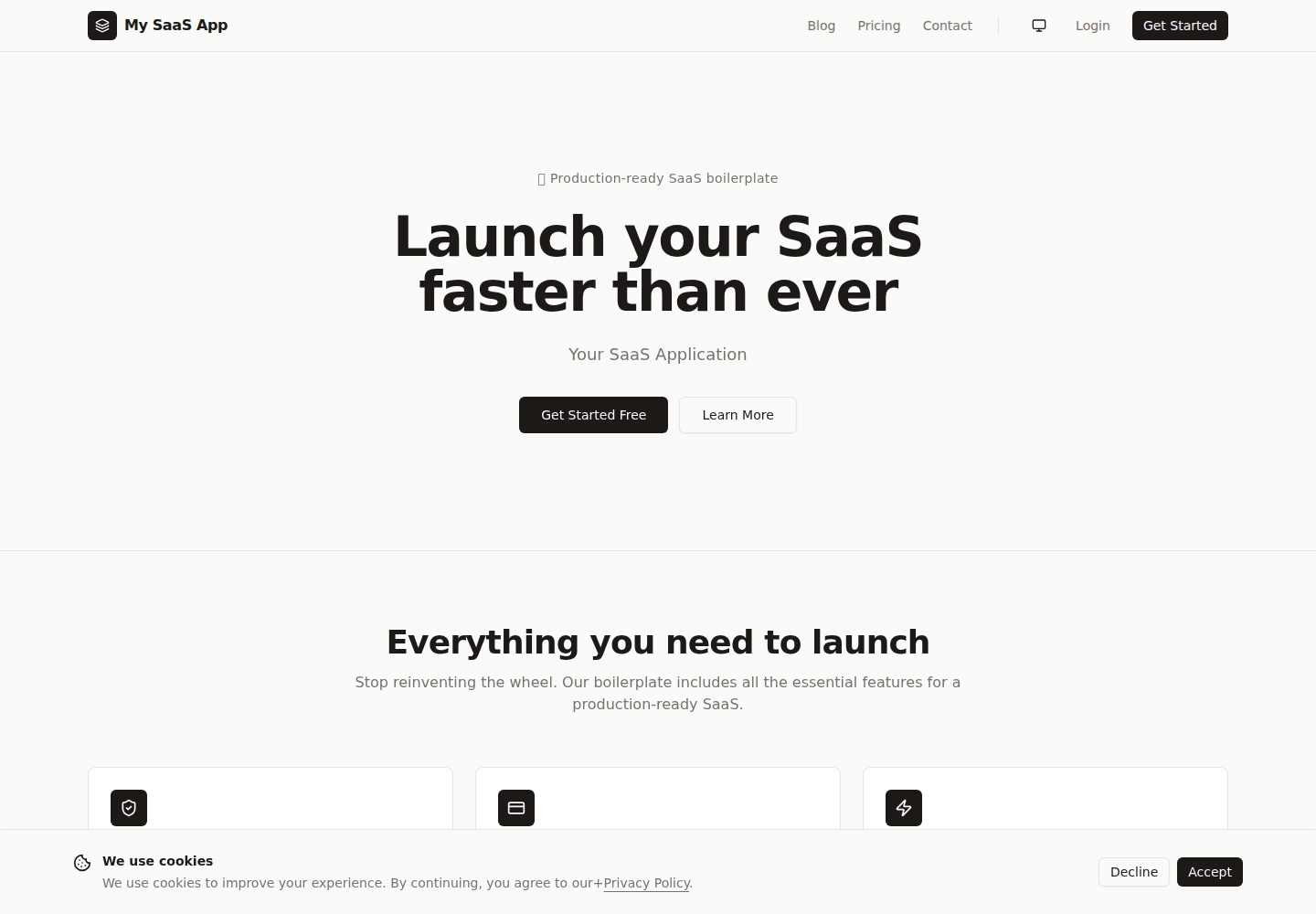
浏览真实页面截图,比较内容排版与手机效果。点击下方缩略图切换,放大查看整页细节。
全部页面与视图 3
截图用于了解视觉与布局,交互效果请以实际项目为准。
采集于 2026-10-01查看来源
值得关注的模板亮点
从已有项目资料中,快速了解它的特点。
Stripe 支付与订阅:Checkout、客户门户、Webhook 幂等处理、套餐管理与支付回执邮件
管理后台:用户管理、角色与权限、组织多租户、可排序筛选分页的数据表格与 Recharts 图表
内容与邮件:Tiptap 富文本博客 CMS,Nodemailer + SMTP 事务邮件,含 11 个 HTML 模板
开发体验:TypeScript 严格模式、Prisma ORM、Zod 校验、Server Actions 与 CLI 初始化脚本
UI 与 SEO:shadcn/ui 50+ 组件、深色模式、响应式布局、动态 sitemap 与 Open Graph 元标签
模板详细介绍
这是一个面向 SaaS 产品的 Next.js 启动模板,仓库采用 MIT 许可,免费版本覆盖该仓库代码本身。模板把常见的 SaaS 基础设施预先接好:认证(邮箱密码、OAuth、2FA、OTP、会话与密码找回)、Stripe 支付与订阅(Checkout、客户门户、Webhook 处理、账单邮件)、管理后台(用户管理、角色与权限、组织/多租户、数据表格、Recharts 图表)、博客 CMS(Tiptap 富文本编辑器)、事务邮件系统(Nodemailer + SMTP,含 11 个 HTML 模板)以及 RBAC 权限控制。UI 层使用 shadcn/ui 组件库与 Tailwind CSS,提供深色模式、响应式布局、落地页区块与 Cookie 同意条。
开发侧使用 TypeScript 严格模式、Prisma ORM 与 PostgreSQL,配合 Zod 校验、Server Actions 与 Server Components;同时提供 CLI 脚本用于创建管理员、填充套餐和同步订阅。SEO 方面包含动态 sitemap 与 robots、Open Graph 元标签,并可选接入 PostHog、Google Analytics 或 Plausible 分析。
使用前需要准备 Node.js 18+、PostgreSQL 数据库与 Stripe 账号,按 README 的步骤复制环境变量、生成 Prisma 客户端、推送数据库结构、创建管理员并填充套餐。免费范围仅限该版本代码;演示图片、字体、图标等第三方素材以及域名、托管、数据库、支付等外部服务可能另行收费,需按各自许可核对。
Next.jsReact后台博客SaaS启动器
适合你的项目吗?
适用场景
- 需要快速搭建带订阅计费与用户管理的 SaaS 产品原型或 MVP
- 为现有 Next.js 项目引入认证、RBAC 与 Stripe 订阅的参考实现
- 需要同时具备管理后台与博客 CMS 的内容型 SaaS 后台
- 评估 Next.js App Router、Prisma 与 shadcn/ui 组合的起步项目
适合人群
- 熟悉 React 与 Next.js、希望减少重复搭建基础设施的开发者
- 需要邮箱/OAuth 登录、订阅计费与后台管理的中小型 SaaS 团队
- 希望以 MIT 许可代码为起点进行二次开发并保留版权声明的项目
上手与定制指南
结合仓库当前版本的说明,按下面的资料检查内容、配置与运行要求。
- 1
需要 Node.js 18+、PostgreSQL 数据库以及 Stripe 账号(用于支付功能)
- 2
复制 .env.example 为 .env 并填写应用、数据库、认证、Stripe 与 SMTP 等环境变量
- 3
依次执行 prisma generate、prisma db push,再运行 npm run setup:admin 与 npm run seed:plans
- 4
演示图片、字体、图标等第三方素材需按各自许可核对,外部服务可能另行收费
- 5
分发代码副本或实质性部分时,需保留原作者版权声明与完整 MIT 许可声明
授权与来源资料
使用条件与限制
免费使用 · 保留许可声明本次收录的是公开仓库中采用 MIT 许可的免费版本;免费范围为该版本代码,不代表外部服务或第三方素材免费。
使用时需要遵守
- 允许免费使用、修改、商用和分发该版本代码。
- 分发代码副本或实质性部分时,保留原作者版权声明和完整 MIT 许可声明。
- 代码按现状提供;担保与责任限制以原许可证及适用法律为准。
额外费用与待核对事项
- 使用支付与订阅功能需要自行注册 Stripe 账号,并配置 STRIPE_SECRET_KEY、STRIPE_WEBHOOK_SECRET 与可发布密钥;Stripe 服务本身按其条款可能产生费用。
- 必须自备 PostgreSQL 数据库(本地或 Neon、Supabase 等托管服务),托管数据库可能产生外部费用。
- 邮件系统依赖外部 SMTP 服务,需提供主机、端口、账号与密码,相关邮件发送服务可能另行收费。
- 启用 Google/GitHub 社交登录需自行申请 OAuth 客户端凭据,属于可选的外部账号依赖。
- PostHog、Google Analytics、Plausible 分析为可选集成,需自备账号与密钥,第三方分析服务可能收费。
- 演示图片、字体、图标及其他第三方素材需按各自许可核对,不能仅凭代码的 MIT 许可判断。
- 域名、托管、数据库、支付或 AI 等外部服务可能另外收费。
查看原文依据
Permission is hereby granted, free of charge
许可证原文
**Stripe** account ([sign up](https://stripe.com)) — for payments
README 原文
**PostgreSQL** database ([Neon](https://neon.tech), [Supabase](https://supabase.com), or local)
README 原文
`SMTP_HOST` | ✅ | SMTP server host
README 原文
`GOOGLE_CLIENT_ID` | ❌ | Google OAuth client ID
README 原文
https://github.com/habibjutt/nextjs_boilerplate/blob/main/LICENSEhttps://github.com/habibjutt/nextjs_boilerplate/blob/main/README.md`NEXT_PUBLIC_POSTHOG_KEY` | ❌ | PostHog project API key
README 原文
DeepSeek 根据仓库许可证和 README 整理 ·2026-10-01。结果仅覆盖已读取资料,依赖、图片、字体及后续条款变更以各自原文为准。
项目核对记录与介绍依据
模板资料
- 来源平台
- GitHub
- 资料与维护参考分
- 资料较完整 · 92 / 100
- 技术栈
- Next.js · React
- 网站类型
- 后台 · 博客 · SaaS · 启动器
这个分数如何计算
本站按许可资料(最高30分)、演示链接(12分)、预览图(10分)、Star数(15分)、记录的维护时间(15分)、描述完整度(8分)、功能记录(5分)和分类资料(5分)计算。它不是代码、安全或性能测试,也不是 Google 评分;有链接不代表已实测可用。
这个项目需要核对什么
- 记录的仓库更新时间
- 2026-06-29
- 截图检查日期
- 2026-10-01
已收录演示链接。请用你的内容与屏幕尺寸检查;有演示不代表表单、认证或支付已经可用。
目录记录的主要技术栈是 Next.js。请通过依赖清单和锁文件核对实际版本与托管要求。这些说明基于收录资料,不代表代码审计或部署实测。
查看具体选型方法 →介绍的制作与核对状态
介绍由 AI 辅助整理目录与仓库资料。仓库作者不等于这篇介绍的审核者。
已完成服务器许可规则与 AI 来源核对;未经过人工编辑审核。
查看当时使用的来源资料
SHA-256: d3abdf9c4b40c984cc2e2ad9372aaa1b40b67a52db749a645f033d5c8afa7926
2026-10-01T01:20:48.553Z
来源文件 / 仓库<div align="center">
<a href="https://github.com/habibjutt/nextjs_boilerplate">
<img src="public/logo.svg" alt="Next.js SaaS Boilerplate Logo" width="128" height="128" />
</a>
<h1>Next.js SaaS Boilerplate</h1>
<p><strong>Ship your SaaS in days, not months.</strong></p>
<p>The open-source, production-ready starter kit with auth, payments, admin dashboard, blog CMS, RBAC, email system, and 50+ components — so you can focus on what makes your product unique.</p>
<p>
<a href="https://github.com/habibjutt/nextjs_boilerplate/stargazers"><img src="https://img.shields.io/github/stars/habibjutt/nextjs_boilerplate?style=for-the-badge&logo=github&color=yellow" alt="Stars" /></a>
<a href="https://github.com/habibjutt/nextjs_boilerplate/network/members"><img src="https://img.shields.io/github/forks/habibjutt/nextjs_boilerplate?style=for-the-badge&logo=github&color=blue" alt="Forks" /></a>
<a href="https://github.com/habibjutt/nextjs_boilerplate/blob/main/LICENSE"><img src="https://img.shields.io/github/license/habibjutt/nextjs_boilerplate?style=for-the-badge&color=green" alt="License" /></a>
<a href="https://github.com/habibjutt/nextjs_boilerplate/issues"><img src="https://img.shields.io/github/issues/habibjutt/nextjs_boilerplate?style=for-the-badge" alt="Issues" /></a>
<a href="https://github.com/habibjutt/nextjs_boilerplate/pulls"><img src="https://img.shields.io/github/issues-pr/habibjutt/nextjs_boilerplate?style=for-the-badge" alt="Pull Requests" /></a>
</p>
<p>
<img src="https://img.shields.io/badge/Next.js-16-black?style=flat-square&logo=next.js" alt="Next.js 16" />
<img src="https://img.shields.io/badge/React-19-61DAFB?style=flat-square&logo=react" alt="React 19" />
<img src="https://img.shields.io/badge/TypeScript-5-3178C6?style=flat-square&logo=typescript&logoColor=white" alt="TypeScript" />
<img src="https://img.shields.io/badge/Tailwind_CSS-4-38B2AC?style=flat-square&logo=tailwind-css&logoColor=white" alt="Tailwind CSS" />
<img src="https://img.shields.io/badge/Prisma-7-2D3748?style=flat-square&logo=prisma" alt="Prisma" />
<img src="https://img.shields.io/badge/Stripe-Payments-635BFF?style=flat-square&logo=stripe&logoColor=white" alt="Stripe" />
<img src="https://img.shields.io/badge/PostgreSQL-Database-336791?style=flat-square&logo=postgresql&logoColor=white" alt="PostgreSQL" />
<img src="https://img.shields.io/badge/shadcn/ui-Components-000000?style=flat-square&logo=shadcnui" alt="shadcn/ui" />
</p>
<p>
<a href="#-quick-start">Quick Start</a> •
<a href="#-features">Features</a> •
<a href="#-screenshots">Screenshots</a> •
<a href="#-tech-stack">Tech Stack</a> •
<a href="#-deployment">Deployment</a> •
<a href="#-contributing">Contributing</a>
</p>
</div>
<br />
> **Stop rebuilding the same SaaS infrastructure from scratch.** This boilerplate includes authentication (email, OAuth, 2FA), Stripe payments & subscriptions, a full admin dashboard, blog CMS, transactional email system, RBAC, and 50+ production-ready UI components — all wired together and ready to deploy.
<br />
## 📸 Screenshots
<div align="center">
<table>
<tr>
<td align="center"><strong>🏠 Landing Page</strong></td>
<td align="center"><strong>📊 Admin Dashboard</strong></td>
</tr>
<tr>
<td><img src="public/frontend_screenshot.png" alt="Landing Page" width="480" /></td>
<td><img src="public/admin_screenshot.png" alt="Admin Dashboard" width="480" /></td>
</tr>
</table>
</div>
<br />
## ✨ Features
### 🔐 Authentication & Security
| Feature | Description |
|---------|-------------|
| **Email & Password** | Secure signup/login with email verification |
| **OAuth** | One-click Google & GitHub social login |
| **Two-Factor Auth (2FA)** | TOTP-based 2FA with QR code setup |
| **OTP Verification** | Email-based one-time password verification |
| **Session Management** | Secure sessions with automatic token refresh |
| **Password Recovery** | Forgot password & reset password flow |
| **Rate Limiting** | IP-based rate limiting on auth endpoints |
| **Security Headers** | CSP, HSTS, X-Frame-Options, and more |
| **Audit Logging** | Track auth events, payments, and security incidents |
| **RBAC** | Granular role-based access control with custom permissions |
### 💳 Payments & Billing
| Feature | Description |
|---------|-------------|
| **Stripe Integration** | Full Stripe Checkout & Customer Portal |
| **Subscription Plans** | Starter, Professional, and Enterprise tiers |
| **Webhook Handling** | Idempotent webhook processing with event deduplication |
| **Billing Portal** | Self-service plan management for customers |
| **Payment Receipts** | Automatic HTML email receipts after payment |
| **Subscription Sync** | CLI tools to sync and verify subscription states |
### 🛠 Admin Dashboard
| Feature | Description |
|---------|-------------|
| **User Management** | List, create, edit, delete users with filters |
| **Blog CMS** | Rich text editor (Tiptap) with image support |
| **Role Management** | Create custom roles and assign permissions |
| **Permission System** | Fine-grained permissions for every feature |
| **Organization Support** | Multi-tenant org management with member roles |
| **Dashboard Analytics** | Interactive charts with Recharts |
| **Settings Panel** | App-wide configuration management |
| **Data Tables** | Sortable, filterable, paginated tables with drag-to-reorder columns |
### 📧 Email System
| Feature | Description |
|---------|-------------|
| **Transactional Email** | Nodemailer with SMTP support |
| **11 Email Templates** | Beautiful HTML templates for every event |
| **Welcome Email** | Sent after email verification |
| **OTP Email** | Verification codes with branded templates |
| **Password Reset** | Secure reset links with expiry |
| **Payment Receipts** | Detailed invoice-style receipts |
| **Subscription Updates** | Plan change & cancellation notifications |
| **Email Change** | Verification & notification for email updates |
| **Contact Form** | Auto-response to contact submissions |
### 🎨 UI & Design
| Feature | Description |
|---------|-------------|
| **50+ Components** | Full shadcn/ui library + custom components |
| **Dark Mode** | System, light, and dark theme toggle |
| **Responsive Design** | Mobile-first layouts across all pages |
| **Landing Page** | Hero, features, pricing, testimonials, FAQ sections |
| **Cookie Consent** | GDPR-compliant cookie consent banner |
| **Loading States** | Skeleton loaders and spinners throughout |
| **Error Handling** | Custom error boundaries, 404, and error pages |
| **Toast Notifications** | Sonner-based notification system |
### 📈 SEO & Analytics
| Feature | Description |
|---------|-------------|
| **SEO Optimized** | Dynamic sitemap.ts & robots.ts |
| **Open Graph** | OG and Twitter Card meta tags |
| **PostHog** | Product analytics integration |
| **Google Analytics** | GA4 measurement support |
| **Plausible** | Privacy-friendly analytics option |
### 🏗 Developer Experience
| Feature | Description |
|---------|-------------|
| **TypeScript** | Fully typed with strict mode |
| **Prisma ORM** | Type-safe database queries with migrations |
| **Zod Validation** | Runtime schema validation |
| **Server Actions** | 30+ server actions for all CRUD operations |
| **Server Components** | RSC-first architecture, minimal client JS |
| **API Keys** | Generate and manage API keys per user |
| **CLI Scripts** | Admin setup, plan seeding, subscription sync |
| **ESLint** | Pre-configured linting |
<br />
## 🚀 Quick Start
### Prerequisites
- **Node.js** 18+ ([download](https://nodejs.org))
- **PostgreSQL** database ([Neon](https://neon.tech), [Supabase](https://supabase.com), or local)
- **Stripe** account ([sign up](https://stripe.com)) — for payments
### 1. Clone & install
```bash
git clone https://github.com/habibjutt/nextjs_boilerplate.git
cd nextjs_boilerplate
npm install
```
### 2. Configure environment
```bash
cp .env.example .env
```
Edit `.env` with your credentials — see [Environment Variables](#-environment-variables) for the full list.
### 3. Set up the database
```bash
npx prisma generate
npx prisma db push
```
### 4. Create your admin user
```bash
npm run setup:admin
```
### 5. Seed pricing plans
```bash
npm run seed:plans
```
### 6. Start developing
```bash
npm run dev
```
Open **[http://localhost:3000](http://localhost:3000)** — your SaaS is running! 🎉
<br />
## 🛠 Tech Stack
<table>
<tr>
<td align="center" width="96"><img src="https://skillicons.dev/icons?i=nextjs" width="48" height="48" alt="Next.js" /><br /><strong>Next.js 16</strong><br /><sub>App Router</sub></td>
<td align="center" width="96"><img src="https://skillicons.dev/icons?i=react" width="48" height="48" alt="React" /><br /><strong>React 19</strong><br /><sub>Server Components</sub></td>
<td align="center" width="96"><img src="https://skillicons.dev/icons?i=ts" width="48" height="48" alt="TypeScript" /><br /><strong>TypeScript 5</strong><br /><sub>Strict Mode</sub></td>
<td align="center" width="96"><img src="https://skillicons.dev/icons?i=tailwind" width="48" height="48" alt="Tailwind" /><br /><strong>Tailwind v4</strong><br /><sub>Utility-First CSS</sub></td>
<td align="center" width="96"><img src="https://skillicons.dev/icons?i=prisma" width="48" height="48" alt="Prisma" /><br /><strong>Prisma 7</strong><br /><sub>Type-Safe ORM</sub></td>
<td align="center" width="96"><img src="https://skillicons.dev/icons?i=postgres" width="48" height="48" alt="PostgreSQL" /><br /><strong>PostgreSQL</strong><br /><sub>Database</sub></td>
</tr>
<tr>
<td align="center" width="96"><img src="https://img.icons8.com/color/48/stripe.png" width="48" height="48" alt="Stripe" /><br /><strong>Stripe</strong><br /><sub>Payments</sub></td>
<td align="center" width="96"><img src="https://authjs.dev/img/etc/logo-sm.webp" width="48" height="48" alt="Better Auth" /><br /><strong>Better Auth</strong><br /><sub>Authentication</sub></td>
<td align="center" width="96"><img src="https://skillicons.dev/icons?i=nodejs" width="48" height="48" alt="Nodemailer" /><br /><strong>Nodemailer</strong><br /><sub>Transactional Email</sub></td>
<td align="center" width="96"><img src="https://ui.shadcn.com/apple-touch-icon.png" width="48" height="48" alt="shadcn/ui" /><br /><strong>shadcn/ui</strong><br /><sub>UI Components</sub></td>
<td align="center" width="96"><img src="https://zod.dev/logo.svg" width="48" height="48" alt="Zod" /><br /><strong>Zod</strong><br /><sub>Validation</sub></td>
<td align="center" width="96"><img src="https://tiptap.dev/favicon.ico" width="48" height="48" alt="Tiptap" /><br /><strong>Tiptap</strong><br /><sub>Rich Text Editor</sub></td>
</tr>
</table>
<br />
## 📋 Environment Variables
Create a `.env` file from the template:
```bash
cp .env.example .env
```
<details>
<summary><strong>Click to expand full environment variable reference</strong></summary>
| Variable | Required | Description |
|----------|----------|-------------|
| **App** | | |
| `NEXT_PUBLIC_APP_NAME` | ✅ | Your app name (shown in UI & emails) |
| `NEXT_PUBLIC_APP_URL` | ✅ | Public URL (e.g., `http://localhost:3000`) |
| `NEXT_PUBLIC_APP_DESCRIPTION` | ❌ | App description for meta tags |
| **Database** | | |
| `DATABASE_URL` | ✅ | PostgreSQL connection string |
| **Authentication** | | |
| `BETTER_AUTH_SECRET` | ✅ | Secret key (min 32 chars) for signing tokens |
| `BETTER_AUTH_URL` | ✅ | Auth base URL (same as app URL) |
| **Stripe** | | |
| `STRIPE_SECRET_KEY` | ✅ | Stripe secret key (`sk_test_...`) |
| `STRIPE_WEBHOOK_SECRET` | ✅ | Webhook signing secret (`whsec_...`) |
| `NEXT_PUBLIC_STRIPE_PUBLISHABLE_KEY` | ✅ | Publishable key (`pk_test_...`) |
| **Email / SMTP** | | |
| `SMTP_HOST` | ✅ | SMTP server host |
| `SMTP_PORT` | ✅ | SMTP port (usually `587`) |
| `SMTP_USER` | ✅ | SMTP username |
| `SMTP_PASSWORD` | ✅ | SMTP password |
| `EMAIL_FROM` | ✅ | Sender email address |
| **OAuth (optional)** | | |
| `GOOGLE_CLIENT_ID` | ❌ | Google OAuth client ID |
| `GOOGLE_CLIENT_SECRET` | ❌ | Google OAuth client secret |
| `GITHUB_CLIENT_ID` | ❌ | GitHub OAuth client ID |
| `GITHUB_CLIENT_SECRET` | ❌ | GitHub OAuth client secret |
| **Analytics (optional)** | | |
| `NEXT_PUBLIC_POSTHOG_KEY` | ❌ | PostHog project API key |
| `NEXT_PUBLIC_GA_MEASUREMENT_ID` | ❌ | Google Analytics 4 measurement ID |
| `NEXT_PUBLIC_PLAUSIBLE_DOMAIN` | ❌ | Plausible analytics domain |
</details>
<br />
## 📁 Project Structure
```
nextjs_boilerplate/
├── app/ # Next.js App Router
│ ├── (protected)/ # 🔒 Auth-required routes
│ │ ├── (admin)/ # Admin panel
│ │ │ ├── dashboard/ # ├── Analytics dashboard
│ │ │ ├── users/ # ├── User management (CRUD)
│ │ │ ├── blogs/ # ├── Blog CMS (Tiptap editor)
│ │ │ ├── roles/ # ├── Role management
│ │ │ ├── permissions/ # ├── Permission management
│ │ │ ├── organizations/ # ├── Organization management
│ │ │ ├── settings/ # └── App settings
│ │ │ └── account/ # └── Admin account
│ │ ├── profile/ # User profile & settings
│ │ ├── billing/ # Subscription & billing
│ │ └── payment/ # Payment success/cancel
│ ├── api/ # API routes
│ │ ├── auth/[...all]/ # ├── Better Auth endpoints
│ │ ├── webhooks/stripe/ # ├── Stripe webhooks
│ │ ├── api-keys/ # ├── API key management
│ │ └── health/ # └── Health check
│ ├── blog/ # 📝 Public blog
│ ├── login/ # Auth pages
│ ├── signup/ #
│ ├── forgot-password/ #
│ ├── reset-password/ #
│ ├── contact/ # Contact form
│ ├── privacy/ # Legal pages
│ ├── terms/ #
│ └── page.tsx # 🏠 Landing page
│
├── components/ # React components
│ ├── ui/ # 40+ shadcn/ui components
│ ├── login-form.tsx # Auth form components
│ ├── signup-form.tsx #
│ ├── billing-client.tsx # Billing management
│ ├── pricing-cards.tsx # Pricing display
│ ├── data-table.tsx # Reusable data table
│ ├── tiptap-editor.tsx # Rich text editor
│ ├── two-factor-settings.tsx # 2FA setup
│ ├── api-keys-manager.tsx # API key management
│ └── ... # 20+ more components
│
├── actions/ # Server Actions
│ ├── users/ # User CRUD (8 actions)
│ ├── payments/ # Stripe operations (8 actions)
│ ├── blogs/ # Blog CRUD (5 actions)
│ ├── roles/ # Role management
│ ├── permissions/ # Permission management
│ ├── settings/ # Settings actions
│ └── contact/ # Contact form handler
│
├── lib/ # Core libraries
│ ├── auth.ts # Better Auth config
│ ├── prisma.ts # Prisma client
│ ├── email-service.ts # Email sending
│ ├── email-templates/ # 11 HTML email templates
│ ├── payments/stripe/ # Stripe config & plans
│ ├── security/ # Rate limiter, audit logger
│ ├── permissions.ts # RBAC helpers
│ └── config.ts # App configuration
│
├── hooks/ # Custom React hooks
│ ├── use-mobile.ts # Mobile detection
│ └── use-permission.ts # Permission checking
│
├── scripts/ # CLI utilities
│ ├── create-admin.ts # Create admin user
│ ├── seed-plans.ts # Seed Stripe plans
│ ├── sync-subscriptions.ts # Sync subscription states
│ └── ... # More utilities
│
├── prisma/
│ └── schema.prisma # Database schema
│
└── types/ # TypeScript definitions
```
<br />
## 🚀 Deployment
### ▲ Vercel (Recommended)
The fastest way to deploy:
1. Push your code to GitHub
2. Import the repository on [vercel.com/new](https://vercel.com/new)
3. Add your environment variables in the Vercel dashboard
4. Deploy — done! ✅
[](https://vercel.com/new/clone?repository-url=https://github.com/habibjutt/nextjs_boilerplate)
### 🐳 Docker
```bash
docker build -t my-saas-app .
docker run -p 3000:3000 --env-file .env my-saas-app
```
### 🔧 Self-Hosted
```bash
npm run build
npm run start
```
> **Tip:** Set up a reverse proxy (Nginx/Caddy) with SSL for production.
<br />
## 📝 Admin Setup
After deploying, create your first admin user:
```bash
# Option 1: Use the CLI script
npm run setup:admin
# Option 2: Sign up normally, then promote via Prisma Studio
npx prisma studio
# → Navigate to the User table → Set isAdmin to true
```
### Available CLI Scripts
| Script | Description |
|--------|-------------|
| `npm run setup:admin` | Create an admin user |
| `npm run seed:plans` | Seed Stripe subscription plans |
| `npm run check:subscriptions` | Verify subscription states |
| `npm run sync:subscriptions` | Sync subscriptions with Stripe |
| `npm run setup:blog-permissions` | Set up blog-related permissions |
| `npm run studio` | Open Prisma Studio (database GUI) |
<br />
## 🔐 Security
This boilerplate takes security seriously:
- 🛡 **Security Headers** — CSP, HSTS, X-Frame-Options, X-Content-Type-Options
- 🚦 **Rate Limiting** — IP-based rate limiting on all auth and API endpoints
- 🔑 **RBAC** — Fine-grained role-based access control
- 📋 **Audit Logging** — Track payments, security events, and user actions
- 🔒 **Session Management** — Secure cookie-based sessions with auto-refresh
- ✉️ **Email Verification** — Required before account activation
- 🔐 **2FA Support** — TOTP-based two-factor authentication
- 🪝 **Webhook Security** — Signature verification and idempotent processing
<br />
## 🤝 Contributing
Contributions are what make the open-source community amazing. Any contributions you make are **greatly appreciated**.
See [CONTRIBUTING.md](CONTRIBUTING.md) for detailed guidelines.
```bash
# Fork the repo, then:
git checkout -b feature/amazing-feature
git commit -m 'feat: add amazing feature'
git push origin feature/amazing-feature
# Open a Pull Request
```
<br />
## 📄 License
Distributed under the **MIT License**. See [LICENSE](LICENSE) for more information.
<br />
## ⭐ Show Your Support
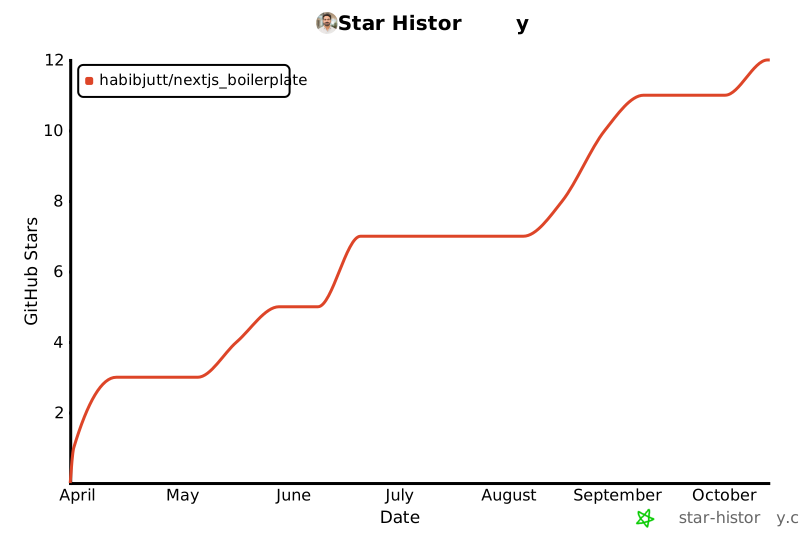
If this project helped you build your SaaS faster, **please give it a star!** It helps others discover the project and motivates continued development.
<div align="center">
[](https://star-history.com/#habibjutt/nextjs_boilerplate&Date)
</div>
<div align="center">
<a href="https://github.com/habibjutt/nextjs_boilerplate/stargazers">
<img src="https://img.shields.io/github/stars/habibjutt/nextjs_boilerplate?style=for-the-badge&logo=github&label=Star%20this%20repo&color=yellow" alt="Star this repo" />
</a>
</div>
<br />
## 📬 Contact
**Habib Jutt** — [@habibjutt](https://github.com/habibjutt) — [email protected]
Project Link: [https://github.com/habibjutt/nextjs_boilerplate](https://github.com/habibjutt/nextjs_boilerplate)
---
<div align="center">
<sub>Built with ❤️ by <a href="https://github.com/habibjutt">Habib Jutt</a> — If this saved you time, consider starring the repo ⭐</sub>
</div>
看看同类模板
对比同技术栈与用途的模板,找到更适合的视觉与内容结构。

ai-website-cloner-template
Clone any website with one command using AI coding agents
Next.js · 启动器

Next.js SaaS Starter
Next.js SaaS Starter 是 Next.js 官方维护的 SaaS 起点模板,定位介于学习资源和可直接部署的脚手架之间。
Next.js · SaaS

Next.js Commerce
Next.js Commerce 是 Vercel 团队维护的电商启动模板,基于 Next.js App Router 构建,采用服务端渲染、React Server Components、Server Actions …
Next.js · 电商

Next-js-Boilerplate
Next-js-Boilerplate 是一个面向 Next.js 16、Tailwind CSS 4 和 TypeScript 的启动器,核心定位是开发者体验优先。
Next.js · 启动器

tailwind-nextjs-starter-blog
tailwind-nextjs-starter-blog 是一个面向个人技术博客的 Next.js 与 Tailwind CSS 启动模板,其 v2 版本基于 App Router 与 React Server Comp…
Next.js · 博客

next-forge
Production-grade Turborepo template for Next.js apps.
Next.js · 启动器