纯 HTML + Tailwind CSS + 原生 JavaScript,无 jQuery 等前端依赖
HTML启动器
Discord-bot-website-template — HTML 启动器模板
作者 hadi-4100
面向 Discord 机器人的静态网站模板,使用 HTML、Tailwind CSS 与原生 JavaScript 构建,包含首页与命令页两个页面。
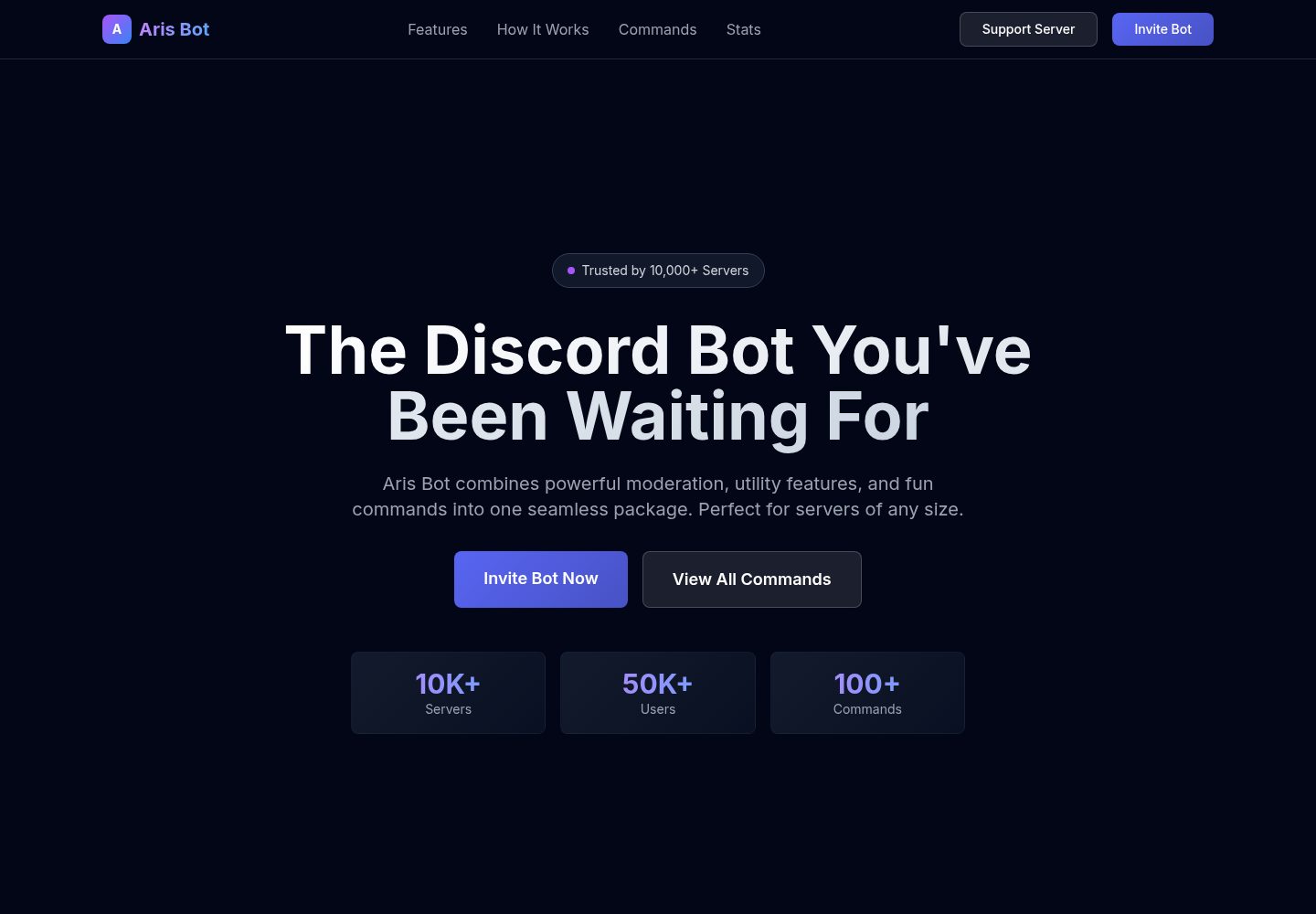
看看你的网站会是什么样
浏览真实页面截图,比较内容排版与手机效果。点击下方缩略图切换,放大查看整页细节。
全部页面与视图 2
截图用于了解视觉与布局,交互效果请以实际项目为准。
采集于 2026-10-02查看来源
值得关注的模板亮点
从已有项目资料中,快速了解它的特点。
包含首页与命令页两个页面,命令页带实时搜索与分类展示
深色主题、渐变文字与悬停过渡效果,移动端优先的响应式布局
命令条目可标注说明、用法示例与所需权限
样式集中在单个 main.css,便于统一调整配色与间距
MIT 许可,可自由使用、修改与分发
模板详细介绍
这是一个用于展示 Discord 机器人的静态网站模板,采用纯 HTML、Tailwind CSS(通过 CDN 引入)和原生 JavaScript 编写,不依赖 jQuery 或其他前端框架。仓库提供两个页面:首页 src/index.html 包含主视觉区、功能展示、统计数字、使用步骤与邀请入口;命令页 src/pages/commands.html 按 Moderation、Utility、Fun、Admin 分类列出命令,并提供实时搜索框、命令说明、用法示例与权限要求。样式集中在 src/css/main.css,采用深色主题与渐变配色,字体使用 Google Fonts 的 Inter。模板为静态页面,不含后端逻辑、数据库或机器人接口,命令数据与文案需手动在 HTML 中修改;部署时把 src/ 目录上传到任意静态托管即可。
HTML启动器
适合你的项目吗?
适用场景
- 为已有的 Discord 机器人搭建介绍与邀请落地页
- 整理并公开展示机器人的命令列表与权限说明
- 作为静态站点部署到 GitHub Pages、Netlify 或 Vercel
- 作为学习 Tailwind CSS 与语义化 HTML 的练习项目
适合人群
- 需要快速上线机器人官网的 Discord 机器人开发者
- 希望用静态托管、不引入构建工具的个人项目
- 能直接编辑 HTML 与 CSS 来替换文案和命令数据的用户
上手与定制指南
结合仓库当前版本的说明,按下面的资料检查内容、配置与运行要求。
- 1
克隆仓库后,在 src/index.html 中替换机器人名称、描述、邀请链接与支持服务器链接
- 2
在 src/pages/commands.html 中按分类补充命令名称、说明、用法示例与权限要求
- 3
在 src/css/main.css 中调整配色、字体与间距,Tailwind 通过 CDN 引入
- 4
将 src/ 目录整体上传到静态托管即可访问,无需构建步骤
- 5
使用前请核对 Google Fonts 等第三方素材的许可,MIT 许可仅覆盖本仓库代码
授权与来源资料
使用条件与限制
免费使用 · 保留许可声明本次收录的是公开仓库中采用 MIT 许可的免费版本;免费范围为该版本代码,不代表外部服务或第三方素材免费。
使用时需要遵守
- 允许免费使用、修改、商用和分发该版本代码。
- 分发代码副本或实质性部分时,保留原作者版权声明和完整 MIT 许可声明。
- 代码按现状提供;担保与责任限制以原许可证及适用法律为准。
额外费用与待核对事项
- 演示图片、字体、图标及其他第三方素材需按各自许可核对,不能仅凭代码的 MIT 许可判断。
- 域名、托管、数据库、支付或 AI 等外部服务可能另外收费。
查看原文依据
https://github.com/hadi-4100/Discord-bot-website-template/blob/Main/LICENSEhttps://github.com/hadi-4100/Discord-bot-website-template/blob/Main/README.mdPermission is hereby granted, free of charge
许可证原文
DeepSeek 根据仓库许可证和 README 整理 ·2026-10-02。结果仅覆盖已读取资料,依赖、图片、字体及后续条款变更以各自原文为准。
项目核对记录与介绍依据
模板资料
- 来源平台
- GitHub
- 资料与维护参考分
- 资料较完整 · 91 / 100
- 技术栈
- HTML
- 网站类型
- 启动器
这个分数如何计算
本站按许可资料(最高30分)、演示链接(12分)、预览图(10分)、Star数(15分)、记录的维护时间(15分)、描述完整度(8分)、功能记录(5分)和分类资料(5分)计算。它不是代码、安全或性能测试,也不是 Google 评分;有链接不代表已实测可用。
这个项目需要核对什么
- 记录的仓库更新时间
- 2026-09-28
- 截图检查日期
- 2026-10-02
已收录演示链接。请用你的内容与屏幕尺寸检查;有演示不代表表单、认证或支付已经可用。
目录记录的主要技术栈是 HTML。请通过依赖清单和锁文件核对实际版本与托管要求。这些说明基于收录资料,不代表代码审计或部署实测。
查看具体选型方法 →介绍的制作与核对状态
介绍由 AI 辅助整理目录与仓库资料。仓库作者不等于这篇介绍的审核者。
已完成服务器许可规则与 AI 来源核对;未经过人工编辑审核。
查看当时使用的来源资料
SHA-256: 8002d9c4d1105ab2fcaa89a4359d13ad90bd9ff13a8396762f490b4ecfe0bbf5
2026-10-02T07:50:33.203Z
来源文件 / 仓库# 🤖 Discord Bot Website Template v3
A **modern, responsive, and beautifully designed** website template for Discord bots. Built with **pure HTML, Tailwind CSS, and vanilla JavaScript** — no frameworks, no dependencies, just clean code.
Perfect for Discord bot creators who want a professional, fast-loading website to showcase their bot.
<br>
<br>
## ❤️ **Support Me**
If you're feeling generous, you can support me financially by clicking the button below. Every contribution is truly appreciated!
<p align="center">
<a href="https://nowpayments.io/donation/Hadi4100">
<img src="https://img.shields.io/badge/Sponsor%20Me-%E2%9D%A4-red?style=for-the-badge">
</a>
</p>
---
## ✨ What's New in v3?
### 🚀 Major Improvements:
- **Replaced Bootstrap with Tailwind CSS** - Smaller footprint, faster performance
- **Pure HTML & Vanilla JS** - No jQuery, no dependencies
- **Modern Discord-Inspired Design** - Dark theme with gradient accents and smooth animations
- **Command Search Functionality** - Real-time search across all bot commands
- **Dynamic Copyright Year** - Automatically updates each year
- **Fully Responsive** - Mobile-first design, works perfectly on all devices
- **Clean Code Architecture** - Well-organized, easy to customize
- **GitHub Integration** - Direct links to your GitHub profile
### 🔄 Version History:
| Version | Framework | Status |
| ------- | ----------------------------- | -------------------------- |
| v1 | Bootstrap | Archived |
| v2 | Bootstrap + jQuery | Available in `v2.0` branch |
| **v3** | **Tailwind CSS + Vanilla JS** | **Current** ✨ |
---
## 📄 Pages Included
### **🏠 Home Page** (`src/index.html`)
- Hero section with call-to-action buttons
- Features showcase with hover effects
- Statistics dashboard
- How it works section with step-by-step guide
- Invitation prompt with strong CTAs
- Responsive footer with social links
### **⚙️ Commands Page** (`src/pages/commands.html`)
- **Search bar** - Find commands instantly
- Organized by categories:
- ⚔️ Moderation Commands
- 🛠️ Utility Commands
- 🎮 Fun Commands
- 👨💼 Admin Commands
- Command descriptions and usage examples
- Permission requirements displayed
- Mobile-responsive grid layout
---
## 🎨 Design Features
✅ **Dark Theme** - Discord-inspired color palette
✅ **Gradient Effects** - Modern gradient text and backgrounds
✅ **Smooth Animations** - Hover effects and transitions
✅ **Accessibility** - Semantic HTML, keyboard navigation
✅ **Performance** - Optimized for speed and SEO
✅ **Mobile First** - Perfect on all screen sizes
---
## 🛠️ Built With
- **[Tailwind CSS](https://tailwindcss.com/)** - Utility-first CSS framework (CDN)
- **HTML5** - Semantic markup
- **Vanilla JavaScript** - No frameworks, pure JS
- **[Google Fonts](https://fonts.google.com/)** - Inter font family
**Zero external dependencies!** Just pure, clean code.
---
## 📦 Project Structure
```
src/
├── index.html # Home page
├── css/
│ └── main.css # All custom styles
└── pages/
└── commands.html # Commands page
```
---
## 🚀 Quick Start
### 1. **Clone the Repository**
```bash
git clone https://github.com/Hadi-4100/Discord-bot-website-template.git
cd Discord-bot-website-template
```
### 2. **Customize Your Bot**
Edit these files to match your bot:
**`src/index.html`:**
- Change bot name from "Aris Bot" to your bot name
- Update descriptions and features
- Modify invitation links
- Add your Discord server/support links
**`src/css/main.css`:**
- Adjust colors (currently using purple/blue gradient)
- Customize fonts and spacing
**`src/pages/commands.html`:**
- Add your bot commands
- Update command descriptions
- Add permissions information
### 3. **Deploy**
Just upload the `src/` folder to any web hosting:
- GitHub Pages
- Netlify
- Vercel
- Traditional hosting (cPanel, FTP, etc.)
---
## 🔗 Quick Links
- **GitHub**: [github.com/Hadi-4100](https://github.com/Hadi-4100)
- **Tailwind CSS Docs**: [tailwindcss.com](https://tailwindcss.com)
- **HTML Semantic Reference**: [developer.mozilla.org](https://developer.mozilla.org)
---
## 📄 License
This project is licensed under the **MIT License** - see the [LICENSE](LICENSE) file for details.
You're free to use, modify, and distribute this template for your Discord bot!
---
## 👨💻 Author
**[Hadi-4100](https://github.com/Hadi-4100)** - Discord Bot Website Template Creator
---
## 🎉 Show Your Support
If this template helped you create an amazing bot website, please:
- ⭐ Star this repository
- 🔄 Share with other bot developers
- 🐛 Report issues and suggest features
- 👨💻 Contribute improvements
---
**Happy bot website building! 🚀**
看看同类模板
对比同技术栈与用途的模板,找到更适合的视觉与内容结构。

startbootstrap-simple-sidebar
An off canvas sidebar navigation Bootstrap HTML template created by Start Bootstrap
HTML · 启动器

adminkit
AdminKit is a free & open-source HTML dashboard & admin template based on Bootstrap 5
HTML · 后台

Landing-Page
Tailwind CSS Starter Template - Landing Page
HTML · 企业官网

light-bootstrap-dashboard
Light Bootstrap Dashboard is an admin dashboard template designed to be beautiful and simple.
HTML · 后台

sing-app
💥Free and open-source admin dashboard template built with Bootstrap 4.5 💥
HTML · 后台

startbootstrap-modern-business
A multipurpose Bootstrap full website template created by Start Bootstrap
HTML · 启动器