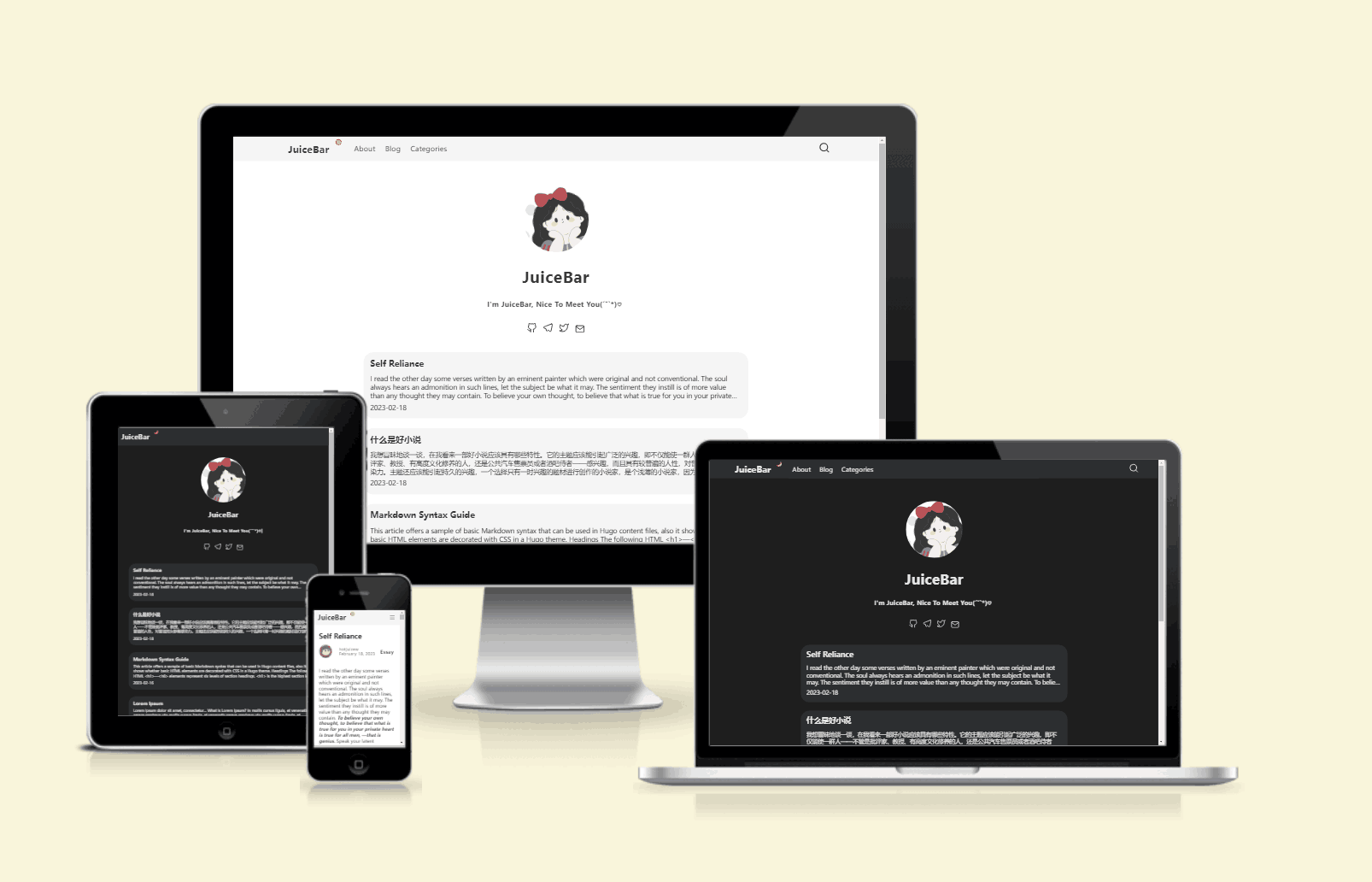
支持明暗模式,可跟随系统偏好或由用户手动切换
Hugo博客
hugo-JuiceBar — Hugo 博客模板
作者 hotjuicew
JuiceBar 是一个基于 Hugo 的简洁博客主题,支持明暗模式、响应式布局、社交图标、目录与代码高亮,并可选接入 giscus 评论。
看看你的网站会是什么样
浏览真实页面截图,比较内容排版与手机效果。点击下方缩略图切换,放大查看整页细节。
目前有 1 张原始预览,可打开完整图片查看设计细节。
截图用于了解视觉与布局,交互效果请以实际项目为准。
采集于 2026-10-02查看来源
值得关注的模板亮点
从已有项目资料中,快速了解它的特点。
响应式布局,适配不同屏幕尺寸
内置社交图标配置,可在 config.toml 中按名称与链接添加
自动生成可展开的目录,并对代码进行自动高亮
可选接入 giscus 评论系统,需自行填写仓库与分类参数
提供 exampleSite 示例配置,便于对照修改站点设置
模板详细介绍
JuiceBar 是一个由 hotjuicew 维护的 Hugo 博客主题,仓库采用 MIT 许可,主题定位为简洁、优雅的博客外观。README 说明其灵感来自 PaperMod 与 LoveIt,并提供在线演示站点。
主题提供明暗模式(跟随系统偏好或用户选择)、响应式布局、社交图标、CSS 动画、可自动展开的目录、代码自动高亮、自定义 script shortcode,以及可选的 giscus 评论系统。配置方式以 config.toml 为主,示例站点 exampleSite 中提供了更完整的可配置项。
安装方式为将仓库以 git submodule 或克隆方式放入 Hugo 站点的 themes/JuiceBar 目录,再复制 exampleSite 的 config.toml 到站点根目录并按需修改;文章与页面通过 hugo new content 命令创建。主题本身不依赖高级配置,但 giscus 评论需要自行填写仓库、分类等参数。
Hugo博客
适合你的项目吗?
适用场景
- 搭建个人技术博客或写作站点
- 需要一个支持明暗主题切换的 Hugo 博客
- 希望用 Hugo 快速建立带目录、代码高亮与社交链接的内容站
- 为已有 Hugo 站点替换为轻量博客主题
适合人群
- 使用 Hugo 构建站点的开发者
- 偏好简洁排版与明暗模式切换的博客作者
- 需要 giscus 评论与代码高亮等技术写作场景的用户
上手与定制指南
结合仓库当前版本的说明,按下面的资料检查内容、配置与运行要求。
- 1
以 git submodule 方式将仓库添加到 themes/JuiceBar,或直接克隆到该目录
- 2
复制 exampleSite 中的 config.toml 到 Hugo 站点根目录,并填写 baseURL、title、author 等信息
- 3
按需在 params.social 中添加社交图标,图标名称需对应主题 svg.html 中已有的名称
- 4
如需评论功能,取消 config.toml 中 params.giscus 段的注释并填写 repo、repoID、category、categoryID 等参数
- 5
使用 hugo new content/about.md 与 hugo new content/post/title.md 创建页面和文章
授权与来源资料
使用条件与限制
免费使用 · 保留许可声明本次收录的是公开仓库中采用 MIT 许可的免费版本;免费范围为该版本代码,不代表外部服务或第三方素材免费。
使用时需要遵守
- 允许免费使用、修改、商用和分发该版本代码。
- 分发代码副本或实质性部分时,保留原作者版权声明和完整 MIT 许可声明。
- 代码按现状提供;担保与责任限制以原许可证及适用法律为准。
额外费用与待核对事项
- giscus 评论为可选功能,需自行提供 GitHub 仓库、repoID、分类名与分类 ID 等参数,未配置时评论不可用。
- 社交图标名称必须与主题 svg.html 中已有的名称对应,否则无法显示。
- 演示图片、字体、图标及其他第三方素材需按各自许可核对,不能仅凭代码的 MIT 许可判断。
- 域名、托管、数据库、支付或 AI 等外部服务可能另外收费。
查看原文依据
Permission is hereby granted, free of charge
许可证原文
# If using the giscus commenting system
README 原文
https://github.com/hotjuicew/hugo-JuiceBar/blob/master/LICENSEhttps://github.com/hotjuicew/hugo-JuiceBar/blob/master/README.mdMore social icons can be found in JuiceBar\layouts\partials\svg.html.
README 原文
DeepSeek 根据仓库许可证和 README 整理 ·2026-10-02。结果仅覆盖已读取资料,依赖、图片、字体及后续条款变更以各自原文为准。
项目核对记录与介绍依据
模板资料
- 来源平台
- GitHub
- 资料与维护参考分
- 资料较完整 · 75 / 100
- 技术栈
- Hugo
- 网站类型
- 博客
这个分数如何计算
本站按许可资料(最高30分)、演示链接(12分)、预览图(10分)、Star数(15分)、记录的维护时间(15分)、描述完整度(8分)、功能记录(5分)和分类资料(5分)计算。它不是代码、安全或性能测试,也不是 Google 评分;有链接不代表已实测可用。
这个项目需要核对什么
- 记录的仓库更新时间
- 2026-01-02
- 截图检查日期
- 2026-10-02
目前没有记录演示链接。请依据仓库说明在本地评估;仅凭截图无法确认交互行为。
目录记录的主要技术栈是 Hugo。请通过依赖清单和锁文件核对实际版本与托管要求。这些说明基于收录资料,不代表代码审计或部署实测。
查看具体选型方法 →介绍的制作与核对状态
介绍由 AI 辅助整理目录与仓库资料。仓库作者不等于这篇介绍的审核者。
已完成服务器许可规则与 AI 来源核对;未经过人工编辑审核。
查看当时使用的来源资料
SHA-256: 2d46e7ac1e058e65e1fe1dfcba939860690a87418ddced884926b0e53dbff456
2026-10-02T10:12:34.841Z
来源文件 / 仓库# JuiceBar English | [简体中文](https://github.com/hotjuicew/hugo-juicebar/tree/master/README-zh_CN.md) JuiceBar is a concise, elegan blog theme powered by [Hugo](https://gohugo.io). This theme drew a lot of inspiration from PapermMod and LoveIt, and credit is due to their excellent work. ⭐Demo → [juicebar-demo.add1.dev](https://juicebar-demo.add1.dev) <hr /> ## Overview  ## Features - Theming: **dark/light mode**, depending on your system preferences or the users choice - An easy way to modify the theme with Hugo tooling - Fully responsive - Support for social icons - Some beautiful CSS animations - Easy-to-use and self-expanding table of contents - Automatically highlighting code - Custom script shortcode - giscus comment system supported by giscus ## How to start You can install the theme either as a clone or submodule. I recommend the latter. From the root of your Hugo site, type the following: ``` $ git submodule add https://github.com/hotjuicew/hugo-JuiceBar.git themes/JuiceBar ``` Now you can get updates to hugo-JuiceBar in the future by updating the submodule: ``` $ git submodule update --remote themes/JuiceBar ``` ## How to configure The theme doesn't require any advanced configuration. Just copy the following config file. `config.toml` ```toml baseURL = 'http://example.org/' languageCode = 'en-us' theme = "JuiceBar" title = "your_blog_title" [params] author = "your_name" description = "My site description" authorImage = "/images/profile.jpg" paginate = 5 Title = "your_blog_title" content = "I'm JuiceBar, nice to meet you(ˊ˘ˋ*)♡" imageUrl = "/images/avatar.jpg" # To add a new social icon # More social icons can be found in JuiceBar\layouts\partials\svg.html. [[params.social]] name = "Github" url = "https://github.com/hotjuicew" [[params.social]] name = "telegram" url = "https://t.me/Hotjuice" [[params.social]] name = "twitter" url = "https://twitter.com/hotjuicee" [[params.social]] name = "email" url = "mailto:[email protected]" [[params.social]] name = "instagram" url = "your_url" [[params.social]] name = "mastodon" url = "your_url" [[params.social]] name = "reddit" url = "your_url" [[params.social]] name = "stackoverflow" url = "your_url" [taxonomies] category = "categories" tag = "tags" # To add a new navigation link [[menu.main]] name = "About" url = "/about" [[menu.main]] name = "Blog" url = "/post" [[menu.main]] name = "Categories" url = "/categories" # If using the giscus commenting system #[params.giscus] #repo = "ENTER REPO HERE" #repoID = "ENTER REPO ID HERE" #category = "ENTER CATEGORY NAME HERE" #categoryID = "ENTER CATEGORY ID HERE" #mapping = "og:title" #reactionsEnabled = "1" #emitMetadata = "0" #inputPosition = "bottom" #lang = "en" #loading = "lazy" # Used for outputting the documentation (required). [outputs] home = ["HTML", "RSS", "JSON"] ``` Note: There are more options to configure. Take a look into the `config.toml` in `exampleSite`. After installation, take a look at the `exampleSite` folder inside `themes/hugo-JuiceBar`. To get started, copy the `config.toml` file inside `exampleSite` to the root of your Hugo site: ``` $ cp themes/hugo-JuiceBar/exampleSite/config.toml . ``` Now edit this file and add your own information. Note that some fields can be omitted. I recommend you use the theme's archetypes so now delete your site's `archetypes/default.md`. Finally, just run `$ hugo new content/about.md` to create your 'About' page, and `$ hugo new content/post/title.md` to create your first blog post.
看看同类模板
对比同技术栈与用途的模板,找到更适合的视觉与内容结构。

hugo-PaperMod
PaperMod 是 Hugo 生态里知名度较高的主题之一,定位很明确:给博客和轻量作品集站点提供一套干净、响应式的阅读界面。
Hugo · 作品集

LoveIt
❤️A clean, elegant but advanced blog theme for Hugo 一个简洁、优雅且高效的 Hugo 主题
Hugo · 博客

hugo-coder
A minimalist blog theme for hugo.
Hugo · 博客

blowfish
Personal Website & Blog Theme for Hugo
Hugo · 博客

hugo-paper
🪺 A simple, clean, customizable Hugo theme
Hugo · 博客

hextra
Hextra 是一个 Hugo 主题,定位在文档站与博客之间:既提供侧边栏导航、目录、面包屑、分页这类文档站结构,也能承载博客内容。
Hugo · 文档