前端使用 React 与 TypeScript,构建工具为 Vite
React后台
Accessibility_Dashboard_React — React 后台模板
作者 hvsr-uw
基于 React 与 TypeScript 的后台管理界面原型,仓库分为前端与 JSON API 后端两部分,提供数据表格、图表与路由等后台常用界面。
看看你的网站会是什么样
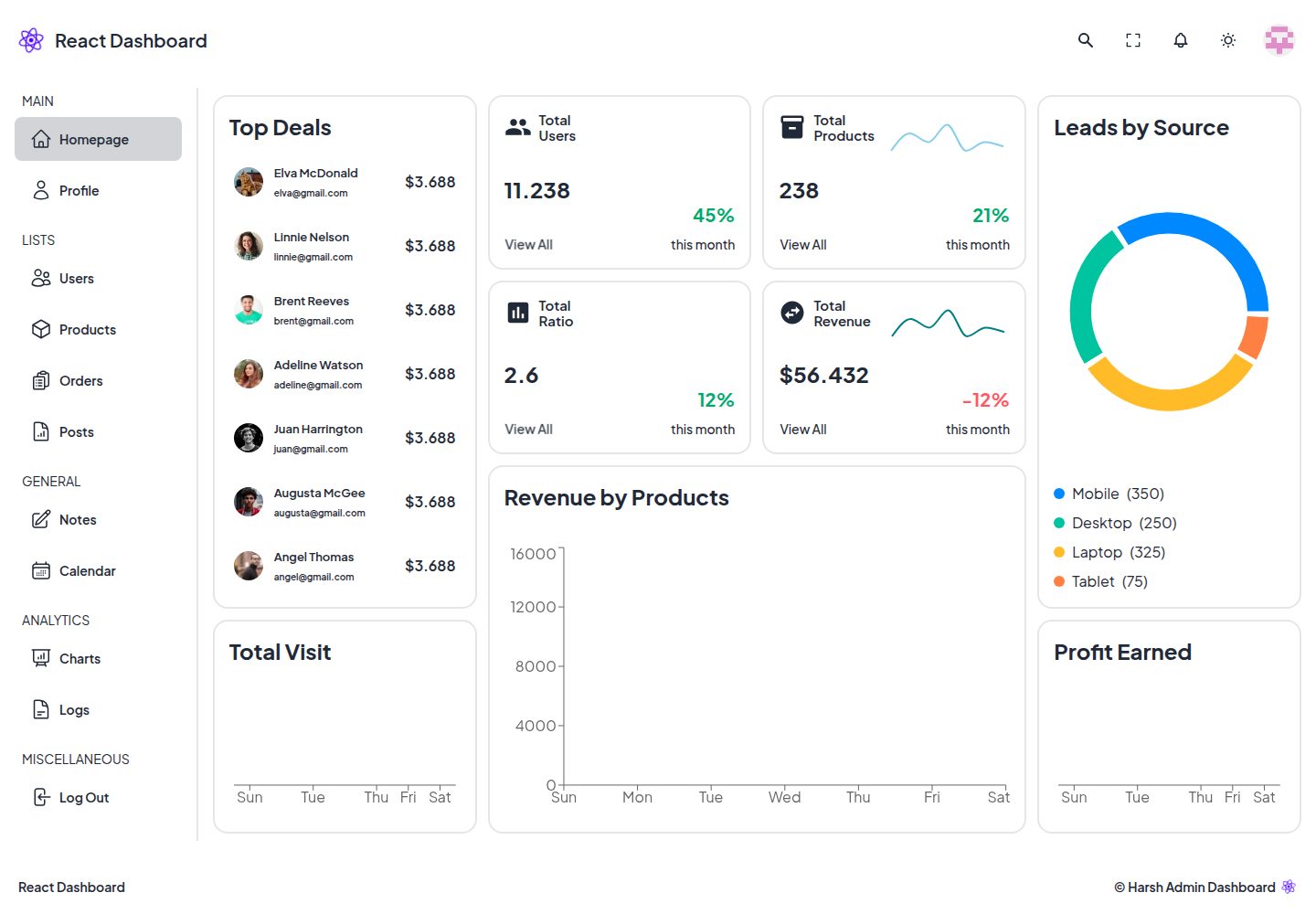
浏览真实页面截图,比较内容排版与手机效果。点击下方缩略图切换,放大查看整页细节。
全部页面与视图 3
截图用于了解视觉与布局,交互效果请以实际项目为准。
采集于 2026-10-03查看来源
值得关注的模板亮点
从已有项目资料中,快速了解它的特点。
使用 React Router 实现声明式路由
使用 React Query 进行数据获取
样式基于 Tailwind CSS 与 Daisy UI,数据表格使用 Material UI
图表使用 Recharts 绘制
仓库包含前端与 JSON API 后端两个目录,后端已配置为可部署到 Vercel
模板详细介绍
这是一个用 React 和 TypeScript 编写的后台管理界面原型,作者将其定位为 Dashboard UI Prototype,目标是给 IT 机构或独立开发者提供界面参考。仓库拆成两个目录:backend 提供 JSON API,并已配置为可部署到 Vercel,也提供了线上 API 地址;frontend 是完整的界面原型,包含声明式路由、数据请求、图标、图表以及基于组件库的数据表格。
从 README 列出的依赖看,界面层使用 React Router 做路由、React Query 做数据获取、React Icons 提供图标、Tailwind CSS 与 Daisy UI 作为样式和设计系统基础、Material UI 用于数据表格、Recharts 绘制图表。运行前端需要 Node 20.11.0 LTS 或更高版本,默认本地地址为 5173 端口;后端本地运行在 5000 端口。若要更换接口地址,需要修改 frontend/src/api/ApiCollection.tsx。
需要注意,README 明确说明这是作者第一次构建的界面原型,用途是给后续项目提供思路,并未声明其已达到生产可用程度。仓库采用 BSD-3-Clause 许可,代码可免费使用、修改和分发,但演示图片、字体、图标等第三方素材需单独核对许可,域名、托管、数据库等外部服务也可能产生费用。
React后台
适合你的项目吗?
适用场景
- 作为后台管理界面的界面参考或原型起点
- 用于演示 React 生态中路由、数据请求、图表与数据表格的组合方式
- 在本地同时启动前端与 JSON API 后端进行界面调试
- 将后端 API 部署到 Vercel 后,前端通过修改 ApiCollection.tsx 切换接口地址
适合人群
- 需要后台管理界面原型的开发者
- 希望参考 React 与 TypeScript 后台界面组织方式的 IT 机构或独立开发者
- 想了解 React Router、React Query、Recharts 等库在仪表盘中如何配合使用的人
上手与定制指南
结合仓库当前版本的说明,按下面的资料检查内容、配置与运行要求。
- 1
运行环境要求 Node 20.11.0 LTS 或更高版本
- 2
后端:进入 backend 目录执行 npm install,本地可用 nodemon ./src/index.ts 启动,默认地址为 http://localhost:5000
- 3
前端:进入 frontend 目录执行 npm install 后运行 npm run dev,默认地址为 http://localhost:5173
- 4
如需更换默认 API 地址,修改 frontend/src/api/ApiCollection.tsx
- 5
代码采用 BSD-3-Clause 许可,但演示图片、字体、图标等第三方素材需单独核对许可,外部托管等服务可能另行收费
授权与来源资料
使用条件与限制
免费使用 · 保留许可声明本次收录的是公开仓库中采用 BSD-3-Clause 许可的免费版本;免费范围为该版本代码,不代表外部服务或第三方素材免费。
使用时需要遵守
- 允许免费使用、修改、商用以及源代码或二进制形式的分发。
- 源代码分发需保留版权声明、三项条件和免责声明;二进制分发需在文档或随附材料中重现这些内容。
- 未经事先书面许可,不得使用权利人或贡献者的名称为衍生产品背书或推广。
- 代码按现状提供;担保与责任限制以原许可证及适用法律为准。
额外费用与待核对事项
- 运行环境限制:使用本项目需要 Node 20.11.0 LTS 或更高版本,低于该版本无法正常运行。
- 外部服务依赖:前端默认调用作者部署在 Vercel 的线上 API,使用该默认接口依赖外部托管服务,可能受其可用性与费用政策影响。
- 配置限制:如需更换默认 API 地址,必须手动修改 frontend/src/api/ApiCollection.tsx 文件。
- 演示图片、字体、图标及其他第三方素材需按各自许可核对,不能仅凭代码的 BSD-3-Clause 许可判断。
- 域名、托管、数据库、支付或 AI 等外部服务可能另外收费。
查看原文依据
Redistribution and use in source and binary forms, with or without modification, are permitted
许可证原文
React Admin UI requires a **Node version higher or equal to 20.11.0 LTS**.
README 原文
By default, I already deployed the API to run in Vercel environment. The live API can be accessed from [https://react-admin-ui-v1-api.vercel.app/](https://react-admin-ui-v1-api.vercel.app/).
README 原文
https://github.com/hvsr-uw/Accessibility_Dashboard_React/blob/main/LICENSEhttps://github.com/hvsr-uw/Accessibility_Dashboard_React/blob/main/README.mdIf you would like to change the default API endpoint, you can go to [ApiCollection.tsx](/frontend/src/api/ApiCollection.tsx).
README 原文
DeepSeek 根据仓库许可证和 README 整理 ·2026-10-03。结果仅覆盖已读取资料,依赖、图片、字体及后续条款变更以各自原文为准。
项目核对记录与介绍依据
模板资料
- 来源平台
- GitHub
- 资料与维护参考分
- 资料较完整 · 83 / 100
- 技术栈
- React
- 网站类型
- 后台
这个分数如何计算
本站按许可资料(最高30分)、演示链接(12分)、预览图(10分)、Star数(15分)、记录的维护时间(15分)、描述完整度(8分)、功能记录(5分)和分类资料(5分)计算。它不是代码、安全或性能测试,也不是 Google 评分;有链接不代表已实测可用。
这个项目需要核对什么
- 记录的仓库更新时间
- 2026-01-02
- 截图检查日期
- 2026-10-03
已收录演示链接。请用你的内容与屏幕尺寸检查;有演示不代表表单、认证或支付已经可用。
目录记录的主要技术栈是 React。请通过依赖清单和锁文件核对实际版本与托管要求。这些说明基于收录资料,不代表代码审计或部署实测。
查看具体选型方法 →介绍的制作与核对状态
介绍由 AI 辅助整理目录与仓库资料。仓库作者不等于这篇介绍的审核者。
已完成服务器许可规则与 AI 来源核对;未经过人工编辑审核。
查看当时使用的来源资料
SHA-256: 3fcd190297f81170971a7cffebe4f3a68d0ac2f982fa45dc9f9ad26c90c2e237
2026-10-03T06:03:47.156Z
来源文件 / 仓库<br/>
<p align="center">
<a href="https://react-admin-ui-v1.vercel.app/" target="_blank">
<img width="60%" src="logo.jpg" alt="Logo">
</a>
</p>
<br/>
<p align="center">
<a href="LICENSE" target="_blank"><img src="https://img.shields.io/github/license/hvsr-uw/Accessibility_Dashboard_React" alt="GitHub license"></a>
<a><img src="https://img.shields.io/badge/version-1.0.0-blue" alt="version"></a>
<a><img src="https://img.shields.io/github/stars/hvsr-uw/Accessibility_Dashboard_React" alt="GitHub stars"></a>
<a><img src="https://img.shields.io/github/languages/top/hvsr-uw/Accessibility_Dashboard_React" alt="language"></a>
<a><img src="https://img.shields.io/github/forks/hvsr-uw/Accessibility_Dashboard_React" alt="forks"></a>
</p>
<br/>
Checkout Story on [Medium](https://medium.com/@harshrathore1098/building-an-accessibility-dashboard-87f4f83ebc1b)
[React Admin UI](https://react-admin-ui-v1.vercel.app/) is a beautiful and open-source **Dashboard User Interface Prototype** built with TypeScript and React based. Surprisingly, this is my first time building a User Interface prototype with a bit complex components. So, my goal is IT agencies or even individual developers could use this prototype to brings insight for their future projects.
Have a look at the preview of [React Admin UI](https://react-admin-ui-v1.vercel.app/) for a comprehensive list of prototype's features, core values and use cases.
<br/>
<p align="center">
<img width="80%" src="preview-optimized.gif" alt="preview">
</p>
<br/>
This repository contains the **core system of React Admin UI Prototype**, splitted into two different directories. Backend is for the JSON API (It is already configured for Vercel deployment), and Frontend is for the whole User Interface prototype.
## 💎 Features and Consist of
- ⚡️ React 18 TypeScript with Vite
- 🎯 Declarative Routing with React Router v6
- 📋 Seamless Data Fetching with React Query v5
- ✨ Optimized Icons with React Icons v5
- 🎨 Tailwind CSS v3 as the Styling Foundation
- 👓 Daisy UI v4 as the Base Design System
- 🕶 Material UI v5 for optimized Data Grid
- 📊 Beautiful Charts with Recharts v2
- 🤯 And many more...
## 🚀 Installation and How to use
See below for a quickstart installation and usage examples.
<details open>
<summary>Backend</summary>
Install all dependencies listed in `package.json` inside backend directory.
```bash
cd backend
```
```bash
npm install
```
By default, I already deployed the API to run in Vercel environment. The live API can be accessed from [https://react-admin-ui-v1-api.vercel.app/](https://react-admin-ui-v1-api.vercel.app/). However, in case you would like to configure the backend by yourself, you can run below.
```bash
nodemon ./src/index.ts
```
And the API can be accessed locally from [http://localhost:5000](http://localhost:5000).
</details>
<details open>
<summary>Frontend</summary>
Install all dependencies listed in `package.json` inside frontend directory.
```bash
cd frontend
```
```bash
npm install
```
```bash
npm run dev
```
If you would like to change the default API endpoint, you can go to [ApiCollection.tsx](/frontend/src/api/ApiCollection.tsx).
And then, the app can be accessed from [http://localhost:5173/](http://localhost:5173/).
</details>
## 📫 Have a question? Would like to chat? Ran into a problem?
Obviously you can always **reach out to me directly** via a formal approach such as [Email](mailto:[email protected]) or [LinkedIn](https://www.linkedin.com/in/harshvardhansr/).
## 🤝 Found a bug? Suggesting a specific feature?
Feel free to **file a new issue** with a respective title and description on the the [hvsr-uw/Accessibility_Dashboard_React](https://github.com/hvsr-uw/Accessibility_Dashboard_React/issues) repository. If you already found a solution to your problem, **we would love to review your pull request**!
## ✅ Requirements
React Admin UI requires a **Node version higher or equal to 20.11.0 LTS**. Have a look at the `dependencies` and `devDependencies` section in the _package.json_ inside [backend](/backend/package.json) and [frontend](/frontend/package.json) to find the **current list of the requirements** of React Admin UI.
## 📘 License
React Admin Dashboard UI Prototype is released under the terms of the [BSD-3-Clause](LICENSE).
看看同类模板
对比同技术栈与用途的模板,找到更适合的视觉与内容结构。
ant-design-pro
Ant Design Pro 是 Ant Design 官方推出的企业级中后台前端脚手架,基于 React 19、Umi Max 4 和 antd 6 构建,内置 TypeScript 支持。
React · 后台

coreui-free-react-admin-template
Free React Admin & Dashboard Template Built for AI-Assisted Development
React · 后台

fastapi-react
fastapi-react 是一个基于 Cookiecutter 的模板,用于快速搭建 FastAPI 与 React(TypeScript)的全栈项目。
React · 后台

react-antd-admin-template
一个基于React+Antd的后台管理模版,在线预览https://nlrx-wjc.github.io/react-antd-admin-template/
React · 后台

react-saas-template
🌊 Template for building an SaaS / admin website using React + Material-UI
React · 后台

react-material-admin
☄️React Material Admin is a React template built with Material-UI
React · 后台