基于 Hugo 的 HTML/CSS 简历主题,可生成在线简历页面
HTML启动器
almeida-cv — HTML 启动器模板
作者 ineesalmeida
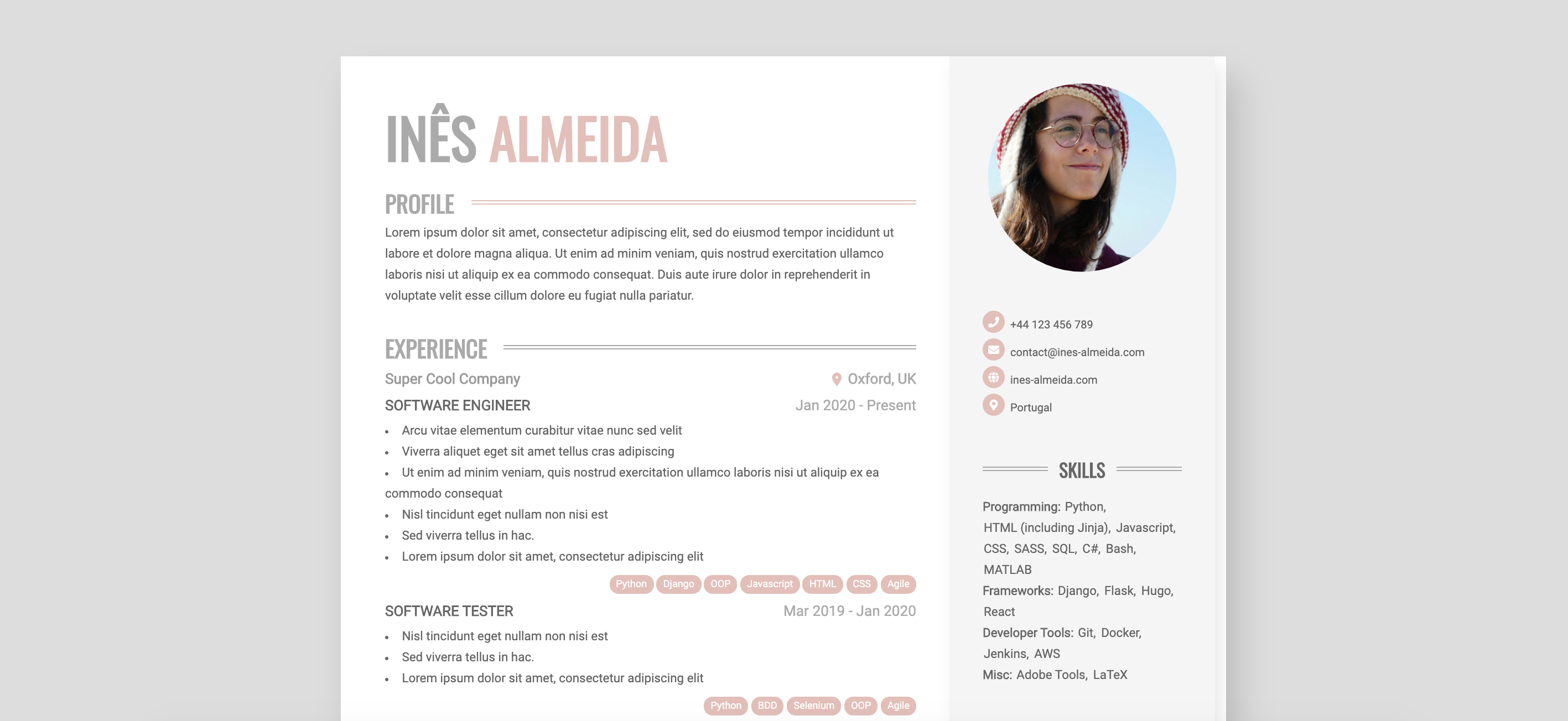
Almeida CV 是一个基于 Hugo 的 HTML/CSS 简历主题,用于生成可打印为 A4 PDF 的在线简历,支持颜色与页数等配置。
看看你的网站会是什么样
浏览真实页面截图,比较内容排版与手机效果。点击下方缩略图切换,放大查看整页细节。
目前有 1 张原始预览,可打开完整图片查看设计细节。
截图用于了解视觉与布局,交互效果请以实际项目为准。
采集于 2026-10-02查看来源
值得关注的模板亮点
从已有项目资料中,快速了解它的特点。
支持浏览器打印为 A4 PDF,内容超过一页时按设定页数分页
提供多组颜色参数,可分别调整页面、高亮、图标和右栏配色
可通过 config.toml 设置 A4 页数、左右栏互换和页脚文字
支持通过 assets/scss/_custom.scss 覆盖主题 SCSS 样式
模板详细介绍
Almeida CV 是一个 Hugo 主题,用于构建可自定义的在线简历页面。它使用 HTML5 与 CSS3,提供有限的网页响应式表现,并针对浏览器打印做了 A4 页面排版:当内容超过一页时,会按设定的页数自动分页,方便直接输出为 PDF 简历。
使用方式是在 Hugo 站点中安装该主题,将 exampleSite 目录中的文件替换到站点根目录,然后在 data/content.yaml 中填写个人职业信息,并在 config.toml 中调整主题颜色、A4 页数、左右栏顺序等参数。主题还允许通过 assets/scss/_custom.scss 覆盖样式。
需要注意,该主题依赖 Hugo Extended 版本;打印时若徽章等带背景的元素显示异常,需要在打印对话框中开启“背景图形”选项。
HTML启动器
适合你的项目吗?
适用场景
- 制作个人在线简历并需要打印为 A4 PDF
- 希望用 YAML 数据文件集中管理简历内容
- 需要调整简历配色、页数或左右栏布局
- 在 Hugo 站点中集成一份可打印的 CV 页面
适合人群
- 熟悉 Hugo 并需要可打印简历主题的开发者
- 希望以数据文件维护简历内容的用户
- 需要自定义简历颜色与分页设置的求职者
上手与定制指南
结合仓库当前版本的说明,按下面的资料检查内容、配置与运行要求。
- 1
需要安装 Hugo Extended 版本
- 2
通过 git submodule 将主题添加到 themes/almeida-cv
- 3
用 exampleSite 中的文件替换站点根目录文件
- 4
在 data/content.yaml 填写职业信息,在 config.toml 调整颜色与页数
- 5
打印时若背景元素缺失,需在打印对话框中开启“背景图形”
授权与来源资料
使用条件与限制
免费使用 · 保留许可声明本次收录的是公开仓库中采用 MIT 许可的免费版本;免费范围为该版本代码,不代表外部服务或第三方素材免费。
使用时需要遵守
- 允许免费使用、修改、商用和分发该版本代码。
- 分发代码副本或实质性部分时,保留原作者版权声明和完整 MIT 许可声明。
- 代码按现状提供;担保与责任限制以原许可证及适用法律为准。
额外费用与待核对事项
- 使用该主题必须安装 Hugo Extended 版本,普通版 Hugo 无法正常构建。
- 打印为 PDF 时,若徽章等带背景元素显示异常,需在浏览器打印对话框中手动开启“背景图形”选项。
- 演示图片、字体、图标及其他第三方素材需按各自许可核对,不能仅凭代码的 MIT 许可判断。
- 域名、托管、数据库、支付或 AI 等外部服务可能另外收费。
查看原文依据
Permission is hereby granted, free of charge
许可证原文
To use `almeida-cv` theme you need to install Hugo Extended
README 原文
https://github.com/ineesalmeida/almeida-cv/blob/master/LICENSEhttps://github.com/ineesalmeida/almeida-cv/blob/master/README.mdremember to toggle the "Background Graphics" option in the print dialog
README 原文
DeepSeek 根据仓库许可证和 README 整理 ·2026-10-02。结果仅覆盖已读取资料,依赖、图片、字体及后续条款变更以各自原文为准。
项目核对记录与介绍依据
模板资料
- 来源平台
- Hugo Themes
- 资料与维护参考分
- 资料较完整 · 79 / 100
- 技术栈
- HTML
- 网站类型
- 启动器
这个分数如何计算
本站按许可资料(最高30分)、演示链接(12分)、预览图(10分)、Star数(15分)、记录的维护时间(15分)、描述完整度(8分)、功能记录(5分)和分类资料(5分)计算。它不是代码、安全或性能测试,也不是 Google 评分;有链接不代表已实测可用。
这个项目需要核对什么
- 记录的仓库更新时间
- 2026-02-23
- 截图检查日期
- 2026-10-02
目前没有记录演示链接。请依据仓库说明在本地评估;仅凭截图无法确认交互行为。
目录记录的主要技术栈是 HTML。请通过依赖清单和锁文件核对实际版本与托管要求。这些说明基于收录资料,不代表代码审计或部署实测。
查看具体选型方法 →介绍的制作与核对状态
介绍由 AI 辅助整理目录与仓库资料。仓库作者不等于这篇介绍的审核者。
已完成服务器许可规则与 AI 来源核对;未经过人工编辑审核。
查看当时使用的来源资料
SHA-256: a7f3339d3762ea33838c24876281f92f22af6e01850ed3101ab7241fc3d46bb3
2026-10-02T18:06:31.189Z
来源文件 / 仓库# Almeida CV Theme Theme to build a customizeable printable HTML/CSS CV.  # Features - Online CV with minor responsiveness - Printable as A4 PDF - HTML5 + CSS3 - Customizeable colors ## Print your PDF CV When printing the page in the browser, you'll get a formatted A4 page that can be used as your PDF resume. If your page holds more than 1 A4 page, the content will be divided into the given amount of pages. For better formatting, you can set the number of pages in the `config.toml` file. If badges and other elements with background don't render correctly, remember to toggle the "Background Graphics" option in the print dialog. # Usage ## Install Hugo (extended) To use `almeida-cv` theme you need to install Hugo Extended by following https://gohugo.io/getting-started/installing/. ## Create your personal website ``` hugo new site <your website's name> cd <your website's name> git init git submodule add https://github.com/ineesalmeida/almeida-cv.git themes/almeida-cv ``` Replace the files in your site root's directory with the ones in `themes/almeida-cv/exampleSite`. ## Start Hugo in development mode ``` hugo server -D ``` Your site is now available at http://localhost:1313/. ## Customization Your professional data should be added in the `data/content.yaml` file. You can change the theme colors and number of pages in the `config.toml` file. For working example, see `exampleSite` directory. ### Configuration Parameters Below are the available parameters for `config.toml` and their descriptions: | Parameter | Description | Example/Default | | --------------------------------------- | --------------------------------------------------------- | ---------------------- | | `languageCode` | The language code for the site. | `en-us` | | `defaultContentLanguage` | The default content language. | `en` | | `enableRobotsTXT` | Enable generation of robots.txt. | `true` | | `enableEmoji` | Enable emoji support. | `true` | | `theme` | The theme to use. | `almeida-cv` | | `disableKinds` | List of page types to disable (e.g., RSS, sitemap, etc.). | See example | | `baseURL` | The base URL of the site. | `https://example.com/` | | `title` | The title of the site. | `Example - CV` | | `params.enableMetaTags` | Enable meta tags for SEO. | `true` | | `params.colorLight` | Light color for theme. | `#fff` | | `params.colorDark` | Dark color for theme. | `#666` | | `params.colorPageBackground` | Background color for the page. | `#ddd` | | `params.colorPrimary` | Primary color for highlights. | `#e3bfb8` | | `params.colorSecondary` | Secondary color for highlights. | `#aaa` | | `params.colorIconPrimary` | Primary color for icons. | `#fff` | | `params.colorIconBackground` | Background color for icons. | `#e3bfb8` | | `params.colorRightColumnBackground` | Background color for the right column. | `#f5f5f5` | | `params.colorRightColumnHeadingText` | Heading text color in the right column. | `#666` | | `params.colorRightColumnBodyText` | Body text color in the right column. | `#666` | | `params.colorRightColumnIconPrimary` | Primary color for icons in the right column. | `#fff` | | `params.colorRightColumnIconBackground` | Background color for icons in the right column. | `#e3bfb8` | | `params.pages` | Number of A4 pages to use for the CV. | `1` | | `params.swapColumns` | If `true`, swaps the left and right columns. | `false` | | `params.footerNote` | Text to display in the footer. | See example | Add or adjust these parameters in your `config.toml` to customize your CV's appearance and behavior. For more advanced customization, in your site root directory create `assets/scss/_custom.scss` file where you can overwrite theme SCSS as per your liking. ## Building To generate static files of your website, execute the following: ``` hugo --minify ``` within the root of your project. # Contributing Post bugs and contributions to the issue tracker. Or make a pull request.
看看同类模板
对比同技术栈与用途的模板,找到更适合的视觉与内容结构。

startbootstrap-simple-sidebar
An off canvas sidebar navigation Bootstrap HTML template created by Start Bootstrap
HTML · 启动器

adminkit
AdminKit is a free & open-source HTML dashboard & admin template based on Bootstrap 5
HTML · 后台

Landing-Page
Tailwind CSS Starter Template - Landing Page
HTML · 企业官网

light-bootstrap-dashboard
Light Bootstrap Dashboard is an admin dashboard template designed to be beautiful and simple.
HTML · 后台

sing-app
💥Free and open-source admin dashboard template built with Bootstrap 4.5 💥
HTML · 后台

startbootstrap-modern-business
A multipurpose Bootstrap full website template created by Start Bootstrap
HTML · 启动器