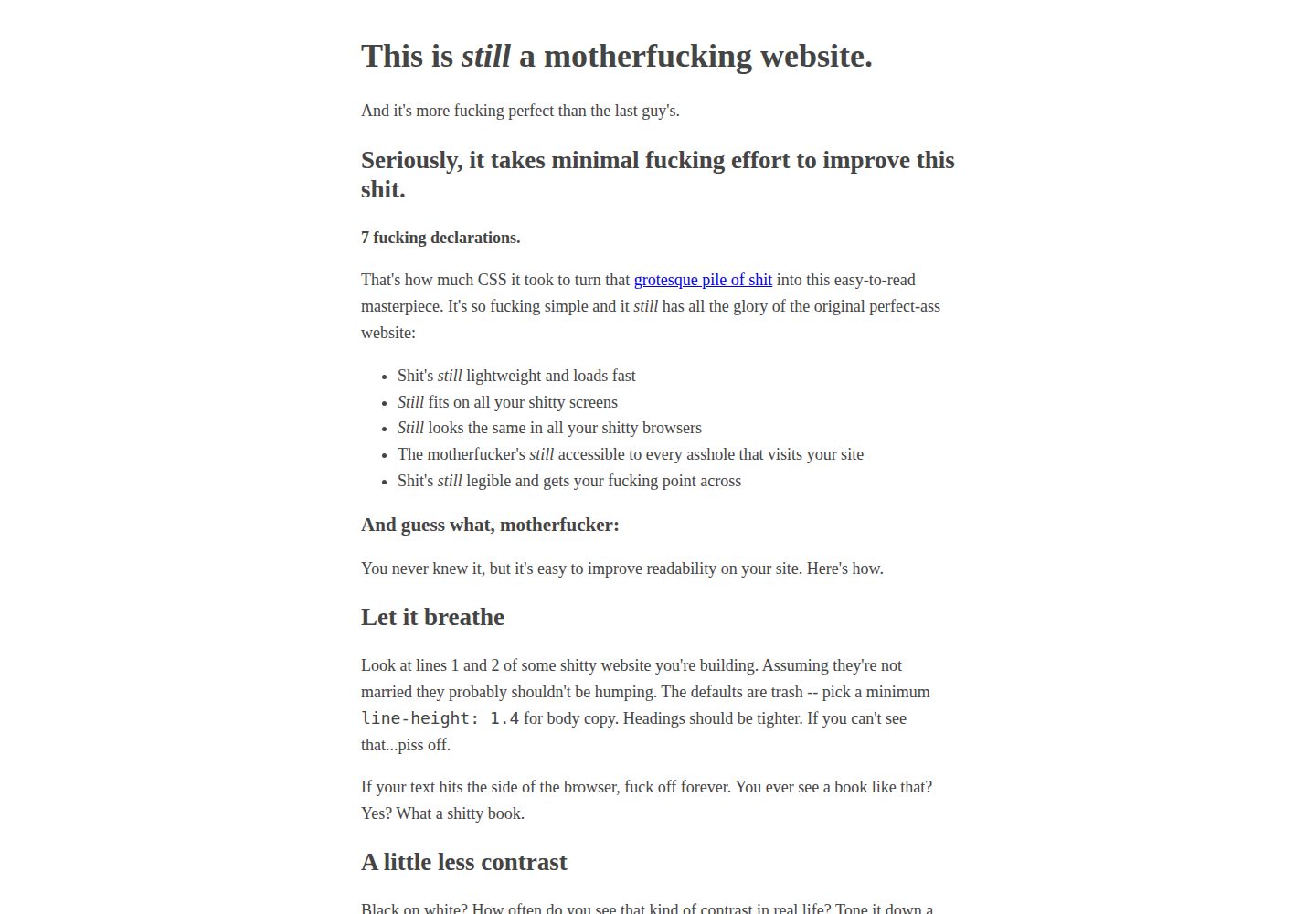
基于 bettermotherfuckingwebsite.com 的 7 条 CSS 声明,仅补充博客所需的最小样式
Hugo博客
bmfw-micro — Hugo 博客模板
作者 jamwil
基于 bettermotherfuckingwebsite.com 的极简 Hugo 主题,兼容 Micro.blog,只保留博客所需的最少样式与功能。
看看你的网站会是什么样
浏览真实页面截图,比较内容排版与手机效果。点击下方缩略图切换,放大查看整页细节。
全部页面与视图 2
截图用于了解视觉与布局,交互效果请以实际项目为准。
采集于 2026-09-30查看来源
值得关注的模板亮点
从已有项目资料中,快速了解它的特点。
不使用 Web 字体、JavaScript 或前端框架
支持 Micro.blog 无标题短帖与完整文章,使用 microformats2 的 h-feed、h-entry 标记
提供回复区、照片页 /photos、归档页 /archive 与分类
输出 RSS、JSON Feed 及播客 XML/JSON 订阅源,并在 head 中声明 IndieWeb 端点
提供 plugins_css、plugins_js、plugins_html 与自定义页脚等 Micro.blog 插件钩子
模板详细介绍
bmfw-micro 是一个兼容 Micro.blog 的 Hugo 博客主题,设计起点是 bettermotherfuckingwebsite.com 的 7 条 CSS 声明:正文宽度、行高、字号、颜色等基础排版,再补充博客实际需要的最小扩展。主题不使用 Web 字体、JavaScript 或前端框架。
功能方面,它支持 Micro.blog 的无标题短帖与完整文章,并用 microformats2 的 h-feed、h-entry 标记;提供回复区(带 u-in-reply-to 上下文)、照片页 /photos、归档页 /archive 和分类。订阅输出包括 RSS、JSON Feed 以及播客的 XML 与 JSON 两种 feed。页面 head 中输出 Micropub、IndieAuth、Webmention、Microsub 和 rel=me 等 IndieWeb 端点。分页需要借助 Micro.blog 的 paginate_home、paginate_categories、paginate_replies 设置开启。主题还预留了 plugins_css、plugins_js、plugins_html 和自定义页脚等 Micro.blog 插件钩子。
安装方式是在 Micro.blog 的 Plug-ins 中通过 GitHub URL 安装本仓库,再到 Design 里选择该主题。站点描述来自 Micro.blog 的 description 参数,可通过编辑 config.json 或安装 About me 插件设置;站点标题取自 Micro.blog 博客设置中的 Title。它也可以作为普通 Hugo 主题使用:克隆到站点的 themes 目录,并在配置中设置 theme = "bmfw-micro";author、theme_seconds、site_id、itunes_* 等 Micro.blog 专用参数由 Micro.blog 在构建时注入,本地可自行定义或忽略。
限制在于主题刻意保持极简,不提供 Web 字体、JavaScript 或前端框架带来的交互效果;分页依赖 Micro.blog 的对应设置。仓库采用 MIT 许可,但演示图片、字体、图标等第三方素材需按各自许可单独核对。
Hugo博客
适合你的项目吗?
适用场景
- 在 Micro.blog 上搭建以文字为主、加载轻量的个人博客
- 发布无标题短帖并保留 microformats2 语义标记
- 为博客提供 RSS、JSON Feed 或播客订阅源
- 使用照片页和归档页整理内容
- 作为普通 Hugo 主题在本地站点中使用
适合人群
- 使用 Micro.blog 并偏好极简排版的博主
- 希望博客不依赖 JavaScript 与 Web 字体的用户
- 需要 microformats2 与 IndieWeb 端点支持的写作者
- 需要 RSS、JSON Feed 或播客订阅输出的博客
- 愿意通过编辑 config.json 或插件调整站点描述的用户
上手与定制指南
结合仓库当前版本的说明,按下面的资料检查内容、配置与运行要求。
- 1
在 Micro.blog 的 Plug-ins 中点击 Find Plug-ins,将本仓库 URL 粘贴到 Install from a GitHub URL 完成安装
- 2
安装后到 Design 中选择 Better Motherfucking Website 作为博客主题
- 3
站点描述通过 Micro.blog 的 description 参数设置,可编辑 config.json 或安装 About me 插件
- 4
站点标题取自 Micro.blog 博客设置中的 Title
- 5
作为普通 Hugo 主题使用时,克隆到 themes 目录并设置 theme = "bmfw-micro";Micro.blog 专用参数可在本地自行定义或忽略
授权与来源资料
使用条件与限制
免费使用 · 保留许可声明本次收录的是公开仓库中采用 MIT 许可的免费版本;免费范围为该版本代码,不代表外部服务或第三方素材免费。
使用时需要遵守
- 允许免费使用、修改、商用和分发该版本代码。
- 分发代码副本或实质性部分时,保留原作者版权声明和完整 MIT 许可声明。
- 代码按现状提供;担保与责任限制以原许可证及适用法律为准。
额外费用与待核对事项
- 安装与使用该主题需要注册并登录 Micro.blog 账户,属于外部服务依赖。
- 在 Micro.blog 上安装主题需通过其 Plug-ins 界面从 GitHub URL 安装,依赖 Micro.blog 平台功能。
- 分页功能默认不启用,需在 Micro.blog 中配置 paginate_home、paginate_categories、paginate_replies 设置后才可用。
- 作为普通 Hugo 主题使用时,author、theme_seconds、site_id、itunes_* 等参数需由 Micro.blog 在构建时注入,本地需自行定义或忽略。
- 演示图片、字体、图标及其他第三方素材需按各自许可核对,不能仅凭代码的 MIT 许可判断。
- 域名、托管、数据库、支付或 AI 等外部服务可能另外收费。
查看原文依据
Permission is hereby granted, free of charge
许可证原文
Sign in to Micro.blog and go to **Plug-ins**.
README 原文
Click **Find Plug-ins**, scroll to the bottom, and paste this repository's URL into **Install from a GitHub URL**.
README 原文
Pagination (enable with Micro.blog's `paginate_home`, `paginate_categories`, `paginate_replies` settings)
README 原文
https://github.com/jamwil/bmfw-micro/blob/main/LICENSEhttps://github.com/jamwil/bmfw-micro/blob/main/README.mdMicro.blog-specific params (`author`, `theme_seconds`, `site_id`, `itunes_*`, …) are injected by Micro.blog at build time
README 原文
DeepSeek 根据仓库许可证和 README 整理 ·2026-10-01。结果仅覆盖已读取资料,依赖、图片、字体及后续条款变更以各自原文为准。
项目核对记录与介绍依据
模板资料
- 来源平台
- GitHub
- 资料与维护参考分
- 资料较完整 · 80 / 100
- 技术栈
- Hugo
- 网站类型
- 博客
这个分数如何计算
本站按许可资料(最高30分)、演示链接(12分)、预览图(10分)、Star数(15分)、记录的维护时间(15分)、描述完整度(8分)、功能记录(5分)和分类资料(5分)计算。它不是代码、安全或性能测试,也不是 Google 评分;有链接不代表已实测可用。
这个项目需要核对什么
- 记录的仓库更新时间
- 2026-09-26
- 截图检查日期
- 2026-10-01
已收录演示链接。请用你的内容与屏幕尺寸检查;有演示不代表表单、认证或支付已经可用。
目录记录的主要技术栈是 Hugo。请通过依赖清单和锁文件核对实际版本与托管要求。这些说明基于收录资料,不代表代码审计或部署实测。
查看具体选型方法 →介绍的制作与核对状态
介绍由 AI 辅助整理目录与仓库资料。仓库作者不等于这篇介绍的审核者。
已完成服务器许可规则与 AI 来源核对;未经过人工编辑审核。
查看当时使用的来源资料
SHA-256: 2beb906f5be73f060ddab70fba097355c1b4984cd04d0a6967c0dc79d69e458d
2026-10-01T15:09:01.711Z
来源文件 / 仓库# Better Motherfucking Website — a Micro.blog theme
A [Micro.blog](https://micro.blog) compatible [Hugo](https://gohugo.io) theme based on
[bettermotherfuckingwebsite.com](http://bettermotherfuckingwebsite.com/).
It starts with the original **7 declarations**:
```css
body {
margin: 40px auto;
max-width: 650px;
line-height: 1.6;
font-size: 18px;
color: #444;
padding: 0 10px;
}
h1, h2, h3 {
line-height: 1.2;
}
```
…then adds only the minimal extras a blog actually needs: images that don't
overflow the layout, readable quotes and code, a photos grid, and pagination.
No webfonts. No JavaScript. No frameworks. Still loads instantly.
## Features
* Micro posts (titleless posts) and full posts, rendered with [microformats2](http://microformats.org/wiki/microformats2) (`h-feed`, `h-entry`)
* Replies section with `u-in-reply-to` context
* Photos page (`/photos`) and archive page (`/archive`)
* Categories
* RSS feed, [JSON Feed](https://jsonfeed.org), podcast feeds (XML + JSON)
* IndieWeb endpoints in `<head>`: Micropub, IndieAuth, Webmention, Microsub, `rel=me`
* Pagination (enable with Micro.blog's `paginate_home`, `paginate_categories`, `paginate_replies` settings)
* Micro.blog plug-in hooks (`plugins_css`, `plugins_js`, `plugins_html`, custom footer)
## Installation on Micro.blog
1. Sign in to Micro.blog and go to **Plug-ins**.
2. Click **Find Plug-ins**, scroll to the bottom, and paste this repository's URL
into **Install from a GitHub URL**.
3. Go to **Design** and select **Better Motherfucking Website** as your blog's theme.
## Customizing
### Site description
The description shown under the site title comes from Micro.blog's `description`
parameter, which defaults to "Follow @username on Micro.blog". To change it:
1. On Micro.blog, go to **Design → Edit Theme**.
2. Edit `config.json` if it exists, otherwise click **New Template** to create it.
3. Add your description:
```json
{
"params": {
"description": "My blog description here."
}
}
```
HTML is allowed in the description. Alternatively, install Micro.blog's
"About me" plug-in, which sets it for you.
### Site title
The site title is your blog's title in Micro.blog's settings (**Settings →
your blog → Title**).
## Using it as a plain Hugo theme
Clone it into your site's `themes` directory and set `theme = "bmfw-micro"` in
your config. Micro.blog-specific params (`author`, `theme_seconds`, `site_id`,
`itunes_*`, …) are injected by Micro.blog at build time; locally you can define
them yourself or ignore them.
## Inspiration
* [motherfuckingwebsite.com](http://motherfuckingwebsite.com/)
* [bettermotherfuckingwebsite.com](http://bettermotherfuckingwebsite.com/)
## License
MIT
看看同类模板
对比同技术栈与用途的模板,找到更适合的视觉与内容结构。

hugo-PaperMod
PaperMod 是 Hugo 生态里知名度较高的主题之一,定位很明确:给博客和轻量作品集站点提供一套干净、响应式的阅读界面。
Hugo · 作品集

LoveIt
❤️A clean, elegant but advanced blog theme for Hugo 一个简洁、优雅且高效的 Hugo 主题
Hugo · 博客

hugo-coder
A minimalist blog theme for hugo.
Hugo · 博客

blowfish
Personal Website & Blog Theme for Hugo
Hugo · 博客

hugo-paper
🪺 A simple, clean, customizable Hugo theme
Hugo · 博客

hextra
Hextra 是一个 Hugo 主题,定位在文档站与博客之间:既提供侧边栏导航、目录、面包屑、分页这类文档站结构,也能承载博客内容。
Hugo · 文档