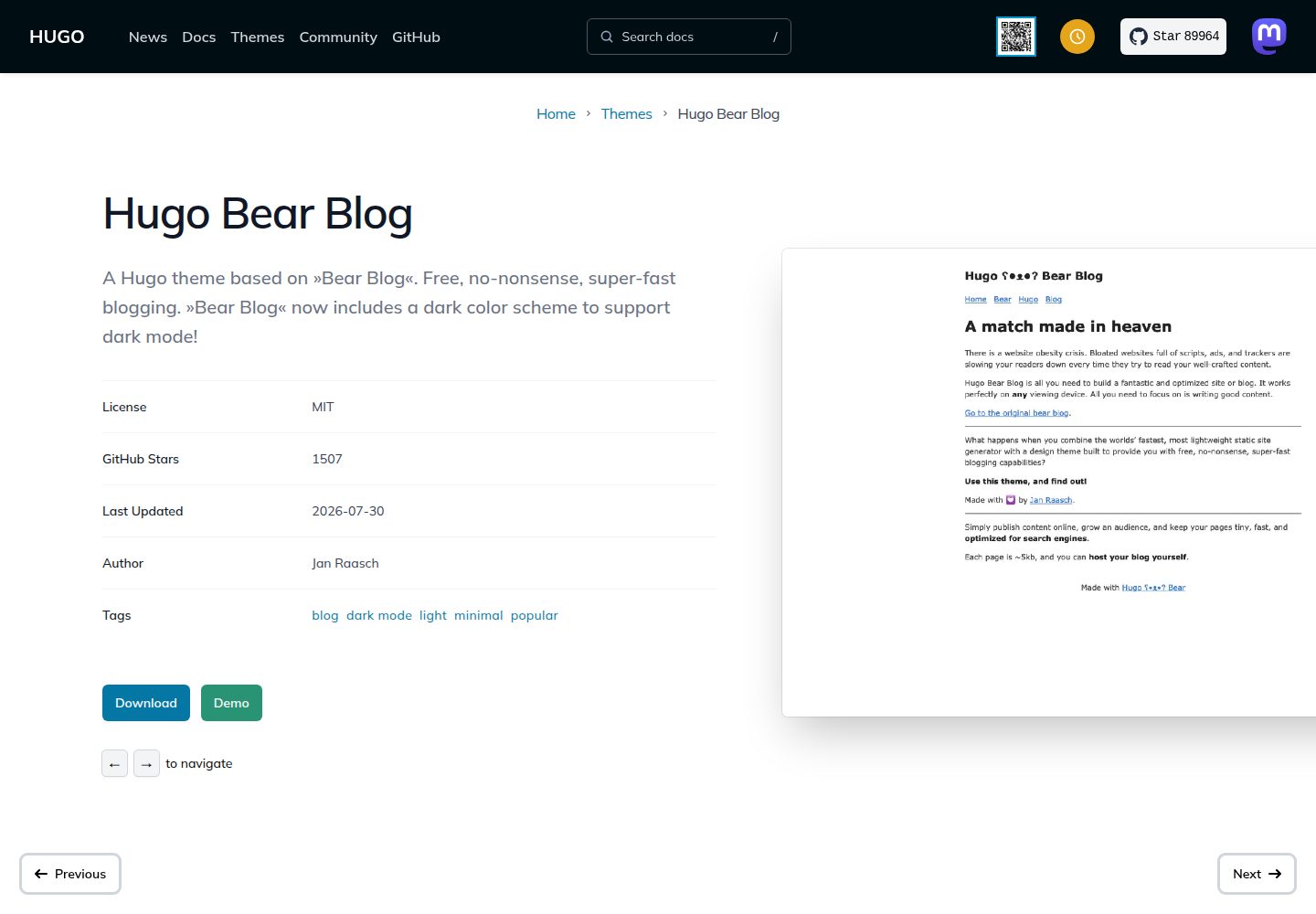
基于 Hugo 的博客主题,设计参考 Bear Blog 的极简风格
Hugo博客
hugo-bearblog — Hugo 博客模板
作者 janraasch
基于 Bear Blog 风格的 Hugo 博客主题,提供浅色与深色配色,通过 exampleSite 与 hugo.toml 配置内容结构。
看看你的网站会是什么样
浏览真实页面截图,比较内容排版与手机效果。点击下方缩略图切换,放大查看整页细节。
全部页面与视图 3
截图用于了解视觉与布局,交互效果请以实际项目为准。
采集于 2026-09-30查看来源
值得关注的模板亮点
从已有项目资料中,快速了解它的特点。
默认浅色配色,浏览器深色模式开启时自动切换深色配色
提供 exampleSite 示例站点与 hugo.toml 配置作为起点
首页内容由 content/_index.md 控制,页面与文章通过 hugo new 命令创建
可通过 layouts/partials/custom_head.html 添加自定义样式或引入 custom.css
以 MIT 许可发布,允许使用、修改、商用与分发
模板详细介绍
hugo-bearblog 是一个 Hugo 主题,设计参考 Bear Blog 的极简博客形态。仓库提供 exampleSite 示例站点与 hugo.toml 配置文件,可作为搭建博客的起点:将 exampleSite 目录内容复制到自己的源目录即可了解主题的工作方式,再逐步替换为自己的内容。
主题默认使用浅色配色,当浏览器处于深色模式时自动切换到深色配色,相关实现位于 layouts/partials/style.html。内容组织上,首页内容由 content/_index.md 控制,页面与博客文章分别通过 hugo new 命令创建,博客文章放在 blog 目录下。
品牌与样式定制方面,可在 layouts/partials 目录添加 custom_head.html,在其中写入 <style> 标签,或通过 <link> 引入独立的 custom.css 文件。仓库还列出社区维护的衍生版本,例如带中文文档的 hugo-bearblog-neo 与支持多语言的 hugo-bearcub,这些是独立分支,不由主主题维护。
主题以 MIT 许可发布,允许使用、修改、商用与分发,但演示图片、字体、图标等第三方素材需单独核对许可;域名、托管等外部服务可能另计费用。
Hugo博客
适合你的项目吗?
适用场景
- 用 Hugo 搭建以文字为主的个人博客
- 需要一个默认支持深色模式的轻量博客主题
- 希望从示例站点复制结构后逐步替换为自己的内容
- 需要在不改动主题核心的前提下注入自定义 CSS 或品牌样式
适合人群
- 使用 Hugo 并偏好极简博客外观的开发者
- 希望快速从示例站点起步、再逐步定制的个人博主
- 需要浅色/深色配色自动切换的博客站点
- 接受以 MIT 许可使用主题代码并自行核对第三方素材的项目
上手与定制指南
结合仓库当前版本的说明,按下面的资料检查内容、配置与运行要求。
- 1
将主题添加为子模块:git submodule add https://github.com/janraasch/hugo-bearblog.git themes/hugo-bearblog
- 2
参照主题 exampleSite 中的 hugo.toml 调整站点配置
- 3
从零开始时,可复制 exampleSite 目录内容到源目录作为起点
- 4
本地运行示例站点:hugo server --source ./exampleSite --themesDir ../..
- 5
自定义样式可在 layouts/partials 下添加 custom_head.html,写入 <style> 或引入 custom.css
授权与来源资料
使用条件与限制
免费使用 · 保留许可声明本次收录的是公开仓库中采用 MIT 许可的免费版本;免费范围为该版本代码,不代表外部服务或第三方素材免费。
使用时需要遵守
- 允许免费使用、修改、商用和分发该版本代码。
- 分发代码副本或实质性部分时,保留原作者版权声明和完整 MIT 许可声明。
- 代码按现状提供;担保与责任限制以原许可证及适用法律为准。
额外费用与待核对事项
- README 中列出的 hugo-bearblog-neo、hugo-bearcub 等衍生版本由各自作者独立维护,不属于本主题,其代码与许可需单独核对。
- 主题设计参考并致谢第三方 Bear Blog 服务(bearblog.dev),该外部服务与本主题代码无关,使用其托管可能涉及独立条款与费用。
- 演示图片、字体、图标及其他第三方素材需按各自许可核对,不能仅凭代码的 MIT 许可判断。
- 域名、托管、数据库、支付或 AI 等外部服务可能另外收费。
查看原文依据
Permission is hereby granted, free of charge
许可证原文
These are independent forks maintained by their respective creators.
README 原文
https://github.com/janraasch/hugo-bearblog/blob/master/LICENSEhttps://github.com/janraasch/hugo-bearblog/blob/master/README.mdA special thank you goes out to [Herman](https://herman.bearblog.dev), for creating the original [ʕ•ᴥ•ʔ Bear Blog](https://bearblog.dev/).
README 原文
DeepSeek 根据仓库许可证和 README 整理 ·2026-10-01。结果仅覆盖已读取资料,依赖、图片、字体及后续条款变更以各自原文为准。
项目核对记录与介绍依据
模板资料
- 来源平台
- GitHub
- 资料与维护参考分
- 资料较完整 · 95 / 100
- 技术栈
- Hugo
- 网站类型
- 博客
这个分数如何计算
本站按许可资料(最高30分)、演示链接(12分)、预览图(10分)、Star数(15分)、记录的维护时间(15分)、描述完整度(8分)、功能记录(5分)和分类资料(5分)计算。它不是代码、安全或性能测试,也不是 Google 评分;有链接不代表已实测可用。
这个项目需要核对什么
- 记录的仓库更新时间
- 2026-07-30
- 截图检查日期
- 2026-10-01
已收录演示链接。请用你的内容与屏幕尺寸检查;有演示不代表表单、认证或支付已经可用。
目录记录的主要技术栈是 Hugo。请通过依赖清单和锁文件核对实际版本与托管要求。这些说明基于收录资料,不代表代码审计或部署实测。
查看具体选型方法 →介绍的制作与核对状态
介绍由 AI 辅助整理目录与仓库资料。仓库作者不等于这篇介绍的审核者。
已完成服务器许可规则与 AI 来源核对;未经过人工编辑审核。
查看当时使用的来源资料
SHA-256: 57d67dc1d309b93ac6230a980dcee9e6678f86687500aec7fbdc6a3c7a99586d
2026-10-01T14:26:07.650Z
来源文件 / 仓库# Hugo ʕ•ᴥ•ʔ Bear Blog [](https://github.com/janraasch/hugo-bearblog/actions/workflows/ci.yml) 🧸 A [Hugo](https://gohugo.io/)-theme based on [Bear Blog](https://bearblog.dev). > Free, no-nonsense, super-fast blogging. ## Demo For a current & working demo of this theme, please check out https://janraasch.github.io/hugo-bearblog/ 🎯. ## Screenshots ⬜️ [Light][light-screenshot] ⬛️ [Dark][dark-screenshot] When the user's browser is running »dark mode«, the dark color scheme will be used automatically. The default is the light/white color scheme. Check out the [`style.html`](https://github.com/janraasch/hugo-bearblog/blob/master/layouts/partials/style.html)-file for the implementation. ## Installation If you already have a Hugo site on your machine, you can simply add this theme via ```bash git submodule add https://github.com/janraasch/hugo-bearblog.git themes/hugo-bearblog ``` Then, adjust the `hugo.toml` as detailed below. For more information, read the official [setup guide][hugo-setup-guide] of Hugo. ## Adjust configuration / hugo.toml Please check out the [hugo.toml](https://github.com/janraasch/hugo-bearblog/blob/master/exampleSite/hugo.toml) included in the [exampleSite](https://github.com/janraasch/hugo-bearblog/tree/master/exampleSite) of this theme. ## Content & structure ### Starting fresh If you are starting fresh, simply copy over the contents of the `exampleSite`-directory included in this theme to your source directory. That should give you a good idea about how things work, and then you can go on from there to make the site your own. ### Adding / editing content #### Index-Page The contents of the `index`-page may be changed by editing your `content/_index.md`-file. #### Page You can add **a new page** via running ```bash hugo new my-new-page.md ``` #### Blog-Post You can add **a new blog-post** via running ```bash hugo new blog/my-new-post.md ``` ### Adding your branding / colors / css Add a `custom_head.html`-file to your `layouts/partials`-directory. In there you may add a `<style>`-tag, *or* you may add a `<link>`-tag referencing your own `custom.css` (in case you prefer to have a separate `.css`-file). Check out the [`style.html`](https://github.com/janraasch/hugo-bearblog/blob/master/layouts/partials/style.html)-file to find out which CSS-styles are applied by default. ## Remixes 🎭 The community has created some interesting variations of Hugo ʕ•ᴥ•ʔ Bear Blog. While the main theme stays true to the minimal Bear Blog philosophy, these remixes experiment with additional features: * [Hugo ʕ•ᴥ•ʔ Bear Blog ✨ Neo](https://github.com/rokcso/hugo-bearblog-neo/) - Features Chinese documentation and an innovative "Toast" upvote system. * [ᕦʕ •ᴥ•ʔᕤ Bear Cub](https://github.com/clente/hugo-bearcub) - A multilingual variant with experimental features like automatic social card generation. _Note: These are independent forks maintained by their respective creators._ ## Contributing & Community 🤝 Interested in contributing to Hugo ʕ•ᴥ•ʔ Bear Blog? Thanks for your interest! - Check out our [Contributing Guidelines](CONTRIBUTING.md) for code contributions and bug reports - [Share your story](https://github.com/janraasch/hugo-bearblog/issues/new/choose) if you're using the theme - we'd love to see what you've built! - Have questions? You can find help in our [GitHub issues](https://github.com/janraasch/hugo-bearblog/issues) or the [Hugo Discourse](https://discourse.gohugo.io/) We aim to keep this theme as simple and fast as the original [Bear Blog](https://bearblog.dev), while making it a friendly space for everyone to contribute and share their experiences. ## Development Run the `exampleSite` locally via ```bash hugo server --source ./exampleSite --themesDir ../.. ``` In case you want to test functionalities and use hugo commands, in the root directory, you'll have to append `--source ./exampleSite --themesDir ../..` to them. For example: ```bash hugo new blog/post.md --source ./exampleSite --themesDir ../.. ``` Same thing for pages: ```bash hugo new page.md --source ./exampleSite --themesDir ../.. ``` ## Special Thanks 🎁 A special thank you goes out to [Herman](https://herman.bearblog.dev), for creating the original [ʕ•ᴥ•ʔ Bear Blog](https://bearblog.dev/). ## License [MIT License](http://en.wikipedia.org/wiki/MIT_License) © [Jan Raasch](https://www.janraasch.com) [hugo-setup-guide]: https://gohugo.io/getting-started/installing [light-screenshot]: https://raw.githubusercontent.com/janraasch/hugo-bearblog/master/images/screenshot.png [dark-screenshot]: https://raw.githubusercontent.com/janraasch/hugo-bearblog/master/images/screenshot-dark.png
看看同类模板
对比同技术栈与用途的模板,找到更适合的视觉与内容结构。

hugo-PaperMod
PaperMod 是 Hugo 生态里知名度较高的主题之一,定位很明确:给博客和轻量作品集站点提供一套干净、响应式的阅读界面。
Hugo · 作品集

LoveIt
❤️A clean, elegant but advanced blog theme for Hugo 一个简洁、优雅且高效的 Hugo 主题
Hugo · 博客

hugo-coder
A minimalist blog theme for hugo.
Hugo · 博客

blowfish
Personal Website & Blog Theme for Hugo
Hugo · 博客

hugo-paper
🪺 A simple, clean, customizable Hugo theme
Hugo · 博客

hextra
Hextra 是一个 Hugo 主题,定位在文档站与博客之间:既提供侧边栏导航、目录、面包屑、分页这类文档站结构,也能承载博客内容。
Hugo · 文档