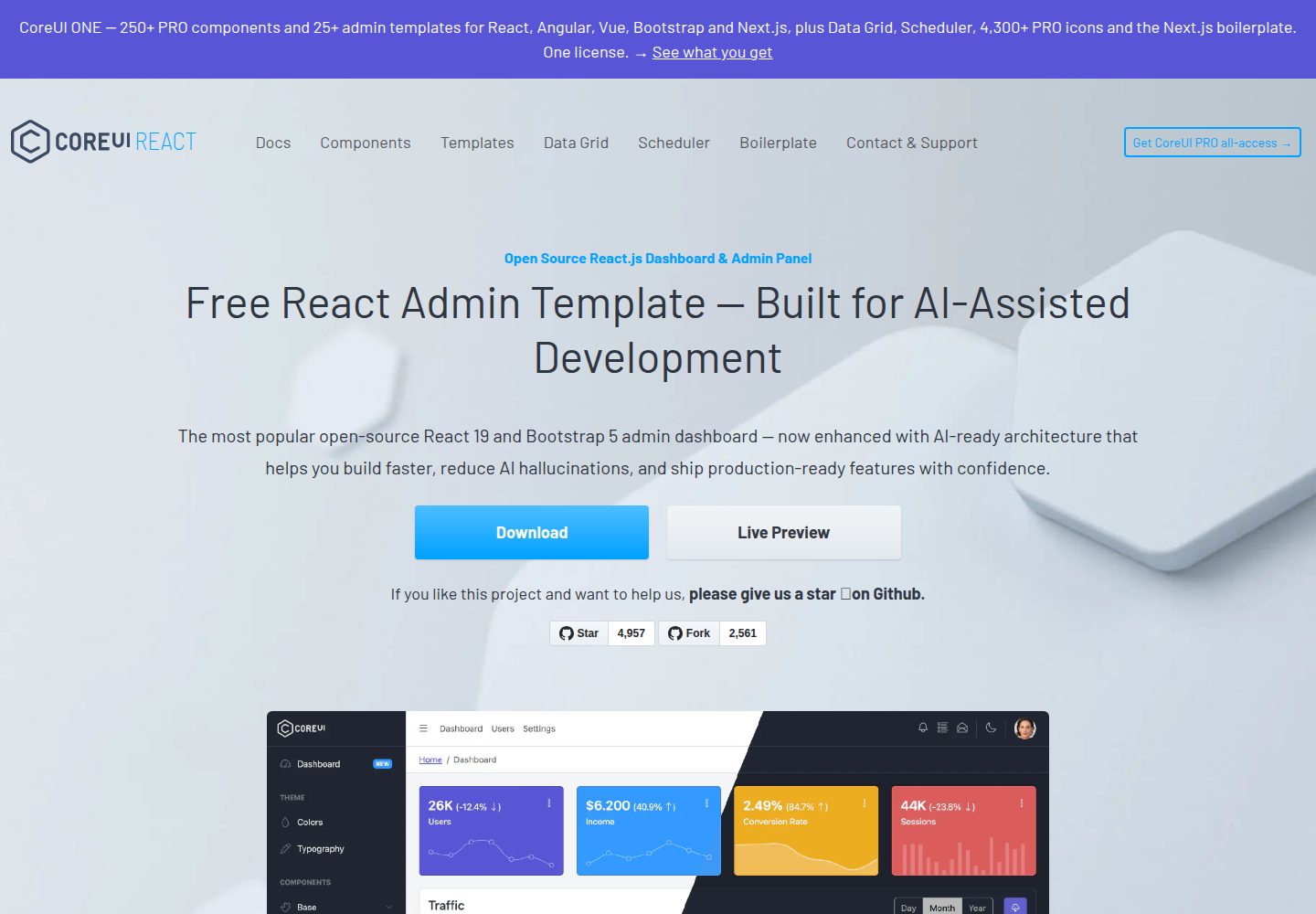
基于 React 与 @coreui/react 组件库构建的后台管理模板
ReactHTML后台
coreui-free-react-admin-template — React 后台模板
作者 jasmincastilo
基于 React 与 CoreUI 组件库的免费后台管理模板,提供侧边栏、路由、布局与示例视图,并附带面向 AI 辅助开发的上下文文件。
看看你的网站会是什么样
浏览真实页面截图,比较内容排版与手机效果。点击下方缩略图切换,放大查看整页细节。
全部页面与视图 3
截图用于了解视觉与布局,交互效果请以实际项目为准。
采集于 2026-10-01查看来源
值得关注的模板亮点
从已有项目资料中,快速了解它的特点。
包含侧边栏、布局容器、路由配置与示例视图等后台界面结构
提供 .cursorrules、ARCHITECTURE.md、DEVELOPMENT.md 等 AI 辅助开发上下文文件
组件带有 JSDoc 注释与 PropTypes 运行时类型检查
采用 Vite 作为构建工具,提供开发服务器与生产构建命令
MIT 许可,允许免费使用、修改、商用和分发该版本代码
模板详细介绍
该模板是 CoreUI 免费 React 后台管理模板的公开仓库版本,采用 MIT 许可,使用 React 与 CoreUI React 组件库构建。项目提供侧边栏导航、布局容器、路由配置和示例视图等后台界面常见结构,源码按 assets、components、layouts、scss、views 等目录组织,导航配置位于 _nav.jsx,路由配置位于 routes.js,并包含一个示例状态文件 store.js。构建工具为 Vite,提供 npm start 开发服务器与 npm run build 生产构建命令。
模板在 AI 辅助开发方面提供了额外上下文文件:.cursorrules 描述项目约定与模式,ARCHITECTURE.md 说明项目结构、组件层级、路由与状态管理,DEVELOPMENT.md 提供开发流程与示例。组件带有 JSDoc 注释与 PropTypes 定义。这些文件用于帮助 Cursor、Claude Code、GitHub Copilot 等工具理解项目使用 React 与 @coreui/react 组件,而非其他样式框架。
使用限制:本次收录的免费范围仅指该版本代码,演示图片、字体、图标等第三方素材需按各自许可单独核对;域名、托管、数据库、支付或 AI 等外部服务可能另行收费。README 中列出的部分组件(如 Date Picker、Smart Table、Multi Select 等)标注为 PRO,属于付费版本,不在免费模板范围内。
ReactHTML后台
适合你的项目吗?
适用场景
- 需要 React 后台管理界面基础结构的项目起步
- 在 Cursor、Claude Code 或 GitHub Copilot 等 AI 辅助环境下开发后台应用
- 需要侧边栏导航、路由与布局容器的管理端界面搭建
- 作为学习 CoreUI React 组件用法的参考项目
适合人群
- 使用 React 构建后台管理界面的开发者
- 希望借助 AI 编码助手加速后台项目搭建的团队
- 需要 MIT 许可后台模板作为起点的项目
上手与定制指南
结合仓库当前版本的说明,按下面的资料检查内容、配置与运行要求。
- 1
使用 npm install 或 yarn install 安装依赖
- 2
运行 npm start 或 yarn start 启动开发服务器,默认地址为 http://localhost:3000
- 3
运行 npm run build 或 yarn build 生成生产构建,产物存放在 build/ 目录
- 4
README 中标注 PRO 的组件属于付费版本,不在免费模板范围内
- 5
演示图片、字体、图标等第三方素材需按各自许可单独核对
授权与来源资料
使用条件与限制
免费使用 · 保留许可声明本次收录的是公开仓库中采用 MIT 许可的免费版本;免费范围为该版本代码,不代表外部服务或第三方素材免费。
使用时需要遵守
- 允许免费使用、修改、商用和分发该版本代码。
- 分发代码副本或实质性部分时,保留原作者版权声明和完整 MIT 许可声明。
- 代码按现状提供;担保与责任限制以原许可证及适用法律为准。
额外费用与待核对事项
- 模板基于 CoreUI 与 CoreUI PRO 组件库构建,其中标注 PRO 的组件(如 Date Picker、Smart Table、Multi Select 等)属于付费版本,不在免费模板范围内。
- CoreUI PRO 为付费产品,购买属于自愿支持行为;免费版本本身可免费使用,但 PRO 组件与 PRO 模板需另行付费。
- 该版本代码采用 MIT 许可,可免费使用、修改、商用和分发,但仅限本仓库免费模板代码,不含 PRO 组件。
- 演示图片、字体、图标及其他第三方素材需按各自许可核对,不能仅凭代码的 MIT 许可判断。
- 域名、托管、数据库、支付或 AI 等外部服务可能另外收费。
查看原文依据
Permission is hereby granted, free of charge
许可证原文
CoreUI React.js Admin Templates are built on top of CoreUI and CoreUI PRO UI components libraries
README 原文
You can support development by buying the [CoreUI PRO]
README 原文
https://github.com/jasmincastilo/coreui-free-react-admin-template/blob/main/LICENSEhttps://github.com/jasmincastilo/coreui-free-react-admin-template/blob/main/README.mdCoreUI is an MIT-licensed open source project and is completely free to use.
README 原文
DeepSeek 根据仓库许可证和 README 整理 ·2026-10-01。结果仅覆盖已读取资料,依赖、图片、字体及后续条款变更以各自原文为准。
项目核对记录与介绍依据
模板资料
- 来源平台
- GitHub
- 资料与维护参考分
- 资料较完整 · 85 / 100
- 技术栈
- React · HTML
- 网站类型
- 后台
这个分数如何计算
本站按许可资料(最高30分)、演示链接(12分)、预览图(10分)、Star数(15分)、记录的维护时间(15分)、描述完整度(8分)、功能记录(5分)和分类资料(5分)计算。它不是代码、安全或性能测试,也不是 Google 评分;有链接不代表已实测可用。
这个项目需要核对什么
- 记录的仓库更新时间
- 2026-07-21
- 截图检查日期
- 2026-10-01
已收录演示链接。请用你的内容与屏幕尺寸检查;有演示不代表表单、认证或支付已经可用。
目录记录的主要技术栈是 React。请通过依赖清单和锁文件核对实际版本与托管要求。这些说明基于收录资料,不代表代码审计或部署实测。
查看具体选型方法 →介绍的制作与核对状态
介绍由 AI 辅助整理目录与仓库资料。仓库作者不等于这篇介绍的审核者。
已完成服务器许可规则与 AI 来源核对;未经过人工编辑审核。
查看当时使用的来源资料
SHA-256: 3d902427ab0451bb3c5cb9b5d176a7a6b5b216417cef7970c5605d498fbf5222
2026-10-01T01:38:40.625Z
来源文件 / 仓库# CoreUI Free React Admin Template - Built for AI-Assisted Development [](https://twitter.com/intent/tweet?text=CoreUI%20-%20Free%React%204%20Admin%20Template%20&url=https://coreui.io&hashtags=bootstrap,admin,template,dashboard,panel,free,angular,react,vue) [](https://opensource.org/licenses/MIT) [](https://github.com/coreui/coreui) [![npm package][npm-coreui-badge]][npm-coreui] [![NPM downloads][npm-coreui-download]][npm-coreui] [](https://github.com/coreui/react) [![npm package][npm-coreui-react-badge]][npm-coreui-react] [![NPM downloads][npm-coreui-react-download]][npm-coreui-react] [npm-coreui]: https://www.npmjs.com/package/@coreui/coreui [npm-coreui-badge]: https://img.shields.io/npm/v/@coreui/coreui.png?style=flat-square [npm-coreui-download]: https://img.shields.io/npm/dm/@coreui/coreui.svg?style=flat-square [npm-coreui-react]: https://www.npmjs.com/package/@coreui/react [npm-coreui-react-badge]: https://img.shields.io/npm/v/@coreui/react.png?style=flat-square [npm-coreui-react-download]: https://img.shields.io/npm/dm/@coreui/react.svg?style=flat-square [npm]: https://www.npmjs.com/package/@coreui/react [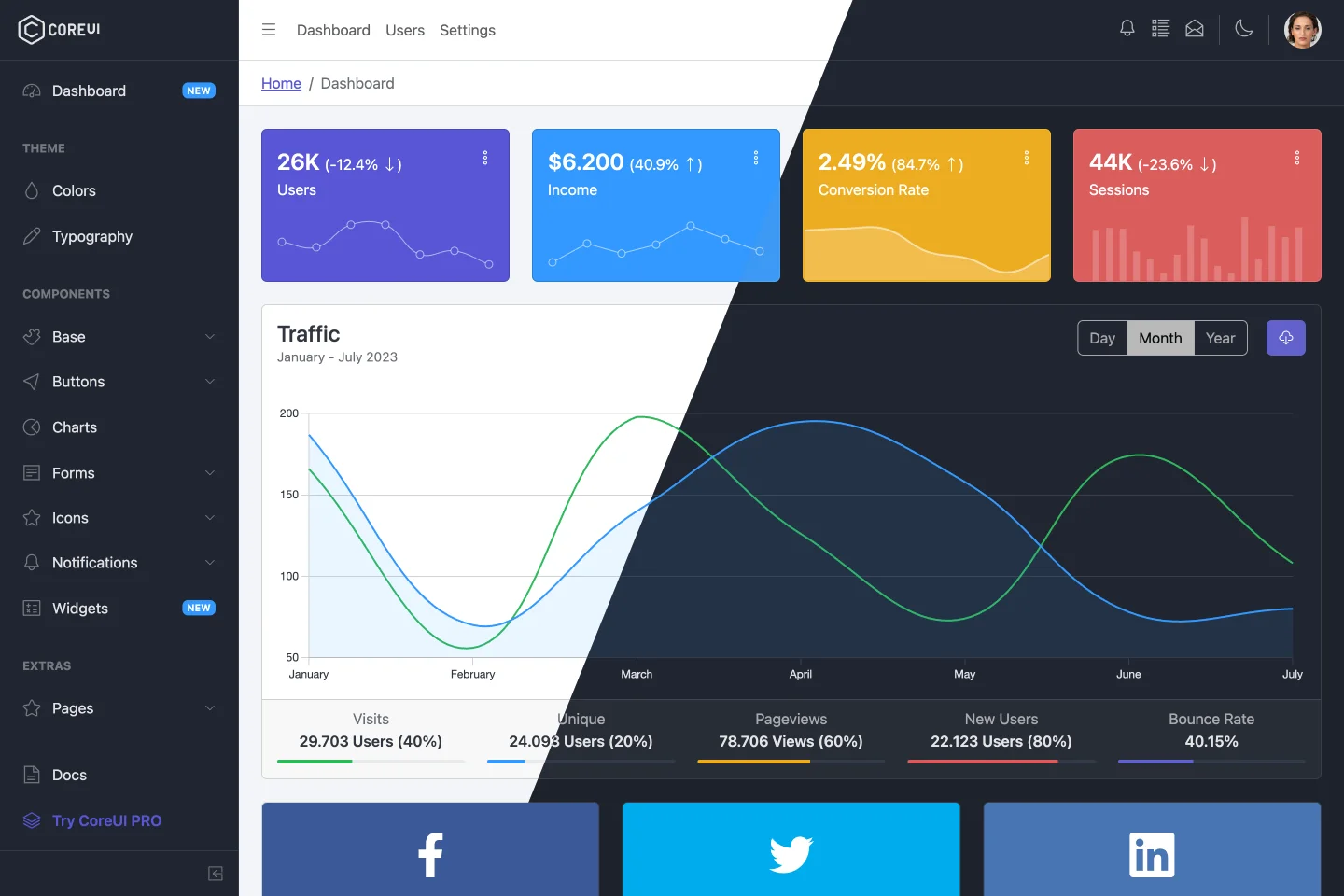](https://coreui.io/product/free-react-admin-template/) CoreUI is meant to be the UX game changer. Pure & transparent code is devoid of redundant components, so the app is light enough to offer ultimate user experience. This means mobile devices also, where the navigation is just as easy and intuitive as on a desktop or laptop. The CoreUI Layout API lets you customize your project for almost any device – be it Mobile, Web or WebApp – CoreUI covers them all! ## Table of Contents * [Versions](#versions) * [CoreUI PRO](#coreui-pro) * [CoreUI PRO React Admin Templates](#coreui-pro-react-admin-templates) * [Quick Start](#quick-start) * [Installation](#installation) * [Basic usage](#basic-usage) * [What's included](#whats-included) * [AI-Friendly Development](#ai-friendly-development) * [Documentation](#documentation) * [Components](#components) * [Versioning](#versioning) * [Creators](#creators) * [Community](#community) * [Support CoreUI Development](#support-coreui-development) * [Copyright and License](#copyright-and-license) ## Versions * [CoreUI Free Bootstrap Admin Template](https://github.com/coreui/coreui-free-bootstrap-admin-template) * [CoreUI Free Angular Admin Template](https://github.com/coreui/coreui-free-angular-admin-template) * [CoreUI Free React.js Admin Template (Vite)](https://github.com/coreui/coreui-free-react-admin-template) * [CoreUI Free React.js Admin Template (Create React App)](https://github.com/coreui/coreui-free-react-admin-template-cra) * [CoreUI Free Vue.js Admin Template](https://github.com/coreui/coreui-free-vue-admin-template) ## CoreUI PRO * 💪 [CoreUI PRO Angular Admin Template](https://coreui.io/product/angular-dashboard-template/) * 💪 [CoreUI PRO Bootstrap Admin Template](https://coreui.io/product/bootstrap-dashboard-template/) * 💪 [CoreUI PRO Next.js Admin Template](https://coreui.io/product/next-js-dashboard-template/) * 💪 [CoreUI PRO React Admin Template](https://coreui.io/product/react-dashboard-template/) * 💪 [CoreUI PRO Vue Admin Template](https://coreui.io/product/vue-dashboard-template/) ## CoreUI PRO React Admin Templates | Default Theme | Light Theme | | --- | --- | | [](https://coreui.io/product/react-dashboard-template/?theme=default) | [](https://coreui.io/product/react-dashboard-template/?theme=light)| | Modern Theme | Bright Theme | | --- | --- | | [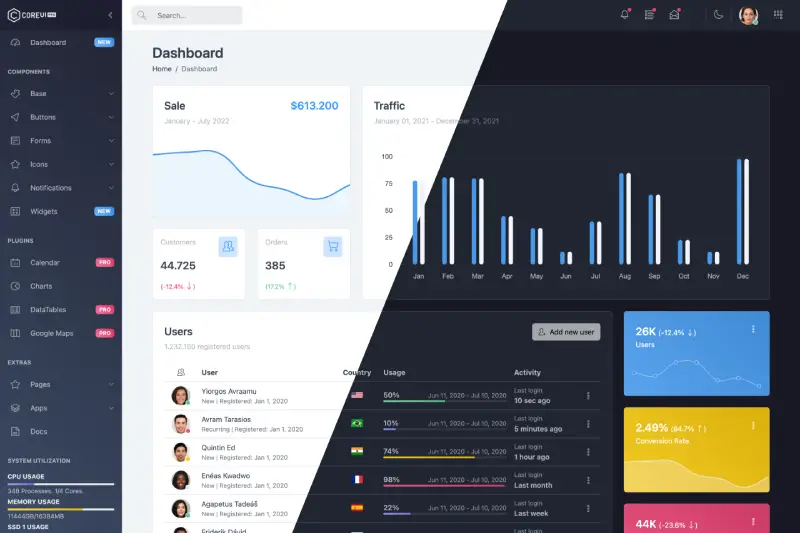](https://coreui.io/product/react-dashboard-template/?theme=modern) | [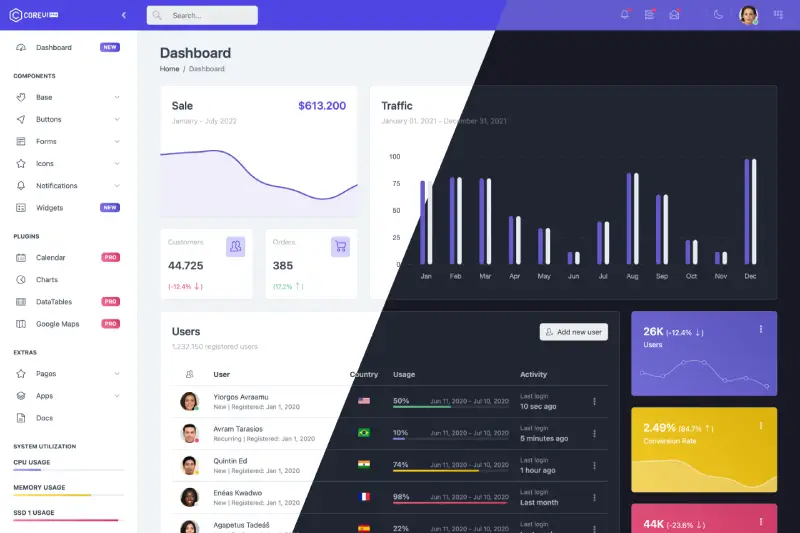](https://coreui.io/product/react-dashboard-template/?theme=bright)| ## Quick Start - [Download the latest release](https://github.com/coreui/coreui-free-react-admin-template/archive/refs/heads/main.zip) - Clone the repo: `git clone https://github.com/coreui/coreui-free-react-admin-template.git` ### Installation ``` bash $ npm install ``` or ``` bash $ yarn install ``` ### Basic usage ``` bash # dev server with hot reload at http://localhost:3000 $ npm start ``` or ``` bash # dev server with hot reload at http://localhost:3000 $ yarn start ``` Navigate to [http://localhost:3000](http://localhost:3000). The app will automatically reload if you change any of the source files. #### Build Run `build` to build the project. The build artifacts will be stored in the `build/` directory. ```bash # build for production with minification $ npm run build ``` or ```bash # build for production with minification $ yarn build ``` ## What's included Within the download you'll find the following directories and files, logically grouping common assets and providing both compiled and minified variations. You'll see something like this: ``` coreui-free-react-admin-template ├── public/ # static files │ ├── favicon.ico │ └── manifest.json │ ├── src/ # project root │ ├── assets/ # images, icons, etc. │ ├── components/ # common components - header, footer, sidebar, etc. │ ├── layouts/ # layout containers │ ├── scss/ # scss styles │ ├── views/ # application views │ ├── _nav.jsx # sidebar navigation config │ ├── App.jsx │ ├── index.jsx │ ├── routes.js # routes config │ └── store.js # template state example │ ├── index.html # html template ├── ... ├── package.json ├── ... └── vite.config.mjs # vite config ``` ## AI-Friendly Development This template is optimized for AI-assisted development with comprehensive context files and documentation: ### Context Files - **`.cursorrules`** - Comprehensive AI context file with project conventions, patterns, and guidelines for working with React, CoreUI, and the template architecture - **`ARCHITECTURE.md`** - Detailed technical documentation covering the project structure, component hierarchy, routing system, state management, and build pipeline - **`DEVELOPMENT.md`** - Practical developer guide with setup instructions, development workflows, code examples, and best practices ### Code Documentation - All React components include detailed JSDoc comments with parameter types and descriptions - Inline documentation explaining complex logic and patterns - PropTypes definitions for runtime type checking ### Benefits for AI Coding Assistants When using AI coding assistants like Cursor, Claude Code, or GitHub Copilot, these context files help the AI to: - **Understand the Stack**: Recognize that this is a React 19 application using CoreUI React components (not Tailwind CSS or other frameworks) - **Follow Patterns**: Generate code that matches the project's component structure and conventions - **Use Correct Components**: Suggest appropriate CoreUI React components from `@coreui/react` - **Maintain Code Style**: Follow ESLint and Prettier rules automatically - **Respect Architecture**: Work within the established routing, state management, and styling patterns Simply open the project in your AI-enabled IDE, and the assistant will automatically have context about the React architecture, CoreUI React component usage, development workflows, and coding standards. ## Documentation The documentation for the CoreUI Admin Template is hosted at our website [CoreUI for React](https://coreui.io/react/docs/templates/installation/) ## Components CoreUI React.js Admin Templates are built on top of CoreUI and CoreUI PRO UI components libraries, including all of these components. - [React Accordion](https://coreui.io/react/docs/components/accordion/) - [React Alert](https://coreui.io/react/docs/components/alert/) - [React Autocomplete](https://coreui.io/react/docs/forms/autocomplete/) **PRO** - [React Avatar](https://coreui.io/react/docs/components/avatar/) - [React Badge](https://coreui.io/react/docs/components/badge/) - [React Breadcrumb](https://coreui.io/react/docs/components/breadcrumb/) - [React Button](https://coreui.io/react/docs/components/button/) - [React Button Group](https://coreui.io/react/docs/components/button-group/) - [React Callout](https://coreui.io/react/docs/components/callout/) - [React Card](https://coreui.io/react/docs/components/card/) - [React Carousel](https://coreui.io/react/docs/components/carousel/) - [React Checkbox](https://coreui.io/react/docs/forms/checkbox/) - [React Close Button](https://coreui.io/react/docs/components/close-button/) - [React Collapse](https://coreui.io/react/docs/components/collapse/) - [React Date Picker](https://coreui.io/react/docs/forms/date-picker/) **PRO** - [React Date Range Picker](https://coreui.io/react/docs/forms/date-range-picker/) **PRO** - [React Dropdown](https://coreui.io/react/docs/components/dropdown/) - [React Floating Labels](https://coreui.io/react/docs/forms/floating-labels/) - [React Footer](https://coreui.io/react/docs/components/footer/) - [React Header](https://coreui.io/react/docs/components/header/) - [React Image](https://coreui.io/react/docs/components/image/) - [React Input](https://coreui.io/react/docs/forms/input/) - [React Input Group](https://coreui.io/react/docs/forms/input-group/) - [React List Group](https://coreui.io/react/docs/components/list-group/) - [React Loading Button](https://coreui.io/react/docs/components/loading-button/) **PRO** - [React Modal](https://coreui.io/react/docs/components/modal/) - [React Multi Select](https://coreui.io/react/docs/forms/multi-select/) **PRO** - [React Navs & Tabs](https://coreui.io/react/docs/components/navs-tabs/) - [React Navbar](https://coreui.io/react/docs/components/navbar/) - [React Offcanvas](https://coreui.io/react/docs/components/offcanvas/) - [React One Time Password Input](https://coreui.io/react/docs/forms/one-time-password-input/) **PRO** - [React Pagination](https://coreui.io/react/docs/components/pagination/) - [React Password Input](https://coreui.io/react/docs/forms/password-input/) **PRO** - [React Placeholder](https://coreui.io/react/docs/components/placeholder/) - [React Popover](https://coreui.io/react/docs/components/popover/) - [React Progress](https://coreui.io/react/docs/components/progress/) - [React Radio](https://coreui.io/react/docs/forms/radio/) - [React Range](https://coreui.io/react/docs/forms/range/) - [React Range Slider](https://coreui.io/react/docs/forms/range-slider/) **PRO** - [React Rating](https://coreui.io/react/docs/forms/rating/) - [React Select](https://coreui.io/react/docs/forms/select/) - [React Sidebar](https://coreui.io/react/docs/components/sidebar/) - [React Smart Pagination](https://coreui.io/react/docs/components/smart-pagination/) **PRO** - [React Smart Table](https://coreui.io/react/docs/components/smart-table/) **PRO** - [React Spinner](https://coreui.io/react/docs/components/spinner/) - [React Stepper](https://coreui.io/react/docs/forms/stepper/) **PRO** - [React Switch](https://coreui.io/react/docs/forms/switch/) - [React Table](https://coreui.io/react/docs/components/table/) - [React Textarea](https://coreui.io/react/docs/forms/textarea/) - [React Time Picker](https://coreui.io/react/docs/forms/time-picker/) **PRO** - [React Toast](https://coreui.io/react/docs/components/toast/) - [React Tooltip](https://coreui.io/react/docs/components/tooltip/) ## Versioning For transparency into our release cycle and in striving to maintain backward compatibility, CoreUI Free Admin Template is maintained under [the Semantic Versioning guidelines](http://semver.org/). See [the Releases section of our project](https://github.com/coreui/coreui-free-react-admin-template/releases) for changelogs for each release version. ## Creators **Łukasz Holeczek** * <https://twitter.com/lukaszholeczek> * <https://github.com/mrholek> **Andrzej Kopański** * <https://github.com/xidedix> **CoreUI Team** * <https://twitter.com/core_ui> * <https://github.com/coreui> * <https://github.com/orgs/coreui/people> ## Community Get updates on CoreUI's development and chat with the project maintainers and community members. - Follow [@core_ui on Twitter](https://twitter.com/core_ui). - Read and subscribe to [CoreUI Blog](https://coreui.ui/blog/). ## Support CoreUI Development CoreUI is an MIT-licensed open source project and is completely free to use. However, the amount of effort needed to maintain and develop new features for the project is not sustainable without proper financial backing. You can support development by buying the [CoreUI PRO](https://coreui.io/pricing/?framework=react&src=github-coreui-free-react-admin-template) or by becoming a sponsor via [Open Collective](https://opencollective.com/coreui/). ## Copyright and License copyright 2026 creativeLabs Łukasz Holeczek. Code released under [the MIT license](https://github.com/coreui/coreui-free-react-admin-template/blob/main/LICENSE).
看看同类模板
对比同技术栈与用途的模板,找到更适合的视觉与内容结构。
ant-design-pro
Ant Design Pro 是 Ant Design 官方推出的企业级中后台前端脚手架,基于 React 19、Umi Max 4 和 antd 6 构建,内置 TypeScript 支持。
React · 后台

coreui-free-react-admin-template
Free React Admin & Dashboard Template Built for AI-Assisted Development
React · 后台

fastapi-react
fastapi-react 是一个基于 Cookiecutter 的模板,用于快速搭建 FastAPI 与 React(TypeScript)的全栈项目。
React · 后台

react-antd-admin-template
一个基于React+Antd的后台管理模版,在线预览https://nlrx-wjc.github.io/react-antd-admin-template/
React · 后台

react-saas-template
🌊 Template for building an SaaS / admin website using React + Material-UI
React · 后台

react-material-admin
☄️React Material Admin is a React template built with Material-UI
React · 后台