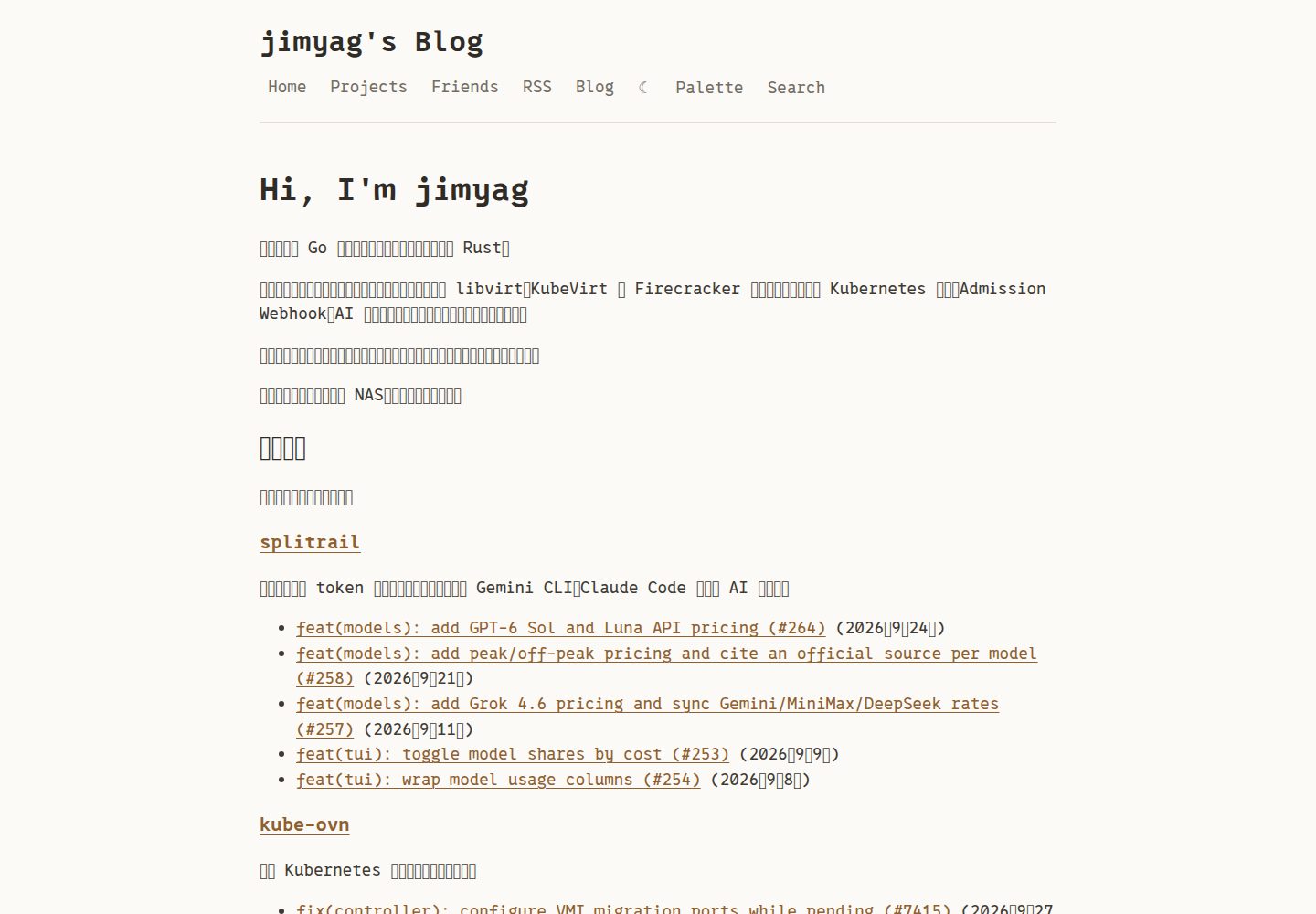
目录在宽屏下固定于侧边栏,窄屏下为浮动按钮加滑出面板
Hugo博客
stark — Hugo 博客模板
作者 jimyag
Stark 是一个基于 hugo-bearblog 的极简 Hugo 博客主题,在简洁版式上增加了目录、全文搜索、Mermaid 图表、图片灯箱与 SEO 结构化数据等实用功能。
看看你的网站会是什么样
浏览真实页面截图,比较内容排版与手机效果。点击下方缩略图切换,放大查看整页细节。
全部页面与视图 3
截图用于了解视觉与布局,交互效果请以实际项目为准。
采集于 2026-09-30查看来源
值得关注的模板亮点
从已有项目资料中,快速了解它的特点。
客户端全文搜索,通过 Ctrl/Cmd+K 或导航按钮打开,无需外部服务
Mermaid 图表与图片灯箱支持缩放、拖拽和键盘快捷键
输出 canonical、Open Graph、Twitter Card 与 schema.org 结构化数据
构建时将本地图片缩放至最大 1200 px 宽并转换为 WebP
内置英文与中文界面,深色模式跟随系统偏好
模板详细介绍
Stark 是一个面向 Hugo 的极简博客主题,基于 hugo-bearblog 扩展而来,适合以文字为主的个人博客。它在保留简洁版式的同时,补充了目录、客户端全文搜索、Mermaid 图表、图片灯箱、代码复制按钮、阅读进度条、返回顶部按钮与数学公式渲染等阅读体验功能,并输出 canonical、Open Graph、Twitter Card 和 schema.org 结构化数据。
主题内置英文与中文界面,跟随系统偏好自动切换深色模式,支持按年份分组并置顶文章的列表、分页、上一篇/下一篇导航以及按标签匹配的相关文章。构建时可将本地图片缩放至最大 1200 px 宽并转换为 WebP。搜索、RSS 摘要、字数与阅读时长不依赖浏览器 JavaScript;Mermaid 与 MathJax 仅在包含相应内容的页面加载。
主题还提供可选的 MDX 工作流,允许在文章中使用 React 组件,但需要 Node.js 与较新版本的 Hugo,且 MDX 页面不经过 Hugo 短代码、Chroma 高亮、Mermaid 代码钩子和自动图片处理。中文字体依赖读者系统安装的霞鹜文楷,主题未内置完整字体文件。
Hugo博客
适合你的项目吗?
适用场景
- 撰写以文字为主、需要目录与全文搜索的个人技术博客
- 在文章中嵌入 Mermaid 流程图或数学公式并希望按需加载脚本
- 需要按年份分组、置顶文章和标签相关推荐的文章列表
- 希望文章页面提供指向原始 Markdown 的链接
适合人群
- 使用 Hugo 搭建个人博客的开发者
- 偏好极简版式但需要搜索、目录等阅读功能的写作者
- 需要中英文双语界面或深色模式支持的站点
- 希望在 Markdown 文章中混用 React 组件的用户(需启用可选 MDX 工作流)
上手与定制指南
结合仓库当前版本的说明,按下面的资料检查内容、配置与运行要求。
- 1
通过 git submodule 将主题添加到 themes/stark,并在 hugo.toml 中设置 theme = "stark"
- 2
搜索功能需要在 [outputs] 中为 home 添加 JSON 输出
- 3
原始 Markdown 链接需要为 page 添加 MARKDOWN 输出,并配置对应的 mediaTypes 与 outputFormats
- 4
MDX 为可选工作流,需要 Node.js 与较新版本的 Hugo,并在每次 Hugo 构建前运行编译脚本
- 5
主题内置 0xProto 字体(SIL OFL),中文字体依赖读者系统安装的霞鹜文楷,未内置完整字体文件
授权与来源资料
使用条件与限制
免费使用 · 保留许可声明本次收录的是公开仓库中采用 MIT 许可的免费版本;免费范围为该版本代码,不代表外部服务或第三方素材免费。
使用时需要遵守
- 允许免费使用、修改、商用和分发该版本代码。
- 分发代码副本或实质性部分时,保留原作者版权声明和完整 MIT 许可声明。
- 代码按现状提供;担保与责任限制以原许可证及适用法律为准。
额外费用与待核对事项
- 可选的 MDX 工作流需要 Node.js 22+ 与 Hugo 0.162+;普通 Markdown 站点仅用 Hugo 即可构建。
- 主题未内置完整霞鹜文楷中文字体,中文渲染依赖读者系统已安装该字体,否则需自行添加站点级子集字体。
- github-file 短代码会在浏览器中请求 raw.githubusercontent.com 获取公开 GitHub 文件,依赖该外部服务可用。
- MDX 页面使用独立渲染器,Hugo 短代码、Chroma 高亮、Mermaid 代码钩子与自动图片处理在 MDX 中均不生效。
- MDX 编译器不监听文件变化,每次修改 MDX 或其导入后需手动重新运行编译脚本。
- 在 MDX 中使用额外 React 组件时,需自行在站点 package.json 中安装相应依赖。
- 演示图片、字体、图标及其他第三方素材需按各自许可核对,不能仅凭代码的 MIT 许可判断。
- 域名、托管、数据库、支付或 AI 等外部服务可能另外收费。
查看原文依据
Permission is hereby granted, free of charge
许可证原文
Node.js 22+ and Hugo 0.162+ are required for this optional workflow.
README 原文
The full LXGW WenKai font is not bundled because the regular TTF is about 25 MB
README 原文
The browser requests the corresponding `raw.githubusercontent.com` URL.
README 原文
MDX uses its own renderer: Hugo shortcodes, Chroma highlighting, Mermaid code hooks, and automatic Hugo image processing do not run inside MDX.
README 原文
Rerun the compiler after editing MDX or its imports; the compiler does not watch files.
README 原文
https://github.com/jimyag/stark/blob/main/LICENSEhttps://github.com/jimyag/stark/blob/main/README.mdInstall extra component dependencies in your site's `package.json`.
README 原文
DeepSeek 根据仓库许可证和 README 整理 ·2026-10-01。结果仅覆盖已读取资料,依赖、图片、字体及后续条款变更以各自原文为准。
项目核对记录与介绍依据
模板资料
- 来源平台
- GitHub
- 资料与维护参考分
- 资料较完整 · 80 / 100
- 技术栈
- Hugo
- 网站类型
- 博客
这个分数如何计算
本站按许可资料(最高30分)、演示链接(12分)、预览图(10分)、Star数(15分)、记录的维护时间(15分)、描述完整度(8分)、功能记录(5分)和分类资料(5分)计算。它不是代码、安全或性能测试,也不是 Google 评分;有链接不代表已实测可用。
这个项目需要核对什么
- 记录的仓库更新时间
- 2026-09-27
- 截图检查日期
- 2026-10-01
已收录演示链接。请用你的内容与屏幕尺寸检查;有演示不代表表单、认证或支付已经可用。
目录记录的主要技术栈是 Hugo。请通过依赖清单和锁文件核对实际版本与托管要求。这些说明基于收录资料,不代表代码审计或部署实测。
查看具体选型方法 →介绍的制作与核对状态
介绍由 AI 辅助整理目录与仓库资料。仓库作者不等于这篇介绍的审核者。
已完成服务器许可规则与 AI 来源核对;未经过人工编辑审核。
查看当时使用的来源资料
SHA-256: c2c36fa8340cafd55d81f41d7146ad16325e8e78bd999a1b8d088a2d2cbf48c1
2026-10-01T13:59:34.720Z
来源文件 / 仓库# Stark
A minimal Hugo blog theme with practical enhancements. Based on [hugo-bearblog](https://github.com/janraasch/hugo-bearblog).
[](https://github.com/jimyag/stark/actions/workflows/check.yaml)
Live demo: [jimyag.com](https://jimyag.com)
## Features
- Table of Contents — fixed sidebar on wide screens (>1400 px), floating button + slide-up modal on narrow screens
- Full-text search — client-side, no external service, `Ctrl/Cmd+K` or the Search button in the nav
- Mermaid diagrams — fenced code block with `mermaid` language tag; click to open zoomable lightbox (scroll wheel, drag, keyboard shortcuts)
- Image lightbox — click any image in a post to preview with zoom controls
- Code copy button — appears on hover over any highlighted code block
- Raw Markdown link — direct link from each post to its source Markdown
- Code block language label — language name shown in top-left corner of each code block
- Reading progress bar — 3 px bar at the top of the viewport
- Back to top button — appears after scrolling 300 px
- Math rendering — MathJax loaded automatically only on pages that contain `$...$` or `\(...\)` expressions
- Enhanced SEO — canonical URL, Open Graph, Twitter Card, schema.org structured data (WebSite, Person, BlogPosting, BreadcrumbList)
- Auto image optimization — local images resized to max 1200 px width and converted to WebP at build time
- Year-grouped post list with pinned posts at the top, pagination support
- Prev/Next post navigation at the bottom of each post
- Related posts section at the bottom of each post (matched by tags)
- Word count, estimated reading time, and last modified date in the post header
- Callout and details shortcodes
- Analytics — Plausible and Google Analytics 4 (opt-in, no script injected unless configured)
- i18n — English and Chinese built-in, extensible to any language
- Dark mode — automatic, follows system preference
## Typography
Stark bundles the 0xProto webfont for Latin text, code, and UI details. The font
files live in `static/fonts/` and are licensed under the SIL Open Font License;
see `static/fonts/0xProto-LICENSE.txt`.
Chinese text prefers the local `LXGW WenKai` / `霞鹜文楷` font when it is
installed on the reader's system. The full LXGW WenKai font is not bundled
because the regular TTF is about 25 MB; sites that need identical Chinese
rendering on every device should add a site-level subset font instead.
## Installation
```bash
git submodule add https://github.com/jimyag/stark.git themes/stark
```
Set the theme in `hugo.toml`:
```toml
theme = "stark"
```
## Configuration
A full working example is in [`exampleSite/hugo.toml`](exampleSite/hugo.toml). The annotated reference below covers every supported option.
```toml
baseURL = "https://example.com"
theme = "stark"
title = "ᕕ( ᐛ )ᕗ My Blog"
copyright = "Copyright © 2024, Your Name."
locale = "zh-CN"
enableRobotsTXT = true
# Suppress unused taxonomy pages; required for clean tag URLs
disableKinds = ["taxonomy"]
ignoreErrors = ["error-disable-taxonomy", "warning-goldmark-raw-html"]
[permalinks]
blog = "/posts/:slug/"
tags = "/blog/:slug"
# Search requires a JSON output on the home page
# Raw Markdown links require the MARKDOWN output on pages
[outputs]
home = ["HTML", "RSS", "JSON"]
page = ["HTML", "MARKDOWN"]
[mediaTypes]
[mediaTypes."text/markdown"]
suffixes = ["md"]
[outputFormats]
[outputFormats.MARKDOWN]
mediaType = "text/markdown"
isPlainText = true
notAlternative = true
permalinkable = true
ugly = true
[[menu.main]]
name = "RSS"
url = "/index.xml"
weight = 2
[params]
description = "A minimal blog about software engineering"
favicon = "images/favicon.png" # path under /static
images = ["images/share.png"] # default OG share image
dateFormat = "2006-01-02" # Go time format
hideMadeWithLine = false # set true to hide footer credit
# ogLocale = "zh_CN" # defaults to "en_US"
[params.author]
name = "Your Name"
email = "[email protected]" # used in RSS <managingEditor>
# Social links for schema.org Person structured data
[params.social]
github = "your-github-username"
# stackoverflow = "https://stackoverflow.com/users/..."
# twitter = "your-twitter-handle"
[markup]
[markup.goldmark]
[markup.goldmark.renderer]
unsafe = true # allow raw HTML in Markdown
[markup.highlight]
style = "monokai"
lineNos = true
lineNumbersInTable = true
codeFences = true
guessSyntax = true
noClasses = false
[markup.tableOfContents]
startLevel = 2
endLevel = 4
```
## Content Structure
```
content/
├── _index.md # home page body (Hugo renders .Content here)
├── blog/
│ ├── _index.md # blog section (title = "Blog")
│ └── my-post/
│ ├── index.md # post content (page bundle)
│ └── image.png # local image — auto-optimized to WebP
└── friends.md # any extra page; add to menu via front matter
```
### Home Page
`content/_index.md` or `content/_index.mdx` is rendered as the body of the home page. Use it for a bio, project table, or any Markdown content. The MDX variant can also import React components:
```markdown
+++
title = ""
+++
# Hi, I'm Your Name
Software engineer. Write about Go, Kubernetes, and systems engineering.
```
### Extra Menu Pages
Add any standalone page to the nav by setting `menu = "main"` and `weight` in the front matter:
```markdown
+++
title = "Friends"
menu = "main"
weight = 2
+++
```
## Post Front Matter
```yaml
---
title: "Post Title"
description: "One-sentence summary used in meta tags and the search index."
date: 2024-06-01T12:00:00+08:00
slug: "post-slug" # controls the URL: /posts/post-slug/
tags: ["go", "linux"]
pinned: false # set true to pin to the top of the list
weight: 1 # lower weight appears first among pinned posts
---
```
All fields except `title` and `date` are optional.
## Features In Detail
### MDX (optional)
Stark supports `.mdx` pages, including the home page and section pages, with imported React components, JSX,
expressions, and GitHub-flavored Markdown. Node.js 22+ and Hugo 0.162+ are
required for this optional workflow. Ordinary Markdown sites still build with
Hugo alone.
The compiler renders content to HTML at build time, then bundles React hydration
for each MDX page. The initial HTML contains the article and component output;
search, RSS summaries, word counts, and reading time remain available without
browser JavaScript. Only MDX pages load React.
From your **site root**, install the theme's locked dependencies and copy the
mount configuration once:
```bash
npm ci --prefix themes/stark
cp themes/stark/exampleSite/mdx.toml mdx.toml
```
Add `.stark-mdx/` and `.stark-mdx-build-*/` to your site's `.gitignore`. If you
already customize Hugo module mounts or content security, merge the settings in
`mdx.toml` with your existing configuration. The mounts combine generated HTML
pages with original content and local images; HTML content must be enabled.
Create `content/blog/my-post/index.mdx` alongside its React components:
```mdx
---
title: "My interactive post"
date: 2026-09-12T10:00:00+08:00
lastmod: 2026-09-12T10:00:00+08:00
description: "A small interactive example."
slug: "my-interactive-post"
tags: ["mdx"]
images: []
draft: false
---
import Counter from './Counter.jsx'
## Try it
This text is rendered at build time.
<Counter />
```
Use [Counter.jsx](exampleSite/content/blog/mdx-demo/Counter.jsx) as a starting
point. YAML and TOML (`+++`) front matter are supported. Compile before every
Hugo build, including in your deployment build command:
```bash
node themes/stark/scripts/mdx.mjs --site .
hugo --config hugo.toml,mdx.toml
```
For local preview, use `hugo server --config hugo.toml,mdx.toml` after compiling.
Rerun the compiler after editing MDX or its imports; the compiler does not watch
files. Drafts and future posts are excluded, including their generated assets.
To preview them, compile with `--drafts --future` and run Hugo with `-D -F`.
Expired pages are always excluded. Use explicit page dates and draft fields;
the compiler does not evaluate Hugo cascades or custom publication-date rules.
Try the included example from the **theme root**:
```bash
npm ci
npm run mdx -- --site exampleSite
hugo server --source exampleSite --themesDir ../.. --config hugo.toml,mdx.toml
```
MDX headings appear in Stark's TOC, with levels 2–4 by default. Override
`params.mdx.tocStartLevel` and `params.mdx.tocEndLevel` for MDX pages. The article's
source link downloads the original MDX; it does not include imported component
files. MDX pages emit HTML instead of the ordinary raw Markdown output.
Boundaries:
- Each `.mdx` file under `content/` is a page. Use `.jsx` or `.tsx` for imported
components. Home and section `_index.mdx` files are supported and hydrate
through their corresponding list or home layout.
- Do not keep both `index.md` and `index.mdx` for the same page. Generated files
stay under `.stark-mdx/`; source content is never overwritten.
- React components must render on the server. Access browser globals such as
`window` inside effects or event handlers. Install extra component dependencies
in your site's `package.json`.
- MDX uses its own renderer: Hugo shortcodes, Chroma highlighting, Mermaid code
hooks, and automatic Hugo image processing do not run inside MDX. Relative
image URLs in page bundles work; Markdown pages retain their existing features.
- MDX is executable source code. Compile articles and imports you trust.
Integration references: [MDX compiler](https://mdxjs.com/packages/mdx/),
[React hydration](https://react.dev/reference/react-dom/client/hydrateRoot), and
[Hugo content formats](https://gohugo.io/content-management/formats/).
### Search
Search is built client-side from a JSON index generated at build time. It requires no external service. Open with the Search button in the nav or `Ctrl/Cmd+K`. Results are scored by title (10×), tags (5×), and content (1×), top 10 shown.
Requires the JSON output on the home page:
```toml
[outputs]
home = ["HTML", "RSS", "JSON"]
```
### Raw Markdown Link
Post pages can show a "Markdown" link to the generated Markdown output for the current page. With the configuration below, `/posts/hello-world/` links to its raw Markdown at `/posts/hello-world.md`.
```toml
[outputs]
home = ["HTML", "RSS", "JSON"]
page = ["HTML", "MARKDOWN"]
[mediaTypes]
[mediaTypes."text/markdown"]
suffixes = ["md"]
[outputFormats]
[outputFormats.MARKDOWN]
mediaType = "text/markdown"
isPlainText = true
notAlternative = true
permalinkable = true
ugly = true
```
### Pinned Posts
Set `pinned: true` in a post's front matter. Pinned posts appear above the year-grouped list. Use `weight` to control ordering among pinned posts (lower = higher in the list).
### Mermaid Diagrams
Use a fenced code block with the `mermaid` identifier. The Mermaid JS library is loaded only on pages that contain at least one diagram.
````markdown
```mermaid
graph TD
A[Client] --> B[Server]
B --> C[(Database)]
```
````
Click a rendered diagram to open the lightbox. Keyboard shortcuts inside the lightbox: `+`/`-` to zoom, `0` or Space to reset, `Escape` to close.
### Math
Inline: `$E = mc^2$`
Block:
```markdown
$$
\int_{-\infty}^{\infty} e^{-x^2} dx = \sqrt{\pi}
$$
```
MathJax is injected into the `<head>` only on pages that contain math expressions (detected by scanning `.RawContent` for `$`, `\(`, or `\[`).
### Table of Contents
The TOC is generated automatically from headings within the range set in `[markup.tableOfContents]` (default h2–h4). It is only shown when the rendered TOC is longer than 100 characters.
- Screen width > 1400 px: fixed sidebar to the left of the content
- Screen width ≤ 1400 px: floating "目录" button (bottom-right) opens a slide-up modal
### Image Lightbox
All images inside the main content area get a click handler. Clicking opens a fullscreen overlay with zoom-in/zoom-out buttons. Keyboard: `+`/`-` to zoom, `Escape` to close.
Local images in page bundles are automatically processed: resized to a max width of 1200 px and converted to WebP with `loading="lazy" decoding="async"`.
### Related Posts
At the bottom of each post, up to 6 posts that share at least one tag are shown as "相关文章". This section is hidden if there are no tag matches.
### Dark Mode
The theme follows the OS/browser `prefers-color-scheme` preference. No toggle is provided; switching is handled automatically.
### Prev/Next Post Navigation
Each post page shows navigation links to the previous and next post within the same section (ordered by date). The links appear below the related posts section.
### Last Modified Date
If a post's `lastmod` date (set via git or explicitly in front matter) differs from its `date`, a "Last modified" line is shown below the reading time.
To enable automatic `lastmod` from git commit history, add to `hugo.toml`:
```toml
[frontmatter]
lastmod = ["lastmod", ":git", "date"]
```
### Reading Progress Bar
A 3 px bar at the top of the viewport shows reading progress on every page. It fills as the user scrolls and updates in real time.
### Code Block Language Label
A small language label (e.g. `go`, `bash`) is shown in the top-left corner of every syntax-highlighted code block. It reads the `data-lang` attribute set by Hugo's Chroma highlighter.
### Callout Shortcode
```markdown
{{</* callout type="note" */>}}
Informational note. Markdown is supported.
{{</* /callout */>}}
{{</* callout type="tip" title="Custom title" */>}}
A helpful tip.
{{</* /callout */>}}
{{</* callout type="warning" */>}}
Something to be cautious about.
{{</* /callout */>}}
{{</* callout type="danger" */>}}
Critical warning.
{{</* /callout */>}}
```
Available types: `note` (default), `tip`, `warning`, `danger`.
### GitHub File Shortcode
Public GitHub files can be requested in the browser and displayed with line
numbers. Use a commit, tag, or branch without a slash in the `blob` URL:
```markdown
{{</* github-file url="https://github.com/kubernetes/kubernetes/blob/52ba90138eb40cab0987dac73e05c838149bdd1c/staging/src/k8s.io/api/core/v1/types.go#L8287-L8326" */>}}
```
Without a line anchor, the whole file is displayed. The code area scrolls both
vertically and horizontally, and can be collapsed. `start` and `end` can also
be passed when the line range is easier to read separately:
```markdown
{{</* github-file
url="https://github.com/example/project/blob/main/example.go"
start="10"
end="30"
*/>}}
```
Syntax highlighting is loaded asynchronously after the file is shown. If the
highlighter is unavailable, the component keeps the readable plain-text view.
For MDX pages, import the shared component from `content/GitHubFile.jsx`:
```mdx
import GitHubFile from '../../GitHubFile.jsx'
<GitHubFile url="https://github.com/example/project/blob/main/example.go" />
```
The URL must point to a public `github.com/<owner>/<repo>/blob/<ref>/<path>`
file. The browser requests the corresponding `raw.githubusercontent.com` URL.
Invalid URLs, missing files, request failures, and files larger than 5 MiB are
shown as errors in the article.
### Details Shortcode
```markdown
{{</* details summary="Click to expand" */>}}
Hidden content revealed on click.
{{</* /details */>}}
```
### Pagination
Set `pagerSize` in `hugo.toml` to control the number of posts per page (Hugo v0.128+ syntax):
```toml
[pagination]
pagerSize = 20
```
Pinned posts are always shown in full on every page and are not included in the paginator.
### Analytics
Plausible:
```toml
[params.analytics]
plausible = "yourdomain.com"
```
Google Analytics 4:
```toml
[params.analytics]
googleAnalyticsId = "G-XXXXXXXXXX"
```
Both can be set at the same time. Neither script is injected unless the corresponding key is present.
### i18n
The theme ships with English (`en`) and Chinese (`zh-CN`) translations. To use English:
```toml
locale = "en-US"
defaultContentLanguage = "en"
```
To add another language, create `i18n/<code>.toml` in your site (not the theme) and translate the keys from `i18n/zh.toml`.
## Development
With Node.js 22 and Hugo 0.165 installed, run the MDX and Hugo smoke tests:
```bash
npm ci
node --test tests/*.test.mjs
```
## Credits
- [hugo-bearblog](https://github.com/janraasch/hugo-bearblog) by Jan Raasch (MIT)
- [Bear Blog](https://bearblog.dev) by Herman Martinus
## License
MIT
看看同类模板
对比同技术栈与用途的模板,找到更适合的视觉与内容结构。

hugo-PaperMod
PaperMod 是 Hugo 生态里知名度较高的主题之一,定位很明确:给博客和轻量作品集站点提供一套干净、响应式的阅读界面。
Hugo · 作品集

LoveIt
❤️A clean, elegant but advanced blog theme for Hugo 一个简洁、优雅且高效的 Hugo 主题
Hugo · 博客

hugo-coder
A minimalist blog theme for hugo.
Hugo · 博客

blowfish
Personal Website & Blog Theme for Hugo
Hugo · 博客

hugo-paper
🪺 A simple, clean, customizable Hugo theme
Hugo · 博客

hextra
Hextra 是一个 Hugo 主题,定位在文档站与博客之间:既提供侧边栏导航、目录、面包屑、分页这类文档站结构,也能承载博客内容。
Hugo · 文档