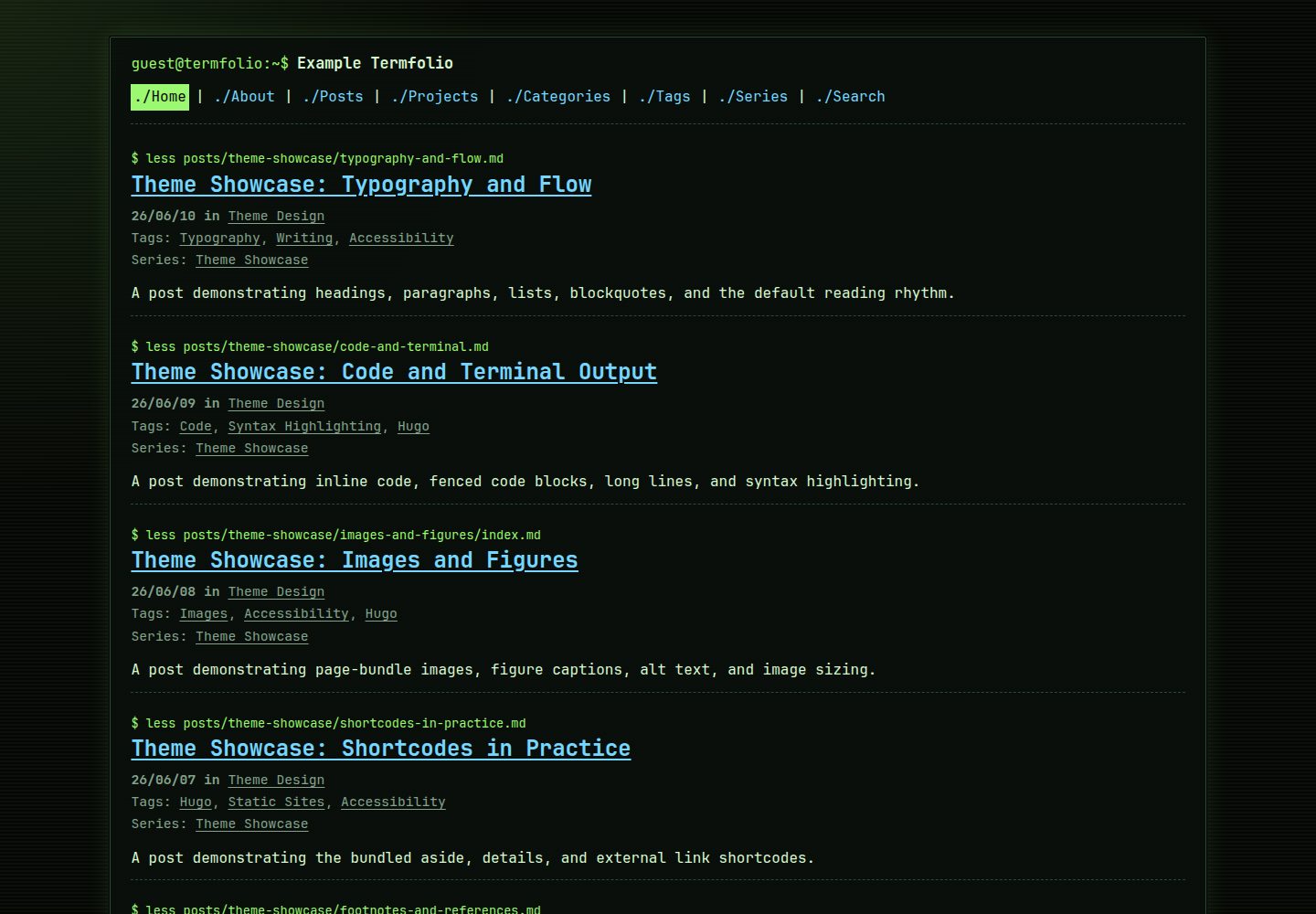
终端风格界面:shell 提示符、命令式标签与文件列表导航形成统一视觉语言
Hugo作品集博客
termfolio — Hugo 作品集模板
作者 joe-mccarthy
Termfolio 是一个终端风格的 Hugo 主题,用 shell 提示符和文件列表式导航呈现博客、作品集与项目索引,默认深色、无追踪、无运行时外部依赖。
看看你的网站会是什么样
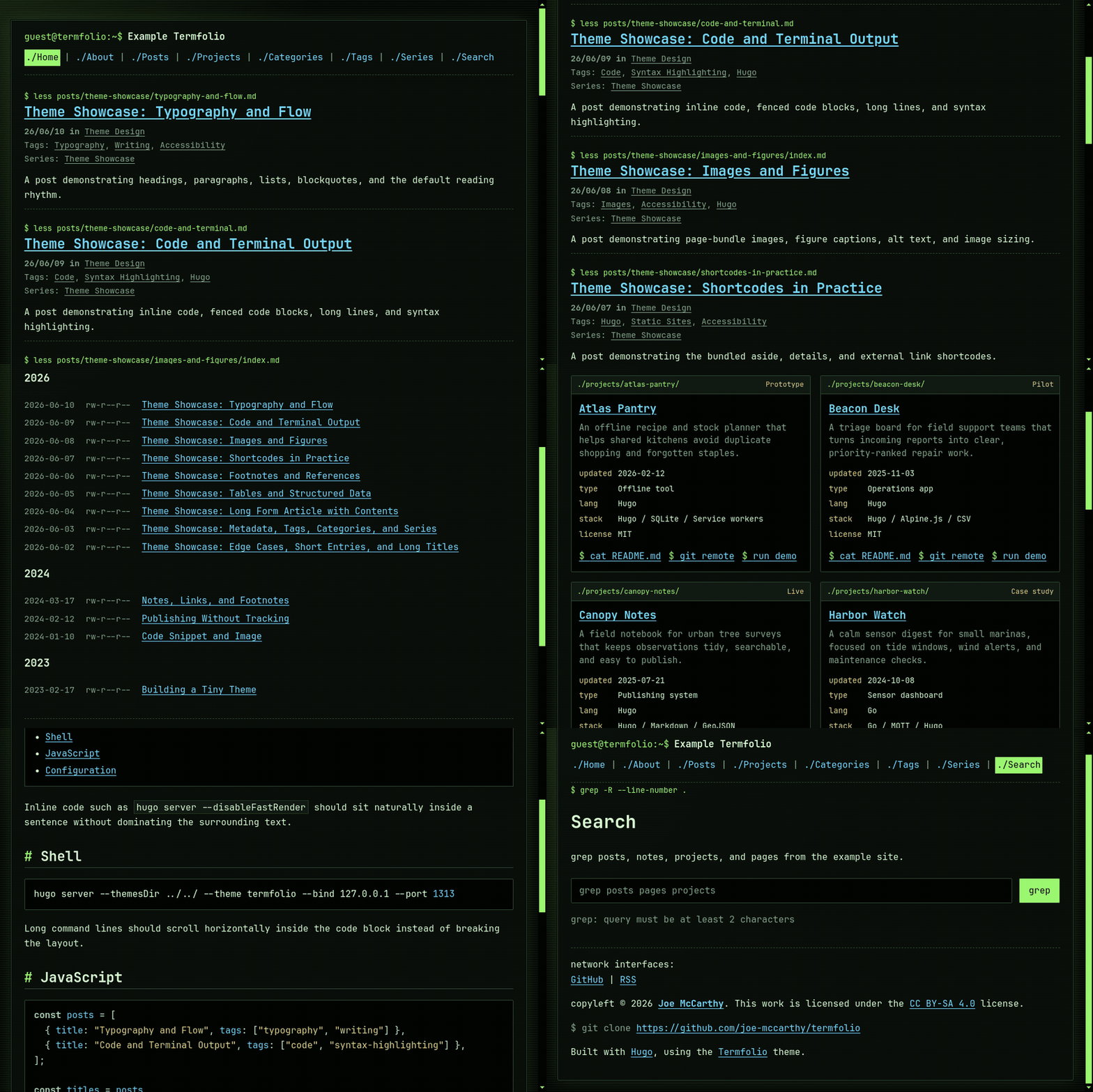
浏览真实页面截图,比较内容排版与手机效果。点击下方缩略图切换,放大查看整页细节。
全部页面与视图 3
截图用于了解视觉与布局,交互效果请以实际项目为准。
采集于 2026-09-30查看来源
值得关注的模板亮点
从已有项目资料中,快速了解它的特点。
深色单色设计,跨浏览器与操作系统保持一致
默认无分析、Cookie、评论、追踪、CDN 字体或第三方运行时依赖
标准页面仅用 HTML 与 CSS,JavaScript 只在启用可选搜索时使用
项目布局支持 stack、status、role、impact、demo、repository、licence、year 等元数据
内置 JSON-LD、Open Graph、Twitter Cards、规范链接、RSS 与分类法页面
模板详细介绍
Termfolio 是一个面向技术博客、工程笔记、个人作品集与仓库索引的 Hugo 主题。它把静态内容放进类似文件系统的界面里:使用 shell 提示符、命令式标签和文件列表导航,整体为深色单色系设计。主题默认不引入分析、Cookie、评论、追踪脚本、CDN 字体或第三方运行时依赖,标准页面仅用 HTML 与 CSS,只有启用可选搜索时才使用 JavaScript。
内容方面,主题为长文排版提供默认样式,覆盖正文、脚注、表格、图表、引用、代码块与 Chroma 语法高亮;项目布局支持 stack、status、role、impact、demo、repository、licence、year 等结构化元数据。站点元数据包含 JSON-LD、Open Graph、Twitter Cards、规范链接、RSS、当前导航状态与分类法页面。搜索可选内置提供方或 Pagefind,后者适合内容量较大的站点。
使用限制:主题为深色单色设计,内容优先,不适合以图片为主的杂志、以转化为目标的营销站点,或需要大量客户端交互的应用。安装需要 Hugo 0.128.0 或更新版本(不要求 Extended),以 Git 子模块方式安装时需要 Git,使用 Pagefind 搜索时需要额外安装 Pagefind。
Hugo作品集博客
适合你的项目吗?
适用场景
- 搭建技术博客或工程笔记,用终端风格呈现长文与代码
- 建立个人作品集或项目索引,展示每个项目的技术栈、状态与仓库链接
- 发布注重隐私、不引入追踪与第三方运行时依赖的静态站点
- 为内容量较大的站点启用内置搜索或 Pagefind 静态搜索
- 用分类法页面组织文章与项目,并输出 RSS 与结构化元数据
适合人群
- 技术博客与工程笔记作者
- 需要展示结构化项目元数据的开发者作品集
- 偏好深色终端界面、内容优先的静态站点
- 对隐私与外部依赖有要求、希望默认无追踪的发布者
上手与定制指南
结合仓库当前版本的说明,按下面的资料检查内容、配置与运行要求。
- 1
需要 Hugo 0.128.0 或更新版本,不要求 Hugo Extended
- 2
推荐以 Git 子模块方式安装到 themes/termfolio,并在配置中设置 theme: termfolio
- 3
也可下载 release 压缩包解压到 themes/termfolio 目录,并记录版本以便复现升级
- 4
配置支持 YAML、TOML 或 JSON,文档示例使用 YAML
- 5
使用 params.search.provider: pagefind 时需要额外安装 Pagefind
授权与来源资料
使用条件与限制
免费使用 · 保留许可声明本次收录的是公开仓库中采用 MIT 许可的免费版本;免费范围为该版本代码,不代表外部服务或第三方素材免费。
使用时需要遵守
- 允许免费使用、修改、商用和分发该版本代码。
- 分发代码副本或实质性部分时,保留原作者版权声明和完整 MIT 许可声明。
- 代码按现状提供;担保与责任限制以原许可证及适用法律为准。
额外费用与待核对事项
- 使用该主题需要 Hugo 0.128.0 或更新版本;不要求 Hugo Extended。
- 以 Git 子模块方式安装主题时需要 Git。
- 仅当使用 params.search.provider: pagefind 时需要额外安装 Pagefind。
- 主题为深色单色、内容优先设计,不适合以图片为主的杂志、以转化为目标的营销站点,或需要大量客户端交互的应用。
- 演示图片、字体、图标及其他第三方素材需按各自许可核对,不能仅凭代码的 MIT 许可判断。
- 域名、托管、数据库、支付或 AI 等外部服务可能另外收费。
查看原文依据
Permission is hereby granted, free of charge
许可证原文
Hugo `0.128.0` or newer; Hugo Extended is not required.
README 原文
Git, when installing the theme as a submodule.
README 原文
Pagefind, only when using `params.search.provider: pagefind`.
README 原文
https://github.com/joe-mccarthy/termfolio/blob/main/LICENSEhttps://github.com/joe-mccarthy/termfolio/blob/main/README.mdIts dark-only, content-first design is less suitable for image-led magazines, conversion-focused marketing sites, or applications with substantial client-side interaction.
README 原文
DeepSeek 根据仓库许可证和 README 整理 ·2026-10-01。结果仅覆盖已读取资料,依赖、图片、字体及后续条款变更以各自原文为准。
项目核对记录与介绍依据
模板资料
- 来源平台
- GitHub
- 资料与维护参考分
- 资料较完整 · 88 / 100
- 技术栈
- Hugo
- 网站类型
- 作品集 · 博客
这个分数如何计算
本站按许可资料(最高30分)、演示链接(12分)、预览图(10分)、Star数(15分)、记录的维护时间(15分)、描述完整度(8分)、功能记录(5分)和分类资料(5分)计算。它不是代码、安全或性能测试,也不是 Google 评分;有链接不代表已实测可用。
这个项目需要核对什么
- 记录的仓库更新时间
- 2026-09-23
- 截图检查日期
- 2026-10-01
已收录演示链接。请用你的内容与屏幕尺寸检查;有演示不代表表单、认证或支付已经可用。
目录记录的主要技术栈是 Hugo。请通过依赖清单和锁文件核对实际版本与托管要求。这些说明基于收录资料,不代表代码审计或部署实测。
查看具体选型方法 →介绍的制作与核对状态
介绍由 AI 辅助整理目录与仓库资料。仓库作者不等于这篇介绍的审核者。
已完成服务器许可规则与 AI 来源核对;未经过人工编辑审核。
查看当时使用的来源资料
SHA-256: b230d020eaadf1e385788443b61cc3b98c524409d5b3a8645936e8486b723465
2026-10-01T13:54:38.222Z
来源文件 / 仓库# Termfolio
A dark, terminal-inspired Hugo theme for technical blogs, project portfolios, and repository-style personal sites.
[](https://github.com/joe-mccarthy/termfolio/actions/workflows/render-example-test.yml) [](https://sonarcloud.io/summary/overall?id=joe-mccarthy_termfolio) [](https://github.com/joe-mccarthy/termfolio/releases/latest) [](LICENSE)
Termfolio presents static content through a filesystem-inspired interface. It combines shell prompts and file-list navigation with layouts for long-form writing, structured project metadata, locally hosted fonts, and privacy-conscious defaults.
[Live demo](https://joe-mccarthy.github.io/termfolio/) · [Screenshots](#screenshots) · [Quick start](#quick-start) · [Documentation](#documentation) · [Releases](https://github.com/joe-mccarthy/termfolio/releases)
## Features
| Feature | Description |
| --- | --- |
| Terminal-inspired interface | Shell prompts, command-style labels, and file-list navigation provide a consistent visual language. |
| Dark-only design | A focused terminal palette remains consistent across browsers and operating systems. |
| Privacy-conscious defaults | No analytics, cookies, comments, tracking, CDN fonts, or third-party runtime dependencies. |
| Minimal client-side code | Standard pages are HTML and CSS; JavaScript is used only when optional search is enabled. |
| Long-form content | Prose, footnotes, tables, figures, blockquotes, code blocks, and Chroma highlighting are styled by default. |
| Structured projects | Project layouts support stack, status, role, impact, demo, repository, licence, and year metadata. |
| Optional static search | Use the built-in search provider or Pagefind for larger content collections. |
| Rich site metadata | JSON-LD, Open Graph, Twitter Cards, canonical URLs, RSS, active navigation, and taxonomy pages are included. |
## Screenshots
| Home | Post |
| --- | --- |
| <img src="https://raw.githubusercontent.com/joe-mccarthy/termfolio/main/static/images/screenshots/home.png" alt="Termfolio homepage screenshot" width="420"> | <img src="https://raw.githubusercontent.com/joe-mccarthy/termfolio/main/static/images/screenshots/post.png" alt="Termfolio post screenshot" width="420"> |
| Projects | Search |
| --- | --- |
| <img src="https://raw.githubusercontent.com/joe-mccarthy/termfolio/main/static/images/screenshots/projects.png" alt="Termfolio projects screenshot" width="420"> | <img src="https://raw.githubusercontent.com/joe-mccarthy/termfolio/main/static/images/screenshots/search.png" alt="Termfolio search screenshot" width="420"> |
## Requirements
- Hugo `0.128.0` or newer; Hugo Extended is not required.
- Git, when installing the theme as a submodule.
- YAML, TOML, or JSON configuration. This documentation uses YAML.
- Pagefind, only when using `params.search.provider: pagefind`.
Termfolio is designed for technical blogs, engineering notebooks, personal portfolios, repository indexes, and privacy-conscious publications. Its dark-only, content-first design is less suitable for image-led magazines, conversion-focused marketing sites, or applications with substantial client-side interaction.
## Quick start
Create a Hugo site and install Termfolio as a Git submodule:
```bash
hugo new site mysite -f yaml
cd mysite
git init
git submodule add https://github.com/joe-mccarthy/termfolio themes/termfolio
```
Add a minimal `config.yaml`:
```yaml
baseURL: https://example.org/
defaultContentLanguage: en-gb
title: My Termfolio Site
theme: termfolio
pagination.pagerSize: 10
markup:
highlight:
noClasses: false
params:
author: Your Name
description: "A short description for metadata and social previews."
mainSections:
- posts
style:
accentColor: "#9bf870"
```
Create a post and start the development server:
```bash
hugo new content/posts/hello-terminal.md
hugo server --buildDrafts
```
Open [http://localhost:1313/](http://localhost:1313/). See the [configuration guide](docs/configuration.md) before deploying a production site.
## Installation
### Git submodule
The recommended installation method keeps the theme version visible in your site's Git history:
```bash
git submodule add https://github.com/joe-mccarthy/termfolio themes/termfolio
```
Set `theme: termfolio` in your Hugo configuration. To update later:
```bash
git submodule update --remote --merge
```
Review the incoming changes before committing the updated submodule reference.
### Release archive
1. Download the [latest release](https://github.com/joe-mccarthy/termfolio/releases/latest).
2. Extract it into your site's `themes/termfolio` directory.
3. Set `theme: termfolio` in your Hugo configuration.
Release archives are convenient for installations that do not use Git submodules. Record the installed release version so upgrades remain reproducible.
## Essential configuration
The following settings enable the most commonly used theme features:
```yaml
menu:
main:
- identifier: home
name: Home
url: /
weight: 1
- identifier: posts
name: Posts
url: /posts/
weight: 2
- identifier: projects
name: Projects
url: /projects/
weight: 3
params:
sourceURL: https://github.com/your-name/your-site
display:
footerAttribution: true
taxonomyMeta: true
toc:
enabled: true
title: Contents
latest:
enabled: true
count: 3
post_nav:
enabled: true
show_title: false
taxonomies:
category: categories
tag: tags
series: series
```
A complete, copy-ready configuration is available in [example-config.yaml](example-config.yaml). Every supported option is described in [docs/configuration.md](docs/configuration.md).
## Documentation
| Guide | Covers |
| --- | --- |
| [Configuration](docs/configuration.md) | Navigation, taxonomies, parameters, styling, search settings, and troubleshooting. |
| [Content](docs/content.md) | Posts, projects, taxonomy pages, shortcodes, search content, and local assets. |
| [Development](docs/development.md) | Example-site workflow, repository structure, checks, CI, media, and maintainer troubleshooting. |
| [Contributing](CONTRIBUTING.md) | Development setup, validation expectations, and the pull-request process. |
| [Support](SUPPORT.md) | Routes for usage questions, bug reports, feature requests, and showcase submissions. |
| [Releasing](RELEASING.md) | Versioning, candidate preparation, publication automation, and independent verification. |
| [Release checklist](docs/release-checklist.md) | The concise checklist used for an exact release candidate. |
| [Hugo Themes submission](docs/hugo-themes-submission.md) | Gallery metadata, media requirements, and submission steps. |
| [Changelog](CHANGELOG.md) | Long-term project history. |
## Demo and starter site
The bundled example demonstrates posts, projects, search, taxonomies, and the full configuration surface:
- [Home](https://joe-mccarthy.github.io/termfolio/)
- [Posts](https://joe-mccarthy.github.io/termfolio/posts/)
- [Projects](https://joe-mccarthy.github.io/termfolio/projects/)
- [Code and terminal post](https://joe-mccarthy.github.io/termfolio/posts/theme-showcase/code-and-terminal/)
- [Search](https://joe-mccarthy.github.io/termfolio/search/)
- [Theme design category](https://joe-mccarthy.github.io/termfolio/categories/theme-design/)
To run or copy the starter site, follow the [example-site instructions](docs/development.md#run-the-example-site). Public sites using Termfolio may be proposed with the repository's [showcase issue template](.github/ISSUE_TEMPLATE/showcase.yml).
## Accessibility and performance
Termfolio uses semantic landmarks, skip links, visible focus states, active navigation state, and a high-contrast palette. Standard reading and navigation do not require JavaScript. The theme bundles JetBrains Mono locally and includes no analytics, tracking scripts, remote embeds, or CDN assets by default.
Run a production build after adding your own content and assets, then audit the result in its deployment environment:
```bash
hugo --minify
```
The repository's automated checks enforce warning-free rendering and a minimum Lighthouse accessibility score. See the [development guide](docs/development.md#quality-and-compatibility) for the current quality baseline and local commands.
## Contributing
Contributions are welcome. Keep changes focused, run the documented checks, update user-facing documentation when behaviour changes, and include screenshots for visual changes. Read the [contributing guide](CONTRIBUTING.md) before opening a pull request, or use the [support guide](SUPPORT.md) to choose the appropriate issue form.
## Release history
See [CHANGELOG.md](CHANGELOG.md) for the complete version history and [GitHub Releases](https://github.com/joe-mccarthy/termfolio/releases) for published source archives and release notes.
## Licence
Termfolio is released under the [MIT License](LICENSE).
## Acknowledgements
- [Hugo](https://gohugo.io/) powers the static site pipeline.
- [JetBrains Mono](https://www.jetbrains.com/lp/mono/) provides the bundled terminal-style typeface.
看看同类模板
对比同技术栈与用途的模板,找到更适合的视觉与内容结构。

hugo-PaperMod
PaperMod 是 Hugo 生态里知名度较高的主题之一,定位很明确:给博客和轻量作品集站点提供一套干净、响应式的阅读界面。
Hugo · 作品集

LoveIt
❤️A clean, elegant but advanced blog theme for Hugo 一个简洁、优雅且高效的 Hugo 主题
Hugo · 博客

hugo-coder
A minimalist blog theme for hugo.
Hugo · 博客

blowfish
Personal Website & Blog Theme for Hugo
Hugo · 博客

hugo-paper
🪺 A simple, clean, customizable Hugo theme
Hugo · 博客

hextra
Hextra 是一个 Hugo 主题,定位在文档站与博客之间:既提供侧边栏导航、目录、面包屑、分页这类文档站结构,也能承载博客内容。
Hugo · 文档