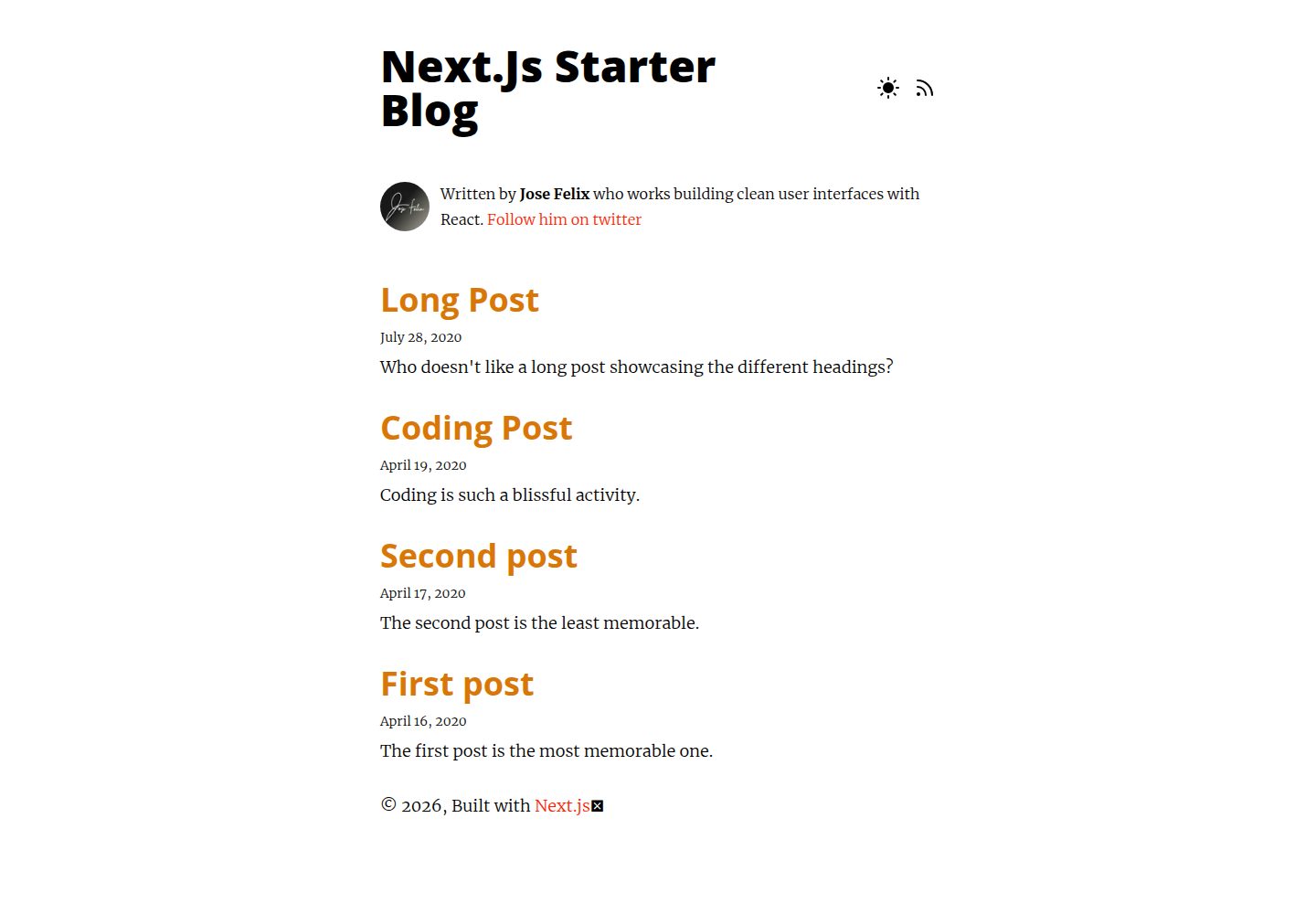
以 Markdown 撰写内容,页面入口为 pages/index.js
Next.jsReact博客启动器
nextjs-starter-blog — Next.js 博客模板
作者 JoseRFelix
基于 Next.js 的 Markdown 博客启动模板,内置暗色模式、RSS 与 Tailwind 排版。
看看你的网站会是什么样
浏览真实页面截图,比较内容排版与手机效果。点击下方缩略图切换,放大查看整页细节。
全部页面与视图 2
截图用于了解视觉与布局,交互效果请以实际项目为准。
采集于 2026-10-02查看来源
值得关注的模板亮点
从已有项目资料中,快速了解它的特点。
内置暗色模式与 RSS Feed
使用 Tailwind.css,并通过 Tailwind Typography 提供 Markdown 排版默认值
react-syntax-highlighter 配合 PrismJs 实现 Markdown 代码高亮
next-optimized-images 提供图片预览、优化、懒加载与 WebP 支持
包含 SEO 组件与动态站点元数据
模板详细介绍
这是一个用于搭建博客的 Next.js 启动模板,内容以 Markdown 撰写。仓库说明中列出的能力包括:RSS Feed、暗色模式、WebP 图片支持、SEO 组件与动态站点元数据,并已勾选为完成项;Sitemap 仍标记为待办。样式方面使用 Tailwind.css,并通过 Tailwind Typography 插件为 Markdown 渲染出的 HTML 提供排版默认值,可在 tailwind.config.js 的 typography 配置中覆盖。代码高亮由 react-syntax-highlighter 与 PrismJs 实现,图片处理依赖 next-optimized-images,并支持懒加载与绝对路径导入。
使用方式为在项目目录运行 npm run dev 或 yarn dev,然后在浏览器打开 http://localhost:3000;页面入口为 pages/index.js,修改后自动更新。部署方面 README 提供了 Netlify 与 ZEIT Now 的部署按钮。
许可为 MIT,允许免费使用、修改、商用和分发该版本代码,分发代码副本或实质性部分时需保留版权声明与完整 MIT 许可声明。演示图片、字体、图标等第三方素材需按各自许可单独核对;域名、托管等外部服务可能另行收费。
Next.js博客启动器
适合你的项目吗?
适用场景
- 搭建以 Markdown 为内容来源的个人博客
- 需要一个带暗色模式和 RSS 输出的 Next.js 起步项目
- 希望用 Tailwind Typography 统一 Markdown 文章排版
适合人群
- 熟悉 Next.js 与 Markdown 工作流的开发者
- 需要 MIT 许可、可自行修改和分发的博客项目
- 准备部署到 Netlify 或 Vercel 等平台的个人站点
上手与定制指南
结合仓库当前版本的说明,按下面的资料检查内容、配置与运行要求。
- 1
在项目目录运行 npm run dev 或 yarn dev 启动开发服务器
- 2
浏览器打开 http://localhost:3000 查看效果
- 3
页面入口为 pages/index.js,编辑后自动更新
- 4
排版默认值可在 tailwind.config.js 的 theme.typography 下覆盖
- 5
README 中 Sitemap 仍为待办项,模板未包含该功能
授权与来源资料
使用条件与限制
免费使用 · 保留许可声明本次收录的是公开仓库中采用 MIT 许可的免费版本;免费范围为该版本代码,不代表外部服务或第三方素材免费。
使用时需要遵守
- 允许免费使用、修改、商用和分发该版本代码。
- 分发代码副本或实质性部分时,保留原作者版权声明和完整 MIT 许可声明。
- 代码按现状提供;担保与责任限制以原许可证及适用法律为准。
额外费用与待核对事项
- 演示图片、字体、图标及其他第三方素材需按各自许可核对,不能仅凭代码的 MIT 许可判断。
- 域名、托管、数据库、支付或 AI 等外部服务可能另外收费。
查看原文依据
https://github.com/JoseRFelix/nextjs-starter-blog/blob/master/LICENSEhttps://github.com/JoseRFelix/nextjs-starter-blog/blob/master/README.mdPermission is hereby granted, free of charge
许可证原文
DeepSeek 根据仓库许可证和 README 整理 ·2026-10-02。结果仅覆盖已读取资料,依赖、图片、字体及后续条款变更以各自原文为准。
项目核对记录与介绍依据
模板资料
- 来源平台
- GitHub
- 资料与维护参考分
- 资料较完整 · 81 / 100
- 技术栈
- Next.js · React
- 网站类型
- 博客 · 启动器
这个分数如何计算
本站按许可资料(最高30分)、演示链接(12分)、预览图(10分)、Star数(15分)、记录的维护时间(15分)、描述完整度(8分)、功能记录(5分)和分类资料(5分)计算。它不是代码、安全或性能测试,也不是 Google 评分;有链接不代表已实测可用。
这个项目需要核对什么
- 记录的仓库更新时间
- 2023-01-07
- 截图检查日期
- 2026-10-02
已收录演示链接。请用你的内容与屏幕尺寸检查;有演示不代表表单、认证或支付已经可用。
目录记录的主要技术栈是 Next.js。请通过依赖清单和锁文件核对实际版本与托管要求。这些说明基于收录资料,不代表代码审计或部署实测。
查看具体选型方法 →介绍的制作与核对状态
介绍由 AI 辅助整理目录与仓库资料。仓库作者不等于这篇介绍的审核者。
已完成服务器许可规则与 AI 来源核对;未经过人工编辑审核。
查看当时使用的来源资料
SHA-256: d92aff6e78ed272d5ef2e08084f1d98d781ee14447365ac2f4e415fe12bc0e95
2026-10-02T09:23:24.849Z
来源文件 / 仓库<h1 align="center"> Next.js blog starter </h1> Start off your writing journey with this Next.js markdown blog template. ## ✏ Features - Next.js 12! - RSS Feed - Streamlined styling experience with [Tailwind.css](https://tailwindcss.com/). - Customizable typographic defaults with [Tailwind Typography](https://github.com/tailwindlabs/tailwindcss-typography) - Automatic image preview and optimization with [next-optimized-images](https://github.com/cyrilwanner/next-optimized-images). - Lazyload images. - Absolute imports. - SEO friendly. - Markdown code highlighting with [react-syntax-highlighter](https://www.npmjs.com/package/react-syntax-highlighter) and [PrismJs](https://prismjs.com/). - Dark Mode - WebP image support ## 🚀 Getting Started First, run the development server: ```bash npm run dev # or yarn dev ``` Open [http://localhost:3000](http://localhost:3000) with your browser to see the result. You can start editing the page by modifying `pages/index.js`. The page auto-updates as you edit the file. ## ✍ Customizing Tailwind Typography [Tailwind Typography](https://github.com/tailwindlabs/tailwindcss-typography) is an official tailwind plugin that provides a set of `prose` classes to add beautiful typographic defaults to any vanilla HTML you don't control (like HTML rendered from Markdown, or pulled from a CMS). To customize the defaults provided by the plugin, add the overrides under the `typography` key in the theme section of the `tailwind.config.js` file. Refer to its [default styles](https://github.com/tailwindlabs/tailwindcss-typography/blob/master/src/styles.js) for more in-depth examples. For more information, please check out Tailwind Typography's [customization section](https://github.com/tailwindlabs/tailwindcss-typography#customization). ## 📖 Learn More ### Next.js To learn more about Next.js, take a look at the following resources: - [Next.js Documentation](https://nextjs.org/docs) - learn about Next.js features and API. - [Learn Next.js](https://nextjs.org/learn) - an interactive Next.js tutorial. You can check out [the Next.js GitHub repository](https://github.com/zeit/next.js/) - your feedback and contributions are welcome! ### Tailwind CSS To learn more about Tailwind CSS, take a look at the following resources: - [Tailwind Documentation](https://tailwindcss.com/) - learn about Tailwind CSS features and API. ## ☑ Upcoming features - [ ] Add Sitemap - [x] Add RSS Feed - [x] Dark Mode - [x] Add support for WebP images - [x] Add SEO Component - [x] Add Dynamic Site Metadata ## ☁ Deploy [](https://app.netlify.com/start/deploy?repository=https://github.com/Jfelix61/nextjs-starter-blog) [](https://zeit.co/import/project?template=https://github.com/Jfelix61/nextjs-starter-blog)
看看同类模板
对比同技术栈与用途的模板,找到更适合的视觉与内容结构。

ai-website-cloner-template
Clone any website with one command using AI coding agents
Next.js · 启动器

Next.js SaaS Starter
Next.js SaaS Starter 是 Next.js 官方维护的 SaaS 起点模板,定位介于学习资源和可直接部署的脚手架之间。
Next.js · SaaS

Next.js Commerce
Next.js Commerce 是 Vercel 团队维护的电商启动模板,基于 Next.js App Router 构建,采用服务端渲染、React Server Components、Server Actions …
Next.js · 电商

Next-js-Boilerplate
Next-js-Boilerplate 是一个面向 Next.js 16、Tailwind CSS 4 和 TypeScript 的启动器,核心定位是开发者体验优先。
Next.js · 启动器

tailwind-nextjs-starter-blog
tailwind-nextjs-starter-blog 是一个面向个人技术博客的 Next.js 与 Tailwind CSS 启动模板,其 v2 版本基于 App Router 与 React Server Comp…
Next.js · 博客

next-forge
Production-grade Turborepo template for Next.js apps.
Next.js · 启动器