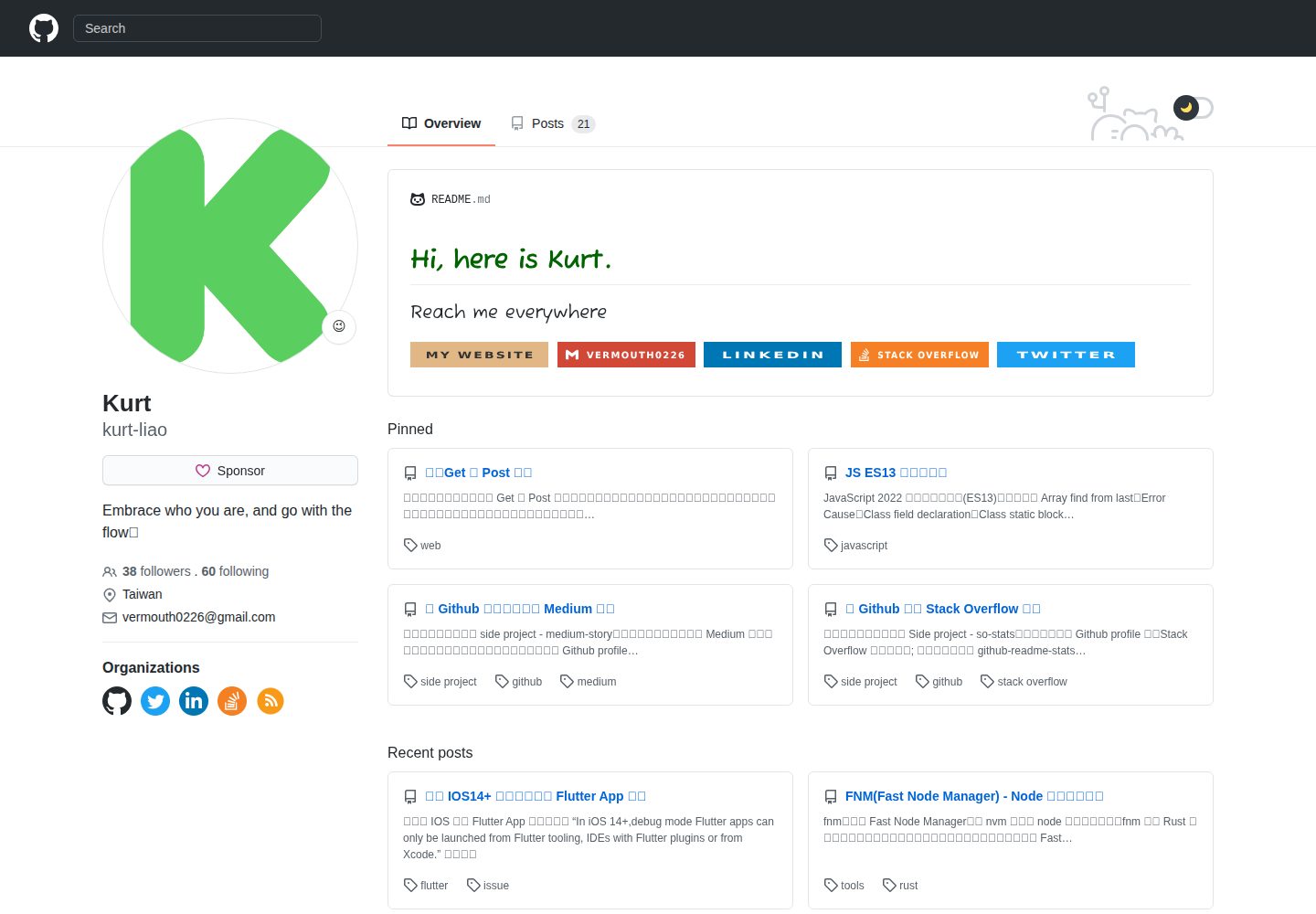
置顶文章与最近文章在同一页面同时展示
Hugo博客
github-style-plus — Hugo 博客模板
作者 kurt-liao
基于 github-style 二次开发的 Hugo 博客主题,保留 GitHub 外观并新增置顶与最近文章同屏、阅读时长、本地搜索、可点击贡献图、自定义 CSS 等特性。
看看你的网站会是什么样
浏览真实页面截图,比较内容排版与手机效果。点击下方缩略图切换,放大查看整页细节。
全部页面与视图 3
截图用于了解视觉与布局,交互效果请以实际项目为准。
采集于 2026-10-02查看来源
值得关注的模板亮点
从已有项目资料中,快速了解它的特点。
每篇文章显示预估阅读时长与字数
基于 Hugo RSS 生成 index.xml 实现本地关键词搜索
年度贡献图按天可点击,展示当天发布的文章
支持自定义 CSS 文件、自定义组织区块与赞助链接按钮
集成 GA4 与 GTM 脚本,并提供上一篇/下一篇导航
模板详细介绍
github-style-plus 是 kurt-liao 维护的 Hugo 博客主题,从 MeiK2333 的 github-style 分支而来,页面外观沿用 GitHub 风格。仓库文档只介绍相对原版新增的功能,基础用法需参考原仓库。
新增能力集中在内容展示与站点配置:置顶文章与最近文章可同时显示;每篇文章显示阅读时长与字数;支持在本地通过 Hugo 生成的 RSS(index.xml)做关键词搜索;年度贡献图可点击查看当天发布的文章;文章底部提供上一篇/下一篇导航;首页默认隐藏大部分文章,通过“显示更多”按钮展开。
站点信息与集成方面,可显示真实的 GitHub 关注者数量,可添加赞助链接按钮,可配置自定义组织区块,支持自定义 CSS 文件,并将旧版 Google Analytics 更新为 GA4,同时支持 GTM 脚本。
使用限制:安装后需要把内容目录从 posts 重命名为 post;本地搜索依赖 params.rss 与 params.enableLocalSearch 两个参数同时开启。主题采用 MIT 许可,但演示图片、字体、图标等第三方素材需单独核对许可,域名、托管等外部服务可能另行收费。
Hugo博客
适合你的项目吗?
适用场景
- 希望博客外观接近 GitHub 个人主页的 Hugo 站点
- 需要在首页同时突出置顶文章和最新文章
- 希望通过本地搜索在站内查找文章而不依赖外部搜索服务
- 需要展示 GitHub 关注者数量、赞助入口或自定义社交组织链接
- 需要接入 GA4 或 GTM 做访问统计
适合人群
- 使用 Hugo 搭建个人博客并偏好 GitHub 视觉风格的开发者
- 需要置顶、阅读时长、本地搜索等增强功能的写作者
- 愿意按文档调整 config.toml 并接受 posts 目录重命名为 post 的用户
上手与定制指南
结合仓库当前版本的说明,按下面的资料检查内容、配置与运行要求。
- 1
先执行 hugo new site 创建站点,再以 git submodule 方式将主题加入 themes/github-style-plus
- 2
安装或更新后需将内容目录 content/posts 重命名为 content/post
- 3
启用本地搜索需同时设置 params.rss = true 与 params.enableLocalSearch = true
- 4
显示 GitHub 关注者需设置 enableGithubFollowers = true 并填写 github 账号
- 5
自定义 CSS 需把样式文件放入 static 目录并在 config.toml 中配置路径
授权与来源资料
使用条件与限制
免费使用 · 保留许可声明本次收录的是公开仓库中采用 MIT 许可的免费版本;免费范围为该版本代码,不代表外部服务或第三方素材免费。
使用时需要遵守
- 允许免费使用、修改、商用和分发该版本代码。
- 分发代码副本或实质性部分时,保留原作者版权声明和完整 MIT 许可声明。
- 代码按现状提供;担保与责任限制以原许可证及适用法律为准。
额外费用与待核对事项
- 安装或更新主题后,必须将内容目录 content/posts 重命名为 content/post,否则文章可能无法正常显示。
- 本地关键词搜索依赖 Hugo 生成的 RSS(index.xml),必须先在配置中设置 params.rss = true。
- 本地搜索默认关闭,需额外设置 params.enableLocalSearch = true 才能启用该功能。
- 显示真实 GitHub 关注者数量需设置 enableGithubFollowers = true 并填写 github 账号,该功能依赖 GitHub 外部服务。
- 使用 GTM 脚本需在 config.toml 中配置 gtmId,涉及 Google 外部服务。
- 演示图片、字体、图标及其他第三方素材需按各自许可核对,不能仅凭代码的 MIT 许可判断。
- 域名、托管、数据库、支付或 AI 等外部服务可能另外收费。
查看原文依据
Permission is hereby granted, free of charge
许可证原文
you need to rename the previous `posts` folder to `post`
README 原文
make sure you have set `params.rss = true`
README 原文
there's another parameter you need to set to true to enable: `params.enableLocalSearch = true`
README 原文
please set `enableGithubFollowers = true` and your github account like `github = kurt-liao`
README 原文
https://github.com/kurt-liao/github-style-plus/blob/main/LICENSEhttps://github.com/kurt-liao/github-style-plus/blob/main/README.mdjust add `gtmId = "xxx"` in your *config.toml* file
README 原文
DeepSeek 根据仓库许可证和 README 整理 ·2026-10-02。结果仅覆盖已读取资料,依赖、图片、字体及后续条款变更以各自原文为准。
项目核对记录与介绍依据
模板资料
- 来源平台
- GitHub
- 资料与维护参考分
- 资料较完整 · 81 / 100
- 技术栈
- Hugo
- 网站类型
- 博客
这个分数如何计算
本站按许可资料(最高30分)、演示链接(12分)、预览图(10分)、Star数(15分)、记录的维护时间(15分)、描述完整度(8分)、功能记录(5分)和分类资料(5分)计算。它不是代码、安全或性能测试,也不是 Google 评分;有链接不代表已实测可用。
这个项目需要核对什么
- 记录的仓库更新时间
- 2024-11-14
- 截图检查日期
- 2026-10-02
已收录演示链接。请用你的内容与屏幕尺寸检查;有演示不代表表单、认证或支付已经可用。
目录记录的主要技术栈是 Hugo。请通过依赖清单和锁文件核对实际版本与托管要求。这些说明基于收录资料,不代表代码审计或部署实测。
查看具体选型方法 →介绍的制作与核对状态
介绍由 AI 辅助整理目录与仓库资料。仓库作者不等于这篇介绍的审核者。
已完成服务器许可规则与 AI 来源核对;未经过人工编辑审核。
查看当时使用的来源资料
SHA-256: 53b9aea5aac85ff6c5ad09c55e2d44e9d80c86fffbbb2c38502bf68d6a967630
2026-10-02T10:15:21.315Z
来源文件 / 仓库# Github Style Plus This is a fork from [github-style](https://github.com/MeiK2333/github-style) with some additional features that I made. > In this repo, the documentation only introduce additional features. > For more information about basic usage, please follow the original repo. ## Quick guide ### New features in this fork version: 1. [Pinned posts and recent posts show together](#pinned-posts-and-recent-posts-show-together) 2. [Support reading time estimation](#support-reading-time-estimation) 3. [Display your real github followers stats](#display-your-real-github-followers-stats) 4. [Add sponsor link button](#add-sponsor-link-button) 5. [Keyword search locally](#keyword-search-locally) 6. [Clickable day contributions](#clickable-day-contributions) 7. [Support custom css file](#support-custom-css-file) 8. [Support previous and next post](#support-previous-and-next-post) 9. [Show more button](#show-more-button) 10. [Update old Google Analytics to GA4](#update-old-google-analytics-to-ga4) 11. [Support GTM Script](#support-gtm-script) 12. [Custom organizations block](#custom-organizations-block) ## Demo First, take a look at my [blog](https://blog.kurtstories.com/), it's the completely demo for this theme. ## Usage ### Init hugo site ```bash hugo new site mysite cd mysite ``` ### Install the theme ```bash git submodule add [email protected]:kurt-liao/github-style-plus.git themes/github-style-plus ``` ### Update the theme If you just installed the theme, it is already in the latest version. If not, you can update using the below commands ```bash cd themes/github-style-plus git pull ``` Then, you need to rename the previous `posts` folder to `post` ```bash cd <you-project-folder> mv content/posts content/post ``` ## New features✨ ### Pinned posts and recent posts show together In the original version, only one of *Pinned* block and *Recent* block will be shown. In this version, both blocks will display together.  --- ### Support reading time estimation This feature evaluates the reading time of every post and shows the count of words. >The evaluation formula referenced [here](https://kodify.net/hugo/strings/reading-time-text/).  --- ### Display your real github followers stats To show real github followers count, please set `enableGithubFollowers = true` and your github account like `github = kurt-liao` in *config.toml* file.   --- ### Add sponsor link button Set your sponsor link in **config.toml** like `sponsorLink = "https://www.buymeacoffee.com/vermouth02D"` and the button will show on the page. For me, I put the [buymeacoffee](https://www.buymeacoffee.com/vermouth02D) link.  --- ### Keyword search locally Searching in personal site might be important with a growing number of articles. This feature uses hugo rss that generate `index.xml` feed file, so make sure you have set `params.rss = true` Since somebody might not want to use this feature, there's another parameter you need to set to true to enable: `params.enableLocalSearch = true`   --- ### Clickable day contributions Make yearly-contributions graph clickable like github does. When you click on specific day, it will show you the posts added that day.  --- ### Support custom css file If you want to use some custom style, create a style file in **static** folder.  Then, set file path in *config.toml* file.  --- ### Support previous and next post  --- ### Show more button For the speed of page loaded in the first paint, I decide to hide most of posts when the page first loaded.  --- ### Update old Google Analytics to GA4 Since the old Google Analytics is being retired. I've change the old GA code to GA4.  --- ### Support GTM Script Apart from Google Analytics, we may also want to add GTM Script. To do this, just add `gtmId = "xxx"` in your *config.toml* file  --- ### Custom organizations block You may want to set some custom organizations except Github, Twitter, Facebook... Therefore, I've add the custom organization block for you to do so. The settings in *config.toml* might look like this:  And the effect would look like:  ## Config Example @see [config.template.toml](/config.template.toml)
看看同类模板
对比同技术栈与用途的模板,找到更适合的视觉与内容结构。

hugo-PaperMod
PaperMod 是 Hugo 生态里知名度较高的主题之一,定位很明确:给博客和轻量作品集站点提供一套干净、响应式的阅读界面。
Hugo · 作品集

LoveIt
❤️A clean, elegant but advanced blog theme for Hugo 一个简洁、优雅且高效的 Hugo 主题
Hugo · 博客

hugo-coder
A minimalist blog theme for hugo.
Hugo · 博客

blowfish
Personal Website & Blog Theme for Hugo
Hugo · 博客

hugo-paper
🪺 A simple, clean, customizable Hugo theme
Hugo · 博客

hextra
Hextra 是一个 Hugo 主题,定位在文档站与博客之间:既提供侧边栏导航、目录、面包屑、分页这类文档站结构,也能承载博客内容。
Hugo · 文档