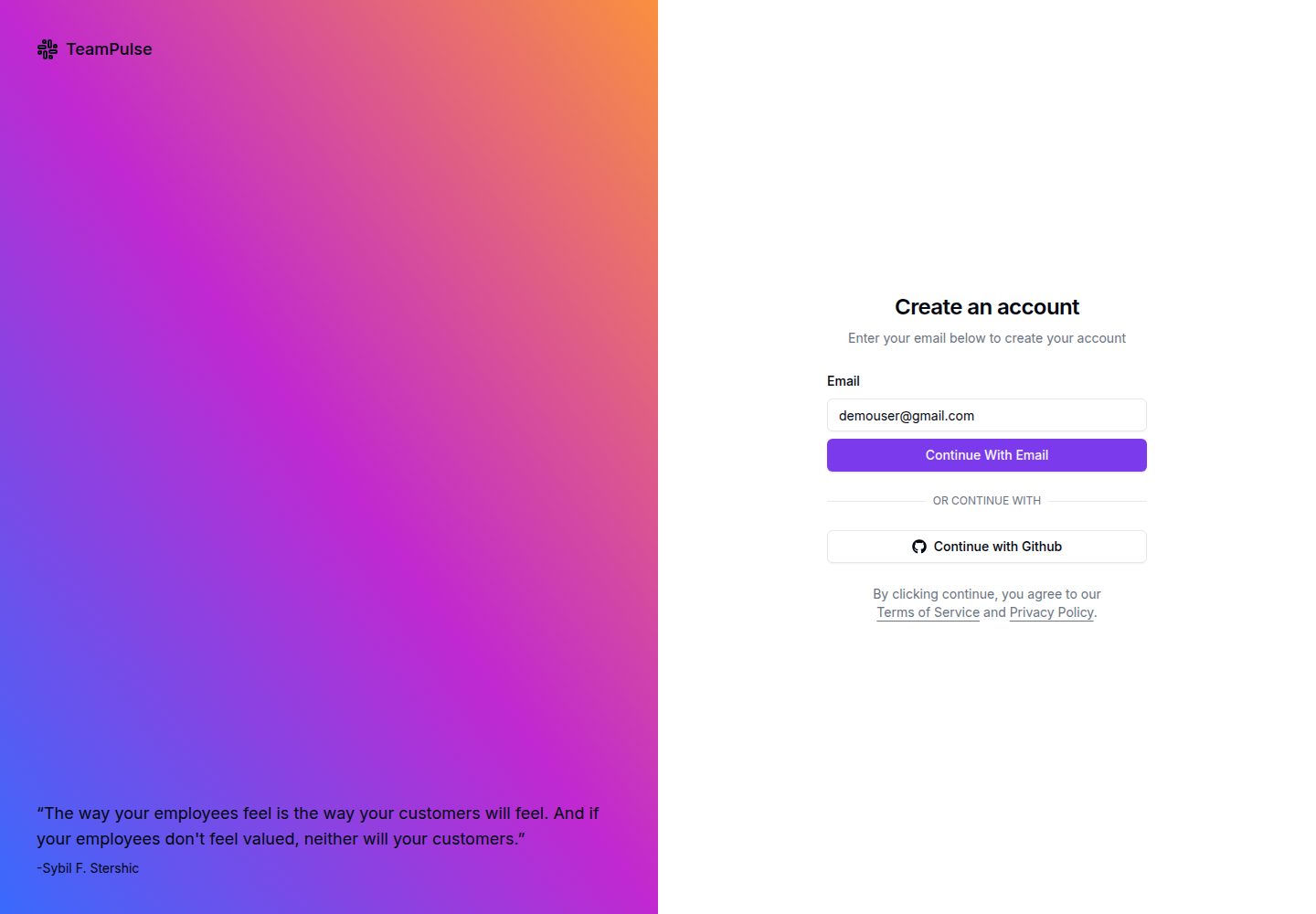
基于 Next.js App Router 与 Shadcn UI 的后台仪表盘模板
Next.jsReact后台启动器
TeamPulse — Next.js 后台模板
作者 manju1807
TeamPulse 是基于 Next.js 与 Shadcn UI 的后台仪表盘启动模板,包含分析图表、用户与员工表格、多步表单、看板、认证和文件上传等页面。
看看你的网站会是什么样
浏览真实页面截图,比较内容排版与手机效果。点击下方缩略图切换,放大查看整页细节。
全部页面与视图 2
截图用于了解视觉与布局,交互效果请以实际项目为准。
采集于 2026-10-04查看来源
值得关注的模板亮点
从已有项目资料中,快速了解它的特点。
Dashboard 页面含分析卡片与 recharts 图表
Users 与 Employee 页面使用 TanStack Table,分别演示客户端与服务端搜索和分页
Profile 页面为 react-hook-form 与 Zod 校验的多步动态表单
Kanban 看板使用 dnd-kit 与 Zustand 实现拖拽任务管理
集成 NextAuth 登录与 Uploadthing 文件上传(含 dropzone)
模板详细介绍
TeamPulse 是一个后台管理仪表盘启动模板,使用 Next.js 的 App Router 与 Shadcn UI 组件构建,配套 TypeScript、Tailwind CSS、Zod、Zustand、NextAuth、Uploadthing、TanStack Table、React Hook Form 等依赖。仓库自带 README 列出了各页面与所用技术,适合作为管理后台界面的起点。
模板提供的页面包括:Signup(NextAuth 社交与邮箱登录)、Dashboard(分析卡片与 recharts 图表)、Users(TanStack 表格,客户端搜索与分页)、Users/new(带 Uploadthing dropzone 的用户表单)、Employee(TanStack 表格,服务端搜索与分页)、Profile(react-hook-form 与 Zod 校验的多步动态表单)、Kanban Board(dnd-kit 与 Zustand 的拖拽任务板)以及根级自定义 404 页面。
使用前需按 README 克隆仓库、安装依赖,并从 env.example.txt 复制出 .env.local 并填入所需环境变量,再运行开发服务器。模板采用 MIT 许可,可免费使用、修改、商用和分发该版本代码,但演示图片、字体、图标等第三方素材需单独核对许可,域名、托管、数据库等外部服务可能另行收费。
Next.jsReact后台启动器
适合你的项目吗?
适用场景
- 搭建带分析图表与数据表格的后台管理界面
- 演示 TanStack Table 的客户端与服务端搜索、分页用法
- 实现多步表单与 Zod 校验的个人资料编辑流程
- 构建支持拖拽的看板式任务管理页面
- 为管理后台接入 NextAuth 登录与 Uploadthing 文件上传
适合人群
- 需要后台仪表盘界面起点的前端开发者
- 使用 Next.js 与 Shadcn UI 技术栈的项目
- 希望参考表格、表单、看板等常见后台页面实现的团队
上手与定制指南
结合仓库当前版本的说明,按下面的资料检查内容、配置与运行要求。
- 1
克隆仓库后进入项目目录并执行 npm install 安装依赖
- 2
复制 env.example.txt 为 .env.local,并填入所需环境变量
- 3
运行 npm run dev 启动开发服务器,默认访问 http://localhost:3000
- 4
NextAuth、Uploadthing 等外部服务需要自行配置对应凭据
- 5
演示图片、字体、图标等第三方素材需按各自许可单独核对
授权与来源资料
使用条件与限制
免费使用 · 保留许可声明本次收录的是公开仓库中采用 MIT 许可的免费版本;免费范围为该版本代码,不代表外部服务或第三方素材免费。
使用时需要遵守
- 允许免费使用、修改、商用和分发该版本代码。
- 分发代码副本或实质性部分时,保留原作者版权声明和完整 MIT 许可声明。
- 代码按现状提供;担保与责任限制以原许可证及适用法律为准。
额外费用与待核对事项
- 使用前必须自行配置环境变量(如 NextAuth、Uploadthing 等外部服务的凭据),否则相关登录与文件上传功能无法运行。
- 社交与邮箱登录依赖 NextAuth 及第三方 OAuth 服务,需自行注册应用并配置密钥,可能受各服务商条款与费用约束。
- 文件上传依赖 Uploadthing 外部服务,需注册账号并配置 API 密钥,其免费额度与收费政策由该服务商决定。
- 演示图片、字体、图标及其他第三方素材需按各自许可核对,不能仅凭代码的 MIT 许可判断。
- 域名、托管、数据库、支付或 AI 等外部服务可能另外收费。
查看原文依据
Permission is hereby granted, free of charge
许可证原文
Add the required environment variables to the `.env.local` file.
README 原文
Authentication support with NextAuth (social and email logins)
README 原文
https://github.com/manju1807/TeamPulse/blob/main/LICENSEhttps://github.com/manju1807/TeamPulse/blob/main/README.mdFile uploading capabilities with Uploadthing and dropzone
README 原文
DeepSeek 根据仓库许可证和 README 整理 ·2026-10-04。结果仅覆盖已读取资料,依赖、图片、字体及后续条款变更以各自原文为准。
项目核对记录与介绍依据
模板资料
- 来源平台
- GitHub
- 资料与维护参考分
- 资料一般 · 73 / 100
- 技术栈
- Next.js · React
- 网站类型
- 后台 · 启动器
这个分数如何计算
本站按许可资料(最高30分)、演示链接(12分)、预览图(10分)、Star数(15分)、记录的维护时间(15分)、描述完整度(8分)、功能记录(5分)和分类资料(5分)计算。它不是代码、安全或性能测试,也不是 Google 评分;有链接不代表已实测可用。
这个项目需要核对什么
- 记录的仓库更新时间
- 2024-09-30
- 截图检查日期
- 2026-10-04
已收录演示链接。请用你的内容与屏幕尺寸检查;有演示不代表表单、认证或支付已经可用。
目录记录的主要技术栈是 Next.js。请通过依赖清单和锁文件核对实际版本与托管要求。这些说明基于收录资料,不代表代码审计或部署实测。
查看具体选型方法 →介绍的制作与核对状态
介绍由 AI 辅助整理目录与仓库资料。仓库作者不等于这篇介绍的审核者。
审核声明: [email protected] · 2026-10-04
查看当时使用的来源资料
SHA-256: 37a1f65857f1ac45b059503e0cdceedbbe9fad7ec9b72e09dfa90d0d958881e6
2026-10-04T02:51:15.340Z
来源文件 / 仓库# 🚀 Teampulse - Next.js 14 Admin Dashboard Starter Template **Teampulse** is a sophisticated dashboard UI template built using Next.js and Shadcn UI. It provides a robust starting point for creating powerful admin interfaces with modern web technologies. ## 🌟 Key Features * 📊 Comprehensive dashboard with analytics cards and recharts graphs * 👥 User management with Tanstack tables (client-side searching, pagination) * 👨💼 Employee management with Tanstack tables (server-side searching, pagination) * 📝 Multi-step dynamic forms for profile management * 📋 Kanban board for task management with drag-and-drop functionality * 🔐 Authentication support with NextAuth (social and email logins) * 📁 File uploading capabilities with Uploadthing and dropzone * 🎨 Sleek UI components from Shadcn-ui * 📱 Responsive design for various devices ## 🛠️ Built With * ⚡ **Next.js 14** - React framework with App Router * 🦾 **TypeScript** - Typed superset of JavaScript * 🎨 **Tailwind CSS** - Utility-first CSS framework * 🧩 **Shadcn-ui** - Re-usable components built with Radix UI and Tailwind CSS * 🔍 **Zod** - TypeScript-first schema validation * 🗃️ **Zustand** - State management * 🔐 **NextAuth.js** - Authentication for Next.js * 📤 **Uploadthing** - File uploading solution * 📊 **Tanstack Table** - Headless UI for building powerful tables * 📝 **React Hook Form** - Performant, flexible and extensible forms * 🧹 **ESLint** - Pluggable JavaScript linter * 🐶 **Husky** - Git hooks made easy * 💅 **Prettier** - Opinionated code formatter ## 📄 Pages 1. **Signup**: Authentication with NextAuth, supporting social and email logins 2. **Dashboard**: Analytics cards with recharts graphs 3. **Users**: Tanstack table with user details, client-side searching, and pagination 4. **Users/new**: User form with Uploadthing for file uploading (dropzone included) 5. **Employee**: Tanstack table with server-side searching and pagination 6. **Profile**: Multi-step dynamic forms using react-hook-form and Zod for validation 7. **Kanban Board**: Drag-and-drop task management board using dnd-kit and Zustand 8. **Not Found**: Custom 404 page at the root level ## 🚀 Getting Started Follow these steps to get Teampulse up and running on your local machine: 1. Clone the repository: git clone <https://github.com/YourUsername/teampulse.git> 2. Navigate to the project directory and install dependencies: cd teampulse npm install 3. Create a `.env.local` file by copying the example: cp env.example.txt .env.local 4. Add the required environment variables to the `.env.local` file. 5. Start the development server: npm run dev You should now be able to access Teampulse at `http://localhost:3000`. --- ### Screenshots       --- Created with ❤️ by Manjunath R
看看同类模板
对比同技术栈与用途的模板,找到更适合的视觉与内容结构。

ai-website-cloner-template
Clone any website with one command using AI coding agents
Next.js · 启动器

Next.js SaaS Starter
Next.js SaaS Starter 是 Next.js 官方维护的 SaaS 起点模板,定位介于学习资源和可直接部署的脚手架之间。
Next.js · SaaS

Next.js Commerce
Next.js Commerce 是 Vercel 团队维护的电商启动模板,基于 Next.js App Router 构建,采用服务端渲染、React Server Components、Server Actions …
Next.js · 电商

Next-js-Boilerplate
Next-js-Boilerplate 是一个面向 Next.js 16、Tailwind CSS 4 和 TypeScript 的启动器,核心定位是开发者体验优先。
Next.js · 启动器

tailwind-nextjs-starter-blog
tailwind-nextjs-starter-blog 是一个面向个人技术博客的 Next.js 与 Tailwind CSS 启动模板,其 v2 版本基于 App Router 与 React Server Comp…
Next.js · 博客

next-forge
Production-grade Turborepo template for Next.js apps.
Next.js · 启动器