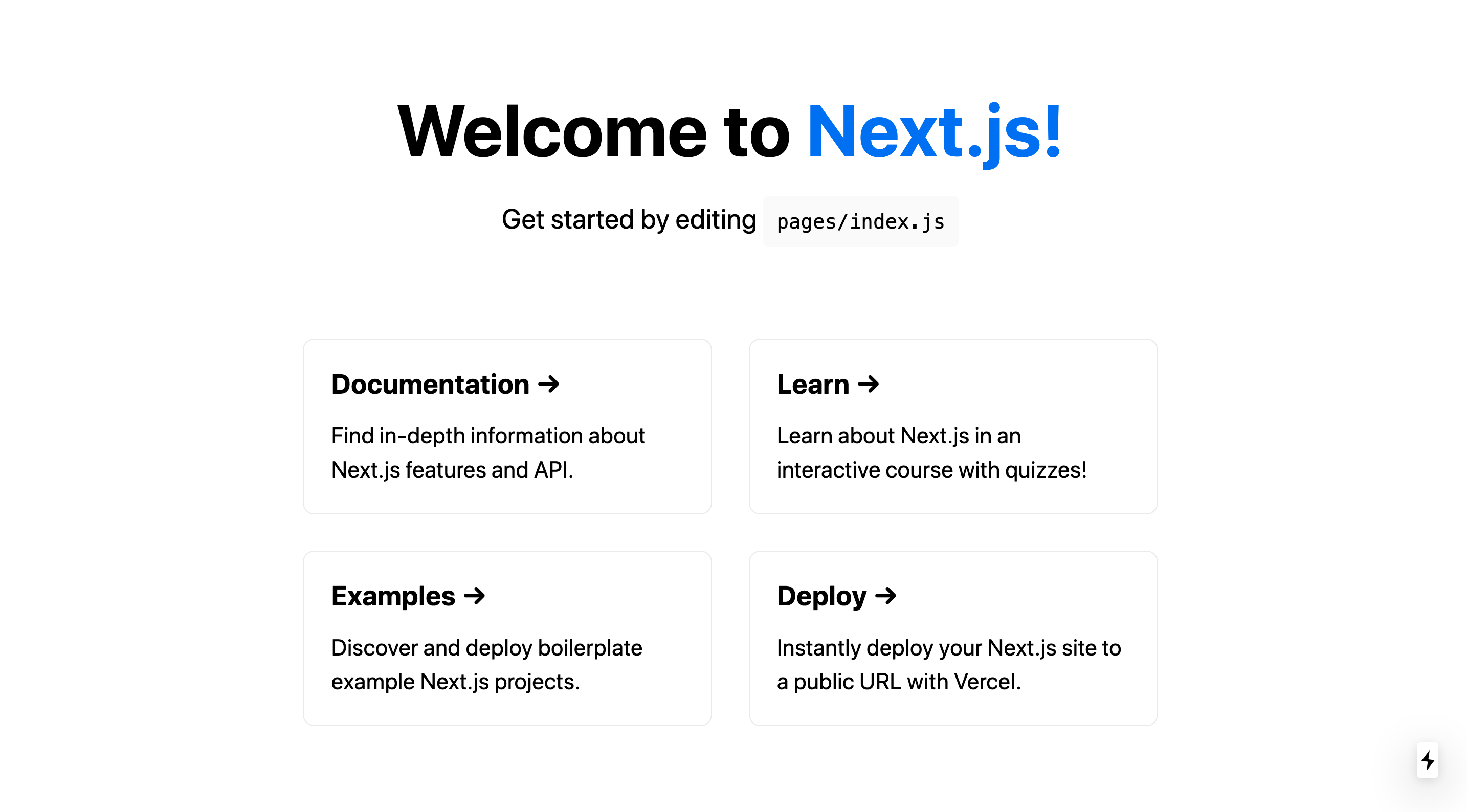
基于 Next.js 的静态网站起步模板,可直接用 GitHub 的 Use this template 生成新项目
Next.jsReact文档启动器
next-quickstart — Next.js 文档模板
作者 MichaelCurrin
基于 Next.js 的静态网站起步模板,附带项目文档与 GitHub Actions 持续集成流程,采用 MIT 许可。
看看你的网站会是什么样
浏览真实页面截图,比较内容排版与手机效果。点击下方缩略图切换,放大查看整页细节。
目前有 1 张原始预览,可打开完整图片查看设计细节。
截图用于了解视觉与布局,交互效果请以实际项目为准。
采集于 2026-10-12查看来源
值得关注的模板亮点
从已有项目资料中,快速了解它的特点。
在 create-next-app 基础结构上增加 GitHub Actions CI 流程(main.yml)
附带 docs 目录形式的项目文档,说明安装、运行与部署
仓库提供 sample.png 预览图,README 中嵌入展示
采用 MIT 许可,允许使用、修改、商用与分发
模板详细介绍
这是一个用于搭建 Next.js 应用的起步模板。项目定位为静态网站:README 说明该模板使用一个可托管为静态站点的简单站点结构,如需服务端渲染可考虑使用 Vercel 等托管方。
模板在 create-next-app 生成的基础项目之上做了扩展。基础部分包含 pages 目录(含一个 JS 文件)、public 目录(含 SVG logo 与 favicon)、.gitignore、package.json 和 README。模板额外增加了 GitHub Actions 的 CI 流程(.github/workflows/main.yml)以及项目文档。
仓库提供 sample.png 预览图,README 中给出“Use this template”入口,可直接基于该仓库生成新项目。文档部分说明如何安装、运行和部署该项目。README 还提到,如需为项目添加 ESLint,可参考 Next.js 的 ESLint 配置指南。
需要注意:仓库未在 README 中列出完整的依赖版本清单,因此不在此处标注具体框架版本;模板本身不包含托管、域名或后端服务,这些需另行配置。
Next.js文档启动器
适合你的项目吗?
适用场景
- 需要快速创建一个可静态托管的 Next.js 站点骨架
- 希望新项目自带 GitHub Actions 持续集成配置
- 需要一个同时包含使用文档与 CI 的 Next.js 起步仓库作为参考
适合人群
- 熟悉 Node.js 与 React、希望从模板起步搭建静态站点的开发者
- 需要为团队内部项目准备统一 Next.js 脚手架与 CI 流程的维护者
- 想参考 Next.js 项目文档组织方式的读者
上手与定制指南
结合仓库当前版本的说明,按下面的资料检查内容、配置与运行要求。
- 1
可通过 GitHub 的 Use this template 按钮基于该仓库生成新项目,或参考 README 中的 create-next-app 命令从零创建
- 2
README 提到项目需要 Node.js(徽章标注 >=14),实际版本以 package.json 与本地环境为准
- 3
CI 流程位于 .github/workflows/main.yml,项目文档位于 docs 目录
- 4
如需服务端渲染,README 建议考虑 Vercel 等托管方案;静态站点可直接托管
- 5
演示图片、字体、图标等第三方素材需按各自许可单独核对
授权与来源资料
使用条件与限制
免费使用 · 保留许可声明本次收录的是公开仓库中采用 MIT 许可的免费版本;免费范围为该版本代码,不代表外部服务或第三方素材免费。
使用时需要遵守
- 允许免费使用、修改、商用和分发该版本代码。
- 分发代码副本或实质性部分时,保留原作者版权声明和完整 MIT 许可声明。
- 代码按现状提供;担保与责任限制以原许可证及适用法律为准。
额外费用与待核对事项
- 演示图片、字体、图标及其他第三方素材需按各自许可核对,不能仅凭代码的 MIT 许可判断。
- 域名、托管、数据库、支付或 AI 等外部服务可能另外收费。
- 若需要服务端渲染(SSR),README 建议考虑使用 Vercel 等托管服务;静态站点可直接托管,但 SSR 场景需依赖外部托管平台,可能涉及第三方服务成本或账号。
查看原文依据
Permission is hereby granted, free of charge
许可证原文
https://github.com/MichaelCurrin/next-quickstart/blob/main/LICENSEhttps://github.com/MichaelCurrin/next-quickstart/blob/main/README.mdYou can look into use _Vercel_ as a host if you want server-side rendering.
README 原文
DeepSeek 根据仓库许可证和 README 整理 ·2026-10-12。结果仅覆盖已读取资料,依赖、图片、字体及后续条款变更以各自原文为准。
项目核对记录与介绍依据
模板资料
- 来源平台
- GitHub
- 资料与维护参考分
- 资料一般 · 61 / 100
- 技术栈
- Next.js · React
- 网站类型
- 文档 · 启动器
这个分数如何计算
本站按许可资料(最高30分)、演示链接(12分)、预览图(10分)、Star数(15分)、记录的维护时间(15分)、描述完整度(8分)、功能记录(5分)和分类资料(5分)计算。它不是代码、安全或性能测试,也不是 Google 评分;有链接不代表已实测可用。
这个项目需要核对什么
- 记录的仓库更新时间
- 2024-06-02
- 截图检查日期
- 2026-10-12
目前没有记录演示链接。请依据仓库说明在本地评估;仅凭截图无法确认交互行为。
目录记录的主要技术栈是 Next.js。请通过依赖清单和锁文件核对实际版本与托管要求。这些说明基于收录资料,不代表代码审计或部署实测。
查看具体选型方法 →介绍的制作与核对状态
介绍由 AI 辅助整理目录与仓库资料。仓库作者不等于这篇介绍的审核者。
审核声明: [email protected] · 2026-10-13
查看当时使用的来源资料
SHA-256: 616f0627c6d6cb611c3ad2eac0449f12bf5d570fd09a9d179fb87741bc42b431
2026-10-12T17:20:48.764Z
来源文件 / 仓库# Next.js Quickstart
> Starter template for a Next.js app with docs and CI
<!-- Badges generated with: https://michaelcurrin.github.io/badge-generator/ -->
[](https://github.com/MichaelCurrin/next-js-quickstart/actions)
[](https://github.com/MichaelCurrin/next-js-quickstart/releases/)
[](#license "Go to license section")
[](https://nodejs.org)
[](https://www.npmjs.com/package/next)
[](https://www.npmjs.com/package/react)
## Preview
<div align="center">
<img src="/sample.png" alt="Sample screenshot" width="600" />
</div>
## Use this project
<div align="center">
[](https://github.com/MichaelCurrin/next-quickstart/generate)
</div>
## About
This is a static website built on Next.js, which is a framework built on React.
Next.js is "The React Framework for Production".
As with React, you can build more advanced web apps but in this case this template uses a simple site which can be hosted as static site. You can look into use _Vercel_ as a host if you want server-side rendering.
See [Next.js](https://michaelcurrin.github.io/dev-resources/resources/javascript/packages/next/) resources to learn more.
### Create a fresh project from scratch
From [Create a Next.js App](https://nextjs.org/learn/basics/create-nextjs-app) tutorial on the homepage using [vercel/next-learn](https://github.com/vercel/next-learn) repo.
```sh
$ npx create-next-app@latest \
nextjs-blog \
--use-npm \
--example "https://github.com/vercel/next-learn/tree/main/basics/learn-starter"
$ cd nextjs-blog
```
That will create:
- [pages](/pages/) directory with one JS file.
- [public](/public/) directory with an SVG logo and favicon.
- [.gitignore](/.gitignore) file.
- [package.json](/package.json) - it comes with Next 11 but I've set up Next 12 for my template here.
- `README.md` file - with just one line.
This template project extends the base project by adding:
- GH Actions CI flow - [main.yml](/.github/workflows/main.yml).
- Docs (see below).
For adding ESLint to your project, see [ESLint](https://nextjs.org/docs/pages/building-your-application/configuring/eslint) configuration guide for Next.
## Documentation
> How to install, run and deploy this project
<div align="center">
[](/docs/ "Go to project docs")
</div>
## License
Released under [MIT](/LICENSE) by [@MichaelCurrin](https://github.com/MichaelCurrin).
看看同类模板
对比同技术栈与用途的模板,找到更适合的视觉与内容结构。

ai-website-cloner-template
Clone any website with one command using AI coding agents
Next.js · 启动器

Next.js SaaS Starter
Next.js SaaS Starter 是 Next.js 官方维护的 SaaS 起点模板,定位介于学习资源和可直接部署的脚手架之间。
Next.js · SaaS

Next.js Commerce
Next.js Commerce 是 Vercel 团队维护的电商启动模板,基于 Next.js App Router 构建,采用服务端渲染、React Server Components、Server Actions …
Next.js · 电商

Next-js-Boilerplate
Next-js-Boilerplate 是一个面向 Next.js 16、Tailwind CSS 4 和 TypeScript 的启动器,核心定位是开发者体验优先。
Next.js · 启动器

tailwind-nextjs-starter-blog
tailwind-nextjs-starter-blog 是一个面向个人技术博客的 Next.js 与 Tailwind CSS 启动模板,其 v2 版本基于 App Router 与 React Server Comp…
Next.js · 博客

next-forge
Production-grade Turborepo template for Next.js apps.
Next.js · 启动器