输出无预设 class 的语义化 HTML,可搭配任意 classless CSS 框架
Hugo博客
hugo-classless — Hugo 博客模板
作者 mozanunal
Hugo Classless 是一个基于 Hugo 的极简博客主题,输出无预设 class 的语义化 HTML,可搭配任意 classless CSS 框架切换外观。
看看你的网站会是什么样
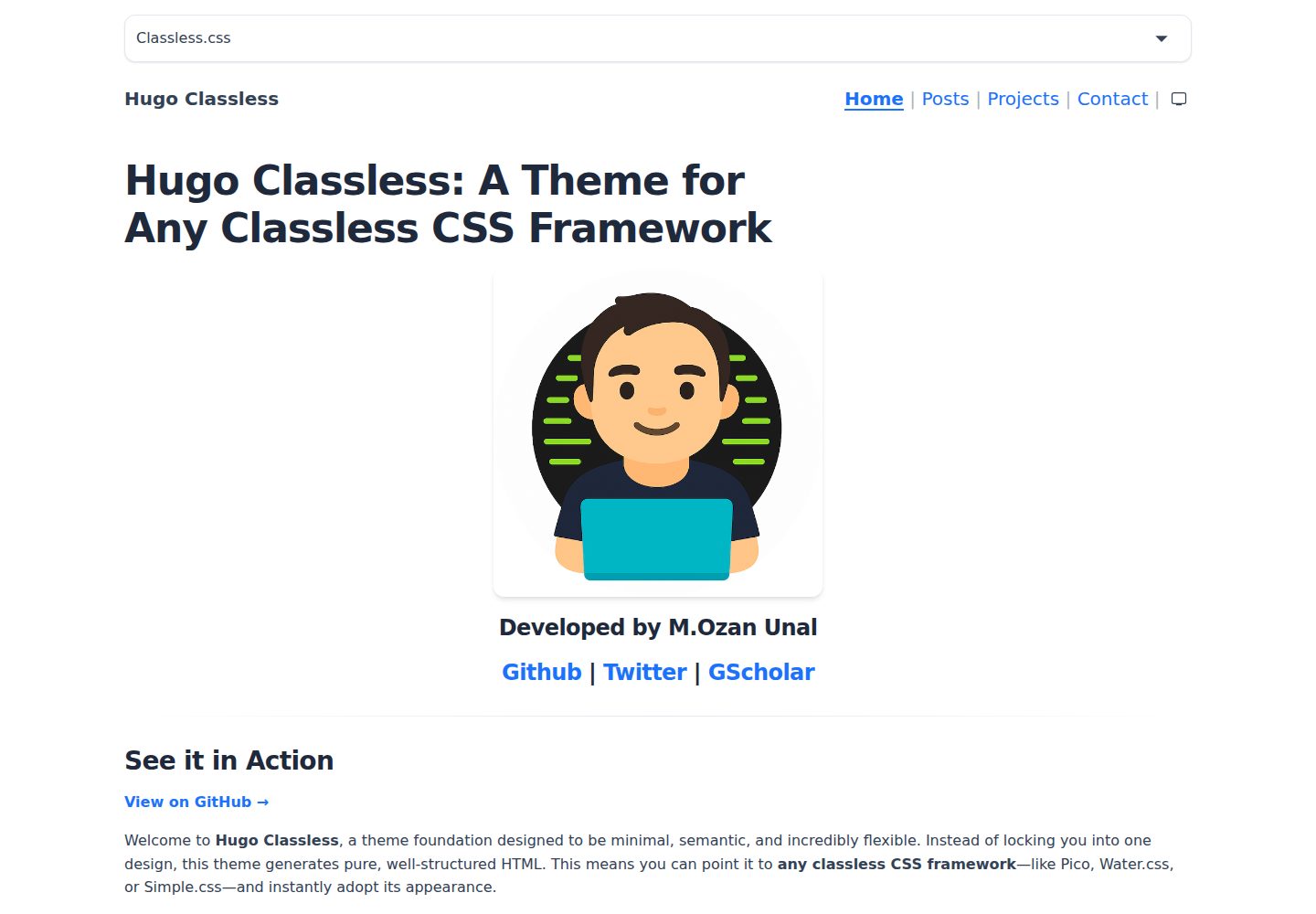
浏览真实页面截图,比较内容排版与手机效果。点击下方缩略图切换,放大查看整页细节。
全部页面与视图 3
截图用于了解视觉与布局,交互效果请以实际项目为准。
采集于 2026-10-03查看来源
值得关注的模板亮点
从已有项目资料中,快速了解它的特点。
导航栏提供亮色、暗色、跟随系统三态切换,选择持久化到 localStorage
演示模式可在页面下拉框中实时切换不同 CSS 框架
通过 hugo.yml 配置导航菜单、可用主题列表和明暗样式表
内置 KaTeX 数学公式支持,需在配置中启用并在页面 front matter 设置 math: true
使用 header、main、article、nav、time 等语义标签
模板详细介绍
Hugo Classless 是一个 Hugo 博客主题,核心思路是输出纯语义化 HTML,不附带预设的 class 或固定样式。它不绑定某一种视觉设计,而是把样式决定权交给外部 classless CSS 框架,例如 Pico.css、Water.css、Simple.css、Sakura.css、New.css 等。
主题通过 hugo.yml 配置。生产模式下可指定 themeBase、themeLight、themeDark 指向 assets 目录中的 CSS;演示模式下可配置 themes 列表,在导航栏提供下拉框实时切换不同框架,便于直观对比同一内容在不同样式下的呈现。
内置功能包括:导航栏三态明暗切换(强制亮色、强制暗色、跟随系统),选择结果保存在 localStorage,无 JavaScript 时回退到 prefers-color-scheme;通过 KaTeX 支持数学公式排版;使用 header、main、article、nav、time 等语义标签。
限制方面:主题本身不提供视觉设计,外观完全取决于所选 classless CSS 框架;主题不包含评论、搜索、分页等博客常见扩展功能;示例站点中列出的框架仅作为可选样式来源,并非主题内置依赖。
Hugo博客
适合你的项目吗?
适用场景
- 希望用同一套内容快速对比 Pico.css、Water.css、Simple.css 等 classless 框架外观
- 想要一个不绑定特定视觉风格、仅输出干净语义 HTML 的 Hugo 博客
- 需要明暗模式切换并跟随系统偏好的个人站点
- 需要在文章中排版数学公式的技术博客
适合人群
- 熟悉 Hugo 并愿意自行选择或编写 CSS 的用户
- 偏好极简、无预设样式、以内容结构为先的博客作者
- 想以 classless CSS 框架作为站点视觉基础的项目
上手与定制指南
结合仓库当前版本的说明,按下面的资料检查内容、配置与运行要求。
- 1
可通过 git submodule add 将主题加入 themes/hugo-classless,并在 hugo.yml 中设置 theme: 'hugo-classless'
- 2
也可从 Releases 下载 ZIP 解压到 themes/hugo-classless 目录后配置 theme
- 3
生产模式在 params 中设置 themeBase、themeLight、themeDark 指向 assets 内的 CSS 文件
- 4
演示模式在 params.themes 中列出至少两个主题以启用实时切换下拉框,第一项为默认
- 5
启用 KaTeX 需在配置中设置 markup.katex.enabled: true,并在页面 front matter 中设置 math: true
授权与来源资料
使用条件与限制
免费使用 · 保留许可声明本次收录的是公开仓库中采用 MIT 许可的免费版本;免费范围为该版本代码,不代表外部服务或第三方素材免费。
使用时需要遵守
- 允许免费使用、修改、商用和分发该版本代码。
- 分发代码副本或实质性部分时,保留原作者版权声明和完整 MIT 许可声明。
- 代码按现状提供;担保与责任限制以原许可证及适用法律为准。
额外费用与待核对事项
- exampleSite 预配置了多种第三方 classless CSS 框架(如 Pico.css、Water.css、Simple.css 等),这些框架由各自项目独立授权,使用前需自行核实其许可条款。
- 演示模式配置示例通过 jsDelivr CDN 加载外部 CSS 框架,实际部署会依赖外部 CDN 服务,可能涉及第三方可用性与隐私成本。
- 数学公式排版依赖 KaTeX,需在配置中显式启用 markup.katex.enabled: true,并在页面 front matter 设置 math: true,否则不生效。
- 演示图片、字体、图标及其他第三方素材需按各自许可核对,不能仅凭代码的 MIT 许可判断。
- 域名、托管、数据库、支付或 AI 等外部服务可能另外收费。
查看原文依据
Permission is hereby granted, free of charge
许可证原文
The `exampleSite` comes pre-configured with a wide variety of popular classless frameworks.
README 原文
url: "https://cdn.jsdelivr.net/npm/@picocss/pico@2/css/pico.classless.min.css"
README 原文
https://github.com/mozanunal/hugo-classless/blob/main/LICENSEhttps://github.com/mozanunal/hugo-classless/blob/main/README.mdIf you have enabled KaTeX in your configuration (`markup.katex.enabled: true`),
README 原文
DeepSeek 根据仓库许可证和 README 整理 ·2026-10-03。结果仅覆盖已读取资料,依赖、图片、字体及后续条款变更以各自原文为准。
项目核对记录与介绍依据
模板资料
- 来源平台
- Hugo Themes
- 资料与维护参考分
- 资料较完整 · 87 / 100
- 技术栈
- Hugo
- 网站类型
- 博客
这个分数如何计算
本站按许可资料(最高30分)、演示链接(12分)、预览图(10分)、Star数(15分)、记录的维护时间(15分)、描述完整度(8分)、功能记录(5分)和分类资料(5分)计算。它不是代码、安全或性能测试,也不是 Google 评分;有链接不代表已实测可用。
这个项目需要核对什么
- 记录的仓库更新时间
- 2026-02-07
- 截图检查日期
- 2026-10-03
已收录演示链接。请用你的内容与屏幕尺寸检查;有演示不代表表单、认证或支付已经可用。
目录记录的主要技术栈是 Hugo。请通过依赖清单和锁文件核对实际版本与托管要求。这些说明基于收录资料,不代表代码审计或部署实测。
查看具体选型方法 →介绍的制作与核对状态
介绍由 AI 辅助整理目录与仓库资料。仓库作者不等于这篇介绍的审核者。
审核声明: [email protected] · 2026-10-04
查看当时使用的来源资料
SHA-256: b6424591d3bcacc3d20822acf69a19b634651f69a5889cb7afb1c690a0911ba6
2026-10-03T22:44:51.588Z
来源文件 / 仓库[](https://app.netlify.com/projects/hugo-classless/deploys)
[](https://github.com/mozanunal/hugo-classless/actions/workflows/ci.yml)
[View the Live Demo on Netlify](https://hugo-classless.netlify.app/)
# Hugo Classless Theme
Hugo Classless is not just another theme; it's a flexible foundation designed to
work with **any classless CSS framework**. Instead of locking you into one
design, it provides clean, semantic HTML, allowing you to get a beautiful
website up and running in minutes by simply choosing a stylesheet.

---
## The "Classless" Philosophy
Most themes come with their own specific styling. This theme does the opposite.
It generates pure, well-structured HTML without any preset classes. This means
you can point it to a classless CSS framework like
[Pico.css](https://picocss.com/), [Water.css](https://watercss.kognise.dev/),
[Simple.css](https://simplecss.org/), or **any other you prefer**, and the site
will instantly adopt its appearance.
The best way to understand this is to try it yourself! Use the **live
theme-switcher** on the demo site to see how the same content dramatically
changes its look with different frameworks.
## Live Demo
[View the Live Demo on Netlify](https://hugo-classless.netlify.app/)
## Installation
You can install the `hugo-classless` theme in two ways:
### Method 1: As a Git Submodule (Recommended)
1. From the root of your Hugo site, add the theme as a submodule:
```bash
git submodule add https://github.com/mozanunal/hugo-classless.git themes/hugo-classless
```
2. Add the theme to your `hugo.yml` file:
```yaml
theme: 'hugo-classless'
```
### Method 2: Manual Installation
1. Download the latest release ZIP file from the [Releases](https://github.com/mozanunal/hugo-classless/releases) page.
2. Extract the contents into the `themes/hugo-classless` directory in your site's root.
3. Add the theme to your `hugo.yml` file.
## Features
- **Plug & Play Styling:** By using pure semantic HTML, the theme is compatible
with any classless CSS framework out of the box.
- **Dark / Light / System Toggle:** A built-in navbar toggle lets users switch
between light mode, dark mode, and automatic (system preference). Each theme
can optionally provide a separate dark stylesheet via config.
- **Live Theme-Switcher:** The perfect tool for demonstrating the power of
classless CSS. Add a dropdown to your site to switch between your favorite
frameworks on the fly.
- **Fully Configurable:** Control every key aspect, from the navigation menu to
the list of available themes, right from your `hugo.yml` file.
- **Minimal & Fast:** No bloated JavaScript or complex dependencies. Just clean
HTML and the style you choose.
- **Math Typesetting:** Built-in support for beautiful mathematical formulas
using KaTeX.
- **SEO Friendly:** Uses proper semantic tags (`<header>`, `<main>`,
`<article>`, `<nav>`, `<time>`) for better search engine indexing.
## Configuration
This theme is configured entirely through your site's `hugo.yml` file. Below is
a basic example to get you started.
### Basic Configuration Example
```yaml
# hugo.yml
baseURL: "https://example.org/"
title: "My Awesome Website"
theme: "hugo-classless"
params:
author: "John Doe"
description: "A personal website about cool things."
# --- Production mode (single theme) ---
# Point to a CSS file inside assets/.
# Optionally add a dark stylesheet for the dark/light toggle.
themeBase: "css/base.css"
themeLight: "css/light.css"
themeDark: "css/dark.css"
# --- Demo mode (theme-switcher) ---
# Define two or more themes to enable the live switcher dropdown.
# The first one is the default. Each entry can have an optional
# "dark" URL to enable the dark/light mode toggle for that theme.
# Local paths (no "http" prefix) are resolved from assets/ and
# processed through Hugo's asset pipeline (minified + fingerprinted).
# themes:
# - name: "Pico"
# url: "https://cdn.jsdelivr.net/npm/@picocss/pico@2/css/pico.classless.min.css"
# - name: "Water.css"
# url: "https://cdn.jsdelivr.net/npm/water.css@2/out/water.min.css"
# dark: "https://cdn.jsdelivr.net/npm/water.css@2/out/dark.min.css"
# - name: "HTML only"
# url: ""
menu:
main:
- name: "Home"
pageRef: "/"
weight: 10
```
### Dark Mode
The theme includes a three-state toggle button in the navbar:
- **Sun icon** — forced light mode
- **Moon icon** — forced dark mode
- **Monitor icon** — follows the operating system preference (default)
The user's choice is persisted in `localStorage`. Without JavaScript the
site falls back to the system preference via `prefers-color-scheme`.
To enable the toggle for a theme, provide a separate dark stylesheet:
**Production mode:**
```yaml
params:
themeBase: "css/base.css"
themeLight: "css/light.css"
themeDark: "css/dark.css"
```
**Demo mode (theme-switcher):**
```yaml
params:
themes:
- name: "Classless.css"
url: "css/light.css"
dark: "css/dark.css"
- name: "Water.css"
url: "https://cdn.jsdelivr.net/npm/water.css@2/out/water.min.css"
dark: "https://cdn.jsdelivr.net/npm/water.css@2/out/dark.min.css"
```
Themes without a `dark` entry still work — the toggle will continue to
control the syntax-highlight stylesheets and the `data-theme` attribute on
`<html>`.
## Included Frameworks
The `exampleSite` comes pre-configured with a wide variety of popular classless
frameworks. You can use any of these in your own `themes` list or explore them
to find your favorite.
- [Classless.css](https://classless.de/)
- [Pico.css](https://picocss.com/)
- [Water.css](https://watercss.kognise.dev/)
- [Sakura.css](https://oxal.org/projects/sakura/)
- [Simple.css](https://simplecss.org/)
- [Almond.css](https://almond.css.alvaromontoro.com/)
- [New.css](https://newcss.net/)
- [Missing.css](https://missing.style/)
- [Bolt.css](https://boltcss.com/)
- [PerfectMFWS](https://perfectmotherfuckingwebsite.com/)
Simply copy the entry from the
[exampleSite's hugo.yml](https://github.com/mozanunal/hugo-classless/blob/main/exampleSite/hugo.yml)
and paste it into your own configuration file.
## Creating Content
To create a new post, run the following command from your site's root:
```bash
hugo new posts/my-first-post.md
```
Remember to set `draft: false` in the front matter of the file when you are
ready to publish it.
## Using Math Typesetting
If you have enabled KaTeX in your configuration (`markup.katex.enabled: true`),
you can write mathematical formulas in your Markdown files by setting
`math: true` in the page's front matter.
- **Inline math:** Wrap your formula in `\\(` and `\\)`.
- **Block math:** Wrap your formula in `\\[` and `\\]`.
## Contributing
Found a bug or have a suggestion? Please
[open an issue](https://github.com/mozanunal/hugo-classless/issues). Pull
requests are also welcome!
## License
This theme is licensed under the [MIT License](LICENSE).
看看同类模板
对比同技术栈与用途的模板,找到更适合的视觉与内容结构。

hugo-PaperMod
PaperMod 是 Hugo 生态里知名度较高的主题之一,定位很明确:给博客和轻量作品集站点提供一套干净、响应式的阅读界面。
Hugo · 作品集

LoveIt
❤️A clean, elegant but advanced blog theme for Hugo 一个简洁、优雅且高效的 Hugo 主题
Hugo · 博客

hugo-coder
A minimalist blog theme for hugo.
Hugo · 博客

blowfish
Personal Website & Blog Theme for Hugo
Hugo · 博客

hugo-paper
🪺 A simple, clean, customizable Hugo theme
Hugo · 博客

hextra
Hextra 是一个 Hugo 主题,定位在文档站与博客之间:既提供侧边栏导航、目录、面包屑、分页这类文档站结构,也能承载博客内容。
Hugo · 文档