MDX 博客系统:每篇文章独立文件夹存放 page.mdx,使用 frontmatter 管理标题、描述、日期、标签和图片
Next.jsReact作品集博客启动器
nextjs-mui-blog-starter — Next.js 作品集模板
作者 muhimasri
基于 Next.js App Router、Material UI 与 MDX 的博客与作品集模板,内置标签筛选、目录、代码高亮和明暗主题,README 说明了目录结构与主题令牌用法。
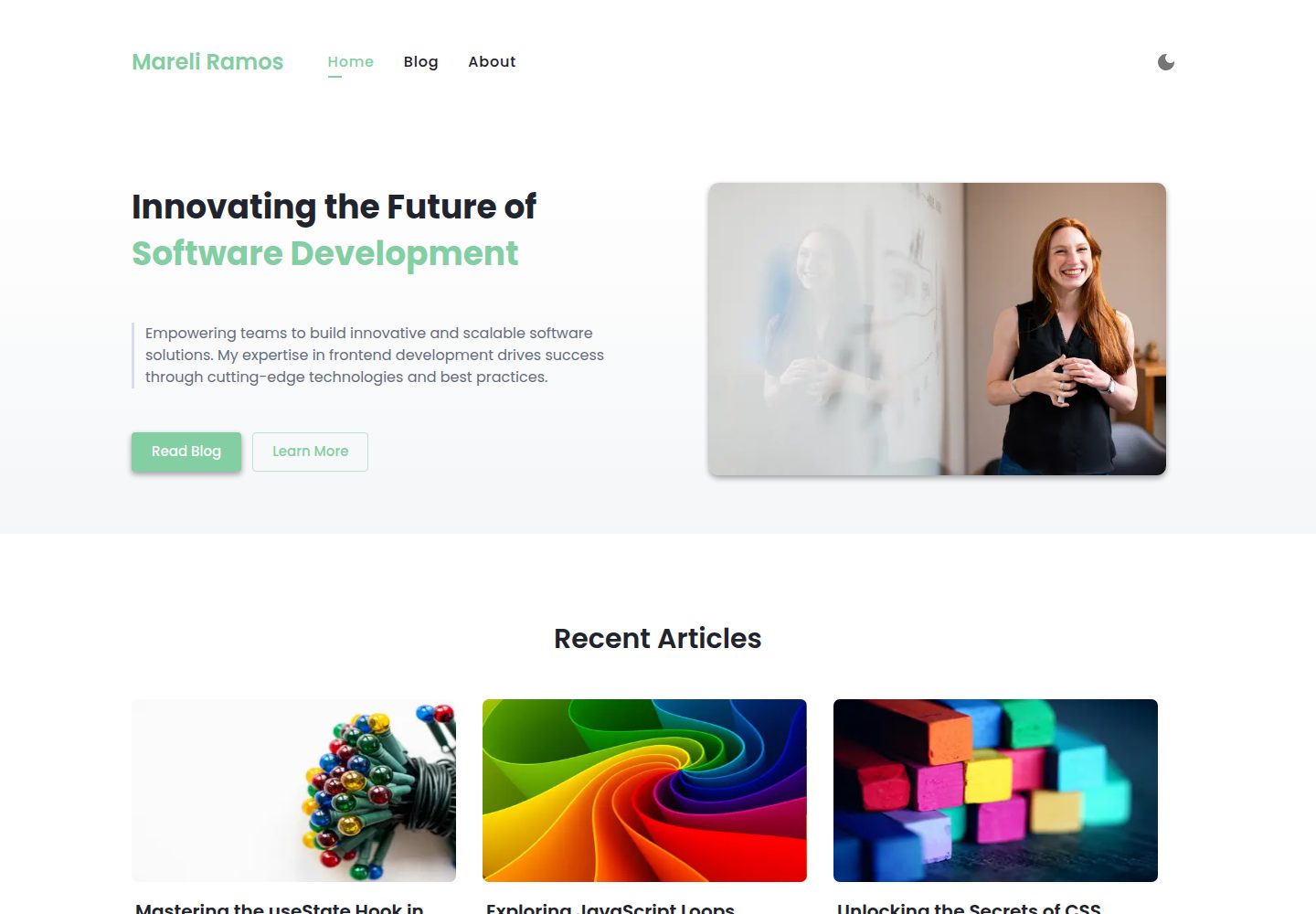
看看你的网站会是什么样
浏览真实页面截图,比较内容排版与手机效果。点击下方缩略图切换,放大查看整页细节。
全部页面与视图 3
截图用于了解视觉与布局,交互效果请以实际项目为准。
采集于 2026-10-14查看来源
值得关注的模板亮点
从已有项目资料中,快速了解它的特点。
支持标签筛选、特色图片、推荐文章和根据标题自动生成的目录
通过 rehype-pretty-code 与 Shiki 实现代码语法高亮
基于 MUI 主题令牌的明暗模式,主题值可转为 CSS 变量供外部样式引用
包含首页、About 页面、动态路由和 Open Graph 元数据
使用 TypeScript,并提供 ESLint 与 Prettier 脚本
模板详细介绍
该模板用于搭建博客或技术作品集站点,README 说明其包含首页、About 页面、基于 MDX 与 frontmatter 的博客系统、动态路由、标签筛选、特色图片与推荐文章、自动生成的目录、通过 rehype-pretty-code 与 Shiki 实现的代码高亮、基于 MUI 主题令牌的明暗模式、Open Graph 元数据以及响应式布局。内容以 content/ 下每篇文章一个文件夹、内含 page.mdx 的方式组织,图片放在 public/images/,标题会进入目录。
技术栈方面,README 列出 Next.js App Router、Material UI、MDX、rehype-pretty-code、TypeScript、ESLint 与 Prettier,并说明 MDX 通过 next-mdx-remote、rehype-pretty-code 和 gray-matter 编译。样式系统集中在 src/styles/tokens.ts、theme.ts 与 global.tsx,主题由设计令牌生成,MUI 会把主题值转为 CSS 变量,便于在外部样式表中引用。
README 的 Roadmap 将无障碍改进、RSS、Sitemap、GitHub 评论、社交分享、PWA、Newsletter 集成和自定义语法高亮主题列为待办,说明这些能力当前未在 README 中作为已实现功能描述。README 未提供部署平台、环境变量或托管步骤的说明,也未说明内容规模、构建产物大小或除 Lighthouse 徽章外的性能数据。
Next.jsReact作品集博客启动器
适合你的项目吗?
适用场景
- 搭建个人技术博客,用 MDX 编写带代码示例的文章
- 创建开发者作品集站点,展示项目与文章列表
- 需要标签分类、文章目录和明暗主题切换的内容站点
- 希望以设计令牌集中管理颜色、间距、字体等样式变量的项目
适合人群
- 熟悉 Next.js App Router 与 React 的开发者
- 愿意使用 Material UI 和 MDX 编写内容的个人或团队
- 需要可自定义主题令牌的博客或作品集项目
- 希望以文件夹加 MDX 文件方式管理文章的作者
上手与定制指南
结合仓库当前版本的说明,按下面的资料检查内容、配置与运行要求。
- 1
README 提供的命令:npm install、npm run dev、npm run build、npm start、npm run lint、npm run format
- 2
文章放在 content/ 下每篇一个文件夹,文件名为 page.mdx,图片放在 public/images/ 并通过 /images/... 引用
- 3
主题与设计令牌位于 src/styles/tokens.ts、theme.ts 和 global.tsx,可按需修改
- 4
README 未提供部署平台、环境变量或托管步骤的说明
授权与来源资料
使用条件与限制
免费使用 · 保留许可声明本次收录的是公开仓库中采用 MIT 许可的免费版本;免费范围为该版本代码,不代表外部服务或第三方素材免费。
使用时需要遵守
- 允许免费使用、修改、商用和分发该版本代码。
- 分发代码副本或实质性部分时,保留原作者版权声明和完整 MIT 许可声明。
- 代码按现状提供;担保与责任限制以原许可证及适用法律为准。
额外费用与待核对事项
- 演示图片、字体、图标及其他第三方素材需按各自许可核对,不能仅凭代码的 MIT 许可判断。
- 域名、托管、数据库、支付或 AI 等外部服务可能另外收费。
查看原文依据
https://github.com/muhimasri/nextjs-mui-blog-starter/blob/main/LICENSEhttps://github.com/muhimasri/nextjs-mui-blog-starter/blob/main/README.mdPermission is hereby granted, free of charge
许可证原文
DeepSeek 根据仓库许可证和 README 整理 ·2026-10-14。结果仅覆盖已读取资料,依赖、图片、字体及后续条款变更以各自原文为准。
项目核对记录与介绍依据
模板资料
- 来源平台
- GitHub
- 资料与维护参考分
- 资料较完整 · 88 / 100
- 技术栈
- Next.js · React
- 网站类型
- 作品集 · 博客 · 启动器
这个分数如何计算
本站按许可资料(最高30分)、演示链接(12分)、预览图(10分)、Star数(15分)、记录的维护时间(15分)、描述完整度(8分)、功能记录(5分)和分类资料(5分)计算。它不是代码、安全或性能测试,也不是 Google 评分;有链接不代表已实测可用。
这个项目需要核对什么
- 记录的仓库更新时间
- 2025-12-11
- 截图检查日期
- 2026-10-14
已收录演示链接。请用你的内容与屏幕尺寸检查;有演示不代表表单、认证或支付已经可用。
目录记录的主要技术栈是 Next.js。请通过依赖清单和锁文件核对实际版本与托管要求。这些说明基于收录资料,不代表代码审计或部署实测。
查看具体选型方法 →介绍的制作与核对状态
介绍由 AI 辅助整理目录与仓库资料。仓库作者不等于这篇介绍的审核者。
审核声明: codex-user-requested-batch-review-20261015 · 2026-10-15
查看当时使用的来源资料
SHA-256: 9dff40220b630f3cec55ded8fd8889ef28774c057b03c7432119fec21ba6e922
2026-10-14T03:35:22.115Z
来源文件 / 仓库# nextjs-mui-blog-starter



A fast, modern, and SEO-friendly blog and portfolio template built with **Next.js 14**, **Material UI (MUI 6)**, and **MDX**. Ideal for developers who want to launch a customizable blog or technical portfolio site with built-in support for dark mode, code highlighting, design tokens, and accessibility.
🔗 Live Demo - [nextjs-mui-blog.muhimasri.com](https://nextjs-mui-blog.muhimasri.com/)
<p align="center">
<img src="./public/images/demo-1.png" width="45%" style="margin: 10px;" />
<img src="./public/images/demo-5.png" width="45%" style="margin: 10px;" />
<br />
<img src="./public/images/demo-2.png" width="45%" style="margin: 10px;" />
<img src="./public/images/demo-3.png" width="45%" style="margin: 10px;" />
</p>
---
## 📚 Table of Contents
- [Features](#-features)
- [Why Use This Template?](#-why-use-this-template)
- [Technologies and Tools](#-technologies-and-tools)
- [Running the Project](#-running-the-project)
- [Roadmap](#-roadmap)
- [Developer Guide](#-developer-guide)
---
## 🚀 Features
- Home & About Pages
- MDX Blog System with Frontmatter
- Dynamic Routing
- Tag Filtering
- Featured Images & Suggested Articles
- Table of Contents (TOC)
- Code Highlighting with Shiki (via rehype-pretty-code)
- Dark/Light Mode (MUI v6 Theme Tokens)
- SEO Metadata with Open Graph
- Accessibility Features
- Fully Responsive and Mobile Friendly
- 85-95% Lighthouse Scores
- Developer-Friendly Architecture
---
## 💡 Why Use This Template?
- ✅ Built with the latest Next.js App Router (14+)
- 🧩 Write MDX content with embedded React components
- 🎨 Custom theming and design tokens using Material UI
- 🧱 Responsive layout and component-based structure
- 🧠 Automatically generated Table of Contents
- 🌐 SEO-friendly with dynamic meta & Open Graph tags
- 🔒 Accessibility and performance best practices
---
## 🛠 Technologies and Tools
- **Next.js 14** – App Router architecture
- **Material UI v6** – Responsive components and design system
- **MDX** – Write JSX inside Markdown files
- **rehype-pretty-code** – Syntax highlighting with Shiki
- **TypeScript** – Safer, more maintainable code
- **ESLint + Prettier** – Code quality and formatting
---
## 🧪 Running the Project
```bash
# Clone the repository
$ git clone <repository-url>
$ cd nextjs-mui-blog-starter
# Install dependencies
$ npm install
# Run the development server
$ npm run dev
# Build for production
$ npm run build
# Start the production server
$ npm start
# Lint and format
$ npm run lint
$ npm run format
```
---
## 🗺 Roadmap
- [ ] Accessibility Improvements
- [ ] RSS Feed
- [ ] Sitemap.xml
- [ ] GitHub-based Commenting System
- [ ] Social Sharing Buttons
- [ ] PWA Support
- [ ] Newsletter Integration
- [ ] Custom sytax highlighting theme with light and dark mode support
---
## 📁 Developer Guide
This guide provides a full breakdown of the directory structure, blog system, styling tokens, and theming implementation for MUI.
### Project Structure Overview
```
content/ # MDX blog post folders
public/ # Static assets like images
src/ # Application source code
├── app/ # Pages and routes (App Router)
├── components/ # Shared UI components
├── styles/ # Global styles and MUI theme setup
```
### Blog Content Directory (content/)
- Each blog post lives in its own folder with a `page.mdx` file.
- Use frontmatter for metadata like title, description, date, tags, and images.
```
content/
react-hooks-guide/
page.mdx
styled-components-vs-mui/
page.mdx
```
### Public Directory (public/)
- Store images and assets accessible via `/images/...`
```
public/
images/
react-hooks-cover.jpg
styled-vs-mui-cover.jpg
```
### App Directory (src/app/)
- `about/` – About page and its layout
- `blogs/` – Blog listing, tag filtering, and dynamic `[slug]/` post rendering
### Component Directory (src/components/)
- `Header.tsx`, `Footer/`, `Tag.tsx`, `PostCard.tsx`, `TableOfContents.tsx`
### Styling System (src/styles/)
- `tokens.ts` – Centralized design tokens: spacing, colors, radii, typography
- `theme.ts` – MUI theme that uses tokens for light/dark mode
- `global.tsx` – Global reset styles and scrollbar customization
### MDX Setup
- MDX files are compiled using `next-mdx-remote` with `rehype-pretty-code` and `gray-matter`
- Supports frontmatter metadata and React components inside content
---
### Creating a Blog Post
1. Create a new folder under `content/your-blog-title/`
2. Add `page.mdx` with the frontmatter and Markdown content.
3. Reference images using `/images/your-image.jpg` from `public/images/`
4. Headings like `##` will automatically populate the Table of Contents.
5. Run the dev server and preview at `/blogs/[slug]`
---
### Styling with Tokens and Theme
- Theme is created from `tokens.ts` with design primitives tokenized to support quick and centralized custom theming:
- `colors`
- `font`
- `spacing`
- `shadows`
- `borderRadius`
- `letterSpacing`
- `lineHeight`
- Tokens are used in `theme.ts` as values for the theme palette, supporting light/dark mode via MUI’s color scheme.
```tsx
const theme = createTheme({
cssVariables: {
colorSchemeSelector: "class",
},
colorSchemes: {
light: {
palette: {
primary: {
main: colors.primary[500],
...
},
secondary: {
main: colors.secondary[500],
...
},
common: {
onBackground: colors.grey[900],
...
},
text: {
primary: colors.grey[800],
...
},
},
},
dark: {
palette: {
primary: {
main: colors.primary[600],
...
},
secondary: {
main: colors.secondary[900],
...
},
text: {
primary: colors.grey[100],
...
},
},
},
},
});
```
- Theme palettes are also extended to define custom variables for specific sections like blog, about, and subscribe pages:
```ts
blog: {
headerBgColor: "white",
h1Color: colors.secondary[500],
},
subscribe: {
headerColor: colors.grey[800],
},
about: {
headerTitle: colors.grey[800],
}
```
- MUI 6 converts all theme values into CSS variables automatically. This enables use of tokens in external stylesheets or with Tailwind:
```ts
about: {
headerTitle: colors.grey[800], // var(--mui-palette-about-headerTitle)
headerText: colors.grey[700], // var(--mui-palette-about-headerText)
}
```
- Components are styled using the sx prop or direct props, supporting shorthand token references for consistency and dark mode support:
```tsx
<Typography color="primary.500">
Mareli Ramos
</Typography>
<Typography
sx={{
fontSize: "6",
color: "text.primary",
}}
>
Mareli Ramos
</Typography>
```
- Responsive styles are defined using MUI’s sx breakpoints:
```tsx
<Box
sx={{
display: { xs: "block", md: "flex" },
fontSize: { xs: "3", lg: "4" },
padding: { xs: 2, md: 4 },
}}
>
Responsive Box
</Box>
```
---
## 📣 Contributing
Contributions and suggestions are welcome! Feel free to fork the repo and submit a pull request.
---
> Made with ❤️ by [Muhi Masri](https://muhimasri.com/)
看看同类模板
对比同技术栈与用途的模板,找到更适合的视觉与内容结构。

ai-website-cloner-template
Clone any website with one command using AI coding agents
Next.js · 启动器

Next.js SaaS Starter
Next.js SaaS Starter 是 Next.js 官方维护的 SaaS 起点模板,定位介于学习资源和可直接部署的脚手架之间。
Next.js · SaaS

Next.js Commerce
Next.js Commerce 是 Vercel 团队维护的电商启动模板,基于 Next.js App Router 构建,采用服务端渲染、React Server Components、Server Actions …
Next.js · 电商

Next-js-Boilerplate
Next-js-Boilerplate 是一个面向 Next.js 16、Tailwind CSS 4 和 TypeScript 的启动器,核心定位是开发者体验优先。
Next.js · 启动器

tailwind-nextjs-starter-blog
tailwind-nextjs-starter-blog 是一个面向个人技术博客的 Next.js 与 Tailwind CSS 启动模板,其 v2 版本基于 App Router 与 React Server Comp…
Next.js · 博客

next-forge
Production-grade Turborepo template for Next.js apps.
Next.js · 启动器