Jekyll 博客主题,样式基于 TailwindCSS
Jekyll博客
blogtheme — Jekyll 博客模板
作者 nathanjessen
基于 Jekyll 与 TailwindCSS 的极简博客主题,通过 _config.yml 与 _data 文件配置首页内容,并提供 Docker 本地开发与 Gulp 构建流程。
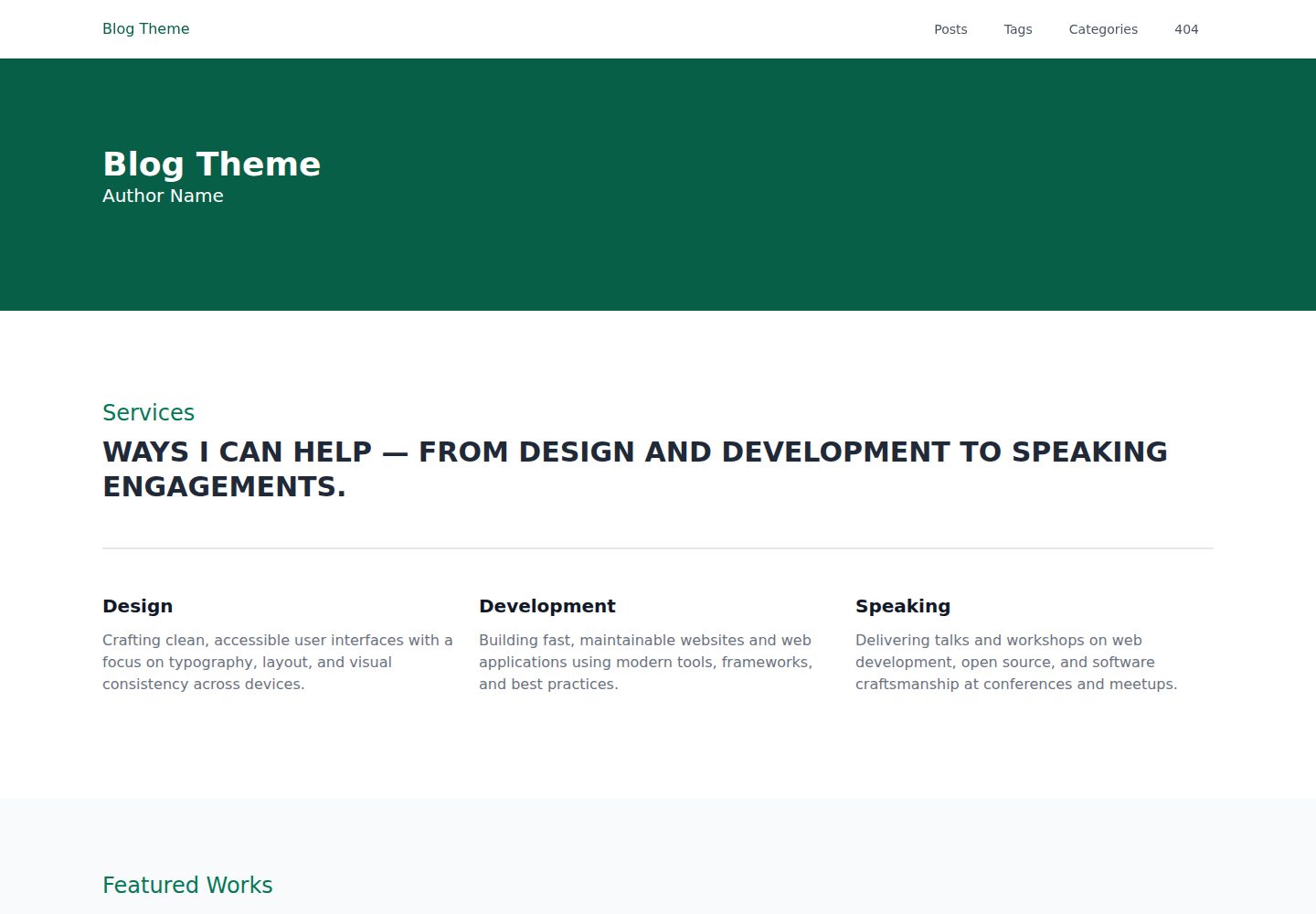
看看你的网站会是什么样
浏览真实页面截图,比较内容排版与手机效果。点击下方缩略图切换,放大查看整页细节。
全部页面与视图 3
截图用于了解视觉与布局,交互效果请以实际项目为准。
采集于 2026-10-03查看来源
值得关注的模板亮点
从已有项目资料中,快速了解它的特点。
以 Ruby gem 形式发布,通过 Gemfile 与 _config.yml 的 theme 字段接入
首页内容由 _data/featured.yml、services.yml、testimonials.yml 驱动
内置文章、标签、分类与 404 页面,布局与组件分目录组织
提供 Docker + Gulp 开发流程,含 Browsersync 实时刷新与生产构建命令
模板详细介绍
blogtheme 是一个面向 Jekyll 的极简博客主题,样式层使用 TailwindCSS。主题本身以 Ruby gem 形式发布,在 Jekyll 站点的 Gemfile 中加入 gem "blogtheme",并在 _config.yml 中设置 theme: blogtheme,再执行 bundle install 即可接入。
站点信息与首页各区块的文案集中在 _config.yml 中配置,包括标题、描述、作者、页脚内容,以及最近文章、精选作品、服务等区块的标题与说明;首页的精选项目、服务、推荐语内容则分别来自 _data/featured.yml、_data/services.yml 和 _data/testimonials.yml。主题还预留了 Google Analytics 4 的 ga_tracking_id 以及 Twitter、GitHub、LinkedIn、Medium、Instagram、Dribbble、CodePen、AngelList 等社交链接配置项,默认以注释形式给出。
主题结构按 Jekyll 惯例划分:_layouts 存放页面布局,_includes 存放可复用组件,_styles 存放 TailwindCSS 源文件,_pages 提供文章列表、标签、分类和 404 等内置页面,_data 承载首页内容,assets 存放图片与编译后的 CSS。
开发流程依赖 Docker 与 Docker Compose,并通过 Node.js 执行 npm 命令。首次使用需运行 npm install 与 npm run docker:rebuild,日常开发用 npm start 启动带实时刷新的本地服务(默认 http://localhost:4000),npm run docker:stop 停止容器;修改 Dockerfile、Gemfile 或 package.json 后需要重新执行 docker:rebuild。构建方面,npm run build:dev 用于开发构建,npm run build 生成压缩资源的生产构建。主题更新发布需同步修改 package.json 与 blogtheme.gemspec 中的版本号,再用 gem build 与 gem push 发布到 RubyGems。
限制与注意:仓库未提供主题的详细样式说明或浏览器兼容范围,使用前建议先查看演示站点;演示图片、字体、图标等第三方素材的许可需单独核对,不能仅凭代码的 MIT 许可判断。
Jekyll博客
适合你的项目吗?
适用场景
- 用 Jekyll 搭建以文章为主的个人博客或作品展示站点
- 需要以数据文件维护首页精选作品、服务与推荐语内容的站点
- 希望在 Docker 容器中统一 Jekyll 与 TailwindCSS 开发环境的项目
- 需要将主题作为 gem 引入现有 Jekyll 站点的场景
适合人群
- 熟悉 Jekyll 与 YAML 配置的前端或全栈开发者
- 偏好极简排版、以内容为主的博客作者
- 接受 Docker 与 npm 工作流的团队或个人
上手与定制指南
结合仓库当前版本的说明,按下面的资料检查内容、配置与运行要求。
- 1
在 Jekyll 站点的 Gemfile 中加入 gem "blogtheme",并在 _config.yml 中设置 theme: blogtheme,然后执行 bundle install。
- 2
站点标题、描述、作者、页脚与首页区块文案在 _config.yml 中配置;精选作品、服务、推荐语内容在 _data/ 下的对应 YAML 文件中维护。
- 3
本地开发需要 Docker、Docker Compose 与 Node.js,首次运行 npm install 和 npm run docker:rebuild,之后用 npm start 启动本地服务。
- 4
修改 Dockerfile、Gemfile 或 package.json 后需重新执行 npm run docker:rebuild。
- 5
生产构建使用 npm run build;发布主题更新需同步修改 package.json 与 blogtheme.gemspec 的版本号后执行 gem build 与 gem push。
授权与来源资料
使用条件与限制
免费使用 · 保留许可声明本次收录的是公开仓库中采用 MIT 许可的免费版本;免费范围为该版本代码,不代表外部服务或第三方素材免费。
使用时需要遵守
- 允许免费使用、修改、商用和分发该版本代码。
- 分发代码副本或实质性部分时,保留原作者版权声明和完整 MIT 许可声明。
- 代码按现状提供;担保与责任限制以原许可证及适用法律为准。
额外费用与待核对事项
- 本地开发必须安装 Docker、Docker Compose 与 Node.js,否则无法运行 npm start 等开发命令。
- 如需启用 Google Analytics 4 统计,需自行提供 GA 跟踪 ID,属于外部服务配置。
- 演示图片、字体、图标及其他第三方素材需按各自许可核对,不能仅凭代码的 MIT 许可判断。
- 域名、托管、数据库、支付或 AI 等外部服务可能另外收费。
查看原文依据
Permission is hereby granted, free of charge
许可证原文
* [Docker](https://www.docker.com/) * [Docker Compose](https://docs.docker.com/compose/) * [Node.js](https://nodejs.org/) (for running npm commands)
README 原文
https://github.com/nathanjessen/blogtheme/blob/main/LICENSE.txthttps://github.com/nathanjessen/blogtheme/blob/main/README.md# Google Analytics 4 # ga_tracking_id: G-XXXXXXXXXX
README 原文
DeepSeek 根据仓库许可证和 README 整理 ·2026-10-03。结果仅覆盖已读取资料,依赖、图片、字体及后续条款变更以各自原文为准。
项目核对记录与介绍依据
模板资料
- 来源平台
- GitHub
- 资料与维护参考分
- 资料较完整 · 80 / 100
- 技术栈
- Jekyll
- 网站类型
- 博客
这个分数如何计算
本站按许可资料(最高30分)、演示链接(12分)、预览图(10分)、Star数(15分)、记录的维护时间(15分)、描述完整度(8分)、功能记录(5分)和分类资料(5分)计算。它不是代码、安全或性能测试,也不是 Google 评分;有链接不代表已实测可用。
这个项目需要核对什么
- 记录的仓库更新时间
- 2026-04-15
- 截图检查日期
- 2026-10-03
已收录演示链接。请用你的内容与屏幕尺寸检查;有演示不代表表单、认证或支付已经可用。
目录记录的主要技术栈是 Jekyll。请通过依赖清单和锁文件核对实际版本与托管要求。这些说明基于收录资料,不代表代码审计或部署实测。
查看具体选型方法 →介绍的制作与核对状态
介绍由 AI 辅助整理目录与仓库资料。仓库作者不等于这篇介绍的审核者。
审核声明: [email protected] · 2026-10-04
查看当时使用的来源资料
SHA-256: 253fc70aebfe13285f6596e132f396e0ff34543190c08ecd302654021fb31544
2026-10-03T18:11:36.805Z
来源文件 / 仓库# blogtheme A clean minimalist theme for [Jekyll](https://jekyllrb.com/) using [TailwindCSS](https://tailwindcss.com) that includes: * A Jekyll blog theme * A Gulpfile that does the following: * Compiles Jekyll * Runs [Browsersync](https://www.browsersync.io/) for local development * Compiles TailwindCSS ## Using this theme Add this line to your Jekyll site's `Gemfile`: ```ruby gem "blogtheme" ``` Add this line to your Jekyll site's `_config.yml`: ```yaml theme: blogtheme ``` Then install dependencies: ```bash bundle install ``` ## Customization All theme settings are configured in `_config.yml`. Key options: ```yaml title: Your Site Title description: Your site description author: Your Name # Google Analytics 4 # ga_tracking_id: G-XXXXXXXXXX # Social links — uncomment and add your username # twitter_url: https://twitter.com/username # github_url: https://github.com/username # linkedin_url: https://www.linkedin.com/in/username # medium_url: https://medium.com/username # instagram_url: https://www.instagram.com/username # dribbble_url: https://dribbble.com/username # codepen_url: https://codepen.io/username # angellist_url: https://angel.co/username # Homepage section content recent_posts_title: Recent Posts recent_posts_content: A short description for your recent posts section. featured_title: Featured Works featured_content: A short description for your featured works section. services_title: Services services_content: A short description for your services section. footer_content: "© 2025 Your Name" ``` ### Data files Customize homepage content by editing the files in `_data/`: | File | Purpose | |---|---| | `_data/featured.yml` | Featured projects shown on the homepage | | `_data/services.yml` | Services section on the homepage | | `_data/testimonials.yml` | Testimonial shown on the homepage | ### Theme structure | Directory | Purpose | |---|---| | `_layouts/` | Page layout templates | | `_includes/` | Reusable components | | `_styles/` | CSS source files (TailwindCSS) | | `_pages/` | Built-in pages (posts, tags, categories, 404) | | `_data/` | Homepage content (featured, services, testimonials) | | `assets/` | Static assets (images, compiled CSS) | ## Development Requirements * [Docker](https://www.docker.com/) * [Docker Compose](https://docs.docker.com/compose/) * [Node.js](https://nodejs.org/) (for running npm commands) ## Local Development The theme uses Docker for development to ensure a consistent environment across different machines. ### First Time Setup ```bash npm install npm run docker:rebuild ``` ### Day-to-Day Development Start the dev server with live reload at http://localhost:4000: ```bash npm start ``` Stop the container: ```bash npm run docker:stop ``` > **Note:** Run `npm run docker:rebuild` again any time you change the `Dockerfile`, `Gemfile`, or `package.json`. ## Building * Build for development: ```bash npm run build:dev ``` * Build for production: ```bash npm run build ``` This will create an optimized production build with minified assets. ## Publishing Theme Updates 1. Update the version number in both `package.json` and `blogtheme.gemspec` 2. Build the gem: ```bash gem build blogtheme.gemspec ``` 3. Push the gem to RubyGems: ```bash gem push blogtheme-x.x.x.gem ``` 4. Commit, tag, and push: ```bash git add package.json blogtheme.gemspec git commit -m "Release version x.x.x" git tag vx.x.x git push origin main --tags ``` ## Contributing Bug reports and pull requests are welcome on GitHub at https://github.com/nathanjessen/blogtheme.
看看同类模板
对比同技术栈与用途的模板,找到更适合的视觉与内容结构。

al-folio
al-folio 是一个面向学者与研究人员的 Jekyll 作品集主题,设计简洁、响应式,适合搭建个人学术主页。
Jekyll · 作品集

minimal-mistakes
:triangular_ruler: Jekyll theme for building a personal site, blog, project documentation, or portfolio.
Jekyll · 作品集

Beautiful Jekyll
Beautiful Jekyll 是一个在 Jekyll 生态中经过长期打磨的博客主题,由 Dean Attali 维护,自 2015 年起积累了超过 5 万用户。
Jekyll · 博客

jekyll-TeXt-theme
💎 🐳 A super customizable Jekyll theme for personal site, team site, blog, project, documentation, etc.
Jekyll · 博客

startbootstrap-clean-blog-jekyll
A Jekyll version of the Clean Blog theme by Start Bootstrap
Jekyll · 博客

So Simple
So Simple 是 Michael Rose 开发的 Jekyll 主题,定位清晰:为文字和图片提供一个干净、可读性强的展示框架。
Jekyll · 博客