官方 FastAPI 全栈模板的 Next.js 分支,前端改用服务端组件与 server actions
Next.jsReact启动器
full-stack-fastapi-template-nextjs — Next.js 启动器模板
作者 nemanjam
官方 fastapi/full-stack-fastapi-template 的 Next.js 分支,用 Next.js 服务端组件与 HttpOnly Cookie 认证重写前端,后端仍为 FastAPI。
看看你的网站会是什么样
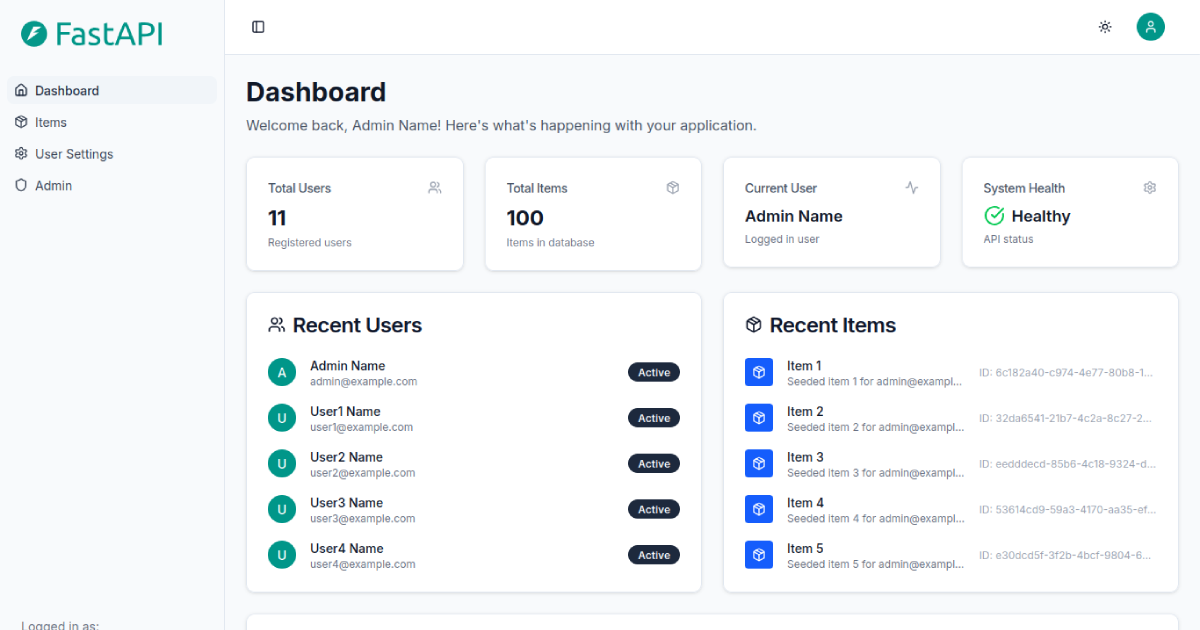
浏览真实页面截图,比较内容排版与手机效果。点击下方缩略图切换,放大查看整页细节。
目前有 1 张原始预览,可打开完整图片查看设计细节。
截图用于了解视觉与布局,交互效果请以实际项目为准。
采集于 2026-10-03查看来源
值得关注的模板亮点
从已有项目资料中,快速了解它的特点。
HttpOnly cookie 认证,支持服务端渲染
Turborepo 单仓库,前端使用 TailwindCSS 与 ShadcnUI,环境变量用 Zod 校验
提供 Docker(main 分支)与 Vercel(vercel-deploy 分支)两种部署路径
仓库 Todo 中仍有多项未完成,如 Playwright 测试迁移、Vitest 单元测试、SEO 与分析
模板详细介绍
这是 nemanjam 维护的启动器模板,基于官方 fastapi/full-stack-fastapi-template 改写,把前端换成 Next.js。仓库说明中明确列出:使用服务端组件、React Hook Form 配合 server actions 处理表单、HttpOnly cookie 认证以支持 SSR、Hey Api 的 client-next、Suspense 与错误边界、Turborepo 单仓库、TailwindCSS 与 ShadcnUI、用 Zod 校验环境变量,以及简化的本地开发环境和 Docker 生产配置。
部署方面提供两条路径:Docker 使用 main 分支,Vercel 使用 vercel-deploy 分支。Vercel 方式需要创建两个项目,分别指向 backend 与 frontend/apps/web 目录,并通过 SITE_URL 与 API_URL 互相识别;可用 Vercel 按钮或 Vercel CLI 部署,环境变量需手动配置,数据库迁移与种子数据也需自行执行。仓库的 Todo 列表显示 Playwright 测试迁移、Vitest 单元测试、Docker 镜像打标签、API 排序参数、邮件与 Sentry 支持、API 国际化、SEO 与分析等尚未完成,因此这些能力不应视为已具备。
安装与运行细节在 docs/running.md,Vercel 前后端部署分别有单独文档。项目采用 MIT 许可,免费范围为该版本代码,演示图片、字体、图标等第三方素材与域名、托管、数据库等外部服务需另行核对。
Next.js启动器
适合你的项目吗?
适用场景
- 想以 FastAPI 为后端、Next.js 为前端搭建全栈项目骨架
- 需要 HttpOnly cookie 认证与 SSR 的登录流程参考
- 希望在 Vercel 上以两个项目分别部署前后端并连接 Postgres
- 在本地用 Docker 运行前后端与数据库的完整开发环境
适合人群
- 熟悉 FastAPI 与 Next.js,想直接使用现成全栈模板的开发者
- 需要 Turborepo 单仓库结构管理前后端代码的团队
- 计划在 Vercel 或 Docker 上部署该模板的开发者
上手与定制指南
结合仓库当前版本的说明,按下面的资料检查内容、配置与运行要求。
- 1
安装与运行步骤见仓库 docs/running.md
- 2
Docker 部署使用 main 分支,Vercel 部署使用 vercel-deploy 分支
- 3
Vercel 需创建两个项目,分别指向 backend 与 frontend/apps/web,并用 SITE_URL、API_URL 互相配置
- 4
Vercel 向导不会自动写入环境变量,需手动配置并执行数据库迁移与种子数据
- 5
演示图片等第三方素材与外部服务需按各自许可与收费情况核对
授权与来源资料
使用条件与限制
免费使用 · 保留许可声明本次收录的是公开仓库中采用 MIT 许可的免费版本;免费范围为该版本代码,不代表外部服务或第三方素材免费。
使用时需要遵守
- 允许免费使用、修改、商用和分发该版本代码。
- 分发代码副本或实质性部分时,保留原作者版权声明和完整 MIT 许可声明。
- 代码按现状提供;担保与责任限制以原许可证及适用法律为准。
额外费用与待核对事项
- 部署方式与分支绑定:Docker 部署须使用 main 分支,Vercel 部署须使用 vercel-deploy 分支,两者不能混用同一分支。
- Vercel 部署需创建两个独立项目分别承载前端与后端,无法以单一项目完成部署。
- Vercel 部署向导不会自动写入环境变量,需在向导完成后手动配置 SITE_URL、API_URL 等变量。
- Vercel 部署依赖 Neon 提供的 Postgres 数据库集成,须将集成目标选为 backend 项目,并自行执行数据库迁移与种子数据初始化。
- 演示图片、字体、图标及其他第三方素材需按各自许可核对,不能仅凭代码的 MIT 许可判断。
- 域名、托管、数据库、支付或 AI 等外部服务可能另外收费。
查看原文依据
Permission is hereby granted, free of charge
许可证原文
If you want to deploy with Docker, use the `main` branch. If you want to deploy with Vercel, use the `vercel-deploy` branch.
README 原文
you also need two separate deployments in Vercel to deploy the frontend and backend
README 原文
No environment variables will be set automatically, you will need to configure them manually after the wizard completes.
README 原文
https://github.com/nemanjam/full-stack-fastapi-template-nextjs/blob/main/LICENSEhttps://github.com/nemanjam/full-stack-fastapi-template-nextjs/blob/main/README.mdyou will be prompted to add the Neon integration for a Postgres database. Make sure to select the **backend** project as the integration target. Finally, you will need to run the database migrations and seed the newly provisioned database.
README 原文
DeepSeek 根据仓库许可证和 README 整理 ·2026-10-03。结果仅覆盖已读取资料,依赖、图片、字体及后续条款变更以各自原文为准。
项目核对记录与介绍依据
模板资料
- 来源平台
- GitHub
- 资料与维护参考分
- 资料较完整 · 87 / 100
- 技术栈
- Next.js · React
- 网站类型
- 启动器
这个分数如何计算
本站按许可资料(最高30分)、演示链接(12分)、预览图(10分)、Star数(15分)、记录的维护时间(15分)、描述完整度(8分)、功能记录(5分)和分类资料(5分)计算。它不是代码、安全或性能测试,也不是 Google 评分;有链接不代表已实测可用。
这个项目需要核对什么
- 记录的仓库更新时间
- 2026-06-03
- 截图检查日期
- 2026-10-03
已收录演示链接。请用你的内容与屏幕尺寸检查;有演示不代表表单、认证或支付已经可用。
目录记录的主要技术栈是 Next.js。请通过依赖清单和锁文件核对实际版本与托管要求。这些说明基于收录资料,不代表代码审计或部署实测。
查看具体选型方法 →介绍的制作与核对状态
介绍由 AI 辅助整理目录与仓库资料。仓库作者不等于这篇介绍的审核者。
审核声明: [email protected] · 2026-10-04
查看当时使用的来源资料
SHA-256: 887a786e5a02194906ed277e352572d8815ec2bb560067275b49aa56cb0e1f1e
2026-10-03T13:54:16.169Z
来源文件 / 仓库# Full stack FastAPI template Next.js Next.js v16 fork of the official [fastapi/full-stack-fastapi-template](https://github.com/fastapi/full-stack-fastapi-template) template. Server components, server actions, HttpOnly cookie auth, ShadcnUI with TailwindCSS v4, simplified local development environment and Docker production. ## Demo **Docker: [https://full-stack-fastapi-template-nextjs.arm1.nemanjamitic.com](https://full-stack-fastapi-template-nextjs.arm1.nemanjamitic.com)** **Vercel: [https://full-stack-fastapi-template-nextjs.vercel.app](https://full-stack-fastapi-template-nextjs.vercel.app)** ## Screenshot  ## Credits - The original repository: [fastapi/full-stack-fastapi-template](https://github.com/fastapi/full-stack-fastapi-template) - Next.js client side rendered PR: https://github.com/fastapi/full-stack-fastapi-template/pull/1733 - HttpOnly cookie PR: https://github.com/fastapi/full-stack-fastapi-template/pull/1606 ## Features - [x] Next.js v16, server components - [x] React Hook Form and server actions for forms - [x] HttpOnly cookie auth, enables SSR - [x] Hey Api with client-next - [x] Suspense, error boundaries - [x] Turborepo monorepo, TailwindCSS v4, ShadcnUI - [x] Validated env vars with Zod - [x] Simple local dev environment, simplified Docker production ## Todo - [x] Register page, Github login - [ ] Migrate Playwright tests - [ ] Unit tests with Vitest, Testing Library - [ ] Tag Docker images - [ ] API sort params - [ ] Support emails, Sentry from the original repo - [ ] no-monorepo branch - [x] Runtime only env vars, reusable build - [x] Env vars with [alizeait/next-public-env](https://github.com/alizeait/next-public-env) - [ ] Versioning with [changesets/changesets](https://github.com/changesets/changesets) or [semantic-release/semantic-release](https://github.com/semantic-release/semantic-release) - [ ] API internationalization - [ ] Update Python - [ ] Open graph, SEO, analytics - [ ] Tailscale Github Actions - [ ] Integration tests frontend and backend - [x] Deploy with Vercel ## Installation and running Docs: [docs/running.md](docs/running.md) ## Deploy to Vercel If you want to deploy with Docker, use the `main` branch. If you want to deploy with Vercel, use the `vercel-deploy` branch. ```bash # Docker git checkout main # Vercel git checkout vercel-deploy ``` Similarly to how you need two separate containers to deploy the app with Docker, you also need two separate deployments in Vercel to deploy the frontend and backend. You will configure them to be aware of each other using `SITE_URL` and `API_URL`, which they use to communicate with each other. You can deploy to Vercel either using "Vercel button" or Vercel CLI method. ### Vercel button [](https://vercel.com/new/clone?demo-description=Build%20full-stack%20apps%20with%20Next.js%20and%20FastAPI.&demo-image=https%3A%2F%2Fgithub.com%2Fnemanjam%2Ffull-stack-fastapi-template-nextjs%2Fraw%2Fmain%2Fdocs%2Fscreenshots%2Ffrontend-screenshot-1200x630.png&demo-title=Full%20stack%20FastAPI%20template%20with%20Next.js&demo-url=https%3A%2F%2Ffull-stack-fastapi-template-nextjs.vercel.app&project-name=Full%20stack%20FastAPI%20template%20with%20Next.js&repository-name=full-stack-fastapi-template-with-next-js&repository-url=https%3A%2F%2Fgithub.com%2Fnemanjam%2Ffull-stack-fastapi-template-nextjs%2Ftree%2Fvercel-deploy&project-names=full-stack-fastapi-frontend%2Cfull-stack-fastapi-backend&root-directories=frontend%2Fapps%2Fweb%2Cbackend&monorepo=1&totalProjects=2&skippable-integrations=1&products=%5B%7B%22type%22%3A%22integration%22%2C%22protocol%22%3A%22storage%22%2C%22productSlug%22%3A%22neon%22%2C%22integrationSlug%22%3A%22neon%22%7D%5D) Clicking the "Deploy" button above will take you to the Vercel deployment wizard. It will create a **single GitHub repository** and **two separate Vercel projects**, pointing to the `/backend` and `/frontend/apps/web` directories for the backend and frontend, respectively. No environment variables will be set automatically, you will need to configure them manually after the wizard completes. During setup, you will be prompted to add the Neon integration for a Postgres database. Make sure to select the **backend** project as the integration target. Finally, you will need to run the database migrations and seed the newly provisioned database. ### Vercel CLI You can also deploy to Vercel from you local development environment using Vercel CLI. ### Documentation You can find more details about deploying using both "Vercel button" and Vercel CLI methods in the documentation linked bellow. Frontend docs: [docs/vercel-deployment-frontend.md](docs/vercel-deployment-frontend.md) Backend docs: [docs/vercel-deployment-backend.md](docs/vercel-deployment-backend.md) ## Routes ```bash # Frontend http://localhost:3000 https://full-stack-fastapi-template-nextjs.arm1.nemanjamitic.com # Backend http://localhost:8000/docs https://api-full-stack-fastapi-template-nextjs.arm1.nemanjamitic.com/docs # openapi.json http://localhost:8000/api/v1/openapi.json https://api-full-stack-fastapi-template-nextjs.arm1.nemanjamitic.com/api/v1/openapi.json ``` ## License MIT license: [License](LICENSE)
看看同类模板
对比同技术栈与用途的模板,找到更适合的视觉与内容结构。

ai-website-cloner-template
Clone any website with one command using AI coding agents
Next.js · 启动器

Next.js SaaS Starter
Next.js SaaS Starter 是 Next.js 官方维护的 SaaS 起点模板,定位介于学习资源和可直接部署的脚手架之间。
Next.js · SaaS

Next.js Commerce
Next.js Commerce 是 Vercel 团队维护的电商启动模板,基于 Next.js App Router 构建,采用服务端渲染、React Server Components、Server Actions …
Next.js · 电商

Next-js-Boilerplate
Next-js-Boilerplate 是一个面向 Next.js 16、Tailwind CSS 4 和 TypeScript 的启动器,核心定位是开发者体验优先。
Next.js · 启动器

tailwind-nextjs-starter-blog
tailwind-nextjs-starter-blog 是一个面向个人技术博客的 Next.js 与 Tailwind CSS 启动模板,其 v2 版本基于 App Router 与 React Server Comp…
Next.js · 博客

next-forge
Production-grade Turborepo template for Next.js apps.
Next.js · 启动器