同一仓库提供 React 与 .NET 8 两种个人网站实现
React作品集
personal-site — React 作品集模板
作者 ngallegos
基于 React 与 Contentful 的个人网站模板,内容由 Contentful 驱动,可静态构建后托管在 AWS S3 与 CloudFront。
看看你的网站会是什么样
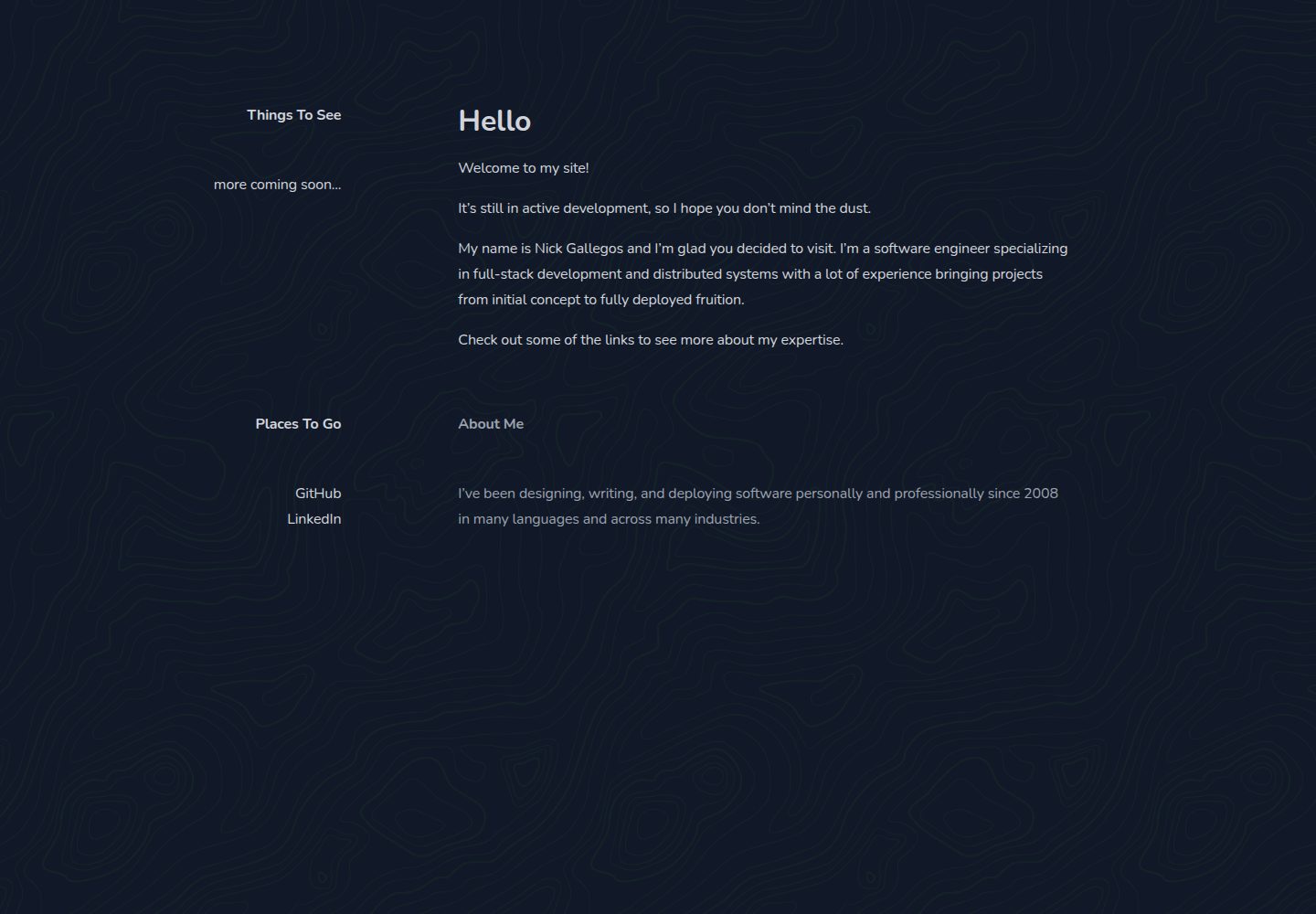
浏览真实页面截图,比较内容排版与手机效果。点击下方缩略图切换,放大查看整页细节。
全部页面与视图 2
截图用于了解视觉与布局,交互效果请以实际项目为准。
采集于 2026-10-05查看来源
值得关注的模板亮点
从已有项目资料中,快速了解它的特点。
React 版本为静态实现,可托管在 AWS S3 与 CloudFront
页面内容由 Contentful 驱动,需配置 Delivery、Preview 与管理 API 密钥
提供 utility 项目,用于在 Contentful 中创建所需内容类型
生产环境通过 AWS Secrets Manager 读取 Contentful 配置
代码采用 MIT 许可
模板详细介绍
该仓库是个人网站的多实现集合,包含 .NET 8 与 React 两个版本。React 版本为静态实现,面向通过 AWS S3 与 CloudFront 的低成本托管;.NET 版本为 ASP.NET 实现,托管在 AWS ECS/Fargate。仓库描述为「Application templates for a personal website driven off of Contentful」,页面内容由 Contentful 提供。
使用前需要准备 Contentful 账号(免费或付费)并配置 API 与管理密钥。仓库中的 utility 项目需要先运行,用于在 Contentful 中创建所需的内容类型。运行 Web 项目或 utility 项目时,需要在项目根目录创建 appsettings.local.json,填入 DeliveryApiKey、PreviewApiKey、Environment、ManagementApiKey 与 SpaceId。生产环境通过 AWS Secrets Manager 读取这些值,本地测试则需在 AWS Secrets Manager 中配置对应 secret,并设置环境变量或名为 personal-site 的 aws cli profile,secret 的 JSON 键需使用 ContentfulOptions: 前缀。
README 提到简历部分受 Thomas Highbaugh 的 resume 模板影响。仓库采用 MIT 许可,免费范围为该版本代码;演示图片、字体、图标等第三方素材需按各自许可核对,域名、托管、数据库等外部服务可能另外收费。
React作品集
适合你的项目吗?
适用场景
- 搭建以 Contentful 为内容源的个人作品集网站
- 需要静态站点并希望托管在 AWS S3 与 CloudFront 的场景
- 希望参考 React 或 ASP.NET 两种实现方式的开发者
- 需要先通过工具项目初始化 Contentful 内容类型的项目
适合人群
- 已有 Contentful 账号并熟悉其 API 密钥配置的开发者
- 使用 AWS 托管静态站点或 ECS/Fargate 的团队
- 需要个人网站模板并接受自行配置内容模型的用户
上手与定制指南
结合仓库当前版本的说明,按下面的资料检查内容、配置与运行要求。
- 1
准备 Contentful 账号(免费或付费),并配置 api/management 密钥
- 2
先运行 utility 项目,在 Contentful 中创建所需的内容类型
- 3
在项目根目录创建 appsettings.local.json,填入 ContentfulOptions 下的 DeliveryApiKey、PreviewApiKey、Environment、ManagementApiKey 与 SpaceId
- 4
生产环境使用 AWS Secrets Manager 读取配置,secret 的 JSON 键需带 ContentfulOptions: 前缀
- 5
本地测试需配置 AWS Secrets Manager secret,并设置环境变量或名为 personal-site 的 aws cli profile
授权与来源资料
使用条件与限制
免费使用 · 保留许可声明本次收录的是公开仓库中采用 MIT 许可的免费版本;免费范围为该版本代码,不代表外部服务或第三方素材免费。
使用时需要遵守
- 允许免费使用、修改、商用和分发该版本代码。
- 分发代码副本或实质性部分时,保留原作者版权声明和完整 MIT 许可声明。
- 代码按现状提供;担保与责任限制以原许可证及适用法律为准。
额外费用与待核对事项
- 演示图片、字体、图标及其他第三方素材需按各自许可核对,不能仅凭代码的 MIT 许可判断。
- 域名、托管、数据库、支付或 AI 等外部服务可能另外收费。
- 使用前必须拥有 Contentful 账号并配置 API 与管理密钥,属于外部服务依赖,免费或付费账号均可。
- 必须先运行 utility 项目,在 Contentful 中创建所需内容类型,否则网站无法正常获取内容。
- 运行 Web 或 utility 项目前,必须在项目根目录创建 appsettings.local.json 并填入 Contentful 密钥配置。
- 生产环境依赖 AWS Secrets Manager 读取配置,需要具备 AWS 账号与相应权限。
- 本地测试也需在 AWS Secrets Manager 配置 secret,并设置环境变量或名为 personal-site 的 aws cli profile。
查看原文依据
Permission is hereby granted, free of charge
许可证原文
You will need a [Contentful](https://www.contentful.com/) account (free or paid) and have configured api/management keys.
README 原文
The utility project will first need to be run to create the required content types in Contentful.
README 原文
To run the web project or the utility project you will need to create an `appsettings.local.json` file in the root of the project
README 原文
The app is configured to use AWS Secrets Manager to retrieve these values in production.
README 原文
https://github.com/ngallegos/personal-site/blob/main/LICENSEhttps://github.com/ngallegos/personal-site/blob/main/README.mdyou will need to configure a secret in AWS Secrets Manager and configure either your environment variables or an aws cli profile named `personal-site` with your credentials.
README 原文
DeepSeek 根据仓库许可证和 README 整理 ·2026-10-05。结果仅覆盖已读取资料,依赖、图片、字体及后续条款变更以各自原文为准。
项目核对记录与介绍依据
模板资料
- 来源平台
- GitHub
- 资料与维护参考分
- 资料较完整 · 80 / 100
- 技术栈
- React
- 网站类型
- 作品集
这个分数如何计算
本站按许可资料(最高30分)、演示链接(12分)、预览图(10分)、Star数(15分)、记录的维护时间(15分)、描述完整度(8分)、功能记录(5分)和分类资料(5分)计算。它不是代码、安全或性能测试,也不是 Google 评分;有链接不代表已实测可用。
这个项目需要核对什么
- 记录的仓库更新时间
- 2026-10-05
- 截图检查日期
- 2026-10-05
已收录演示链接。请用你的内容与屏幕尺寸检查;有演示不代表表单、认证或支付已经可用。
目录记录的主要技术栈是 React。请通过依赖清单和锁文件核对实际版本与托管要求。这些说明基于收录资料,不代表代码审计或部署实测。
查看具体选型方法 →介绍的制作与核对状态
介绍由 AI 辅助整理目录与仓库资料。仓库作者不等于这篇介绍的审核者。
审核声明: [email protected] · 2026-10-05
查看当时使用的来源资料
SHA-256: d9fe4994d6b9cc575ff56cb6339d21b552e32163c0c6299ab99155a29da1354a
2026-10-05T06:08:20.451Z
来源文件 / 仓库# Personal Site
Various implementations of a personal site set up with Contentful and Tailwind
[.NET 8](./dotnet/README.md) - An ASP.NET implementation hosted using AWS ECS/Fargate
[React](./react/README.md) - A static react implementation for budget friendly hosting through AWS S3 and Cloudfront
## Getting Started
You will need a [Contentful](https://www.contentful.com/) account (free or paid)
and have configured api/management keys.
The utility project will first need to be run to create the required content types in Contentful.
To run the web project or the utility project you will need to create an `appsettings.local.json`
file in the root of the project with the following structure:
```json
{
"ContentfulOptions": {
"DeliveryApiKey": "YOUR_DELIVERY_API_KEY",
"PreviewApiKey": "YOUR_PREVIEW_API_KEY",
"Environment": "environment-you-want-to-use",
"ManagementApiKey": "YOUR_MANAGEMENT_API_KEY",
"SpaceId": "YOUR_SPACE_ID"
}
}
```
### Secrets Manager
The app is configured to use AWS Secrets Manager to retrieve these values in production.
If you want to test your setup locally, you will need to configure a secret in AWS Secrets Manager
and configure either your environment variables or an aws cli profile named `personal-site` with
your credentials. Because of the way the secret is retrieved, the json config in AWS should
be in the format:
```json
{
"ContentfulOptions:DeliveryApiKey": "YOUR_DELIVERY_API_KEY",
"ContentfulOptions:PreviewApiKey": "YOUR_PREVIEW_API_KEY",
"ContentfulOptions:Environment": "environment-you-want-to-use",
"ContentfulOptions:ManagementApiKey": "YOUR_MANAGEMENT_API_KEY",
"ContentfulOptions:SpaceId": "YOUR_SPACE_ID"
}
```
## Shout Outs
The resume is heavily influenced by [this excellent template](https://github.com/Thomashighbaugh/resume)
by Thomas Highbaugh - thank you for sharing your work!看看同类模板
对比同技术栈与用途的模板,找到更适合的视觉与内容结构。

react-portfolio-template
React powered portfolio website template for developers
React · 作品集

personal-website-react
personal-website-react 是一个面向开发者的个人作品集单页模板,由 React 和 Material-UI 构建,并通过 Create React App 初始化。
React · 作品集

karngyan.com
karngyan.com 是一个面向开发者的个人网站与博客模板,作者用它搭建了自己的站点,并公开了完整代码。 模板的核心定位很明确:让写作者专注于内容,而不是花时间搭建基础设施。
React · 作品集

react-portfolio-template
react-portfolio-template 是一个由 Ryan Balieiro 开发的 React 作品集模板,定位为“sleek, futuristic”,适合开发者展示个人履历。
React · 作品集

portfolio
Personal website, Data scientist portfolio template
React · 作品集

react-portfolio
react-portfolio 是一个面向开发者的个人作品集模板,基于 React 16 和 Create React App 构建,界面样式采用 Material-UI。
React · 作品集