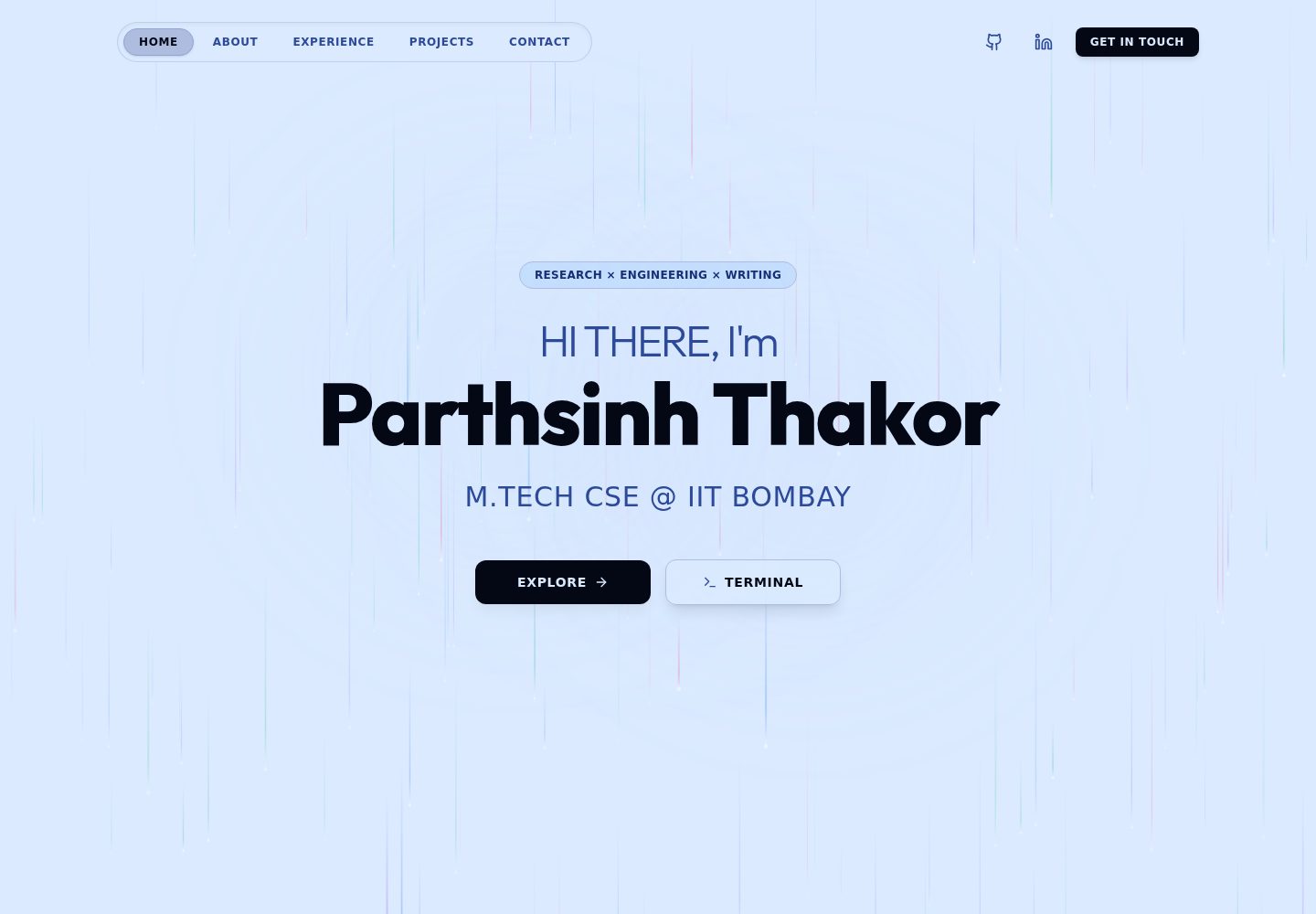
深色单色灰阶视觉风格,搭配动画画布网格背景与玻璃拟态卡片效果
React作品集
MTech-Portfolio — React 作品集模板
作者 PARTH-THAKOR
MTech-Portfolio 是一个用 React、TypeScript、Tailwind CSS 和 Vite 构建的深色单色灰阶个人作品集网站模板,包含动画画布网格背景、玻璃拟态卡片和响应式布局。
看看你的网站会是什么样
浏览真实页面截图,比较内容排版与手机效果。点击下方缩略图切换,放大查看整页细节。
全部页面与视图 2
截图用于了解视觉与布局,交互效果请以实际项目为准。
采集于 2026-10-13查看来源
值得关注的模板亮点
从已有项目资料中,快速了解它的特点。
使用 React、TypeScript、Tailwind CSS 和 Vite 构建,并配置 Firebase Hosting 部署
包含 Hero、About、Education、Experience、Projects、Achievements、Contact 等完整履历分区
Education 采用 bento 网格布局,Experience 采用时间线卡片,Achievements 采用 2x2 网格
针对桌面、平板和移动端视口做响应式布局,并提供平滑滚动导航
模板详细介绍
MTech-Portfolio 是一个个人作品集网站模板,源码托管在 GitHub,采用 React、TypeScript、Tailwind CSS 与 Vite 构建,并配置了 Firebase Hosting 部署。页面整体为深色单色灰阶风格,带有动画画布网格背景、玻璃拟态卡片效果和平滑滚动导航,布局针对桌面、平板和手机视口做了响应式处理。
内容结构按个人履历组织,包含 Hero 首屏(角色打字轮播与行动按钮)、About(个人简介、学业成绩与分类技术技能)、Education(本硕学习经历的 bento 网格布局与年份排版图形)、Experience(时间线式职业经历卡片)、Projects(工程与研究项目及 GitHub 链接)、Achievements(2x2 网格展示全国考试与学业排名)、Profile Links(GitHub、LinkedIn、LeetCode、Medium 外链)、More About Me(LinkedIn 行动引导)、Contact(邮箱与所在地卡片)以及 Footer(品牌、版权与返回顶部)。
使用限制方面,README 提到 Firebase 集成,启用相关动态功能前需自行配置并核对 Firebase 的额度与收费;演示图片、字体、图标等第三方素材需按各自许可单独核对,不能仅凭代码的 MIT 许可判断。仓库采用 MIT 许可证,可免费使用、修改、商用和分发该版本代码,分发时需保留版权声明与完整 MIT 许可声明。
React作品集
适合你的项目吗?
适用场景
- 个人开发者或学生搭建展示学历、技能、项目与成就的作品集网站
- 需要深色单色灰阶风格、带动态背景与玻璃拟态效果的履历页面
- 使用 React 与 Tailwind CSS 技术栈、并计划部署到 Firebase Hosting 的静态站点
- 作为个人主页模板,替换文案与项目数据后用于求职或学术展示
适合人群
- 希望快速搭建个人作品集的前端开发者
- 需要展示教育背景、项目经历与获奖情况的硕士或本科学生
- 偏好深色极简视觉风格并接受 React 技术栈的用户
- 计划使用 Firebase Hosting 托管静态作品集站点的人
上手与定制指南
结合仓库当前版本的说明,按下面的资料检查内容、配置与运行要求。
- 1
需要 Node.js v18 或更高版本以及 npm
- 2
克隆仓库后执行 npm install 安装依赖,再用 npm run dev 启动本地开发服务器(默认 http://localhost:5173)
- 3
执行 npm run build 生成生产构建,输出位于 dist/ 目录
- 4
部署到 Firebase Hosting 前需安装 firebase-tools、登录并配置项目,然后执行 firebase deploy --only hosting
- 5
README 提及 Firebase 集成,启用相关动态功能前需自行配置并核对 Firebase 的额度与收费
授权与来源资料
使用条件与限制
免费使用 · 保留许可声明本次收录的是公开仓库中采用 MIT 许可的免费版本;免费范围为该版本代码,不代表外部服务或第三方素材免费。
使用时需要遵守
- 允许免费使用、修改、商用和分发该版本代码。
- 分发代码副本或实质性部分时,保留原作者版权声明和完整 MIT 许可声明。
- 代码按现状提供;担保与责任限制以原许可证及适用法律为准。
额外费用与待核对事项
- README 提及 Firebase 集成;启用相关动态功能前需自行配置,并核对 Firebase 的额度与收费。
- 演示图片、字体、图标及其他第三方素材需按各自许可核对,不能仅凭代码的 MIT 许可判断。
- 域名、托管、数据库、支付或 AI 等外部服务可能另外收费。
- 部署到 Firebase Hosting 前需自行安装并配置 Firebase CLI,属于外部服务依赖,需自行准备账号与项目配置。
- 部署流程要求登录 Firebase 账号并执行部署命令,使用该托管服务可能涉及 Firebase 的额度与收费,需自行核对。
查看原文依据
Permission is hereby granted, free of charge
许可证原文
Ensure Firebase CLI is installed and the project is configured:
README 原文
https://github.com/PARTH-THAKOR/MTech-Portfolio/blob/main/LICENSEhttps://github.com/PARTH-THAKOR/MTech-Portfolio/blob/main/README.mdfirebase login firebase deploy --only hosting
README 原文
DeepSeek 根据仓库许可证和 README 整理 ·2026-10-13。结果仅覆盖已读取资料,依赖、图片、字体及后续条款变更以各自原文为准。
项目核对记录与介绍依据
模板资料
- 来源平台
- GitHub
- 资料与维护参考分
- 资料较完整 · 83 / 100
- 技术栈
- React
- 网站类型
- 作品集
这个分数如何计算
本站按许可资料(最高30分)、演示链接(12分)、预览图(10分)、Star数(15分)、记录的维护时间(15分)、描述完整度(8分)、功能记录(5分)和分类资料(5分)计算。它不是代码、安全或性能测试,也不是 Google 评分;有链接不代表已实测可用。
这个项目需要核对什么
- 记录的仓库更新时间
- 2026-08-15
- 截图检查日期
- 2026-10-13
已收录演示链接。请用你的内容与屏幕尺寸检查;有演示不代表表单、认证或支付已经可用。
目录记录的主要技术栈是 React。请通过依赖清单和锁文件核对实际版本与托管要求。这些说明基于收录资料,不代表代码审计或部署实测。
查看具体选型方法 →介绍的制作与核对状态
介绍由 AI 辅助整理目录与仓库资料。仓库作者不等于这篇介绍的审核者。
审核声明: [email protected] · 2026-10-13
查看当时使用的来源资料
SHA-256: 51180c1b95006093d92b368077841f699f52a580c1e54747716a0b4b51c9ce1d
2026-10-13T08:13:26.986Z
来源文件 / 仓库# MTech-Portfolio Personal portfolio website built with React, TypeScript, Tailwind CSS, and Vite. Deployed on Firebase Hosting. Live: [paraglide.in](https://paraglide.in) --- ## Table of Contents - [Overview](#overview) - [Tech Stack](#tech-stack) - [Project Structure](#project-structure) - [Getting Started](#getting-started) - [Build and Deploy](#build-and-deploy) - [License](#license) --- ## Overview A modern, dark-themed portfolio website designed with a monochromatic grayscale aesthetic. The site features an animated canvas grid background, glassmorphism card effects, smooth scroll navigation, and a fully responsive layout optimized for desktop, tablet, and mobile viewports. ### Sections - **Hero** -- Introduction with typewriter role cycling and call-to-action buttons. - **About** -- Bio, academic achievements, and categorized technical skills. - **Education** -- Premium bento grid layout detailing postgraduate and undergraduate studies with typographic year graphics. - **Experience** -- Timeline-based professional experience cards. - **Projects** -- Highlighted engineering and research projects with GitHub links. - **Achievements** -- 2x2 grid representing national exams and academic rank accomplishments. - **Profile Links** -- External links to GitHub, LinkedIn, LeetCode, and Medium. - **More About Me** -- LinkedIn call-to-action section. - **Contact** -- Direct email and current location cards. - **Footer** -- Branding, copyright, and back-to-top navigation. --- ## Tech Stack | Layer | Technology | |--------------|-----------------------------------| | Framework | React 19 | | Language | TypeScript 6 | | Styling | Tailwind CSS 4 | | Build Tool | Vite 8 | | Icons | Lucide React | | Fonts | Inter, Outfit (Google Fonts) | | Hosting | Firebase Hosting | | Linting | OxLint | --- ## Project Structure ``` Portfolio/ ├── public/ │ └── favicon.png ├── src/ │ ├── components/ │ │ ├── AnimatedGridBackground.tsx │ │ ├── About.tsx │ │ ├── Education.tsx │ │ ├── Contact.tsx │ │ ├── Experience.tsx │ │ ├── Achievements.tsx │ │ ├── Footer.tsx │ │ ├── Header.tsx │ │ ├── Hero.tsx │ │ ├── MoreAboutMe.tsx │ │ ├── ProfileLinks.tsx │ │ └── Projects.tsx │ ├── App.tsx │ ├── main.tsx │ └── index.css ├── index.html ├── firebase.json ├── package.json ├── tsconfig.json ├── tsconfig.app.json ├── tsconfig.node.json └── vite.config.ts ``` --- ## Getting Started ### Prerequisites - Node.js (v18 or later) - npm ### Installation ```bash git clone https://github.com/PARTH-THAKOR/MTech-Portfolio.git cd MTech-Portfolio npm install ``` ### Development Server ```bash npm run dev ``` The application will be available at `http://localhost:5173`. --- ## Build and Deploy ### Production Build ```bash npm run build ``` Output is generated in the `dist/` directory. ### Firebase Deployment Ensure Firebase CLI is installed and the project is configured: ```bash npm install -g firebase-tools firebase login firebase deploy --only hosting ``` The site is deployed to [paraglide.in](https://paraglide.in). --- ## License This project is licensed under the MIT License. See the [LICENSE](LICENSE) file for details.
看看同类模板
对比同技术栈与用途的模板,找到更适合的视觉与内容结构。

react-portfolio-template
React powered portfolio website template for developers
React · 作品集

personal-website-react
personal-website-react 是一个面向开发者的个人作品集单页模板,由 React 和 Material-UI 构建,并通过 Create React App 初始化。
React · 作品集

karngyan.com
karngyan.com 是一个面向开发者的个人网站与博客模板,作者用它搭建了自己的站点,并公开了完整代码。 模板的核心定位很明确:让写作者专注于内容,而不是花时间搭建基础设施。
React · 作品集

react-portfolio-template
react-portfolio-template 是一个由 Ryan Balieiro 开发的 React 作品集模板,定位为“sleek, futuristic”,适合开发者展示个人履历。
React · 作品集

portfolio
Personal website, Data scientist portfolio template
React · 作品集

react-portfolio
react-portfolio 是一个面向开发者的个人作品集模板,基于 React 16 和 Create React App 构建,界面样式采用 Material-UI。
React · 作品集