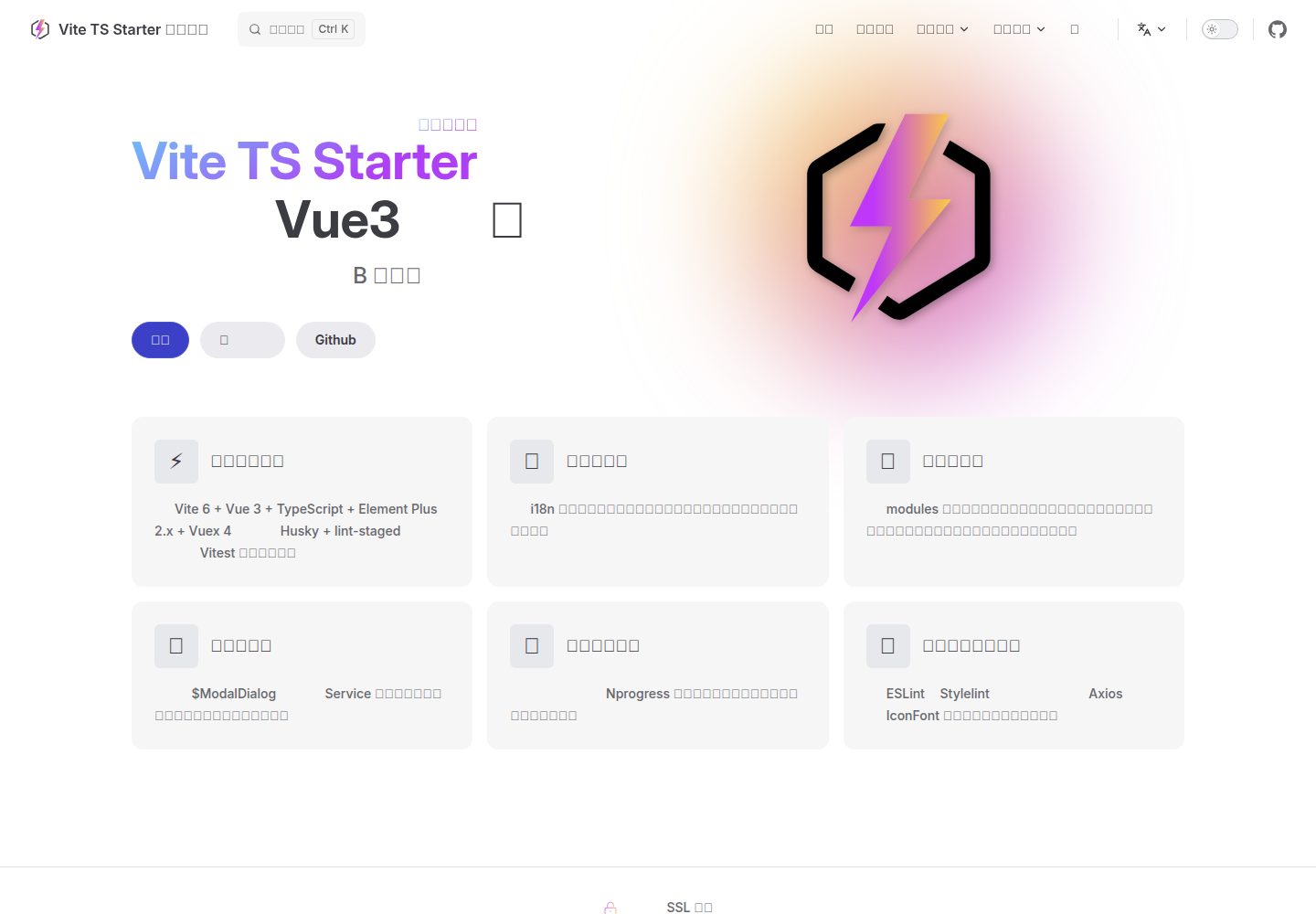
Vue 3 + Vite + TypeScript 组合,UI 采用 Element Plus
VueVite后台启动器
vite-ts-starter — Vue 后台模板
作者 pdsuwwz
基于 Vite 与 Vue 3 的 TypeScript 中后台管理模板,集成 Element Plus、Vuex 4、i18n 与 ESLint 等工程化配置,提供登录、列表、详情等示例页面。
看看你的网站会是什么样
浏览真实页面截图,比较内容排版与手机效果。点击下方缩略图切换,放大查看整页细节。
全部页面与视图 2
截图用于了解视觉与布局,交互效果请以实际项目为准。
采集于 2026-10-02查看来源
值得关注的模板亮点
从已有项目资料中,快速了解它的特点。
内置 i18n,支持按 VueRouter 路由级别切换语言
集成 ESLint、Stylelint、Husky、lint-staged 与 Vitest
封装 Axios、IconFont 组件与全局 $ModalDialog 插件
预置路由鉴权与 Nprogress,提供登录、列表、详情示例页面
模块化目录结构,页面、路由与样式可按模块解耦
模板详细介绍
vite-ts-starter 是一个面向中小型 B 端中后台管理系统的前端基础模板,采用 Vue 3(setup 语法)+ Vite + TypeScript 构建,UI 使用 Element Plus,状态管理使用 Vuex 4,并内置 i18n 国际化、ESLint、Stylelint、Husky、lint-staged 与 Vitest 等开发与规范化工具。
模板提供登录、列表、详情三个核心页面的业务流程示例,并封装了 Axios、IconFont 组件以及全局 $ModalDialog 插件,同时预置路由鉴权与 Nprogress 进度条。项目采用模块化目录组织,页面组件、路由组件与样式可按模块解耦,便于在此基础上进行二次业务开发。
该仓库是作者维护的多个技术栈模板之一,同系列还提供 Pinia 版本、JavaScript 版本以及 Naive UI 版本,可按需选择。使用前需注意环境要求:Node >= 22.12.x、Pnpm 9.x,并建议安装指定版本的 VSCode ESLint 扩展。
VueVite后台启动器
适合你的项目吗?
适用场景
- 快速搭建中小型 B 端中后台管理系统的前端骨架
- 作为 Vue 3 + TypeScript + Element Plus 项目的起步模板
- 需要路由级国际化与多语言扩展的管理后台
- 希望统一代码规范与单元测试配置的前端团队
适合人群
- 使用 Vue 3 与 TypeScript 开发中后台系统的前端开发者
- 需要开箱即用工程化配置(Lint、Git Hook、测试)的团队
- 偏好 Element Plus 与 Vuex 4 技术选型的项目
- 需要多语言支持并希望按路由切换语言的管理系统
上手与定制指南
结合仓库当前版本的说明,按下面的资料检查内容、配置与运行要求。
- 1
环境要求:Node >= 22.12.x、Pnpm 9.x
- 2
使用 pnpm i 安装依赖,pnpm dev 启动开发服务器
- 3
运行 pnpm test 或 pnpm test:coverage 执行单元测试
- 4
若 Husky 未生效,可运行 pnpm run prepare 初始化
- 5
默认语言为英文,可在 src/locales/index.ts 中修改 defaultLanguageLocale
授权与来源资料
使用条件与限制
免费使用 · 保留许可声明本次收录的是公开仓库中采用 MIT 许可的免费版本;免费范围为该版本代码,不代表外部服务或第三方素材免费。
使用时需要遵守
- 允许免费使用、修改、商用和分发该版本代码。
- 分发代码副本或实质性部分时,保留原作者版权声明和完整 MIT 许可声明。
- 代码按现状提供;担保与责任限制以原许可证及适用法律为准。
额外费用与待核对事项
- 演示图片、字体、图标及其他第三方素材需按各自许可核对,不能仅凭代码的 MIT 许可判断。
- 域名、托管、数据库、支付或 AI 等外部服务可能另外收费。
- 运行环境要求 Node >= 22.12.x,低于该版本无法正常使用。
- 包管理器要求 Pnpm 9.x。
- 建议安装指定版本的 VSCode ESLint 扩展(dbaeumer.vscode-eslint >= v3.0.5 预发布版)。
- 若 Husky 未生效,需运行 pnpm run prepare 进行初始化。
查看原文依据
Permission is hereby granted, free of charge
许可证原文
* Node >= 22.12.x
README 原文
* Node >= 22.12.x * Pnpm 9.x * **VSCode Extension `dbaeumer.vscode-eslint` >= v3.0.5 (pre-release)**
README 原文
* **VSCode Extension `dbaeumer.vscode-eslint` >= v3.0.5 (pre-release)**
README 原文
https://github.com/pdsuwwz/vite-ts-starter/blob/main/LICENSEhttps://github.com/pdsuwwz/vite-ts-starter/blob/main/README.md* If Husky is not working, it may be due to incomplete initialization. Try running the following command to initialize:
README 原文
DeepSeek 根据仓库许可证和 README 整理 ·2026-10-04。结果仅覆盖已读取资料,依赖、图片、字体及后续条款变更以各自原文为准。
项目核对记录与介绍依据
模板资料
- 来源平台
- GitHub
- 资料与维护参考分
- 资料较完整 · 96 / 100
- 技术栈
- Vue · Vite
- 网站类型
- 后台 · 启动器
这个分数如何计算
本站按许可资料(最高30分)、演示链接(12分)、预览图(10分)、Star数(15分)、记录的维护时间(15分)、描述完整度(8分)、功能记录(5分)和分类资料(5分)计算。它不是代码、安全或性能测试,也不是 Google 评分;有链接不代表已实测可用。
这个项目需要核对什么
- 记录的仓库更新时间
- 2025-12-19
- 截图检查日期
- 2026-10-04
已收录演示链接。请用你的内容与屏幕尺寸检查;有演示不代表表单、认证或支付已经可用。
目录记录的主要技术栈是 Vue。请通过依赖清单和锁文件核对实际版本与托管要求。这些说明基于收录资料,不代表代码审计或部署实测。
查看具体选型方法 →介绍的制作与核对状态
介绍由 AI 辅助整理目录与仓库资料。仓库作者不等于这篇介绍的审核者。
审核声明: codex-user-requested-batch-review-20261017 · 2026-10-16
查看当时使用的来源资料
SHA-256: ecb15f6c085259a17b1c306dd114e06a9b24e5d5e506a9a86ff01f7044f57419
2026-10-04T12:25:18.860Z
来源文件 / 仓库# vite-ts-starter
English | [中文](README-zh.md)
[](https://github.com/pdsuwwz/vite-ts-starter/actions/workflows/deploy.yml)
[](https://github.com/pdsuwwz/vite-ts-starter/deployments/activity_log?environment=github-pages)
[](https://github.com/pdsuwwz)
[](https://github.com/pdsuwwz/vite-ts-starter/blob/main/LICENSE)
🐬 A Starter template built on Vite 7.x + Vue 3.x + Element Plus 2.x + TypeScript + Husky + lint-staged.
A ready-to-use prototype template framework for quickly developing management systems using Vue3 + Vite7 + TS, with continuous updates on the latest tech stack 💪
[🚀 Online Playground](https://pdsuwwz.github.io/vite-ts-starter/#en)
## 🌱 Different Versions
Five different tech stack repo templates are maintained. Try them and pick the one that fits you.
- 💥 (Recommended) [TS + Pinia + 🌐 Low-coupling (i18n) multilingual Vite7 + Vue3 + TS + Element-Plus2 + vue-i18n@next](https://github.com/pdsuwwz/vue-boilerplate-i18n)
- ⚡️ TS + Pinia [Vite5 + Vue3 + TS + Pinia + Element-Plus2 + useLocale + i18n](https://github.com/pdsuwwz/pinia-starter-ts)
- ⚡️ JS + Pinia [Vite5 + Vue3 + Pinia + Element-Plus2 + useLocale + i18n](https://github.com/pdsuwwz/vite-pinia-starter)
- ⚡️ TS + Vuex4 (Current Repo)[Vite7 + Vue3 + TS + Vuex4 + Element-Plus2 + useLocale + i18n](https://github.com/pdsuwwz/vite-ts-starter)
- ⚡️ JS + Vuex4 [Vite5 + Vue3 + Vuex4 + Element-Plus2 + useLocale + i18n](https://github.com/pdsuwwz/vite-starter)
## 🪄 Using Different UI Libraries
If you prefer using [Naive UI](https://www.naiveui.com/) as your UI library, we've also prepared several corresponding template projects for you. You can use these as a foundation for secondary business development and customization:
- 🏄♂️ [Naive UI basic template](https://github.com/pdsuwwz/vite-naive-template)
- 🗂️ [Naive UI Tab switching demo](https://github.com/pdsuwwz/vue3-tab-demo)
## 🎉 Features
* Supports __Vite 7 + Vue 3 + TypeScript__
* UI framework: __Element Plus 2.x__
* State management: __Vuex 4__
* Code standardization: __Husky + lint-staged__
* Unit testing framework: ~~__Jest__~~ upgraded to __Vitest__
* Built-in __ESlint__ and __Stylelint__, expandable for your desired Lint configuration
* Built-in encapsulation of a **potentially useful** Axios, to be used with Vuex Actions when needed
* Encapsulated \<IconFont \/> component for direct use of IconFont icons
* Built-in global **$ModalDialog** plugin, supports dynamic service-style calls to display any component
* Built-in i18n, supports language switching at VueRouter route level, allows writing internationalization config files and extending other languages
* Pre-configured route authentication, along with Nprogress, just modify the `permission.ts` file
* Comes with a modular component development environment, allowing decoupling of page components, route components, styles, etc. in the modules directory
* Highly encapsulated yet flexible, with an abstracted complete business process for reference, involving three core pages: login, list, and details
* Saves your configuration time, the project's **lightweight** nature allows you to focus solely on writing your business code
## Environment Support
* Vue 3.x
* Node >= 22.12.x
* Pnpm 9.x
* **VSCode Extension `dbaeumer.vscode-eslint` >= v3.0.5 (pre-release)**
## Screenshot
<img width="1440" alt="image" src="https://user-images.githubusercontent.com/19891724/154829635-46de24db-e4c5-409f-9fa5-6a9770ace166.png">
<img width="1440" alt="image" src="https://user-images.githubusercontent.com/19891724/154829667-a84787b0-0104-4466-bb9e-9f586be66778.png">
## Install
Run `pnpm i` to install the dependencies.
```bash
pnpm i
```
## Run
Run `pnpm dev` to start the frontend dev server.
```bash
pnpm dev
```
## Test
Unit Testing.
```bash
pnpm test
```
Test code coverage.
```bash
pnpm test:coverage
```
## 🌍 Internationalization (i18n) Setup
This project supports multi-language settings, with `English` as the default language.
### Default Language Configuration
The default language is set through the [`defaultLanguageLocale`](src/locales/index.ts#L43) constant. To change the default language, simply modify the value of this constant:
```ts
export const defaultLanguageLocale = 'en'
```
### Extending Supported Languages
The project currently supports the following languages, as detailed in [src/locales/index.ts](src/locales/index.ts#L13):
```ts
export const localesMapping = [
{
localeCode: 'zh-hans',
localeName: '简体中文',
localeLang: {...}
},
{
localeCode: 'en',
localeName: 'English',
localeLang: {...}
}
]
```
To add support for a new language:
* Add a new language object to the [`localesMapping`](src/locales/index.ts#L13) array
* Create a corresponding language file in the [`src/locales/lang/`](src/locales/lang/) directory (e.g., de.ts for German)
```
./lang
├── en.ts
└── zh-hans.ts
```
* Import and merge the `Element Plus` language pack and custom language file, ensuring both UI components and custom content are localized.
## 💡 Tip
* If Husky is not working, it may be due to incomplete initialization. Try running the following command to initialize:
```bash
pnpm run prepare
```
## 😎 Awesome
* [awesome-vite](https://github.com/pdsuwwz/awesome-vite)
看看同类模板
对比同技术栈与用途的模板,找到更适合的视觉与内容结构。

vuestic-admin
Vuestic Admin is an open-source, ready-to-use admin template suite designed for rapid development, easy mainte…
Vue · 后台

vitesse
🏕 Opinionated Vite + Vue Starter Template
Vue · 启动器

v3-admin-vite
v3-admin-vite 是一个主打 AI 编程友好体验的 Vue3 后台管理模板,基于 Vue3、Vite、TypeScript、Element Plus 构建。
Vue · 后台

vue-typescript-admin-template
vue-typescript-admin-template 是一套面向后台管理界面的前端解决方案,基于 Vue 2.6、TypeScript 和 Element UI 构建。
Vue · 后台

vue-antd-admin
Vue Antd Admin 是 Ant Design Pro 的 Vue 实现版本,目标是为中后台项目提供一套开箱即用的前端与设计解决方案。
Vue · 后台

coreui-free-vue-admin-template
Free Vue Admin & Dashboard Template Built for AI-Assisted Development
Vue · 后台