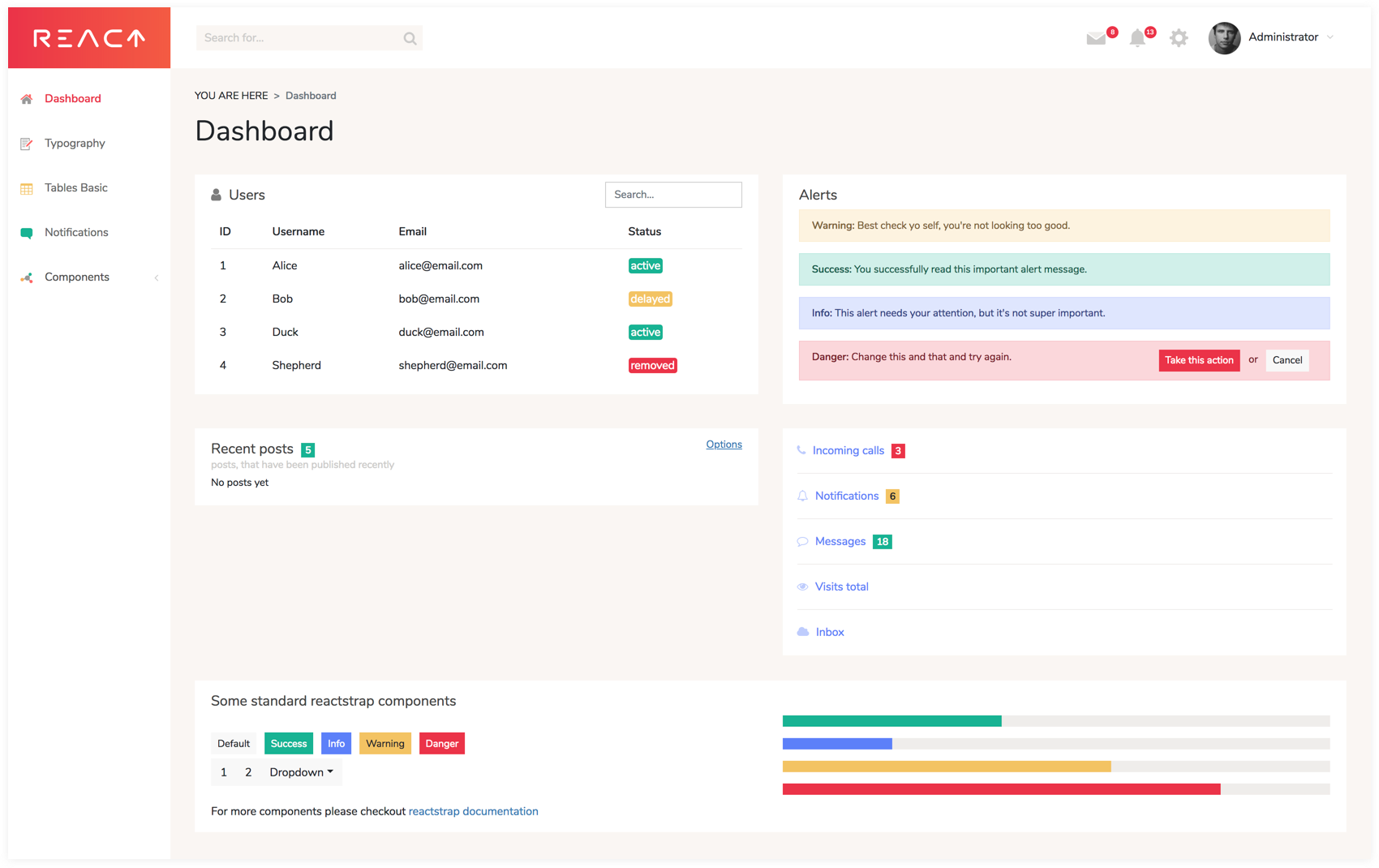
同构架构:React 前端配合 Node.js 服务端渲染
ReactHTML后台
react-dashboard — React 后台模板
作者 pilotbe2man
基于 React 与 Bootstrap 的同构后台管理模板,带服务端渲染、GraphQL 与 Node.js 后端集成。
看看你的网站会是什么样
浏览真实页面截图,比较内容排版与手机效果。点击下方缩略图切换,放大查看整页细节。
目前有 1 张原始预览,可打开完整图片查看设计细节。
截图用于了解视觉与布局,交互效果请以实际项目为准。
采集于 2026-10-02查看来源
值得关注的模板亮点
从已有项目资料中,快速了解它的特点。
集成 GraphQL,并提供 GraphQL 服务与 IDE 入口
基于 React Router 与 Redux 组织路由和状态
使用 Bootstrap3 与 Sass,提供响应式移动端友好布局
内置认证与 CRUD 操作示例,附一套工具类 CSS
开发环境使用 Webpack 构建与 Browsersync 热更新
模板详细介绍
这是一个后台管理模板(admin dashboard),采用同构(isomorphic)方案:前端用 React 与 React Router 构建界面,服务端渲染由 Node.js 承担,数据层使用 GraphQL,状态管理使用 Redux,样式用 Sass 编写,构建工具为 Webpack,开发时通过 Browsersync 与热更新刷新浏览器。项目基于 React Starter Kit 搭建,README 将其定位为 Themeforest、Wrapbootstrap 上付费后台模板的免费版本,带可运行的后端集成,可用于启动下一个 Web 应用的开发。
功能层面,模板提供响应式移动端友好布局、认证、CRUD 操作示例,以及一套用于快速开发的工具类 CSS(flatlogic css set)。README 给出的启动流程为:克隆仓库、执行 yarn install、执行 yarn start,构建产物输出到 build 目录,随后启动 Node.js 服务器与 Browsersync。README 说明运行环境要求 Node.js >= 6.5,并列出本地端口:3000 为 Node.js 服务器,3000/graphql 为 GraphQL 服务与 IDE,3001 为带 HMR 的 BrowserSync 代理,3002 为 BrowserSync 控制面板。
使用限制方面,仓库信息显示最后更新时间为 2018 年,README 中引用的依赖与工具链(如 Bootstrap3、旧版 Node.js 要求)属于较早的技术组合,实际使用前需自行核对依赖清单与当前环境的兼容性。演示站点使用 user/password 登录。许可为 MIT(另含 React Starter Kit 的 MIT 许可),允许免费使用、修改、商用与分发该版本代码,但分发时需保留版权与许可声明;演示图片、字体、图标等第三方素材需按各自许可单独核对,域名、托管、数据库等外部服务可能另行收费。
ReactHTML后台
适合你的项目吗?
适用场景
- 作为后台管理系统或数据界面的开发起点
- 需要服务端渲染的 React 管理端项目
- 需要 GraphQL 数据接口与 Node.js 后端集成的场景
- 参考认证与 CRUD 示例实现后台基础功能
适合人群
- 使用 React 技术栈开发后台管理界面的开发者
- 需要同构渲染与 GraphQL 组合方案的团队
- 希望以免费 MIT 模板替代付费后台模板的项目
上手与定制指南
结合仓库当前版本的说明,按下面的资料检查内容、配置与运行要求。
- 1
README 要求 Node.js >= 6.5,请先核对本地环境与依赖清单的兼容性
- 2
克隆仓库后执行 yarn install 安装依赖,再执行 yarn start 启动
- 3
默认端口:3000 为 Node.js 服务器,3000/graphql 为 GraphQL 服务与 IDE,3001 为 BrowserSync 代理,3002 为控制面板
- 4
演示站点使用 user/password 登录
- 5
仓库最后更新于 2018 年,使用前建议检查依赖版本与安全状况
授权与来源资料
使用条件与限制
免费使用 · 保留许可声明本次收录的是公开仓库中采用 MIT 许可的免费版本;免费范围为该版本代码,不代表外部服务或第三方素材免费。
使用时需要遵守
- 允许免费使用、修改、商用和分发该版本代码。
- 分发代码副本或实质性部分时,保留原作者版权声明和完整 MIT 许可声明。
- 代码按现状提供;担保与责任限制以原许可证及适用法律为准。
额外费用与待核对事项
- 本项目是付费后台模板的免费种子版本,功能可能少于 Themeforest/Wrapbootstrap 上的完整付费版;如需更完整功能需另行购买付费模板。
- README 推广 Flatlogic 的付费高级主题与模板,属于可选的付费升级,免费 MIT 版本不包含这些付费产品。
- 代码同时受本项目 MIT 许可与 React Starter Kit 的 MIT 许可约束,分发时需同时保留两份版权与许可声明。
- 在线演示部署在 Heroku 上并使用 user/password 登录;自行部署时需自备托管、域名与数据库等外部服务,可能产生费用。
- 演示图片、字体、图标及其他第三方素材需按各自许可核对,不能仅凭代码的 MIT 许可判断。
- 域名、托管、数据库、支付或 AI 等外部服务可能另外收费。
查看原文依据
Permission is hereby granted, free of charge
许可证原文
This seed project is a sort of a free version of a template that may be found on [Themeforest](https://themeforest.net/category/site-templates/admin-templates) or [Wrapbootstrap](https://wrapbootstrap.com/themes/admin) with working backend integration.
README 原文
Looking for premium themes and templates? Check out our products at [flatlogic.com](https://flatlogic.com/products).
README 原文
[MIT](https://github.com/flatlogic/react-dashboard/blob/master/LICENSE.txt) and another [MIT](https://github.com/flatlogic/react-dashboard/blob/master/LICENSE-react-starter-kit.txt) from RSK.
README 原文
https://github.com/pilotbe2man/react-dashboard/blob/master/LICENSE.txthttps://github.com/pilotbe2man/react-dashboard/blob/master/README.mdDemo](https://flatlogic-react-dashboard.herokuapp.com/). Use following credentials: user/password.
README 原文
DeepSeek 根据仓库许可证和 README 整理 ·2026-10-02。结果仅覆盖已读取资料,依赖、图片、字体及后续条款变更以各自原文为准。
项目核对记录与介绍依据
模板资料
- 来源平台
- GitHub
- 资料与维护参考分
- 资料一般 · 61 / 100
- 技术栈
- React · HTML
- 网站类型
- 后台
这个分数如何计算
本站按许可资料(最高30分)、演示链接(12分)、预览图(10分)、Star数(15分)、记录的维护时间(15分)、描述完整度(8分)、功能记录(5分)和分类资料(5分)计算。它不是代码、安全或性能测试,也不是 Google 评分;有链接不代表已实测可用。
这个项目需要核对什么
- 记录的仓库更新时间
- 2018-09-30
- 截图检查日期
- 2026-10-02
目前没有记录演示链接。请依据仓库说明在本地评估;仅凭截图无法确认交互行为。
目录记录的主要技术栈是 React。请通过依赖清单和锁文件核对实际版本与托管要求。这些说明基于收录资料,不代表代码审计或部署实测。
查看具体选型方法 →介绍的制作与核对状态
介绍由 AI 辅助整理目录与仓库资料。仓库作者不等于这篇介绍的审核者。
已完成服务器许可规则与 AI 来源核对;未经过人工编辑审核。
查看当时使用的来源资料
SHA-256: 388321ee2f237a442e7a6bcac9bec97dc9ce1dc1d3e081a46d47d65526255d8c
2026-10-02T16:59:24.758Z
来源文件 / 仓库## React Dashboard — "[isomorphic](http://nerds.airbnb.com/isomorphic-javascript-future-web-apps/)" admin dashboard template
built with [React](https://facebook.github.io/react/), [Bootstrap](http://getbootstrap.com/), [React Router](https://reacttraining.com/react-router/) (with **Server Side Rendering**!),
[Redux](http://redux.js.org/) and [GraphQL](http://graphql.org/) based on
[React Starter Kit](https://www.reactstarterkit.com) and latest industry best practices.
[Demo](https://flatlogic-react-dashboard.herokuapp.com/). Use following credentials: user/password.
[](https://flatlogic-react-dashboard.herokuapp.com/)
This seed project is a sort of a free version of a template that may be found on
[Themeforest](https://themeforest.net/category/site-templates/admin-templates)
or [Wrapbootstrap](https://wrapbootstrap.com/themes/admin) with working backend integration.
You may use it to bootstrap the development of your next web app.
## Features
* React
* Server Side Rendering
* Mobile friendly layout (responsive)
* React Router
* Bootstrap3
* GraphQL
* Nodejs backend inegration
* Sass styles
* Webpack build
* Stylish, clean, responsive layout
* Lots of utility css classes for rapid development (flatlogic css set)
* Authentication
* CRUD operations examples
* Browsersync for the ease of development
## Quick Start
#### 1. Get the latest version
You can start by cloning the latest version of React Dashboard on your
local machine by running:
```shell
$ git clone -o react-dashboard -b master --single-branch \
https://github.com/flatlogic/react-dashboard.git MyApp
$ cd MyApp
```
#### 2. Run `yarn install`
This will install both run-time project dependencies and developer tools listed
in [package.json](../package.json) file.
#### 3. Run `yarn start`
This command will build the app from the source files (`/src`) into the output
`/build` folder. As soon as the initial build completes, it will start the
Node.js server (`node build/server.js`) and [Browsersync](https://browsersync.io/)
with [HMR](https://webpack.github.io/docs/hot-module-replacement) on top of it.
> [http://localhost:3000/](http://localhost:3000/) — Node.js server (`build/server.js`)<br>
> [http://localhost:3000/graphql](http://localhost:3000/graphql) — GraphQL server and IDE<br>
> [http://localhost:3001/](http://localhost:3001/) — BrowserSync proxy with HMR, React Hot Transform<br>
> [http://localhost:3002/](http://localhost:3002/) — BrowserSync control panel (UI)
Now you can open your web app in a browser, on mobile devices and start
hacking. Whenever you modify any of the source files inside the `/src` folder,
the module bundler ([Webpack](http://webpack.github.io/)) will recompile the
app on the fly and refresh all the connected browsers.
For more info please refer to [getting started](./docs/getting-started.md) guide to download and run the project (Node.js >= 6.5)
## Support
For any additional information please refer to [Flatlogic homepage](https://flatlogic.com).
## How can I support developers?
- Star our GitHub repo :star:
- [Tweet about it](https://twitter.com/intent/tweet?text=Amazing%20dashboard%20built%20with%20NodeJS,%20React%20and%20Bootstrap!&url=https://github.com/flatlogic/react-dashboard&via=flatlogic).
- Create pull requests, submit bugs, suggest new features or documentation updates :wrench:
- Follow [@flatlogic on Twitter](https://twitter.com/flatlogic).
- Subscribe to Flatlogic newsletter at [flatlogic.com](https://flatlogic.com/)
- Like our page on [Facebook](https://www.facebook.com/flatlogic/) :thumbsup:
## Premium themes
Looking for premium themes and templates? Check out our products at [flatlogic.com](https://flatlogic.com/products).
## License
[MIT](https://github.com/flatlogic/react-dashboard/blob/master/LICENSE.txt) and another [MIT](https://github.com/flatlogic/react-dashboard/blob/master/LICENSE-react-starter-kit.txt) from RSK.
看看同类模板
对比同技术栈与用途的模板,找到更适合的视觉与内容结构。
ant-design-pro
Ant Design Pro 是 Ant Design 官方推出的企业级中后台前端脚手架,基于 React 19、Umi Max 4 和 antd 6 构建,内置 TypeScript 支持。
React · 后台

coreui-free-react-admin-template
Free React Admin & Dashboard Template Built for AI-Assisted Development
React · 后台

fastapi-react
fastapi-react 是一个基于 Cookiecutter 的模板,用于快速搭建 FastAPI 与 React(TypeScript)的全栈项目。
React · 后台

react-antd-admin-template
一个基于React+Antd的后台管理模版,在线预览https://nlrx-wjc.github.io/react-antd-admin-template/
React · 后台

react-saas-template
🌊 Template for building an SaaS / admin website using React + Material-UI
React · 后台

react-material-admin
☄️React Material Admin is a React template built with Material-UI
React · 后台