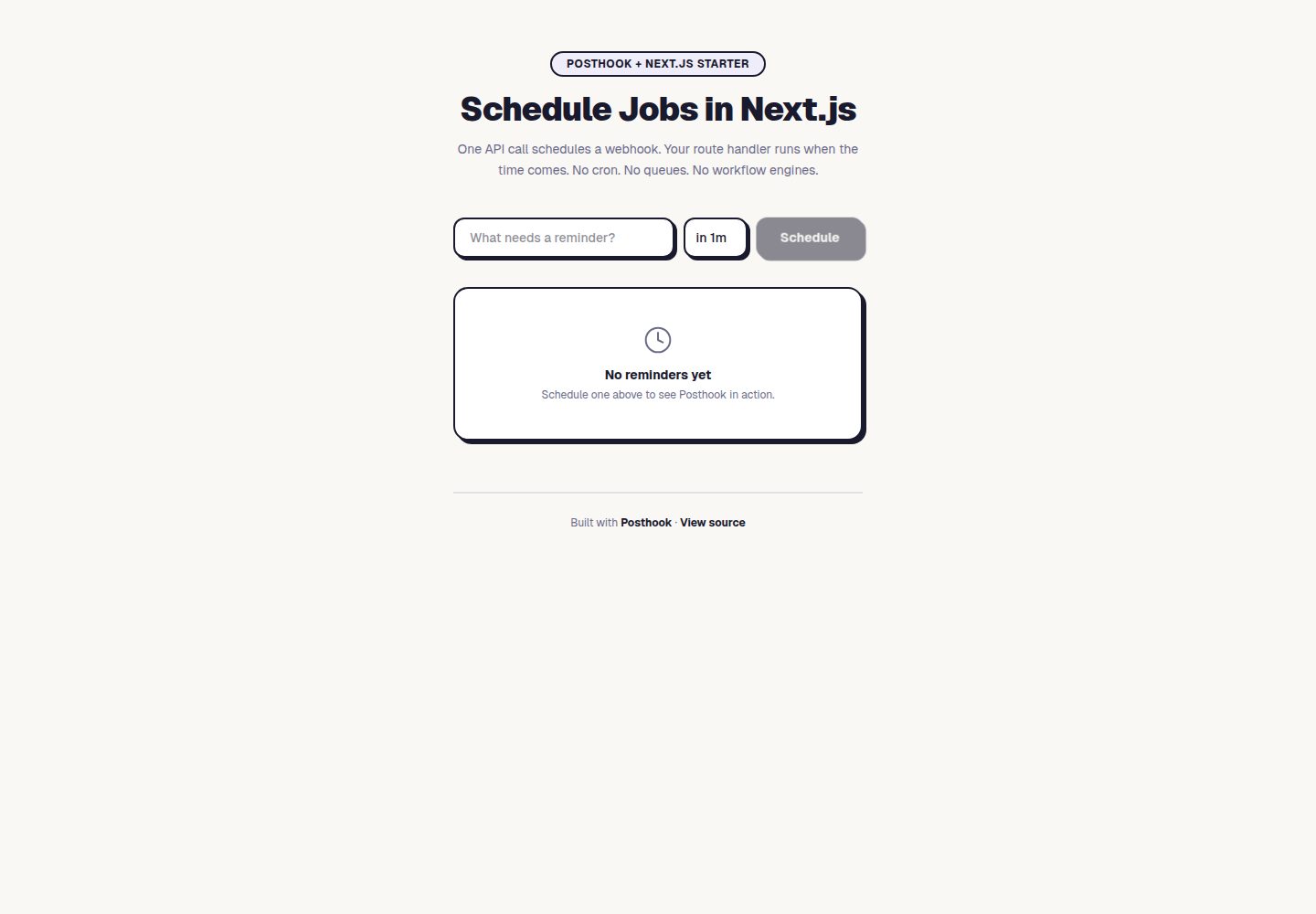
用 Posthook 安排按事件触发的提醒 webhook,无需 cron 或队列
Next.jsReact启动器
nextjs-posthook-scheduling — Next.js 启动器模板
作者 posthook
基于 Next.js 与 Posthook 的任务提醒示例项目,用 webhook 按事件安排提醒,不依赖 cron 或队列。
看看你的网站会是什么样
浏览真实页面截图,比较内容排版与手机效果。点击下方缩略图切换,放大查看整页细节。
全部页面与视图 2
截图用于了解视觉与布局,交互效果请以实际项目为准。
采集于 2026-10-03查看来源
值得关注的模板亮点
从已有项目资料中,快速了解它的特点。
创建任务时先安排 hook 再写入状态,安排失败不会留下坏任务
投递时做状态校验:提前标记完成的任务,到期的 hook 会空操作
posthook.toml 以配置即代码定义每日清理序列,删除 24 小时前已解决的任务
提供 Docker Compose 本地数据库与 posthook listen 本地投递转发
MIT 许可,代码可免费使用、修改与分发
模板详细介绍
这是一个 Next.js 启动器,演示如何用 Posthook 为每个任务安排一次性的提醒 webhook,而不引入 cron、队列或工作流引擎。项目包含仪表盘界面:创建任务时通过 Posthook 安排一个延迟触发的 webhook,页面上以倒计时显示触发时间;hook 触发后由回调路由处理,任务状态变为已提醒。如果用户在触发前手动标记完成,投递到期的 hook 会因状态校验而空操作。
数据层使用 Drizzle ORM 与 PostgreSQL,仓库附带 docker compose 配置用于本地数据库,并提供 Vercel 部署按钮(会一并开通 Neon Postgres)。posthook.toml 以配置即代码的方式定义了一个每日清理序列,用于删除 24 小时前已解决的任务;本地开发时可用 posthook CLI 初始化并部署该序列,并通过 posthook listen 把投递转发到本地服务。
README 明确说明这是演示性质的项目:真实应用中需要在提醒处理函数里补充通知、邮件或外部 API 调用逻辑;生产环境还应把 postbuild 脚本替换为正式的数据库迁移流程,因为 drizzle-kit push 可能删除列。项目采用 MIT 许可,代码可免费使用、修改和分发,但 Posthook、托管、数据库等外部服务可能另行收费,演示图片等第三方素材需单独核对许可。
Next.js启动器
适合你的项目吗?
适用场景
- 学习如何在 Next.js 中接入 Posthook 做延迟 webhook 调度
- 为任务或事件添加一次性提醒,而不搭建 cron 与队列
- 参考状态校验模式,处理用户提前完成导致 hook 失效的情况
- 用 Sequences 配置周期性的数据清理任务
适合人群
- 想了解 Posthook 调度方式与 Next.js 集成方式的开发者
- 需要按事件而非固定周期触发提醒的小型项目
- 希望以配置即代码方式管理定时清理序列的团队
上手与定制指南
结合仓库当前版本的说明,按下面的资料检查内容、配置与运行要求。
- 1
需要 Posthook 的 API key 与 signing key,以及 PostgreSQL 连接串
- 2
本地开发先启动 docker compose 的数据库,再执行 npm run db:push 与 npm run dev
- 3
用 npx posthook listen --forward http://localhost:3000 把投递转发到本地
- 4
部署后需在 Posthook 项目设置中填写部署域名,并用 posthook init 与 apply 部署清理序列
- 5
生产环境应把 postbuild 脚本替换为正式迁移流程,drizzle-kit push 可能删除列
授权与来源资料
使用条件与限制
免费使用 · 保留许可声明本次收录的是公开仓库中采用 MIT 许可的免费版本;免费范围为该版本代码,不代表外部服务或第三方素材免费。
使用时需要遵守
- 允许免费使用、修改、商用和分发该版本代码。
- 分发代码副本或实质性部分时,保留原作者版权声明和完整 MIT 许可声明。
- 代码按现状提供;担保与责任限制以原许可证及适用法律为准。
额外费用与待核对事项
- 使用该模板必须注册 Posthook 账号并获取 API key 与 signing key,属于外部服务依赖,可能产生费用。
- 部署按钮会开通 Neon Postgres 数据库,需依赖该外部托管数据库服务,可能另行收费。
- 清理序列需通过 Posthook CLI 连接项目并部署到 Posthook 服务,依赖其外部平台。
- 生产环境需自行替换 postbuild 迁移脚本,否则 drizzle-kit push 可能删除数据库列。
- 演示图片、字体、图标及其他第三方素材需按各自许可核对,不能仅凭代码的 MIT 许可判断。
- 域名、托管、数据库、支付或 AI 等外部服务可能另外收费。
查看原文依据
Permission is hereby granted, free of charge
许可证原文
Add your `POSTHOOK_API_KEY` and `POSTHOOK_SIGNING_KEY` from [posthook.io]
README 原文
provisions a Neon Postgres database
README 原文
npx posthook init # connects your project, keeps the sequence config
README 原文
https://github.com/posthook/nextjs-posthook-scheduling/blob/main/LICENSEhttps://github.com/posthook/nextjs-posthook-scheduling/blob/main/README.mdFor production, replace the `postbuild` script with a proper migration workflow (`drizzle-kit push` can drop columns)
README 原文
DeepSeek 根据仓库许可证和 README 整理 ·2026-10-03。结果仅覆盖已读取资料,依赖、图片、字体及后续条款变更以各自原文为准。
项目核对记录与介绍依据
模板资料
- 来源平台
- GitHub
- 资料与维护参考分
- 资料较完整 · 83 / 100
- 技术栈
- Next.js · React
- 网站类型
- 启动器
这个分数如何计算
本站按许可资料(最高30分)、演示链接(12分)、预览图(10分)、Star数(15分)、记录的维护时间(15分)、描述完整度(8分)、功能记录(5分)和分类资料(5分)计算。它不是代码、安全或性能测试,也不是 Google 评分;有链接不代表已实测可用。
这个项目需要核对什么
- 记录的仓库更新时间
- 2026-04-06
- 截图检查日期
- 2026-10-03
已收录演示链接。请用你的内容与屏幕尺寸检查;有演示不代表表单、认证或支付已经可用。
目录记录的主要技术栈是 Next.js。请通过依赖清单和锁文件核对实际版本与托管要求。这些说明基于收录资料,不代表代码审计或部署实测。
查看具体选型方法 →介绍的制作与核对状态
介绍由 AI 辅助整理目录与仓库资料。仓库作者不等于这篇介绍的审核者。
已完成服务器许可规则与 AI 来源核对;未经过人工编辑审核。
查看当时使用的来源资料
SHA-256: 43791a559aa9623b9d67d31b8a91ea4b9f92cc54aebcc5f81e19d966fc5f3f25
2026-10-03T04:16:01.696Z
来源文件 / 仓库# Posthook + Next.js Reminders
Schedule webhooks that fire at the right time — no cron, no queues, no workflow engines. Built with [Posthook](https://posthook.io?utm_source=nextjs-posthook-scheduling&utm_medium=readme&utm_campaign=vercel) for durable per-event scheduling.
[](https://vercel.com/new/clone?repository-url=https%3A%2F%2Fgithub.com%2Fposthook%2Fnextjs-posthook-scheduling&env=POSTHOOK_API_KEY,POSTHOOK_SIGNING_KEY&envDescription=Get%20your%20API%20key%20and%20signing%20key%20from%20posthook.io&envLink=https%3A%2F%2Fposthook.io%2Fapp%2Fsignup%3Futm_source%3Dnextjs-posthook-scheduling%26utm_medium%3Ddeploy-button%26utm_campaign%3Dvercel&stores=%5B%7B%22type%22%3A%22integration%22%2C%22integrationSlug%22%3A%22neon%22%2C%22productSlug%22%3A%22neon%22%2C%22protocol%22%3A%22storage%22%7D%5D&project-name=posthook-scheduling&repository-name=posthook-scheduling)

## How It Works
1. **Create a task** — schedules a reminder webhook via Posthook
2. **Countdown ticks** — the dashboard shows when the hook will fire
3. **Hook fires** — Posthook delivers the webhook, task status changes to "reminded"
4. **Mark done early** — the pending hook no-ops on delivery (state verification pattern)
In a real app, the webhook handler would also send a notification, trigger a workflow, or call an external API.
## Deploy to Production
1. Click the **Deploy with Vercel** button above (provisions a Neon Postgres database)
2. Add your `POSTHOOK_API_KEY` and `POSTHOOK_SIGNING_KEY` from [posthook.io](https://posthook.io/app/signup?utm_source=nextjs-posthook-scheduling&utm_medium=readme&utm_campaign=vercel)
3. Set your deployment domain in your Posthook project settings (e.g., `my-app.vercel.app`)
4. Set up the cleanup sequence:
```bash
npx posthook init # connects your project, keeps the sequence config
npx posthook apply # deploys the sequence to Posthook
```
## Local Development
```bash
git clone https://github.com/posthook/nextjs-posthook-scheduling.git
cd nextjs-posthook-scheduling
npm install
docker compose up -d db
cp .env.example .env.local # add your Posthook API key + signing key
npm run db:push
npm run dev
```
In another terminal, forward Posthook deliveries to your local server:
```bash
npx posthook listen --forward http://localhost:3000
```
Open [http://localhost:3000](http://localhost:3000), create a task with a 30s delay, and watch it fire.
## Posthook Patterns
See [PATTERNS.md](PATTERNS.md) for detailed explanations and copy-pasteable code:
- **Schedule hooks before committing state** — if scheduling fails, no broken task
- **State verification on delivery** — mark done before the hook fires, it no-ops
- **Handler as extension point** — add your notification/email/API call logic
## Recurring Cleanup with Sequences
This starter includes a daily cleanup sequence defined in `posthook.toml` using [Posthook Sequences](https://docs.posthook.io/essentials/sequences). It deletes resolved tasks older than 24 hours. See the [Deploy to Production](#deploy-to-production) section for setup.
## Project Structure
```
app/
page.tsx # Dashboard UI
create-form.tsx # Task creation form
mark-done-button.tsx # Complete task action
api/
tasks/route.ts # POST (create), GET (list)
tasks/[id]/route.ts # GET (detail), PATCH (complete)
webhooks/
remind/route.ts # Posthook reminder callback
cleanup/route.ts # Posthook sequence: daily cleanup
lib/
posthook.ts # Posthook client (lazy singleton)
tasks.ts # Task logic + Posthook scheduling
store.ts # Data access layer (Drizzle)
types.ts # TypeScript types
db/schema.ts # Drizzle schema
db/index.ts # Database connection
posthook.toml # Sequences config (config-as-code)
```
## Customize
- Change `REMINDER_DELAY` env var to set the default delay (e.g., `30s`, `5m`, `1h`, `1d`)
- Add new webhook handlers for different hook types
- Add notification logic (email, Slack, push) inside the remind handler
- See [PATTERNS.md](PATTERNS.md) for advanced patterns
- For production, replace the `postbuild` script with a proper migration workflow (`drizzle-kit push` can drop columns)
## Environment Variables
| Variable | Required | Description |
|---|---|---|
| `DATABASE_URL` | Yes | Postgres connection string |
| `POSTHOOK_API_KEY` | Yes | Posthook API key |
| `POSTHOOK_SIGNING_KEY` | Yes | Posthook signing key |
| `REMINDER_DELAY` | No | Default reminder delay (default: `1h`) |
## Tech Stack
- [Next.js](https://nextjs.org) 16 (App Router)
- [Posthook](https://posthook.io?utm_source=nextjs-posthook-scheduling&utm_medium=readme&utm_campaign=vercel) for durable per-event scheduling
- [Drizzle ORM](https://orm.drizzle.team) + PostgreSQL
- [Tailwind CSS](https://tailwindcss.com)
## License
MIT
看看同类模板
对比同技术栈与用途的模板,找到更适合的视觉与内容结构。

ai-website-cloner-template
Clone any website with one command using AI coding agents
Next.js · 启动器

Next.js SaaS Starter
Next.js SaaS Starter 是 Next.js 官方维护的 SaaS 起点模板,定位介于学习资源和可直接部署的脚手架之间。
Next.js · SaaS

Next.js Commerce
Next.js Commerce 是 Vercel 团队维护的电商启动模板,基于 Next.js App Router 构建,采用服务端渲染、React Server Components、Server Actions …
Next.js · 电商

Next-js-Boilerplate
Next-js-Boilerplate 是一个面向 Next.js 16、Tailwind CSS 4 和 TypeScript 的启动器,核心定位是开发者体验优先。
Next.js · 启动器

tailwind-nextjs-starter-blog
tailwind-nextjs-starter-blog 是一个面向个人技术博客的 Next.js 与 Tailwind CSS 启动模板,其 v2 版本基于 App Router 与 React Server Comp…
Next.js · 博客

next-forge
Production-grade Turborepo template for Next.js apps.
Next.js · 启动器