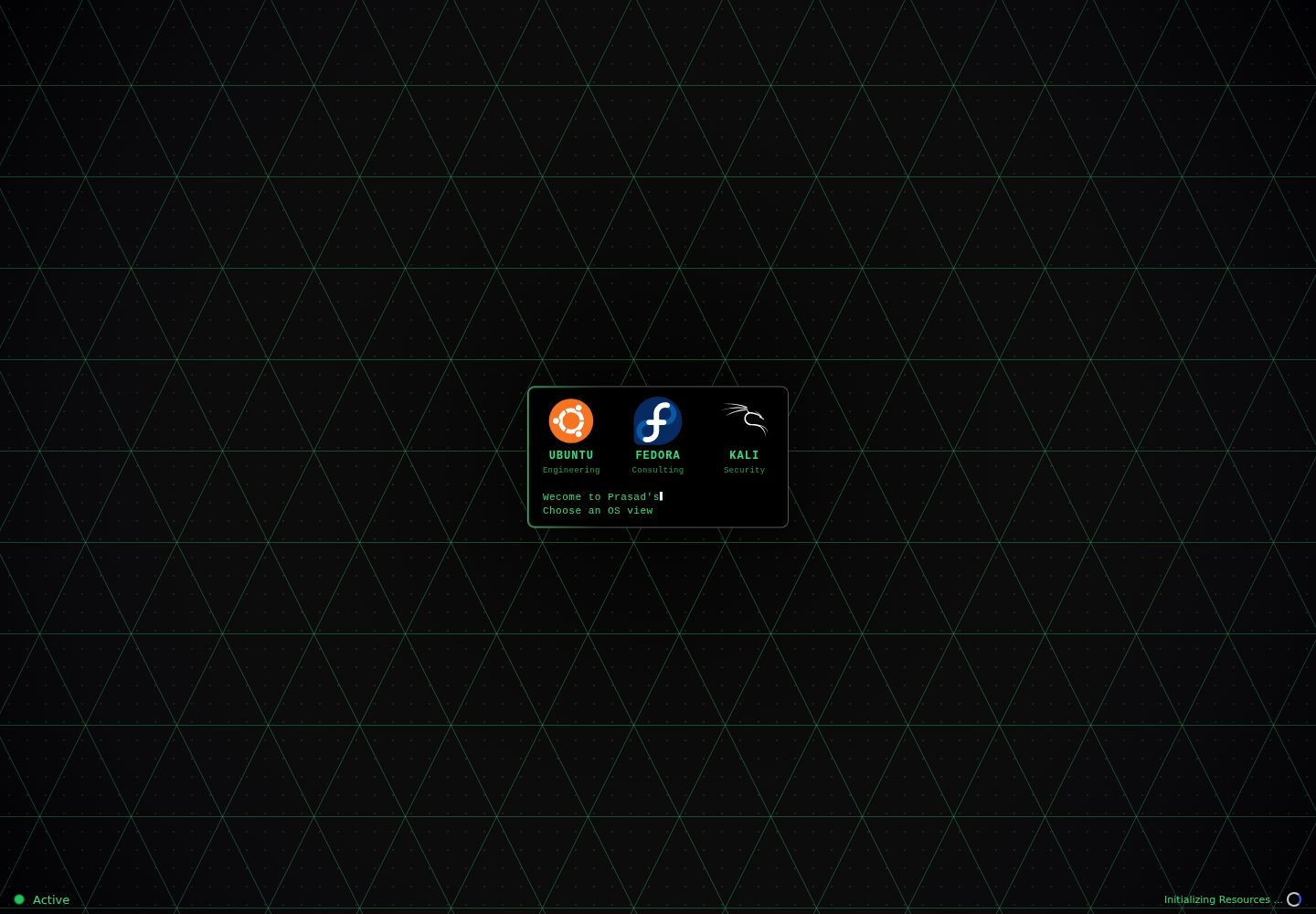
以 Linux 桌面为界面隐喻,可在 Ubuntu、Kali、Fedora 三种发行版主题间切换
React作品集
Linux-Portfolio — React 作品集模板
作者 prasadkjose
以 Linux 桌面环境为视觉主题的开发者作品集网站,用 React 与 TypeScript 实现,通过终端命令和窗口交互展示项目、简历与联系方式。
看看你的网站会是什么样
浏览真实页面截图,比较内容排版与手机效果。点击下方缩略图切换,放大查看整页细节。
全部页面与视图 2
截图用于了解视觉与布局,交互效果请以实际项目为准。
采集于 2026-10-13查看来源
值得关注的模板亮点
从已有项目资料中,快速了解它的特点。
内置终端支持 TAB/Ctrl+i 自动补全与上下方向键命令历史
提供 about、projects、resume、socials、email、education 等命令集
简历随发行版主题变化,分别对应顾问、信息安全、软件开发三个方向
包含带时钟、日历、系统公告与小组件面板的任务栏
使用 Supabase 做访客统计与会话跟踪,并用服务端函数代理 GitHub GraphQL 请求
模板详细介绍
这是一个把个人作品集做成 Linux 桌面模拟器的前端项目。页面启动后呈现类似 Linux 的桌面界面,用户可以在 Ubuntu、Kali、Fedora 三种发行版主题之间切换,界面配色与风格随之变化。核心交互是一个内置终端,支持 TAB 或 Ctrl+i 自动补全、上下方向键浏览命令历史,并提供 about、help、projects、resume、socials、email、education、clear 等命令来打开对应内容。项目同时提供图形化的任务栏,包含时钟、日历、系统公告和小组件面板。简历内容与发行版主题绑定:Ubuntu 对应顾问方向、Kali 对应信息安全方向、Fedora 对应软件开发方向。技术实现上使用 TypeScript、React、Vite 与 Styled Components,并包含 Supabase 数据库集成用于访客统计与会话跟踪(据 README 说明只记录访问量和国家位置,不存储 IP),以及一个服务端函数代理 GraphQL 请求以在服务端保存 GitHub token。仓库提供 Dockerfile 用于容器化部署,并附带 Netlify 部署状态徽章。项目基于 Kali-Linux-Hacker-Portfolio 的分支继续开发,采用 MIT 许可。
React作品集
适合你的项目吗?
适用场景
- 开发者想用终端式交互呈现个人项目与简历
- 需要同时展示多个职业方向简历的求职作品集
- 作为学习 React、TypeScript 与 Styled Components 的界面参考项目
- 用 Docker 在本地或服务器上容器化运行一个静态作品集站点
适合人群
- 具备 React 与 TypeScript 基础、希望改造现成作品集模板的开发者
- 偏好命令行交互风格、想突出技术属性的个人站点作者
- 需要一份可切换主题与简历版本的作品集源码作为起点的人
上手与定制指南
结合仓库当前版本的说明,按下面的资料检查内容、配置与运行要求。
- 1
需要 Node.js 16 或更高版本,推荐使用 pnpm,也可用 npm
- 2
本地开发执行 pnpm install 后运行 pnpm dev,默认访问 http://localhost:3000
- 3
Docker 方式:docker build -t prasad-portfolio . 后运行容器并映射 3000 端口
- 4
Supabase 与 GitHub token 相关配置需按仓库内 serverless 目录的说明自行准备
- 5
演示图片、字体、图标等第三方素材需单独核对其许可,MIT 许可仅覆盖代码
授权与来源资料
使用条件与限制
免费使用 · 保留许可声明本次收录的是公开仓库中采用 MIT 许可的免费版本;免费范围为该版本代码,不代表外部服务或第三方素材免费。
使用时需要遵守
- 允许免费使用、修改、商用和分发该版本代码。
- 分发代码副本或实质性部分时,保留原作者版权声明和完整 MIT 许可声明。
- 代码按现状提供;担保与责任限制以原许可证及适用法律为准。
额外费用与待核对事项
- 演示图片、字体、图标及其他第三方素材需按各自许可核对,不能仅凭代码的 MIT 许可判断。
- 域名、托管、数据库、支付或 AI 等外部服务可能另外收费。
- 访客统计、会话跟踪与数据持久化依赖 Supabase PostgreSQL 数据库,需自行注册 Supabase 并配置连接,属于外部服务依赖。
- 获取 GitHub 置顶仓库需部署服务端函数并配置 GitHub token,属于外部服务与 API 密钥要求。
- 项目为 Kali-Linux-Hacker-Portfolio 的分支,沿用上游代码,使用时需同时遵守上游项目的许可与署名要求。
查看原文依据
Permission is hereby granted, free of charge
许可证原文
__Supabase Database Integration__: Built-in visitor analytics, session tracking and persistent data storage using Supabase PostgreSQL database.
README 原文
__Serverless Function__: A backend function proxies GraphQL API calls (GitHub fetching pinned repos for now) to keep the token server-side.
README 原文
https://github.com/prasadkjose/Linux-Portfolio/blob/main/LICENSEhttps://github.com/prasadkjose/Linux-Portfolio/blob/main/README.mdThis project is based on a fork of [Kali-Linux-Hacker-Portfolio](https://github.com/jihedkdiss/Kali-Linux-Hacker-Portfolio).
README 原文
DeepSeek 根据仓库许可证和 README 整理 ·2026-10-13。结果仅覆盖已读取资料,依赖、图片、字体及后续条款变更以各自原文为准。
项目核对记录与介绍依据
模板资料
- 来源平台
- GitHub
- 资料与维护参考分
- 资料较完整 · 83 / 100
- 技术栈
- React
- 网站类型
- 作品集
这个分数如何计算
本站按许可资料(最高30分)、演示链接(12分)、预览图(10分)、Star数(15分)、记录的维护时间(15分)、描述完整度(8分)、功能记录(5分)和分类资料(5分)计算。它不是代码、安全或性能测试,也不是 Google 评分;有链接不代表已实测可用。
这个项目需要核对什么
- 记录的仓库更新时间
- 2026-07-29
- 截图检查日期
- 2026-10-13
已收录演示链接。请用你的内容与屏幕尺寸检查;有演示不代表表单、认证或支付已经可用。
目录记录的主要技术栈是 React。请通过依赖清单和锁文件核对实际版本与托管要求。这些说明基于收录资料,不代表代码审计或部署实测。
查看具体选型方法 →介绍的制作与核对状态
介绍由 AI 辅助整理目录与仓库资料。仓库作者不等于这篇介绍的审核者。
审核声明: [email protected] · 2026-10-13
查看当时使用的来源资料
SHA-256: 0f640034860cfe86a9906ee8341ea00342514056a8921fe5cc053b34229f6f64
2026-10-13T03:23:02.450Z
来源文件 / 仓库# Linux-like Portfolio Website [](https://app.netlify.com/sites/prasadkjose/deploys) [](LICENSE) [](https://github.com/prasadkjose/Kali-Linux-Portfolio) [](https://github.com/prasadkjose/Kali-Linux-Portfolio) [](https://prasadkjose.com) My developer portfolio website themed after Linux, built with React & TypeScript, simulating a Linux desktop environment to showcase projects, resume, and contact information. ## 🚀 Features - **Linux Desktop Experience**: With Linux themes and colours. Choose between Ubuntu, Kali and Fedora distros at any time and see the UI change. - **Interactive Terminal**: Built-in Linux Terminal for you command line junkies with autocomplete (TAB/Ctrl+i) and command history (Up/Down) - **Rich Command Set**: Navigate through `about`, `help`, `projects`, `resume`, `socials`, `email`, `education`, and more - **Keyboard-First Design**: Type commands, open windows, toggle fullscreen for optimal developer experience - **Responsive Design**: Works seamlessly across desktop, tablet, and mobile devices - **Dynamic Resume**: Choose between Ubuntu, Kali, and Fedora themes to view different professional resumes - Ubuntu shows Consultant resume, Kali shows Information Security resume, and Fedora shows SDE resume - __Resource Preloading__: Critical assets are preloaded after the splash screen for faster subsequent renders. - __Supabase Database Integration__: Built-in visitor analytics, session tracking and persistent data storage using Supabase PostgreSQL database. Handles anonymous visitor metrics securely with row level security. **Tracks only visitor counts and country location, no IP addresses are stored or logged.** - __Serverless Function__: A backend function proxies GraphQL API calls (GitHub fetching pinned repos for now) to keep the token server-side. Look at [serverless/readme](src/serverless/README.md) - __Docker Support__: Dockerfile included for containerized deployment. - **Modern Taskbar**: Fully featured desktop taskbar with clock, calendar, system announcements and widget panel. See [Taskbar Documentation](src/layout/taskbar/README.md) for full details. ## 🛠️ Tech Stack [](https://www.typescriptlang.org/) [](https://reactjs.org/) [](https://vitejs.dev/) [](https://styled-components.com/) [](https://supabase.com/) ## 📦 Installation & Setup ### Prerequisites - Node.js (version 16 or higher) - pnpm (recommended) or npm ### Local Development 1. **Clone the repository:** ```bash git clone https://github.com/prasadkjose/Linux-Portfolio.git cd Linux-Portfolio ``` 2. **Install dependencies:** ```bash # Using pnpm (recommended) pnpm install # Or using npm npm install ``` 3. **Start development server:** ```bash pnpm dev ``` 4. **Open your browser:** Navigate to `http://localhost:3000` to view the portfolio ### Docker Setup For containerized development: ```bash # Build the Docker image docker build -t prasad-portfolio . # Run the container docker run -p 127.0.0.1:3000:3000 prasad-portfolio ``` ## 🎯 Usage Once the application is running, you'll be greeted with a Linux-style desktop interface. Here are some commands you can try: - `help` - Display available commands - `about` - Learn about the developer - `projects` - View featured projects - `resume` - Access the professional resume - `socials` - View social media links - `email` - Get contact information - `education` - View educational background - `clear` - Clear the terminal output ### Keyboard Shortcuts - **TAB** or **Ctrl+i** - Autocomplete commands - **Up/Down Arrow** - Navigate command history - **F11** - Toggle fullscreen mode ## 🤝 Contributing We welcome contributions! Here's how to get started: 1. **Fork the repository** on GitHub 2. **Clone your fork** locally 3. **Create a feature branch** with a descriptive name 4. **Make your changes** following our coding standards 5. **Test your changes** thoroughly 6. **Submit a pull request** with a clear description ### Development Guidelines - Use TypeScript for type safety - Follow the existing code style and patterns - Add appropriate comments for complex logic - Ensure responsive design across all screen sizes - Test in multiple browsers ## 📄 License This project is licensed under the MIT License - see the [LICENSE](LICENSE) file for details. ## 👥 Author **Prasad Koshy Jose** [](https://prasadkjose.com) [](https://www.linkedin.com/in/prasadkjose) [](https://x.com/prasadkjose) ## 🙏 Acknowledgements This project is based on a fork of [Kali-Linux-Hacker-Portfolio](https://github.com/jihedkdiss/Kali-Linux-Hacker-Portfolio). I would like to thank the original authors and contributors for their excellent work and for making the project open source. This fork builds upon their work with additional modifications and improvements to better showcase my professional portfolio. ## 📊 Project Statistics - **Languages**: TypeScript, React, CSS-in-JS with styled components. - **Framework**: React 17+ - **Build Tool**: Vite - **Package Manager**: pnpm (recommended) - **License**: MIT ## 🔗 Quick Links - [Live Demo](https://prasadkjose.com) - [GitHub Repository](https://github.com/prasadkjose/Linux-Portfolio) - [Issues](https://github.com/prasadkjose/Linux-Portfolio/issues) - [Pull Requests](https://github.com/prasadkjose/Linux-Portfolio/pulls) --- **Built with ❤️ using React & TypeScript**
看看同类模板
对比同技术栈与用途的模板,找到更适合的视觉与内容结构。

react-portfolio-template
React powered portfolio website template for developers
React · 作品集

personal-website-react
personal-website-react 是一个面向开发者的个人作品集单页模板,由 React 和 Material-UI 构建,并通过 Create React App 初始化。
React · 作品集

karngyan.com
karngyan.com 是一个面向开发者的个人网站与博客模板,作者用它搭建了自己的站点,并公开了完整代码。 模板的核心定位很明确:让写作者专注于内容,而不是花时间搭建基础设施。
React · 作品集

react-portfolio-template
react-portfolio-template 是一个由 Ryan Balieiro 开发的 React 作品集模板,定位为“sleek, futuristic”,适合开发者展示个人履历。
React · 作品集

portfolio
Personal website, Data scientist portfolio template
React · 作品集

react-portfolio
react-portfolio 是一个面向开发者的个人作品集模板,基于 React 16 和 Create React App 构建,界面样式采用 Material-UI。
React · 作品集