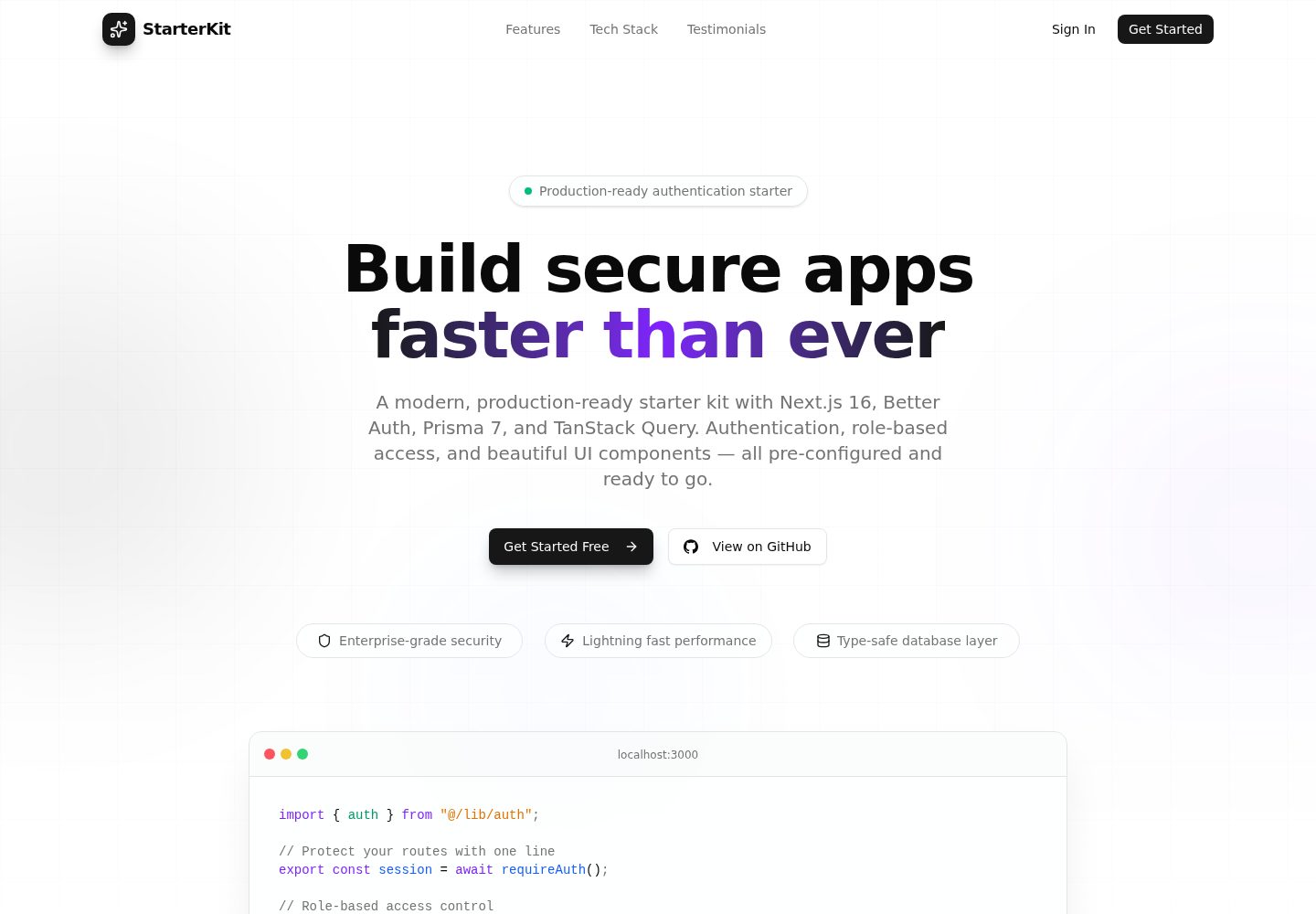
使用 Better Auth 实现邮箱密码登录与 Google OAuth,并提供登录、注册、服务商注册等页面
Next.jsReactSaaS启动器
nextjs-better-auth — Next.js SaaS模板
作者 rogenecarl
基于 Next.js 与 Better Auth 的认证启动模板,集成 Prisma、PostgreSQL 与角色权限控制,含登录注册、Google OAuth 与后台页面。
看看你的网站会是什么样
浏览真实页面截图,比较内容排版与手机效果。点击下方缩略图切换,放大查看整页细节。
全部页面与视图 2
截图用于了解视觉与布局,交互效果请以实际项目为准。
采集于 2026-10-01查看来源
值得关注的模板亮点
从已有项目资料中,快速了解它的特点。
内置 USER、ADMIN、PROVIDER 三种角色及对应受保护仪表盘路由
Prisma 连接 PostgreSQL,README 给出 Neon、Supabase、Railway、Render 与自建数据库的连接串示例
提供 requireAuth、requireRole、getServerSession 服务端辅助方法与 useAuth、AuthGuard 等客户端守卫
认证接口带速率限制,并包含会话 Cookie 缓存与跨标签页登出同步
使用 Tailwind CSS 与 shadcn/ui 组件,表单结合 React Hook Form 与 Zod 校验
模板详细介绍
这是一个面向 SaaS 场景的 Next.js 认证启动模板,仓库采用 MIT 许可。认证部分使用 Better Auth,支持邮箱密码登录与 Google OAuth;数据层使用 Prisma 连接 PostgreSQL,README 说明通过驱动适配器访问数据库。模板内置 USER、ADMIN、PROVIDER 三种角色,并分别为其提供 /dashboard、/admin/dashboard、/provider/dashboard 受保护页面,角色跳转集中配置在 src/config/auth.ts。
项目结构按功能划分:src/app 下包含 (auth)、(landing)、(user)、admin、provider 等路由组与 api/auth 接口;src/actions/auth 存放登录、注册、服务商注册的服务端操作;src/components 分为 auth 与 ui 两部分;src/lib 集中 Better Auth 服务端配置、React 客户端、服务端辅助函数与 Prisma 单例;src/schema 存放 Zod 校验规则。README 还提供了 requireAuth、requireRole、getServerSession 等服务端辅助方法,以及 useAuth 钩子和 AuthGuard、AdminOnly、ProviderOnly、UserOnly 等客户端守卫组件的用法示例。
模板附带路由保护(README 称基于 Next.js 的 optimistic proxy)、认证接口速率限制(如登录与注册 5 分钟 5 次、找回密码 5 分钟 3 次)、会话 Cookie 缓存与跨标签页登出同步。样式使用 Tailwind CSS 与 shadcn/ui 组件,表单结合 React Hook Form 与 Zod,客户端数据获取使用 TanStack Query。
使用前需准备 Node.js 18+、包管理器与 PostgreSQL 数据库,并配置 DATABASE_URL、BETTER_AUTH_SECRET、BETTER_AUTH_URL、NEXT_PUBLIC_APP_URL,Google 登录还需 GOOGLE_CLIENT_ID 与 GOOGLE_CLIENT_SECRET。README 列出了 Neon、Supabase、Railway、Render 及自建 Docker 的连接串示例,并建议在 Vercel 部署。仓库星标数较少,属于个人维护的起步模板;第三方素材与外部服务(数据库、托管、OAuth)的许可与费用需自行核对。
Next.jsReactSaaS启动器
适合你的项目吗?
适用场景
- 为 SaaS 项目搭建带角色区分的登录注册与后台入口
- 需要邮箱密码加 Google OAuth 双登录方式的 Next.js 应用起步
- 使用 Prisma 与 PostgreSQL 并希望预先定义用户角色与权限路由的项目
- 需要认证接口限流、会话缓存等基础安全配置的模板起点
适合人群
- 熟悉 Next.js App Router 与 TypeScript 的开发者
- 计划使用 PostgreSQL 并接受 Prisma 作为 ORM 的团队
- 需要多角色(普通用户、管理员、服务商)权限结构的 SaaS 项目
- 希望以 MIT 许可代码为基础自行修改和分发的使用者
上手与定制指南
结合仓库当前版本的说明,按下面的资料检查内容、配置与运行要求。
- 1
需 Node.js 18+ 与 pnpm/npm/yarn,并准备一个 PostgreSQL 数据库
- 2
复制 .env.example 为 .env,填写 DATABASE_URL、BETTER_AUTH_SECRET(至少 32 字符)、BETTER_AUTH_URL 与 NEXT_PUBLIC_APP_URL
- 3
Google 登录需在 Google Cloud Console 创建 OAuth 客户端,回调地址为 {APP_URL}/api/auth/callback/google
- 4
执行 npx prisma generate 后用 npx prisma db push 或 prisma migrate dev 建表,再运行 pnpm dev
- 5
部署到 Vercel 等平台时需单独设置生产环境变量,数据库、托管与 OAuth 服务可能产生额外费用
授权与来源资料
使用条件与限制
免费使用 · 保留许可声明本次收录的是公开仓库中采用 MIT 许可的免费版本;免费范围为该版本代码,不代表外部服务或第三方素材免费。
使用时需要遵守
- 允许免费使用、修改、商用和分发该版本代码。
- 分发代码副本或实质性部分时,保留原作者版权声明和完整 MIT 许可声明。
- 代码按现状提供;担保与责任限制以原许可证及适用法律为准。
额外费用与待核对事项
- 使用该模板必须自行准备并运行一个 PostgreSQL 数据库,模板本身不包含数据库服务,需承担数据库托管或自建成本。
- Google 登录为可选功能,启用时需自行在 Google Cloud Console 创建 OAuth 客户端并提供 GOOGLE_CLIENT_ID 与 GOOGLE_CLIENT_SECRET。
- 必须自行生成并配置至少 32 字符的 BETTER_AUTH_SECRET,否则认证功能无法正常安全运行。
- 部署到 Vercel 等平台时需自行配置生产环境变量,托管、数据库与 OAuth 服务可能产生额外费用。
- 演示图片、字体、图标及其他第三方素材需按各自许可核对,不能仅凭代码的 MIT 许可判断。
- 域名、托管、数据库、支付或 AI 等外部服务可能另外收费。
查看原文依据
Permission is hereby granted, free of charge
许可证原文
PostgreSQL database (see [Database Providers](#database-providers))
README 原文
Google OAuth (optional)
README 原文
BETTER_AUTH_SECRET="generate-a-strong-secret-at-least-32-characters"
README 原文
https://github.com/rogenecarl/nextjs-better-auth/blob/main/LICENSEhttps://github.com/rogenecarl/nextjs-better-auth/blob/main/README.mdAdd environment variables in Vercel dashboard
README 原文
DeepSeek 根据仓库许可证和 README 整理 ·2026-10-01。结果仅覆盖已读取资料,依赖、图片、字体及后续条款变更以各自原文为准。
项目核对记录与介绍依据
模板资料
- 来源平台
- GitHub
- 资料与维护参考分
- 资料较完整 · 88 / 100
- 技术栈
- Next.js · React
- 网站类型
- SaaS · 启动器
这个分数如何计算
本站按许可资料(最高30分)、演示链接(12分)、预览图(10分)、Star数(15分)、记录的维护时间(15分)、描述完整度(8分)、功能记录(5分)和分类资料(5分)计算。它不是代码、安全或性能测试,也不是 Google 评分;有链接不代表已实测可用。
这个项目需要核对什么
- 记录的仓库更新时间
- 2026-07-15
- 截图检查日期
- 2026-10-01
已收录演示链接。请用你的内容与屏幕尺寸检查;有演示不代表表单、认证或支付已经可用。
目录记录的主要技术栈是 Next.js。请通过依赖清单和锁文件核对实际版本与托管要求。这些说明基于收录资料,不代表代码审计或部署实测。
查看具体选型方法 →介绍的制作与核对状态
介绍由 AI 辅助整理目录与仓库资料。仓库作者不等于这篇介绍的审核者。
已完成服务器许可规则与 AI 来源核对;未经过人工编辑审核。
查看当时使用的来源资料
SHA-256: 38cbdf7b1442092f72e2d20c768ffa65d49aaf175b67919ec187dabcf751a64c
2026-10-01T01:23:35.629Z
来源文件 / 仓库# Next.js 16 + Better Auth + Prisma 7 Starter Kit A production-ready authentication starter kit built with the latest Next.js 16, Better Auth, and Prisma 7. Features role-based access control, Google OAuth, and a clean, scalable architecture. **[Live Demo](https://nextjs16-betterauth-prisma-starterk.vercel.app/)** --- ## Features - **Next.js 16** with App Router and React 19 - **Better Auth** for authentication (email/password + Google OAuth) - **Prisma 7** with PostgreSQL (using driver adapters) - **Role-Based Access Control** (USER, ADMIN, PROVIDER) - **Route Protection** with optimistic proxy (Next.js 16+ feature) - **TanStack Query** for client-side data fetching - **Zod 4** for form validation - **Tailwind CSS 4** with shadcn/ui components - **Rate Limiting** built-in for auth endpoints - **Session Cookie Caching** for reduced database calls - **Cross-Tab Sign Out Sync** - **TypeScript** throughout --- ## Tech Stack | Category | Technology | |----------|------------| | Framework | Next.js 16 | | Authentication | Better Auth | | Database ORM | Prisma 7 | | Database | PostgreSQL | | Styling | Tailwind CSS 4 + shadcn/ui | | Forms | React Hook Form + Zod 4 | | Data Fetching | TanStack Query | | Language | TypeScript | --- ## Getting Started ### Prerequisites - Node.js 18+ - pnpm (recommended) or npm/yarn - PostgreSQL database (see [Database Providers](#database-providers)) ### 1. Clone the Repository ```bash git clone https://github.com/rogenecarl/nextjs16-betterauth-prisma-starterkit.git cd nextjs16-betterauth-prisma-starterkit ``` ### 2. Install Dependencies ```bash pnpm install ``` ### 3. Set Up Environment Variables Copy the example environment file: ```bash cp .env.example .env ``` Edit `.env` with your values: ```env # Database (PostgreSQL connection string) DATABASE_URL="postgresql://user:password@host:5432/database?sslmode=require" # Better Auth BETTER_AUTH_SECRET="generate-a-strong-secret-at-least-32-characters" BETTER_AUTH_URL="http://localhost:3000" # Google OAuth (optional) GOOGLE_CLIENT_ID="your-google-client-id" GOOGLE_CLIENT_SECRET="your-google-client-secret" # App URL NEXT_PUBLIC_APP_URL="http://localhost:3000" ``` Generate a secure secret: ```bash openssl rand -base64 32 ``` ### 4. Set Up the Database Generate the Prisma client and push the schema to your database: ```bash # Generate Prisma client npx prisma generate # Push schema to database (creates tables) npx prisma db push ``` Or create a migration for version control: ```bash npx prisma migrate dev --name init ``` ### 5. Run the Development Server ```bash pnpm dev ``` Open [http://localhost:3000](http://localhost:3000) in your browser. --- ## Database Providers This starter kit supports multiple PostgreSQL providers. Update your `DATABASE_URL` accordingly: ### Neon (Recommended for Vercel) ```env DATABASE_URL="postgresql://user:[email protected]/dbname?sslmode=require" ``` ### Supabase ```env DATABASE_URL="postgresql://postgres.[project-ref]:[password]@aws-0-[region].pooler.supabase.com:6543/postgres" ``` ### Railway ```env DATABASE_URL="postgresql://postgres:[password]@[host].railway.app:5432/railway" ``` ### Render ```env DATABASE_URL="postgresql://user:pass@[host].render.com:5432/dbname?sslmode=require" ``` ### Self-Hosted / Docker ```env DATABASE_URL="postgresql://postgres:password@localhost:5432/mydb" ``` --- ## Project Structure ``` src/ ├── actions/auth/ # Server actions (signIn, signUp, signUpProvider) ├── app/ │ ├── (auth)/ # Auth pages (login, register, register-provider) │ ├── (landing)/ # Landing page │ ├── (user)/ # User dashboard (protected) │ ├── admin/ # Admin dashboard (protected) │ ├── provider/ # Provider dashboard (protected) │ └── api/auth/ # Better Auth API routes ├── components/ │ ├── auth/ # Auth components (forms, guards) │ └── ui/ # shadcn/ui components ├── config/ │ └── auth.ts # Centralized auth config (role redirects) ├── context/ # React Query provider ├── hooks/ # Custom hooks (useAuth, useRequireAuth) ├── lib/ │ ├── generated/prisma/ # Prisma client (auto-generated) │ ├── auth.ts # Better Auth server config │ ├── auth-client.ts # Better Auth React client │ ├── auth-server.ts # Server-side auth helpers │ └── db.ts # Prisma singleton ├── schema/ # Zod validation schemas ├── types/ # TypeScript types └── proxy.ts # Route protection (optimistic) ``` --- ## Authentication ### User Roles Three roles are available out of the box: | Role | Dashboard | Description | |------|-----------|-------------| | `USER` | `/dashboard` | Default role for regular users | | `ADMIN` | `/admin/dashboard` | Administrative access | | `PROVIDER` | `/provider/dashboard` | Service provider access | ### Auth Pages - `/login` - Sign in with email/password or Google - `/register` - User registration - `/register-provider` - Provider registration - `/choose-role` - Role selection (if applicable) ### Server-Side Helpers ```typescript // In Server Components import { requireAuth, requireRole, getServerSession } from "@/lib/auth-server" // Require authentication export default async function ProtectedPage() { const session = await requireAuth() return <div>Hello {session.user.name}</div> } // Require specific role export default async function AdminPage() { const session = await requireRole("ADMIN") return <div>Admin Panel</div> } ``` ### Client-Side Hooks ```typescript // In Client Components import { useAuth } from "@/hooks" export function MyComponent() { const { user, isAuthenticated, isAdmin, signOut, isPending } = useAuth() if (isPending) return <Loading /> if (!isAuthenticated) return <LoginPrompt /> return <div>Hello {user.name}</div> } ``` ### Auth Guard Components ```tsx import { AuthGuard, AdminOnly, ProviderOnly, UserOnly } from "@/components/auth/auth-guard" // Basic authentication guard <AuthGuard fallback={<Loading />}> <ProtectedContent /> </AuthGuard> // Role-specific guards <AdminOnly> <AdminPanel /> </AdminOnly> <ProviderOnly> <ProviderDashboard /> </ProviderOnly> ``` --- ## Google OAuth Setup 1. Go to [Google Cloud Console](https://console.cloud.google.com/apis/credentials) 2. Create a new OAuth 2.0 Client ID 3. Add authorized redirect URI: `{YOUR_APP_URL}/api/auth/callback/google` 4. Copy the Client ID and Client Secret to your `.env` file --- ## Available Scripts ```bash pnpm dev # Start development server pnpm build # Production build pnpm start # Start production server pnpm lint # Run ESLint # Database npx prisma generate # Regenerate Prisma client npx prisma migrate dev --name # Create migration npx prisma db push # Push schema changes npx prisma studio # Open Prisma Studio GUI ``` --- ## Deployment ### Vercel (Recommended) 1. Push your code to GitHub 2. Import the repository in [Vercel](https://vercel.com) 3. Add environment variables in Vercel dashboard 4. Deploy The `postinstall` script automatically runs `prisma generate` during deployment. ### Environment Variables for Production Make sure to set these in your deployment platform: - `DATABASE_URL` - Your production PostgreSQL connection string - `BETTER_AUTH_SECRET` - A strong, unique secret (different from development) - `BETTER_AUTH_URL` - Your production URL (e.g., `https://yourdomain.com`) - `NEXT_PUBLIC_APP_URL` - Same as `BETTER_AUTH_URL` - `GOOGLE_CLIENT_ID` - Google OAuth client ID - `GOOGLE_CLIENT_SECRET` - Google OAuth client secret --- ## Customization ### Adding a New Role 1. Update the `UserRole` enum in `prisma/schema.prisma`: ```prisma enum UserRole { USER ADMIN PROVIDER MODERATOR // Add new role } ``` 2. Run `npx prisma db push` or create a migration 3. Add the role redirect in `src/config/auth.ts`: ```typescript export const ROLE_REDIRECTS: Record<Role, string> = { ADMIN: "/admin/dashboard", PROVIDER: "/provider/dashboard", USER: "/dashboard", MODERATOR: "/moderator/dashboard", // Add redirect } ``` 4. Update `src/proxy.ts` if needed for route protection ### Adding Social Providers Better Auth supports multiple OAuth providers. Add them in `src/lib/auth.ts`: ```typescript socialProviders: { google: { ... }, github: { clientId: process.env.GITHUB_CLIENT_ID!, clientSecret: process.env.GITHUB_CLIENT_SECRET!, }, } ``` --- ## Rate Limiting Built-in rate limiting protects auth endpoints: | Endpoint | Window | Max Requests | |----------|--------|--------------| | `/sign-in/email` | 5 min | 5 | | `/sign-up/email` | 5 min | 5 | | `/forget-password` | 5 min | 3 | | `/reset-password` | 5 min | 5 | | `/get-session` | 1 min | 20 | Configure in `src/lib/auth.ts`. --- ## Author **Rogene Carl** - GitHub: [@rogenecarl](https://github.com/rogenecarl) --- ## Contributing Contributions are welcome! Please feel free to submit a Pull Request. --- ## License This project is open source and available under the [MIT License](LICENSE). --- ## Acknowledgments - [Next.js](https://nextjs.org/) - [Better Auth](https://better-auth.com/) - [Prisma](https://prisma.io/) - [shadcn/ui](https://ui.shadcn.com/) - [TanStack Query](https://tanstack.com/query)
看看同类模板
对比同技术栈与用途的模板,找到更适合的视觉与内容结构。

ai-website-cloner-template
Clone any website with one command using AI coding agents
Next.js · 启动器

Next.js SaaS Starter
Next.js SaaS Starter 是 Next.js 官方维护的 SaaS 起点模板,定位介于学习资源和可直接部署的脚手架之间。
Next.js · SaaS

Next.js Commerce
Next.js Commerce 是 Vercel 团队维护的电商启动模板,基于 Next.js App Router 构建,采用服务端渲染、React Server Components、Server Actions …
Next.js · 电商

Next-js-Boilerplate
Next-js-Boilerplate 是一个面向 Next.js 16、Tailwind CSS 4 和 TypeScript 的启动器,核心定位是开发者体验优先。
Next.js · 启动器

tailwind-nextjs-starter-blog
tailwind-nextjs-starter-blog 是一个面向个人技术博客的 Next.js 与 Tailwind CSS 启动模板,其 v2 版本基于 App Router 与 React Server Comp…
Next.js · 博客

next-forge
Production-grade Turborepo template for Next.js apps.
Next.js · 启动器