Next.js App Router + TypeScript + Tailwind CSS + shadcn/ui
Next.jsReact启动器
template-static — Next.js 启动器模板
作者 romkagribok
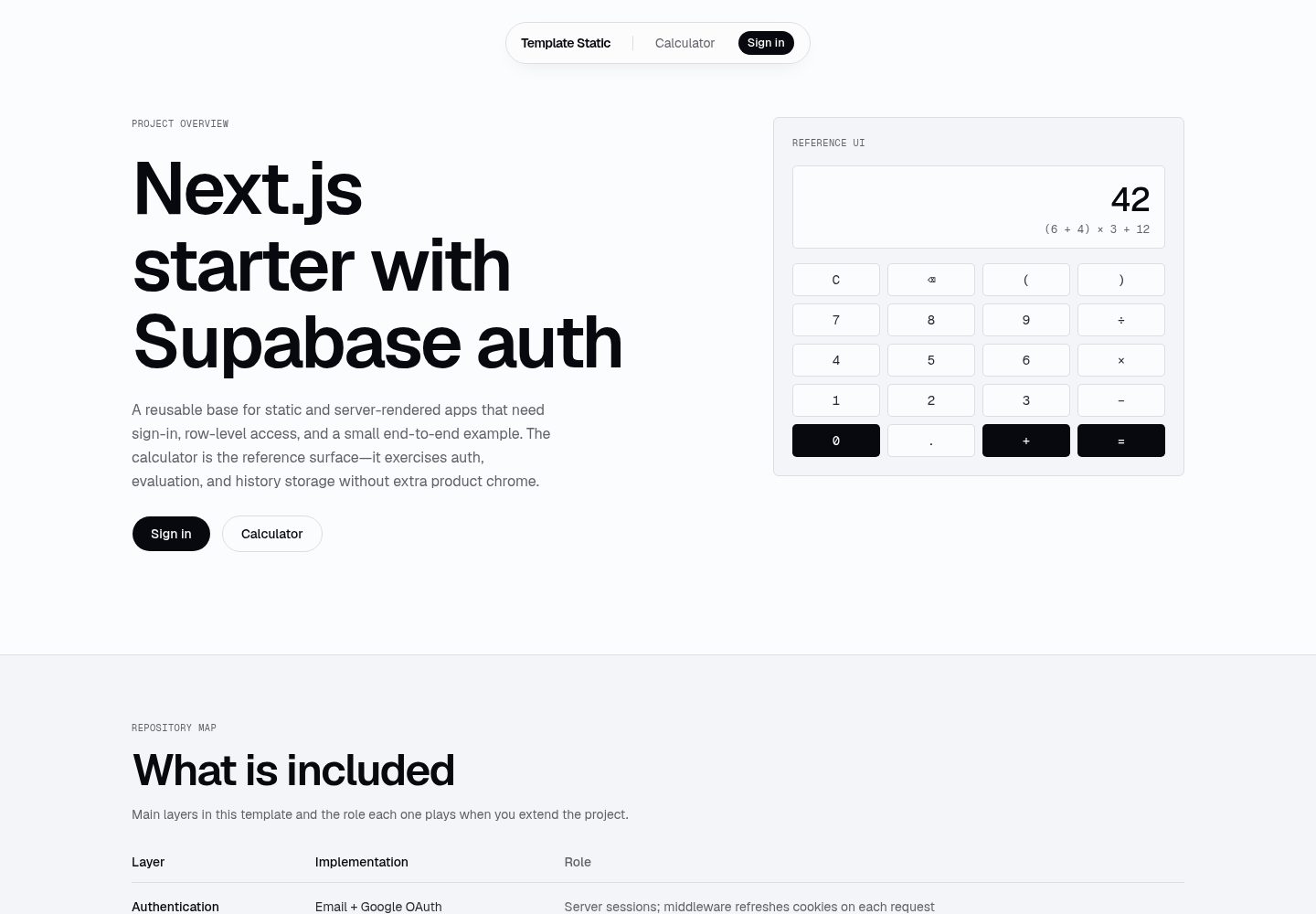
基于 Next.js App Router 的可复用模板,集成 Supabase 邮箱/密码与 Google 登录、Postgres 持久化和 Vercel 部署,附带一个带历史记录的演示计算器。
看看你的网站会是什么样
浏览真实页面截图,比较内容排版与手机效果。点击下方缩略图切换,放大查看整页细节。
全部页面与视图 2
截图用于了解视觉与布局,交互效果请以实际项目为准。
采集于 2026-10-14查看来源
值得关注的模板亮点
从已有项目资料中,快速了解它的特点。
Supabase SSR 认证:邮箱/密码注册登录、Google OAuth、会话刷新中间件
Postgres 持久化与 RLS:profiles 与 calculator_history 表
Zod 校验的服务器操作:saveCalculation、listHistory、clearHistory
演示计算器使用安全表达式求值器(未使用 eval()),支持访客历史或登录后按用户持久化
包含落地页与登录页,便于定制为新项目
模板详细介绍
这是一个可复用的 Next.js 模板,README 说明其包含 Supabase SSR 认证(邮箱/密码注册与登录、Google OAuth、会话刷新中间件)、Postgres 持久化与 RLS(profiles 与 calculator_history 表)、Zod 校验的服务器操作(saveCalculation、listHistory、clearHistory),以及一个演示计算器(使用安全表达式求值器,未使用 eval(),提供键盘 UI,未登录时使用访客会话历史,登录后按用户持久化)。模板还包含落地页与登录页,供新项目定制。
使用方式上,README 提供了从模板创建仓库、安装依赖、配置环境变量、应用数据库迁移、本地运行以及替换演示计算器的步骤,并给出 Supabase、Google OAuth 与 Vercel 的人工配置清单和冒烟测试步骤。
README 未说明该模板的生产就绪程度、性能表现或除上述技术栈之外的具体框架版本号;previews 仅证明截图存在,不代表页面功能。
Next.js启动器
适合你的项目吗?
适用场景
- 需要快速搭建带 Supabase 认证与 Postgres 持久化的 Next.js 项目
- 希望参考邮箱/密码与 Google OAuth 登录、会话刷新中间件的实现方式
- 需要一个使用安全表达式求值器、带历史记录面板的计算器演示
- 计划在 Vercel 上部署并配置 Supabase 环境变量与回调 URL
适合人群
- 熟悉 Next.js 与 Supabase、希望复用认证与数据库模板的开发者
- 需要从模板创建新项目并替换演示计算器的团队
- 需要参考 Supabase RLS、服务器操作与 OAuth 回调配置的开发者
上手与定制指南
结合仓库当前版本的说明,按下面的资料检查内容、配置与运行要求。
- 1
从模板创建仓库或克隆后重新指向远程,运行 npm install 安装依赖
- 2
复制 .env.example 为 .env.local,填入 NEXT_PUBLIC_SUPABASE_URL 与 NEXT_PUBLIC_SUPABASE_PUBLISHABLE_KEY
- 3
在 Supabase 创建项目并运行 npx supabase db push 应用迁移,创建 profiles 与 calculator_history 表及 RLS
- 4
在 Supabase 配置 Site URL 与 Redirect URLs(本地与生产),并按 README 配置邮箱与 Google 认证提供方
- 5
在 Vercel 导入仓库并添加环境变量,部署后将 Vercel URL 加入 Supabase 的 Site URL 与 Redirect URLs
授权与来源资料
使用条件与限制
免费使用 · 保留许可声明本次收录的是公开仓库中采用 MIT 许可的免费版本;免费范围为该版本代码,不代表外部服务或第三方素材免费。
使用时需要遵守
- 允许免费使用、修改、商用和分发该版本代码。
- 分发代码副本或实质性部分时,保留原作者版权声明和完整 MIT 许可声明。
- 代码按现状提供;担保与责任限制以原许可证及适用法律为准。
额外费用与待核对事项
- 演示图片、字体、图标及其他第三方素材需按各自许可核对,不能仅凭代码的 MIT 许可判断。
- 域名、托管、数据库、支付或 AI 等外部服务可能另外收费。
- 使用前必须填写 NEXT_PUBLIC_SUPABASE_URL 与 NEXT_PUBLIC_SUPABASE_PUBLISHABLE_KEY 环境变量,否则无法连接 Supabase。
- 需要自行在 supabase.com 创建 Supabase 项目,模板本身不提供托管后端。
- 启用 Google 登录需在 Google Cloud Console 创建 OAuth 2.0 客户端并配置凭据。
- 部署需在 vercel.com 导入 GitHub 仓库并配置环境变量。
- SUPABASE_SECRET_KEY 为可选,仅用于服务端管理任务,不应暴露给客户端。
查看原文依据
Permission is hereby granted, free of charge
许可证原文
Fill in `NEXT_PUBLIC_SUPABASE_URL` and `NEXT_PUBLIC_SUPABASE_PUBLISHABLE_KEY` (see setup checklist below).
README 原文
- [ ] Create a project at [supabase.com](https://supabase.com)
README 原文
- [ ] [Google Cloud Console](https://console.cloud.google.com/) → APIs & Services → Credentials → OAuth 2.0 Client
README 原文
- [ ] Import GitHub repo at [vercel.com/new](https://vercel.com/new)
README 原文
https://github.com/romkagribok/template-static/blob/main/LICENSEhttps://github.com/romkagribok/template-static/blob/main/README.md| `SUPABASE_SECRET_KEY` | No | Server-only admin jobs only |
README 原文
DeepSeek 根据仓库许可证和 README 整理 ·2026-10-14。结果仅覆盖已读取资料,依赖、图片、字体及后续条款变更以各自原文为准。
项目核对记录与介绍依据
模板资料
- 来源平台
- GitHub
- 资料与维护参考分
- 资料较完整 · 80 / 100
- 技术栈
- Next.js · React
- 网站类型
- 启动器
这个分数如何计算
本站按许可资料(最高30分)、演示链接(12分)、预览图(10分)、Star数(15分)、记录的维护时间(15分)、描述完整度(8分)、功能记录(5分)和分类资料(5分)计算。它不是代码、安全或性能测试,也不是 Google 评分;有链接不代表已实测可用。
这个项目需要核对什么
- 记录的仓库更新时间
- 2026-05-25
- 截图检查日期
- 2026-10-14
已收录演示链接。请用你的内容与屏幕尺寸检查;有演示不代表表单、认证或支付已经可用。
目录记录的主要技术栈是 Next.js。请通过依赖清单和锁文件核对实际版本与托管要求。这些说明基于收录资料,不代表代码审计或部署实测。
查看具体选型方法 →介绍的制作与核对状态
介绍由 AI 辅助整理目录与仓库资料。仓库作者不等于这篇介绍的审核者。
审核声明: codex-user-requested-batch-review-20261015 · 2026-10-15
查看当时使用的来源资料
SHA-256: 002053549834c442c01aba35172eb2615cc3a57303e87ad31f6e043a3294afae
2026-10-14T20:31:14.024Z
来源文件 / 仓库# Template Static Reusable Next.js template with Supabase auth (email/password + Google), Postgres persistence, and Vercel deployment. Demo app: calculator with per-user history. **Live demo:** [template-static.vercel.app](https://template-static.vercel.app) — reference deployment of this template (guest calculator works without sign-in; sign-in persists history to Supabase). ## What's included - **Next.js 16** (App Router) + TypeScript + Tailwind CSS v4 + shadcn/ui - **Supabase SSR auth** — email/password sign-up & sign-in, Google OAuth, session refresh middleware - **Postgres + RLS** — `profiles` (auto-created on signup) and `calculator_history` tables - **Server actions** — Zod-validated `saveCalculation`, `listHistory`, `clearHistory` - **Demo calculator** — safe expression evaluator (no `eval()`), keypad UI, guest session history or per-user persistence when signed in - **Landing + login pages** — ready to customize for new projects ## Clone for a new project 1. **Create a repo from this template** (GitHub “Use this template”) or clone and re-point remote: ```bash git clone https://github.com/YOUR_ORG/template-static.git my-new-app cd my-new-app rm -rf .git && git init git remote add origin [email protected]:YOUR_ORG/my-new-app.git ``` 2. **Install dependencies:** ```bash npm install ``` 3. **Configure environment:** ```bash cp .env.example .env.local ``` Fill in `NEXT_PUBLIC_SUPABASE_URL` and `NEXT_PUBLIC_SUPABASE_PUBLISHABLE_KEY` (see setup checklist below). 4. **Apply database migrations** (after Supabase project exists): ```bash npx supabase link --project-ref YOUR_PROJECT_REF npx supabase db push ``` 5. **Run locally** (see [Local development](#local-development)), then customize pages, branding, and replace the calculator demo as needed. ## Human setup checklist Complete these steps once per Supabase project and deployment target. ### Supabase - [ ] Create a project at [supabase.com](https://supabase.com) - [ ] Copy **Project URL** → `NEXT_PUBLIC_SUPABASE_URL` - [ ] Copy **Publishable key** (`sb_publishable_...`) → `NEXT_PUBLIC_SUPABASE_PUBLISHABLE_KEY` (Settings → API Keys — use publishable, not legacy anon) - [ ] Run migrations: `npx supabase db push` (creates `profiles` + `calculator_history` with RLS) - [ ] **Authentication → URL configuration** - Site URL: `http://localhost:3000` (dev) and your production URL (e.g. `https://my-app.vercel.app`) - Redirect URLs: `http://localhost:3000/auth/callback`, `https://my-app.vercel.app/auth/callback` ### Auth providers (Supabase dashboard) **Email** (enabled by default) - [ ] **Authentication → Providers → Email** — leave enabled for native sign-up/sign-in - [ ] Optional: **Authentication → Email** — disable “Confirm email” for instant access in dev, or keep it on and use the confirmation email flow **Google** - [ ] [Google Cloud Console](https://console.cloud.google.com/) → APIs & Services → Credentials → OAuth 2.0 Client - [ ] Authorized redirect URI: `https://YOUR_PROJECT_REF.supabase.co/auth/v1/callback` - [ ] Copy Client ID + Secret into Supabase → Authentication → Providers → Google ### Vercel - [ ] Import GitHub repo at [vercel.com/new](https://vercel.com/new) - [ ] Add environment variables (Production + Preview): - `NEXT_PUBLIC_SUPABASE_URL` - `NEXT_PUBLIC_SUPABASE_PUBLISHABLE_KEY` - [ ] Deploy, then add the Vercel URL to Supabase **Site URL** and **Redirect URLs** (see above) - [ ] Re-test Google sign-in on the production URL ### Smoke test - [ ] `npm run dev` → open `/calculator`, calculate `2+2` — guest history appears in the panel - [ ] Sign in or create an account at `/login` — OAuth completes via `/auth/callback` - [ ] Calculate again while signed in — entry persists in Supabase after refresh - [ ] Sign out returns to `/` ## Local development ```bash cp .env.example .env.local # Fill in NEXT_PUBLIC_SUPABASE_URL and NEXT_PUBLIC_SUPABASE_PUBLISHABLE_KEY npm install npm run dev ``` Open [http://localhost:3000](http://localhost:3000). Other scripts: | Command | Purpose | | ------- | ------- | | `npm run dev` | Start dev server (Turbopack) | | `npm run build` | Production build + typecheck | | `npm run start` | Serve production build | | `npm run lint` | ESLint | ## Environment variables | Variable | Required | Notes | | -------- | -------- | ----- | | `NEXT_PUBLIC_SUPABASE_URL` | Yes | Project API URL | | `NEXT_PUBLIC_SUPABASE_PUBLISHABLE_KEY` | Yes | `sb_publishable_...` — not legacy anon | | `SUPABASE_SECRET_KEY` | No | Server-only admin jobs only | ## Project layout ``` src/ app/ (app)/calculator/ # Demo app (guest or signed-in) auth/callback/ # OAuth code exchange login/ # Sign-in page components/ auth/ # Email + OAuth + sign-out calculator/ # Demo UI ui/ # shadcn components lib/ actions/ # Server actions (auth, history) auth/session.ts # User + profile helpers calculator/evaluate.ts # Safe math evaluator supabase/ # SSR clients + middleware helper middleware.ts # Session refresh on each request tokens.css # Spacing, color, motion tokens (project root) supabase/ migrations/ # SQL schema + RLS apply-all.sql # Optional single-file SQL for dashboard ```
看看同类模板
对比同技术栈与用途的模板,找到更适合的视觉与内容结构。

ai-website-cloner-template
Clone any website with one command using AI coding agents
Next.js · 启动器

Next.js SaaS Starter
Next.js SaaS Starter 是 Next.js 官方维护的 SaaS 起点模板,定位介于学习资源和可直接部署的脚手架之间。
Next.js · SaaS

Next.js Commerce
Next.js Commerce 是 Vercel 团队维护的电商启动模板,基于 Next.js App Router 构建,采用服务端渲染、React Server Components、Server Actions …
Next.js · 电商

Next-js-Boilerplate
Next-js-Boilerplate 是一个面向 Next.js 16、Tailwind CSS 4 和 TypeScript 的启动器,核心定位是开发者体验优先。
Next.js · 启动器

tailwind-nextjs-starter-blog
tailwind-nextjs-starter-blog 是一个面向个人技术博客的 Next.js 与 Tailwind CSS 启动模板,其 v2 版本基于 App Router 与 React Server Comp…
Next.js · 博客

next-forge
Production-grade Turborepo template for Next.js apps.
Next.js · 启动器