Hugo 通用博客主题,通过 config 中的 theme 字段启用
Hugo博客
tinyce-hugo-theme — Hugo 博客模板
作者 roperzh
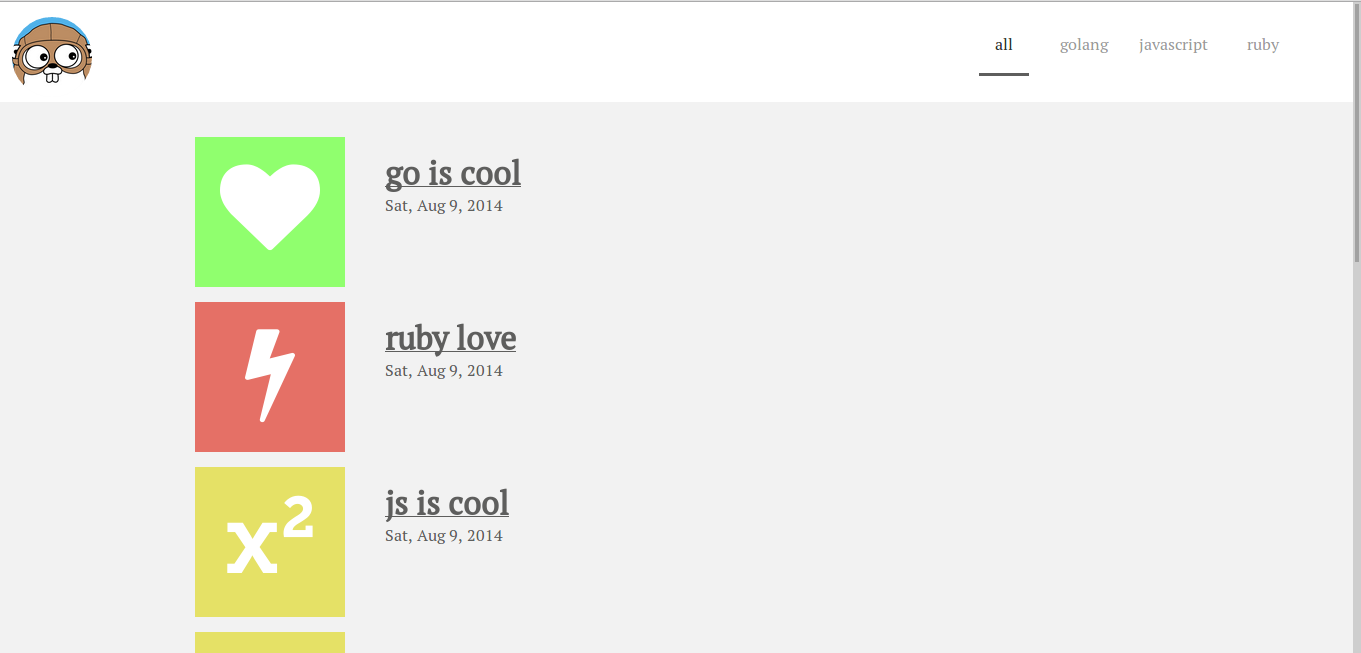
Tinyce 是一个面向 Hugo 的通用博客主题,通过 front matter 中的 color 与 icon 变量为每篇文章指定配色和 Font Awesome 图标。
看看你的网站会是什么样
浏览真实页面截图,比较内容排版与手机效果。点击下方缩略图切换,放大查看整页细节。
目前有 1 张原始预览,可打开完整图片查看设计细节。
截图用于了解视觉与布局,交互效果请以实际项目为准。
采集于 2026-10-02查看来源
值得关注的模板亮点
从已有项目资料中,快速了解它的特点。
每篇文章可在 front matter 用 color 变量指定六种预设颜色之一
用 icon 变量指定 Font Awesome 图标,填写时省略 fa- 前缀
依赖自定义 archetype 才能正常生成文章 front matter
Hugo v0.11 及以下需切换到 08a497 提交使用
MIT 许可,允许免费使用、修改、商用与分发
模板详细介绍
Tinyce 是 roperzh 发布的 Hugo 主题,仓库自述为通用型(general-purpose)主题,模板分类归为博客。它的核心机制是在每篇文章的 front matter 中额外定义两个变量:color 用于指定文章关联的颜色,可选值为 red、green、blue、yellow、orange、gray;icon 用于指定 Font Awesome 图标名称,填写时省略 fa- 前缀,例如写 heart 而非 fa-heart。主题需要配套的自定义 archetype 才能正常工作。
安装方式为在 Hugo 站点目录的 themes 下克隆仓库,然后在 config 中设置 theme = "tinyce-hugo-theme",或用 hugo server --theme=tinyce-hugo-theme --buildDrafts --watch 启动。README 另说明:若使用 Hugo v0.11 及更早版本,需在克隆后切换到 08a497 提交,因为主题最新版包含依赖 Hugo v0.12 的特性。
该仓库采用 MIT 许可,可免费使用、修改、商用和分发,分发时需保留版权声明与完整 MIT 许可声明;代码按现状提供。演示图片、字体、图标等第三方素材需按各自许可单独核对。仓库最近更新时间为 2018 年,README 中引用的 Hugo 版本与文档链接均属早期版本语境。
Hugo博客
适合你的项目吗?
适用场景
- 用 Hugo 搭建以文章列表和文章页为主的个人博客
- 希望每篇文章有独立配色与图标标识的内容站点
- 在旧版 Hugo(v0.11 及以下)环境中复用该主题
适合人群
- 已安装 Hugo 并熟悉 config 与 front matter 写法的使用者
- 接受在每篇文章手动填写 color 与 icon 变量的作者
- 需要 MIT 许可、可自行修改主题源码的博客项目
上手与定制指南
结合仓库当前版本的说明,按下面的资料检查内容、配置与运行要求。
- 1
先执行 hugo new site my-site 创建站点
- 2
进入 themes 目录后 git clone https://github.com/roperzh/tinyce-hugo-theme
- 3
在 config 中加入 theme = "tinyce-hugo-theme",或启动时加 --theme=tinyce-hugo-theme
- 4
为文章配置自定义 archetype,并在 front matter 填写 color 与 icon
- 5
Hugo v0.11 及以下需在主题目录执行 git checkout 08a497
授权与来源资料
使用条件与限制
免费使用 · 保留许可声明本次收录的是公开仓库中采用 MIT 许可的免费版本;免费范围为该版本代码,不代表外部服务或第三方素材免费。
使用时需要遵守
- 允许免费使用、修改、商用和分发该版本代码。
- 分发代码副本或实质性部分时,保留原作者版权声明和完整 MIT 许可声明。
- 代码按现状提供;担保与责任限制以原许可证及适用法律为准。
额外费用与待核对事项
- 使用该主题必须为站点配置自定义 archetype,否则无法正常生成文章 front matter,主题不能开箱即用。
- Hugo v0.11 及更早版本需额外切换到 08a497 提交,最新版主题依赖 Hugo v0.12 特性,旧版环境不能直接使用当前代码。
- icon 变量必须填写有效的 Font Awesome 图标名并省略 fa- 前缀,否则图标无法正常显示。
- color 变量仅支持 red、green、blue、yellow、orange、gray 六种取值,其他颜色值不被主题接受。
- 演示图片、字体、图标及其他第三方素材需按各自许可核对,不能仅凭代码的 MIT 许可判断。
- 域名、托管、数据库、支付或 AI 等外部服务可能另外收费。
查看原文依据
Permission is hereby granted, free of charge
许可证原文
Tinyce needs a custom archetype in order to work properly
README 原文
If you are using Hugo v0.11 or below, please read
README 原文
a valid font-awesome icon name, without the `fa-` prefix
README 原文
https://github.com/roperzh/tinyce-hugo-theme/blob/master/LICENSE.mdhttps://github.com/roperzh/tinyce-hugo-theme/blob/master/README.mdvalid colors are: `red`, `green`, `blue`, `yellow`, `orange` and `gray`
README 原文
DeepSeek 根据仓库许可证和 README 整理 ·2026-10-02。结果仅覆盖已读取资料,依赖、图片、字体及后续条款变更以各自原文为准。
项目核对记录与介绍依据
模板资料
- 来源平台
- GitHub
- 资料与维护参考分
- 资料一般 · 56 / 100
- 技术栈
- Hugo
- 网站类型
- 博客
这个分数如何计算
本站按许可资料(最高30分)、演示链接(12分)、预览图(10分)、Star数(15分)、记录的维护时间(15分)、描述完整度(8分)、功能记录(5分)和分类资料(5分)计算。它不是代码、安全或性能测试,也不是 Google 评分;有链接不代表已实测可用。
这个项目需要核对什么
- 记录的仓库更新时间
- 2018-04-26
- 截图检查日期
- 2026-10-02
目前没有记录演示链接。请依据仓库说明在本地评估;仅凭截图无法确认交互行为。
目录记录的主要技术栈是 Hugo。请通过依赖清单和锁文件核对实际版本与托管要求。这些说明基于收录资料,不代表代码审计或部署实测。
查看具体选型方法 →介绍的制作与核对状态
介绍由 AI 辅助整理目录与仓库资料。仓库作者不等于这篇介绍的审核者。
已完成服务器许可规则与 AI 来源核对;未经过人工编辑审核。
查看当时使用的来源资料
SHA-256: 6a1e2f3741987639f96df88f182f998801b44234df76007fe0d2e87fc5b67034
2026-10-02T10:16:37.409Z
来源文件 / 仓库Tinyce === Tinyce is a general-purpose [Hugo](http://hugo.spf13.com) theme.  You can check the live version [here](http://roperzh.github.io/tinyce-hugo-theme/). Getting started === Once you have Hugo up and running, you must: Create a Hugo project: ```bash $ hugo new site my-site ``` And then install tinyce: ```bash $ cd themes $ git clone https://github.com/roperzh/tinyce-hugo-theme ``` *If you are using Hugo v0.11 or below, please read [this](https://github.com/roperzh/tinyce-hugo-theme/#usage-with-hugo-v011-and-below)* Now you can set tinyce as the default theme for your site by adding this line in the `config` file: ```toml theme = "tinyce-hugo-theme" ``` Or you can start the server with: ```bash hugo server --theme=tinyce-hugo-theme --buildDrafts --watch ``` Setting Variables === Tinyce needs a custom archetype in order to work properly, behind the covers you will only need to define two new variables in the front matter section of your contents. - **color** : the color associated with the post, valid colors are: `red`, `green`, `blue`, `yellow`, `orange` and `gray`. - **icon** : a valid font-awesome icon name, without the `fa-` prefix. For example, instead of `fa-heart`, you only need to put `heart`. [here](http://fortawesome.github.io/Font-Awesome/cheatsheet/) is a cheatsheet of valid icons. ***Example*** ```toml +++ Categories = ["Development", "GoLang"] Description = "My short description" Tags = ["Development", "golang"] color = "green" icon = "heart" title = "Go is cool" date = 2014-08-09T05:04:40Z +++ ``` Usage with Hugo v0.11 and below === The latest version of the theme includes some features bundled with Hugo v0.12, if you are using an old version, please install tinyce like this: ```bash $ cd themes $ git clone https://github.com/roperzh/tinyce-hugo-theme $ cd tinyce-hugo-theme $ git checkout 08a497 ``` That's it! Contributing === 1. Fork it 2. Create your feature branch (`git checkout -b my-new-feature`) 3. Commit your changes (`git commit -am 'Add some feature'`) 4. Push to the branch (`git push origin my-new-feature`) 5. Create new Pull Request
看看同类模板
对比同技术栈与用途的模板,找到更适合的视觉与内容结构。

hugo-PaperMod
PaperMod 是 Hugo 生态里知名度较高的主题之一,定位很明确:给博客和轻量作品集站点提供一套干净、响应式的阅读界面。
Hugo · 作品集

LoveIt
❤️A clean, elegant but advanced blog theme for Hugo 一个简洁、优雅且高效的 Hugo 主题
Hugo · 博客

hugo-coder
A minimalist blog theme for hugo.
Hugo · 博客

blowfish
Personal Website & Blog Theme for Hugo
Hugo · 博客

hugo-paper
🪺 A simple, clean, customizable Hugo theme
Hugo · 博客

hextra
Hextra 是一个 Hugo 主题,定位在文档站与博客之间:既提供侧边栏导航、目录、面包屑、分页这类文档站结构,也能承载博客内容。
Hugo · 文档