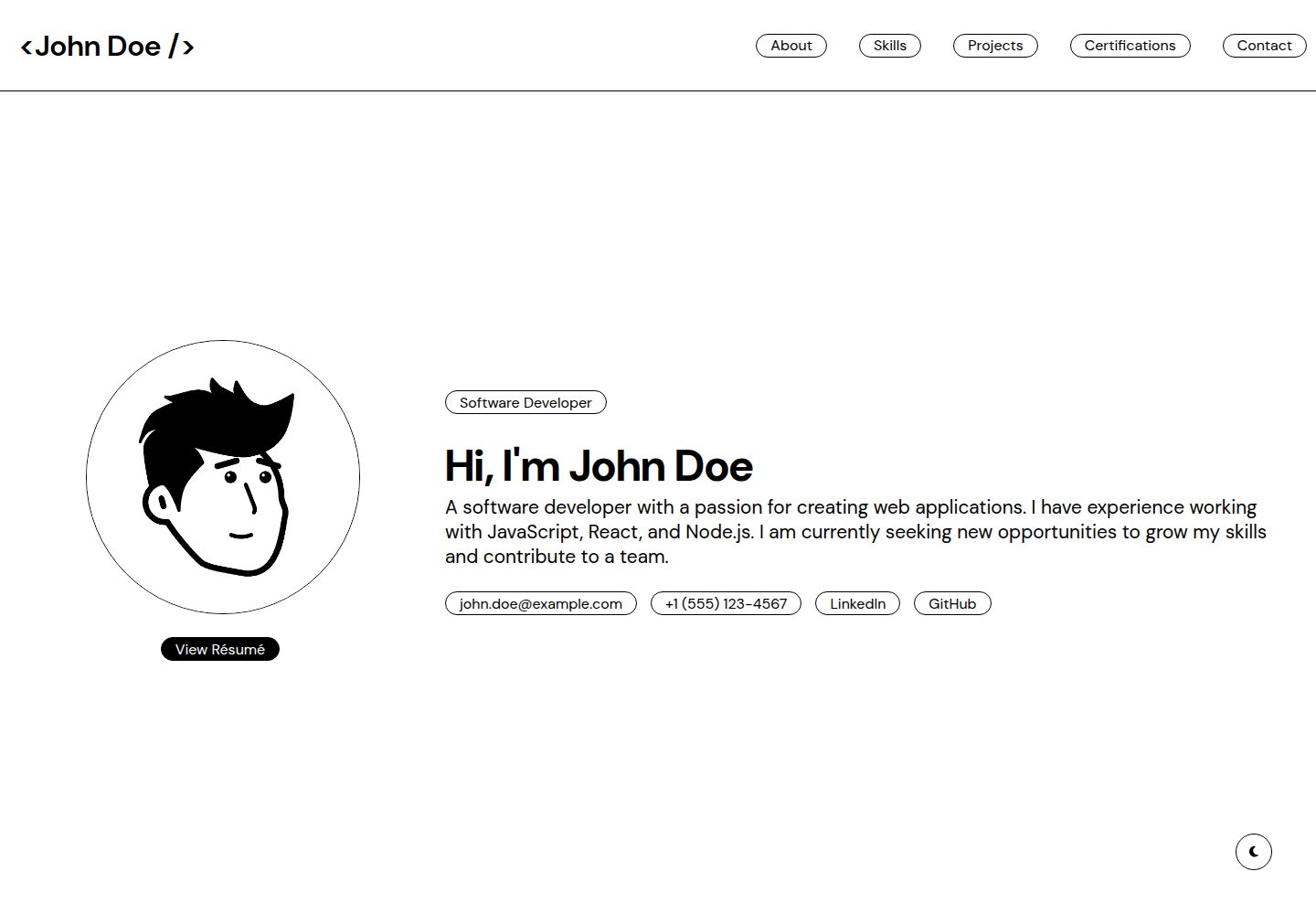
内容集中在 public/data.json,修改姓名、技能、项目、证书与联系方式等字段即可更新页面
React作品集
edgefolio — React 作品集模板
作者 sandeepruttala
Edgefolio 是一个基于 React 的极简响应式作品集模板,面向学生和开发者,通过编辑 public/data.json 即可替换姓名、技能、项目与联系方式等内容。
看看你的网站会是什么样
浏览真实页面截图,比较内容排版与手机效果。点击下方缩略图切换,放大查看整页细节。
全部页面与视图 2
截图用于了解视觉与布局,交互效果请以实际项目为准。
采集于 2026-10-03查看来源
值得关注的模板亮点
从已有项目资料中,快速了解它的特点。
基于 React 组件组织代码,包含 Header、About、Projects 等可复用组件,便于按需调整结构
提供深色模式,并针对移动端与桌面端做响应式适配
package.json 已配置 homepage 与部署脚本,可执行 npm run deploy 发布到 GitHub Pages
联系表单接入 Formspree,需自行配置表单端点才能接收提交
模板详细介绍
Edgefolio 是一个用 React 构建的极简响应式作品集模板,定位是帮助学生和开发者展示技能、项目与经历。模板把作品集内容集中放在 public/data.json 中,姓名、角色、描述、邮箱、电话、LinkedIn、GitHub、教育背景、兴趣、技能分类、项目与证书等字段都通过这个 JSON 文件维护,README 说明无需改动代码即可完成个性化。页面结构由 React 组件组成,包含 Header、About、Projects 等可复用组件,App.jsx 负责整体布局,index.js 是入口。模板提供深色模式,并针对移动端和桌面端做了响应式适配。
安装流程为克隆仓库、进入目录、执行 npm install,再用 npm run dev 启动开发服务器,README 给出的访问地址是 http://localhost:3000/edgefolio/。部署方面,package.json 中已配置 homepage 和部署脚本,执行 npm run deploy 可发布到 GitHub Pages,地址形如 https://<用户名>.github.io/edgefolio/。
联系表单使用 Formspree 发送邮件,需要自行注册 Formspree 账号并在 Components/Contact.jsx 中更新表单端点,否则无法接收提交。仓库采用 MIT 许可,可免费使用、修改、商用和分发该版本代码,分发时需保留版权声明和许可声明;演示图片、字体、图标等第三方素材需按各自许可单独核对。
React作品集
适合你的项目吗?
适用场景
- 学生整理个人技能、项目与教育经历,制作可公开访问的作品集页面
- 开发者快速搭建一个极简风格的个人主页,集中展示项目与联系方式
- 需要将作品集部署到 GitHub Pages 并绑定自定义域名的个人使用场景
- 以 React 组件为基础,按需增删板块或调整页面布局的二次开发
适合人群
- 希望不写代码、只改 JSON 就能更新作品集内容的学生
- 需要轻量 React 作品集模板并计划部署到 GitHub Pages 的开发者
- 接受自行配置 Formspree 以启用联系表单的个人用户
- 需要 MIT 许可下可修改和分发的作品集代码的开发者
上手与定制指南
结合仓库当前版本的说明,按下面的资料检查内容、配置与运行要求。
- 1
克隆仓库后进入项目目录,执行 npm install 安装依赖,再用 npm run dev 启动开发服务器
- 2
访问地址为 http://localhost:3000/edgefolio/,与 README 中给出的路径一致
- 3
编辑 public/data.json 更新个人信息、技能、项目与证书等内容
- 4
联系表单依赖 Formspree,需注册账号并在 Components/Contact.jsx 中替换表单端点
- 5
部署前确认 package.json 中的 homepage 与仓库名匹配,再执行 npm run deploy 发布到 GitHub Pages
授权与来源资料
使用条件与限制
免费使用 · 保留许可声明本次收录的是公开仓库中采用 MIT 许可的免费版本;免费范围为该版本代码,不代表外部服务或第三方素材免费。
使用时需要遵守
- 允许免费使用、修改、商用和分发该版本代码。
- 分发代码副本或实质性部分时,保留原作者版权声明和完整 MIT 许可声明。
- 代码按现状提供;担保与责任限制以原许可证及适用法律为准。
额外费用与待核对事项
- 联系表单依赖第三方服务 Formspree:需自行注册 Formspree 账号,并在 Components/Contact.jsx 中替换表单端点,否则无法接收表单提交。
- README 提及 Formspree 表单服务;真实提交需配置服务端点,其使用额度与费用需单独核对。
- 演示图片、字体、图标及其他第三方素材需按各自许可核对,不能仅凭代码的 MIT 许可判断。
- 域名、托管、数据库、支付或 AI 等外部服务可能另外收费。
查看原文依据
Permission is hereby granted, free of charge
许可证原文
https://github.com/sandeepruttala/edgefolio/blob/main/LICENSEhttps://github.com/sandeepruttala/edgefolio/blob/main/README.mdyou need to set up your Formspree account and update the form endpoint
README 原文
DeepSeek 根据仓库许可证和 README 整理 ·2026-10-03。结果仅覆盖已读取资料,依赖、图片、字体及后续条款变更以各自原文为准。
项目核对记录与介绍依据
模板资料
- 来源平台
- GitHub
- 资料与维护参考分
- 资料较完整 · 83 / 100
- 技术栈
- React
- 网站类型
- 作品集
这个分数如何计算
本站按许可资料(最高30分)、演示链接(12分)、预览图(10分)、Star数(15分)、记录的维护时间(15分)、描述完整度(8分)、功能记录(5分)和分类资料(5分)计算。它不是代码、安全或性能测试,也不是 Google 评分;有链接不代表已实测可用。
这个项目需要核对什么
- 记录的仓库更新时间
- 2026-05-14
- 截图检查日期
- 2026-10-03
已收录演示链接。请用你的内容与屏幕尺寸检查;有演示不代表表单、认证或支付已经可用。
目录记录的主要技术栈是 React。请通过依赖清单和锁文件核对实际版本与托管要求。这些说明基于收录资料,不代表代码审计或部署实测。
查看具体选型方法 →介绍的制作与核对状态
介绍由 AI 辅助整理目录与仓库资料。仓库作者不等于这篇介绍的审核者。
审核声明: [email protected] · 2026-10-04
查看当时使用的来源资料
SHA-256: 7ee1f127969f94a252301ee55fb2a69b36353d813867a9127e57b7e4022886be
2026-10-03T23:22:18.272Z
来源文件 / 仓库# Edgefolio: A Minimal & Responsive Student Portfolio A modern, responsive portfolio template built with React JS, designed to showcase skills, projects, and achievements effectively. This template provides a clean and minimalistic design suitable for students and developers. [](https://sandeepruttala.github.io/edgefolio/) ## 🌐 Live Demo Check out the live version: [https://sandeepruttala.github.io/edgefolio/](https://sandeepruttala.github.io/edgefolio/) ## ✨ Features - **Responsive Design**: Optimized for mobile and desktop views. - **Easy Customization**: Modify data to fit your personal profile just by changing function parameters or props. - **Dark Mode**: Dark Mode Available. - **React Components**: Organized code structure for quick editing and expansion. - **Dynamic Project Showcase**: Easily add and manage project entries. ## � Quick Start Make your portfolio yours **in seconds**: 1. Open `/public/data.json` 2. Update your information: - Your name, role, description - Email, phone, LinkedIn, GitHub links - Education, interests, hobbies - Skills by category - Projects and certifications 3. Save the file - your portfolio updates instantly! **No coding needed!** Just edit the JSON file and watch your portfolio transform. ## 📂 Project Structure Here's a quick overview of the key files and folders: - `public/` - Contains static files and images. - `data.json` - **Your portfolio data** - Edit this to customize everything! - `src/` - Main React code with component files and styling. - `components/` - Reusable components (Header, About, Projects, etc.) - `App.jsx` - Main app component where the layout is structured. - `index.js` - Entry point for the React app. ## 🛠️ Installation 1. Clone the repository: ```bash git clone https://github.com/sandeepruttala/edgefolio.git ``` 2. Navigate into the project directory: ```bash cd edgefolio ``` 3. Install dependencies: ```bash npm install ``` 4. Run the development server: ```bash npm run dev ``` 5. Open your browser and go to `http://localhost:3000/edgefolio/` ## 📋 Usage Customize your portfolio in seconds: 1. **Edit your data**: Open `public/data.json` and update all your information 2. **See changes instantly**: The site updates automatically every 5 seconds during development 3. **No code changes needed**: All portfolio content comes from `data.json` Check out [DATA_MANAGEMENT.md](DATA_MANAGEMENT.md) for detailed examples and structure information. ## 🚀 Deployment To deploy this portfolio on GitHub Pages: 1. The `homepage` and deployment scripts are already configured in `package.json` 2. Deploy the project to GitHub Pages: ```bash npm run deploy ``` 3. Your portfolio will now be live at `https://<your-github-username>.github.io/edgefolio/` **Note**: Make sure to update your data in `public/data.json` before deploying for the best results! ## Contact Form API The contact form in this template uses [Formspree](https://formspree.io/) to send emails. To receive form submissions, you need to set up your Formspree account and update the form endpoint in the `Components/Contact.jsx` file. ## 🤝 Contributing Feel free to open issues or submit pull requests if you have suggestions for improvements.
看看同类模板
对比同技术栈与用途的模板,找到更适合的视觉与内容结构。

react-portfolio-template
React powered portfolio website template for developers
React · 作品集

personal-website-react
personal-website-react 是一个面向开发者的个人作品集单页模板,由 React 和 Material-UI 构建,并通过 Create React App 初始化。
React · 作品集

karngyan.com
karngyan.com 是一个面向开发者的个人网站与博客模板,作者用它搭建了自己的站点,并公开了完整代码。 模板的核心定位很明确:让写作者专注于内容,而不是花时间搭建基础设施。
React · 作品集

react-portfolio-template
react-portfolio-template 是一个由 Ryan Balieiro 开发的 React 作品集模板,定位为“sleek, futuristic”,适合开发者展示个人履历。
React · 作品集

portfolio
Personal website, Data scientist portfolio template
React · 作品集

react-portfolio
react-portfolio 是一个面向开发者的个人作品集模板,基于 React 16 和 Create React App 构建,界面样式采用 Material-UI。
React · 作品集