以 Hugo 模块形式分发,通过 module.imports 引入
Hugo作品集
hugo-mod-json-resume — Hugo 作品集模板
作者 schnerring
hugo-mod-json-resume 是一个 Hugo 模块,提供模板与短代码,把多语言 JSON Resume 数据渲染到 Hugo 站点中。
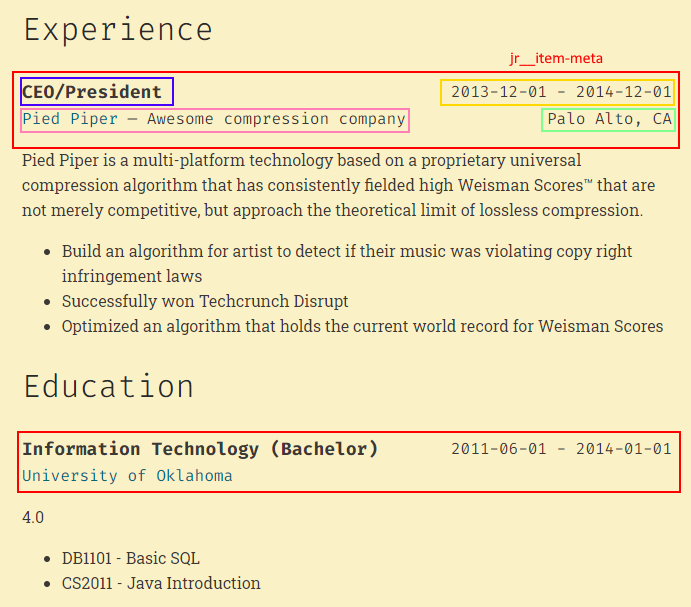
看看你的网站会是什么样
浏览真实页面截图,比较内容排版与手机效果。点击下方缩略图切换,放大查看整页细节。
目前有 1 张原始预览,可打开完整图片查看设计细节。
截图用于了解视觉与布局,交互效果请以实际项目为准。
采集于 2026-10-02查看来源
值得关注的模板亮点
从已有项目资料中,快速了解它的特点。
读取 data/json_resume/ 下的 JSON Resume 数据,支持按语言代码分文件
提供 json-resume 短代码,可按 work、education 等区块渲染
提供 json-resume/basics.html 等 partial,便于在布局中组合
附带 json-resume.css 与 jr__、jr-<section>__<section-field> 类名体系
社交图标依赖 Simple Icons(CC0)
模板详细介绍
该模块面向使用 Hugo 构建个人简历或作品集页面的场景,核心作用是把存放在 data/json_resume/ 目录下的 JSON Resume 数据接入 Hugo 模板系统。数据文件需遵循 JSON Resume schema,并按语言代码命名,例如 en.json、de.json;至少需要存在一个与默认内容语言代码同名的文件(默认 en)。
使用方式有两种:在 Markdown 中通过 json-resume 短代码按区块渲染,例如 {{< json-resume "work" >}} 或 {{< json-resume "education" >}};在布局文件中调用 partial,例如 partial "json-resume/basics.html"。模块附带 assets/css/json-resume.css 样式表,并提供 jr__ 通用类与 jr-<section>__<section-field> 分区类供自定义样式。
接入前需要把站点初始化为 Hugo 模块、在 config.toml 中声明模块导入并挂载 simple-icons 图标资源,再执行 hugo mod get 与 hugo mod npm pack、npm install 安装依赖。社交图标使用 Simple Icons(CC0)。
Hugo作品集
适合你的项目吗?
适用场景
- 在 Hugo 站点中生成多语言个人简历页面
- 把已有 JSON Resume 数据接入 Hugo 内容或布局
- 在 Markdown 正文中按区块插入工作经历、教育经历等简历内容
- 在自定义布局的侧边栏中渲染 basics 等简历区块
适合人群
- 使用 Hugo 并希望复用 JSON Resume 数据的开发者
- 需要维护多语言简历内容的个人站点
- 愿意通过短代码或 partial 自行组合页面结构的用户
上手与定制指南
结合仓库当前版本的说明,按下面的资料检查内容、配置与运行要求。
- 1
先执行 hugo mod init example.com 将站点初始化为 Hugo 模块
- 2
在 config.toml 中添加 module.imports 指向 github.com/schnerring/hugo-mod-json-resume,并挂载 node_modules/simple-icons/icons 到 assets/simple-icons
- 3
执行 hugo mod get,再执行 hugo mod npm pack 与 npm install 安装依赖
- 4
在 data/json_resume/ 下放置符合 JSON Resume schema 的语言文件,至少包含默认内容语言代码对应的文件(默认 en)
授权与来源资料
使用条件与限制
免费使用 · 保留许可声明本次收录的是公开仓库中采用 MIT 许可的免费版本;免费范围为该版本代码,不代表外部服务或第三方素材免费。
使用时需要遵守
- 允许免费使用、修改、商用和分发该版本代码。
- 分发代码副本或实质性部分时,保留原作者版权声明和完整 MIT 许可声明。
- 代码按现状提供;担保与责任限制以原许可证及适用法律为准。
额外费用与待核对事项
- 社交图标依赖 Simple Icons(CC0)资源,需自行安装并挂载 node_modules/simple-icons/icons 到 assets/simple-icons,否则图标无法显示。
- 使用前需初始化 NPM 并安装依赖(hugo mod npm pack 与 npm install),构建流程依赖 Node/NPM 环境。
- 数据文件必须遵循 JSON Resume schema,且至少存在一个与默认内容语言代码同名的文件(默认 en),否则无法渲染。
- 演示图片、字体、图标及其他第三方素材需按各自许可核对,不能仅凭代码的 MIT 许可判断。
- 域名、托管、数据库、支付或 AI 等外部服务可能另外收费。
查看原文依据
Permission is hereby granted, free of charge
许可证原文
To display social icons, [Simple Icons](https://simpleicons.org/) (CC0) are used.
README 原文
Initialize the NPM `package.json` and install the dependencies:
README 原文
https://github.com/schnerring/hugo-mod-json-resume/blob/main/LICENSEhttps://github.com/schnerring/hugo-mod-json-resume/blob/main/README.mdAt least one file with the name `<default content language code>.json` must exist (defaults to `en`).
README 原文
DeepSeek 根据仓库许可证和 README 整理 ·2026-10-02。结果仅覆盖已读取资料,依赖、图片、字体及后续条款变更以各自原文为准。
项目核对记录与介绍依据
模板资料
- 来源平台
- GitHub
- 资料与维护参考分
- 资料较完整 · 75 / 100
- 技术栈
- Hugo
- 网站类型
- 作品集
这个分数如何计算
本站按许可资料(最高30分)、演示链接(12分)、预览图(10分)、Star数(15分)、记录的维护时间(15分)、描述完整度(8分)、功能记录(5分)和分类资料(5分)计算。它不是代码、安全或性能测试,也不是 Google 评分;有链接不代表已实测可用。
这个项目需要核对什么
- 记录的仓库更新时间
- 2026-09-28
- 截图检查日期
- 2026-10-02
目前没有记录演示链接。请依据仓库说明在本地评估;仅凭截图无法确认交互行为。
目录记录的主要技术栈是 Hugo。请通过依赖清单和锁文件核对实际版本与托管要求。这些说明基于收录资料,不代表代码审计或部署实测。
查看具体选型方法 →介绍的制作与核对状态
介绍由 AI 辅助整理目录与仓库资料。仓库作者不等于这篇介绍的审核者。
已完成服务器许可规则与 AI 来源核对;未经过人工编辑审核。
查看当时使用的来源资料
SHA-256: 8bae470e4976612d426996e8d04a14d659297289e33e3810fccda1347fd6f96b
2026-10-02T19:52:16.532Z
来源文件 / 仓库# hugo-mod-json-resume
A [Hugo module](https://gohugo.io/hugo-modules/) containing templates to
integrate multilingual [JSON Resume](https://jsonresume.org/) data into your
Hugo website.
## Getting Started
Initialize your Hugo site as a Hugo module:
```shell
hugo mod init example.com
```
Add the following to the `config.toml` file of your site to import the module:
```toml
[module]
[[module.imports]]
path = "github.com/schnerring/hugo-mod-json-resume"
[[module.mounts]]
source = "node_modules/simple-icons/icons"
target = "assets/simple-icons"
```
Install the module:
```shell
hugo mod get
```
Initialize the NPM `package.json` and install the dependencies:
```shell
hugo mod npm pack
npm install
```
The module offers a simple CSS stylesheet [assets/css/json-resume.css](./assets/css/json-resume.css)
that you can use.
Use the `json-resume` shortcode in markdown files:
```markdown
---
title: "CV"
draft: false
---
## Experience
{{< json-resume "work" >}}
## Education
{{< json-resume "education" >}}
```
Or use the partials in your layout files:
```html
<div class="sidebar">
<aside class="bio">{{ partial "json-resume/basics.html" . }}</aside>
</div>
```
## Data Structure
The module reads JSON Resume data from Hugo's `data/` directory:
```text
data/
├─ json_resume/
├─ de.json
├─ en.json
```
Each file must adhere to the [JSON Resume schema](https://github.com/jsonresume/resume-schema/blob/master/schema.json)
specification. At least one file with the name `<default content language code>.json`
must exist (defaults to `en`). See also [Hugo Multilingual Mode](https://gohugo.io/content-management/multilingual/).
## Styling
You can style the existing templates by using the pre-defined classes. There are
generic classes prefixed with `jr__` like `jr__item` or `jr__date-range` that
apply to any template.
Classes specific to resume sections are prefixed with `jr-<section>__<section-field>`,
like `jr-work__description` or `jr-basics__name`.
### Example

The above requires the following CSS:
```css
.jr__item-meta {
align-items: center;
flex-flow: row wrap;
}
.jr__date,
.jr__date-range,
.jr-work__location {
flex-grow: 1;
text-align: right;
}
.jr-education__institution {
flex-basis: 100%;
}
```
## Attributions
To display social icons, [Simple Icons](https://simpleicons.org/) (CC0) are
used.
看看同类模板
对比同技术栈与用途的模板,找到更适合的视觉与内容结构。

hugo-PaperMod
PaperMod 是 Hugo 生态里知名度较高的主题之一,定位很明确:给博客和轻量作品集站点提供一套干净、响应式的阅读界面。
Hugo · 作品集

Congo
Congo 是一款为 Hugo 设计的现代内容主题,核心定位是让内容本身成为页面焦点。 它基于 Tailwind CSS 3.0 构建,整体布局完全响应式,视觉风格干净且克制,没有多余装饰。
Hugo · 博客

toha
Toha 是一款面向个人作品集场景的 Hugo 主题,以极简设计和响应式布局为核心,适合用来搭建个人主页、作品展示或技术博客。
Hugo · 作品集

hugo-profile
A highly customizable and mobile first Hugo template for personal portfolio and blog.
Hugo · 作品集

hugo-theme-introduction
Minimal, single page, smooth-scrolling theme for Hugo static site generator.
Hugo · 作品集

hugo-theme-console
hugo-theme-console 是一款以系统终端为灵感的极简 Hugo 主题,基于 Terminal CSS 构建,整体视觉干净利落,强调快速加载与响应式布局。
Hugo · 作品集